Level 1
Foundations of Cloud Security
Lesson 4 - Logging in the Cloud
Objective 4:
● Understand why logging is important
● Learn about various types of logs
● Discuss Tags and Tag Compliance
● Discuss the impact of logging in single
accounts and multiple accounts
● Practice a little cloud forensics using AWS
Athena
Why Log?
Reasons to Log Data
● Two types of logs
○ Things in the cloud
○ Things that control your cloud aka Control Plane
● Business Drivers
○ Compliance
○ Risk management
● Security
○ Forensics
○ Incident Management
○ Detection
○ Configuration Analysis
● Operations
○ Performance
○ Error Tracking
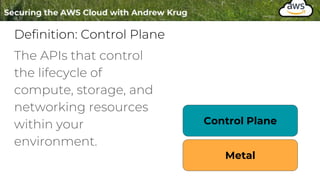
Definition: Control Plane
The APIs that control
the lifecycle of
compute, storage, and
networking resources
within your
environment.
Control Plane
Metal
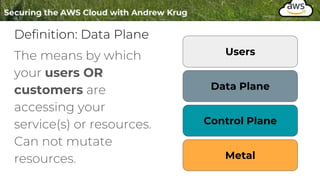
Definition: Data Plane
The means by which
your users OR
customers are
accessing your
service(s) or resources.
Can not mutate
resources.
Control Plane
Metal
Data Plane
Users
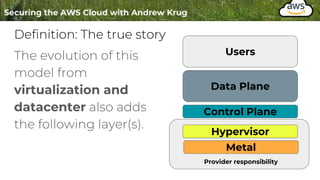
Definition: The true story
The evolution of this
model from
virtualization and
datacenter also adds
the following layer(s).
Control Plane
Metal
Data Plane
Users
Hypervisor
Provider responsibility
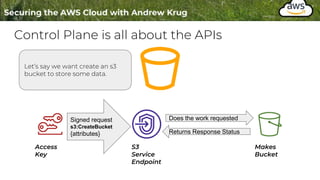
Control Plane is all about the APIs
Let’s say we want create an s3
bucket to store some data.
Signed request
s3:CreateBucket
{attributes}
Access
Key
S3
Service
Endpoint
Does the work requested
Returns Response Status
Makes
Bucket
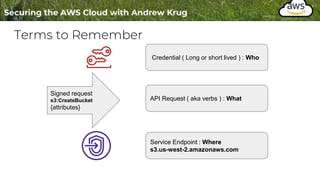
Terms to Remember
Signed request
s3:CreateBucket
{attributes}
Credential ( Long or short lived ) : Who
API Request ( aka verbs ) : What
Service Endpoint : Where
s3.us-west-2.amazonaws.com
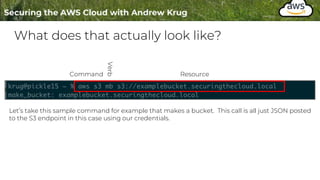
What does that actually look like?
Let’s take this sample command for example that makes a bucket. This call is all just JSON posted
to the S3 endpoint in this case using our credentials.
Command Resource
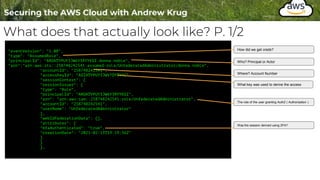
What does that actually look like? P. 1/2
"eventVersion": "1.08",
"type": "AssumedRole",
"principalId": "AROATYPUY3JW6Y3RYYEGI:donna.noble",
"arn":"arn:aws:sts::258748242541:assumed-role/UnfederatedAdministrator/donna.noble",
"accountId": "258748242541",
"accessKeyId": "ASIATYPUY3JWV7DYTYYC",
"sessionContext": {
"sessionIssuer": {
"type": "Role",
"principalId": "AROATYPUY3JW6Y3RYYEGI",
"arn": "arn:aws:iam::258748242541:role/UnfederatedAdministrator",
"accountId": "258748242541",
"userName": "UnfederatedAdministrator"
},
"webIdFederationData": {},
"attributes": {
"mfaAuthenticated": "true",
"creationDate": "2021-02-13T19:19:56Z"
}
}
},
How did we get creds?
Who? Principal or Actor
Where? Account Number
What key was used to derive the access
The role of the user granting AuthZ ( Authorization )
Was the session derived using 2FA?
What does that actually look like? P. 2/2
"eventTime": "2021-02-13T19:20:22Z",
"eventSource": "s3.amazonaws.com",
"eventName": "CreateBucket",
"awsRegion": "us-west-2",
"sourceIPAddress": "68.185.27.210",
"userAgent": "[aws-cli/2.1.21 Python/3.9.1 Darwin/20.3.0 source/x86_64 prompt/off
command/s3.mb]",
"requestParameters": {
"CreateBucketConfiguration": {
"LocationConstraint": "us-west-2",
"xmlns": "http://s3.amazonaws.com/doc/2006-03-01/"
},
"bucketName": "examplebucket1.securingthecloud.local",
"Host": "s3.us-west-2.amazonaws.com"
},
"responseElements": null,
"additionalEventData": {
"SignatureVersion": "SigV4",
"CipherSuite": "ECDHE-RSA-AES128-GCM-SHA256",
"bytesTransferredIn": 153,
"AuthenticationMethod": "AuthHeader",
"x-amz-id-2":
"p/jM0+HCYyqM8MBzIHAvzwtW1MFka3diEfclB0Xgi7femq+MiWYmfc9ndoe4GfKiL9Ydzcr75hc=",
"bytesTransferredOut": 0
},
"requestID": "A57328BD8E3112D9",
"eventID": "875597d7-998a-4a16-ae48-b2d41dc59e85",
"readOnly": false,
"eventType": "AwsApiCall",
"managementEvent": true,
"eventCategory": "Management",
"recipientAccountId": "258748242541"
Source
Verb ( aka Action )
Region
Caller IP Address
What User Agent
The rest of the data is request specific
data or specific to this particular service.
See : `requestParameters`
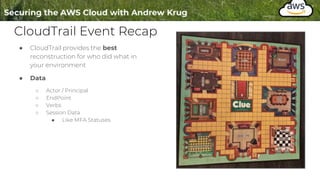
CloudTrail Event Recap
● CloudTrail provides the best
reconstruction for who did what in
your environment
● Data
○ Actor / Principal
○ EndPoint
○ Verbs
○ Session Data
■ Like MFA Statuses
CloudTrail Limits
Things to be aware of:
1. SLA CloudTrail Deliveries is ~ 15 minutes
2. Some REALLY noisy events are off by default
S3:Read for example -- This is a good thing
Choose to instrument these things for compliance OR strategically.
1. Does not include host events, load balancer logs, etc
Log What?
Supplemental Material
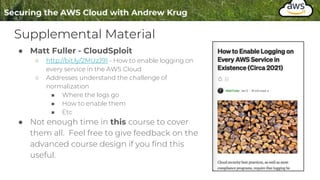
● Matt Fuller - CloudSploit
○ http://bit.ly/2MUzJ91 - How to enable logging on
every service in the AWS Cloud
○ Addresses understand the challenge of
normalization
■ Where the logs go
■ How to enable them
■ Etc
● Not enough time in this course to cover
them all. Feel free to give feedback on the
advanced course design if you find this
useful.
Our Scope
Remains in Control Plane Events and IR
(semi in order of importance)
● CloudTrail
● S3 Access Logs
● Lambda Invocation Logs ( if using )
● VPC Flow Logs
● AWS Config
● Custom Logging : CloudWatch
Out of Scope Logs
● CloudFront ( CDN )
● API Gateway
● Access Advisor
● …
● ( bunches of other logs )
So what?
Increased Options Leads to Poor Adoption
● Need to establish a “front door” for logs.
○ A single pattern for shipment and storage.
● Plethora of storage options exist
○ S3, CloudWatch Logs, Kinesis
● S3 is probably the easiest and least expensive.
How?
Setting up CloudTrail
● Logging should be setup with code ( same as everything else )
○ Reproducibility is one of the tenants of security.
● It’s good to see the UI first to understand the options
● Understand the tradeoffs
● You WILL be setting this up in Labs
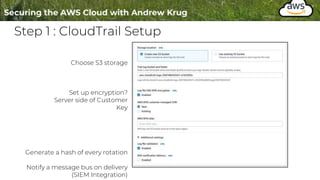
Step 1 : CloudTrail Setup
Choose S3 storage
Set up encryption?
Server side of Customer
Key
Generate a hash of every rotation
Notify a message bus on delivery
(SIEM Integration)
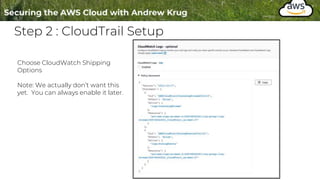
Step 2 : CloudTrail Setup
Choose CloudWatch Shipping
Options
Note: We actually don’t want this
yet. You can always enable it later.
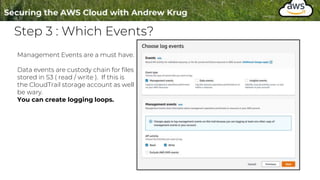
Step 3 : Which Events?
Management Events are a must have.
Data events are custody chain for files
stored in S3 ( read / write ). If this is
the CloudTrail storage account as well
be wary.
You can create logging loops.
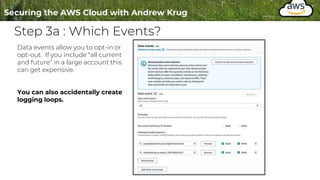
Step 3a : Which Events?
Data events allow you to opt-in or
opt-out. If you include “all current
and future” in a large account this
can get expensive.
You can also accidentally create
logging loops.
Step 3 : Insights? Maybe ...
The insights events are a type of
anomaly detection. But the feature is
very new and expensive.
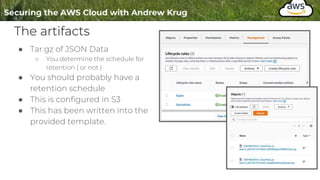
The artifacts
● Tar.gz of JSON Data
○ You determine the schedule for
retention ( or not )
● You should probably have a
retention schedule
● This is configured in S3
● This has been written into the
provided template.
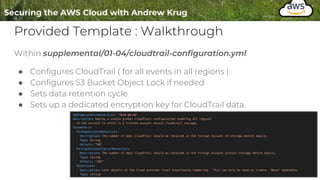
Provided Template : Walkthrough
Within supplemental/01-04/cloudtrail-configuration.yml
● Configures CloudTrail ( for all events in all regions )
● Configures S3 Bucket Object Lock if needed
● Sets data retention cycle
● Sets up a dedicated encryption key for CloudTrail data.
Terminology
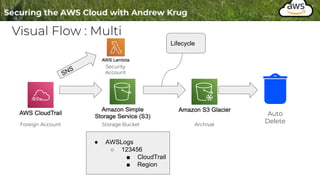
● Trusted Account : Any external account we’re trusting to access
data.
● Foreign Account: Depending on the relationship sometimes the
account ID you are working in. We’ll set up a log bastion using AWS
Organizations later.
If in single account foreign account and trusted account are the
same account.
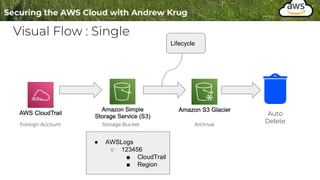
Visual Flow : Single
Foreign Account Storage Bucket Archival
Auto
Delete
● AWSLogs
○ 123456
■ CloudTrail
■ Region
Lifecycle
Visual Flow : Multi
Foreign Account Storage Bucket Archival
Auto
Delete
● AWSLogs
○ 123456
■ CloudTrail
■ Region
Lifecycle
Security
Account
Tags
and Tag
Compliance
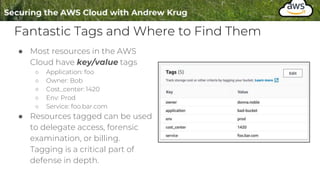
Fantastic Tags and Where to Find Them
● Most resources in the AWS
Cloud have key/value tags
○ Application: foo
○ Owner: Bob
○ Cost_center: 1420
○ Env: Prod
○ Service: foo.bar.com
● Resources tagged can be used
to delegate access, forensic
examination, or billing.
Tagging is a critical part of
defense in depth.
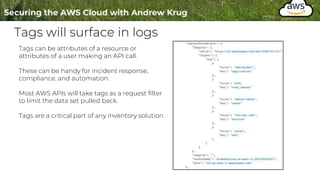
Tags will surface in logs
Tags can be attributes of a resource or
attributes of a user making an API call.
These can be handy for incident response,
compliance, and automation.
Most AWS APIs will take tags as a request filter
to limit the data set pulled back.
Tags are a critical part of any inventory solution.
Single and Multi-
Account
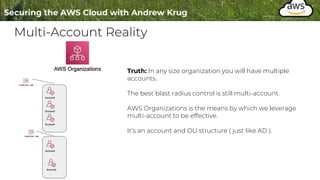
Multi-Account Reality
Truth: In any size organization you will have multiple
accounts.
The best blast radius control is still multi-account.
AWS Organizations is the means by which we leverage
multi-account to be effective.
It’s an account and OU structure ( just like AD ).
Start with Security Tools
● A security tools account(s) is your SecOps bastion. It’s protected from
data deletion, a “landing zone” for artifacts,
● AWS has blueprints and patterns for this ( we won’t use them )
○ https://aws.amazon.com/controltower/ - Doesn’t work with existing accounts yet
○ https://aws.amazon.com/solutions/implementations/aws-landing-zone/
● Crazy right?
Security Tools
Dedicated
Account
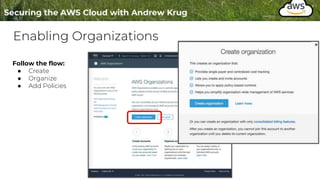
Enabling Organizations
Follow the flow:
● Create
● Organize
● Add Policies
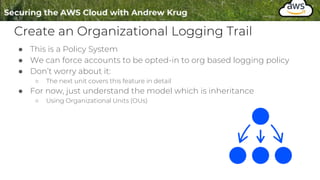
Create an Organizational Logging Trail
● This is a Policy System
● We can force accounts to be opted-in to org based logging policy
● Don’t worry about it:
○ The next unit covers this feature in detail
● For now, just understand the model which is inheritance
○ Using Organizational Units (OUs)
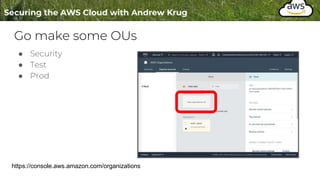
Go make some OUs
● Security
● Test
● Prod
https://console.aws.amazon.com/organizations
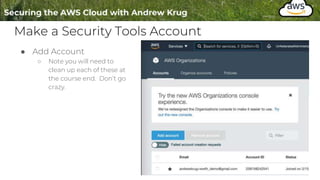
Make a Security Tools Account
● Add Account
○ Note you will need to
clean up each of these at
the course end. Don’t go
crazy.
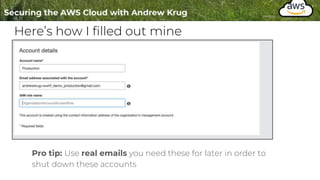
Here’s how I filled out mine
Pro tip: Use real emails you need these for later in order to
shut down these accounts
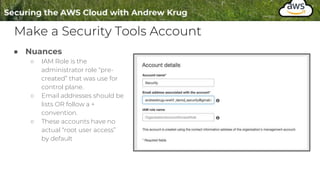
Make a Security Tools Account
● Nuances
○ IAM Role is the
administrator role “pre-
created” that was use for
control plane.
○ Email addresses should be
lists OR follow a +
convention.
○ These accounts have no
actual “root user access”
by default
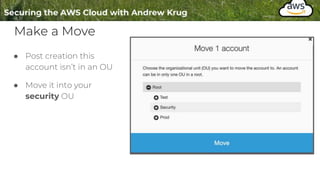
Make a Move
● Post creation this
account isn’t in an OU
● Move it into your
security OU
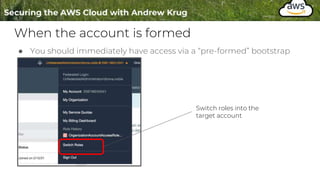
When the account is formed
● You should immediately have access via a “pre-formed” bootstrap
Switch roles into the
target account
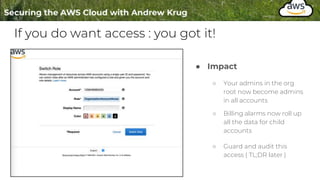
If you do want access : you got it!
● Impact
○ Your admins in the org
root now become admins
in all accounts
○ Billing alarms now roll up
all the data for child
accounts
○ Guard and audit this
access ( TL;DR later )
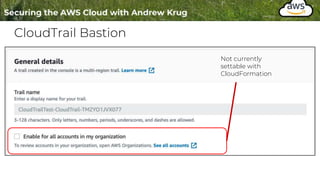
CloudTrail Bastion
Not currently
settable with
CloudFormation
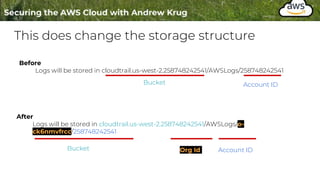
This does change the storage structure
Before
Logs will be stored in cloudtrail.us-west-2.258748242541/AWSLogs/258748242541
After
Logs will be stored in cloudtrail.us-west-2.258748242541/AWSLogs/o-
ck6nmvfrcc/258748242541
Bucket Org Id Account ID
Bucket Account ID
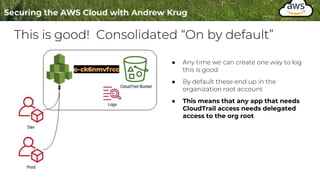
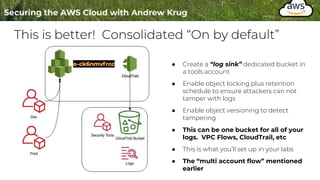
This is good! Consolidated “On by default”
● Any time we can create one way to log
this is good
● By default these end up in the
organization root account
● This means that any app that needs
CloudTrail access needs delegated
access to the org root
This is better! Consolidated “On by default”
● Create a “log sink” dedicated bucket in
a tools account
● Enable object locking plus retention
schedule to ensure attackers can not
tamper with logs
● Enable object versioning to detect
tampering
● This can be one bucket for all of your
logs. VPC Flows, CloudTrail, etc
● This is what you’ll set up in your labs
● The “multi account flow” mentioned
earlier
Howz it work?
The magic of bucket policies
https://docs.aws.amazon.com/AmazonS3/latest/userguide/add-bucket-policy.html
Q: What’s a bucket policy?
A: A bucket policy is a resource-based
AWS Identity and Access Management
(IAM) policy.
The magic of bucket policies
https://docs.aws.amazon.com/AmazonS3/latest/userguide/add-bucket-policy.html
Instead of “who can call what API”
Resource policies dictate broadly what
principals can access a resource
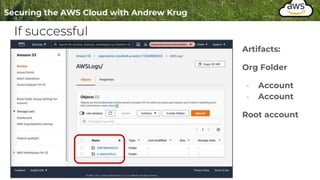
If successful
Artifacts:
Org Folder
- Account
- Account
Root account
Lab Flow for this Section
1. Apply the template to setup and observe single account
CloudFormation
2. Use organizations to create another account and assumeRole into
that account
3. Assume that role and create the log-sink bucket
4. Update your existing CloudTrail to ship there
5. Verify it works
6. Then manually enable “all accounts” in the organization
Log Analysis
Final Stretch!
In this section:
● Understand why log analysis
matters
● Simulate a breach
● Observe the behavior using
scalable log analysis
Photo credit: https://www.flickr.com/photos/tasayu/13241909724/
CC License
Log Analysis
What?
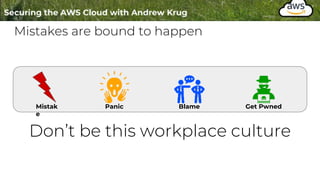
Mistakes are bound to happen
Mistak
e
Panic Blame Get Pwned
Don’t be this workplace culture
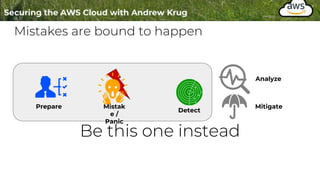
Mistakes are bound to happen
Prepare Mistak
e /
Panic
Detect
Be this one instead
Analyze
Mitigate
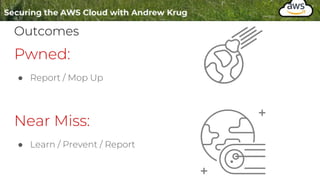
Outcomes
Pwned:
● Report / Mop Up
Near Miss:
● Learn / Prevent / Report
Either Way
● We have to do the analysis
● Quality is essential
● Proving theories
Log Analysis
( simple )
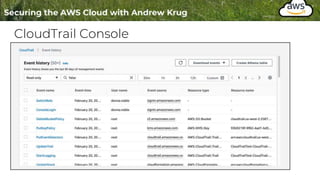
CloudTrail Console
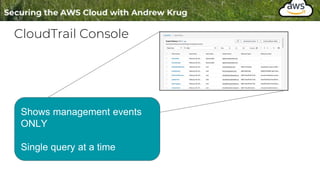
CloudTrail Console
Shows management events
ONLY
Single query at a time
Log Analysis
Inelegant but practical
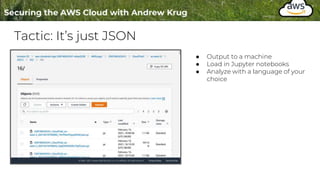
Tactic: It’s just JSON
● Output to a machine
● Load in Jupyter notebooks
● Analyze with a language of your
choice
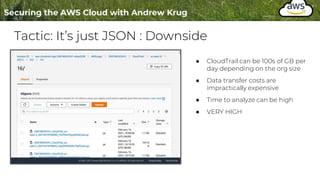
Tactic: It’s just JSON : Downside
● CloudTrail can be 100s of GB per
day depending on the org size
● Data transfer costs are
impractically expensive
● Time to analyze can be high
● VERY HIGH
Log Analysis
Scalable and Easy
AWS Athena
Analyze directly from S3
Use ANSI SQL to query content
Very inexpensive
( compared to other options )
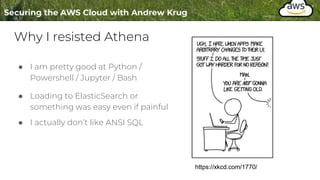
Why I resisted Athena
● I am pretty good at Python /
Powershell / Jupyter / Bash
● Loading to ElasticSearch or
something was easy even if painful
● I actually don’t like ANSI SQL
https://xkcd.com/1770/
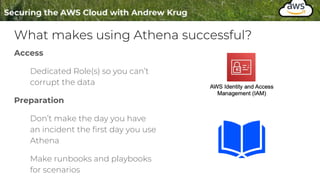
What makes using Athena successful?
Access
Dedicated Role(s) so you can’t
corrupt the data
Preparation
Don’t make the day you have
an incident the first day you use
Athena
Make runbooks and playbooks
for scenarios
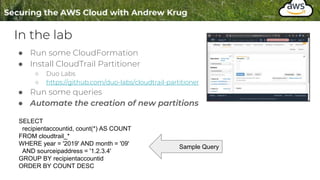
In the lab
● Run some CloudFormation
● Install CloudTrail Partitioner
○ Duo Labs
○ https://github.com/duo-labs/cloudtrail-partitioner
● Run some queries
● Automate the creation of new partitions
SELECT
recipientaccountid, count(*) AS COUNT
FROM cloudtrail_*
WHERE year = '2019' AND month = '09'
AND sourceipaddress = '1.2.3.4'
GROUP BY recipientaccountid
ORDER BY COUNT DESC
Sample Query
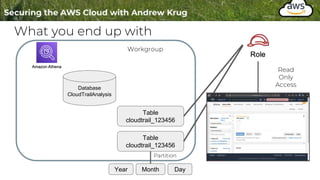
What you end up with
Database
CloudTrailAnalysis
Table
cloudtrail_123456
Table
cloudtrail_123456
Workgroup
Read
Only
Access
Year Month Day
Partition
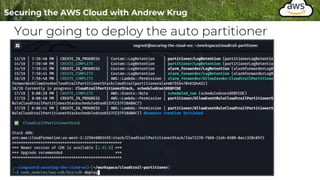
Your going to deploy the auto partitioner
Afterward you can observe two things
1. CloudWatch Event ( like a cron but cloud-y )
2. A Lambda Function
Demo Time : Athena Stack in Action
CloudTrail
Disruption Tactics
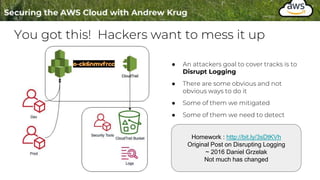
You got this! Hackers want to mess it up
● An attackers goal to cover tracks is to
Disrupt Logging
● There are some obvious and not
obvious ways to do it
● Some of them we mitigated
● Some of them we need to detect
Homework : http://bit.ly/3sDtKVh
Original Post on Disrupting Logging
~ 2016 Daniel Grzelak
Not much has changed
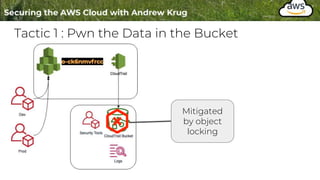
Tactic 1 : Pwn the Data in the Bucket
Mitigated
by object
locking
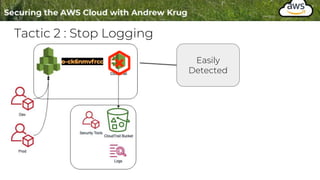
Tactic 2 : Stop Logging
Easily
Detected
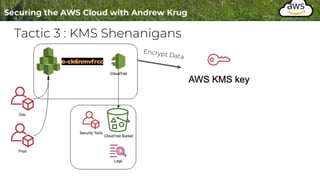
Tactic 3 : KMS Shenanigans
Scheduled
Delete in 7 Days
What did we do?
● Learned about single / multi org
● Set up a security account
● Learned the value and setup for Athena
● Saw some examples of IR in action
● Reviewed tactics for log disruption
Questions
Go forth and configure your environment using the instructions for labs
in section 01-04.
Coming up
Day 2
Setting up services, cloudformation / terraform, other methods of logging, more
fun with Athena
Be sure to put your questions in Discord for recap and review tomorrow

004 - Logging in the Cloud -- hide01.ir.pptx

  • 1.
    Level 1 Foundations ofCloud Security
  • 2.
    Lesson 4 -Logging in the Cloud Objective 4: ● Understand why logging is important ● Learn about various types of logs ● Discuss Tags and Tag Compliance ● Discuss the impact of logging in single accounts and multiple accounts ● Practice a little cloud forensics using AWS Athena
  • 3.
  • 4.
    Reasons to LogData ● Two types of logs ○ Things in the cloud ○ Things that control your cloud aka Control Plane ● Business Drivers ○ Compliance ○ Risk management ● Security ○ Forensics ○ Incident Management ○ Detection ○ Configuration Analysis ● Operations ○ Performance ○ Error Tracking
  • 5.
    Definition: Control Plane TheAPIs that control the lifecycle of compute, storage, and networking resources within your environment. Control Plane Metal
  • 6.
    Definition: Data Plane Themeans by which your users OR customers are accessing your service(s) or resources. Can not mutate resources. Control Plane Metal Data Plane Users
  • 7.
    Definition: The truestory The evolution of this model from virtualization and datacenter also adds the following layer(s). Control Plane Metal Data Plane Users Hypervisor Provider responsibility
  • 8.
    Control Plane isall about the APIs Let’s say we want create an s3 bucket to store some data. Signed request s3:CreateBucket {attributes} Access Key S3 Service Endpoint Does the work requested Returns Response Status Makes Bucket
  • 9.
    Terms to Remember Signedrequest s3:CreateBucket {attributes} Credential ( Long or short lived ) : Who API Request ( aka verbs ) : What Service Endpoint : Where s3.us-west-2.amazonaws.com
  • 10.
    What does thatactually look like? Let’s take this sample command for example that makes a bucket. This call is all just JSON posted to the S3 endpoint in this case using our credentials. Command Resource
  • 11.
    What does thatactually look like? P. 1/2 "eventVersion": "1.08", "type": "AssumedRole", "principalId": "AROATYPUY3JW6Y3RYYEGI:donna.noble", "arn":"arn:aws:sts::258748242541:assumed-role/UnfederatedAdministrator/donna.noble", "accountId": "258748242541", "accessKeyId": "ASIATYPUY3JWV7DYTYYC", "sessionContext": { "sessionIssuer": { "type": "Role", "principalId": "AROATYPUY3JW6Y3RYYEGI", "arn": "arn:aws:iam::258748242541:role/UnfederatedAdministrator", "accountId": "258748242541", "userName": "UnfederatedAdministrator" }, "webIdFederationData": {}, "attributes": { "mfaAuthenticated": "true", "creationDate": "2021-02-13T19:19:56Z" } } }, How did we get creds? Who? Principal or Actor Where? Account Number What key was used to derive the access The role of the user granting AuthZ ( Authorization ) Was the session derived using 2FA?
  • 12.
    What does thatactually look like? P. 2/2 "eventTime": "2021-02-13T19:20:22Z", "eventSource": "s3.amazonaws.com", "eventName": "CreateBucket", "awsRegion": "us-west-2", "sourceIPAddress": "68.185.27.210", "userAgent": "[aws-cli/2.1.21 Python/3.9.1 Darwin/20.3.0 source/x86_64 prompt/off command/s3.mb]", "requestParameters": { "CreateBucketConfiguration": { "LocationConstraint": "us-west-2", "xmlns": "http://s3.amazonaws.com/doc/2006-03-01/" }, "bucketName": "examplebucket1.securingthecloud.local", "Host": "s3.us-west-2.amazonaws.com" }, "responseElements": null, "additionalEventData": { "SignatureVersion": "SigV4", "CipherSuite": "ECDHE-RSA-AES128-GCM-SHA256", "bytesTransferredIn": 153, "AuthenticationMethod": "AuthHeader", "x-amz-id-2": "p/jM0+HCYyqM8MBzIHAvzwtW1MFka3diEfclB0Xgi7femq+MiWYmfc9ndoe4GfKiL9Ydzcr75hc=", "bytesTransferredOut": 0 }, "requestID": "A57328BD8E3112D9", "eventID": "875597d7-998a-4a16-ae48-b2d41dc59e85", "readOnly": false, "eventType": "AwsApiCall", "managementEvent": true, "eventCategory": "Management", "recipientAccountId": "258748242541" Source Verb ( aka Action ) Region Caller IP Address What User Agent The rest of the data is request specific data or specific to this particular service. See : `requestParameters`
  • 13.
    CloudTrail Event Recap ●CloudTrail provides the best reconstruction for who did what in your environment ● Data ○ Actor / Principal ○ EndPoint ○ Verbs ○ Session Data ■ Like MFA Statuses
  • 14.
    CloudTrail Limits Things tobe aware of: 1. SLA CloudTrail Deliveries is ~ 15 minutes 2. Some REALLY noisy events are off by default S3:Read for example -- This is a good thing Choose to instrument these things for compliance OR strategically. 1. Does not include host events, load balancer logs, etc
  • 15.
  • 16.
    Supplemental Material ● MattFuller - CloudSploit ○ http://bit.ly/2MUzJ91 - How to enable logging on every service in the AWS Cloud ○ Addresses understand the challenge of normalization ■ Where the logs go ■ How to enable them ■ Etc ● Not enough time in this course to cover them all. Feel free to give feedback on the advanced course design if you find this useful.
  • 17.
    Our Scope Remains inControl Plane Events and IR (semi in order of importance) ● CloudTrail ● S3 Access Logs ● Lambda Invocation Logs ( if using ) ● VPC Flow Logs ● AWS Config ● Custom Logging : CloudWatch Out of Scope Logs ● CloudFront ( CDN ) ● API Gateway ● Access Advisor ● … ● ( bunches of other logs )
  • 18.
  • 19.
    Increased Options Leadsto Poor Adoption ● Need to establish a “front door” for logs. ○ A single pattern for shipment and storage. ● Plethora of storage options exist ○ S3, CloudWatch Logs, Kinesis ● S3 is probably the easiest and least expensive.
  • 20.
  • 21.
    Setting up CloudTrail ●Logging should be setup with code ( same as everything else ) ○ Reproducibility is one of the tenants of security. ● It’s good to see the UI first to understand the options ● Understand the tradeoffs ● You WILL be setting this up in Labs
  • 22.
    Step 1 :CloudTrail Setup Choose S3 storage Set up encryption? Server side of Customer Key Generate a hash of every rotation Notify a message bus on delivery (SIEM Integration)
  • 23.
    Step 2 :CloudTrail Setup Choose CloudWatch Shipping Options Note: We actually don’t want this yet. You can always enable it later.
  • 24.
    Step 3 :Which Events? Management Events are a must have. Data events are custody chain for files stored in S3 ( read / write ). If this is the CloudTrail storage account as well be wary. You can create logging loops.
  • 25.
    Step 3a :Which Events? Data events allow you to opt-in or opt-out. If you include “all current and future” in a large account this can get expensive. You can also accidentally create logging loops.
  • 26.
    Step 3 :Insights? Maybe ... The insights events are a type of anomaly detection. But the feature is very new and expensive.
  • 27.
    The artifacts ● Tar.gzof JSON Data ○ You determine the schedule for retention ( or not ) ● You should probably have a retention schedule ● This is configured in S3 ● This has been written into the provided template.
  • 28.
    Provided Template :Walkthrough Within supplemental/01-04/cloudtrail-configuration.yml ● Configures CloudTrail ( for all events in all regions ) ● Configures S3 Bucket Object Lock if needed ● Sets data retention cycle ● Sets up a dedicated encryption key for CloudTrail data.
  • 29.
    Terminology ● Trusted Account: Any external account we’re trusting to access data. ● Foreign Account: Depending on the relationship sometimes the account ID you are working in. We’ll set up a log bastion using AWS Organizations later. If in single account foreign account and trusted account are the same account.
  • 30.
    Visual Flow :Single Foreign Account Storage Bucket Archival Auto Delete ● AWSLogs ○ 123456 ■ CloudTrail ■ Region Lifecycle
  • 31.
    Visual Flow :Multi Foreign Account Storage Bucket Archival Auto Delete ● AWSLogs ○ 123456 ■ CloudTrail ■ Region Lifecycle Security Account
  • 32.
  • 33.
    Fantastic Tags andWhere to Find Them ● Most resources in the AWS Cloud have key/value tags ○ Application: foo ○ Owner: Bob ○ Cost_center: 1420 ○ Env: Prod ○ Service: foo.bar.com ● Resources tagged can be used to delegate access, forensic examination, or billing. Tagging is a critical part of defense in depth.
  • 34.
    Tags will surfacein logs Tags can be attributes of a resource or attributes of a user making an API call. These can be handy for incident response, compliance, and automation. Most AWS APIs will take tags as a request filter to limit the data set pulled back. Tags are a critical part of any inventory solution.
  • 35.
  • 36.
    Multi-Account Reality Truth: Inany size organization you will have multiple accounts. The best blast radius control is still multi-account. AWS Organizations is the means by which we leverage multi-account to be effective. It’s an account and OU structure ( just like AD ).
  • 37.
    Start with SecurityTools ● A security tools account(s) is your SecOps bastion. It’s protected from data deletion, a “landing zone” for artifacts, ● AWS has blueprints and patterns for this ( we won’t use them ) ○ https://aws.amazon.com/controltower/ - Doesn’t work with existing accounts yet ○ https://aws.amazon.com/solutions/implementations/aws-landing-zone/ ● Crazy right?
  • 38.
  • 39.
    Enabling Organizations Follow theflow: ● Create ● Organize ● Add Policies
  • 40.
    Create an OrganizationalLogging Trail ● This is a Policy System ● We can force accounts to be opted-in to org based logging policy ● Don’t worry about it: ○ The next unit covers this feature in detail ● For now, just understand the model which is inheritance ○ Using Organizational Units (OUs)
  • 41.
    Go make someOUs ● Security ● Test ● Prod https://console.aws.amazon.com/organizations
  • 42.
    Make a SecurityTools Account ● Add Account ○ Note you will need to clean up each of these at the course end. Don’t go crazy.
  • 43.
    Here’s how Ifilled out mine Pro tip: Use real emails you need these for later in order to shut down these accounts
  • 44.
    Make a SecurityTools Account ● Nuances ○ IAM Role is the administrator role “pre- created” that was use for control plane. ○ Email addresses should be lists OR follow a + convention. ○ These accounts have no actual “root user access” by default
  • 45.
    Make a Move ●Post creation this account isn’t in an OU ● Move it into your security OU
  • 46.
    When the accountis formed ● You should immediately have access via a “pre-formed” bootstrap Switch roles into the target account
  • 47.
    If you dowant access : you got it! ● Impact ○ Your admins in the org root now become admins in all accounts ○ Billing alarms now roll up all the data for child accounts ○ Guard and audit this access ( TL;DR later )
  • 48.
  • 49.
    This does changethe storage structure Before Logs will be stored in cloudtrail.us-west-2.258748242541/AWSLogs/258748242541 After Logs will be stored in cloudtrail.us-west-2.258748242541/AWSLogs/o- ck6nmvfrcc/258748242541 Bucket Org Id Account ID Bucket Account ID
  • 50.
    This is good!Consolidated “On by default” ● Any time we can create one way to log this is good ● By default these end up in the organization root account ● This means that any app that needs CloudTrail access needs delegated access to the org root
  • 51.
    This is better!Consolidated “On by default” ● Create a “log sink” dedicated bucket in a tools account ● Enable object locking plus retention schedule to ensure attackers can not tamper with logs ● Enable object versioning to detect tampering ● This can be one bucket for all of your logs. VPC Flows, CloudTrail, etc ● This is what you’ll set up in your labs ● The “multi account flow” mentioned earlier
  • 52.
  • 53.
    The magic ofbucket policies https://docs.aws.amazon.com/AmazonS3/latest/userguide/add-bucket-policy.html Q: What’s a bucket policy? A: A bucket policy is a resource-based AWS Identity and Access Management (IAM) policy.
  • 54.
    The magic ofbucket policies https://docs.aws.amazon.com/AmazonS3/latest/userguide/add-bucket-policy.html Instead of “who can call what API” Resource policies dictate broadly what principals can access a resource
  • 55.
    If successful Artifacts: Org Folder -Account - Account Root account
  • 56.
    Lab Flow forthis Section 1. Apply the template to setup and observe single account CloudFormation 2. Use organizations to create another account and assumeRole into that account 3. Assume that role and create the log-sink bucket 4. Update your existing CloudTrail to ship there 5. Verify it works 6. Then manually enable “all accounts” in the organization
  • 57.
  • 58.
    Final Stretch! In thissection: ● Understand why log analysis matters ● Simulate a breach ● Observe the behavior using scalable log analysis Photo credit: https://www.flickr.com/photos/tasayu/13241909724/ CC License
  • 59.
  • 60.
    Mistakes are boundto happen Mistak e Panic Blame Get Pwned Don’t be this workplace culture
  • 61.
    Mistakes are boundto happen Prepare Mistak e / Panic Detect Be this one instead Analyze Mitigate
  • 62.
    Outcomes Pwned: ● Report /Mop Up Near Miss: ● Learn / Prevent / Report
  • 63.
    Either Way ● Wehave to do the analysis ● Quality is essential ● Proving theories
  • 64.
  • 65.
  • 66.
    CloudTrail Console Shows managementevents ONLY Single query at a time
  • 67.
  • 68.
    Tactic: It’s justJSON ● Output to a machine ● Load in Jupyter notebooks ● Analyze with a language of your choice
  • 69.
    Tactic: It’s justJSON : Downside ● CloudTrail can be 100s of GB per day depending on the org size ● Data transfer costs are impractically expensive ● Time to analyze can be high ● VERY HIGH
  • 70.
  • 71.
    AWS Athena Analyze directlyfrom S3 Use ANSI SQL to query content Very inexpensive ( compared to other options )
  • 72.
    Why I resistedAthena ● I am pretty good at Python / Powershell / Jupyter / Bash ● Loading to ElasticSearch or something was easy even if painful ● I actually don’t like ANSI SQL https://xkcd.com/1770/
  • 73.
    What makes usingAthena successful? Access Dedicated Role(s) so you can’t corrupt the data Preparation Don’t make the day you have an incident the first day you use Athena Make runbooks and playbooks for scenarios
  • 74.
    In the lab ●Run some CloudFormation ● Install CloudTrail Partitioner ○ Duo Labs ○ https://github.com/duo-labs/cloudtrail-partitioner ● Run some queries ● Automate the creation of new partitions SELECT recipientaccountid, count(*) AS COUNT FROM cloudtrail_* WHERE year = '2019' AND month = '09' AND sourceipaddress = '1.2.3.4' GROUP BY recipientaccountid ORDER BY COUNT DESC Sample Query
  • 75.
    What you endup with Database CloudTrailAnalysis Table cloudtrail_123456 Table cloudtrail_123456 Workgroup Read Only Access Year Month Day Partition
  • 76.
    Your going todeploy the auto partitioner
  • 77.
    Afterward you canobserve two things 1. CloudWatch Event ( like a cron but cloud-y ) 2. A Lambda Function
  • 78.
    Demo Time :Athena Stack in Action
  • 79.
  • 80.
    You got this!Hackers want to mess it up ● An attackers goal to cover tracks is to Disrupt Logging ● There are some obvious and not obvious ways to do it ● Some of them we mitigated ● Some of them we need to detect Homework : http://bit.ly/3sDtKVh Original Post on Disrupting Logging ~ 2016 Daniel Grzelak Not much has changed
  • 81.
    Tactic 1 :Pwn the Data in the Bucket Mitigated by object locking
  • 82.
    Tactic 2 :Stop Logging Easily Detected
  • 83.
    Tactic 3 :KMS Shenanigans
  • 84.
    Tactic 3 :KMS Shenanigans Scheduled Delete in 7 Days
  • 85.
    What did wedo? ● Learned about single / multi org ● Set up a security account ● Learned the value and setup for Athena ● Saw some examples of IR in action ● Reviewed tactics for log disruption
  • 86.
    Questions Go forth andconfigure your environment using the instructions for labs in section 01-04.
  • 87.
    Coming up Day 2 Settingup services, cloudformation / terraform, other methods of logging, more fun with Athena Be sure to put your questions in Discord for recap and review tomorrow