Adding 2nd IP address
in Windows 10
Adding a second IP address in Windows 10.
Network Settings
Presentation’s title3
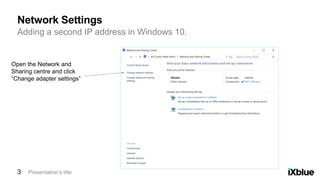
Open the Network and
Sharing centre and click
“Change adapter settings”
Adding a second IP address in Windows 10.
Network Settings
Presentation’s title4
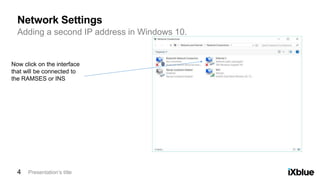
Now click on the interface
that will be connected to
the RAMSES or INS
Adding a second IP address in Windows 10.
Network Settings
Presentation’s title5
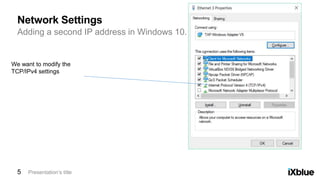
We want to modify the
TCP/IPv4 settings
Adding a second IP address in Windows 10.
Network Settings
Presentation’s title6
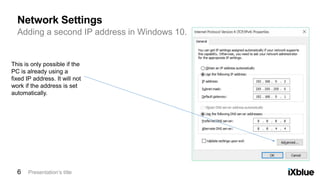
This is only possible if the
PC is already using a
fixed IP address. It will not
work if the address is set
automatically.
Adding a second IP address in Windows 10.
Network Settings
Presentation’s title7
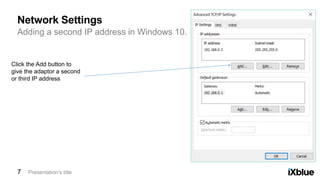
Click the Add button to
give the adaptor a second
or third IP address
Adding a second IP address in Windows 10.
Network Settings
Presentation’s title8
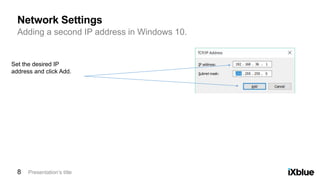
Set the desired IP
address and click Add.
Adding a second IP address in Windows 10.
Network Settings
Presentation’s title9
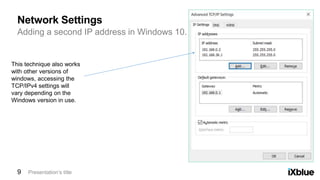
This technique also works
with other versions of
windows, accessing the
TCP/IPv4 settings will
vary depending on the
Windows version in use.

003 ramses windows tip

  • 2.
    Adding 2nd IPaddress in Windows 10
  • 3.
    Adding a secondIP address in Windows 10. Network Settings Presentation’s title3 Open the Network and Sharing centre and click “Change adapter settings”
  • 4.
    Adding a secondIP address in Windows 10. Network Settings Presentation’s title4 Now click on the interface that will be connected to the RAMSES or INS
  • 5.
    Adding a secondIP address in Windows 10. Network Settings Presentation’s title5 We want to modify the TCP/IPv4 settings
  • 6.
    Adding a secondIP address in Windows 10. Network Settings Presentation’s title6 This is only possible if the PC is already using a fixed IP address. It will not work if the address is set automatically.
  • 7.
    Adding a secondIP address in Windows 10. Network Settings Presentation’s title7 Click the Add button to give the adaptor a second or third IP address
  • 8.
    Adding a secondIP address in Windows 10. Network Settings Presentation’s title8 Set the desired IP address and click Add.
  • 9.
    Adding a secondIP address in Windows 10. Network Settings Presentation’s title9 This technique also works with other versions of windows, accessing the TCP/IPv4 settings will vary depending on the Windows version in use.