Teams: Telefoni og møter
Lasse Nordvik Wedø – Office Apps and Services MVP
ExpertsLive Café Bergen
14. Mars - 2019
Team
Modern
Group
Chat
Channel
SharePoint
Reply ChainMessage
Images, Emojis,
Stickers, Giphy,
Recordings
OneDrive
Tabs
Folder
Tabs
Activity Feed
Meetings
Calling
Apps
Apps
Contacts
Teams
Chats
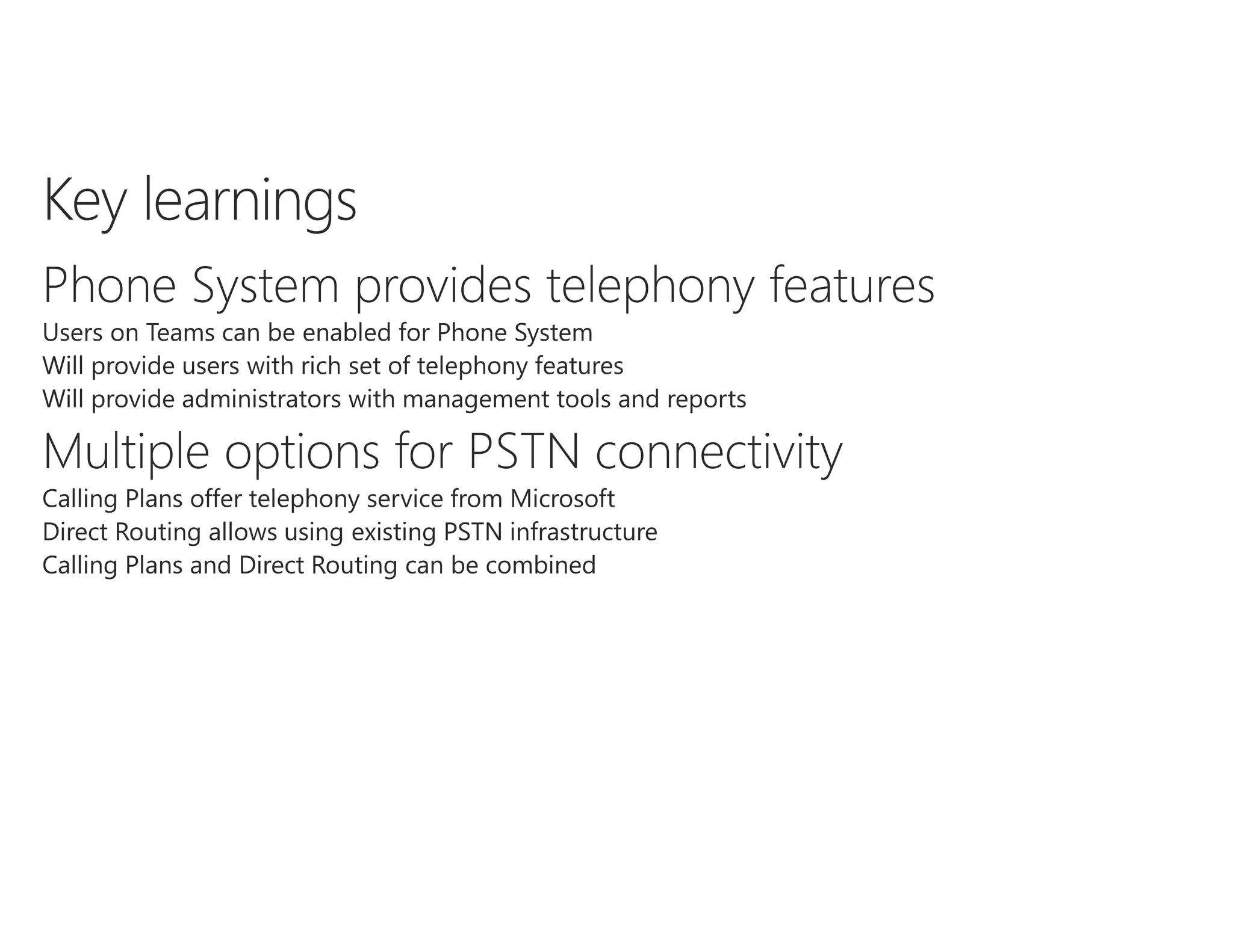
Voice
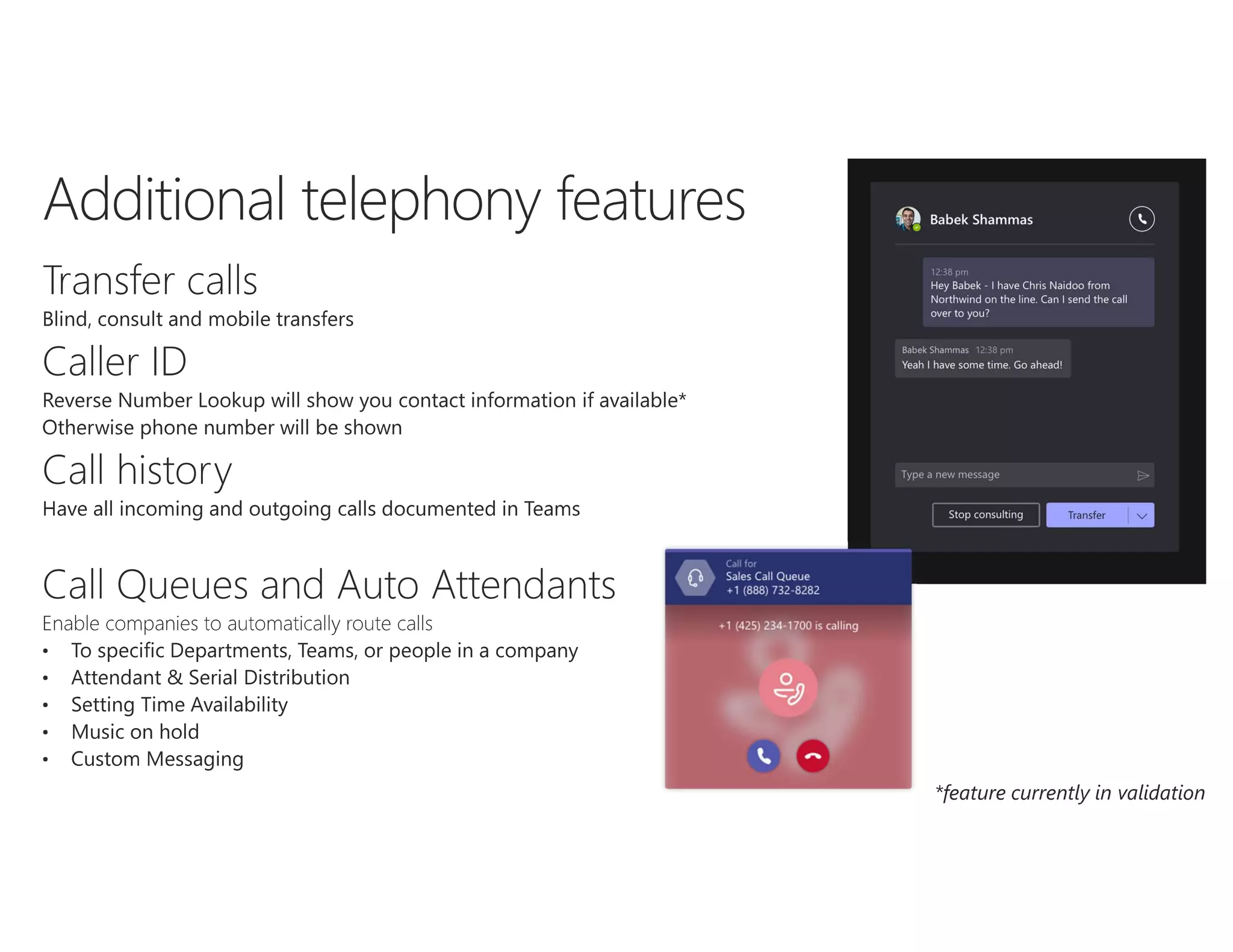
Basic calling features
Place, receive and
hold calls
DID numbers
Device switching
Distinctive ringing
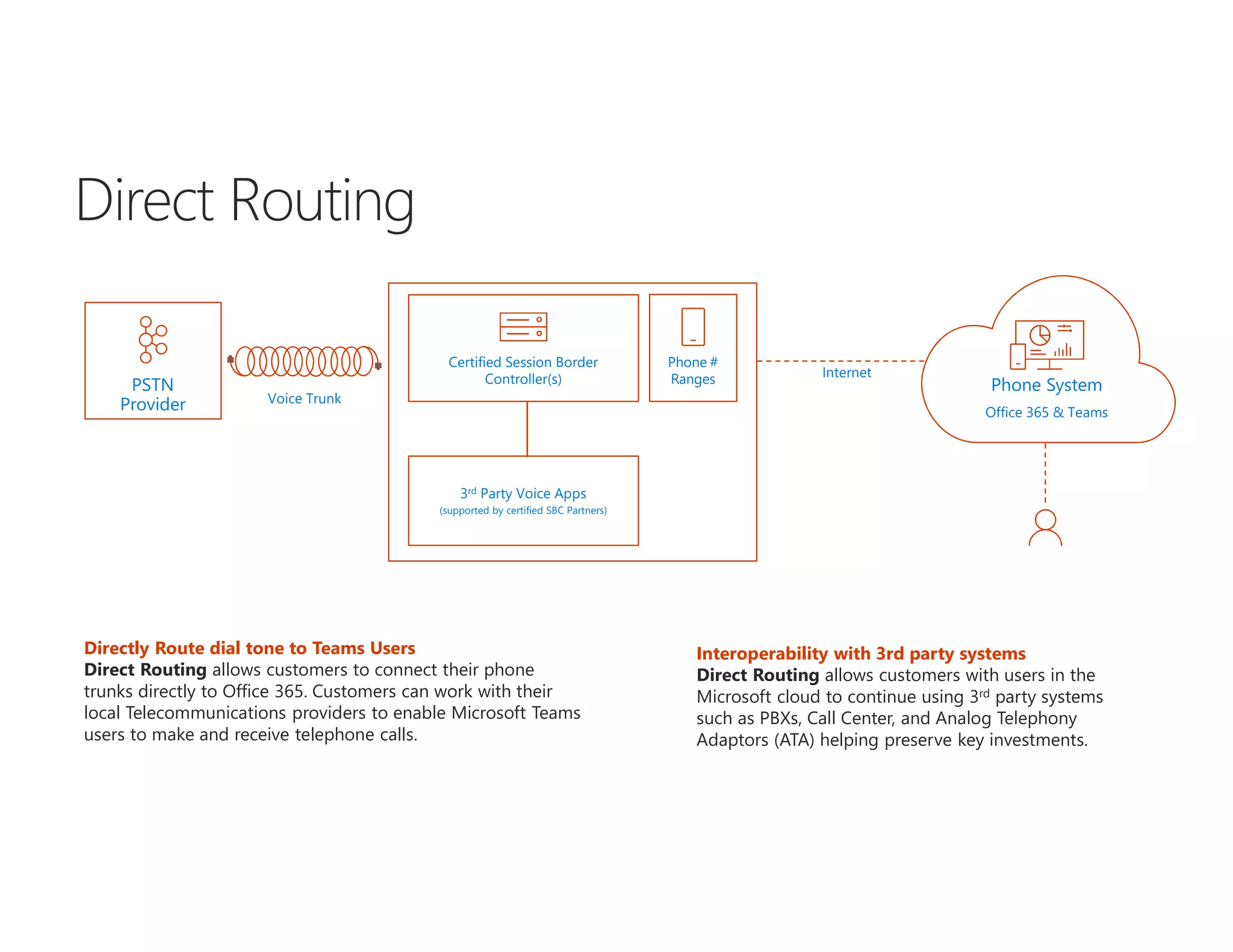
Directly Route dial tone to Teams Users
Direct Routing allows customers to connect their phone
trunks directly to Office 365. Customers can work with their
local Telecommunications providers to enable Microsoft Teams
users to make and receive telephone calls.
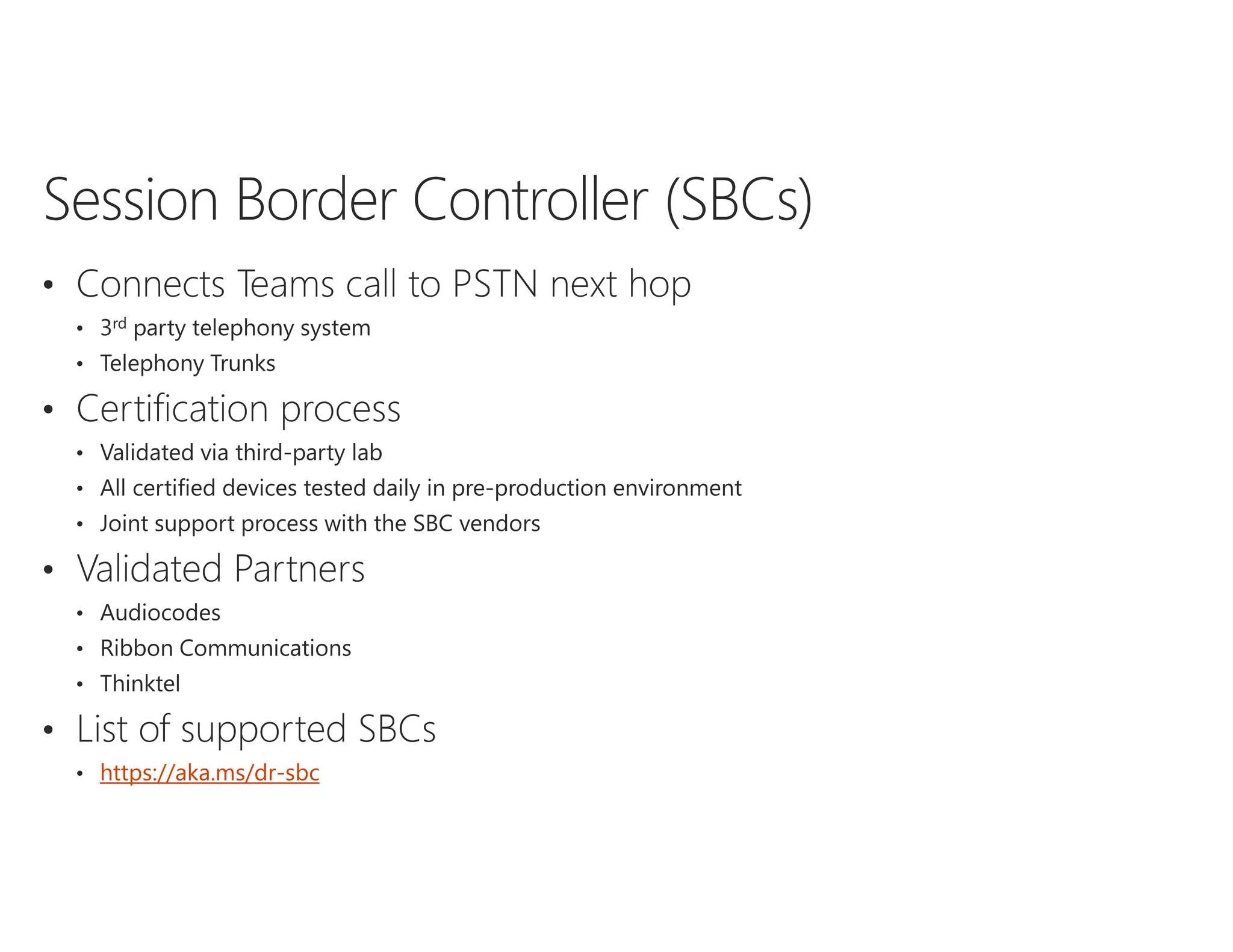
PSTN
Provider
Phone System
Voice Trunk
Internet
3rd Party Voice Apps
(supported by certified SBC Partners)
Phone #
Ranges
Certified Session Border
Controller(s)
Interoperability with 3rd party systems
Direct Routing allows customers with users in the
Microsoft cloud to continue using 3rd party systems
such as PBXs, Call Center, and Analog Telephony
Adaptors (ATA) helping preserve key investments.
Office 365 & Teams
Certified Session Border
Controller(s)User on
corporate network
User outside
corporate network
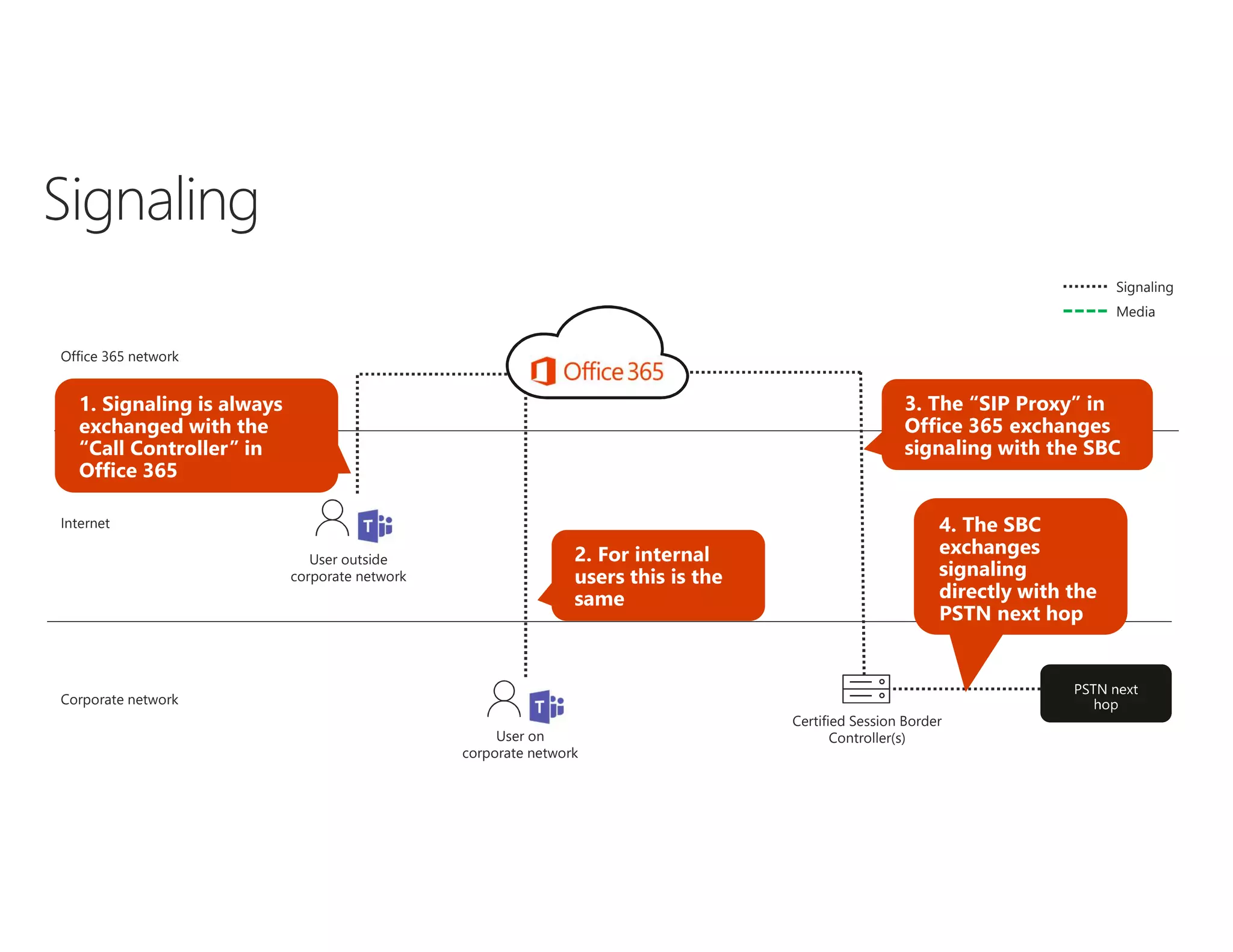
Office 365 network
Internet
Corporate network
Signaling
Media
Certified Session Border
Controller(s)User on
corporate network
User outside
corporate network
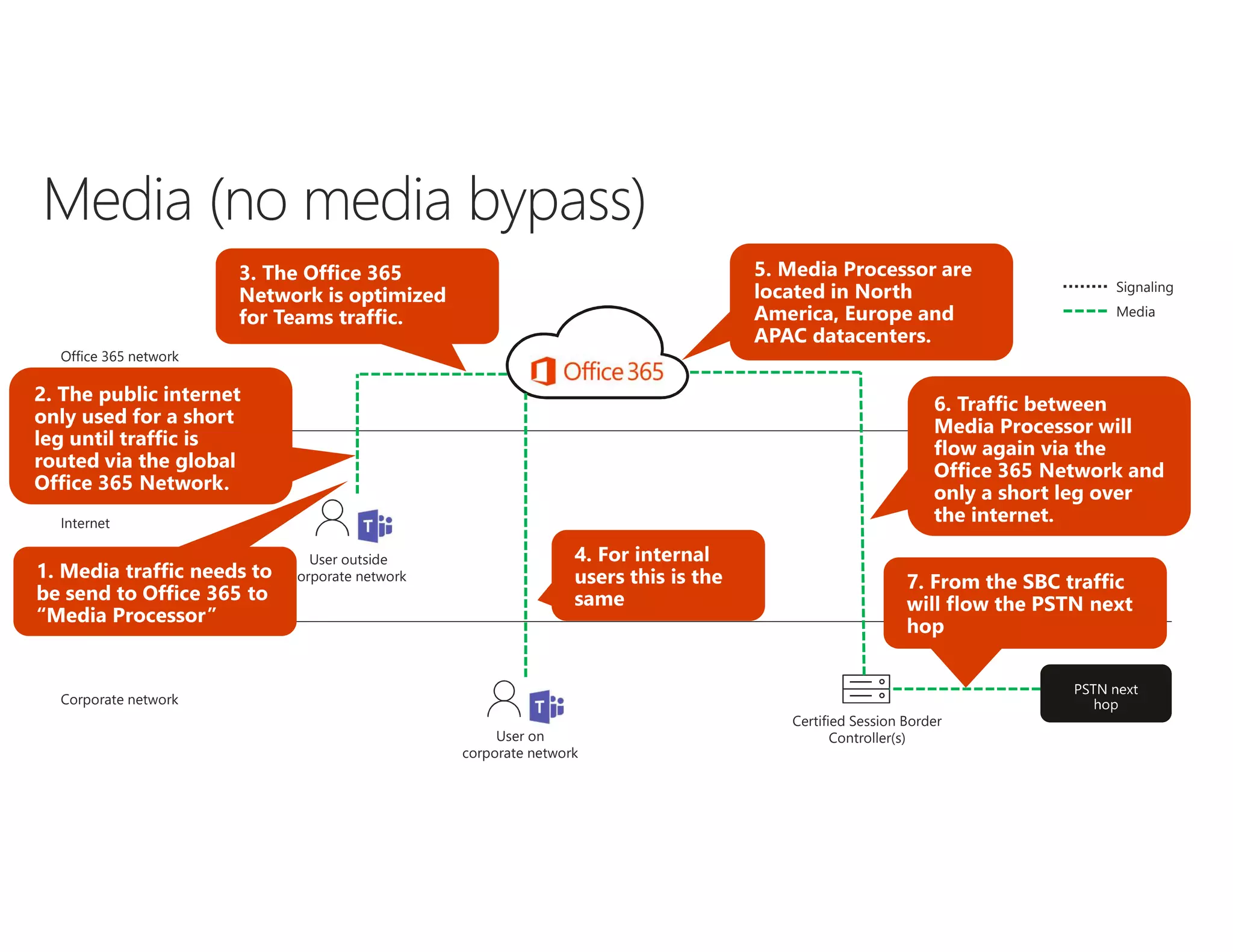
Office 365 network
Internet
Corporate network
Signaling
Media
Self deployed SBC Partner hosted SBC
Benefits • Full control over SBC
• Connectivity to existing PBX
• No need for purchasing, maintaining and
hosting own SBC
Disadvantages • Customer responsible for SBC
configuration
• Need to purchase, maintain and host SBC
• No control over SBC configuration
• Support model more complex
https://aka.ms/dr-sbc
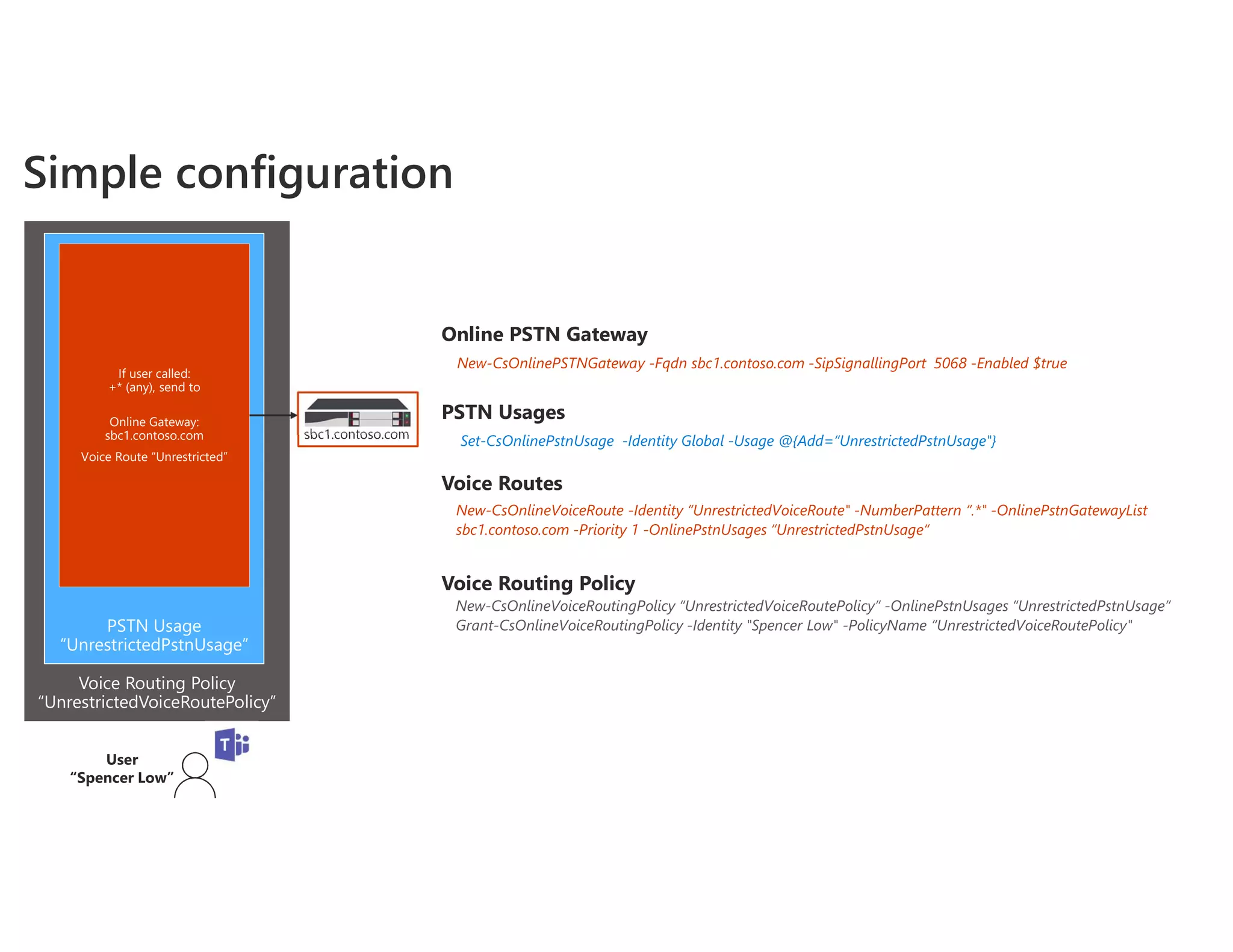
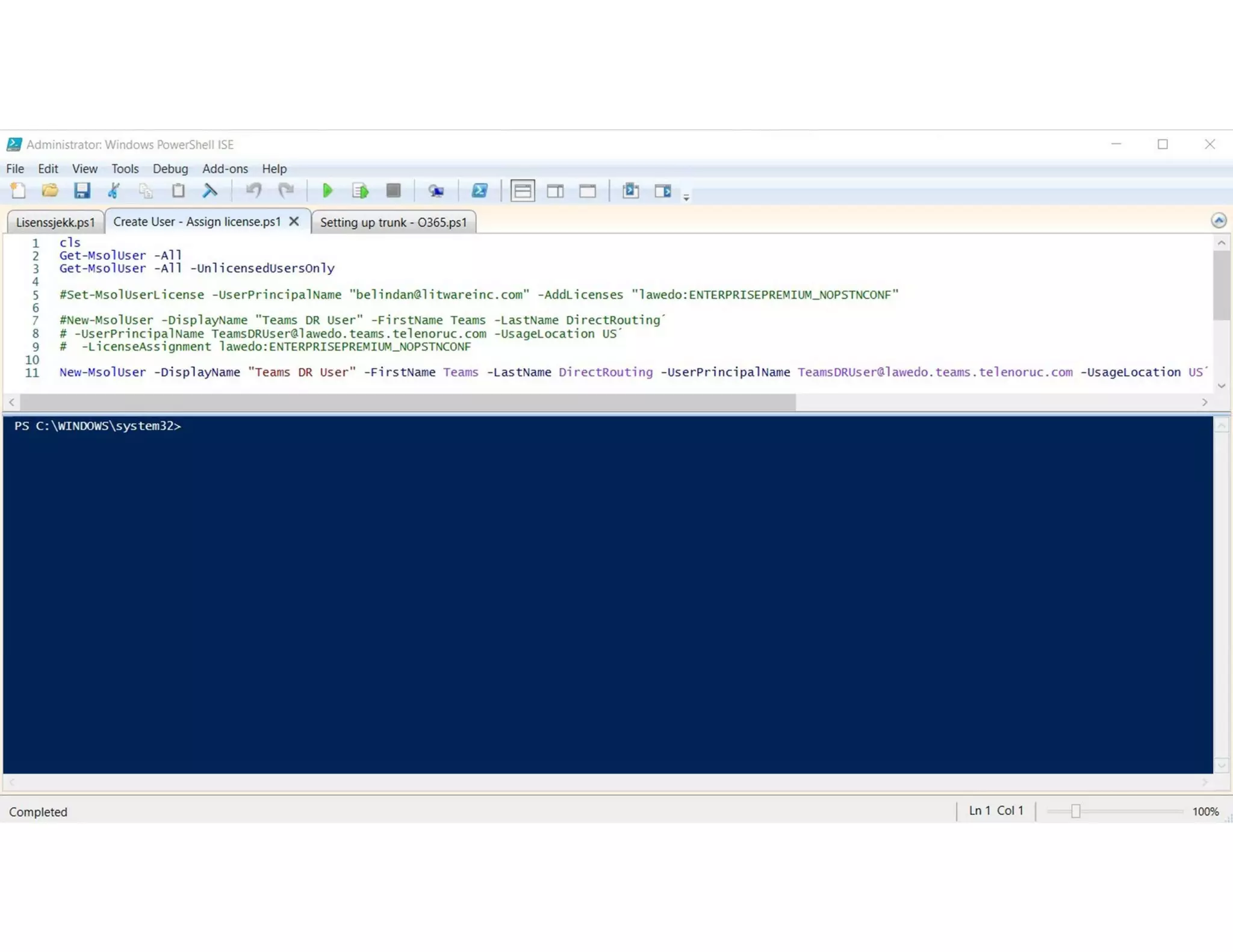
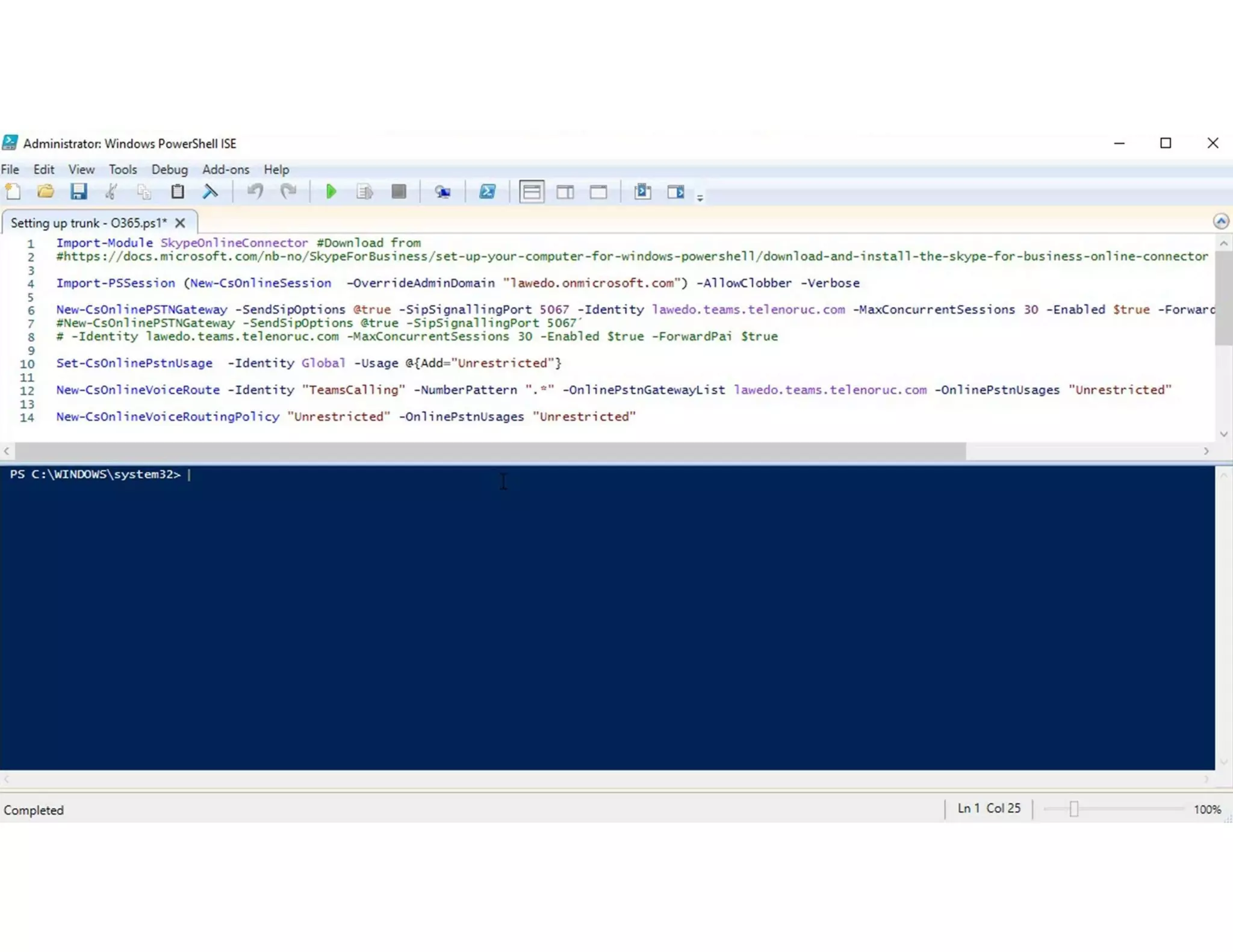
Online PSTN Gateway
New-CsOnlinePSTNGateway -Fqdn sbc1.contoso.com -SipSignallingPort 5068 -Enabled $true
Voice Routes
New-CsOnlineVoiceRoute -Identity “UnrestrictedVoiceRoute" -NumberPattern “.*" -OnlinePstnGatewayList
sbc1.contoso.com -Priority 1 -OnlinePstnUsages “UnrestrictedPstnUsage“
PSTN Usages
Set-CsOnlinePstnUsage -Identity Global -Usage @{Add=“UnrestrictedPstnUsage"}
Voice Routing Policy
New-CsOnlineVoiceRoutingPolicy “UnrestrictedVoiceRoutePolicy” -OnlinePstnUsages “UnrestrictedPstnUsage”
Grant-CsOnlineVoiceRoutingPolicy -Identity "Spencer Low" -PolicyName “UnrestrictedVoiceRoutePolicy"
Voice Routing Policy
“UnrestrictedVoiceRoutePolicy”
PSTN Usage
“UnrestrictedPstnUsage”
If user called:
+* (any), send to
Online Gateway:
sbc1.contoso.com
Voice Route “Unrestricted”
sbc1.contoso.com
Simple configuration
User
“Spencer Low”
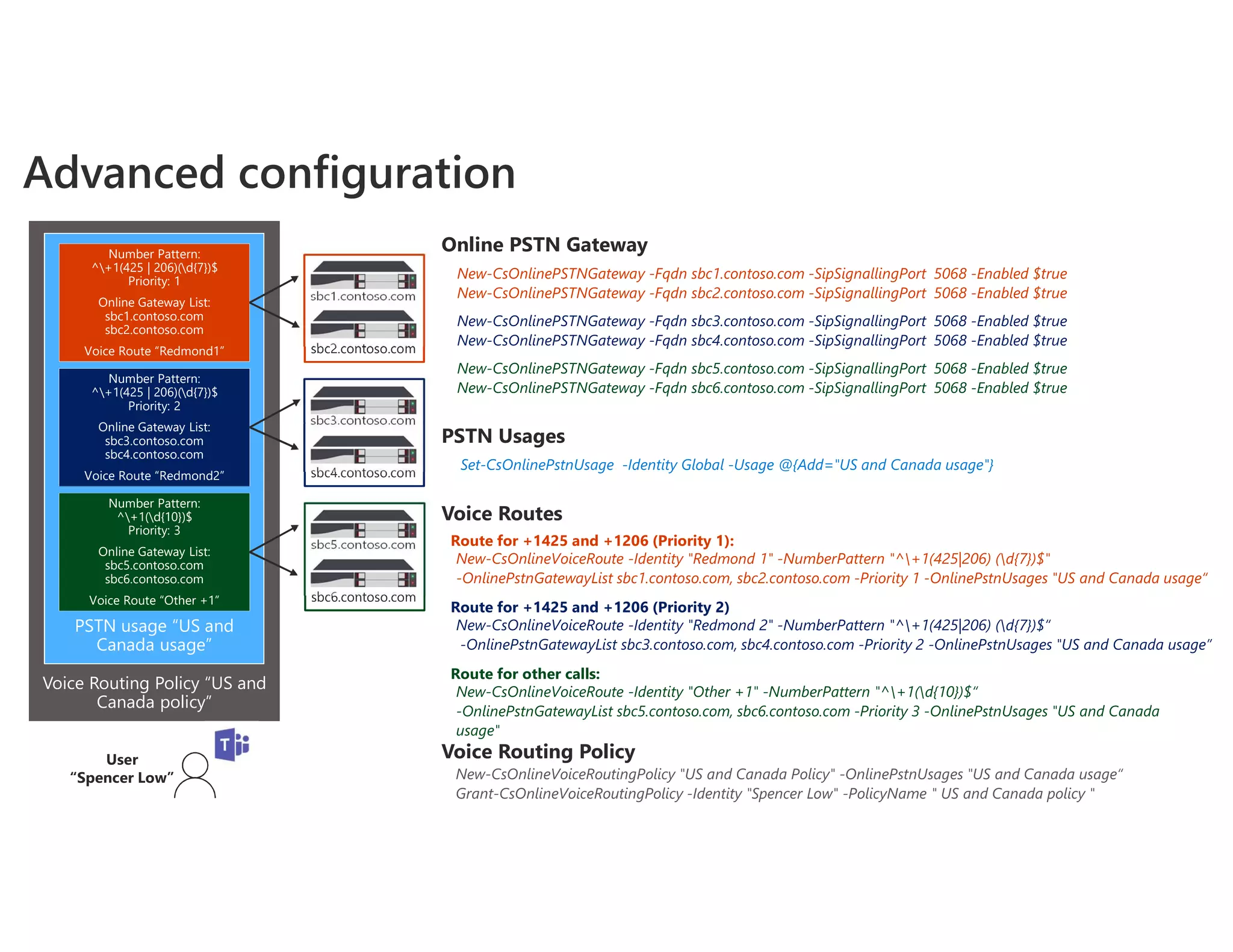
Online PSTN Gateway
New-CsOnlinePSTNGateway -Fqdn sbc1.contoso.com -SipSignallingPort 5068 -Enabled $true
New-CsOnlinePSTNGateway -Fqdn sbc2.contoso.com -SipSignallingPort 5068 -Enabled $true
Voice Routes
Route for +1425 and +1206 (Priority 1):
New-CsOnlineVoiceRoute -Identity "Redmond 1" -NumberPattern "^+1(425|206) (d{7})$"
-OnlinePstnGatewayList sbc1.contoso.com, sbc2.contoso.com -Priority 1 -OnlinePstnUsages "US and Canada usage“
PSTN Usages
Set-CsOnlinePstnUsage -Identity Global -Usage @{Add="US and Canada usage"}
New-CsOnlinePSTNGateway -Fqdn sbc3.contoso.com -SipSignallingPort 5068 -Enabled $true
New-CsOnlinePSTNGateway -Fqdn sbc4.contoso.com -SipSignallingPort 5068 -Enabled $true
Route for +1425 and +1206 (Priority 2)
New-CsOnlineVoiceRoute -Identity "Redmond 2" -NumberPattern "^+1(425|206) (d{7})$“
-OnlinePstnGatewayList sbc3.contoso.com, sbc4.contoso.com -Priority 2 -OnlinePstnUsages "US and Canada usage”
New-CsOnlinePSTNGateway -Fqdn sbc5.contoso.com -SipSignallingPort 5068 -Enabled $true
New-CsOnlinePSTNGateway -Fqdn sbc6.contoso.com -SipSignallingPort 5068 -Enabled $true
Route for other calls:
New-CsOnlineVoiceRoute -Identity "Other +1" -NumberPattern "^+1(d{10})$“
-OnlinePstnGatewayList sbc5.contoso.com, sbc6.contoso.com -Priority 3 -OnlinePstnUsages "US and Canada
usage"
Voice Routing Policy
New-CsOnlineVoiceRoutingPolicy "US and Canada Policy" -OnlinePstnUsages "US and Canada usage“
Grant-CsOnlineVoiceRoutingPolicy -Identity "Spencer Low" -PolicyName " US and Canada policy "
Voice Routing Policy “US and
Canada policy”
PSTN usage “US and
Canada usage”
Number Pattern:
^+1(425 | 206)(d{7})$
Priority: 1
Online Gateway List:
sbc1.contoso.com
sbc2.contoso.com
Voice Route “Redmond1”
Number Pattern:
^+1(425 | 206)(d{7})$
Priority: 2
Online Gateway List:
sbc3.contoso.com
sbc4.contoso.com
Voice Route “Redmond2”
Number Pattern:
^+1(d{10})$
Priority: 3
Online Gateway List:
sbc5.contoso.com
sbc6.contoso.com
Voice Route “Other +1”
sbc5.contoso.com
sbc6.contoso.com
sbc3.contoso.com
sbc4.contoso.com
sbc1.contoso.com
sbc2.contoso.com
Advanced configuration
User
“Spencer Low”
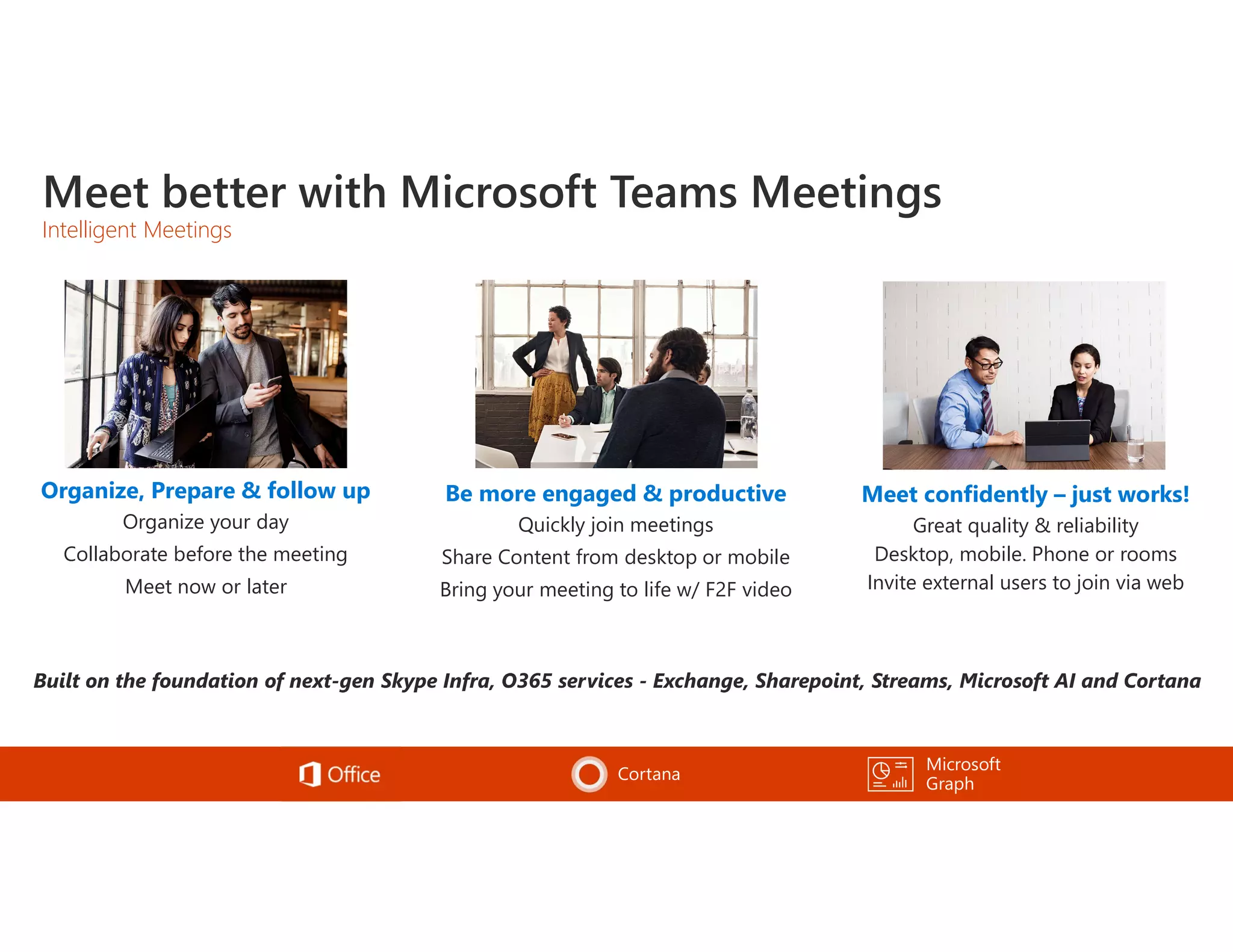
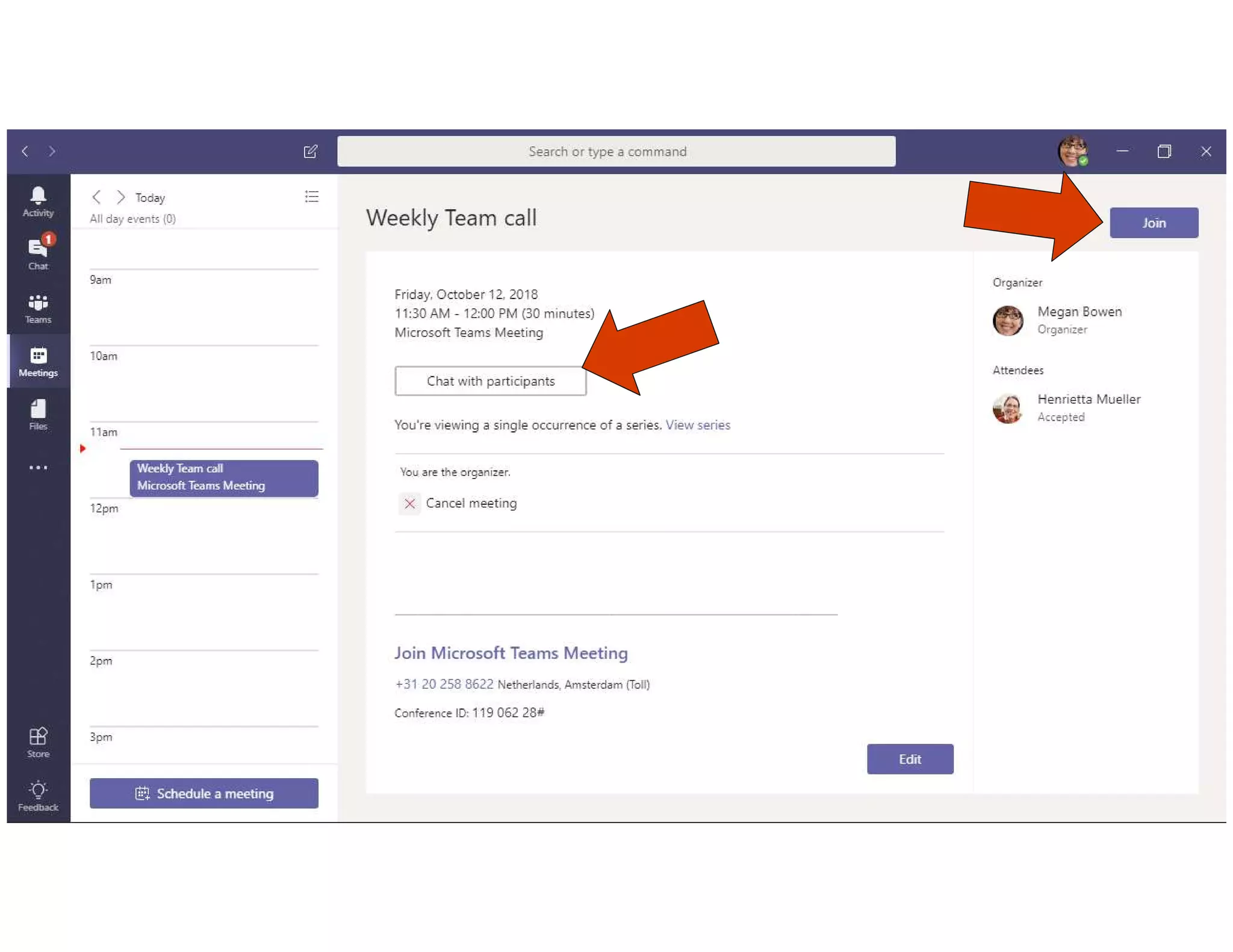
Meet better with Microsoft Teams Meetings
Intelligent Meetings
Be more engaged & productive
Quickly join meetings
Share Content from desktop or mobile
Bring your meeting to life w/ F2F video
Microsoft
Graph
Cortana
Organize, Prepare & follow up
Organize your day
Collaborate before the meeting
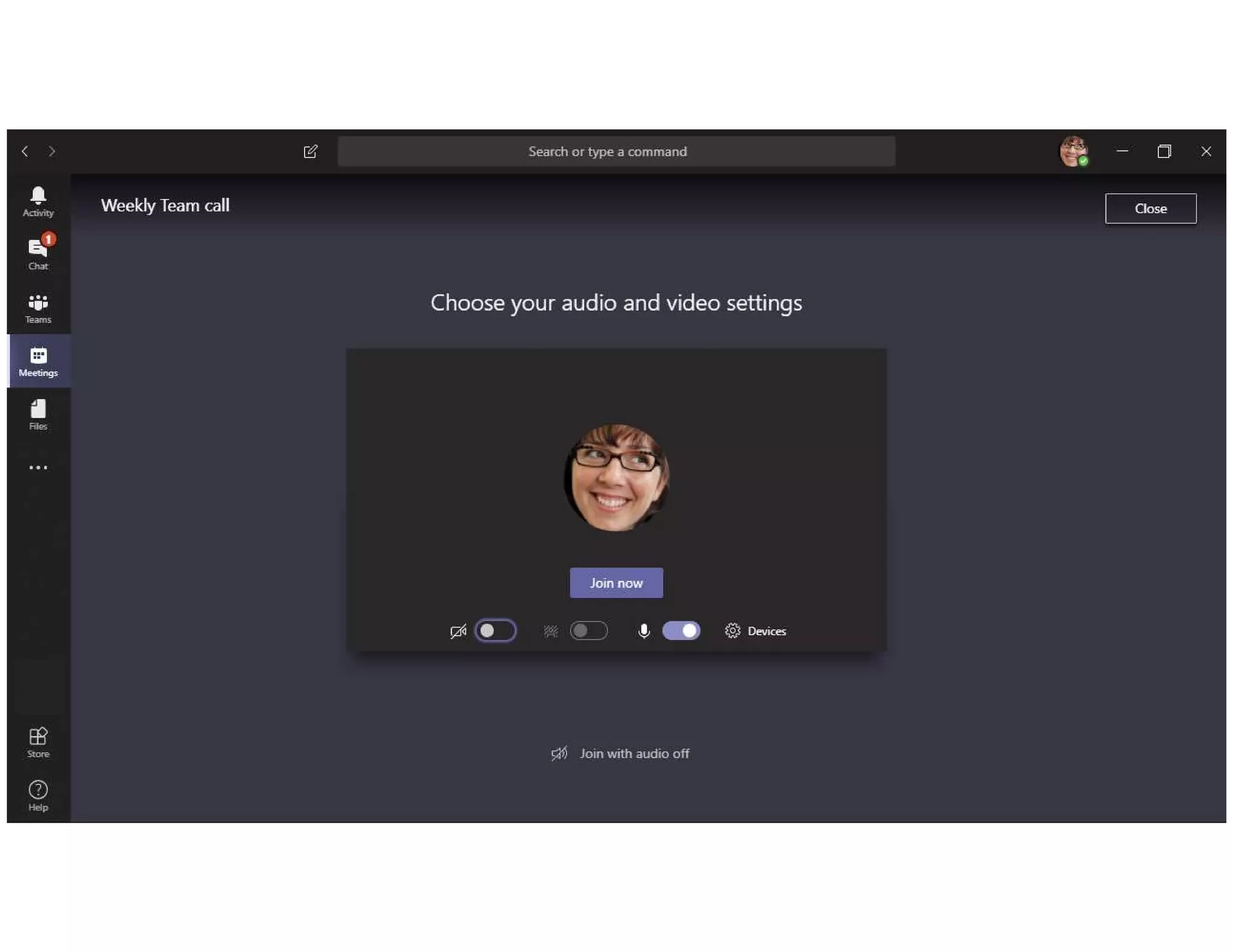
Meet now or later
Meet confidently – just works!
Great quality & reliability
Desktop, mobile. Phone or rooms
Invite external users to join via web
Meeting Lifecycle
During Meeting
F/F video – follow the action
Share content
Record the Meeting w/ transcription
Join from a Skype room easily
Pre Meeting
Contextual conversations in Teams
Prepare and discuss content
Schedule Meetings
Post Meeting
Playback a meeting w/ transcription
Share notes
Post meeting chat & collaboration




Edge Chrome
Audio  
Video  planned
View
screensharing
 
Active
screenshare
planned planned
Microsoft Teams
Cisco/Polycom
VTC system
Pexip is architected as a enterprise cloud application for
customers that requires an authenticted experience and a setup
adjusted to ther existing brand/domain and infrastructure.
VTC Rooms VTC Call Control VTC Management
VTC Bridging MCUVTC FW Traversal
Teams client
Microsoft Teams
?
Pexip Self Hosted vs Pexip as a Service
Customer/partner tenant
VTC Rooms VTC Call Control VTC Management
VTC Bridging MCUVTC FW Traversal
Pexip tenant
Self Hosted: For complex deployments As a Service: Turnkey
Feature Pexip Self Hosted Pexip as a Service
Installation/topology
Deploy Virtual Machines Yes N/A
Install & Configure Pexip (VMware or Azure) Yes N/A
Integrate with existing VTC call control Yes (or decomission) N/A
Install & Configure Pexip Teams Connector Yes N/A
Choice of Azure regions Customer Pexip
Azure subscription owner Customer Pexip
SLA Customer Pexip
Deployment type Dedicated Shared
Configuration/Features
Customer specific DNS SIP domain Yes Yes
VTC endpoint registration and P2P calling Yes Yes
Lobby bypass for customer owned VTCs Yes Yes
Lobby bypass with customer VTC call control Yes No
SfB and Guest WebRTC dialin to Teams Meetings Yes No
VTC to SfB Meetings during migration period to Teams Yes Yes (customers own VTCs, not guests)
Customer specific branding/splash screens Yes No (at launch time)
Pexip Self Hosted vs Pexip as a Service
Environment
• Acoustical noise
• Visual noise
Device
• Device for capturing
audio and video
• Device for playing back
audio
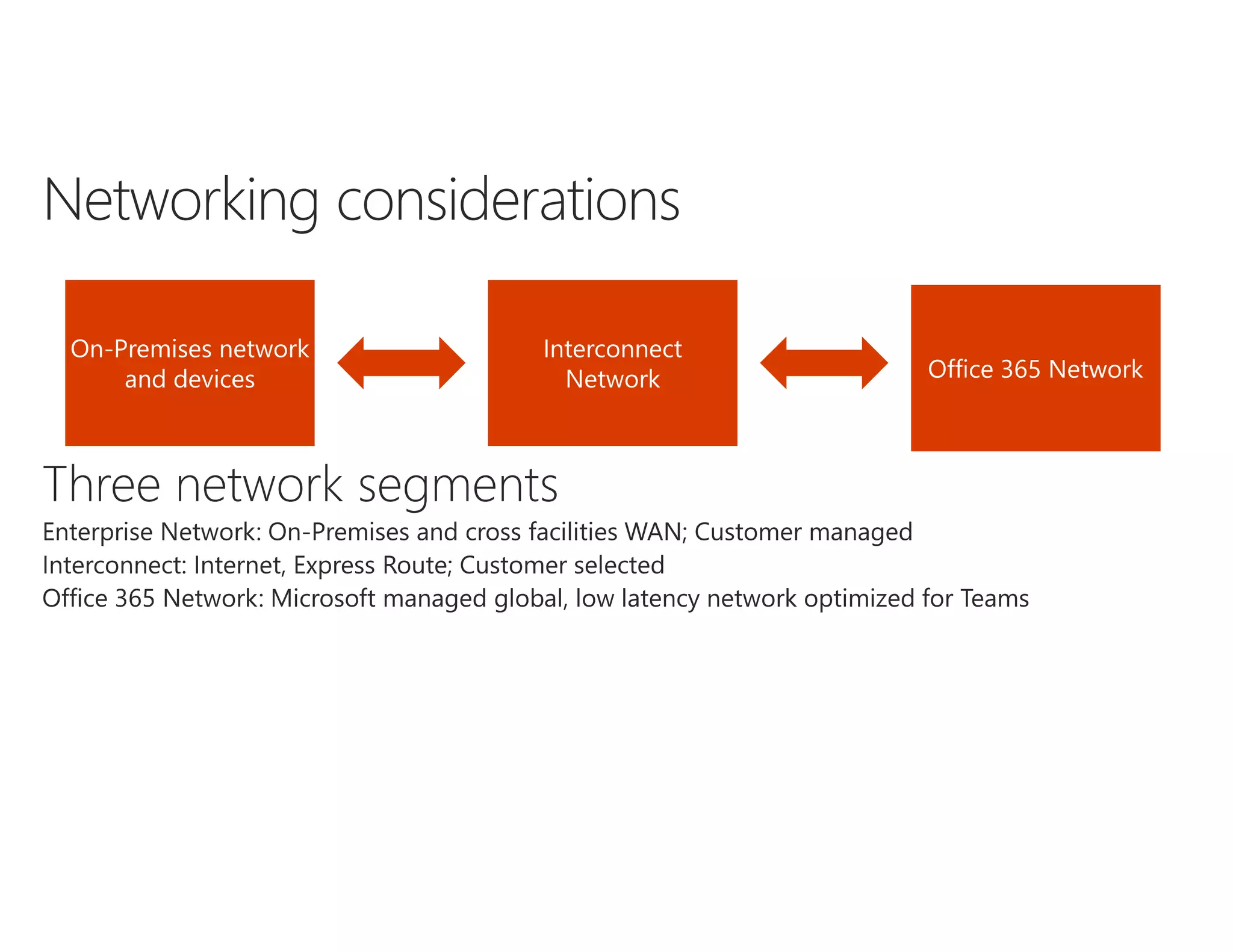
Network
• Connectivity to Office
365 network
• Quality of the network
• Available bandwidth
Wedo calling   meeting - interop

Wedo calling meeting - interop

  • 1.
    Teams: Telefoni ogmøter Lasse Nordvik Wedø – Office Apps and Services MVP ExpertsLive Café Bergen 14. Mars - 2019
  • 2.
    Team Modern Group Chat Channel SharePoint Reply ChainMessage Images, Emojis, Stickers,Giphy, Recordings OneDrive Tabs Folder Tabs Activity Feed Meetings Calling Apps Apps Contacts Teams Chats Voice
  • 6.
    Basic calling features Place,receive and hold calls DID numbers Device switching Distinctive ringing
  • 9.
    Directly Route dialtone to Teams Users Direct Routing allows customers to connect their phone trunks directly to Office 365. Customers can work with their local Telecommunications providers to enable Microsoft Teams users to make and receive telephone calls. PSTN Provider Phone System Voice Trunk Internet 3rd Party Voice Apps (supported by certified SBC Partners) Phone # Ranges Certified Session Border Controller(s) Interoperability with 3rd party systems Direct Routing allows customers with users in the Microsoft cloud to continue using 3rd party systems such as PBXs, Call Center, and Analog Telephony Adaptors (ATA) helping preserve key investments. Office 365 & Teams
  • 11.
    Certified Session Border Controller(s)Useron corporate network User outside corporate network Office 365 network Internet Corporate network Signaling Media
  • 12.
    Certified Session Border Controller(s)Useron corporate network User outside corporate network Office 365 network Internet Corporate network Signaling Media
  • 13.
    Self deployed SBCPartner hosted SBC Benefits • Full control over SBC • Connectivity to existing PBX • No need for purchasing, maintaining and hosting own SBC Disadvantages • Customer responsible for SBC configuration • Need to purchase, maintain and host SBC • No control over SBC configuration • Support model more complex
  • 15.
  • 16.
    Online PSTN Gateway New-CsOnlinePSTNGateway-Fqdn sbc1.contoso.com -SipSignallingPort 5068 -Enabled $true Voice Routes New-CsOnlineVoiceRoute -Identity “UnrestrictedVoiceRoute" -NumberPattern “.*" -OnlinePstnGatewayList sbc1.contoso.com -Priority 1 -OnlinePstnUsages “UnrestrictedPstnUsage“ PSTN Usages Set-CsOnlinePstnUsage -Identity Global -Usage @{Add=“UnrestrictedPstnUsage"} Voice Routing Policy New-CsOnlineVoiceRoutingPolicy “UnrestrictedVoiceRoutePolicy” -OnlinePstnUsages “UnrestrictedPstnUsage” Grant-CsOnlineVoiceRoutingPolicy -Identity "Spencer Low" -PolicyName “UnrestrictedVoiceRoutePolicy" Voice Routing Policy “UnrestrictedVoiceRoutePolicy” PSTN Usage “UnrestrictedPstnUsage” If user called: +* (any), send to Online Gateway: sbc1.contoso.com Voice Route “Unrestricted” sbc1.contoso.com Simple configuration User “Spencer Low”
  • 17.
    Online PSTN Gateway New-CsOnlinePSTNGateway-Fqdn sbc1.contoso.com -SipSignallingPort 5068 -Enabled $true New-CsOnlinePSTNGateway -Fqdn sbc2.contoso.com -SipSignallingPort 5068 -Enabled $true Voice Routes Route for +1425 and +1206 (Priority 1): New-CsOnlineVoiceRoute -Identity "Redmond 1" -NumberPattern "^+1(425|206) (d{7})$" -OnlinePstnGatewayList sbc1.contoso.com, sbc2.contoso.com -Priority 1 -OnlinePstnUsages "US and Canada usage“ PSTN Usages Set-CsOnlinePstnUsage -Identity Global -Usage @{Add="US and Canada usage"} New-CsOnlinePSTNGateway -Fqdn sbc3.contoso.com -SipSignallingPort 5068 -Enabled $true New-CsOnlinePSTNGateway -Fqdn sbc4.contoso.com -SipSignallingPort 5068 -Enabled $true Route for +1425 and +1206 (Priority 2) New-CsOnlineVoiceRoute -Identity "Redmond 2" -NumberPattern "^+1(425|206) (d{7})$“ -OnlinePstnGatewayList sbc3.contoso.com, sbc4.contoso.com -Priority 2 -OnlinePstnUsages "US and Canada usage” New-CsOnlinePSTNGateway -Fqdn sbc5.contoso.com -SipSignallingPort 5068 -Enabled $true New-CsOnlinePSTNGateway -Fqdn sbc6.contoso.com -SipSignallingPort 5068 -Enabled $true Route for other calls: New-CsOnlineVoiceRoute -Identity "Other +1" -NumberPattern "^+1(d{10})$“ -OnlinePstnGatewayList sbc5.contoso.com, sbc6.contoso.com -Priority 3 -OnlinePstnUsages "US and Canada usage" Voice Routing Policy New-CsOnlineVoiceRoutingPolicy "US and Canada Policy" -OnlinePstnUsages "US and Canada usage“ Grant-CsOnlineVoiceRoutingPolicy -Identity "Spencer Low" -PolicyName " US and Canada policy " Voice Routing Policy “US and Canada policy” PSTN usage “US and Canada usage” Number Pattern: ^+1(425 | 206)(d{7})$ Priority: 1 Online Gateway List: sbc1.contoso.com sbc2.contoso.com Voice Route “Redmond1” Number Pattern: ^+1(425 | 206)(d{7})$ Priority: 2 Online Gateway List: sbc3.contoso.com sbc4.contoso.com Voice Route “Redmond2” Number Pattern: ^+1(d{10})$ Priority: 3 Online Gateway List: sbc5.contoso.com sbc6.contoso.com Voice Route “Other +1” sbc5.contoso.com sbc6.contoso.com sbc3.contoso.com sbc4.contoso.com sbc1.contoso.com sbc2.contoso.com Advanced configuration User “Spencer Low”
  • 29.
    Meet better withMicrosoft Teams Meetings Intelligent Meetings Be more engaged & productive Quickly join meetings Share Content from desktop or mobile Bring your meeting to life w/ F2F video Microsoft Graph Cortana Organize, Prepare & follow up Organize your day Collaborate before the meeting Meet now or later Meet confidently – just works! Great quality & reliability Desktop, mobile. Phone or rooms Invite external users to join via web
  • 40.
    Meeting Lifecycle During Meeting F/Fvideo – follow the action Share content Record the Meeting w/ transcription Join from a Skype room easily Pre Meeting Contextual conversations in Teams Prepare and discuss content Schedule Meetings Post Meeting Playback a meeting w/ transcription Share notes Post meeting chat & collaboration
  • 42.
  • 43.
    Edge Chrome Audio  Video  planned View screensharing   Active screenshare planned planned
  • 50.
    Microsoft Teams Cisco/Polycom VTC system Pexipis architected as a enterprise cloud application for customers that requires an authenticted experience and a setup adjusted to ther existing brand/domain and infrastructure.
  • 51.
    VTC Rooms VTCCall Control VTC Management VTC Bridging MCUVTC FW Traversal Teams client Microsoft Teams ? Pexip Self Hosted vs Pexip as a Service Customer/partner tenant VTC Rooms VTC Call Control VTC Management VTC Bridging MCUVTC FW Traversal Pexip tenant Self Hosted: For complex deployments As a Service: Turnkey
  • 52.
    Feature Pexip SelfHosted Pexip as a Service Installation/topology Deploy Virtual Machines Yes N/A Install & Configure Pexip (VMware or Azure) Yes N/A Integrate with existing VTC call control Yes (or decomission) N/A Install & Configure Pexip Teams Connector Yes N/A Choice of Azure regions Customer Pexip Azure subscription owner Customer Pexip SLA Customer Pexip Deployment type Dedicated Shared Configuration/Features Customer specific DNS SIP domain Yes Yes VTC endpoint registration and P2P calling Yes Yes Lobby bypass for customer owned VTCs Yes Yes Lobby bypass with customer VTC call control Yes No SfB and Guest WebRTC dialin to Teams Meetings Yes No VTC to SfB Meetings during migration period to Teams Yes Yes (customers own VTCs, not guests) Customer specific branding/splash screens Yes No (at launch time) Pexip Self Hosted vs Pexip as a Service
  • 54.
    Environment • Acoustical noise •Visual noise Device • Device for capturing audio and video • Device for playing back audio Network • Connectivity to Office 365 network • Quality of the network • Available bandwidth