Pronunciation in a Distance Learning Environment Marsha Chan Mission College, Santa Clara,  CA  and Sunburst Media, Sunnyvale, CA
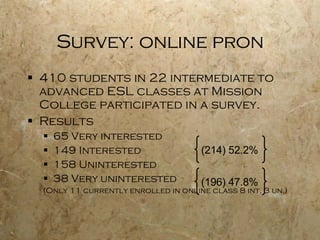
Survey: online pron 410 students in 22 intermediate to advanced ESL classes at Mission College participated in a survey. Results 65 Very interested 149 Interested 158 Uninterested 38 Very uninterested (Only 11 currently enrolled in online class 8 int, 3 un.) (214) 52.2% (196) 47.8%
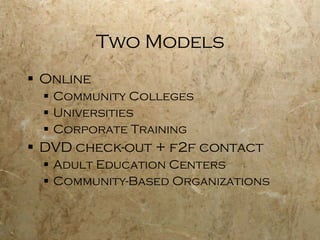
Two Models Online Community Colleges Universities Corporate Training DVD check-out + f2f contact Adult Education Centers Community-Based Organizations
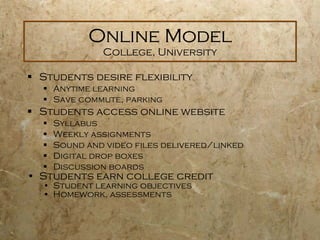
Online Model College, University Students desire flexibility Anytime learning Save commute, parking Students access online website Syllabus  Weekly assignments Sound and video files delivered/linked Digital drop boxes Discussion boards Students earn college credit Student learning objectives Homework, assessments
Information webpage Pronunciation course description, units Prerequisites & advisories Course objectives Course topics Instructor contact information Orientation dates, times & places Pronunciation course materials  Textbook Audio CDs  DVDs or CD-ROMs Equipment needed Computer with Internet access Headset (earphones & microphone) or speaker & mic CD player* or iPod DVD player*  * standalone or in computer Methods of instruction and assessment Web registration link & info Sample DL info page
On-campus orientation in a computer lab Pedagogical objectives Course Overview : expectations, objectives, outcomes Orientation to Course Management System Site navigation Communication Demonstration of course materials Textbook Audio CDs DVDs or CD-ROMs   Teach how to use sound recording software : download, record, edit, save as mp3, send, receive administrative objectives Ensure students are registered Authorize student adds
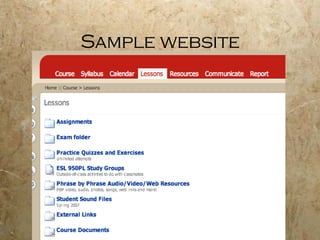
Sample website
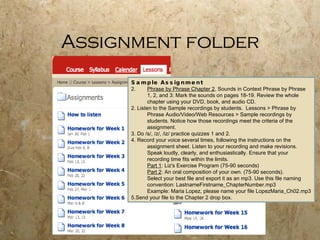
Assignment folder Sample Assignment Phrase by Phrase Chapter 2 , Sounds in Context Phrase by Phrase 1, 2, and 3: Mark the sounds on pages 18-19. Review the whole chapter using your DVD, book, and audio CD.  2. Listen to the Sample recordings by students.  Lessons > Phrase by Phrase Audio/Video/Web Resources > Sample recordings by students. Notice how those recordings meet the criteria of the assignment. 3. Do /s/, /z/, /iz/ practice quizzes 1 and 2. 4. Record your voice several times, following the instructions on the assignment sheet. Listen to your recording and make revisions.  Speak loudly, clearly, and enthusiastically. Ensure that your recording time fits within the limits. Part 1 : Liz's Exercise Program (75-90 seconds) Part 2 : An oral composition of your own. (75-90 seconds). Select your best file and export it as an mp3. Use this file naming convention: LastnameFirstname_ChapterNumber.mp3 Example: Maria Lopez, please name your file LopezMaria_Ch02.mp3 5.Send your file to the Chapter 2 drop box.
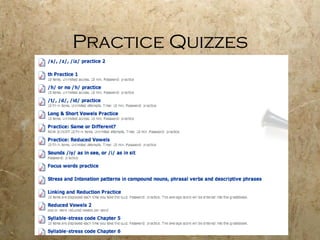
Practice Quizzes
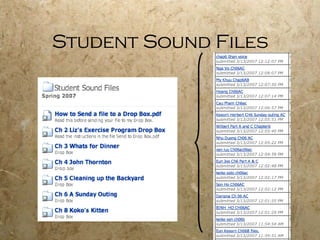
Student Sound Files
Audio/Video/Web Resources Audio files Photos Songs Web links (text, audio, video, images, interactive exercises)
Delivery Alternatives  Completely online  (except orientations) Online–On-campus Hybrid 51+% online 49-% face-to-face Synchronous–Asynchronous Distance Learning Hybrid Online asynchronous  Online synchronous web conferencing
Orientation 2 if synchronous sessions Live interactive web seminar CCC Confer, WebEx Login , equipment, plugin, help Participation by web chat Oral communication by telephone or using VOIP & headset Application sharing Web camera Accessing archives CCC Confer
Check-out Model Adult & Community Education Students desire flexibility Family, work, health, legal issues affect regular class attendance Students want to learn more & faster With DVDs, family members learn too Proven pronunciation curriculum Adult Ed is A.D.A. driven Collect ADA from DVD learning at home
Information meeting Purposes of the pronunciation class Improve pronunciation, intelligibility  Improve listening discrimination Equipment needed CD player DVD player, VCR, or computer Pronunciation materials demonstration  Textbook, workbook or worksheets Audio CDs or cassette tapes DVDs, videotapes or CD-ROMs  Weekly time commitment 10 hours at home 20 minutes at school Class sign-ups
First 20-minute meeting Pedagogical objectives Review how to use course materials Textbook, workbook or worksheets Audio CDs or cassette tapes DVDs, videotapes or CD-ROMs  Assign first lesson Respond to student’s questions Administrative objectives Check materials out Generate contact hours
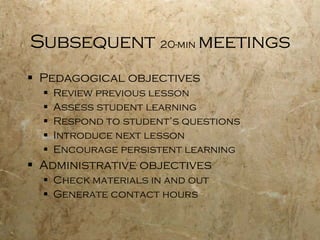
Subsequent  20-min  meetings Pedagogical objectives Review previous lesson Assess student learning Respond to student’s questions Introduce next lesson Encourage persistent learning Administrative objectives Check materials in and out Generate contact hours
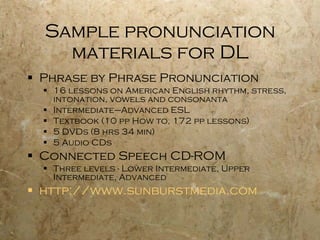
Sample pronunciation materials for DL Phrase by Phrase Pronunciation 16 lessons on American English rhythm, stress, intonation, vowels and consonanta  Intermediate–Advanced ESL Textbook (10 pp How to, 172 pp lessons) 5 DVDs (8 hrs 34 min) 5 Audio CDs Connected Speech CD-ROM Three levels - Lower Intermediate, Upper Intermediate, Advanced   http://www.sunburstmedia.com

Pronunciation in a Distance Learning Environment

  • 1.
    Pronunciation in aDistance Learning Environment Marsha Chan Mission College, Santa Clara, CA and Sunburst Media, Sunnyvale, CA
  • 2.
    Survey: online pron410 students in 22 intermediate to advanced ESL classes at Mission College participated in a survey. Results 65 Very interested 149 Interested 158 Uninterested 38 Very uninterested (Only 11 currently enrolled in online class 8 int, 3 un.) (214) 52.2% (196) 47.8%
  • 3.
    Two Models OnlineCommunity Colleges Universities Corporate Training DVD check-out + f2f contact Adult Education Centers Community-Based Organizations
  • 4.
    Online Model College,University Students desire flexibility Anytime learning Save commute, parking Students access online website Syllabus Weekly assignments Sound and video files delivered/linked Digital drop boxes Discussion boards Students earn college credit Student learning objectives Homework, assessments
  • 5.
    Information webpage Pronunciationcourse description, units Prerequisites & advisories Course objectives Course topics Instructor contact information Orientation dates, times & places Pronunciation course materials Textbook Audio CDs DVDs or CD-ROMs Equipment needed Computer with Internet access Headset (earphones & microphone) or speaker & mic CD player* or iPod DVD player* * standalone or in computer Methods of instruction and assessment Web registration link & info Sample DL info page
  • 6.
    On-campus orientation ina computer lab Pedagogical objectives Course Overview : expectations, objectives, outcomes Orientation to Course Management System Site navigation Communication Demonstration of course materials Textbook Audio CDs DVDs or CD-ROMs Teach how to use sound recording software : download, record, edit, save as mp3, send, receive administrative objectives Ensure students are registered Authorize student adds
  • 7.
  • 8.
    Assignment folder SampleAssignment Phrase by Phrase Chapter 2 , Sounds in Context Phrase by Phrase 1, 2, and 3: Mark the sounds on pages 18-19. Review the whole chapter using your DVD, book, and audio CD. 2. Listen to the Sample recordings by students. Lessons > Phrase by Phrase Audio/Video/Web Resources > Sample recordings by students. Notice how those recordings meet the criteria of the assignment. 3. Do /s/, /z/, /iz/ practice quizzes 1 and 2. 4. Record your voice several times, following the instructions on the assignment sheet. Listen to your recording and make revisions. Speak loudly, clearly, and enthusiastically. Ensure that your recording time fits within the limits. Part 1 : Liz's Exercise Program (75-90 seconds) Part 2 : An oral composition of your own. (75-90 seconds). Select your best file and export it as an mp3. Use this file naming convention: LastnameFirstname_ChapterNumber.mp3 Example: Maria Lopez, please name your file LopezMaria_Ch02.mp3 5.Send your file to the Chapter 2 drop box.
  • 9.
  • 10.
  • 11.
    Audio/Video/Web Resources Audiofiles Photos Songs Web links (text, audio, video, images, interactive exercises)
  • 12.
    Delivery Alternatives Completely online (except orientations) Online–On-campus Hybrid 51+% online 49-% face-to-face Synchronous–Asynchronous Distance Learning Hybrid Online asynchronous Online synchronous web conferencing
  • 13.
    Orientation 2 ifsynchronous sessions Live interactive web seminar CCC Confer, WebEx Login , equipment, plugin, help Participation by web chat Oral communication by telephone or using VOIP & headset Application sharing Web camera Accessing archives CCC Confer
  • 14.
    Check-out Model Adult& Community Education Students desire flexibility Family, work, health, legal issues affect regular class attendance Students want to learn more & faster With DVDs, family members learn too Proven pronunciation curriculum Adult Ed is A.D.A. driven Collect ADA from DVD learning at home
  • 15.
    Information meeting Purposesof the pronunciation class Improve pronunciation, intelligibility Improve listening discrimination Equipment needed CD player DVD player, VCR, or computer Pronunciation materials demonstration Textbook, workbook or worksheets Audio CDs or cassette tapes DVDs, videotapes or CD-ROMs Weekly time commitment 10 hours at home 20 minutes at school Class sign-ups
  • 16.
    First 20-minute meetingPedagogical objectives Review how to use course materials Textbook, workbook or worksheets Audio CDs or cassette tapes DVDs, videotapes or CD-ROMs Assign first lesson Respond to student’s questions Administrative objectives Check materials out Generate contact hours
  • 17.
    Subsequent 20-min meetings Pedagogical objectives Review previous lesson Assess student learning Respond to student’s questions Introduce next lesson Encourage persistent learning Administrative objectives Check materials in and out Generate contact hours
  • 18.
    Sample pronunciation materialsfor DL Phrase by Phrase Pronunciation 16 lessons on American English rhythm, stress, intonation, vowels and consonanta Intermediate–Advanced ESL Textbook (10 pp How to, 172 pp lessons) 5 DVDs (8 hrs 34 min) 5 Audio CDs Connected Speech CD-ROM Three levels - Lower Intermediate, Upper Intermediate, Advanced http://www.sunburstmedia.com