개발자가	 알아야할	 보안


         조민재
   popeye92@gmail.com
보안?
Security?
Encryption/Decryption          Hash
  Availability         Confidentiality      DoS
     Authorization ARP Poisoning Accountability
               Authentication    SQL Injection
   Integrity                  Non-Repudiation
             Defacement
Data leakage       Dumpster Diving    IP Spoofing
   IPS/IDS      Infiltration     XSS       Firewall
       Click Fraud     Social Engineering

  Least Privilege    OTP      Phishing/Pharming

 SSL            Virus/Worm      Malware
                                          공인인증서
Security Is Holistic
Physical Security

Technical Security

  Application Security

  Operation System Security

  Network Security

Policies & Procedures
Mitigation of Threats
Authentication        Accountability

Authorization         Availability

Confidentiality        Non-Repudiation

Data / Message Integrity
Threats
Defacement               Click Fraud

Infiltration              Denial-of-Service (DoS)

Phishing                 Data leakage

Pharming

Insider’s mis-behavior
Designing-In Security
Design Features w/ security in mind
  Not as an afterthought
  Hard to “add-on” security later

Define concrete, measurable security goals
  Only certain users should be able to do X.
  Output of feature Y should be encrypted.
  Feature Z should be available 99.9% of time

Bad Examples : Windows 98, Internet
Convenience Vs. Security
Sometimes inversely proportional
  More secure -> Less convenient
  Too Convenient -> Less secure

Too inconvenient -> unusable
-> users will workaround -> insecure

Good technologies increase both
  relative security benefit at only slight inconvenience
Security in Software
       Requirements
1. Robust, Consistent Error Handling

2.Share requirements w/ QA team

3.Handle internal errors securely

4.Include Validation and Fraud Checks

5.Write Measurable Security Requirements

6.“Security or Bust” policy
Security by Obscurity
Hiding how it works + Obfuscation
Reversing/Fuzzing can reveal


Don’t “invent” your own encryption algorithm!
Don’t embed keys/passwd in your software
Don’t put readable value in Windows Registry
Reuse well-tested software
Open VS. Close Source
“Is Open-Source Software Secure?”

Open
 Some people might look at security of your SW
 May or may not tell you what they find

Close
 not making code available, but does not hide much
 need diverse security-aware code reviews

        “The Cathedral and the Bazaar”
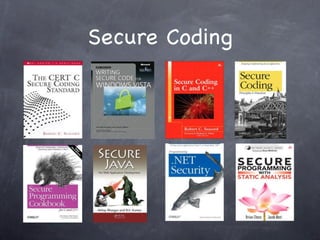
Secure Coding
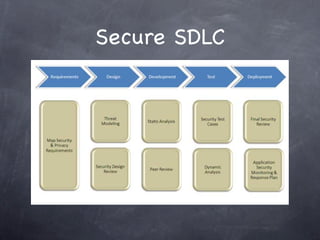
Secure SDLC
Security, however, is an art,
    not a science.(RFC3631)
Foundation of Security
: What Every Programmer Needs To Know”
By Neil Daswani, Christoph Kern & Anita Kesavan
Questions?
whalswo@{     |   |         }.com
   popeye92@{         |     }.com
                        popeye92
Thanks

개발자가 알아야 할 보안

  • 1.
    개발자가 알아야할 보안 조민재 popeye92@gmail.com
  • 3.
  • 5.
    Encryption/Decryption Hash Availability Confidentiality DoS Authorization ARP Poisoning Accountability Authentication SQL Injection Integrity Non-Repudiation Defacement Data leakage Dumpster Diving IP Spoofing IPS/IDS Infiltration XSS Firewall Click Fraud Social Engineering Least Privilege OTP Phishing/Pharming SSL Virus/Worm Malware 공인인증서
  • 6.
    Security Is Holistic PhysicalSecurity Technical Security Application Security Operation System Security Network Security Policies & Procedures
  • 8.
    Mitigation of Threats Authentication Accountability Authorization Availability Confidentiality Non-Repudiation Data / Message Integrity
  • 9.
    Threats Defacement Click Fraud Infiltration Denial-of-Service (DoS) Phishing Data leakage Pharming Insider’s mis-behavior
  • 10.
    Designing-In Security Design Featuresw/ security in mind Not as an afterthought Hard to “add-on” security later Define concrete, measurable security goals Only certain users should be able to do X. Output of feature Y should be encrypted. Feature Z should be available 99.9% of time Bad Examples : Windows 98, Internet
  • 11.
    Convenience Vs. Security Sometimesinversely proportional More secure -> Less convenient Too Convenient -> Less secure Too inconvenient -> unusable -> users will workaround -> insecure Good technologies increase both relative security benefit at only slight inconvenience
  • 12.
    Security in Software Requirements 1. Robust, Consistent Error Handling 2.Share requirements w/ QA team 3.Handle internal errors securely 4.Include Validation and Fraud Checks 5.Write Measurable Security Requirements 6.“Security or Bust” policy
  • 13.
    Security by Obscurity Hidinghow it works + Obfuscation Reversing/Fuzzing can reveal Don’t “invent” your own encryption algorithm! Don’t embed keys/passwd in your software Don’t put readable value in Windows Registry Reuse well-tested software
  • 14.
    Open VS. CloseSource “Is Open-Source Software Secure?” Open Some people might look at security of your SW May or may not tell you what they find Close not making code available, but does not hide much need diverse security-aware code reviews “The Cathedral and the Bazaar”
  • 15.
  • 16.
  • 17.
    Security, however, isan art, not a science.(RFC3631)
  • 18.
    Foundation of Security :What Every Programmer Needs To Know” By Neil Daswani, Christoph Kern & Anita Kesavan
  • 19.
    Questions? whalswo@{ | | }.com popeye92@{ | }.com popeye92
  • 20.

Editor's Notes

  • #2 \n
  • #3 이상으로 저희가 준비한 세 가지 제안을 말씀드렸습니다. 그런데, 한 가지 더 있습니다. \n
  • #4 \n
  • #5 \n
  • #6 \n
  • #7 \n
  • #8 \n
  • #9 \n
  • #10 \n
  • #11 \n
  • #12 \n
  • #13 \n
  • #14 \n
  • #15 \n
  • #16 \n
  • #17 \n
  • #18 \n
  • #19 \n
  • #20 \n
  • #21 이상으로 저희가 준비한 세 가지 제안을 말씀드렸습니다. 그런데, 한 가지 더 있습니다. \n