


Tic Tac Toe
Pengqia Chen, Yusuke Takeshita, & Gautam Butalia
Where we got the Original Program?
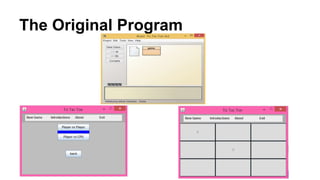
The Original Program
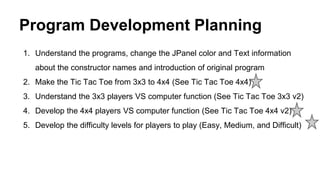
Program Development Planning
1. Understand the programs, change the JPanel color and Text information
about the constructor names and introduction of original program
2. Make the Tic Tac Toe from 3x3 to 4x4 (See Tic Tac Toe 4x4)
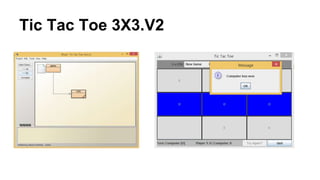
3. Understand the 3x3 players VS computer function (See Tic Tac Toe 3x3 v2)
4. Develop the 4x4 players VS computer function (See Tic Tac Toe 4x4 v2)
5. Develop the difficulty levels for players to play (Easy, Medium, and Difficult)
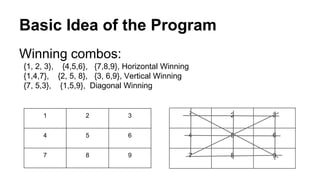
Basic Idea of the Program
1 2 3
4 5 6
7 8 9
Winning combos:
{1, 2, 3}, {4,5,6}, {7,8,9}, Horizontal Winning
{1,4,7}, {2, 5, 8}, {3, 6,9}, Vertical Winning
{7, 5,3}, {1,5,9}, Diagonal Winning
1 2 3
4 5 6
7 8 9
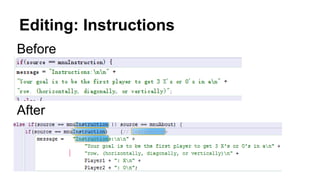
Editing: Instructions
After
Before
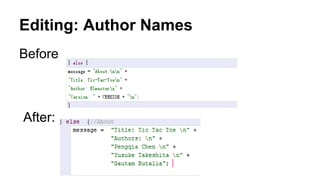
Editing: Author Names
Before
After:
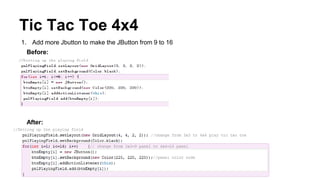
Tic Tac Toe 4x4
1. Add more Jbutton to make the JButton from 9 to 16
Before:
After:
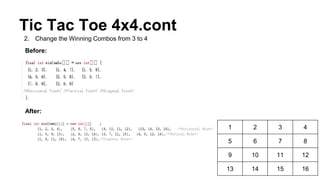
Tic Tac Toe 4x4.cont
1 2 3 4
5 6 7 8
9 10 11 12
13 14 15 16
Before:
2. Change the Winning Combos from 3 to 4
After:
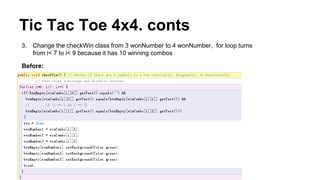
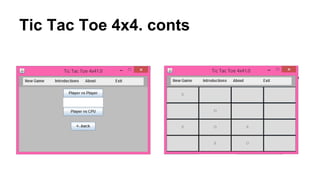
Tic Tac Toe 4x4. conts
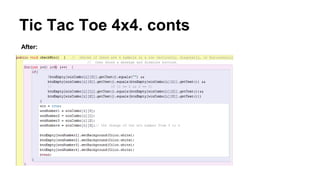
3. Change the checkWin class from 3 wonNumber to 4 wonNumber, for loop turns
from i< 7 to i< 9 because it has 10 winning combos
Before:
Tic Tac Toe 4x4. conts
After:
Tic Tac Toe 4x4. conts
Tic Tac Toe 3X3 Players VS Computer
Main Change:
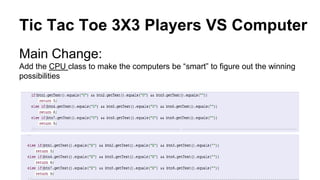
Add the CPU class to make the computers be “smart” to figure out the winning
possibilities
Tic Tac Toe 3X3 Players VS Computer
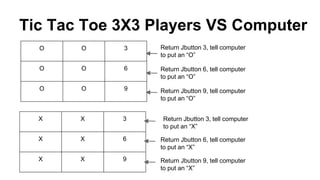
O O 3
O O 6
O O 9
Return Jbutton 3, tell computer
to put an “O”
Return Jbutton 6, tell computer
to put an “O”
Return Jbutton 9, tell computer
to put an “O”
X X 3
X X 6
X X 9
Return Jbutton 3, tell computer
to put an “X”
Return Jbutton 6, tell computer
to put an “X”
Return Jbutton 9, tell computer
to put an “X”
Tic Tac Toe 3X3.V2
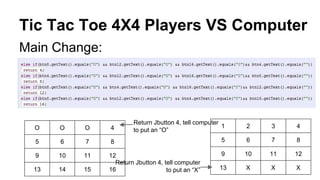
Tic Tac Toe 4X4 Players VS Computer
Main Change:
1 2 3 4
5 6 7 8
9 10 11 12
13 X X X
Return Jbutton 4, tell computer
to put an “O”O O O 4
5 6 7 8
9 10 11 12
13 14 15 16
Return Jbutton 4, tell computer
to put an “X”
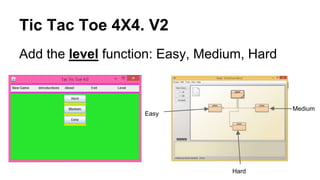
Tic Tac Toe 4X4. V2
Add the level function: Easy, Medium, Hard
Medium
Hard
Easy
How to Play with Different Levels?
1. Players can select the Easy, Medium, and
Hard levels to play
1. Player can also click the player vs CPU
button to play, the program will randomly
select the level for you to play
The End

Tic Tac Toe Java Development

  • 1.
    Tic Tac Toe PengqiaChen, Yusuke Takeshita, & Gautam Butalia
  • 2.
    Where we gotthe Original Program?
  • 3.
  • 4.
    Program Development Planning 1.Understand the programs, change the JPanel color and Text information about the constructor names and introduction of original program 2. Make the Tic Tac Toe from 3x3 to 4x4 (See Tic Tac Toe 4x4) 3. Understand the 3x3 players VS computer function (See Tic Tac Toe 3x3 v2) 4. Develop the 4x4 players VS computer function (See Tic Tac Toe 4x4 v2) 5. Develop the difficulty levels for players to play (Easy, Medium, and Difficult)
  • 5.
    Basic Idea ofthe Program 1 2 3 4 5 6 7 8 9 Winning combos: {1, 2, 3}, {4,5,6}, {7,8,9}, Horizontal Winning {1,4,7}, {2, 5, 8}, {3, 6,9}, Vertical Winning {7, 5,3}, {1,5,9}, Diagonal Winning 1 2 3 4 5 6 7 8 9
  • 6.
  • 7.
  • 8.
    Tic Tac Toe4x4 1. Add more Jbutton to make the JButton from 9 to 16 Before: After:
  • 9.
    Tic Tac Toe4x4.cont 1 2 3 4 5 6 7 8 9 10 11 12 13 14 15 16 Before: 2. Change the Winning Combos from 3 to 4 After:
  • 10.
    Tic Tac Toe4x4. conts 3. Change the checkWin class from 3 wonNumber to 4 wonNumber, for loop turns from i< 7 to i< 9 because it has 10 winning combos Before:
  • 11.
    Tic Tac Toe4x4. conts After:
  • 12.
    Tic Tac Toe4x4. conts
  • 13.
    Tic Tac Toe3X3 Players VS Computer Main Change: Add the CPU class to make the computers be “smart” to figure out the winning possibilities
  • 14.
    Tic Tac Toe3X3 Players VS Computer O O 3 O O 6 O O 9 Return Jbutton 3, tell computer to put an “O” Return Jbutton 6, tell computer to put an “O” Return Jbutton 9, tell computer to put an “O” X X 3 X X 6 X X 9 Return Jbutton 3, tell computer to put an “X” Return Jbutton 6, tell computer to put an “X” Return Jbutton 9, tell computer to put an “X”
  • 15.
  • 16.
    Tic Tac Toe4X4 Players VS Computer Main Change: 1 2 3 4 5 6 7 8 9 10 11 12 13 X X X Return Jbutton 4, tell computer to put an “O”O O O 4 5 6 7 8 9 10 11 12 13 14 15 16 Return Jbutton 4, tell computer to put an “X”
  • 17.
    Tic Tac Toe4X4. V2 Add the level function: Easy, Medium, Hard Medium Hard Easy
  • 18.
    How to Playwith Different Levels? 1. Players can select the Easy, Medium, and Hard levels to play 1. Player can also click the player vs CPU button to play, the program will randomly select the level for you to play
  • 19.