Azure Kubernetes
Service (AKS)
PR OVISION IN G W ITH
TER R AFOR M
OC T 2022
Core Concept
Control plane
https://learn.microsoft.com/en-us/azure/aks/concepts-clusters-workloads
Control plane
• AKS Control plane
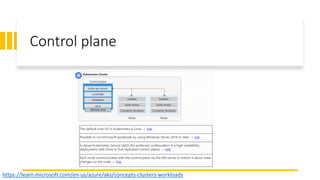
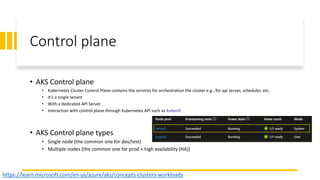
• Kubernetes Cluster Control Plane contains the services for orchestration the cluster e.g., for api server, scheduler, etc.
• It’s a single tenant
• With a dedicated API Server
• Interaction with control plane through Kubernetes API such as kubectl
• AKS Control plane types
• Single node (the common one for dev/test)
• Multiple nodes (the common one for prod + high availability (HA))
https://learn.microsoft.com/en-us/azure/aks/concepts-clusters-workloads
Node pool
• AKS must have at least one node pool, which is a system node pool.
• System node pool is for the control plane or core services.
• System node pool is Linux-based.
• System node pool must have at least one node.
• For the workloads, the user node pool must be used.
• User node pool can be Windows-based or Linux-based OS.
• A user node pool contains only the nodes of the same OS & size.
• User node pool can have even zero node. (for the cost optimization purposes)
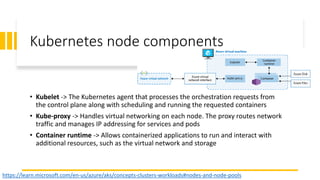
Kubernetes node components
https://learn.microsoft.com/en-us/azure/aks/concepts-clusters-workloads#nodes-and-node-pools
• Kubelet -> The Kubernetes agent that processes the orchestration requests from
the control plane along with scheduling and running the requested containers
• Kube-proxy -> Handles virtual networking on each node. The proxy routes network
traffic and manages IP addressing for services and pods
• Container runtime -> Allows containerized applications to run and interact with
additional resources, such as the virtual network and storage
Resource reservations
https://learn.microsoft.com/en-us/azure/aks/concepts-clusters-workloads#nodes-and-node-pools
AKS uses node resources to orchestrate the node
Using AKS add-ons will consume additional node resources such as Container Insights (OMS)
Demo : check this command -> kubectl describe node [NODE_NAME] Admin
Resource reservations
https://learn.microsoft.com/en-us/azure/aks/concepts-clusters-workloads
Type of reserved resources
- CPU is reserved based on kube-reserved (millicore) for each CPU on host
- Memory
- Kubelet daemon
- Kubelet daemon functionality
- For Windows nodes, some additional memory reservation is required for system process
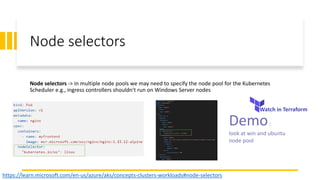
Node selectors
Node selectors -> in multiple node pools we may need to specify the node pool for the Kubernetes
Scheduler e.g., ingress controllers shouldn't run on Windows Server nodes
https://learn.microsoft.com/en-us/azure/aks/concepts-clusters-workloads#node-selectors
Watch in Terraform
Demo:
look at win and ubuntu
node pool
Pods
• Pods typically have a 1:1 mapping with a container.
• In advanced scenarios, a pod may contain multiple containers.
• Multi-container pods are scheduled together on the same node, and allow containers to share related
resources
https://learn.microsoft.com/en-us/azure/aks/concepts-clusters-workloads#pods
Watch in Terraform
Demo
StatefulSets and DaemonSets
Deployment controller
• StatefulSets -> maintain the state of applications beyond an individual pod lifecycle
• DaemonSets -> ensure a running instance on each node, early in the Kubernetes bootstrap process
If using the Virtual Nodes add-on, DaemonSets will not create pods on the virtual node
https://learn.microsoft.com/en-us/azure/aks/concepts-clusters-workloads
Namespaces
Namespaces
• Default -> pods and deployments are created by default when none is provided. In smaller
environments, you can deploy applications directly into the default namespace without creating
additional logical separations
• kube-system -> core resources exist, such as network features like DNS and proxy, or the Kubernetes
dashboard. You typically don't deploy your own applications into this namespace
• kube-public -> Typically not used, but can be used for resources to be visible across the whole cluster,
and can be viewed by any user
https://learn.microsoft.com/en-us/azure/aks/concepts-clusters-workloads
Watch in Terraform
Demo
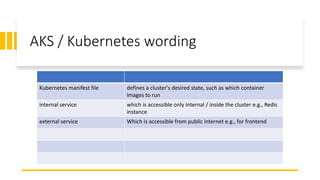
AKS / Kubernetes wording
Kubernetes manifest file defines a cluster's desired state, such as which container
images to run
internal service which is accessible only internal / inside the cluster e.g., Redis
instance
external service Which is accessible from public internet e.g., for frontend
Next topic
AKS Security concept for applications and
clusters

AKS components

  • 1.
    Azure Kubernetes Service (AKS) PROVISION IN G W ITH TER R AFOR M OC T 2022 Core Concept
  • 2.
  • 3.
    Control plane • AKSControl plane • Kubernetes Cluster Control Plane contains the services for orchestration the cluster e.g., for api server, scheduler, etc. • It’s a single tenant • With a dedicated API Server • Interaction with control plane through Kubernetes API such as kubectl • AKS Control plane types • Single node (the common one for dev/test) • Multiple nodes (the common one for prod + high availability (HA)) https://learn.microsoft.com/en-us/azure/aks/concepts-clusters-workloads
  • 4.
    Node pool • AKSmust have at least one node pool, which is a system node pool. • System node pool is for the control plane or core services. • System node pool is Linux-based. • System node pool must have at least one node. • For the workloads, the user node pool must be used. • User node pool can be Windows-based or Linux-based OS. • A user node pool contains only the nodes of the same OS & size. • User node pool can have even zero node. (for the cost optimization purposes)
  • 5.
    Kubernetes node components https://learn.microsoft.com/en-us/azure/aks/concepts-clusters-workloads#nodes-and-node-pools •Kubelet -> The Kubernetes agent that processes the orchestration requests from the control plane along with scheduling and running the requested containers • Kube-proxy -> Handles virtual networking on each node. The proxy routes network traffic and manages IP addressing for services and pods • Container runtime -> Allows containerized applications to run and interact with additional resources, such as the virtual network and storage
  • 6.
    Resource reservations https://learn.microsoft.com/en-us/azure/aks/concepts-clusters-workloads#nodes-and-node-pools AKS usesnode resources to orchestrate the node Using AKS add-ons will consume additional node resources such as Container Insights (OMS) Demo : check this command -> kubectl describe node [NODE_NAME] Admin
  • 7.
    Resource reservations https://learn.microsoft.com/en-us/azure/aks/concepts-clusters-workloads Type ofreserved resources - CPU is reserved based on kube-reserved (millicore) for each CPU on host - Memory - Kubelet daemon - Kubelet daemon functionality - For Windows nodes, some additional memory reservation is required for system process
  • 8.
    Node selectors Node selectors-> in multiple node pools we may need to specify the node pool for the Kubernetes Scheduler e.g., ingress controllers shouldn't run on Windows Server nodes https://learn.microsoft.com/en-us/azure/aks/concepts-clusters-workloads#node-selectors Watch in Terraform Demo: look at win and ubuntu node pool
  • 9.
    Pods • Pods typicallyhave a 1:1 mapping with a container. • In advanced scenarios, a pod may contain multiple containers. • Multi-container pods are scheduled together on the same node, and allow containers to share related resources https://learn.microsoft.com/en-us/azure/aks/concepts-clusters-workloads#pods Watch in Terraform Demo
  • 10.
    StatefulSets and DaemonSets Deploymentcontroller • StatefulSets -> maintain the state of applications beyond an individual pod lifecycle • DaemonSets -> ensure a running instance on each node, early in the Kubernetes bootstrap process If using the Virtual Nodes add-on, DaemonSets will not create pods on the virtual node https://learn.microsoft.com/en-us/azure/aks/concepts-clusters-workloads
  • 11.
    Namespaces Namespaces • Default ->pods and deployments are created by default when none is provided. In smaller environments, you can deploy applications directly into the default namespace without creating additional logical separations • kube-system -> core resources exist, such as network features like DNS and proxy, or the Kubernetes dashboard. You typically don't deploy your own applications into this namespace • kube-public -> Typically not used, but can be used for resources to be visible across the whole cluster, and can be viewed by any user https://learn.microsoft.com/en-us/azure/aks/concepts-clusters-workloads Watch in Terraform Demo
  • 12.
    AKS / Kuberneteswording Kubernetes manifest file defines a cluster's desired state, such as which container images to run internal service which is accessible only internal / inside the cluster e.g., Redis instance external service Which is accessible from public internet e.g., for frontend
  • 13.
    Next topic AKS Securityconcept for applications and clusters

Editor's Notes

  • #6 Talk about: Based on the scenario select an appropriate vm size, Disk type SSD / HDD, Scale out number, consider the appropriate ip space for the network VM images can be Ubuntu Linux or windows server 2019 You can use the Azure Reservation as well
  • #7 Talk about: To maintain node performance and functionality, AKS reserves resources on each node. As a node grows larger in resources, the resource reservation grows due to a higher need for management of user-deployed pods
  • #8 Talk about: To maintain node performance and functionality, AKS reserves resources on each node. As a node grows larger in resources, the resource reservation grows due to a higher need for management of user-deployed pods
  • #10 Talk about When you create a pod, you can define resource requests to request a certain amount of CPU or memory resources You can also specify maximum resource limits to prevent a pod from consuming too much compute resource from the underlying node Best practice is to include resource limits for all pods to help the Kubernetes Scheduler identify necessary, permitted resources
  • #11 Talk about
  • #12 Talk about