
Container
Orchestrators
- K8s, AKS
Rajesh Kolla
Full-stack development ,Azure Architect
Email: rajesh.kolla01@outlook.com
Twitter: @RajeshKolla18
LinkedIn: https://be.linkedin.com/in/razeshkolla
Agenda
• Why do need Orchestrator
• Kubernetes Overview
• Demo-
• Azure Kubernetes Service (AKS)
• Demos
• Create an AKS Cluster
• Deploy apps with kubectl
• Q&A
2
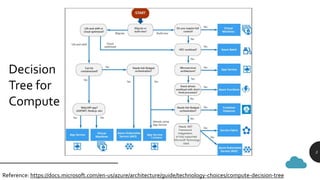
Decision
Tree for
Compute
Reference: https://docs.microsoft.com/en-us/azure/architecture/guide/technology-choices/compute-decision-tree 3
3
4
4
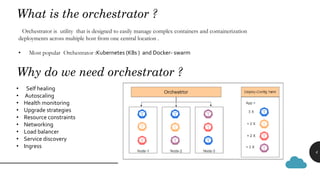
What is the orchestrator ?
Orchestrator is utility that is designed to easily manage complex containers and containerization
deployments across multiple host from one central location .
• Most popular Orchestrator :Kubernetes (K8s ) and Docker- swarm
Why do we need orchestrator ?
• Self healing
• Autoscaling
• Health monitoring
• Upgrade strategies
• Resource constraints
• Networking
• Load balancer
• Service discovery
• Ingress
Kubernetes (K8s) is production level most popular orchestration system from
Google.
Kubernetes (K8s) cluster contains
▪ Master Node- scheduler container
▪ Master node needs less resources compare to worker node
▪ worker Node- running containers
➢ Default host OS in K8s is Linux for linux containers
➢ Can run windows container by windows 2019 or later
5
Kubernetes
Overview
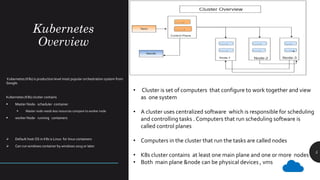
• Cluster is set of computers that configure to work together and view
as one system
• A cluster uses centralized software which is responsible for scheduling
and controlling tasks . Computers that run scheduling software is
called control planes
• Computers in the cluster that run the tasks are called nodes
• K8s cluster contains at least one main plane and one or more nodes
• Both main plane &node can be physical devices , vms
K8s Components
6
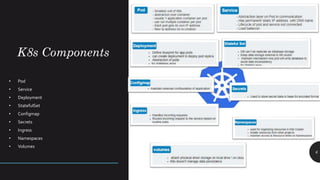
• Pod
• Service
• Deployment
• StatefulSet
• Configmap
• Secrets
• Ingress
• Namespaces
• Volumes
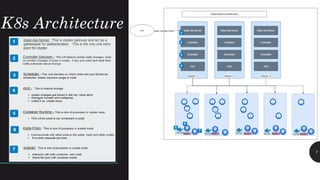
K8s Architecture
7
8
8
How do we create testdev K8 cluster ?
Can communicate with K8 cluster using API , UI dashboard , CLI (kubectl)
Kubectl:- is command line utility which enables communication with kube-Api-Server in K8s Cluster
How do communicate with K8 cluster?
• MiniKube:- is an open-source project to create test dev k8 cluster
• Docker Desktop:- can enable K8s local cluster using Docker Desktop in local DEV environment
Commands description
kubectl version To see k8s client & server version
kubectl get pod List of running pods in default namespace
kubectl get replicaset List of running replicasets in default namespace
kubectl get deployment List of deployments in default namespace
kubectl get Service List of services in default namespace
kubectl create deployment <Name> –Image=Image Create deployment default namespace
kubectl describe pod <podName> Describe details of pod in default namespace
kubectl logs <podName> See logs of pod
Kubectl exec –it <podName> --bin /bash Debugging pod
kubectl apply -f deployment-config.yaml Deployment using deployment configuration file
9
Metadata
State
Desired?=Actual?
Specification
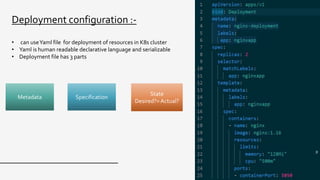
Deployment configuration :-
• can useYaml file for deployment of resources in K8s cluster
• Yaml is human readable declarative language and serializable
• Deployment file has 3 parts
Demo-1
10
Deployment resources
usingYaml files in local miniKube cluster
docker desktop cluster
11
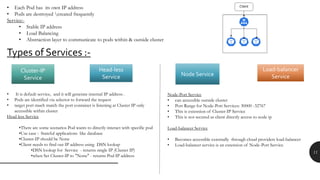
Types of Services :-
• Each Pod has its own IP address
• Pods are destroyed created frequently
Service:-
• Stable IP address
• Load Balancing
• Abstraction layer to communicate to pods within & outside cluster
Cluster-IP
Service
Load-balancer
ServiceNode Service
Head-less
Service
• It is default service, and it will generate internal IP address .
• Pods are identified via selector to forward the request
• target port much match the port container is listening at Cluster IP only
accessible within cluster
Head less Service
•There are some scenarios Pod wants to directly interact with specific pod
•Use case : Stateful applications like database
•Cluster-IP should be None
•Client needs to find out IP address using DSN lookup
•DSN lookup for Service - returns single IP (Cluster IP)
•when Set Cluster-IP to "None" - returns Pod IP address
Node-Port Service
• can accessible outside cluster
• Port Range for Node-Port Services: 30000 -32767
• This is extension of Cluster-IP Service
• This is not secured as client directly access to node ip
Load-balancer Service
• Becomes accessible externally through cloud providers load-balancer
• Load-balancer service is an extension of Node-Port Service
12
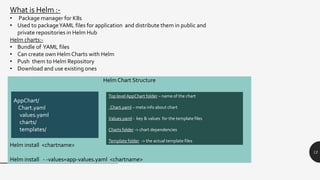
Helm Chart Structure
Helm install <chartname>
Helm install - -values=app-values.yaml <chartname>
Top level AppChart folder – name of the chart
Chart.yaml – meta info about chart
Values.yaml - key & values for the template files
Charts folder -> chart dependencies
Template folder -> the actual template files
AppChart/
Chart.yaml
values.yaml
charts/
templates/
What is Helm :-
• Package manager for K8s
• Used to packageYAML files for application and distribute them in public and
private repositories in Helm Hub
Helm charts:-
• Bundle of YAML files
• Can create own Helm Charts with Helm
• Push them to Helm Repository
• Download and use existing ones
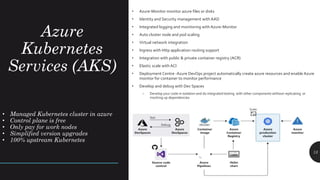
Azure
Kubernetes
Services (AKS)
13
• Azure-Monitor monitor azure files or disks
• Identity and Security management with AAD
• Integrated logging and monitoring with Azure-Monitor
• Auto cluster node and pod scaling
• Virtual network integration
• Ingress with Http application routing support
• Integration with public & private container registry (ACR)
• Elastic scale with ACI
• Deployment Centre -Azure DevOps project automatically create azure resources and enable Azure
monitor for container to monitor performance
• Develop and debug with Dev Spaces
– Develop your code in isolation and do integrated testing with other components without replicating or
mocking up dependencies
• Managed Kubernetes cluster in azure
• Control plane is free
• Only pay for work nodes
• Simplified version upgrades
• 100% upstream Kubernetes
Demo-2
14
AKS Cluster creation
• AKS cluster creation
Demo-3
15
Deploy services inAKS Cluster
• kubectl
AKS Cluster creation
Demo-4
16
Scaling In AKS:-
Horizontal Pod scalar
Horizontal Node scaling
• kubectl
AKS Cluster creation
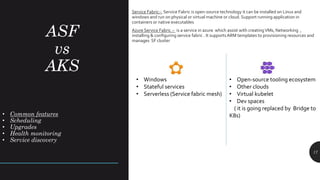
ASF
vs
AKS
17
Service Fabric:- Service Fabric is open-source technology it can be installed on Linux and
windows and run on physical or virtual machine or cloud. Support running application in
containers or native executables
Azure Service Fabric :- is a service in azure which assist with creatingVMs, Networking ,
installing & configuring service fabric . It supportsARM templates to provisioning resources and
manages SF cluster
• Common features
• Scheduling
• Upgrades
• Health monitoring
• Service discovery
• Windows
• Stateful services
• Serverless (Service fabric mesh)
• Open-source tooling ecosystem
• Other clouds
• Virtual kubelet
• Dev spaces
( it is going replaced by Bridge to
K8s)
Q&A
18
Email: razesh.kolla@gmail.com
Twitter: @RajeshKolla18
LinkedIn: https://be.linkedin.com/in/razeshkolla
Thank you!
Email: razesh.kolla@gmail.com
Twitter: @RajeshKolla18
LinkedIn: https://be.linkedin.com/in/razeshkolla

Container orchestration k8s azure kubernetes services

  • 1.
    Container Orchestrators - K8s, AKS RajeshKolla Full-stack development ,Azure Architect Email: rajesh.kolla01@outlook.com Twitter: @RajeshKolla18 LinkedIn: https://be.linkedin.com/in/razeshkolla
  • 2.
    Agenda • Why doneed Orchestrator • Kubernetes Overview • Demo- • Azure Kubernetes Service (AKS) • Demos • Create an AKS Cluster • Deploy apps with kubectl • Q&A 2
  • 3.
  • 4.
    4 4 What is theorchestrator ? Orchestrator is utility that is designed to easily manage complex containers and containerization deployments across multiple host from one central location . • Most popular Orchestrator :Kubernetes (K8s ) and Docker- swarm Why do we need orchestrator ? • Self healing • Autoscaling • Health monitoring • Upgrade strategies • Resource constraints • Networking • Load balancer • Service discovery • Ingress
  • 5.
    Kubernetes (K8s) isproduction level most popular orchestration system from Google. Kubernetes (K8s) cluster contains ▪ Master Node- scheduler container ▪ Master node needs less resources compare to worker node ▪ worker Node- running containers ➢ Default host OS in K8s is Linux for linux containers ➢ Can run windows container by windows 2019 or later 5 Kubernetes Overview • Cluster is set of computers that configure to work together and view as one system • A cluster uses centralized software which is responsible for scheduling and controlling tasks . Computers that run scheduling software is called control planes • Computers in the cluster that run the tasks are called nodes • K8s cluster contains at least one main plane and one or more nodes • Both main plane &node can be physical devices , vms
  • 6.
    K8s Components 6 • Pod •Service • Deployment • StatefulSet • Configmap • Secrets • Ingress • Namespaces • Volumes
  • 7.
  • 8.
    8 8 How do wecreate testdev K8 cluster ? Can communicate with K8 cluster using API , UI dashboard , CLI (kubectl) Kubectl:- is command line utility which enables communication with kube-Api-Server in K8s Cluster How do communicate with K8 cluster? • MiniKube:- is an open-source project to create test dev k8 cluster • Docker Desktop:- can enable K8s local cluster using Docker Desktop in local DEV environment Commands description kubectl version To see k8s client & server version kubectl get pod List of running pods in default namespace kubectl get replicaset List of running replicasets in default namespace kubectl get deployment List of deployments in default namespace kubectl get Service List of services in default namespace kubectl create deployment <Name> –Image=Image Create deployment default namespace kubectl describe pod <podName> Describe details of pod in default namespace kubectl logs <podName> See logs of pod Kubectl exec –it <podName> --bin /bash Debugging pod kubectl apply -f deployment-config.yaml Deployment using deployment configuration file
  • 9.
    9 Metadata State Desired?=Actual? Specification Deployment configuration :- •can useYaml file for deployment of resources in K8s cluster • Yaml is human readable declarative language and serializable • Deployment file has 3 parts
  • 10.
    Demo-1 10 Deployment resources usingYaml filesin local miniKube cluster docker desktop cluster
  • 11.
    11 Types of Services:- • Each Pod has its own IP address • Pods are destroyed created frequently Service:- • Stable IP address • Load Balancing • Abstraction layer to communicate to pods within & outside cluster Cluster-IP Service Load-balancer ServiceNode Service Head-less Service • It is default service, and it will generate internal IP address . • Pods are identified via selector to forward the request • target port much match the port container is listening at Cluster IP only accessible within cluster Head less Service •There are some scenarios Pod wants to directly interact with specific pod •Use case : Stateful applications like database •Cluster-IP should be None •Client needs to find out IP address using DSN lookup •DSN lookup for Service - returns single IP (Cluster IP) •when Set Cluster-IP to "None" - returns Pod IP address Node-Port Service • can accessible outside cluster • Port Range for Node-Port Services: 30000 -32767 • This is extension of Cluster-IP Service • This is not secured as client directly access to node ip Load-balancer Service • Becomes accessible externally through cloud providers load-balancer • Load-balancer service is an extension of Node-Port Service
  • 12.
    12 Helm Chart Structure Helminstall <chartname> Helm install - -values=app-values.yaml <chartname> Top level AppChart folder – name of the chart Chart.yaml – meta info about chart Values.yaml - key & values for the template files Charts folder -> chart dependencies Template folder -> the actual template files AppChart/ Chart.yaml values.yaml charts/ templates/ What is Helm :- • Package manager for K8s • Used to packageYAML files for application and distribute them in public and private repositories in Helm Hub Helm charts:- • Bundle of YAML files • Can create own Helm Charts with Helm • Push them to Helm Repository • Download and use existing ones
  • 13.
    Azure Kubernetes Services (AKS) 13 • Azure-Monitormonitor azure files or disks • Identity and Security management with AAD • Integrated logging and monitoring with Azure-Monitor • Auto cluster node and pod scaling • Virtual network integration • Ingress with Http application routing support • Integration with public & private container registry (ACR) • Elastic scale with ACI • Deployment Centre -Azure DevOps project automatically create azure resources and enable Azure monitor for container to monitor performance • Develop and debug with Dev Spaces – Develop your code in isolation and do integrated testing with other components without replicating or mocking up dependencies • Managed Kubernetes cluster in azure • Control plane is free • Only pay for work nodes • Simplified version upgrades • 100% upstream Kubernetes
  • 14.
  • 15.
    Demo-3 15 Deploy services inAKSCluster • kubectl AKS Cluster creation
  • 16.
    Demo-4 16 Scaling In AKS:- HorizontalPod scalar Horizontal Node scaling • kubectl AKS Cluster creation
  • 17.
    ASF vs AKS 17 Service Fabric:- ServiceFabric is open-source technology it can be installed on Linux and windows and run on physical or virtual machine or cloud. Support running application in containers or native executables Azure Service Fabric :- is a service in azure which assist with creatingVMs, Networking , installing & configuring service fabric . It supportsARM templates to provisioning resources and manages SF cluster • Common features • Scheduling • Upgrades • Health monitoring • Service discovery • Windows • Stateful services • Serverless (Service fabric mesh) • Open-source tooling ecosystem • Other clouds • Virtual kubelet • Dev spaces ( it is going replaced by Bridge to K8s)
  • 18.
  • 19.
    Thank you! Email: razesh.kolla@gmail.com Twitter:@RajeshKolla18 LinkedIn: https://be.linkedin.com/in/razeshkolla