“Why Not”
Invoice Automation in 2014
Pat Myers
EVP, Capture Practice
Zia Consulting
pat@ziaconsulting.com
Phil Robinson
SVP, Business Development
Zia Consulting
phil@ziaconsulting.com
• Most Common Objections and Why
They Were Correct
• What’s Different in 2014
• We’ll Tell You
• We’ll Show You
• How Do You Get Started
Breaking Down the Barriers to Adoption
• We can’t automate, our invoices aren’t standardized –
they arrive as Paper, Fax, Email, Upload, EDI.
• All of our invoices are so different, we don’t have any
single large vendor or small group of vendors
• Our business rules are too complex to automate – with
approvals, exception processes, etc…
• We’ve tried automation (document capture) before and
we didn’t see the benefits
• How & when will I see the results, how will I know it’s
working.
Most Common Objections
• We can’t automate, our invoices aren’t standardized
– they arrive as Paper, Fax, Email, Upload, EDI.
• You are not alone.
• Invoice Automation is not the Mailroom Automation of the
past
• Today’s Automation Solutions can receive, classify,
extract, and process invoices from ALL sources
Most Common Objections - #1
• All of our invoices are so different, we don’t have any
single large vendor or small group of vendors
• You are not alone
• Past solutions (with approaches such as
templates/variables) often didn’t deliver promised value
• Today’s solutions can be trained for frequent suppliers /
invoice types but for “one offs” also utilize full-page OCR
for pattern recognition AND matching against ERP
database
Most Common Objections - #2
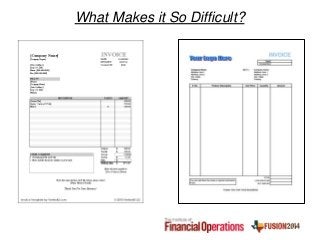
What Makes it So Difficult?
• Our business rules are too complex to automate –
with approvals, exception processes, etc…
• You are not alone
• Past solutions focused on individual technologies
(Capture) and didn’t address business needs. Often
closed platforms couldn’t integrate with business
applications
• Today’s Automation Solutions include Advanced
BPM/Workflow capabilities and integration with
commercial/custom ERP
Most Common Objections - #3
• We’ve tried automation (document capture) before
and we didn’t see the benefits
• You are not alone
• Past solutions either lacked full OCR capabilities required
for Invoice Automation or were too costly or too complex
• Today’s Automation Solutions leverage modern
technologies that are simple & smart, with pricing models
to fit your needs
Most Common Objections - #4
• How & when will I see the results, how will I know it’s
working.
• You are not alone
• Past solutions failed to provide analytical data or required
lengthy timeframes for ROI
• Today’s Automation Solutions deliver actionable analytics
integrated with BI/Reporting tools and ROI’s of less than
1 year
Most Common Objections - #5
The Problem:
• Online Sales of Replacement Parts
• Expanding Product Categories & Items
• More Vendors
• More Invoices / Invoice Types
Zia Case Study
eReplacement Parts
The Solution:
• Digitize all invoices
• Intelligent Capture
• Integration with homegrown ERP system
The Results:
• Less than 3 month project
• Saved hundreds of hours of employee time
• Improved invoicing accuracy
• Reduced paper waste / physical storage
Zia Case Study
eReplacement Parts
• Most Common Objections and Why They
Were Correct
• What’s Different in 2014
• We’ll Tell You
• We’ll Show You
• How Do You Get Started
Breaking Down the Barriers to Adoption
• Modern Technology + New Approach
• Smart Document (Invoice) Repository +
• Smart Capture +
• ERP/Accounting Integration
• New Pricing & Deployment Models
• Pricing for Your Business Goals
• Leveraging the Cloud
What’s Different in 2014
• iFolder – docs + metadata
• Paper, Fax, Email Integration, Vendor Uploads
• Enterprise Document Management
• Version Control
• Enterprise Search
• Annotation (Markup) of Documents
• Automated Records Management
Smart Repository
Smart Capture
• From Paper to PDF
• Mailroom Automation +
• OCR-as-a-Service (In-Process Capture™)
• Within Repository
• Within Business Process
• Via Modern Web Services
Smart Capture
• Centralized / Remote Scanning
• Intelligent Capture Technologies
• Classification and Extraction
• Without Bar Codes or Separator pages
• Free-Form & Tables
• Integration w/ ERP & Accounting Systems
• Hardware “Agnostic”
• Email Integration
• Secure Vendor Website/Portal
• ERP/Accounting
• SAP, Oracle/PeopleSoft, NetSuite, etc…
• Homegrown, Customized
• Lookup/Matching
• Point-to-Point or ESB
How – “In-Process Integration”
Zia Case Study:
City of Chattanooga
Point-to-Point Integration
• Procure-to-Pay Solution
• Contracts Management
• Invoice Automation with Database Matching
• Customized Integration with Oracle E-
Business Suite
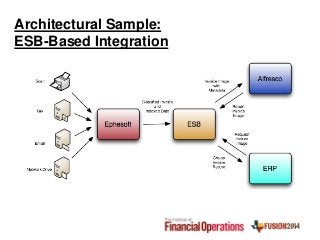
Architectural Sample:
ESB-Based Integration
Actionable Analytics
• How to prove it.
• Management metrics that drive decision making
• Reporting / BI Integration
• Data collection & delivery managed by Zia
OneView ™
Zia Case Study
BSA
The Problem:
• 1,000 Employees + 1,400 Contractors
• 8 Branches
• Immediate Needs + Long-term Goals
• Processing & Approvals
Zia Case Study
BSA
The Solution:
• Scan/Email/Upload to Capture Technology for
OCR Extraction
• Data & Metadata Tags Exported to ECM
• Workflow for Review, Comments, Approval
• Integration with ERP
• Searchable Records based on Retention Policies
Zia Case Study
BSA
The Results:
• Automation of Invoice Process
• Email based workflow
• ERP/ECM integration via Webscripts
• Initial Rollout to 100 users in AP
• Adding Additional Business Operations
Invoice Automation
DEMO
• Most Common Objections and Why They
Were Correct
• What’s Different in 2014
• We’ll Tell You
• We’ll Show You
• How Do You Get Started
Breaking Down the Barriers to Adoption
Enterprise Software/Solutions
• License + Maintenance
• (Per-Page & Per Module Charges)
Cloud Model
• Unit-Based
SAAS Model
• Annual Subscription (Per Server/CPU)
• No Per-Page / Module Charges
Pricing for Your Business Goals
Data Center
• Existing Hardware
• “Everything Inside”
Cloud Based
• Public Cloud: Amazon EC2, Azure, etc…
• Private Cloud: Vendor Cloud, Dedicated Hosting
Hybrid Model
• Data Center Document/Records Management & ERP
• Cloud Collaboration
Leveraging the Cloud
• Talk to us
• Talk to our customers
• Enterprise / Cloud Trials
• Initial Consulting Engagements (ICE)
• Learn More - http://www.ziaconsulting.com/home/resources/
• Case Studies
• Whiteboard Series
• Webinars
• Data Sheets
How do YOU get started?

Breaking Down the Barriers to ECM Adoption

  • 1.
    “Why Not” Invoice Automationin 2014 Pat Myers EVP, Capture Practice Zia Consulting pat@ziaconsulting.com Phil Robinson SVP, Business Development Zia Consulting phil@ziaconsulting.com
  • 2.
    • Most CommonObjections and Why They Were Correct • What’s Different in 2014 • We’ll Tell You • We’ll Show You • How Do You Get Started Breaking Down the Barriers to Adoption
  • 3.
    • We can’tautomate, our invoices aren’t standardized – they arrive as Paper, Fax, Email, Upload, EDI. • All of our invoices are so different, we don’t have any single large vendor or small group of vendors • Our business rules are too complex to automate – with approvals, exception processes, etc… • We’ve tried automation (document capture) before and we didn’t see the benefits • How & when will I see the results, how will I know it’s working. Most Common Objections
  • 4.
    • We can’tautomate, our invoices aren’t standardized – they arrive as Paper, Fax, Email, Upload, EDI. • You are not alone. • Invoice Automation is not the Mailroom Automation of the past • Today’s Automation Solutions can receive, classify, extract, and process invoices from ALL sources Most Common Objections - #1
  • 5.
    • All ofour invoices are so different, we don’t have any single large vendor or small group of vendors • You are not alone • Past solutions (with approaches such as templates/variables) often didn’t deliver promised value • Today’s solutions can be trained for frequent suppliers / invoice types but for “one offs” also utilize full-page OCR for pattern recognition AND matching against ERP database Most Common Objections - #2
  • 6.
    What Makes itSo Difficult?
  • 7.
    • Our businessrules are too complex to automate – with approvals, exception processes, etc… • You are not alone • Past solutions focused on individual technologies (Capture) and didn’t address business needs. Often closed platforms couldn’t integrate with business applications • Today’s Automation Solutions include Advanced BPM/Workflow capabilities and integration with commercial/custom ERP Most Common Objections - #3
  • 8.
    • We’ve triedautomation (document capture) before and we didn’t see the benefits • You are not alone • Past solutions either lacked full OCR capabilities required for Invoice Automation or were too costly or too complex • Today’s Automation Solutions leverage modern technologies that are simple & smart, with pricing models to fit your needs Most Common Objections - #4
  • 9.
    • How &when will I see the results, how will I know it’s working. • You are not alone • Past solutions failed to provide analytical data or required lengthy timeframes for ROI • Today’s Automation Solutions deliver actionable analytics integrated with BI/Reporting tools and ROI’s of less than 1 year Most Common Objections - #5
  • 10.
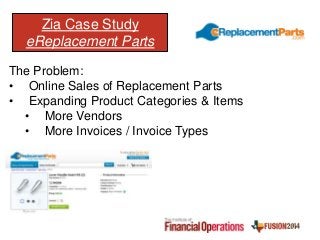
    The Problem: • OnlineSales of Replacement Parts • Expanding Product Categories & Items • More Vendors • More Invoices / Invoice Types Zia Case Study eReplacement Parts
  • 11.
    The Solution: • Digitizeall invoices • Intelligent Capture • Integration with homegrown ERP system The Results: • Less than 3 month project • Saved hundreds of hours of employee time • Improved invoicing accuracy • Reduced paper waste / physical storage Zia Case Study eReplacement Parts
  • 12.
    • Most CommonObjections and Why They Were Correct • What’s Different in 2014 • We’ll Tell You • We’ll Show You • How Do You Get Started Breaking Down the Barriers to Adoption
  • 13.
    • Modern Technology+ New Approach • Smart Document (Invoice) Repository + • Smart Capture + • ERP/Accounting Integration • New Pricing & Deployment Models • Pricing for Your Business Goals • Leveraging the Cloud What’s Different in 2014
  • 14.
    • iFolder –docs + metadata • Paper, Fax, Email Integration, Vendor Uploads • Enterprise Document Management • Version Control • Enterprise Search • Annotation (Markup) of Documents • Automated Records Management Smart Repository
  • 15.
    Smart Capture • FromPaper to PDF • Mailroom Automation + • OCR-as-a-Service (In-Process Capture™) • Within Repository • Within Business Process • Via Modern Web Services
  • 16.
    Smart Capture • Centralized/ Remote Scanning • Intelligent Capture Technologies • Classification and Extraction • Without Bar Codes or Separator pages • Free-Form & Tables • Integration w/ ERP & Accounting Systems • Hardware “Agnostic”
  • 17.
    • Email Integration •Secure Vendor Website/Portal • ERP/Accounting • SAP, Oracle/PeopleSoft, NetSuite, etc… • Homegrown, Customized • Lookup/Matching • Point-to-Point or ESB How – “In-Process Integration”
  • 18.
    Zia Case Study: Cityof Chattanooga Point-to-Point Integration • Procure-to-Pay Solution • Contracts Management • Invoice Automation with Database Matching • Customized Integration with Oracle E- Business Suite
  • 19.
  • 20.
    Actionable Analytics • Howto prove it. • Management metrics that drive decision making • Reporting / BI Integration • Data collection & delivery managed by Zia OneView ™
  • 21.
    Zia Case Study BSA TheProblem: • 1,000 Employees + 1,400 Contractors • 8 Branches • Immediate Needs + Long-term Goals • Processing & Approvals
  • 22.
    Zia Case Study BSA TheSolution: • Scan/Email/Upload to Capture Technology for OCR Extraction • Data & Metadata Tags Exported to ECM • Workflow for Review, Comments, Approval • Integration with ERP • Searchable Records based on Retention Policies
  • 23.
    Zia Case Study BSA TheResults: • Automation of Invoice Process • Email based workflow • ERP/ECM integration via Webscripts • Initial Rollout to 100 users in AP • Adding Additional Business Operations
  • 24.
  • 25.
    • Most CommonObjections and Why They Were Correct • What’s Different in 2014 • We’ll Tell You • We’ll Show You • How Do You Get Started Breaking Down the Barriers to Adoption
  • 26.
    Enterprise Software/Solutions • License+ Maintenance • (Per-Page & Per Module Charges) Cloud Model • Unit-Based SAAS Model • Annual Subscription (Per Server/CPU) • No Per-Page / Module Charges Pricing for Your Business Goals
  • 27.
    Data Center • ExistingHardware • “Everything Inside” Cloud Based • Public Cloud: Amazon EC2, Azure, etc… • Private Cloud: Vendor Cloud, Dedicated Hosting Hybrid Model • Data Center Document/Records Management & ERP • Cloud Collaboration Leveraging the Cloud
  • 28.
    • Talk tous • Talk to our customers • Enterprise / Cloud Trials • Initial Consulting Engagements (ICE) • Learn More - http://www.ziaconsulting.com/home/resources/ • Case Studies • Whiteboard Series • Webinars • Data Sheets How do YOU get started?

Editor's Notes

  • #6 Matching – against entire ERP databaseVendor Name, Address, Every invoice different / thousands of invoice types (“no two invoices are the same”)Where to find:PO NumberInvoice NumberSubtotalTaxesGrand TotalSupplier DetailsTemplates don’t really workDifficult to define comprehensive list of variables“Train by sample” for frequent suppliers / invoicesPattern recognition intelligent extraction for “one-offs”
  • #8 You are not alone – every company unique business processes, even when use SAP, everyone’s deployment is differentBusiness rules – approvals over $10k, etc… exceptions more than rules
  • #9 You are not alone – many tried earlier scanning/capture solutions – didn’t address business needsSimple: To InstallTo Train SystemTo Train Users(Compared with Kofax KTM or Captiva Advanced Recognition)
  • #19 Pull data from Oracle Financials to match “loose integration” - City-wide deployment – neogov integration, employee onboarding to payroll / workflows, into Oracle HCMRequestions to – Lifecycle w/in oracleCitations & documents / doc prep – courtsPolice deptEphesoft – w/in courts system – incode – custom filer, custom renamerCitywide, cross department – hr to payroll – 4.2 deployment largest – open platform, open to consistents – secure cloud site Alfresco OneAutomated redaction w/in HR remove all SS’#’s for exampe
  • #22 Once in the Alfresco system, a workflow begins by triggering an email in Microsoft Outlook with the document URL to the accounts payable department. The invoice is then reviewed, commented on, and additional information can be added as appropriate before final approval. Zia helped integrate Alfresco with BSA’s ERP system from Pronto via Webscripts. Once an invoice is approved it is turned into a Pronto record and moved into a final invoice folder. The invoices can be easily searched using the metadata and stored according to the predefined retention policies.