

HTML5 Developer Conf. 2012
Best practices for JavaScript Testing


            Karl Mendes
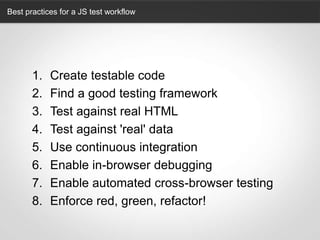
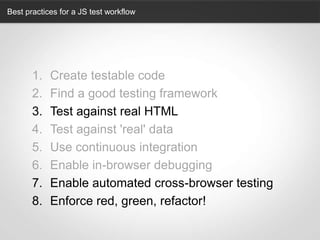
Best practices for a JS test workflow


       1.   Create testable code
       2.   Find a good testing framework
       3.   Test against real HTML
       4.   Test against 'real' data
       5.   Use continuous integration
       6.   Enable in-browser debugging
       7.   Enable automated cross-browser testing
       8.   Enforce red, green, refactor!
Best practices for a JS test workflow


       1.   Create testable code
       2.   Find a good testing framework
       3.   Test against real HTML
       4.   Test against 'real' data
       5.   Use continuous integration
       6.   Enable in-browser debugging
       7.   Enable automated cross-browser testing
       8.   Enforce red, green, refactor!
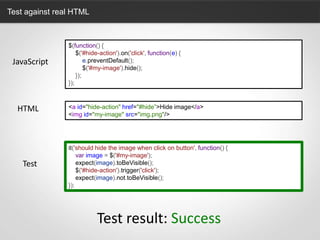
Test against real HTML


                $(function() {
                    $('#hide-action').on('click', function(e) {
 JavaScript             e.preventDefault();
                        $('#my-image').hide();
                    });
                });


  HTML          <a id="hide-action" href="#hide”>Hide image</a>
                <img id="my-image" src="img.png"/>


                it('should hide the image when click on button', function() {
                    var image = $('#my-image');
    Test            expect(image).toBeVisible();
                    $('#hide-action').trigger('click');
                    expect(image).not.toBeVisible();
                });


                           Test result: Success
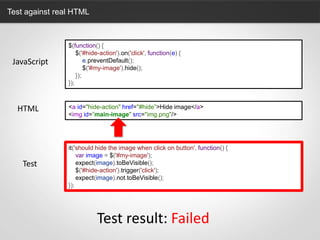
Test against real HTML


                $(function() {
                    $('#hide-action').on('click', function(e) {
 JavaScript             e.preventDefault();
                        $('#my-image').hide();
                    });
                });


  HTML          <a id="hide-action" href="#hide”>Hide image</a>
                <img id=”main-image" src="img.png"/>


                it('should hide the image when click on button', function() {
                    var image = $('#my-image');
    Test            expect(image).toBeVisible();
                    $('#hide-action').trigger('click');
                    expect(image).not.toBeVisible();
                });


                           Test result: Failed
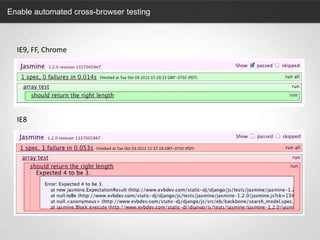
Enable automated cross-browser testing


                                 var myArray = [1,2,3,];

                           IE8             IE9              FF   Chrome
    myArray.length         4               3                3    3


    var myArray = [1,2,3,];

    describe('array test', function() {
        it('should return the right length', function() {
            expect(myArray.length).toBe(3);
        });
    });
Enable automated cross-browser testing


  IE9, FF, Chrome


  IE8
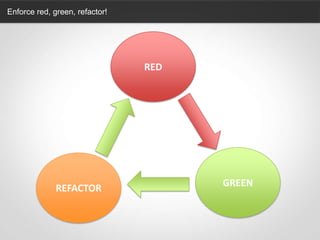
Enforce red, green, refactor!


                                RED


                                      GREEN
              REFACTOR
@karlmendes
http://karlmendes.com

Best practices for js testing

  • 1.
  • 2.
    Best practices forJavaScript Testing Karl Mendes
  • 3.
    Best practices fora JS test workflow 1. Create testable code 2. Find a good testing framework 3. Test against real HTML 4. Test against 'real' data 5. Use continuous integration 6. Enable in-browser debugging 7. Enable automated cross-browser testing 8. Enforce red, green, refactor!
  • 4.
    Best practices fora JS test workflow 1. Create testable code 2. Find a good testing framework 3. Test against real HTML 4. Test against 'real' data 5. Use continuous integration 6. Enable in-browser debugging 7. Enable automated cross-browser testing 8. Enforce red, green, refactor!
  • 5.
  • 6.
    Test against realHTML $(function() { $('#hide-action').on('click', function(e) { JavaScript e.preventDefault(); $('#my-image').hide(); }); }); HTML <a id="hide-action" href="#hide”>Hide image</a> <img id="my-image" src="img.png"/> it('should hide the image when click on button', function() { var image = $('#my-image'); Test expect(image).toBeVisible(); $('#hide-action').trigger('click'); expect(image).not.toBeVisible(); }); Test result: Success
  • 7.
    Test against realHTML $(function() { $('#hide-action').on('click', function(e) { JavaScript e.preventDefault(); $('#my-image').hide(); }); }); HTML <a id="hide-action" href="#hide”>Hide image</a> <img id=”main-image" src="img.png"/> it('should hide the image when click on button', function() { var image = $('#my-image'); Test expect(image).toBeVisible(); $('#hide-action').trigger('click'); expect(image).not.toBeVisible(); }); Test result: Failed
  • 8.
  • 9.
    Enable automated cross-browsertesting var myArray = [1,2,3,]; IE8 IE9 FF Chrome myArray.length 4 3 3 3 var myArray = [1,2,3,]; describe('array test', function() { it('should return the right length', function() { expect(myArray.length).toBe(3); }); });
  • 10.
    Enable automated cross-browsertesting IE9, FF, Chrome IE8
  • 11.
  • 12.
    Enforce red, green,refactor! RED GREEN REFACTOR
  • 13.

Editor's Notes

  • #14 If you’re interested on an extended exploration of all of those requirements you can read my blog post about it.