Benchmark	&	Metrics	
Yuta	Imai
Agenda	
1.  Metrics	
2.  Benchmark
Cita:ons	
•  This	slide	deck	is	based	on	the	stories	what	
Robert	Barnes	told	us	at	his	AWS	:me.	
hCps://www.youtube.com/watch?v=jffB30FRmlY
Why	benchmark?	
•  How	long	will	the	current	configura:on	be	adequate?	
•  Will	this	plaSorm	provide	adequate	performance,	now	and	in	the	
future?	
•  For	a	specific	workload,	how	does	one	plaSorm	compare	to	
another?		
•  What	configura:on	will	it	take	to	meet	current	needs?	
•  What	size	instance	will	provide	the	best	cost/performance	for	my	
applica:on?	
•  Are	the	changes	being	made	to	a	system	going	to	have	the	
intended	impact	on	the	system?
Agenda	
1.  Metrics	
2.  Benchmark
Metrics	
•  To	measure/benchmark	system	performance	
or	business,	what	to	monitor	is	so	important.	
•  Does	that	metrics	describe	your	challenge	
well?	
•  Is	that	metrics	difficult	to	hack?
Business?
Sample	case1:		
Metrics	to	monitor	the	business	
•  If	you	want	to	monitor	how	the	business	is	
going	on,	which	metrics	do	you	monitor??	
hCp://www.slideshare.net/TokorotenNakayama/dau-21559783
Customer	Experience?
Sample	case2:	
Metrics	to	monitor	customer	experience	
•  If	you	want	to	monitor	how	good	is	the	
customer	experience,	which	metrics	do	you	
monitor??
Percen:le
Percen:le	
•  Amazon	heavily	relies	on	“Percen:le”.	
•  Percen:le:	
– Describes	user/customer	experience	directly.	
	 99.9%	=	42ms
Percen:le	
•  Amazon	heavily	relies	on	“Percen:le”.	
•  Percen:le:	
– Describes	user/customer	experience	directly.	
	
samples=1,000	
It	means	999	queries	has	been	finished	in	42ms.	
99.9%	=	42ms
Percen:le	
•  If	you	pick	average	for	your	SLA,	it	does	not	
describe	customer’s	experience.	
99.9%	=	42ms	
Average=29ms	
In	such	standard	distribu:on,	
Average	might	be	OK	but…
Percen:le	
99.9%	
=46ms	
99.5%	
=44ms	
•  Even	if	such	form	of	histogram,	percen:le	can	
properly	describe	customer	experience.	
99%	
=41ms
Percen:le	
99.9%	=	50ms	
Average=31ms	
•  If	you	pick	average,	it	does	not	describe	
customer’s	experience.	
In	such	distribu:on,	
Average	does	not	work	well
Percen:le	
99.9%	
=45ms	
99.5%	
=42ms	
•  Percen:le	is	good	for	SLA	decision	in	business	
because	it	well	describes	customer’s	
experience.	
99%	
=40ms
Percen:le	
99.9%	
=45ms	
99.5%	
=42ms	
•  Percen:le	is	good	for	SLA	decision	in	business	
because	it	well	describes	customer’s	
experience.	
99%	
=40ms
Percen:le	
99.9%	
=45ms	
99.5%	
=42ms	
•  Percen:le	is	good	for	SLA	decision	in	business	
because	it	well	describes	customer’s	
experience.	
99%	
=40ms	
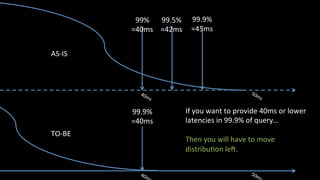
OK,	let’s	set	business	SLA	to	
40ms	in	99.9%
99.9%	
=45ms	
99.5%	
=42ms	
99%	
=40ms	
99.9%	
=40ms	
If	you	want	to	provide	40ms	or	lower	
latencies	in	99.9%	of	query…	
	
Then	you	will	have	to	move	
distribu:on	lel.	
AS-IS	
TO-BE
Percen:le	
•  Percen:le	is	also	good	for	service	level	
monitoring.	
4/1	
99.9%	=	42ms
Percen:le	
•  Percen:le	is	also	good	for	service	level	
monitoring.	
4/1	
99.9%	=	42ms	
4/7	
99.9%	=	44ms
Percen:le	
•  Percen:le	is	also	good	for	service	level	
monitoring.	
4/1	
99.9%	=	42ms	
4/7	
99.9%	=	44ms	
4/14	
99.9%	=	46ms
Percen:le	
•  Percen:le	is	also	good	for	service	level	
monitoring.	
4/1	
99.9%	=	42ms	
4/7	
99.9%	=	44ms	
4/14	
99.9%	=	46ms	
Throughput	increased?	
Data	volume	increased?	
	
Let’s	start	inves:ga:on.
Metrics:	Summary	
•  Choose	metrics	well	describe	your	challenge.	
•  Choose	NOT	hack-able	metrics!
Agenda	
1.  Metrics	
2.  Benchmark
The	Benchmark	Lifecycle	
Test	Design	
Test	
Analysis	
Measure	
against	goal	
Report	
Test	
Configura:on	
Start	with	a	Goal	
Carefully	
control	
changes	
Test	
Execu:on	
Run	a	series	of	
controlled	
experiments	
Design	your	
workload	
Build	
Environment	
Generate	
Load
The	Benchmark	Lifecycle	
Test	Design	
Test	
Analysis	
Measure	
against	goal	
Report	
Test	
Configura:on	
Start	with	a	Goal	
Carefully	
control	
changes	
Test	
Execu:on	
Run	a	series	of	
controlled	
experiments	
Design	your	
workload	
Build	
Environment	
Generate	
Load
First…	
•  What	is	“OK”?	
– “Faster”	means	“Infinite”.	
•  Choose	your	benchmark.	
– Your	applica:on	is	the	best	benchmark	tool.
Ensure	your	design	works	if	scale	changes	by	10X	or	
20X	but	the	right	solu:on	for	X	olen	not	op:mal	for	
100X	
	
Jeff	Dean,	Google	
The	hints	for	define	“OK”
Sacrificial	Architecture	
	
Essen:ally	it	means	accep:ng	now	that	in	a	few	years	:me	
you’ll	(hopefully)	need	to	throw	away	what	you’re	currently	
building.	
	
Mar:n	Fowler	
The	hints	for	define	“OK”
Set	performance	targets	
Target:	Achieve	adequate	performance	
•  If	no	target	exists	
–  Use	current	performance	
–  Run	experiments	to	define	baseline	
–  Copy	from	someone	else	
–  Guess	
•  Why	set	performance	targets?	
–  To	know	when	you	are	done	
–  Target	met	or	:me	to	rewrite…
Example:	Set	performance	targets	
Total	users:	10,000,000	
Request	rate:	1,000	RPS	
Peak	rate:	5,000	RPS	
Concurrent	users:	10,000	
Peak	users:	50,000	
	
Transac'on	 Mix	
ra'o	
95%
(msec)	
New	user	sign-up	 5%	 1500	
Sign-in	 25%	 1250	
Catalog	search	 50%	 1000	
Order	item	 10%	 1500	
Check	order	status	 10%	 1000
Choose	your	workloads	
•  Select	features	
–  Most	important	
–  Most	popular	
–  Highest	complaints	
–  “Worst”	performing	
•  Define	the	workload	mix	
–  Ra:o	of	features	
–  Typical	“uesrs”	and	what	they	do	
–  Popula:on	and	distribu:on	of	users	
•  Random(even	distribu:on)	
•  Hotspots
3	ways	to	use	benchmark	
1.  Run	a	benchmark	using	your	exis:ng	
applica:on	and	workloads	
2.  Run	a	standard	benchmark	
3.  Use	published	benchmark	results
1.	Use	your	exis:ng	applica:on	
•  Choose	which	part	of	the	applica:on	
•  Determine	how	to	generate	load	
•  Decide	how	to	measure	and	what	metrics	
•  Design	how	reports	get	generated
2.	Run	a	standard	benchmark	
•  Is	the	test	relevant	to	your	requirements?	
•  How	does	the	test	map	to	your	applica:on?	
•  Be	aware	of	most	of	them	are	micro-bench.
When	you	cant’	use	your	applica:on,	standard	
benchmarks	can	help	
•  Standard	benchmarks	s:ll	leave	work	to	be	done:	
–  Tuning	needed	
–  Automa:on	and	test	execu:on	
–  How	are	they	test	results	relevant?	
–  How	is	this	test	implementa:on	relevant?	
•  Examples	and	:ps	referencing	standard	benchmarks	
are	not	endorsements	of	these	benchmarks		
2.	Run	a	standard	benchmark
3.	Use	published	benchmark	results	
•  What	is	being	measured?	
•  Why	is	it	being	measured?	
•  How	is	it	being	measured?	
•  How	closely	does	this	benchmark	resemble	my	
results?	
•  How	accurate	are	the	reports	and	cita:ons?	
•  Are	the	results	repeatable?
Tip:	The	4	Rs	
•  Relevant	
–  the	best	test	is	based	on	your	applica:on	
•  Recent	
–  Out	of	date	results	are	rarely	useful	
•  Repeatable	
–  Is	there	enough	informa:on	to	repeat	test?	
•  Reliable	
–  Do	you	trust	the	tools,	the	publisher	and	the	results?
The	Benchmark	Lifecycle	
Test	Design	
Test	
Analysis	
Measure	
against	goal	
Report	
Test	
Configura:on	
Start	with	a	Goal	
Carefully	
control	
changes	
Test	
Execu:on	
Run	a	series	of	
controlled	
experiments	
Design	your	
workload	
Build	
Environment	
Generate	
Load
How	to	generate	load	
•  Humans(Don’t	use	human,	if	you	want	repeatable	and	
reproducible	one)	
–  “Record/Playback”	traffic	
–  Volunteers	
–  Mechanical	Turk	
•  Synthe:c	load	
–  Open	source	
–  Commercial	
•  SOASTA,	Neustar,	Gomez,	Keynote	
–  Write	your	own…
How	to	measure	
•  Load	generator	metrics	
•  Applica:on	metrics(end	to	end)	
•  Add	instrumenta:on	
•  Stopwatch	
•  Use	log	files	
–  Note	that	emiung	lot	of	log	will	introduce	another	
workload.
Tips:	End-to-end	tes:ng	
•  You	need	to	understand	and	trust	the	tests	
–  Some:mes	tools(clients)	have	boClenecks	
•  Use	realis:c	data	
–  Scale	
–  Distribu:on	
•  Use	ramp-up,	steady-state,	and	ramp-down	
•  Choose	reasonable	test	dura:on	
–  Use	scale	down	environment	for	longer	test.	For	something	like	Like	
SLA	proof	tests.	
•  Run	mul:ple	tests	and	calculate	variability
Finding	boClenecks	
•  Search	metrics	and	and	logs	for	clues	
•  If	there	aren’t	any,	add	instrumenta:on	
•  Isolate	and	individually	test	services	and	infrastructure	
•  Test	“categories”	
–  Business	logic	
–  Presenta:on	
–  Compute	
–  Memory	
–  Disk	I/O	
–  Network	
–  Database	
–  Other	services
Cloud:	the	good	tool	for	benchmark	
•  Benchmark	is	not	easy	because	building	up	
and	tearing	down	test	configura:ons	can	be	
very	labor	intensive	
•  Benchmarking	in	cloud	is	fast	with	parallel	
execu:on,	affordable(pay	as	you	go),	scalable	
and	can	be	automated!
The	Benchmark	Lifecycle	
Test	Design	
Test	
Analysis	
Measure	
against	goal	
Report	
Test	
Configura:on	
Start	with	a	Goal	
Carefully	
control	
changes	
Test	
Execu:on	
Run	a	series	of	
controlled	
experiments	
Design	your	
workload	
Build	
Environment	
Generate	
Load
In	my	experience	
•  I	had	to	run	Sysbench	to	find	CPU/Memory/IO	
performances	are	consistent	in	each	Amazon	
EC2	instance	type.	
•  I	spun	up	60	instances	for	each	instance	type	
and	ran	Sysbench….	
•  Of	cource	automa:cally.
To	automate	perf	tests…	
Result_Value1	 Result_Value2	 Result_Value3	 Result_Value4	 Result_Value5	
Condi:on1	
Condi:on2	
Condi:on3	
Condi:on4	
Condi:on5	
•  Create	output/report	format	first.	
•  Then	write	a	script	to	run	tests	like…
Automate	end-to-end	
foreach	my	$pram	(@condi:ons){	
	write_report(run_ec2(	
	 	$param{instance_type},	
	 	$param{image_id},	
	 	$param{script_to_run}	
	));	
}
API	
Gateway	
Slack	
Lambda	
ECS	
Lambda	 S3	
Aurora	
Outgoing	Webhook	
-  cluster	name	
-  #	of	tasks	
-  commands	
RunTasks	
-  cluster	name	
-  #	of	tasks	
-  commands	as	environment	variables	
-  output	loca:on	
Output	STDOUT	as	file	
Spin	up	containers	and	run	tasks	
Incoming	Webhook	
-  Read	file	from	S3	and	emit	it	to	Slack	
Automated	distributed	Sysbench	to	Amazon	Aurora
Benchmark:	Summary	
•  Goal?	
•  Workload?	
•  Load	generator?	Environment?	
•  Make	the	list	of	all	of	tests	
•  Run(and	automate!)

Benchmark and Metrics