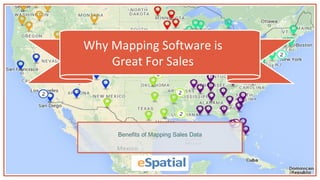
Why Mapping Software is
Great For Sales
Benefits of Mapping Sales Data
Why Map sales
Data?
1
Why Map sales Data?
 Having clearly defined and aligned sales territories is a key
driver of success
 Good sales territory alignment enhances customer coverage, increases sales and reduces costs*
 Data mapping enables you to develop a comprehensive sales strategy and allocate your resources
effectively
 Managers who use visual data discovery tools are 28% more likely to find timely information than
those who rely solely on managed reporting and dashboards**
*Zoltners, A. A., & Lorimer, S. E. (2000). Sales territory alignment: An overlooked productivity tool. Journal of Personal selling & sales Management, 20(3), 139-150.
**Aberdeen Group: White, D. (2013) Visualization. Set Your Analytics Users Free.
-Mark Hagenberg
Perfection Learning
eSpatial is a game-changer in
terms of helping our sales reps
visualize and target their
territories!“
Benefits of Sales
Mapping
2
Benefits of Sales
Mapping
 Analyze sales performance instantly
 Ability to allocate sales teams more effectively, leading to higher profits and greater efficiency
 Plan a more effective sales strategy to reduce costs
 Reduce risk by identifying re-alignment opportunities
 Cultivate leads
 Realign sales territories
 Rapidly report on key sales data
Benefits of Sales
Mapping
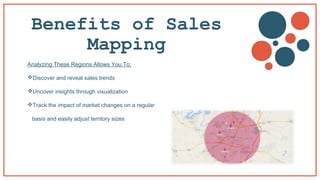
Analyzing These Regions Allows You To:
Discover and reveal sales trends
Uncover insights through visualization
Track the impact of market changes on a regular
basis and easily adjust territory sizes
-Graham Oliver
Door Entry IP
It’s the whole visual thing. It’s
simple. It’s pretty cost effective
as well...it just works!“
How Can You Map
Your Sales Data?
2
How Can you Map Your
Sales Data?
1. Define your Sales Territories with Territory Mapping
Create a territory map by stitching together existing geographic boundaries or by drawing customized
areas.
Territories can be given unique names and used as base-maps on which you can place other relevant
data.
Territories can be formed by combining small geographic boundaries such as zip codes, or large
geographic boundaries such as countries.
How Can you Map Your
Sales Data?
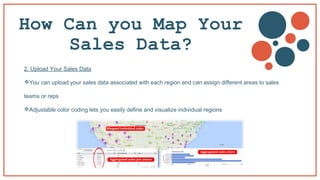
2. Upload Your Sales Data
You can upload your sales data associated with each region and can assign different areas to sales
teams or reps
Adjustable color coding lets you easily define and visualize individual regions
How Can you Map Your
Sales Data?
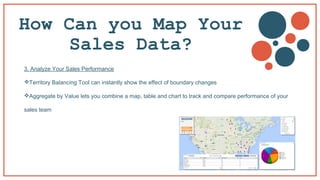
3. Analyze Your Sales Performance
Territory Balancing Tool can instantly show the effect of boundary changes
Aggregate by Value lets you combine a map, table and chart to track and compare performance of your
sales team
-Bradi Dobson
American Credit Acceptance
We started out looking at 12 types
of mapping software. We cut that
down to 7. eSpatial was the final
– and best – choice
“
Importing your
data
3
Importing Your Data
 Now that you can clearly see you need to switch to eSpatial
to help you with your sales performance, the remaining question is,
how easy is it to use?
 Luckily, it's a really simple process. We’ve outlined all you need to do
in the following two-step guide.
Step 1 – Ensure your data is arranged correctly
It is unlikely that this will be an issue but it is a good idea
to check your dataset is formatted correctly. There are 4 simple rules:
Address, City, County, State and ZIP should all be in separate columns.
Each column has a unique header
Each Column has only one type of data (e.g. Numerical, Text)
The file must be in a standard spreadsheet format, CSV, XLS or
XLSX format
Importing Your Data
Step 2 – Upload your data to eSpatial
This is quite a simple process. Your data most likely falls
under three categories;
Spreadsheet file containing addresses
Spreadsheet file containing X and Y coordinates
Spreadsheet file containing geographic region names
Spreadsheet file containing a list of your territories
Importing Your Data
Here’s what you
can do nowFind out more by downloading our eBook today
Download eBook

Why mapping software is great for sales

  • 1.
    Why Mapping Softwareis Great For Sales Benefits of Mapping Sales Data
  • 2.
  • 3.
    Why Map salesData?  Having clearly defined and aligned sales territories is a key driver of success  Good sales territory alignment enhances customer coverage, increases sales and reduces costs*  Data mapping enables you to develop a comprehensive sales strategy and allocate your resources effectively  Managers who use visual data discovery tools are 28% more likely to find timely information than those who rely solely on managed reporting and dashboards** *Zoltners, A. A., & Lorimer, S. E. (2000). Sales territory alignment: An overlooked productivity tool. Journal of Personal selling & sales Management, 20(3), 139-150. **Aberdeen Group: White, D. (2013) Visualization. Set Your Analytics Users Free.
  • 4.
    -Mark Hagenberg Perfection Learning eSpatialis a game-changer in terms of helping our sales reps visualize and target their territories!“
  • 5.
  • 6.
    Benefits of Sales Mapping Analyze sales performance instantly  Ability to allocate sales teams more effectively, leading to higher profits and greater efficiency  Plan a more effective sales strategy to reduce costs  Reduce risk by identifying re-alignment opportunities  Cultivate leads  Realign sales territories  Rapidly report on key sales data
  • 7.
    Benefits of Sales Mapping AnalyzingThese Regions Allows You To: Discover and reveal sales trends Uncover insights through visualization Track the impact of market changes on a regular basis and easily adjust territory sizes
  • 8.
    -Graham Oliver Door EntryIP It’s the whole visual thing. It’s simple. It’s pretty cost effective as well...it just works!“
  • 9.
    How Can YouMap Your Sales Data? 2
  • 10.
    How Can youMap Your Sales Data? 1. Define your Sales Territories with Territory Mapping Create a territory map by stitching together existing geographic boundaries or by drawing customized areas. Territories can be given unique names and used as base-maps on which you can place other relevant data. Territories can be formed by combining small geographic boundaries such as zip codes, or large geographic boundaries such as countries.
  • 11.
    How Can youMap Your Sales Data? 2. Upload Your Sales Data You can upload your sales data associated with each region and can assign different areas to sales teams or reps Adjustable color coding lets you easily define and visualize individual regions
  • 12.
    How Can youMap Your Sales Data? 3. Analyze Your Sales Performance Territory Balancing Tool can instantly show the effect of boundary changes Aggregate by Value lets you combine a map, table and chart to track and compare performance of your sales team
  • 13.
    -Bradi Dobson American CreditAcceptance We started out looking at 12 types of mapping software. We cut that down to 7. eSpatial was the final – and best – choice “
  • 14.
  • 15.
    Importing Your Data Now that you can clearly see you need to switch to eSpatial to help you with your sales performance, the remaining question is, how easy is it to use?  Luckily, it's a really simple process. We’ve outlined all you need to do in the following two-step guide.
  • 16.
    Step 1 –Ensure your data is arranged correctly It is unlikely that this will be an issue but it is a good idea to check your dataset is formatted correctly. There are 4 simple rules: Address, City, County, State and ZIP should all be in separate columns. Each column has a unique header Each Column has only one type of data (e.g. Numerical, Text) The file must be in a standard spreadsheet format, CSV, XLS or XLSX format Importing Your Data
  • 17.
    Step 2 –Upload your data to eSpatial This is quite a simple process. Your data most likely falls under three categories; Spreadsheet file containing addresses Spreadsheet file containing X and Y coordinates Spreadsheet file containing geographic region names Spreadsheet file containing a list of your territories Importing Your Data
  • 18.
    Here’s what you cando nowFind out more by downloading our eBook today Download eBook