Coordinación bilingüe

Isabel Pérez Torres

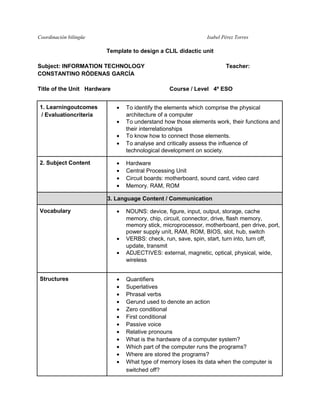
Template to design a CLIL didactic unit
Subject: INFORMATION TECHNOLOGY
CONSTANTINO RÓDENAS GARCÍA
Title of the Unit Hardware
1. Learningoutcomes
/ Evaluationcriteria

Course / Level 4º ESO
•
•
•
•

2. Subject Content

Teacher:

•
•
•
•

To identify the elements which comprise the physical
architecture of a computer
To understand how those elements work, their functions and
their interrelationships
To know how to connect those elements.
To analyse and critically assess the influence of
technological development on society.
Hardware
Central Processing Unit
Circuit boards: motherboard, sound card, video card
Memory. RAM, ROM

3. Language Content / Communication
Vocabulary

•

•
•

Structures

•
•
•
•
•
•
•
•
•
•
•
•

NOUNS: device, figure, input, output, storage, cache
memory, chip, circuit, connector, drive, flash memory,
memory stick, microprocessor, motherboard, pen drive, port,
power supply unít, RAM, ROM, BIOS, slot, hub, switch
VERBS: check, run, save, spin, start, turn into, turn off,
update, transmit
ADJECTIVES: external, magnetic, optical, physical, wide,
wireless
Quantifiers
Superlatives
Phrasal verbs
Gerund used to denote an action
Zero conditional
First conditional
Passive voice
Relative pronouns
What is the hardware of a computer system?
Which part of the computer runs the programs?
Where are stored the programs?
What type of memory loses its data when the computer is
switched off?
Coordinación bilingüe

Isabel Pérez Torres

•
•
•
•
•

Where are calculations carried out in a computer?
A computer is advertised as having 5GB of RAM. How many
bytes is that?
What is the smallest unit of data called?
According to Moore's Law, how often does the number of
transistors in a processor double?
What part of RAM is used for queuing up as it's being input?

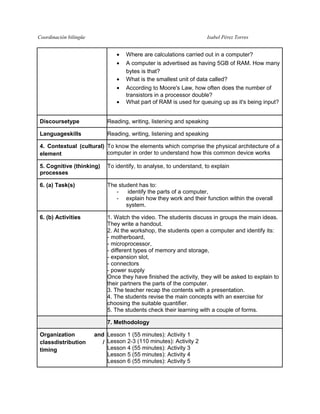
Discoursetype

Reading, writing, listening and speaking

Languageskills

Reading, writing, listening and speaking

4. Contextual (cultural) To know the elements which comprise the physical architecture of a
computer in order to understand how this common device works
element
5. Cognitive (thinking)
processes

To identify, to analyse, to understand, to explain

6. (a) Task(s)

The student has to:
identify the parts of a computer,
- explain how they work and their function within the overall
system.

6. (b) Activities

1. Watch the video. The students discuss in groups the main ideas.
They write a handout.
2. At the workshop, the students open a computer and identify its:
- motherboard,
- microprocessor,
- different types of memory and storage,
- expansion slot,
- connectors
- power supply
Once they have finished the activity, they will be asked to explain to
their partners the parts of the computer.
3. The teacher recap the contents with a presentation.
4. The students revise the main concepts with an exercise for
choosing the suitable quantifier.
5. The students check their learning with a couple of forms.
7. Methodology

Organization
classdistribution
timing

and Lesson 1 (55 minutes): Activity 1
/ Lesson 2-3 (110 minutes): Activity 2
Lesson 4 (55 minutes): Activity 3
Lesson 5 (55 minutes): Activity 4
Lesson 6 (55 minutes): Activity 5
Coordinación bilingüe

Isabel Pérez Torres

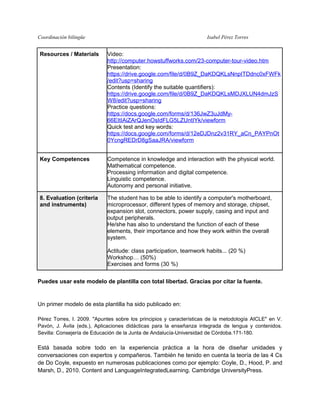
Resources / Materials

Video:
http://computer.howstuffworks.com/23-computer-tour-video.htm
Presentation:
https://drive.google.com/file/d/0B9Z_DaKDQKLsNnpITDdnc0xFWFk
/edit?usp=sharing
Contents (Identify the suitable quantifiers):
https://drive.google.com/file/d/0B9Z_DaKDQKLsMDJXLUN4dmJzS
W8/edit?usp=sharing
Practice questions:
https://docs.google.com/forms/d/136JwZ3uJdMy66EItIAiZArQJenOsIdFLG5LZUntIYk/viewform
Quick test and key words:
https://docs.google.com/forms/d/12eDJDnz2v31RY_aCn_PAYPnOt
0YcngREDrD8gSaaJRA/viewform

Key Competences

Competence in knowledge and interaction with the physical world.
Mathematical competence.
Processing information and digital competence.
Linguistic competence.
Autonomy and personal initiative.

8. Evaluation (criteria
and instruments)

The student has to be able to identify a computer's motherboard,
microprocessor, different types of memory and storage, chipset,
expansion slot, connectors, power supply, casing and input and
output peripherals.
He/she has also to understand the function of each of these
elements, their importance and how they work within the overall
system.
Actitude: class participation, teamwork habits... (20 %)
Workshop… (50%)
Exercises and forms (30 %)

Puedes usar este modelo de plantilla con total libertad. Gracias por citar la fuente.

Un primer modelo de esta plantilla ha sido publicado en:
Pérez Torres, I. 2009. "Apuntes sobre los principios y características de la metodología AICLE" en V.
Pavón, J. Ávila (eds.), Aplicaciones didácticas para la enseñanza integrada de lengua y contenidos.
Sevilla: Consejería de Educación de la Junta de Andalucía-Universidad de Córdoba.171-180.

Está basada sobre todo en la experiencia práctica a la hora de diseñar unidades y
conversaciones con expertos y compañeros. También he tenido en cuenta la teoría de las 4 Cs
de Do Coyle, expuesto en numerosas publicaciones como por ejemplo: Coyle, D., Hood, P. and
Marsh, D., 2010. Content and LanguageIntegratedLearning. Cambridge UniversityPress.
Coordinación bilingüe

Isabel Pérez Torres

Hardware CLIL

  • 1.
    Coordinación bilingüe Isabel PérezTorres Template to design a CLIL didactic unit Subject: INFORMATION TECHNOLOGY CONSTANTINO RÓDENAS GARCÍA Title of the Unit Hardware 1. Learningoutcomes / Evaluationcriteria Course / Level 4º ESO • • • • 2. Subject Content Teacher: • • • • To identify the elements which comprise the physical architecture of a computer To understand how those elements work, their functions and their interrelationships To know how to connect those elements. To analyse and critically assess the influence of technological development on society. Hardware Central Processing Unit Circuit boards: motherboard, sound card, video card Memory. RAM, ROM 3. Language Content / Communication Vocabulary • • • Structures • • • • • • • • • • • • NOUNS: device, figure, input, output, storage, cache memory, chip, circuit, connector, drive, flash memory, memory stick, microprocessor, motherboard, pen drive, port, power supply unít, RAM, ROM, BIOS, slot, hub, switch VERBS: check, run, save, spin, start, turn into, turn off, update, transmit ADJECTIVES: external, magnetic, optical, physical, wide, wireless Quantifiers Superlatives Phrasal verbs Gerund used to denote an action Zero conditional First conditional Passive voice Relative pronouns What is the hardware of a computer system? Which part of the computer runs the programs? Where are stored the programs? What type of memory loses its data when the computer is switched off?
  • 2.
    Coordinación bilingüe Isabel PérezTorres • • • • • Where are calculations carried out in a computer? A computer is advertised as having 5GB of RAM. How many bytes is that? What is the smallest unit of data called? According to Moore's Law, how often does the number of transistors in a processor double? What part of RAM is used for queuing up as it's being input? Discoursetype Reading, writing, listening and speaking Languageskills Reading, writing, listening and speaking 4. Contextual (cultural) To know the elements which comprise the physical architecture of a computer in order to understand how this common device works element 5. Cognitive (thinking) processes To identify, to analyse, to understand, to explain 6. (a) Task(s) The student has to: identify the parts of a computer, - explain how they work and their function within the overall system. 6. (b) Activities 1. Watch the video. The students discuss in groups the main ideas. They write a handout. 2. At the workshop, the students open a computer and identify its: - motherboard, - microprocessor, - different types of memory and storage, - expansion slot, - connectors - power supply Once they have finished the activity, they will be asked to explain to their partners the parts of the computer. 3. The teacher recap the contents with a presentation. 4. The students revise the main concepts with an exercise for choosing the suitable quantifier. 5. The students check their learning with a couple of forms. 7. Methodology Organization classdistribution timing and Lesson 1 (55 minutes): Activity 1 / Lesson 2-3 (110 minutes): Activity 2 Lesson 4 (55 minutes): Activity 3 Lesson 5 (55 minutes): Activity 4 Lesson 6 (55 minutes): Activity 5
  • 3.
    Coordinación bilingüe Isabel PérezTorres Resources / Materials Video: http://computer.howstuffworks.com/23-computer-tour-video.htm Presentation: https://drive.google.com/file/d/0B9Z_DaKDQKLsNnpITDdnc0xFWFk /edit?usp=sharing Contents (Identify the suitable quantifiers): https://drive.google.com/file/d/0B9Z_DaKDQKLsMDJXLUN4dmJzS W8/edit?usp=sharing Practice questions: https://docs.google.com/forms/d/136JwZ3uJdMy66EItIAiZArQJenOsIdFLG5LZUntIYk/viewform Quick test and key words: https://docs.google.com/forms/d/12eDJDnz2v31RY_aCn_PAYPnOt 0YcngREDrD8gSaaJRA/viewform Key Competences Competence in knowledge and interaction with the physical world. Mathematical competence. Processing information and digital competence. Linguistic competence. Autonomy and personal initiative. 8. Evaluation (criteria and instruments) The student has to be able to identify a computer's motherboard, microprocessor, different types of memory and storage, chipset, expansion slot, connectors, power supply, casing and input and output peripherals. He/she has also to understand the function of each of these elements, their importance and how they work within the overall system. Actitude: class participation, teamwork habits... (20 %) Workshop… (50%) Exercises and forms (30 %) Puedes usar este modelo de plantilla con total libertad. Gracias por citar la fuente. Un primer modelo de esta plantilla ha sido publicado en: Pérez Torres, I. 2009. "Apuntes sobre los principios y características de la metodología AICLE" en V. Pavón, J. Ávila (eds.), Aplicaciones didácticas para la enseñanza integrada de lengua y contenidos. Sevilla: Consejería de Educación de la Junta de Andalucía-Universidad de Córdoba.171-180. Está basada sobre todo en la experiencia práctica a la hora de diseñar unidades y conversaciones con expertos y compañeros. También he tenido en cuenta la teoría de las 4 Cs de Do Coyle, expuesto en numerosas publicaciones como por ejemplo: Coyle, D., Hood, P. and Marsh, D., 2010. Content and LanguageIntegratedLearning. Cambridge UniversityPress.
  • 4.