Web Optimization with
ServiceWoker
Blackie Tsai
blackie.tsai@xuenn.com
06/06/2017
Agenda
Introduction to ServiceWorker
Strategy for ServiceWorker
sw-toolbox
Result Comparison
Introduction to
ServiceWorker
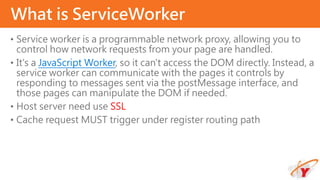
• Service worker is a programmable network proxy, allowing you to
control how network requests from your page are handled.
• It's a JavaScript Worker, so it can't access the DOM directly. Instead, a
service worker can communicate with the pages it controls by
responding to messages sent via the postMessage interface, and
those pages can manipulate the DOM if needed.
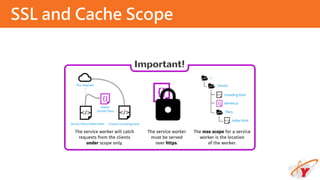
• Host server need use SSL
• Cache request MUST trigger under register routing path
What is ServiceWorker
SSL and Cache Scope
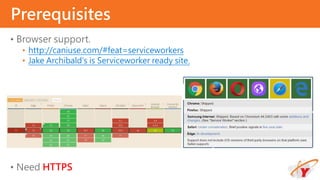
• Browser support.
• http://caniuse.com/#feat=serviceworkers
• Jake Archibald's is Serviceworker ready site.
• Need HTTPS
Prerequisites
The service worker life cycle
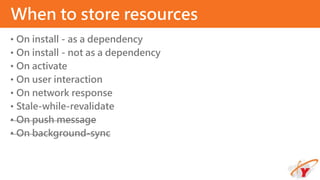
• On install - as a dependency
• On install - not as a dependency
• On activate
• On user interaction
• On network response
• Stale-while-revalidate
• On push message
• On background-sync
When to store resources
On install - as a dependency
self.addEventListener('install', function(event) {
event.waitUntil(
caches.open('mysite-static-
v3').then(function(cache) {
return cache.addAll([
'/css/whatever-v3.css',
'/css/imgs/sprites-v6.png',
'/css/fonts/whatever-v8.woff',
'/js/all-min-v4.js'
// etc
]);
})
);
});
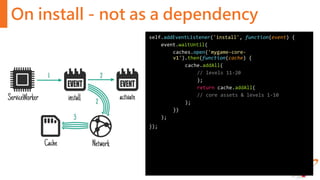
On install - not as a dependency
self.addEventListener('install', function(event) {
event.waitUntil(
caches.open('mygame-core-
v1').then(function(cache) {
cache.addAll(
// levels 11-20
);
return cache.addAll(
// core assets & levels 1-10
);
})
);
});
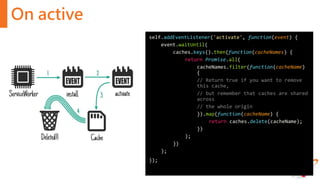
On active
self.addEventListener('activate', function(event) {
event.waitUntil(
caches.keys().then(function(cacheNames) {
return Promise.all(
cacheNames.filter(function(cacheName)
{
// Return true if you want to remove
this cache,
// but remember that caches are shared
across
// the whole origin
}).map(function(cacheName) {
return caches.delete(cacheName);
})
);
})
);
});
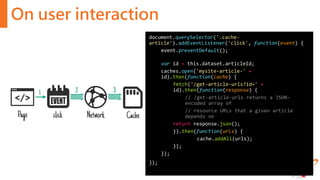
On user interaction
document.querySelector('.cache-
article').addEventListener('click', function(event) {
event.preventDefault();
var id = this.dataset.articleId;
caches.open('mysite-article-' +
id).then(function(cache) {
fetch('/get-article-urls?id=' +
id).then(function(response) {
// /get-article-urls returns a JSON-
encoded array of
// resource URLs that a given article
depends on
return response.json();
}).then(function(urls) {
cache.addAll(urls);
});
});
});
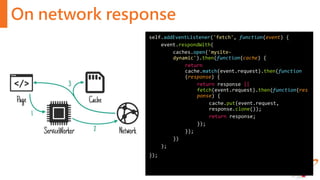
On network response
self.addEventListener('fetch', function(event) {
event.respondWith(
caches.open('mysite-
dynamic').then(function(cache) {
return
cache.match(event.request).then(function
(response) {
return response ||
fetch(event.request).then(function(res
ponse) {
cache.put(event.request,
response.clone());
return response;
});
});
})
);
});
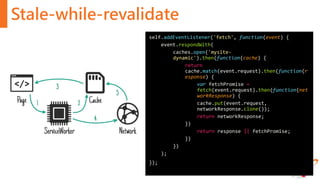
Stale-while-revalidate
self.addEventListener('fetch', function(event) {
event.respondWith(
caches.open('mysite-
dynamic').then(function(cache) {
return
cache.match(event.request).then(function(r
esponse) {
var fetchPromise =
fetch(event.request).then(function(net
workResponse) {
cache.put(event.request,
networkResponse.clone());
return networkResponse;
})
return response || fetchPromise;
})
})
);
});
Strategy for
ServiceWorker
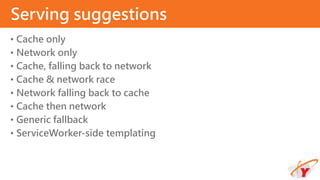
• Cache only
• Network only
• Cache, falling back to network
• Cache & network race
• Network falling back to cache
• Cache then network
• Generic fallback
• ServiceWorker-side templating
Serving suggestions
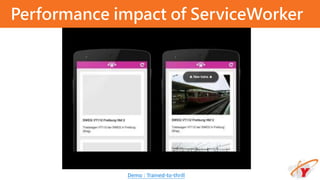
Performance impact of ServiceWorker
Demo : Trained-to-thrill
• Cache on install, for the static UI and behaviour
• Cache on network response, for the Flickr images and data
• Fetch from cache, falling back to network, for most requests
• Fetch from cache, then network, for the Flickr search results
Demo uses
sw-toolbox
• sw-toolbox is a collection of tools for service workers, create by
Google
• Install
• npm install --save sw-toolbox
• Register your service worker
• navigator.serviceWorker.register('my-service-worker.js’);
• Add Service Worker Toolbox to your service worker script
• importScripts('node_components/sw-toolbox/sw-toolbox.js');
sw-toolbox
• toolbox.networkFirst
• toolbox.cacheFirst
• toolbox.fastest
• toolbox.cacheOnly
• toolbox.networkOnly
Handlers
• Router related
• toolbox.router.<get|post|put|delete|head>(urlPattern, handler, options)
• toolbox.router.any(urlPattern, handler, options)
• toolbox.router.default
• Cache related
• toolbox.precache(arrayOfURLs)
• toolbox.cache(url, options)
• toolbox.uncache(url, options)
Methods
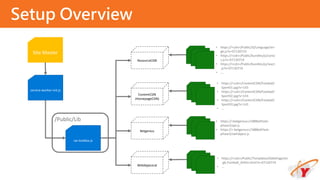
• ResourceCDN(maxEntries: 100, maxAgeSeconds: 1200)
• https://<CDNDomain>/Public/*
• ContentCDN(maxEntries: 20, maxAgeSeconds: 1800)
• https://<CDNDomain>/ContentCDN/*
• Betgenius(maxEntries: 5, maxAgeSeconds: 600)
• https://<BetgeniusDomain>/*
• WebAppLocal(maxEntries: 10, maxAgeSeconds: 1200)
• https://<WebAppDomain>/Public/Lib/*
Recommend Setting
Setup Overview
service-worker-init.js
sw-toolbox.js
Site.Master
ResourceCDN
Betgenius
ContentCDN
(HomepageCDN)
WebAppLocal
/Public/Lib
• https://<cdn>/Public/JS/Language/en-
gb.js?v=07130719
• https://<cdn>/Public/bundles/js/coreJ
s.js?v=07130719
• https://<cdn>/Public/bundles/js/react
.js?v=07130719
• ….
• https://<betgenius>/188BetFlash-
phase3/api.js
• https://< betgenius>/188BetFlash-
phase3/swfobject.js
• https://<cdn>/ContentCDN/Football/
Sport01.jpg?v=143
• https://<cdn>/ContentCDN/Football/
Sport02.jpg?v=143
• https://<cdn>/ContentCDN/Football/
Sport03.jpg?v=143
• …
• https://<cdn>/Public/Templates/OddsPage/en
-gb.Football_AHOU.html?v=07130719
• …
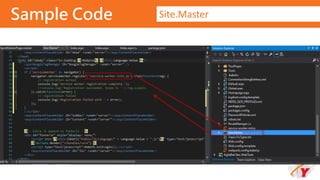
Sample Code Site.Master
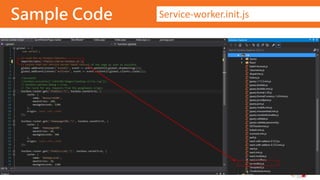
Sample Code Service-worker.init.js
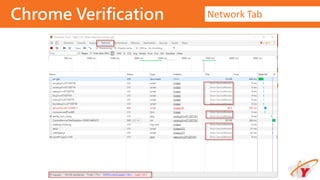
Chrome Verification Network Tab
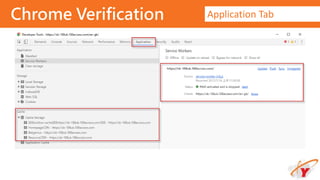
Chrome Verification Application Tab
Result Comparison
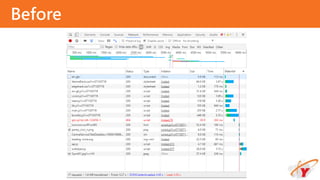
Before
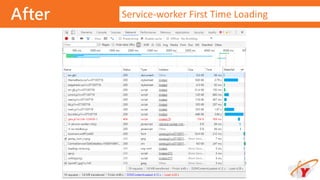
After Service-worker First Time Loading
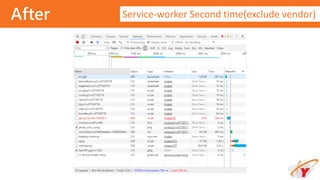
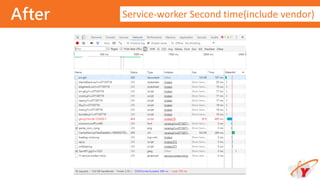
After Service-worker Second time(exclude vendor)
After Service-worker Second time(include vendor)
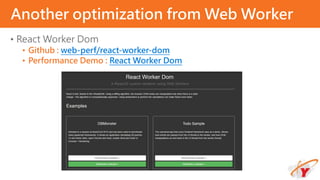
• React Worker Dom
• Github : web-perf/react-worker-dom
• Performance Demo : React Worker Dom
Another optimization from Web Worker
• Service Workers: an Introduction
• Jake Archibald - The offline cookbook
• Making a Simple Site Work Offline with ServiceWorker
References
Q & A
11F., No.399, Ruiguang Rd., Neihu Dist., Taipei City 114, Taiwan
THANK YOU!
Xuenn
+886 2 2798 8529
+886 2 2798 8531
www.xuenn.com
YiTeng
+886 2 2659 8958
+886 2 2659 8956
www.yitmh.com

Web optimization with service woker

  • 1.
    Web Optimization with ServiceWoker BlackieTsai blackie.tsai@xuenn.com 06/06/2017
  • 2.
    Agenda Introduction to ServiceWorker Strategyfor ServiceWorker sw-toolbox Result Comparison
  • 3.
  • 4.
    • Service workeris a programmable network proxy, allowing you to control how network requests from your page are handled. • It's a JavaScript Worker, so it can't access the DOM directly. Instead, a service worker can communicate with the pages it controls by responding to messages sent via the postMessage interface, and those pages can manipulate the DOM if needed. • Host server need use SSL • Cache request MUST trigger under register routing path What is ServiceWorker
  • 5.
  • 6.
    • Browser support. •http://caniuse.com/#feat=serviceworkers • Jake Archibald's is Serviceworker ready site. • Need HTTPS Prerequisites
  • 7.
  • 8.
    • On install- as a dependency • On install - not as a dependency • On activate • On user interaction • On network response • Stale-while-revalidate • On push message • On background-sync When to store resources
  • 9.
    On install -as a dependency self.addEventListener('install', function(event) { event.waitUntil( caches.open('mysite-static- v3').then(function(cache) { return cache.addAll([ '/css/whatever-v3.css', '/css/imgs/sprites-v6.png', '/css/fonts/whatever-v8.woff', '/js/all-min-v4.js' // etc ]); }) ); });
  • 10.
    On install -not as a dependency self.addEventListener('install', function(event) { event.waitUntil( caches.open('mygame-core- v1').then(function(cache) { cache.addAll( // levels 11-20 ); return cache.addAll( // core assets & levels 1-10 ); }) ); });
  • 11.
    On active self.addEventListener('activate', function(event){ event.waitUntil( caches.keys().then(function(cacheNames) { return Promise.all( cacheNames.filter(function(cacheName) { // Return true if you want to remove this cache, // but remember that caches are shared across // the whole origin }).map(function(cacheName) { return caches.delete(cacheName); }) ); }) ); });
  • 12.
    On user interaction document.querySelector('.cache- article').addEventListener('click',function(event) { event.preventDefault(); var id = this.dataset.articleId; caches.open('mysite-article-' + id).then(function(cache) { fetch('/get-article-urls?id=' + id).then(function(response) { // /get-article-urls returns a JSON- encoded array of // resource URLs that a given article depends on return response.json(); }).then(function(urls) { cache.addAll(urls); }); }); });
  • 13.
    On network response self.addEventListener('fetch',function(event) { event.respondWith( caches.open('mysite- dynamic').then(function(cache) { return cache.match(event.request).then(function (response) { return response || fetch(event.request).then(function(res ponse) { cache.put(event.request, response.clone()); return response; }); }); }) ); });
  • 14.
    Stale-while-revalidate self.addEventListener('fetch', function(event) { event.respondWith( caches.open('mysite- dynamic').then(function(cache){ return cache.match(event.request).then(function(r esponse) { var fetchPromise = fetch(event.request).then(function(net workResponse) { cache.put(event.request, networkResponse.clone()); return networkResponse; }) return response || fetchPromise; }) }) ); });
  • 15.
  • 16.
    • Cache only •Network only • Cache, falling back to network • Cache & network race • Network falling back to cache • Cache then network • Generic fallback • ServiceWorker-side templating Serving suggestions
  • 17.
    Performance impact ofServiceWorker Demo : Trained-to-thrill
  • 18.
    • Cache oninstall, for the static UI and behaviour • Cache on network response, for the Flickr images and data • Fetch from cache, falling back to network, for most requests • Fetch from cache, then network, for the Flickr search results Demo uses
  • 19.
  • 20.
    • sw-toolbox isa collection of tools for service workers, create by Google • Install • npm install --save sw-toolbox • Register your service worker • navigator.serviceWorker.register('my-service-worker.js’); • Add Service Worker Toolbox to your service worker script • importScripts('node_components/sw-toolbox/sw-toolbox.js'); sw-toolbox
  • 21.
    • toolbox.networkFirst • toolbox.cacheFirst •toolbox.fastest • toolbox.cacheOnly • toolbox.networkOnly Handlers
  • 22.
    • Router related •toolbox.router.<get|post|put|delete|head>(urlPattern, handler, options) • toolbox.router.any(urlPattern, handler, options) • toolbox.router.default • Cache related • toolbox.precache(arrayOfURLs) • toolbox.cache(url, options) • toolbox.uncache(url, options) Methods
  • 23.
    • ResourceCDN(maxEntries: 100,maxAgeSeconds: 1200) • https://<CDNDomain>/Public/* • ContentCDN(maxEntries: 20, maxAgeSeconds: 1800) • https://<CDNDomain>/ContentCDN/* • Betgenius(maxEntries: 5, maxAgeSeconds: 600) • https://<BetgeniusDomain>/* • WebAppLocal(maxEntries: 10, maxAgeSeconds: 1200) • https://<WebAppDomain>/Public/Lib/* Recommend Setting
  • 24.
    Setup Overview service-worker-init.js sw-toolbox.js Site.Master ResourceCDN Betgenius ContentCDN (HomepageCDN) WebAppLocal /Public/Lib • https://<cdn>/Public/JS/Language/en- gb.js?v=07130719 •https://<cdn>/Public/bundles/js/coreJ s.js?v=07130719 • https://<cdn>/Public/bundles/js/react .js?v=07130719 • …. • https://<betgenius>/188BetFlash- phase3/api.js • https://< betgenius>/188BetFlash- phase3/swfobject.js • https://<cdn>/ContentCDN/Football/ Sport01.jpg?v=143 • https://<cdn>/ContentCDN/Football/ Sport02.jpg?v=143 • https://<cdn>/ContentCDN/Football/ Sport03.jpg?v=143 • … • https://<cdn>/Public/Templates/OddsPage/en -gb.Football_AHOU.html?v=07130719 • …
  • 25.
  • 26.
  • 27.
  • 28.
  • 29.
  • 30.
  • 31.
  • 32.
    After Service-worker Secondtime(exclude vendor)
  • 33.
    After Service-worker Secondtime(include vendor)
  • 34.
    • React WorkerDom • Github : web-perf/react-worker-dom • Performance Demo : React Worker Dom Another optimization from Web Worker
  • 35.
    • Service Workers:an Introduction • Jake Archibald - The offline cookbook • Making a Simple Site Work Offline with ServiceWorker References
  • 36.
  • 37.
    11F., No.399, RuiguangRd., Neihu Dist., Taipei City 114, Taiwan THANK YOU! Xuenn +886 2 2798 8529 +886 2 2798 8531 www.xuenn.com YiTeng +886 2 2659 8958 +886 2 2659 8956 www.yitmh.com

Editor's Notes

  • #9 Push isn't supported in Chrome yet. Background sync hasn't yet landed in Chrome stable.
  • #10 Ideal for: CSS, images, fonts, JS, templates… basically anything you'd consider static to that "version" of your site. event.waitUntil takes a promise to define the length & success of the install. If the promise rejects, the installation is considered a failure and this ServiceWorker will be abandoned (if an older version is running, it'll be left intact). caches.open and cache.addAll return promises. If any of the resources fail to fetch, the cache.addAll call rejects. On trained-to-thrill I use this to cache static assets.
  • #11 Similar to above, but won't delay install completing and won't cause installation to fail if caching fails. Ideal for: Bigger resources that aren't needed straight away, such as assets for later levels of a game. We're not passing the cache.addAll promise for levels 11-20 back to event.waitUntil, so even if it fails, the game will still be available offline. Of course, you'll have to cater for the possible absence of those levels & reattempt caching them if they're missing. The ServiceWorker may be killed while levels 11-20 download since it's finished handling events, meaning they won't be cached. In future we plan to add a background downloading API to handle cases like this, and larger downloads such as movies.
  • #12 Ideal for: Clean-up & migration. Once a new ServiceWorker has installed & a previous version isn't being used, the new one activates, and you get an activate event. Because the old version is out of the way, it's a good time to handle schema migrations in IndexedDB and also delete unused caches. During activation, other events such as fetch are put into a queue, so a long activation could potentially block page loads. Keep your activation as lean as possible, only use it for things you couldn't do while the old version was active. On trained-to-thrill I use this to remove old caches.
  • #13 Ideal for: If the whole site can't be taken offline, you may allow the user to select the content they want available offline. E.g. a video on something like YouTube, an article on Wikipedia, a particular gallery on Flickr. Give the user a "Read later" or "Save for offline" button. When it's clicked, fetch what you need from the network & pop it in the cache. The caches API is available from pages as well as service workers, meaning you don't need to involve the service worker to add things to the cache.
  • #14 Ideal for: Frequently updating resources such as a user's inbox, or article contents. Also useful for non-essential content such as avatars, but care is needed. If a request doesn't match anything in the cache, get it from the network, send it to the page & add it to the cache at the same time. If you do this for a range of URLs, such as avatars, you'll need to be careful you don't bloat the storage of your origin — if the user needs to reclaim disk space you don't want to be the prime candidate. Make sure you get rid of items in the cache you don't need any more. To allow for efficient memory usage, you can only read a response/request's body once. In the code above, .clone() is used to create additional copies that can be read separately. On trained-to-thrill I use this to cache Flickr images.
  • #15 Ideal for: Frequently updating resources where having the very latest version is non-essential. Avatars can fall into this category. If there's a cached version available, use it, but fetch an update for next time This is very similar to HTTP's stale-while-revalidate.
  • #22 toolbox.networkFirst Try to handle the request by fetching from the network. If it succeeds, store the response in the cache. Otherwise, try to fulfill the request from the cache. This is the strategy to use for basic read-through caching. It’s also good for API requests where you always want the freshest data when it is available but would rather have stale data than no data. toolbox.cacheFirst If the request matches a cache entry, respond with that. Otherwise try to fetch the resource from the network. If the network request succeeds, update the cache. This option is good for resources that don’t change, or have some other update mechanism. toolbox.fastest Request the resource from both the cache and the network in parallel. Respond with whichever returns first. Usually this will be the cached version, if there is one. On the one hand this strategy will always make a network request, even if the resource is cached. On the other hand, if/when the network request completes the cache is updated, so that future cache reads will be more up-to-date. toolbox.cacheOnly Resolve the request from the cache, or fail. This option is good for when you need to guarantee that no network request will be made, for example saving battery on mobile. toolbox.networkOnly Handle the request by trying to fetch the URL from the network. If the fetch fails, fail the request. Essentially the same as not creating a route for the URL at all.