Drupal Theming
by
Arshad Vayani
Theme Engine
• Drupal’s theme directory also has an engines
directory that contains a theme engine called
PHPTemplate.
• Theme engines provide an easy way to separate
themable output into template files as opposed to
plain old PHP.
• The main benefit of using the PHPTemplate engine is
that separating logic from presentation is simplified.
Theme Engine
• While other theme engines such as
Smarty, XTemplate, and PHPTal may be used.
• PHPTemplate is Drupal’s default theme engine and is by
far the most popular theme engine used by Drupal
themes.

• It is also possible to write pure PHP Drupal themes. See
the Chameleon theme for an example of a pure PHP
theme at http://drupal.org/project/chameleon.
• For a full listing of available theme engines, visit
http://drupal.org/project/theme+engines.
Basic Theme Requirements
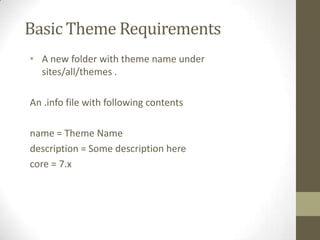
• A new folder with theme name under
sites/all/themes .
An .info file with following contents
name = Theme Name
description = Some description here
core = 7.x
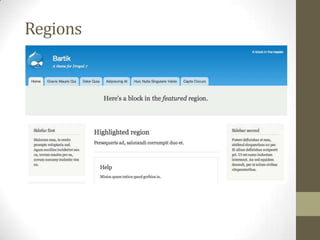
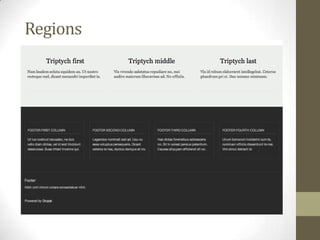
Regions
Regions
Default Regions
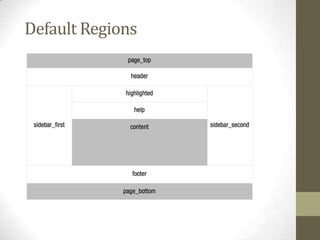
• Drupal core defines nine regions for themes to utilize
programmatically by default.
• Until a theme defines its own regions, Drupal will use
the defaults.
• This means that if the default regions are sufficient
for your design, you will not need to define regions in
your theme’s .info file.
Default Regions
regions[page_top] = Page Top
regions[header] = Header
regions[highlighted] = Highlighted
regions[help] = Help
regions[content] = Content
regions[sidebar_first] = Sidebar First
regions[sidebar_second] = Sidebar Second
regions[footer] = Footer
regions[page_bottom] = Page Bottom
Default Regions
; CORE REGIONS - DISABLED
;regions[highlighted] = Highlighted
;regions[help] = Help
;regions[header] = Header
;regions[footer] = Footer
; CORE REGIONS - REQUIRED
regions[page_top] = Page Top
regions[content] = Content
regions[page_bottom] = Page Bottom
; CORE REGIONS
regions[sidebar_first] = Sidebar First
regions[sidebar_second] = Sidebar Second

; CUSTOM REGIONS
regions[my_custom_region] = My Custom Region
Default Regions
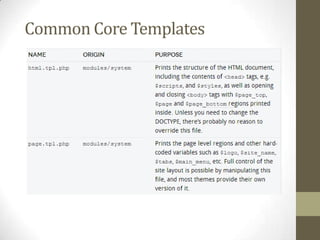
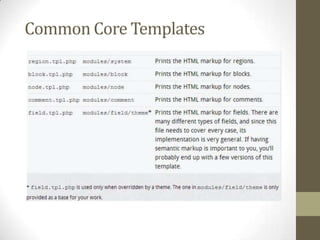
Common Core Templates
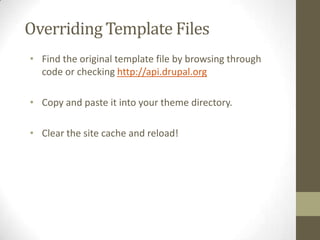
Overriding Template Files
• Find the original template file by browsing through
code or checking http://api.drupal.org
• Copy and paste it into your theme directory.
• Clear the site cache and reload!
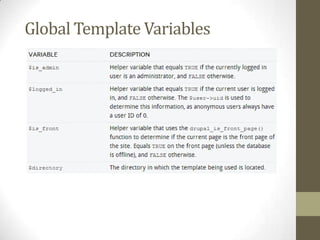
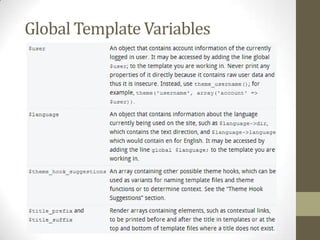
Global Template Variables
Subtheme
• Start by creating the shell of a new theme. Create a
directory for it, and create the .info file containing at least
the name and core properties.
• In the .info file, add the “base theme” property containing
the name of the theme you want to use as a base, like so:
base theme = basethemename
• If the base theme has regions and/or features defined in
the .info file, you’ll need to copy those to the subtheme as
well.

Drupal theming

  • 1.
  • 2.
    Theme Engine • Drupal’stheme directory also has an engines directory that contains a theme engine called PHPTemplate. • Theme engines provide an easy way to separate themable output into template files as opposed to plain old PHP. • The main benefit of using the PHPTemplate engine is that separating logic from presentation is simplified.
  • 3.
    Theme Engine • Whileother theme engines such as Smarty, XTemplate, and PHPTal may be used. • PHPTemplate is Drupal’s default theme engine and is by far the most popular theme engine used by Drupal themes. • It is also possible to write pure PHP Drupal themes. See the Chameleon theme for an example of a pure PHP theme at http://drupal.org/project/chameleon. • For a full listing of available theme engines, visit http://drupal.org/project/theme+engines.
  • 4.
    Basic Theme Requirements •A new folder with theme name under sites/all/themes . An .info file with following contents name = Theme Name description = Some description here core = 7.x
  • 5.
  • 6.
  • 7.
    Default Regions • Drupalcore defines nine regions for themes to utilize programmatically by default. • Until a theme defines its own regions, Drupal will use the defaults. • This means that if the default regions are sufficient for your design, you will not need to define regions in your theme’s .info file.
  • 8.
    Default Regions regions[page_top] =Page Top regions[header] = Header regions[highlighted] = Highlighted regions[help] = Help regions[content] = Content regions[sidebar_first] = Sidebar First regions[sidebar_second] = Sidebar Second regions[footer] = Footer regions[page_bottom] = Page Bottom
  • 9.
    Default Regions ; COREREGIONS - DISABLED ;regions[highlighted] = Highlighted ;regions[help] = Help ;regions[header] = Header ;regions[footer] = Footer ; CORE REGIONS - REQUIRED regions[page_top] = Page Top regions[content] = Content regions[page_bottom] = Page Bottom ; CORE REGIONS regions[sidebar_first] = Sidebar First regions[sidebar_second] = Sidebar Second ; CUSTOM REGIONS regions[my_custom_region] = My Custom Region
  • 10.
  • 11.
  • 12.
  • 13.
    Overriding Template Files •Find the original template file by browsing through code or checking http://api.drupal.org • Copy and paste it into your theme directory. • Clear the site cache and reload!
  • 14.
  • 15.
  • 16.
    Subtheme • Start bycreating the shell of a new theme. Create a directory for it, and create the .info file containing at least the name and core properties. • In the .info file, add the “base theme” property containing the name of the theme you want to use as a base, like so: base theme = basethemename • If the base theme has regions and/or features defined in the .info file, you’ll need to copy those to the subtheme as well.