Using the Cloud
 - the Newcastle experience
            Stephen McGough
        Vassilis Glenis, Chris Kilsby,
     Vedrana Kutija, Simon Wodman
University of Sussex : HPC Workshop 2013
             January 16th 2013
CLOUD COMPUTING
The Cloud model

             Data In                                     Data Out

            £                                                    £
                               Some work performed
                                                      £                   £
                                                                       Data
                                        *aaS                          Storage


SaaS – Software as a Service, you use programs provided by someone else
PaaS – Platform as a Service, you provide the program and above
IaaS – Infrastructure as a Service, you provide the OS and above
(acknowledgements to Dennis
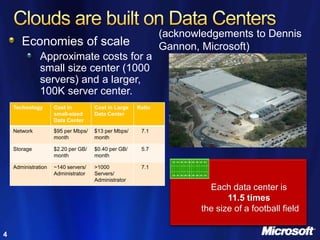
       Economies of scale                                    Gannon, Microsoft)
               Approximate costs for a
               small size center (1000
               servers) and a larger,
               100K server center.
    Technology       Cost in         Cost in Large   Ratio
                     small-sized     Data Center
                     Data Center

    Network          $95 per Mbps/   $13 per Mbps/    7.1
                     month           month

    Storage          $2.20 per GB/   $0.40 per GB/    5.7
                     month           month

    Administration   ~140 servers/   >1000            7.1
                     Administrator   Servers/
                                     Administrator
                                                                       Each data center is
                                                                            11.5 times
                                                                     the size of a football field

4
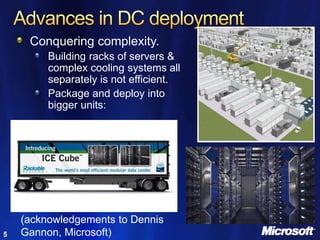
Conquering complexity.
         Building racks of servers &
         complex cooling systems all
         separately is not efficient.
         Package and deploy into
         bigger units:


    (acknowledgements to Dennis
5   Gannon, Microsoft)
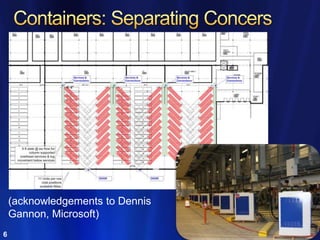
(acknowledgements to Dennis
    Gannon, Microsoft)
6
What is the Cloud Good for?
• Highly democratic access to resources
   – Anyone with a credit card can use
• Rapid provisioning - Minutes as opposed to days / weeks / months
• Only pay for the time you use
   – Operational cost rather than capital cost
• Very good for small players
   – Can access more resources than they could buy
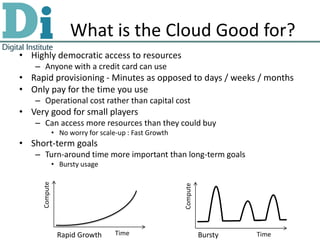
               • No worry for scale-up : Fast Growth
• Short-term goals
   – Turn-around time more important than long-term goals
               • Bursty usage
     Compute


                                                       Compute


                Rapid Growth       Time                          Bursty   Time
When not to use the Cloud
• General problems
  – Data (program) security / legality
     • Can I send my data (program) there?
  – Interaction with program
     • GUI interfaces
     • Interactive use
  – Data volumes
     • How long to transfer data?
     • data to program vs program to data
• Cloud specific problems
  – Data volumes
     • Cost of transferring
  – Execution time
     • Execution time (cost) vs ownership cost
THE PROBLEM
Flood Modelling
     • Landscape topology
     • Add buildings
     • Simulate rain storms
     • Flow rainfall over
       landscape
     • Determine which areas
       are prone to flooding
Why we need the Cloud
• Available resources
   – Simulate a city suburb (small area low resolution) requires
     ~1.5GB memory
   – Really want to simulate an entire city (large area) and/or at
     higher resolution
      • Requiring much more memory (up to 48GB)
• Running multiple ensembles
   – Different rain storms
      • Once every 2/10/20/50/100/200 year storm event
   – Different durations
      • 15 minutes, 30 minutes, 1 hour, 2 hours, 3 hours and 6 hours
   – Use high throughput computing
• Run time
   – Simulations last 1 – 13 days
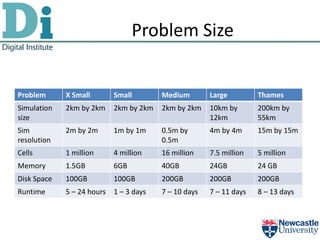
Problem Size


Problem      X Small      Small        Medium        Large         Thames
Simulation   2km by 2km   2km by 2km   2km by 2km    10km by       200km by
size                                                 12km          55km
Sim          2m by 2m     1m by 1m     0.5m by       4m by 4m      15m by 15m
resolution                             0.5m
Cells        1 million    4 million    16 million    7.5 million   5 million
Memory       1.5GB        6GB          40GB          24GB          24 GB
Disk Space   100GB        100GB        200GB         200GB         200GB
Runtime      5 – 24 hours 1 – 3 days   7 – 10 days   7 – 11 days   8 – 13 days
THE PLAN
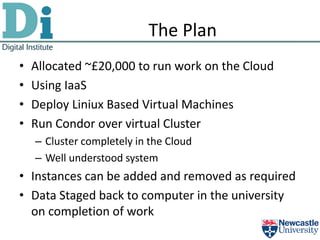
The Plan
•   Allocated ~£20,000 to run work on the Cloud
•   Using IaaS
•   Deploy Liniux Based Virtual Machines
•   Run Condor over virtual Cluster
    – Cluster completely in the Cloud
    – Well understood system
• Instances can be added and removed as required
• Data Staged back to computer in the university
  on completion of work
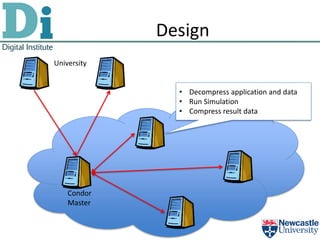
Design
University


               • Decompress application and data
               • Run Simulation
               • Compress result data


    Condor
    Master
ISSUES
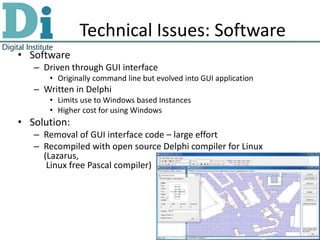
Technical Issues: Software
• Software
   – Driven through GUI interface
      • Originally command line but evolved into GUI application
   – Written in Delphi
      • Limits use to Windows based Instances
      • Higher cost for using Windows
• Solution:
   – Removal of GUI interface code – large effort
   – Recompiled with open source Delphi compiler for Linux
     (Lazarus,
      Linux free Pascal compiler)
Legal Issues: Licensing
• Landscape topology data free to use under any
  circumstance
• Building data under license from external
  company
  – Licensed to use for non commercial use within the
    University
     • Cloud not in the University
• Solution:
  – Needed to draft up new collaboration agreement with
    company
Political issues
• £20,000
   – Can’t do this by stealth
• University decided that this should be spent in-house
  not go to external company
   – Can’t we do this in-house?
      • No appropriate resources
   – Can’t we buy the resources?
      • Not enough money, £20,000 would buy 2-3 servers
          – ~ 3 years work
   – European Tendering laws
      • Producing a price comparison report
   – Can’t we do this in-house – we have resources?
      • Resources are running key university services
• No infrastructure in place to deal with Cloud
Pricing Comparison
• Two metrics defined
  – Cost per simulation hour
     • Cost per cloud hour / simulations per cloud instance
  – Hours in one month
     • The number of hours in one month we could purchase
• Used to compare between cloud providers
  and purchased resources
• Look at two problem cases
  – Small jobs (3GB), large jobs (40GB)
Local Resources
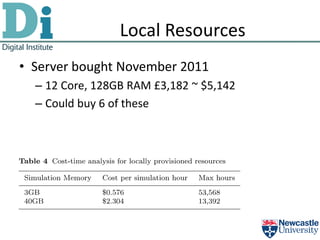
• Server bought November 2011
  – 12 Core, 128GB RAM £3,182 ~ $5,142
  – Could buy 6 of these
Cloud : Azure
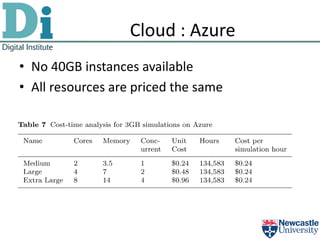
• No 40GB instances available
• All resources are priced the same
Cloud : GoGrid
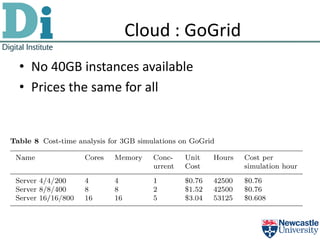
• No 40GB instances available
• Prices the same for all
Cloud : RackSpace
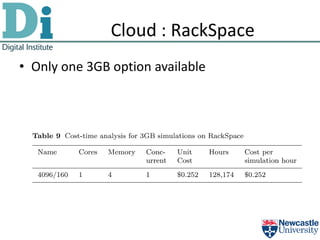
• Only one 3GB option available
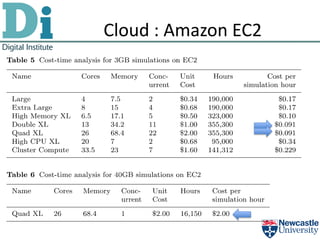
Cloud : Amazon EC2
Cost Summary
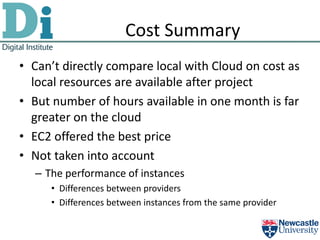
• Can’t directly compare local with Cloud on cost as
  local resources are available after project
• But number of hours available in one month is far
  greater on the cloud
• EC2 offered the best price
• Not taken into account
  – The performance of instances
     • Differences between providers
     • Differences between instances from the same provider
Payment Issue
• Most cloud providers ‘insist’ on payment by
  credit card
• We wanted to do £20,000 worth of work in one
  month
  – Can’t get a university credit card with this sort of limit
  – Special arrangements made to allow head of finance
    to have this limit
     • Doesn’t work as he wants to pay for an item not have an
       open card payment
  – Raised exiting card limit to £20,000 and split work
    over payment months
• Discovered too late that Cloud providers can take
  payment by invoice (not advertised)
Technical Issues: Data transfer
• Upload files:
   – 3 – 25MB depending on simulation run
• Download files:
   – 1.4 – 9GB
• With compression we can bring this down to
   – 125 – 1024MB
• Uploads free downloads not
• Data transfer speeds
   – Dependent on time of day
      • Varied from 200-600KB/s (worst when US awake)
   – Keeping instances alive
SOME PRELIMINARY RESULTS
Simulation Results
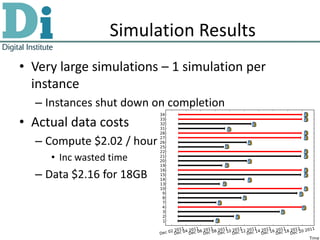
• Very large simulations – 1 simulation per
  instance
  – Instances shut down on completion
• Actual data costs
  – Compute $2.02 / hour
     • Inc wasted time
  – Data $2.16 for 18GB
Simulation Results
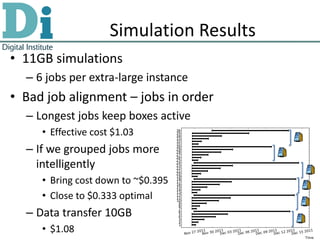
• 11GB simulations
  – 6 jobs per extra-large instance
• Bad job alignment – jobs in order
  – Longest jobs keep boxes active
     • Effective cost $1.03
  – If we grouped jobs more
    intelligently
     • Bring cost down to ~$0.395
     • Close to $0.333 optimal
  – Data transfer 10GB
     • $1.08
Some Results
Conclusions
• Technical issues on using the Cloud are
  relatively easy to solve
• Political issues are more difficult to solve
  – Breaks the model of how University does work
  – Lots of people to convince this is a valid way to do
    things
• Hopefully next time will be easier!
• Need more (Cloud) time to process results
stephen.mcgough@ncl.ac.uk

Thank you

QUESTIONS

Flood modelling on the Cloud

  • 1.
    Using the Cloud - the Newcastle experience Stephen McGough Vassilis Glenis, Chris Kilsby, Vedrana Kutija, Simon Wodman University of Sussex : HPC Workshop 2013 January 16th 2013
  • 2.
  • 3.
    The Cloud model Data In Data Out £ £ Some work performed £ £ Data *aaS Storage SaaS – Software as a Service, you use programs provided by someone else PaaS – Platform as a Service, you provide the program and above IaaS – Infrastructure as a Service, you provide the OS and above
  • 4.
    (acknowledgements to Dennis Economies of scale Gannon, Microsoft) Approximate costs for a small size center (1000 servers) and a larger, 100K server center. Technology Cost in Cost in Large Ratio small-sized Data Center Data Center Network $95 per Mbps/ $13 per Mbps/ 7.1 month month Storage $2.20 per GB/ $0.40 per GB/ 5.7 month month Administration ~140 servers/ >1000 7.1 Administrator Servers/ Administrator Each data center is 11.5 times the size of a football field 4
  • 5.
    Conquering complexity. Building racks of servers & complex cooling systems all separately is not efficient. Package and deploy into bigger units: (acknowledgements to Dennis 5 Gannon, Microsoft)
  • 6.
    (acknowledgements to Dennis Gannon, Microsoft) 6
  • 7.
    What is theCloud Good for? • Highly democratic access to resources – Anyone with a credit card can use • Rapid provisioning - Minutes as opposed to days / weeks / months • Only pay for the time you use – Operational cost rather than capital cost • Very good for small players – Can access more resources than they could buy • No worry for scale-up : Fast Growth • Short-term goals – Turn-around time more important than long-term goals • Bursty usage Compute Compute Rapid Growth Time Bursty Time
  • 8.
    When not touse the Cloud • General problems – Data (program) security / legality • Can I send my data (program) there? – Interaction with program • GUI interfaces • Interactive use – Data volumes • How long to transfer data? • data to program vs program to data • Cloud specific problems – Data volumes • Cost of transferring – Execution time • Execution time (cost) vs ownership cost
  • 9.
  • 10.
    Flood Modelling • Landscape topology • Add buildings • Simulate rain storms • Flow rainfall over landscape • Determine which areas are prone to flooding
  • 11.
    Why we needthe Cloud • Available resources – Simulate a city suburb (small area low resolution) requires ~1.5GB memory – Really want to simulate an entire city (large area) and/or at higher resolution • Requiring much more memory (up to 48GB) • Running multiple ensembles – Different rain storms • Once every 2/10/20/50/100/200 year storm event – Different durations • 15 minutes, 30 minutes, 1 hour, 2 hours, 3 hours and 6 hours – Use high throughput computing • Run time – Simulations last 1 – 13 days
  • 12.
    Problem Size Problem X Small Small Medium Large Thames Simulation 2km by 2km 2km by 2km 2km by 2km 10km by 200km by size 12km 55km Sim 2m by 2m 1m by 1m 0.5m by 4m by 4m 15m by 15m resolution 0.5m Cells 1 million 4 million 16 million 7.5 million 5 million Memory 1.5GB 6GB 40GB 24GB 24 GB Disk Space 100GB 100GB 200GB 200GB 200GB Runtime 5 – 24 hours 1 – 3 days 7 – 10 days 7 – 11 days 8 – 13 days
  • 13.
  • 14.
    The Plan • Allocated ~£20,000 to run work on the Cloud • Using IaaS • Deploy Liniux Based Virtual Machines • Run Condor over virtual Cluster – Cluster completely in the Cloud – Well understood system • Instances can be added and removed as required • Data Staged back to computer in the university on completion of work
  • 15.
    Design University • Decompress application and data • Run Simulation • Compress result data Condor Master
  • 16.
  • 17.
    Technical Issues: Software •Software – Driven through GUI interface • Originally command line but evolved into GUI application – Written in Delphi • Limits use to Windows based Instances • Higher cost for using Windows • Solution: – Removal of GUI interface code – large effort – Recompiled with open source Delphi compiler for Linux (Lazarus, Linux free Pascal compiler)
  • 18.
    Legal Issues: Licensing •Landscape topology data free to use under any circumstance • Building data under license from external company – Licensed to use for non commercial use within the University • Cloud not in the University • Solution: – Needed to draft up new collaboration agreement with company
  • 19.
    Political issues • £20,000 – Can’t do this by stealth • University decided that this should be spent in-house not go to external company – Can’t we do this in-house? • No appropriate resources – Can’t we buy the resources? • Not enough money, £20,000 would buy 2-3 servers – ~ 3 years work – European Tendering laws • Producing a price comparison report – Can’t we do this in-house – we have resources? • Resources are running key university services • No infrastructure in place to deal with Cloud
  • 20.
    Pricing Comparison • Twometrics defined – Cost per simulation hour • Cost per cloud hour / simulations per cloud instance – Hours in one month • The number of hours in one month we could purchase • Used to compare between cloud providers and purchased resources • Look at two problem cases – Small jobs (3GB), large jobs (40GB)
  • 21.
    Local Resources • Serverbought November 2011 – 12 Core, 128GB RAM £3,182 ~ $5,142 – Could buy 6 of these
  • 22.
    Cloud : Azure •No 40GB instances available • All resources are priced the same
  • 23.
    Cloud : GoGrid •No 40GB instances available • Prices the same for all
  • 24.
    Cloud : RackSpace •Only one 3GB option available
  • 25.
  • 26.
    Cost Summary • Can’tdirectly compare local with Cloud on cost as local resources are available after project • But number of hours available in one month is far greater on the cloud • EC2 offered the best price • Not taken into account – The performance of instances • Differences between providers • Differences between instances from the same provider
  • 27.
    Payment Issue • Mostcloud providers ‘insist’ on payment by credit card • We wanted to do £20,000 worth of work in one month – Can’t get a university credit card with this sort of limit – Special arrangements made to allow head of finance to have this limit • Doesn’t work as he wants to pay for an item not have an open card payment – Raised exiting card limit to £20,000 and split work over payment months • Discovered too late that Cloud providers can take payment by invoice (not advertised)
  • 28.
    Technical Issues: Datatransfer • Upload files: – 3 – 25MB depending on simulation run • Download files: – 1.4 – 9GB • With compression we can bring this down to – 125 – 1024MB • Uploads free downloads not • Data transfer speeds – Dependent on time of day • Varied from 200-600KB/s (worst when US awake) – Keeping instances alive
  • 29.
  • 30.
    Simulation Results • Verylarge simulations – 1 simulation per instance – Instances shut down on completion • Actual data costs – Compute $2.02 / hour • Inc wasted time – Data $2.16 for 18GB
  • 31.
    Simulation Results • 11GBsimulations – 6 jobs per extra-large instance • Bad job alignment – jobs in order – Longest jobs keep boxes active • Effective cost $1.03 – If we grouped jobs more intelligently • Bring cost down to ~$0.395 • Close to $0.333 optimal – Data transfer 10GB • $1.08
  • 32.
  • 36.
    Conclusions • Technical issueson using the Cloud are relatively easy to solve • Political issues are more difficult to solve – Breaks the model of how University does work – Lots of people to convince this is a valid way to do things • Hopefully next time will be easier! • Need more (Cloud) time to process results
  • 37.