PrintCSS
A Quick Walkthrough
Andreas Jung (ZOPYX)

info@zopyx.com

www.print-css.rocks
XMLPrague 2020
1 https:!//cutt.ly/jrIh5TI
AGENDA
‣ What is PrintCSS?
‣ Overview and tools
‣ Examples and usecases
‣ print-css.rocks project
‣ Basic and common "PrintCSS" features
‣ Demo time
‣ The missing parts and the bad parts
‣ Q & A
2
ANDREAS JUNG
‣ Master in Computer Science and Electrical Engineering
‣ background in electronic publishing since 1995
‣ freelancer since 2004
‣ large scale content management based on Plone CMS
‣ individual Python software development
‣ conversion workflows and publishing solutions
3
ANDREAS JUNG
‣Produce & Publish -
www.produce-and-publish.com
‣Collaborative content solutions based on Smashdocs -
www.creating-content-together.com
‣XML-Director foundation for XML CMS solutions -
www.xml-director.info
‣PrintCSS tutorial -
www.print-css.rocks
My projects:
4
What is "PrintCSS"?
5
WHAT IS "PRINTCSS"?
‣ "PrintCSS" = XML/HTML + CSS →PDF
‣ Browser "Print" is not "PrintCSS"
‣ "PrintCSS" deals with print specific aspects
‣ "paper" layout information
‣ counters and page numbers
‣ page areas
‣ pagination
‣ footnotes
‣ …
6
PRINTCSS AKA CSS PAGED MEDIA
‣ Draft: CSS Paged Media Module Level 3 (2018)
‣ Draft: CSS Generated Content for Paged Media Module (2014)
‣ Concepts
‣ Content: XML or HTML
‣ Design and layout: Cascading Stylesheets CSS
‣ Rule-based approach for defining all aspects of automatic typesetting
‣ separation between content and styling
‣ CSS Paged Media vs. XSL-FO
‣ easy approachability in general
‣ less complex than XSL-FO (CSS as foundation is common knowledge)
7
"CSS PAGED MEDIA" TOOLS
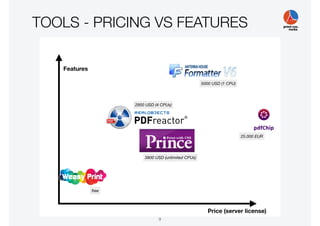
‣ WeasyPrint
‣ PrinceXML
‣ PDFreactor
‣ Antennahouse
‣ pdfChip
‣ Versatype (ex Vivliostyle)
8
TOOLS - PRICING VS FEATURES
9
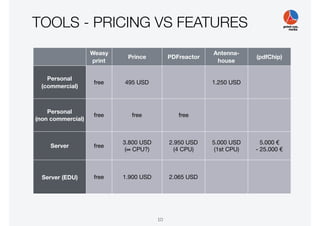
TOOLS - PRICING VS FEATURES
Weasy

print
Prince PDFreactor
Antenna-
house
(pdfChip)
Personal

(commercial)
free 495 USD 1.250 USD
Personal

(non commercial)
free free free
Server free
3.800 USD

(∞ CPU?)
2.950 USD

(4 CPU)
5.000 USD

(1st CPU)
5.000 €

- 25.000 €
Server (EDU) free 1.900 USD 2.065 USD
10
Some examples
and use case
11
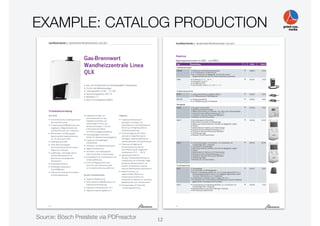
EXAMPLE: CATALOG PRODUCTION
Source: Bösch Preisliste via PDFreactor 12
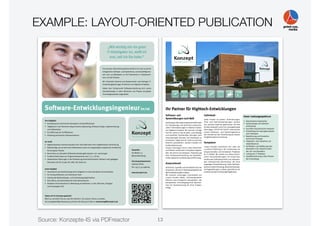
EXAMPLE: LAYOUT-ORIENTED PUBLICATION
Source: Konzepte-IS via PDFreactor 13
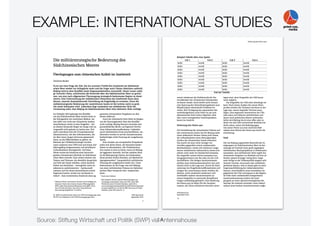
EXAMPLE: INTERNATIONAL STUDIES
Source: Stiftung Wirtschaft und Politik (SWP) via Antennahouse14
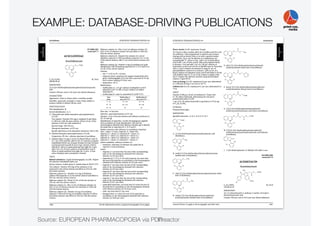
EXAMPLE: DATABASE-DRIVING PUBLICATIONS
Source: EUROPEAN PHARMACOPOEIA via PDFreactor15
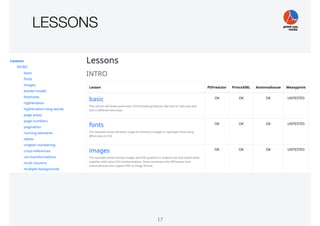
‣ vendor-neutral information about "PrintCSS"
‣ information about tools
‣ tested tools:
‣ PrinceXML
‣ Antennahouse
‣ PDFreactor
‣ WeasyPrint
‣ tutorial and lessons
‣ "PrintCSS" related resources
‣ www.print-css.rocks
16
LESSONS
17
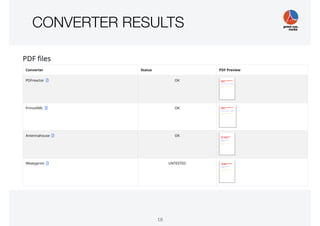
CONVERTER RESULTS
18
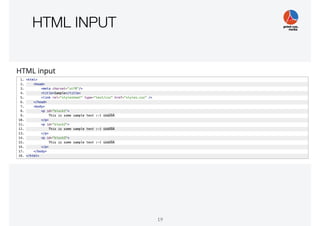
HTML INPUT
19
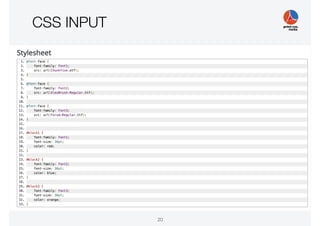
CSS INPUT
20
Basic and common
"PrintCSS" features
21
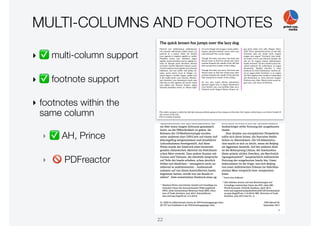
MULTI-COLUMNS AND FOOTNOTES
‣ ✅ multi-column support
‣ ✅ footnote support
‣ footnotes within the
same column
‣ ✅ AH, Prince
‣ 🚫 PDFreactor
22
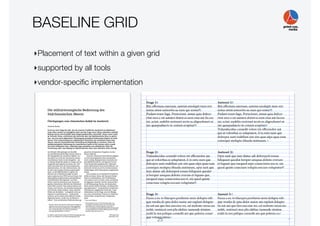
BASELINE GRID
‣Placement of text within a given grid
‣supported by all tools
‣vendor-specific implementation
23
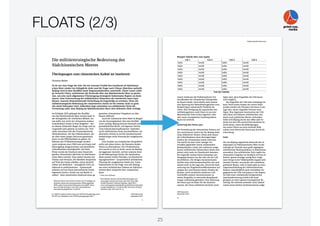
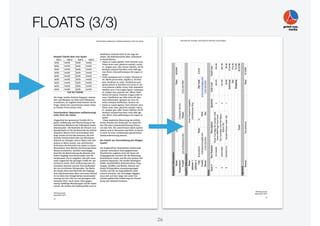
FLOATS (1/3)
‣ (automatic) moving of block elements (images,
tables, inserts)
‣ within the current page
‣ within the current column set
‣ to the next page
‣ colspan optional
‣ AH: most complete, but complex extension
‣ Prince, PDFreactor: partial support
24
FLOATS (2/3)
25
FLOATS (3/3)
26
IMAGES
‣ Bitmap images: JPEG, PNG, GIF, TIFF
‣ Vector formats: PDF, SVG
‣ Color spaces: RGB, CMYK, ICC profiles
‣ Problems:
‣ auto-placement
‣ automatic (down)-scaling
27
PAGINATION
‣ automatic pagination
‣ pagiation hints through CSS
‣ support for orphans and widows
div.chapter {

page-break-after: always;

}
table {

page-break-inside: avoid;

}
div.chapter {

page-break-after: never;

}
div.chapter {

orphans: 2;

widows: 3;

}
28
FONTS
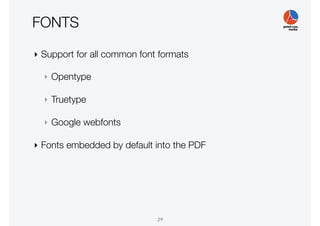
‣ Support for all common font formats
‣ Opentype
‣ Truetype
‣ Google webfonts
‣ Fonts embedded by default into the PDF
29
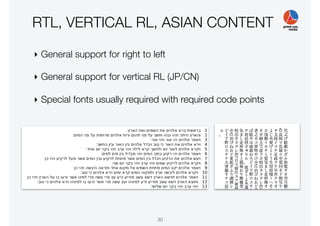
RTL, VERTICAL RL, ASIAN CONTENT
‣ General support for right to left
‣ General support for vertical RL (JP/CN)
‣ Special fonts usually required with required code points
30
Demo time
What do you want to see?
31
The missing parts.
The bad parts.
32
THE "STANDARD" (1/2)
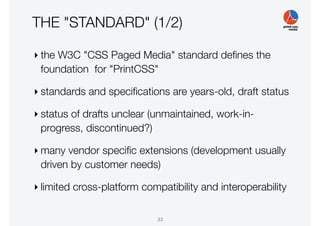
‣ the W3C "CSS Paged Media" standard defines the
foundation for "PrintCSS"
‣ standards and specifications are years-old, draft status
‣ status of drafts unclear (unmaintained, work-in-
progress, discontinued?)
‣ many vendor specific extensions (development usually
driven by customer needs)
‣ limited cross-platform compatibility and interoperability
33
THE "STANDARD" (2/2)
‣ conflicting implementations
‣ conflicting interpretations of the "standard"
‣ (missing?) test suite(s)
‣ support of modern/new CSS features
‣ in browsers: fast adaptation
‣ in PrintCSS tools: moving (very) slowly
34
(CONSISTENT) JAVASCRIPT SUPPORT
‣ ✅ PrinceXML and PDFreactor
‣ 🚫 Antennahouse
‣ support only for selected JavaScript modules
‣ missing rendering API for hooking into the rendering process
35
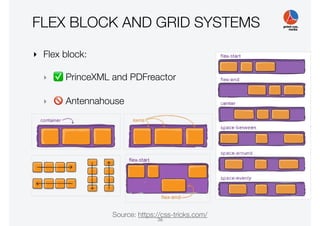
FLEX BLOCK AND GRID SYSTEMS
‣ Flex block:
‣ ✅ PrinceXML and PDFreactor
‣ 🚫 Antennahouse
Source: https://css-tricks.com/
36
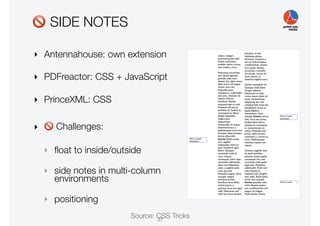
🚫 SIDE NOTES
Source: CSS Tricks
‣ Antennahouse: own extension
‣ PDFreactor: CSS + JavaScript
‣ PrinceXML: CSS
‣ 🚫 Challenges:
‣ float to inside/outside
‣ side notes in multi-column
environments
‣ positioning
37
🚫 IMAGE POSITIONING (1/2)
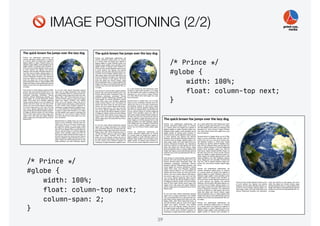
‣ Problem:
‣ an image does not fit on the remaining page or
into the remaining column
‣ avoid blank areas
‣ Solutions:
‣ float image on next page or into next column
‣ scale image down to remaining space in column or
on page
38
🚫 IMAGE POSITIONING (2/2)
!/* Prince !*/

#globe {

width: 100%;

float: column-top next;

column-span: 2;

}
!/* Prince !*/

#globe {

width: 100%;

float: column-top next;

}
39
🚫 FIT TEXT INTO A GIVEN BOX
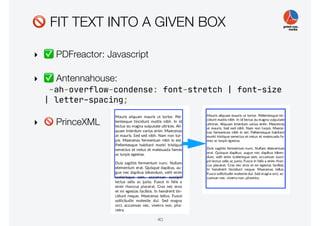
‣ ✅ PDFreactor: Javascript
‣ ✅ Antennahouse:
-ah-overflow-condense: font-stretch | font-size
| letter-spacing;

‣ 🚫 PrinceXML
40
🚫 ISSUES WITH HYPHENATION
‣ hyphenation quality differs by language and tool
‣ breaking of long words/terms (e.g. URLs) often an issue
‣ no standard for hyphenation exceptions
‣ injecting and maintaining hyphenation hints
(e.g. soft-hyphens) is a pain
41
🚫 ISSUES WITH TABLES
‣ tables split over multiple pages
‣ control over repeating headers and footers
‣ custom table captions ("continued….")
‣ controlling page breaks with row spans
42
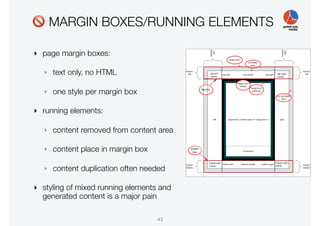
🚫 MARGIN BOXES/RUNNING ELEMENTS
‣ page margin boxes:
‣ text only, no HTML
‣ one style per margin box
‣ running elements:
‣ content removed from content area
‣ content place in margin box
‣ content duplication often needed
‣ styling of mixed running elements and
generated content is a major pain
43
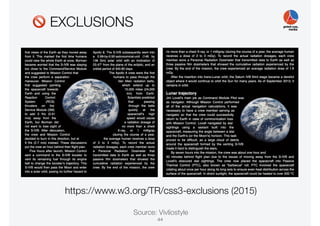
🚫 EXCLUSIONS
https://www.w3.org/TR/css3-exclusions (2015)
Source: Vivliostyle
44
🚫 DEVELOPING WITH PRINTCSS
‣ no real development tools
‣ rendering process is a blackbox process
‣ content + styles in, PDF out
but what is happening inside and why?
‣ few tracing options for the mortal PrintCSS developer
‣ usually a lengthy, iterative process
‣ no/little support for introspecting the rendering process
‣ no/little support for influencing the rendering process
besides CSS
45
THE ECOSYSTEM
‣ CSS Paged Media tools:
‣ few commercial tools
‣ even fewer non-commercial, free tools
‣ limited options
‣ in-depth evaluation needed for advanced projects
‣ at one point you need to decide and pick one tool
46
Questions?
47
Thank you!
www.print-css.rocks
www.zopyx.com
Andreas Jung <info@zopyx.com>
48

PrintCSS workshop XMLPrague 2020

  • 1.
    PrintCSS A Quick Walkthrough AndreasJung (ZOPYX) info@zopyx.com www.print-css.rocks XMLPrague 2020 1 https:!//cutt.ly/jrIh5TI
  • 2.
    AGENDA ‣ What isPrintCSS? ‣ Overview and tools ‣ Examples and usecases ‣ print-css.rocks project ‣ Basic and common "PrintCSS" features ‣ Demo time ‣ The missing parts and the bad parts ‣ Q & A 2
  • 3.
    ANDREAS JUNG ‣ Masterin Computer Science and Electrical Engineering ‣ background in electronic publishing since 1995 ‣ freelancer since 2004 ‣ large scale content management based on Plone CMS ‣ individual Python software development ‣ conversion workflows and publishing solutions 3
  • 4.
    ANDREAS JUNG ‣Produce &Publish - www.produce-and-publish.com ‣Collaborative content solutions based on Smashdocs - www.creating-content-together.com ‣XML-Director foundation for XML CMS solutions - www.xml-director.info ‣PrintCSS tutorial - www.print-css.rocks My projects: 4
  • 5.
  • 6.
    WHAT IS "PRINTCSS"? ‣"PrintCSS" = XML/HTML + CSS →PDF ‣ Browser "Print" is not "PrintCSS" ‣ "PrintCSS" deals with print specific aspects ‣ "paper" layout information ‣ counters and page numbers ‣ page areas ‣ pagination ‣ footnotes ‣ … 6
  • 7.
    PRINTCSS AKA CSSPAGED MEDIA ‣ Draft: CSS Paged Media Module Level 3 (2018) ‣ Draft: CSS Generated Content for Paged Media Module (2014) ‣ Concepts ‣ Content: XML or HTML ‣ Design and layout: Cascading Stylesheets CSS ‣ Rule-based approach for defining all aspects of automatic typesetting ‣ separation between content and styling ‣ CSS Paged Media vs. XSL-FO ‣ easy approachability in general ‣ less complex than XSL-FO (CSS as foundation is common knowledge) 7
  • 8.
    "CSS PAGED MEDIA"TOOLS ‣ WeasyPrint ‣ PrinceXML ‣ PDFreactor ‣ Antennahouse ‣ pdfChip ‣ Versatype (ex Vivliostyle) 8
  • 9.
    TOOLS - PRICINGVS FEATURES 9
  • 10.
    TOOLS - PRICINGVS FEATURES Weasy
 print Prince PDFreactor Antenna- house (pdfChip) Personal
 (commercial) free 495 USD 1.250 USD Personal
 (non commercial) free free free Server free 3.800 USD
 (∞ CPU?) 2.950 USD
 (4 CPU) 5.000 USD
 (1st CPU) 5.000 €
 - 25.000 € Server (EDU) free 1.900 USD 2.065 USD 10
  • 11.
  • 12.
    EXAMPLE: CATALOG PRODUCTION Source:Bösch Preisliste via PDFreactor 12
  • 13.
    EXAMPLE: LAYOUT-ORIENTED PUBLICATION Source:Konzepte-IS via PDFreactor 13
  • 14.
    EXAMPLE: INTERNATIONAL STUDIES Source:Stiftung Wirtschaft und Politik (SWP) via Antennahouse14
  • 15.
    EXAMPLE: DATABASE-DRIVING PUBLICATIONS Source:EUROPEAN PHARMACOPOEIA via PDFreactor15
  • 16.
    ‣ vendor-neutral informationabout "PrintCSS" ‣ information about tools ‣ tested tools: ‣ PrinceXML ‣ Antennahouse ‣ PDFreactor ‣ WeasyPrint ‣ tutorial and lessons ‣ "PrintCSS" related resources ‣ www.print-css.rocks 16
  • 17.
  • 18.
  • 19.
  • 20.
  • 21.
  • 22.
    MULTI-COLUMNS AND FOOTNOTES ‣✅ multi-column support ‣ ✅ footnote support ‣ footnotes within the same column ‣ ✅ AH, Prince ‣ 🚫 PDFreactor 22
  • 23.
    BASELINE GRID ‣Placement oftext within a given grid ‣supported by all tools ‣vendor-specific implementation 23
  • 24.
    FLOATS (1/3) ‣ (automatic)moving of block elements (images, tables, inserts) ‣ within the current page ‣ within the current column set ‣ to the next page ‣ colspan optional ‣ AH: most complete, but complex extension ‣ Prince, PDFreactor: partial support 24
  • 25.
  • 26.
  • 27.
    IMAGES ‣ Bitmap images:JPEG, PNG, GIF, TIFF ‣ Vector formats: PDF, SVG ‣ Color spaces: RGB, CMYK, ICC profiles ‣ Problems: ‣ auto-placement ‣ automatic (down)-scaling 27
  • 28.
    PAGINATION ‣ automatic pagination ‣pagiation hints through CSS ‣ support for orphans and widows div.chapter {
 page-break-after: always;
 } table {
 page-break-inside: avoid;
 } div.chapter {
 page-break-after: never;
 } div.chapter {
 orphans: 2;
 widows: 3;
 } 28
  • 29.
    FONTS ‣ Support forall common font formats ‣ Opentype ‣ Truetype ‣ Google webfonts ‣ Fonts embedded by default into the PDF 29
  • 30.
    RTL, VERTICAL RL,ASIAN CONTENT ‣ General support for right to left ‣ General support for vertical RL (JP/CN) ‣ Special fonts usually required with required code points 30
  • 31.
    Demo time What doyou want to see? 31
  • 32.
  • 33.
    THE "STANDARD" (1/2) ‣the W3C "CSS Paged Media" standard defines the foundation for "PrintCSS" ‣ standards and specifications are years-old, draft status ‣ status of drafts unclear (unmaintained, work-in- progress, discontinued?) ‣ many vendor specific extensions (development usually driven by customer needs) ‣ limited cross-platform compatibility and interoperability 33
  • 34.
    THE "STANDARD" (2/2) ‣conflicting implementations ‣ conflicting interpretations of the "standard" ‣ (missing?) test suite(s) ‣ support of modern/new CSS features ‣ in browsers: fast adaptation ‣ in PrintCSS tools: moving (very) slowly 34
  • 35.
    (CONSISTENT) JAVASCRIPT SUPPORT ‣✅ PrinceXML and PDFreactor ‣ 🚫 Antennahouse ‣ support only for selected JavaScript modules ‣ missing rendering API for hooking into the rendering process 35
  • 36.
    FLEX BLOCK ANDGRID SYSTEMS ‣ Flex block: ‣ ✅ PrinceXML and PDFreactor ‣ 🚫 Antennahouse Source: https://css-tricks.com/ 36
  • 37.
    🚫 SIDE NOTES Source:CSS Tricks ‣ Antennahouse: own extension ‣ PDFreactor: CSS + JavaScript ‣ PrinceXML: CSS ‣ 🚫 Challenges: ‣ float to inside/outside ‣ side notes in multi-column environments ‣ positioning 37
  • 38.
    🚫 IMAGE POSITIONING(1/2) ‣ Problem: ‣ an image does not fit on the remaining page or into the remaining column ‣ avoid blank areas ‣ Solutions: ‣ float image on next page or into next column ‣ scale image down to remaining space in column or on page 38
  • 39.
    🚫 IMAGE POSITIONING(2/2) !/* Prince !*/ #globe { width: 100%; float: column-top next; column-span: 2; } !/* Prince !*/ #globe { width: 100%; float: column-top next; } 39
  • 40.
    🚫 FIT TEXTINTO A GIVEN BOX ‣ ✅ PDFreactor: Javascript ‣ ✅ Antennahouse: -ah-overflow-condense: font-stretch | font-size | letter-spacing; ‣ 🚫 PrinceXML 40
  • 41.
    🚫 ISSUES WITHHYPHENATION ‣ hyphenation quality differs by language and tool ‣ breaking of long words/terms (e.g. URLs) often an issue ‣ no standard for hyphenation exceptions ‣ injecting and maintaining hyphenation hints (e.g. soft-hyphens) is a pain 41
  • 42.
    🚫 ISSUES WITHTABLES ‣ tables split over multiple pages ‣ control over repeating headers and footers ‣ custom table captions ("continued….") ‣ controlling page breaks with row spans 42
  • 43.
    🚫 MARGIN BOXES/RUNNINGELEMENTS ‣ page margin boxes: ‣ text only, no HTML ‣ one style per margin box ‣ running elements: ‣ content removed from content area ‣ content place in margin box ‣ content duplication often needed ‣ styling of mixed running elements and generated content is a major pain 43
  • 44.
  • 45.
    🚫 DEVELOPING WITHPRINTCSS ‣ no real development tools ‣ rendering process is a blackbox process ‣ content + styles in, PDF out but what is happening inside and why? ‣ few tracing options for the mortal PrintCSS developer ‣ usually a lengthy, iterative process ‣ no/little support for introspecting the rendering process ‣ no/little support for influencing the rendering process besides CSS 45
  • 46.
    THE ECOSYSTEM ‣ CSSPaged Media tools: ‣ few commercial tools ‣ even fewer non-commercial, free tools ‣ limited options ‣ in-depth evaluation needed for advanced projects ‣ at one point you need to decide and pick one tool 46
  • 47.
  • 48.