

Adding Your URL to
  Search Engines
  Abdul Razak Ahmad
  ajakq8@gmail.com
Adding URL to Google
• Go to http://www.google.com/addurl
• Enter your website’s full URL including the
  http:// e.g. http://www.yourcompany.com
• Type in comments or keywords to describe
  your website. Its optional and does not affect
  the way search engine indexes your website
• Type in the “funny, squiggly letters” before
  you click on “Add URL” button
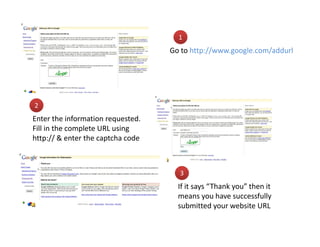
1
                                   Go to http://www.google.com/addurl


2
Enter the information requested.
Fill in the complete URL using
http:// & enter the captcha code


                                     3
                                     If it says “Thank you” then it
                                     means you have successfully
                                     submitted your website URL
Adding URL to Yahoo
• Got to
  http://siteexplorer.search.yahoo.com/submit
• Click on Submit a Webpage or Website
  hyperlink
• Type in your website URL including the http://
  prefix e.g. http://www.yourcompany.com &
  click on Submit URL button
• If you see the Yahoo sign in page then it
  means your submission was successful
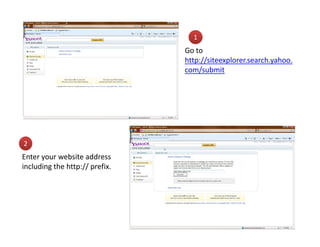
1
                                Go to
                                http://siteexplorer.search.yahoo.
                                com/submit


2
Enter your website address
including the http:// prefix.
Adding URL to Bing
• Go to
  http://www.bing.com/webmaster/SubmitSite
  Page.aspx
• Type in the “funny, squiggly” characters in the
  box given
• Type in your website URL including the http://
  prefix
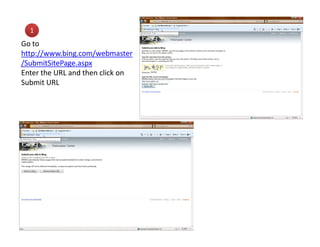
1
Go to
http://www.bing.com/webmaster
/SubmitSitePage.aspx
Enter the URL and then click on
Submit URL

Adding Your URL to Search Engine

  • 1.
    Adding Your URLto Search Engines Abdul Razak Ahmad ajakq8@gmail.com
  • 2.
    Adding URL toGoogle • Go to http://www.google.com/addurl • Enter your website’s full URL including the http:// e.g. http://www.yourcompany.com • Type in comments or keywords to describe your website. Its optional and does not affect the way search engine indexes your website • Type in the “funny, squiggly letters” before you click on “Add URL” button
  • 3.
    1 Go to http://www.google.com/addurl 2 Enter the information requested. Fill in the complete URL using http:// & enter the captcha code 3 If it says “Thank you” then it means you have successfully submitted your website URL
  • 4.
    Adding URL toYahoo • Got to http://siteexplorer.search.yahoo.com/submit • Click on Submit a Webpage or Website hyperlink • Type in your website URL including the http:// prefix e.g. http://www.yourcompany.com & click on Submit URL button • If you see the Yahoo sign in page then it means your submission was successful
  • 5.
    1 Go to http://siteexplorer.search.yahoo. com/submit 2 Enter your website address including the http:// prefix.
  • 6.
    Adding URL toBing • Go to http://www.bing.com/webmaster/SubmitSite Page.aspx • Type in the “funny, squiggly” characters in the box given • Type in your website URL including the http:// prefix
  • 7.