JAVASCRIPT
Presented By :- Vishal
15-CSE-2835
Content
• What is JavaScript ?
• History & Versions
• JavaScript Over Java
• Elements of JavaScript
• Applications
• Advantages
• Cautions
What is JavaScript ?
• JavaScript is the programming language for HTML and
the Web.
• It is similar to C language.
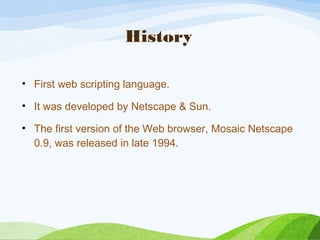
History
• First web scripting language.
• It was developed by Netscape & Sun.
• The first version of the Web browser, Mosaic Netscape
0.9, was released in late 1994.
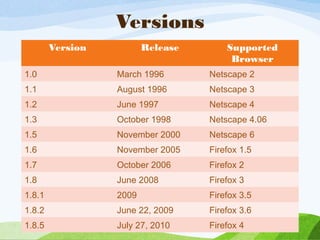
Versions
Version Release Supported
Browser
1.0 March 1996 Netscape 2
1.1 August 1996 Netscape 3
1.2 June 1997 Netscape 4
1.3 October 1998 Netscape 4.06
1.5 November 2000 Netscape 6
1.6 November 2005 Firefox 1.5
1.7 October 2006 Firefox 2
1.8 June 2008 Firefox 3
1.8.1 2009 Firefox 3.5
1.8.2 June 22, 2009 Firefox 3.6
1.8.5 July 27, 2010 Firefox 4
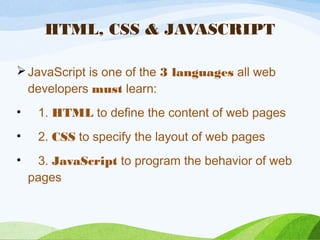
HTML, CSS & JAVASCRIPT
JavaScript is one of the 3 languages all web
developers must learn:
•    1. HTML to define the content of web pages
•    2. CSS to specify the layout of web pages
•    3. JavaScript to program the behavior of web
pages
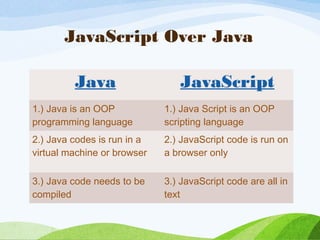
JavaScript Over Java
Java JavaScript
1.) Java is an OOP
programming language
1.) Java Script is an OOP
scripting language
2.) Java codes is run in a
virtual machine or browser
2.) JavaScript code is run on
a browser only
3.) Java code needs to be
compiled
3.) JavaScript code are all in
text
Elements of JavaScript
• Variables
• Arrays
• Functions
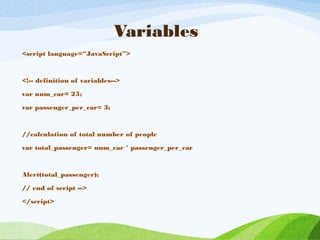
Variables
<script language=“JavaScript”>
<!-- definition of variables-->
var num_car= 25;
var passenger_per_car= 3;
//calculation of total number of people
var total_passenger= num_car * passenger_per_car
Alert(total_passenger);
// end of script -->
</script>
Arrays
var score = new Array(3);
score[0] = 35;
score[1] = 56;
score[2] = 10;
sum=score[0]+score[1]+score[2];
alert(sum) ;
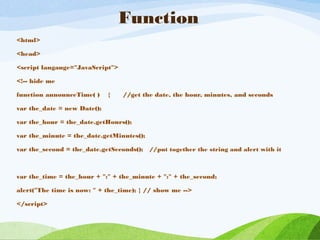
Function
<html>
<head>
<script langauge="JavaScript">
<!-- hide me
function announceTime( ) { //get the date, the hour, minutes, and seconds
var the_date = new Date();
var the_hour = the_date.getHours();
var the_minute = the_date.getMinutes();
var the_second = the_date.getSeconds(); //put together the string and alert with it
var the_time = the_hour + ":" + the_minute + ":" + the_second;
alert("The time is now: " + the_time); } // show me -->
</script>
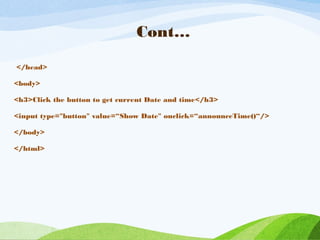
Cont…
</head>
<body>
<h3>Click the button to get current Date and time</h3>
<input type="button" value=“Show Date" onclick=“announceTime()“/>
</body>
</html>
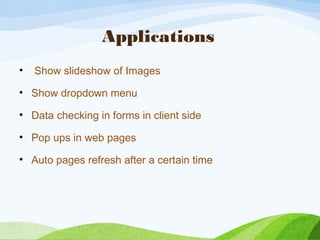
Applications
• Show slideshow of Images
• Show dropdown menu
• Data checking in forms in client side
• Pop ups in web pages
• Auto pages refresh after a certain time
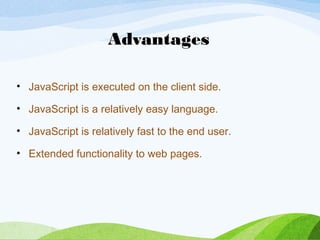
Advantages
• JavaScript is executed on the client side.
• JavaScript is a relatively easy language.
• JavaScript is relatively fast to the end user.
• Extended functionality to web pages.
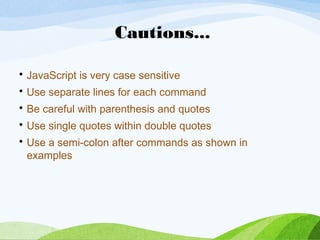
• JavaScript is very case sensitive
• Use separate lines for each command
• Be careful with parenthesis and quotes
• Use single quotes within double quotes
• Use a semi-colon after commands as shown in
examples
Cautions...
Thanks…

Javascript Basics

  • 1.
    JAVASCRIPT Presented By :-Vishal 15-CSE-2835
  • 2.
    Content • What isJavaScript ? • History & Versions • JavaScript Over Java • Elements of JavaScript • Applications • Advantages • Cautions
  • 3.
    What is JavaScript? • JavaScript is the programming language for HTML and the Web. • It is similar to C language.
  • 4.
    History • First webscripting language. • It was developed by Netscape & Sun. • The first version of the Web browser, Mosaic Netscape 0.9, was released in late 1994.
  • 5.
    Versions Version Release Supported Browser 1.0March 1996 Netscape 2 1.1 August 1996 Netscape 3 1.2 June 1997 Netscape 4 1.3 October 1998 Netscape 4.06 1.5 November 2000 Netscape 6 1.6 November 2005 Firefox 1.5 1.7 October 2006 Firefox 2 1.8 June 2008 Firefox 3 1.8.1 2009 Firefox 3.5 1.8.2 June 22, 2009 Firefox 3.6 1.8.5 July 27, 2010 Firefox 4
  • 6.
    HTML, CSS &JAVASCRIPT JavaScript is one of the 3 languages all web developers must learn: •    1. HTML to define the content of web pages •    2. CSS to specify the layout of web pages •    3. JavaScript to program the behavior of web pages
  • 7.
    JavaScript Over Java JavaJavaScript 1.) Java is an OOP programming language 1.) Java Script is an OOP scripting language 2.) Java codes is run in a virtual machine or browser 2.) JavaScript code is run on a browser only 3.) Java code needs to be compiled 3.) JavaScript code are all in text
  • 8.
    Elements of JavaScript •Variables • Arrays • Functions
  • 9.
    Variables <script language=“JavaScript”> <!-- definitionof variables--> var num_car= 25; var passenger_per_car= 3; //calculation of total number of people var total_passenger= num_car * passenger_per_car Alert(total_passenger); // end of script --> </script>
  • 10.
    Arrays var score =new Array(3); score[0] = 35; score[1] = 56; score[2] = 10; sum=score[0]+score[1]+score[2]; alert(sum) ;
  • 11.
    Function <html> <head> <script langauge="JavaScript"> <!-- hideme function announceTime( ) { //get the date, the hour, minutes, and seconds var the_date = new Date(); var the_hour = the_date.getHours(); var the_minute = the_date.getMinutes(); var the_second = the_date.getSeconds(); //put together the string and alert with it var the_time = the_hour + ":" + the_minute + ":" + the_second; alert("The time is now: " + the_time); } // show me --> </script>
  • 12.
    Cont… </head> <body> <h3>Click the buttonto get current Date and time</h3> <input type="button" value=“Show Date" onclick=“announceTime()“/> </body> </html>
  • 13.
    Applications • Show slideshowof Images • Show dropdown menu • Data checking in forms in client side • Pop ups in web pages • Auto pages refresh after a certain time
  • 14.
    Advantages • JavaScript isexecuted on the client side. • JavaScript is a relatively easy language. • JavaScript is relatively fast to the end user. • Extended functionality to web pages.
  • 15.
    • JavaScript isvery case sensitive • Use separate lines for each command • Be careful with parenthesis and quotes • Use single quotes within double quotes • Use a semi-colon after commands as shown in examples Cautions...
  • 16.

Editor's Notes

  • #16 &amp;lt;number&amp;gt;