NPO 雲端部屬策略
Office 365 協作平台
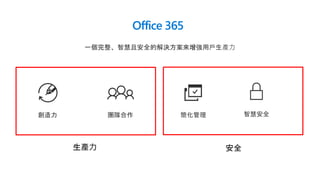
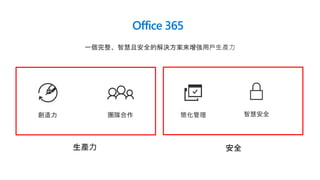
Office 365
一個完整、智慧且安全的解決方案來增強用戶生產力
智慧安全創造力 團隊合作 簡化管理
生產力
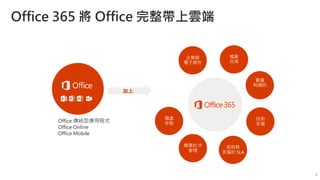
Office 365 將 Office 完整帶上雲端
加上
Office 傳統型應用程式
Office Online
Office Mobile
企業級
電子郵件
會議
和通訊
檔案
共用
隨處
存取
簡單的 IT
管理
受財務
支援的 SLA
技術
支援
4
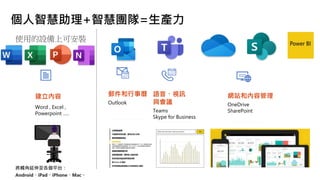
個人智慧助理+智慧團隊=生產力
將觸角延伸至各個平台:
Android、iPad、iPhone、Mac。
建立內容
Word , Excel ,
Powerpoint …..
郵件和行事曆
Outlook
語音、視訊
與會議
Teams
Skype for Business
網站和內容管理
OneDrive
SharePoint
AI in PowerPoint
翻譯機器人 10 秒翻譯整份投影片
口譯小幫手,即時同步字幕
設計構想,讓你排版不求人
Demo
AI in PowerPoint
翻譯機器人 10 秒翻譯整份投影片
口譯小幫手,即時同步字幕
設計構想,讓你排版不求人
Demo
年度募款餐會提案
專案時程
• 2019/5/1 第一次籌備大會
• 2019/5/8 確認幹部成員
• 2019/5/15 預算討論
• 2019/5/22 第二次籌備大會
Demo
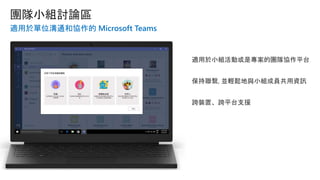
適用於單位溝通和協作的 Microsoft Teams
適用於小組活動或是專案的團隊協作平台
保持聯繫, 並輕鬆地與小組成員共用資訊
跨裝置、跨平台支援
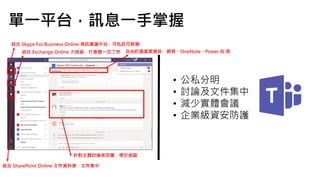
• 公私分明
• 討論及文件集中
• 減少實體會議
• 企業級資安防護
結合 Skype For Business Online 視訊會議平台,可私訊可群聊
結合 Exchange Online 大信箱,行事曆一目了然
結合 SharePoint Online 文件資料庫,文件集中
自由釘選重要資訊,網頁、OneNote、Power BI 等
針對主題討論串回覆,便於追蹤
單一平台,訊息一手掌握
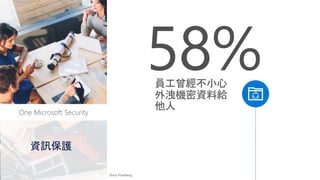
Office 365 Security
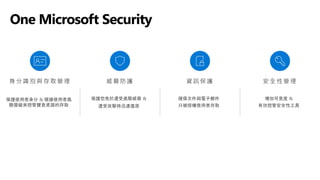
One Microsoft Security
員工曾經不小心
外洩機密資料給
他人
58%
Stroz Friedberg
資訊保護
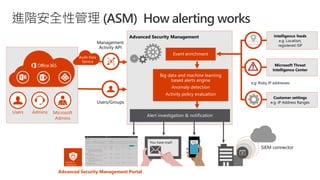
進階安全性管理 (ASM) How alerting works
Users Admins Microsoft
Admins
Audit Data
Service
Event enrichment
Big data and machine learning
based alerts engine
Anomaly detection
Activity policy evaluation
Alert investigation & notification
Advanced Security Management Portal
SIEM connector
You have mail! SMS
Office 365
一個完整、智慧且安全的解決方案來增強用戶生產力
智慧安全創造力 團隊合作 簡化管理
生產力
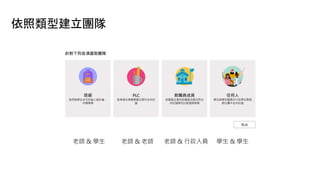
依照類型建立團隊
老師 & 學生 老師 & 老師 老師 & 行政人員 學生 & 學生
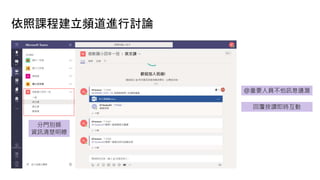
依照課程建立頻道進行討論
@重要人員不怕訊息遺漏
分門別類
資訊清楚明瞭
回覆按讚即時互動
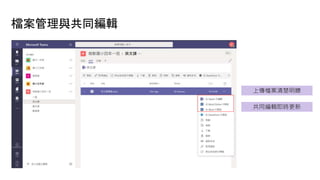
檔案管理與共同編輯
上傳檔案清楚明瞭
共同編輯即時更新
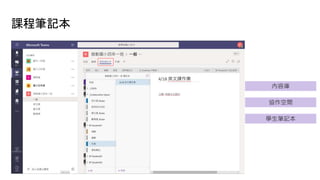
課程筆記本
內容庫
協作空間
學生筆記本
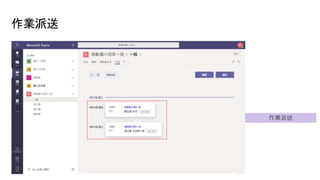
作業派送
作業派送
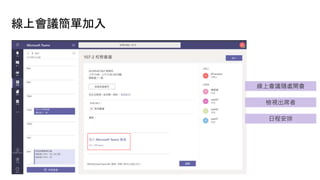
線上會議簡單加入
線上會議隨處開會
檢視出席者
日程安排
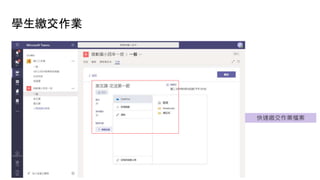
學生繳交作業
快速繳交作業檔案
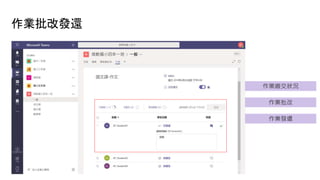
作業批改發還
作業繳交狀況
作業批改
作業發還
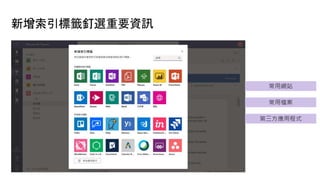
新增索引標籤釘選重要資訊
常用網站
常用檔案
第三方應用程式
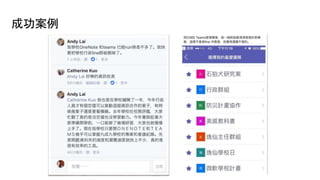
成功案例
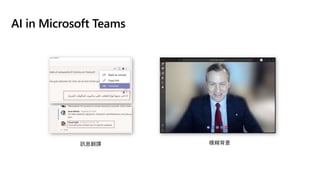
AI in Microsoft Teams
訊息翻譯 模糊背景
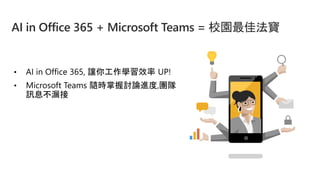
• AI in Office 365, 讓你工作學習效率 UP!
• Microsoft Teams 隨時掌握討論進度,團隊
訊息不漏接
AI in Office 365 + Microsoft Teams = 校園最佳法寶

NPO雲端佈署策略-Office 365協作平台@2019 非營利組織資訊運用座談會

Editor's Notes

  • #4 Microsoft 365 focuses on four key areas. Creativity and teamwork, are about unlocking the potential of every individual, to drive innovation in the organization. And we are focused on creating the lowest TCO environment by integrating for simplicity, and having intelligent security, built-in.
  • #5 NOTE TO SPEAKER: Keep in mind that most people, when they hear “Office 365”, only hear “Office” and think “Word, PowerPoint, Excel”. And when they hear “cloud”, they think “Online” only, thinking this is only a browser-based version of Office, similar to Google Apps. So it’s important to take your time and labor on these 2 points specifically. Talk track Office 365 is your complete office in the cloud. When we say “complete office”, first of all, we mean the Office apps that you know and love – Word, PowerPoint, Excel, Outlook, downloadable onto up to 5 PCs/MACs and mobile devices per user. With Office 365, you get these same apps as you have always used them, as rich desktop apps. The difference is, you are now subscribing to Office, instead of downloading a single version onto a given PC. This means you will always get the latest version of these Office apps on your desktop (for use whether you are online or offline), but also Office Online for editing in the browser and Office Mobile on your smart phones for viewing and editing on the go. But Office 365 also gives you so much more. You get Office, [click] plus all the services and benefits of the cloud. This means cloud-based productivity services hosted by Microsoft, including business-class email, file sharing, HD video conferencing, all working together and connected to Office so you have anywhere access to everything you need to run your business. Our SMB targeted offerings in particular offer simple IT management, and all Office 365 subscriptions offer a financially-backed SLA and 24/7 technical phone support for critical issues. Office 365 is your complete office in the cloud and the best way to acquire the new Office. <CLICK>
  • #7 翻譯機器人: 整份外文簡報 口譯小幫手: 雙語教學環境
  • #9 設計構想: 沒有美感也能快速製作漂亮簡報
  • #13 建立團隊 新增頻道 團隊討論 新增索引標籤 檔案共同編輯 新增會議 檢視最近使用檔案 新增雲端儲存 指派作業 (老師) 上船作業 (學生) 批改作業 (老師) 第三方應用程式
  • #14 講到溝通, 大家常常使用 LINE FB 社團 適用於小組活動或是專案的團隊協作平台: 討論, 文件編輯, 人員控管 保持聯繫, 並輕鬆地與小組成員共用資訊: 後加入不怕資料看不到 跨裝置、跨平台支援: 手機平板電腦隨處可用
  • #15 (換成緯創的截圖)
  • #16 建立團隊 新增頻道 團隊討論 新增索引標籤 檔案共同編輯 新增會議 檢視最近使用檔案 新增雲端儲存 指派作業 (老師) 上船作業 (學生) 批改作業 (老師) 第三方應用程式
  • #17 Microsoft Ignite 2016
  • #20 http://www.strozfriedberg.com/wp-content/uploads/2014/01/Stroz-Friedberg_On-the-Pulse_Information-Security-in-American-Business.pdf
  • #25 Yair Activities are fetched via the activity APIs on a continuous basis every few seconds, querying for new activities. This way, the service can analyze and present activities within seconds of occurrence, however apps with built-in delays in the APIs like Office365 will still experience these delays. The first step is to create a common language so all events are stored according to a consistent format allowing “file download” and “Login” to be the same across apps. The second step is to enrich the events with geo-location data and correlate with Microsoft threat intelligence. This integration is critical since it allows us to leverage the power of Microsoft intelligence as a built in capability, imagine that for any company in the world which is undergoing a phishing attack on Office365, we can immediately detect if any of our users had recent access from these locations. After enrichment, the events are sent for policy evaluation. If the event violates any of the activity policies, it is tagged as a violation and will trigger an a alert. Once an alert is triggered, it appears in the alert center which allows for further investigation. Alerts can also be send via email or SMS as well as integrated with 3rd party systems and SIEM solutions.
  • #27 Streamline with advanced data analysis The eDiscovery process often involves sorting through thousands of email messages, documents, and other data to find the small number of files that may be relevant. Office 365 Advanced eDiscovery integrates Equivio machine learning, predictive coding, and text analytics to reduce the costs and challenges of sorting through large quantities of data. Enhanced focus on what’s relevant Office 365 Advanced eDiscovery reduces the volume of data by finding near-duplicate files, reconstructing email threads, and identifying key themes and data relationships. You can also train the system to intelligently explore and analyze large, unstructured datasets and quickly zero in on what’s relevant. Finally, you can export this data to third-party applications for review.
  • #28 Providing security, transparency and compliance in Office 365 is our top priority. Customer Lockbox for Office 365 can help your customers meet compliance obligations for data access authorization with logging and auditing controls. Meet Compliance Needs Customer Lockbox can enable customers to meet compliance needs by demonstrating that they have procedures in place for explicit data access authorization. Customer Lockbox can help customers meet controls in regulations such as in HIPAA and FEDRAMP. Extended Access Control Use Customer Lockbox to control access to customer content for service operations. Customers who initiate the original request will grant final approval access to the Microsoft engineer. Customers have visibility into the purpose and length of access. Access to customer content will be revoked when service operation is completed. Visibility into Actions Actions taken by Microsoft engineers in response to Customer Lockbox requests are logged and accessible via the Management Activity API or the Security and Compliance Center.
  • #30 Microsoft 365 focuses on four key areas. Creativity and teamwork, are about unlocking the potential of every individual, to drive innovation in the organization. And we are focused on creating the lowest TCO environment by integrating for simplicity, and having intelligent security, built-in.
  • #32 (類)Microsoft 團隊為教師提供了一個單一的數位中心, 以管理學生更互聯、更協作的課堂體驗。學校資料同步通過自動創建課程和保持學生名冊的最新狀態, 節省教師的時間。每個班級都內置了課堂筆記本, 讓老師們輕鬆組織課程計畫, 為每個學生提供個人化的學習支援。教師還可以快速建立、審閱和評分所有作業, 而無需離開團隊。通過持續的對話, 教師和學生可以有機地分享回饋, 以創造一個更具支援性和吸引力的學習環境。   (PLC)教師可以定期與同行聯繫, 並通過團隊中的專業學習社區 (Plc) 繼續自己的發展。Plc 自動附帶 PLC 筆記本, 因此教師可以分享最佳實踐並就課程計畫進行協作, 以提高學生的學習成績。通過持續的對話, 教師有一個集體的歷史, 他們的討論和內容, 讓每個人都保持最新的, 即使新的教師加入團隊。除了可以輕鬆訪問他們每天使用的 Office 365 應用外, 教師還可以自訂他們的 PLC, 以保持他們所需的資源觸手可及。 (工作人員)工作人員小組允許學校管理人員和教師分享資訊, 並在全校範圍內共同努力。有了工作人員筆記本, 工作人員可以公佈學校政策, 供整個團隊訪問或創建個人專業發展計畫。通過與 Office 365 應用的持續對話和集成, 工作人員可以利用他們為學生創建的相同功能強大的工具和連接的學習體驗, 以實現自己的協作。 當然, 教育客戶總是可以創建一個團隊, 在任何基於專案或團隊的活動上共同工作, 比如組織放學後的學生團體。學校可以利用與 Office 365 服務的集成來協調事件, 並在應用中跟蹤團隊檔。由於每個團隊都有 office 365 組的支援, 因此學校甚至可以通過 Yammer 或 Outlook 將對話擴展到更廣泛的社區。
  • #35 学生笔记本 -- 教师和每个学生之间共享的私人空间。教师可以访问每个学生笔记本,而学生只能看到自己的笔记本。  内容库 -- 教师可与学生共享讲义的只读空间。  协作空间 -- 可供课堂中的所有人共享、组织和协作的空间。 
  • #36 作業指派
  • #37 校務會議人卻不在學校? 線上加入隨處開會
  • #38 作業繳交
  • #39 作業指派/批改 節省過去紙本傳遞
  • #40 釘選重要資訊
  • #41 釘選重要資訊
  • #42 訊息翻譯 會議視訊功能模糊背景
  • #43 recap