INTRO TO MATLAB + GUI
By Syed Owais Ali Chishti
(P146011)
INTRODUCTION
 MATLAB stands for Matrix Laboratory.
 MATLAB had many functions and toolboxes
 Integration
 Image Processing
 Linear Algebra
 …
 Is high level language
 Solves computing problems
 in a fraction of the time
2
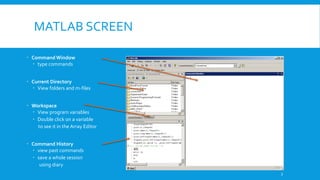
MATLAB SCREEN
 Command Window
 type commands
 Current Directory
 View folders and m-files
 Workspace
 View program variables
 Double click on a variable
to see it in the Array Editor
 Command History
 view past commands
 save a whole session
using diary
3
VARIABLE
No need for types
int a = 10;
float pie = 3.1415;
All variable are of double precision unless specified
pie = 3.1415
s = 123
All variable are 1x1 matrices
4
ARRAY
a vector
 x = [1 2 5 1]
 x = 1 2 5 1
a matrix
 x = [1 2 3; 5 1 4; 3 2 -1]
transpose
 y = x’
5
VECTOR/MATRIX GENERATION
t = [1:10]
 t = 1 2 3 4 5 6 7 8 9 10
x = [1:4; 5:8]
x =
 1 2 3 4
 5 6 7 8
6
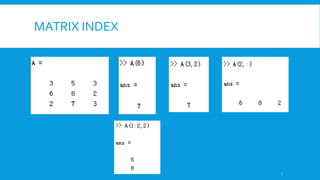
MATRIX INDEX
7
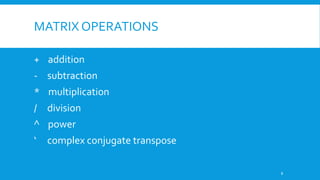
MATRIX OPERATIONS
+ addition
- subtraction
* multiplication
/ division
^ power
‘ complex conjugate transpose
8
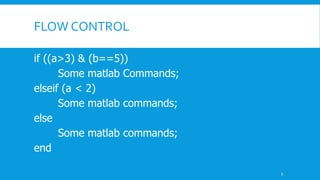
FLOW CONTROL
if ((a>3) & (b==5))
Some matlab Commands;
elseif (a < 2)
Some matlab commands;
else
Some matlab commands;
end
9
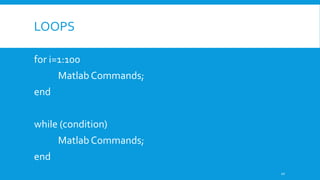
LOOPS
for i=1:100
Matlab Commands;
end
while (condition)
Matlab Commands;
end
10
FUNCTIONS
 No return keyword
 function out1=fname(in1,in2,in3)
 Some commands
 function [out1,out2]=name(in1,in2)
 EXAMPLE
 function [out1, out2] = sumprod(array)
out1 = sum(array)
out2 = prod(array)
11
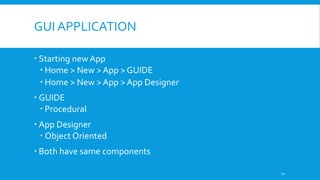
GUI APPLICATION
 Starting new App
 Home > New > App > GUIDE
 Home > New > App > App Designer
 GUIDE
 Procedural
 App Designer
 Object Oriented
 Both have same components
12
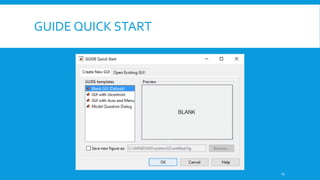
GUIDE QUICK START
13
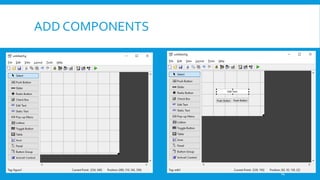
ADD COMPONENTS
14
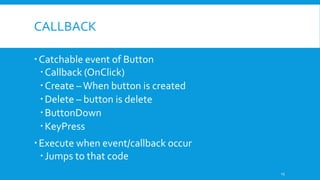
CALLBACK
Catchable event of Button
Callback (OnClick)
Create –When button is created
Delete – button is delete
ButtonDown
KeyPress
Execute when event/callback occur
Jumps to that code
15
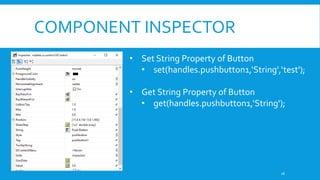
COMPONENT INSPECTOR
• Set String Property of Button
• set(handles.pushbutton1,‘String',‘test');
• Get String Property of Button
• get(handles.pushbutton1,‘String');
16
SOME USEFULTIPS
 Open Dialog Box
 [filename,pathname] = uigetfile('*.bmp;','Select bmp file');
 Save Dialog Box
 [filename, pathname] = uiputfile('*.bmp;','Save Image', filename);
 sum – Add all element of matrix or vector
 mean – Return mean of matrix or vector
 strcat – String concatenation (+ operator for string not supported)
 a(:) – Return Nx1 matrix considering a multi-dimensional.
17
SHOWING IMAGE
Add Axes component in GUI
Call imshow([…])
18
THANKYOU!
REFERENCES
 www.eee.metu.edu.tr/~yozbek/PDF430/Introduction%20to%20Matlab.ppt
20

Intro to Matlab + GUI

  • 1.
    INTRO TO MATLAB+ GUI By Syed Owais Ali Chishti (P146011)
  • 2.
    INTRODUCTION  MATLAB standsfor Matrix Laboratory.  MATLAB had many functions and toolboxes  Integration  Image Processing  Linear Algebra  …  Is high level language  Solves computing problems  in a fraction of the time 2
  • 3.
    MATLAB SCREEN  CommandWindow  type commands  Current Directory  View folders and m-files  Workspace  View program variables  Double click on a variable to see it in the Array Editor  Command History  view past commands  save a whole session using diary 3
  • 4.
    VARIABLE No need fortypes int a = 10; float pie = 3.1415; All variable are of double precision unless specified pie = 3.1415 s = 123 All variable are 1x1 matrices 4
  • 5.
    ARRAY a vector  x= [1 2 5 1]  x = 1 2 5 1 a matrix  x = [1 2 3; 5 1 4; 3 2 -1] transpose  y = x’ 5
  • 6.
    VECTOR/MATRIX GENERATION t =[1:10]  t = 1 2 3 4 5 6 7 8 9 10 x = [1:4; 5:8] x =  1 2 3 4  5 6 7 8 6
  • 7.
  • 8.
    MATRIX OPERATIONS + addition -subtraction * multiplication / division ^ power ‘ complex conjugate transpose 8
  • 9.
    FLOW CONTROL if ((a>3)& (b==5)) Some matlab Commands; elseif (a < 2) Some matlab commands; else Some matlab commands; end 9
  • 10.
    LOOPS for i=1:100 Matlab Commands; end while(condition) Matlab Commands; end 10
  • 11.
    FUNCTIONS  No returnkeyword  function out1=fname(in1,in2,in3)  Some commands  function [out1,out2]=name(in1,in2)  EXAMPLE  function [out1, out2] = sumprod(array) out1 = sum(array) out2 = prod(array) 11
  • 12.
    GUI APPLICATION  Startingnew App  Home > New > App > GUIDE  Home > New > App > App Designer  GUIDE  Procedural  App Designer  Object Oriented  Both have same components 12
  • 13.
  • 14.
  • 15.
    CALLBACK Catchable event ofButton Callback (OnClick) Create –When button is created Delete – button is delete ButtonDown KeyPress Execute when event/callback occur Jumps to that code 15
  • 16.
    COMPONENT INSPECTOR • SetString Property of Button • set(handles.pushbutton1,‘String',‘test'); • Get String Property of Button • get(handles.pushbutton1,‘String'); 16
  • 17.
    SOME USEFULTIPS  OpenDialog Box  [filename,pathname] = uigetfile('*.bmp;','Select bmp file');  Save Dialog Box  [filename, pathname] = uiputfile('*.bmp;','Save Image', filename);  sum – Add all element of matrix or vector  mean – Return mean of matrix or vector  strcat – String concatenation (+ operator for string not supported)  a(:) – Return Nx1 matrix considering a multi-dimensional. 17
  • 18.
    SHOWING IMAGE Add Axescomponent in GUI Call imshow([…]) 18
  • 19.
  • 20.