

How to Build Docker Persistent Storage on
Amazon Web Services
Greg Pellegrino
VP Products
SoftNAS
Introducing
2
Greg Pellegrino
VP Products
SoftNAS
© 2015 SoftNAS Inc.
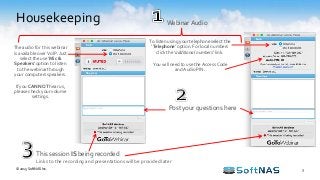
Housekeeping
3
Post your questions here
This session IS being recorded
Links to the recording and presentations will be provided later
To listen using your telephone select the
‘Telephone’ option. For local numbers
click the ‘additional numbers’ link.
You will need to use the Access Code
and Audio PIN.
The audio for this webinar
is available over VoIP. Just
select the use ‘Mic &
Speakers’ option to listen
to the webinar through
your computers speakers.
If you CAN NOT hear us,
please check your volume
settings.
Webinar Audio
© 2015 SoftNAS Inc.
Get My $100 AWS Credit!
4
First 100 attendees to register
(URL announced later)
© 2015 SoftNAS Inc.
Agenda
© 2015 SoftNAS Inc. 5
• Docker in 3 Minutes
• SoftNAS Architecture
• Persistent Storage for Docker
• Demo
– Set-up a Cloud NAS on AWS for Docker
Persistent Storage
• Amazon EC2 Container Service (ECS)
• SoftNAS Overview
• Q&A
Docker in 3 Minutes
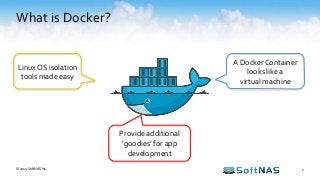
What is Docker?
7
A Docker Container
looks like a
virtual machine
Linux OS isolation
tools made easy
Provide additional
‘goodies’ for app
development
© 2015 SoftNAS Inc.
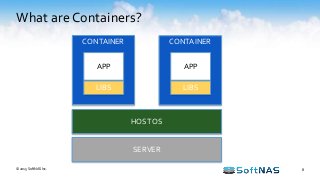
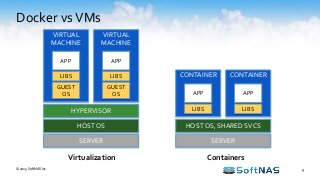
What are Containers?
8
CONTAINER CONTAINER
HOST OS
SERVER
APP
LIBS
APP
LIBS
© 2015 SoftNAS Inc.
Docker vsVMs
9
HOST OS
SERVER
HYPERVISOR
VIRTUAL
MACHINE
APP
LIBS
GUEST
OS
VIRTUAL
MACHINE
APP
LIBS
GUEST
OS
HOST OS, SHARED SVCS
SERVER
CONTAINER
APP
LIBS
CONTAINER
APP
LIBS
Virtualization Containers
© 2015 SoftNAS Inc.
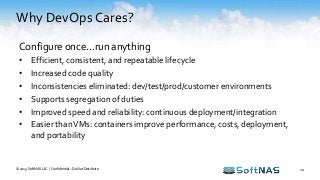
Why DevOps Cares?
© 2015 SoftNAS LLC | Confidential – Do Not Distribute 10
Configure once…run anything
• Efficient, consistent, and repeatable lifecycle
• Increased code quality
• Inconsistencies eliminated: dev/test/prod/customer environments
• Supports segregation of duties
• Improved speed and reliability: continuous deployment/integration
• Easier thanVMs: containers improve performance, costs, deployment,
and portability
SoftNAS Architecture
© 2015 SoftNAS LLC 12
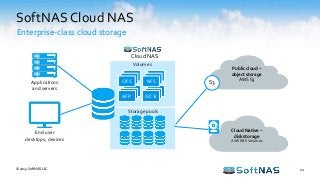
SoftNAS Cloud NAS
Enterprise-class cloud storage
Public cloud –
object storage
AWS S3
S3
End-user
desktops, devices
Applications
and servers
Volumes
AFP iSCSI
Storage pools
Cloud NAS
CIFS NFS
Cloud Native –
disk storage
AWS EBS Volumes
Persistent Storage for Docker
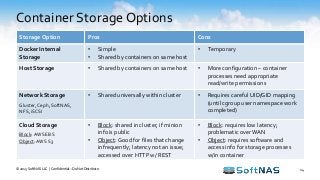
Container Storage Options
© 2015 SoftNAS LLC | Confidential – Do Not Distribute 14
Storage Option Pros Cons
Docker Internal
Storage
• Simple
• Shared by containers on same host
• Temporary
Host Storage • Shared by containers on same host • More configuration – container
processes need appropriate
read/write permissions
Network Storage
Gluster,Ceph, SoftNAS,
NFS, iSCSI
• Shared universally within cluster • Requires careful UID/GID mapping
(until cgroup user namespace work
completed)
Cloud Storage
Block: AWS EBS
Object:AWS S3
• Block: shared in cluster, if minion
info is public
• Object: Good for files that change
infrequently; latency not an issue;
accessed over HTTP w/ REST
• Block: requires low latency;
problematic over WAN
• Object: requires software and
access info for storage processes
w/in container
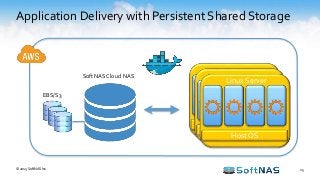
Application Delivery with Persistent Shared Storage
15© 2015 SoftNAS Inc.
SoftNAS Cloud NAS
EBS/S3
Host OS
Host OS
Host OS
Linux Server
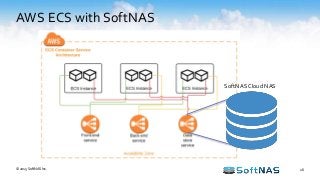
AWS ECS with SoftNAS
16© 2015 SoftNAS Inc.
SoftNAS Cloud NAS
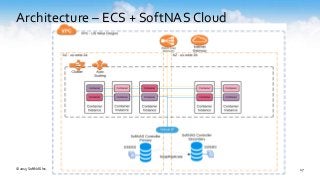
Architecture – ECS + SoftNAS Cloud
© 2015 SoftNAS Inc. 17
Demo
Set-up a Cloud NAS on AWS for Docker
Persistent storage
Demo
19© 2015 SoftNAS Inc.
View Demo inYouTube
Amazon EC2 Container Service (ECS)
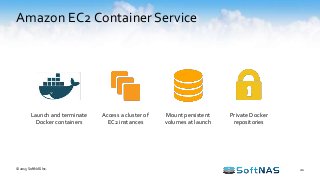
Amazon EC2 Container Service
21
Launch and terminate
Docker containers
Access a cluster of
EC2 instances
Mount persistent
volumes at launch
Private Docker
repositories
© 2015 SoftNAS Inc.
Amazon ECS Benefits
22
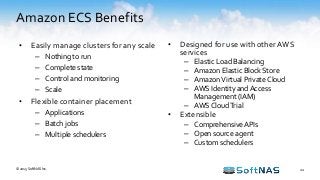
• Easily manage clusters for any scale
– Nothing to run
– Complete state
– Control and monitoring
– Scale
• Flexible container placement
– Applications
– Batch jobs
– Multiple schedulers
© 2015 SoftNAS Inc.
• Designed for use with other AWS
services
– Elastic Load Balancing
– Amazon Elastic Block Store
– AmazonVirtual Private Cloud
– AWS Identity and Access
Management (IAM)
– AWS CloudTrial
• Extensible
– ComprehensiveAPIs
– Open source agent
– Custom schedulers
SoftNAS Overview
SoftNAS Products
24
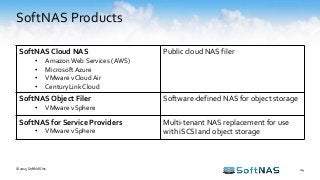
SoftNAS Cloud NAS
• Amazon Web Services (AWS)
• Microsoft Azure
• VMware vCloud Air
• CenturyLink Cloud
Public cloud NAS filer
SoftNAS Object Filer
• VMware vSphere
Software-defined NAS for object storage
SoftNAS for Service Providers
• VMware vSphere
Multi-tenant NAS replacement for use
with iSCSI and object storage
© 2015 SoftNAS Inc.
Technology Partners
25© 2015 SoftNAS Inc.
BrandsYou KnowTrust SoftNAS
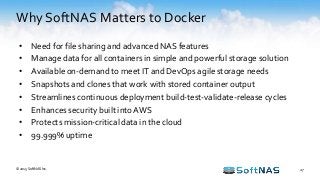
Why SoftNAS Matters to Docker
27
• Need for file sharing and advanced NAS features
• Manage data for all containers in simple and powerful storage solution
• Available on-demand to meet IT and DevOps agile storage needs
• Snapshots and clones that work with stored container output
• Streamlines continuous deployment build-test-validate-release cycles
• Enhances security built into AWS
• Protects mission-critical data in the cloud
• 99.999% uptime
© 2015 SoftNAS Inc.
Earn $100 AWS Credit!
28
First 100 attendees to register
bit.ly/docker-aws-credits
© 2015 SoftNAS Inc.
Next Steps
• Learn more
softnas.com/docker
• Try it
softnas.com/tryaws
• Contact sales
sales@softnas.com
Try It!
© 2015 SoftNAS Inc.
Questions?
Thank you

Docker Persistent Storage on Amazon Web Services (AWS)

  • 1.
    How to BuildDocker Persistent Storage on Amazon Web Services Greg Pellegrino VP Products SoftNAS
  • 2.
  • 3.
    Housekeeping 3 Post your questionshere This session IS being recorded Links to the recording and presentations will be provided later To listen using your telephone select the ‘Telephone’ option. For local numbers click the ‘additional numbers’ link. You will need to use the Access Code and Audio PIN. The audio for this webinar is available over VoIP. Just select the use ‘Mic & Speakers’ option to listen to the webinar through your computers speakers. If you CAN NOT hear us, please check your volume settings. Webinar Audio © 2015 SoftNAS Inc.
  • 4.
    Get My $100AWS Credit! 4 First 100 attendees to register (URL announced later) © 2015 SoftNAS Inc.
  • 5.
    Agenda © 2015 SoftNASInc. 5 • Docker in 3 Minutes • SoftNAS Architecture • Persistent Storage for Docker • Demo – Set-up a Cloud NAS on AWS for Docker Persistent Storage • Amazon EC2 Container Service (ECS) • SoftNAS Overview • Q&A
  • 6.
    Docker in 3Minutes
  • 7.
    What is Docker? 7 ADocker Container looks like a virtual machine Linux OS isolation tools made easy Provide additional ‘goodies’ for app development © 2015 SoftNAS Inc.
  • 8.
    What are Containers? 8 CONTAINERCONTAINER HOST OS SERVER APP LIBS APP LIBS © 2015 SoftNAS Inc.
  • 9.
    Docker vsVMs 9 HOST OS SERVER HYPERVISOR VIRTUAL MACHINE APP LIBS GUEST OS VIRTUAL MACHINE APP LIBS GUEST OS HOSTOS, SHARED SVCS SERVER CONTAINER APP LIBS CONTAINER APP LIBS Virtualization Containers © 2015 SoftNAS Inc.
  • 10.
    Why DevOps Cares? ©2015 SoftNAS LLC | Confidential – Do Not Distribute 10 Configure once…run anything • Efficient, consistent, and repeatable lifecycle • Increased code quality • Inconsistencies eliminated: dev/test/prod/customer environments • Supports segregation of duties • Improved speed and reliability: continuous deployment/integration • Easier thanVMs: containers improve performance, costs, deployment, and portability
  • 11.
  • 12.
    © 2015 SoftNASLLC 12 SoftNAS Cloud NAS Enterprise-class cloud storage Public cloud – object storage AWS S3 S3 End-user desktops, devices Applications and servers Volumes AFP iSCSI Storage pools Cloud NAS CIFS NFS Cloud Native – disk storage AWS EBS Volumes
  • 13.
  • 14.
    Container Storage Options ©2015 SoftNAS LLC | Confidential – Do Not Distribute 14 Storage Option Pros Cons Docker Internal Storage • Simple • Shared by containers on same host • Temporary Host Storage • Shared by containers on same host • More configuration – container processes need appropriate read/write permissions Network Storage Gluster,Ceph, SoftNAS, NFS, iSCSI • Shared universally within cluster • Requires careful UID/GID mapping (until cgroup user namespace work completed) Cloud Storage Block: AWS EBS Object:AWS S3 • Block: shared in cluster, if minion info is public • Object: Good for files that change infrequently; latency not an issue; accessed over HTTP w/ REST • Block: requires low latency; problematic over WAN • Object: requires software and access info for storage processes w/in container
  • 15.
    Application Delivery withPersistent Shared Storage 15© 2015 SoftNAS Inc. SoftNAS Cloud NAS EBS/S3 Host OS Host OS Host OS Linux Server
  • 16.
    AWS ECS withSoftNAS 16© 2015 SoftNAS Inc. SoftNAS Cloud NAS
  • 17.
    Architecture – ECS+ SoftNAS Cloud © 2015 SoftNAS Inc. 17
  • 18.
    Demo Set-up a CloudNAS on AWS for Docker Persistent storage
  • 19.
    Demo 19© 2015 SoftNASInc. View Demo inYouTube
  • 20.
    Amazon EC2 ContainerService (ECS)
  • 21.
    Amazon EC2 ContainerService 21 Launch and terminate Docker containers Access a cluster of EC2 instances Mount persistent volumes at launch Private Docker repositories © 2015 SoftNAS Inc.
  • 22.
    Amazon ECS Benefits 22 •Easily manage clusters for any scale – Nothing to run – Complete state – Control and monitoring – Scale • Flexible container placement – Applications – Batch jobs – Multiple schedulers © 2015 SoftNAS Inc. • Designed for use with other AWS services – Elastic Load Balancing – Amazon Elastic Block Store – AmazonVirtual Private Cloud – AWS Identity and Access Management (IAM) – AWS CloudTrial • Extensible – ComprehensiveAPIs – Open source agent – Custom schedulers
  • 23.
  • 24.
    SoftNAS Products 24 SoftNAS CloudNAS • Amazon Web Services (AWS) • Microsoft Azure • VMware vCloud Air • CenturyLink Cloud Public cloud NAS filer SoftNAS Object Filer • VMware vSphere Software-defined NAS for object storage SoftNAS for Service Providers • VMware vSphere Multi-tenant NAS replacement for use with iSCSI and object storage © 2015 SoftNAS Inc.
  • 25.
  • 26.
  • 27.
    Why SoftNAS Mattersto Docker 27 • Need for file sharing and advanced NAS features • Manage data for all containers in simple and powerful storage solution • Available on-demand to meet IT and DevOps agile storage needs • Snapshots and clones that work with stored container output • Streamlines continuous deployment build-test-validate-release cycles • Enhances security built into AWS • Protects mission-critical data in the cloud • 99.999% uptime © 2015 SoftNAS Inc.
  • 28.
    Earn $100 AWSCredit! 28 First 100 attendees to register bit.ly/docker-aws-credits © 2015 SoftNAS Inc.
  • 29.
    Next Steps • Learnmore softnas.com/docker • Try it softnas.com/tryaws • Contact sales sales@softnas.com Try It! © 2015 SoftNAS Inc.
  • 30.
  • 31.

Editor's Notes

  • #8 Docker allows you to package an application with all of its dependencies into a standardized unit for software development. Docker has been around for only a few short years, but container technology has been with us for decades. While containers proved useful in the mainframe era, Docker has hit its stride now due to a confluence of factors, including the prominence of Linux, the spread of virtualization, and the cloud's erosion of the importance of operating systems.
  • #9 Containers running on a single machine all share the same operating system kernel so they start instantly and make more efficient use of RAM. Images are constructed from layered filesystems so they can share common files, making disk usage and image downloads much more efficient. Docker containers are based on open standards allowing containers to run on all major Linux distributions and Microsoft operating systems with support for every infrastructure. Containers isolate applications from each other and the underlying infrastructure while providing an added layer of protection for the application.
  • #10 Containers have similar resource isolation and allocation benefits as virtual machines but a different architectural approach allows them to be much more portable and efficient. Virtual Machines: Each virtual machine includes the application, the necessary binaries and libraries and an entire guest operating system - all of which may be tens of GBs in size. Containers: Containers include the application and all of its dependencies, but share the kernel with other containers. They run as an isolated process in userspace on the host operating system. They’re also not tied to any specific infrastructure – Docker containers run on any computer, on any infrastructure and in any cloud. Benefits include: Lesser overhead Faster Instantiation Better Isolation Easier Scale
  • #15 http://cloud-mechanic.blogspot.com/2014/10/storage-concepts-in-docker-network-and.html
  • #16 SoftNAS leverages EBS and S3 for primary storage on AWS, making it highly available with additional NAS features, including unified storage via NFS, CIFS and iSCSI. SoftNAS Cloud NAS addresses the tough storage problems unsolved with containers alone; e.g., containers have only ephemeral storage and no shared storage. SoftNAS Cloud NAS provides persistent, feature-rich shared storage that Docker containers use to ensure high-availability and scale-out clustering.
  • #17 Front-end service displays information on a web page Back-end service provides APIs for the front-end service Data store provides storage SoftNAS Cloud provides persistent highly available shared storage for data stores
  • #22 Amazon EC2 Container Service (Amazon ECS) is a highly scalable, fast, container management service that makes it easy to run, stop, and manage Docker containers on a cluster of Amazon EC2 instances. Amazon ECS lets you launch and stop container-enabled applications with simple API calls, allows you to get the state of your cluster from a centralized service, and gives you access to many familiar Amazon EC2 features. You can use Amazon ECS to schedule the placement of containers across your cluster based on your resource needs, isolation policies, and availability requirements. Amazon ECS eliminates the need for you to operate your own cluster management and configuration management systems or worry about scaling your management infrastructure.
  • #27 The Street Netflix Yelp Starz Boeing Coca Cola Mars Incorporated Purdue University McGraw Hill Education Technicolor RioTinto Logitech Edmunds.com University of California Irvine AGC iN DEMAND Brightcove Atypon QualityNetContent Accelops OrigamiRisk Annalect Carbon Media Group CallSource Cytobank PageUp People FedBid Atlanticus Autodesk The Weather Channel KMC Music Corp Informatica Albo Aruba Infor Different Life DNM Technology IP
  • #30 - Reference NFR available for Team