Accessible Reordering
For Touch Devices
Sigute Kateivaite
@Sigute_K
Microsoft To
Do
Drag and drop
• Standard on mobile
• Familiar to many users
• Straight forward UX
• RecyclerView with ItemTouchHelper: a lot of tutorials
@Sigute_K
Drag and drop accessibility
problems
• Accurate pointer gestures required
• Not available with non-touch inputs
• Hard to use with Talkback
• Discoverability
@Sigute_K
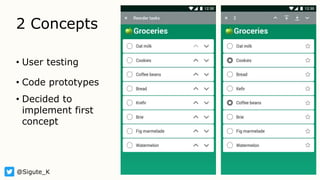
2 Concepts
• User testing
• Code prototypes
• Decided to
implement first
concept
@Sigute_K
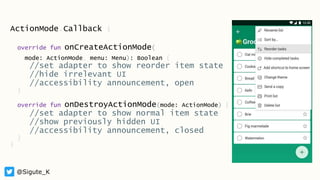
ActionMode.Callback {
override fun onCreateActionMode(
mode: ActionMode, menu: Menu): Boolean {
//set adapter to show reorder item state
//hide irrelevant UI
//accessibility announcement, open
}
override fun onDestroyActionMode(mode: ActionMode) {
//set adapter to show normal item state
//show previously hidden UI
//accessibility announcement, closed
}
}
@Sigute_K
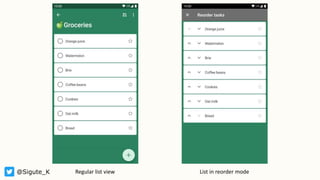
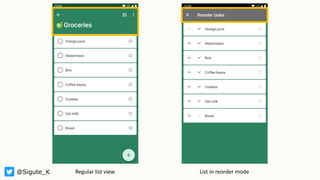
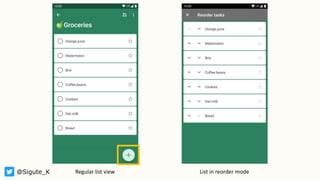
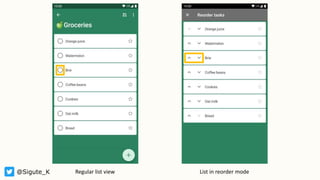
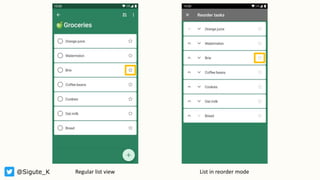
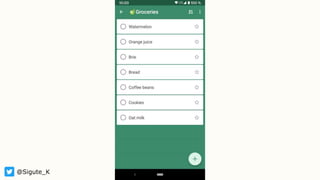
@Sigute_K Regular list view List in reorder mode
Talkback
• Action mode opened/closed announcements
• Item moved announcements and focus
• Descriptions for buttons
@Sigute_K
@Sigute_K
Thank you ❤️
@Sigute_K
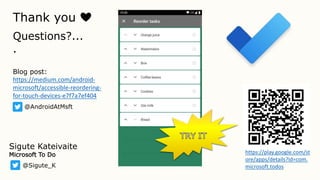
https://play.google.com/st
ore/apps/details?id=com.
microsoft.todos
Sigute Kateivaite
Microsoft To Do
Blog post:
https://medium.com/android-
microsoft/accessible-reordering-
for-touch-devices-e7f7a7ef404
Questions?...
.
@AndroidAtMsft

Accessible Reordering For Touch Devices

Editor's Notes

  • #3 If an app supports reordering, it will probably be via drag and drop Shared pattern on iOS and Android, as well as other devices UX mimics real life physics
  • #4 Motor disabilities - might not be able to accurately execute the gesture. Keyboard or other input device - might not be able to carry out gestures at all. For example, switch access. Users navigating via Talkback might find it hard to accurately drag an item without seeing where it is going. Lack of platform familiarity – users simply unfamiliar with drag and drop interaction and not be able to discover it easily when using the app Considering these issue – we needed a solution which does not rely on complex gestures, is available to everyone, regardless on whether they use touch or input device, and of course Talkback needs to be considered too
  • #5 Covering concept 1 here, second one explained more in the article Concept 1 tested better in user testing and was more straightforward to fit into existing codebase and figure out keyboard/Talkback navigation
  • #7 First: normal mode Second: adjusted for reorder and better UX
  • #8 Collapsible toolbar -> make sure it’s collapsed
  • #9 Add a new item button -> remove to allow user to focus on the main task
  • #10 User cannot complete the task in reorder mode. Replaced with buttons to introduce clarity and also to reduce complexity of the cell and to make space
  • #11 Marking task as important -> not the focus here, so kept for information, but not interactable This makes keyboard and Talkback navigation simpler
  • #14 Next steps: Gather more user feedback Try the app! Read the article for more information