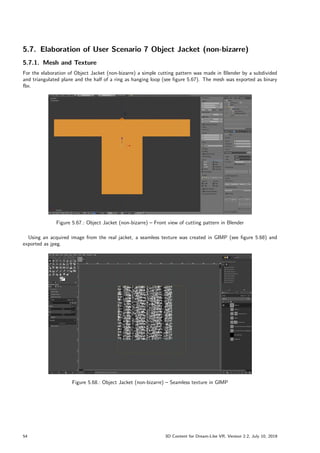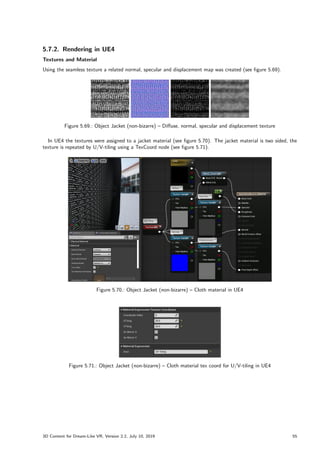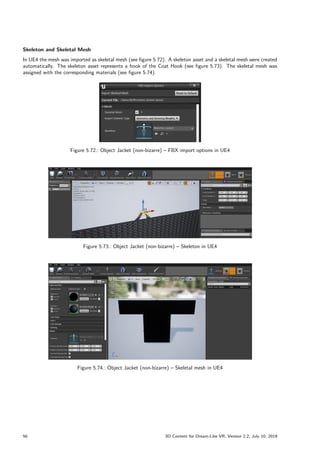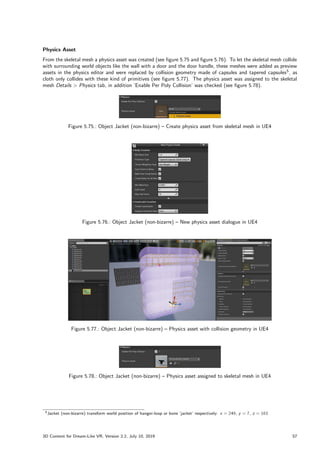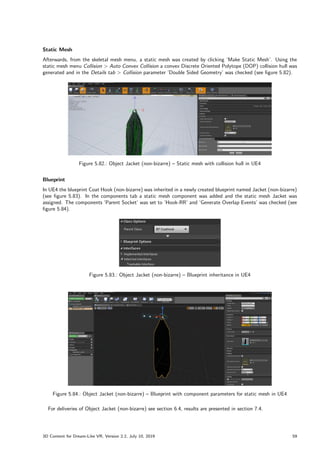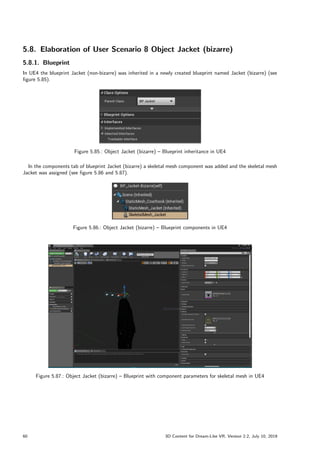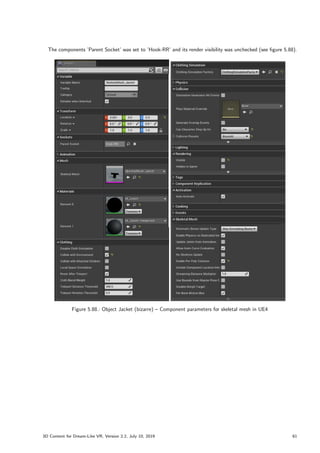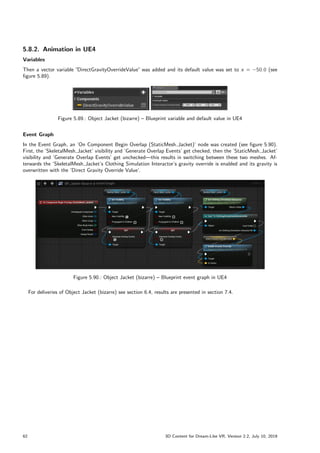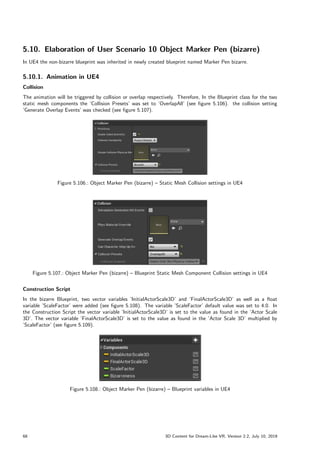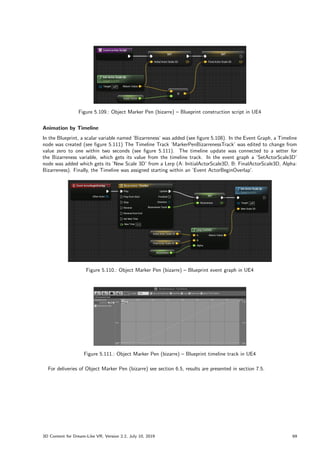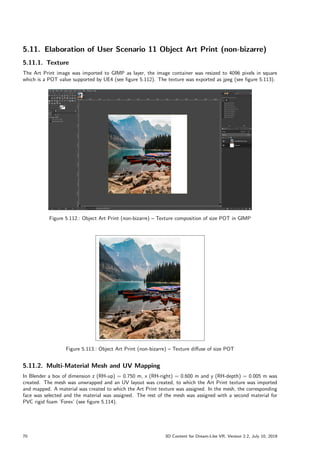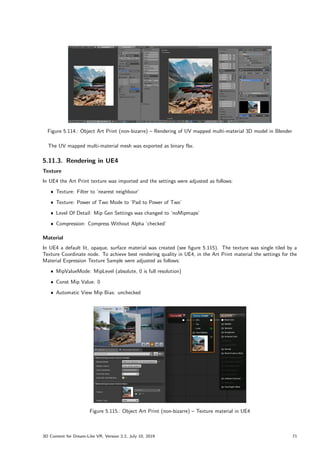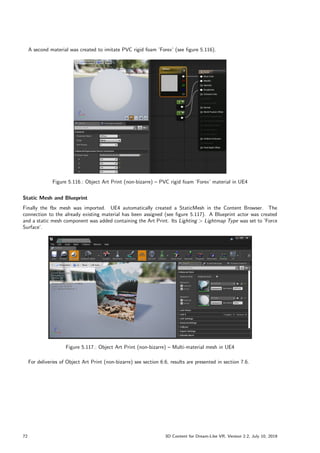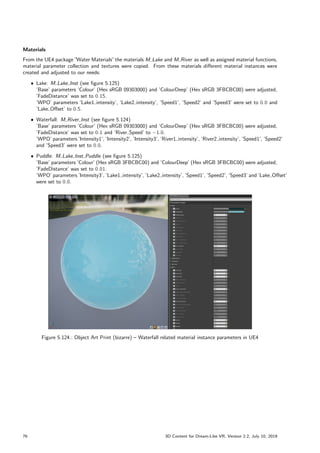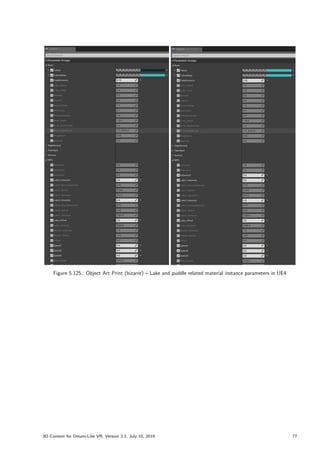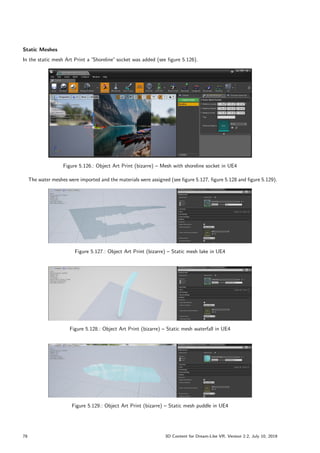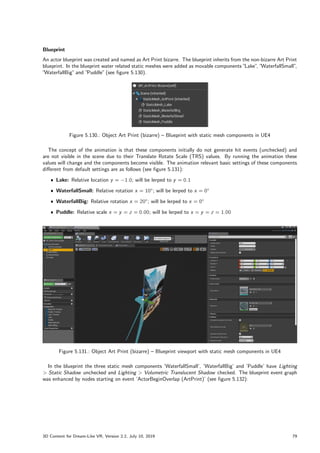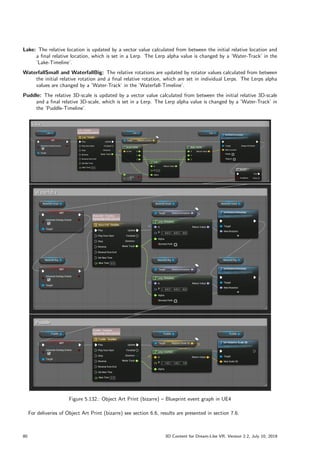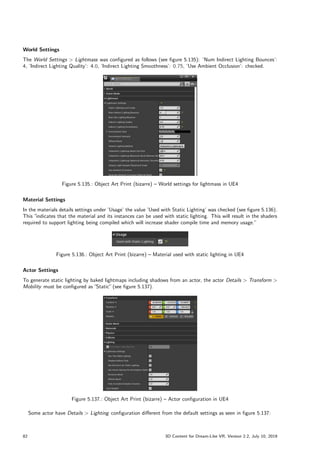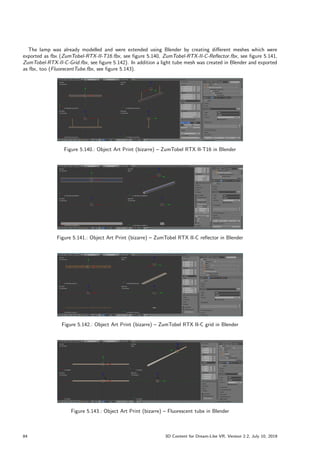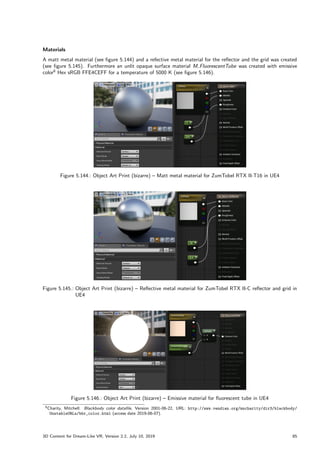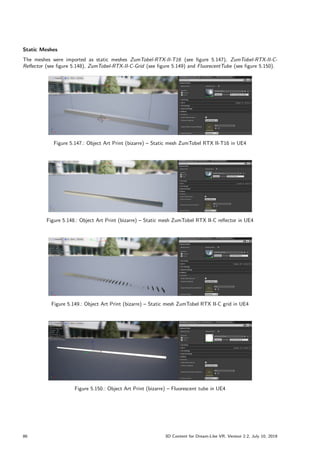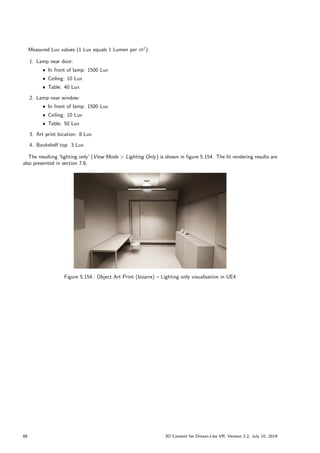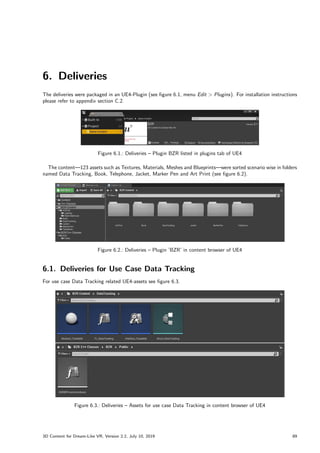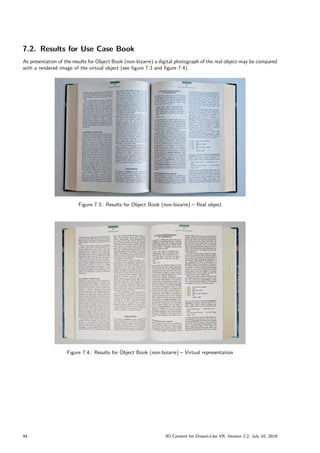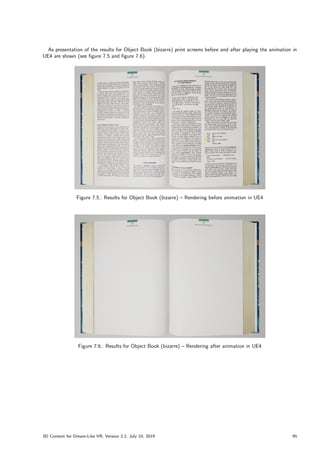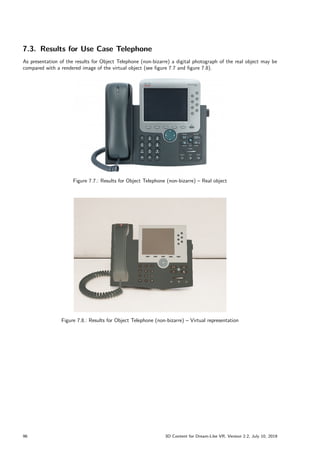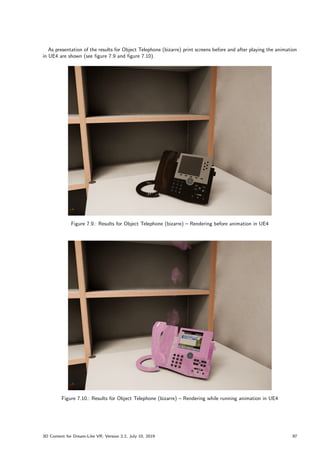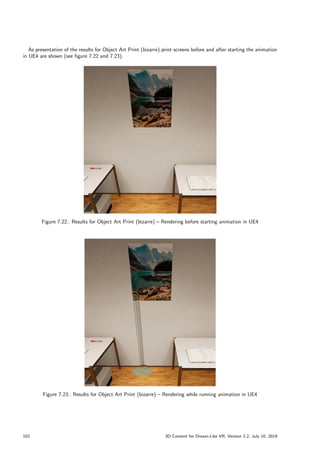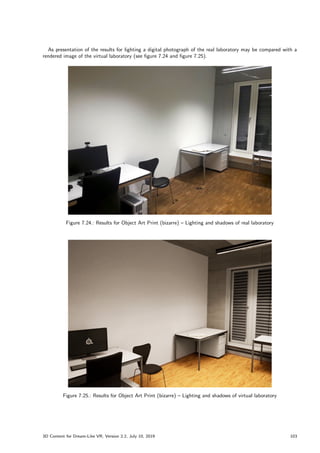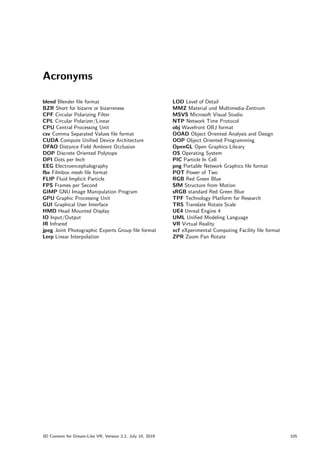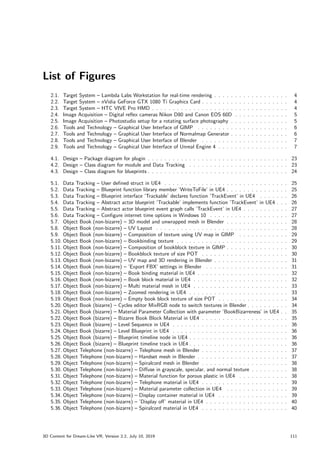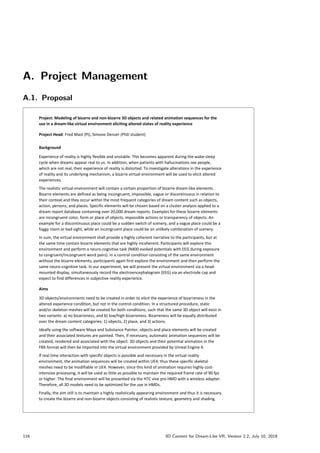



Experience of reality is highly flexible and unstable. This becomes apparent during the wake-sleep
cycle when dreams appear real to us. To investigate alterations in the experience of reality and its
underlying mechanism, a bizarre virtual environment will be used to elicit altered experiences.
Therefore, 3D objects and environments had to be created.
Index terms: Dream Simulation, Virtual Reality, 3D Modelling, Animation,
Rotating Surface Photography, Cloth Simulation, Fluid Simulation
Technology: HTC VIVE Pro, Unreal Engine, UE C++-Plugin Development, Blender,
GIMP, Nikon D80, Cannon EOS 60D, Nvidia Cloth, Nvidia Cataclysm
Department: Cognitive Psychology, Perception and Research Methods, Institute of Psychology
Project Head: Prof. Dr. Fred Mast, fred.mast@psy.unibe.ch
Researcher: PhD student MSc Simone Denzer, simone.denzer@psy.unibe.ch
Developer: Roland Bruggmann, roland.bruggmann@humdek.unibe.ch
Date: July 10, 2019
Technology Platform for Research TPF – Faculty of Human Sciences, University of Bern
3D Content for Dream-Like VR
Modelling and Animation of 3D Objects for
Use in a Dream-Like Virtual Environment
Project Documentation
Management Summary
Experience of reality is highly flexible and unstable. This becomes apparent during the wake-sleep cycle when dreams
appear real to us. In addition, when patients with hallucinations see people, which are not real, their experience of
reality is distorted. To investigate alterations in the experience of reality and its underlying mechanism, a bizarre
virtual environment will be used to elicit altered experiences.
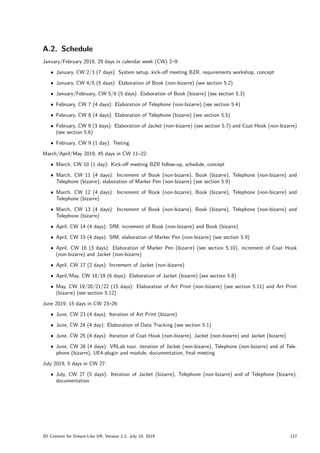
Therefore, 3D objects and environments were elaborated in order to elicit the experience of bizarreness in the
altered experience condition, but not in the control condition. In a structured procedure, static and/or skeleton
meshes were created for both conditions, such that the same 3D object exists in two variants. The created objects
do not load a target system too much, so that a frame rate of 90 Frames per Second (FPS) or more should be
achieved in the current target system.
In order to store data generated during an experiment persistently, the game engine has been modularly exten-
ded with the necessary functionality. The 3D objects and the module can be easily integrated into the existing
application, as they were packaged as a plugin and made available for distribution.
3D Content for Dream-Like VR, Version 2.2, July 10, 2019 i
Contents
1. Introduction 1
1.1. Vision . . . . . . . . . . . . . . . . . . . . . . . . . . . . . . . . . . . . . . . . . . . . . . . . . . 1
1.2. Problem Statement . . . . . . . . . . . . . . . . . . . . . . . . . . . . . . . . . . . . . . . . . . . 1
1.2.1. Content Creation Workflow . . . . . . . . . . . . . . . . . . . . . . . . . . . . . . . . . . . 1
1.2.2. Target System . . . . . . . . . . . . . . . . . . . . . . . . . . . . . . . . . . . . . . . . . . 1
1.2.3. Additional Conditions . . . . . . . . . . . . . . . . . . . . . . . . . . . . . . . . . . . . . . 1
1.3. Overview . . . . . . . . . . . . . . . . . . . . . . . . . . . . . . . . . . . . . . . . . . . . . . . . . 2
2. Methodology 3
2.1. Virtual Reality . . . . . . . . . . . . . . . . . . . . . . . . . . . . . . . . . . . . . . . . . . . . . . 3
2.1.1. 3D Objects . . . . . . . . . . . . . . . . . . . . . . . . . . . . . . . . . . . . . . . . . . . 3
2.1.2. Animation . . . . . . . . . . . . . . . . . . . . . . . . . . . . . . . . . . . . . . . . . . . . 3
2.1.3. Physics Simulation . . . . . . . . . . . . . . . . . . . . . . . . . . . . . . . . . . . . . . . 3
2.2. Target System . . . . . . . . . . . . . . . . . . . . . . . . . . . . . . . . . . . . . . . . . . . . . . 4
2.3. Image Acquisition . . . . . . . . . . . . . . . . . . . . . . . . . . . . . . . . . . . . . . . . . . . . 5
2.4. Tools . . . . . . . . . . . . . . . . . . . . . . . . . . . . . . . . . . . . . . . . . . . . . . . . . . . 6
2.4.1. Raster Graphics Editor . . . . . . . . . . . . . . . . . . . . . . . . . . . . . . . . . . . . . 6
2.4.2. Shader Maps Editor . . . . . . . . . . . . . . . . . . . . . . . . . . . . . . . . . . . . . . . 6
2.4.3. 3D Computer Graphics Editor . . . . . . . . . . . . . . . . . . . . . . . . . . . . . . . . . 7
2.4.4. Game Engine and Editor . . . . . . . . . . . . . . . . . . . . . . . . . . . . . . . . . . . . 7
3. Concept 9
3.1. Use Cases and User Scenarios . . . . . . . . . . . . . . . . . . . . . . . . . . . . . . . . . . . . . . 9
3.2. User Scenario 1 Data Tracking . . . . . . . . . . . . . . . . . . . . . . . . . . . . . . . . . . . . . 11
3.3. User Scenario 2 Object Book (non-bizarre) . . . . . . . . . . . . . . . . . . . . . . . . . . . . . . . 12
3.4. User Scenario 3 Object Book (bizarre) . . . . . . . . . . . . . . . . . . . . . . . . . . . . . . . . . 13
3.5. User Scenario 4 Object Telephone (non-bizarre) . . . . . . . . . . . . . . . . . . . . . . . . . . . . 14
3.6. User Scenario 5 Object Telephone (bizarre) . . . . . . . . . . . . . . . . . . . . . . . . . . . . . . 15
3.7. User Scenario 6 Object Coat Hook (non-bizarre) . . . . . . . . . . . . . . . . . . . . . . . . . . . . 16
3.8. User Scenario 7 Object Jacket (non-bizarre) . . . . . . . . . . . . . . . . . . . . . . . . . . . . . . 17
3.9. User Scenario 8 Object Jacket (bizarre) . . . . . . . . . . . . . . . . . . . . . . . . . . . . . . . . 18
3.10. User Scenario 9 Object Marker Pen (non-bizarre) . . . . . . . . . . . . . . . . . . . . . . . . . . . 19
3.11. User Scenario 10 Object Marker Pen (bizarre) . . . . . . . . . . . . . . . . . . . . . . . . . . . . . 20
3.12. User Scenario 11 Object Art Print (non-bizarre) . . . . . . . . . . . . . . . . . . . . . . . . . . . . 21
3.13. User Scenario 12 Object Art Print (bizarre) . . . . . . . . . . . . . . . . . . . . . . . . . . . . . . 22
4. Design 23
5. Elaboration 25
5.1. Elaboration of User Scenario 1 Data Tracking . . . . . . . . . . . . . . . . . . . . . . . . . . . . . 25
5.1.1. Data Tracking Struct . . . . . . . . . . . . . . . . . . . . . . . . . . . . . . . . . . . . . . 25
5.1.2. Data Tracking Function Library . . . . . . . . . . . . . . . . . . . . . . . . . . . . . . . . . 25
5.1.3. Interface Trackable . . . . . . . . . . . . . . . . . . . . . . . . . . . . . . . . . . . . . . . 26
5.1.4. Abstract Actor Trackable . . . . . . . . . . . . . . . . . . . . . . . . . . . . . . . . . . . . 26
5.2. Elaboration of User Scenario 2 Object Book (non-bizarre) . . . . . . . . . . . . . . . . . . . . . . . 28
5.2.1. Mesh and UV Layout . . . . . . . . . . . . . . . . . . . . . . . . . . . . . . . . . . . . . . 28
5.2.2. Textures . . . . . . . . . . . . . . . . . . . . . . . . . . . . . . . . . . . . . . . . . . . . . 29
5.2.3. Multi-Material Mesh . . . . . . . . . . . . . . . . . . . . . . . . . . . . . . . . . . . . . . 31
5.2.4. Rendering in UE4 . . . . . . . . . . . . . . . . . . . . . . . . . . . . . . . . . . . . . . . . 32
5.3. Elaboration of User Scenario 3 Object Book (bizarre) . . . . . . . . . . . . . . . . . . . . . . . . . 34
5.3.1. Texture . . . . . . . . . . . . . . . . . . . . . . . . . . . . . . . . . . . . . . . . . . . . . 34
3D Content for Dream-Like VR, Version 2.2, July 10, 2019 iii
5.3.2. Animation in Blender . . . . . . . . . . . . . . . . . . . . . . . . . . . . . . . . . . . . . . 34
5.3.3. Animation in UE4 . . . . . . . . . . . . . . . . . . . . . . . . . . . . . . . . . . . . . . . . 35
5.4. Elaboration of User Scenario 4 Object Telephone (non-bizarre) . . . . . . . . . . . . . . . . . . . . 37
5.4.1. Textured Meshes . . . . . . . . . . . . . . . . . . . . . . . . . . . . . . . . . . . . . . . . 37
5.4.2. Rendering in UE4 . . . . . . . . . . . . . . . . . . . . . . . . . . . . . . . . . . . . . . . . 38
5.5. Elaboration of User Scenario 5 Object Telephone (bizarre) . . . . . . . . . . . . . . . . . . . . . . 43
5.5.1. Materials . . . . . . . . . . . . . . . . . . . . . . . . . . . . . . . . . . . . . . . . . . . . . 43
5.5.2. Particle System . . . . . . . . . . . . . . . . . . . . . . . . . . . . . . . . . . . . . . . . . 47
5.5.3. Blueprint . . . . . . . . . . . . . . . . . . . . . . . . . . . . . . . . . . . . . . . . . . . . . 48
5.5.4. Animation in UE4 . . . . . . . . . . . . . . . . . . . . . . . . . . . . . . . . . . . . . . . . 48
5.6. Elaboration of User Scenario 6 Object Coat Hook (non-bizarre) . . . . . . . . . . . . . . . . . . . . 51
5.6.1. Multi-Material Mesh . . . . . . . . . . . . . . . . . . . . . . . . . . . . . . . . . . . . . . 51
5.6.2. Rendering in UE4 . . . . . . . . . . . . . . . . . . . . . . . . . . . . . . . . . . . . . . . . 52
5.7. Elaboration of User Scenario 7 Object Jacket (non-bizarre) . . . . . . . . . . . . . . . . . . . . . . 54
5.7.1. Mesh and Texture . . . . . . . . . . . . . . . . . . . . . . . . . . . . . . . . . . . . . . . . 54
5.7.2. Rendering in UE4 . . . . . . . . . . . . . . . . . . . . . . . . . . . . . . . . . . . . . . . . 55
5.8. Elaboration of User Scenario 8 Object Jacket (bizarre) . . . . . . . . . . . . . . . . . . . . . . . . 60
5.8.1. Blueprint . . . . . . . . . . . . . . . . . . . . . . . . . . . . . . . . . . . . . . . . . . . . . 60
5.8.2. Animation in UE4 . . . . . . . . . . . . . . . . . . . . . . . . . . . . . . . . . . . . . . . . 62
5.9. Elaboration of User Scenario 9 Object Marker Pen (non-bizarre) . . . . . . . . . . . . . . . . . . . 63
5.9.1. Mesh and UV Layout . . . . . . . . . . . . . . . . . . . . . . . . . . . . . . . . . . . . . . 63
5.9.2. Texture . . . . . . . . . . . . . . . . . . . . . . . . . . . . . . . . . . . . . . . . . . . . . 63
5.9.3. Multi-Material Mesh . . . . . . . . . . . . . . . . . . . . . . . . . . . . . . . . . . . . . . 64
5.9.4. Rendering in UE4 . . . . . . . . . . . . . . . . . . . . . . . . . . . . . . . . . . . . . . . . 65
5.10. Elaboration of User Scenario 10 Object Marker Pen (bizarre) . . . . . . . . . . . . . . . . . . . . . 68
5.10.1. Animation in UE4 . . . . . . . . . . . . . . . . . . . . . . . . . . . . . . . . . . . . . . . . 68
5.11. Elaboration of User Scenario 11 Object Art Print (non-bizarre) . . . . . . . . . . . . . . . . . . . . 70
5.11.1. Texture . . . . . . . . . . . . . . . . . . . . . . . . . . . . . . . . . . . . . . . . . . . . . 70
5.11.2. Multi-Material Mesh and UV Mapping . . . . . . . . . . . . . . . . . . . . . . . . . . . . . 70
5.11.3. Rendering in UE4 . . . . . . . . . . . . . . . . . . . . . . . . . . . . . . . . . . . . . . . . 71
5.12. Elaboration of User Scenario 12 Object Art Print (bizarre) . . . . . . . . . . . . . . . . . . . . . . 73
5.12.1. Water Simulation in UE4 . . . . . . . . . . . . . . . . . . . . . . . . . . . . . . . . . . . . 73
5.12.2. Lighting in UE4 . . . . . . . . . . . . . . . . . . . . . . . . . . . . . . . . . . . . . . . . . 81
6. Deliveries 89
6.1. Deliveries for Use Case Data Tracking . . . . . . . . . . . . . . . . . . . . . . . . . . . . . . . . . 89
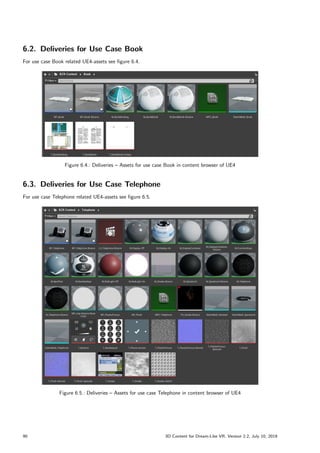
6.2. Deliveries for Use Case Book . . . . . . . . . . . . . . . . . . . . . . . . . . . . . . . . . . . . . . 90
6.3. Deliveries for Use Case Telephone . . . . . . . . . . . . . . . . . . . . . . . . . . . . . . . . . . . 90
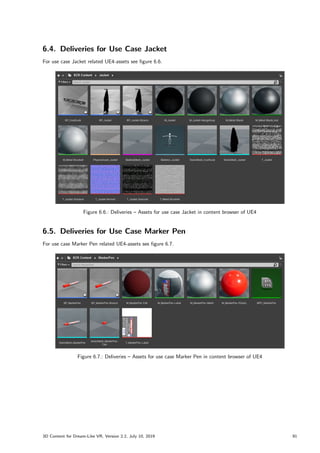
6.4. Deliveries for Use Case Jacket . . . . . . . . . . . . . . . . . . . . . . . . . . . . . . . . . . . . . 91
6.5. Deliveries for Use Case Marker Pen . . . . . . . . . . . . . . . . . . . . . . . . . . . . . . . . . . . 91
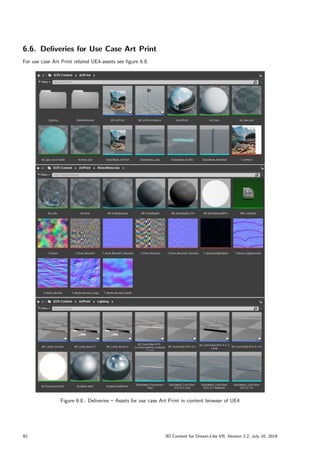
6.6. Deliveries for Use Case Art Print . . . . . . . . . . . . . . . . . . . . . . . . . . . . . . . . . . . . 92
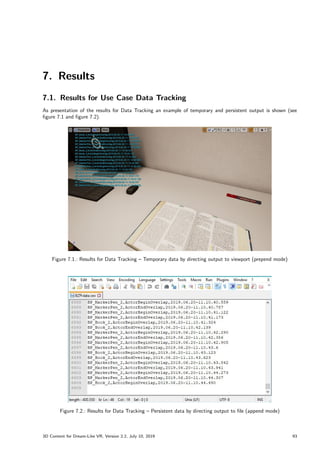
7. Results 93
7.1. Results for Use Case Data Tracking . . . . . . . . . . . . . . . . . . . . . . . . . . . . . . . . . . 93
7.2. Results for Use Case Book . . . . . . . . . . . . . . . . . . . . . . . . . . . . . . . . . . . . . . . 94
7.3. Results for Use Case Telephone . . . . . . . . . . . . . . . . . . . . . . . . . . . . . . . . . . . . . 96
7.4. Results for Use Case Jacket . . . . . . . . . . . . . . . . . . . . . . . . . . . . . . . . . . . . . . . 98
7.5. Results for Use Case Marker Pen . . . . . . . . . . . . . . . . . . . . . . . . . . . . . . . . . . . . 100
7.6. Results for Use Case Art Print . . . . . . . . . . . . . . . . . . . . . . . . . . . . . . . . . . . . . 101
Acronyms 105
Glossary 106
References 108
Picture Reference 109
iv 3D Content for Dream-Like VR, Version 2.2, July 10, 2019
List of Figures 111
List of Tables 114
A. Project Management 116
A.1. Proposal . . . . . . . . . . . . . . . . . . . . . . . . . . . . . . . . . . . . . . . . . . . . . . . . . 116
A.2. Schedule . . . . . . . . . . . . . . . . . . . . . . . . . . . . . . . . . . . . . . . . . . . . . . . . . 117
B. Materials 118
B.1. Bizarreness . . . . . . . . . . . . . . . . . . . . . . . . . . . . . . . . . . . . . . . . . . . . . . . . 119
B.2. Rotating Surface Photography . . . . . . . . . . . . . . . . . . . . . . . . . . . . . . . . . . . . . 121
B.3. Fluid Simulation . . . . . . . . . . . . . . . . . . . . . . . . . . . . . . . . . . . . . . . . . . . . . 126
C. Solution 127
C.1. Repositories . . . . . . . . . . . . . . . . . . . . . . . . . . . . . . . . . . . . . . . . . . . . . . . 127
C.2. Plugin . . . . . . . . . . . . . . . . . . . . . . . . . . . . . . . . . . . . . . . . . . . . . . . . . . 127
C.3. VRLab Tour . . . . . . . . . . . . . . . . . . . . . . . . . . . . . . . . . . . . . . . . . . . . . . . 128
3D Content for Dream-Like VR, Version 2.2, July 10, 2019 v
vi 3D Content for Dream-Like VR, Version 2.2, July 10, 2019
1. Introduction
1.1. Vision
Experience of reality is highly flexible and unstable. This becomes apparent during the wake-sleep cycle when dreams
appear real to us. In addition, when patients with hallucinations see people, which are not real, their experience of
reality is distorted. To investigate alterations in the experience of reality and its underlying mechanism, a bizarre
virtual environment will be used to elicit altered experiences.
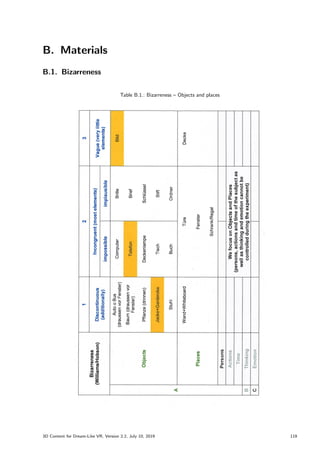
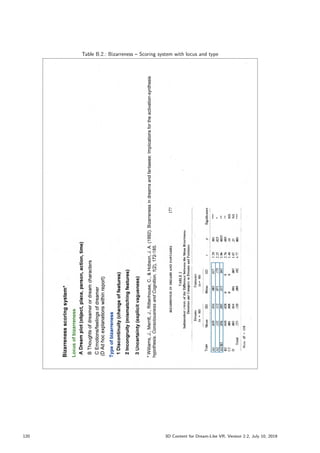
The realistic virtual environment will contain a certain proportion of bizarre dream-like elements. Bizarre elements
are defined as being incongruent, impossible, vague or discontinuous in relation to their context and they occur
within the most frequent categories of dream content such as objects, action, persons, and places. Specific
elements will be chosen based on a cluster analysis applied to a dream report database containing over 20,000
dream reports. Examples for these bizarre elements are incongruent color, form or place of objects, impossible
actions or transparency of objects. An example for a discontinuous place could be a sudden switch of scenery, and
a vague place could be a foggy room or bad sight, while an incongruent place could be an unlikely combination of
scenery.
In sum, the virtual environment shall provide a highly coherent narrative to the participants, but at the same
time contain bizarre elements that are highly incoherent. Participants will explore this environment and perform a
neuro-cognitive task (N400 evoked potentials with Electroencephalography (EEG) during exposure to congruent/in-
congruent word pairs). In a control condition consisting of the same environment without the bizarre elements,
participants again first explore the environment and then perform the same neuro-cognitive task. In our experiment,
we will present the virtual environment via a head-mounted display, simultaneously record the EEG via an electrode
cap and expect to find differences in subjective reality experience.
1.2. Problem Statement
3D objects and environments need to be created in order to elicit the experience of bizarreness in the altered
experience condition, but not in the control condition. In a structured procedure, static and/or skeleton meshes
will be created for both conditions, such that the same 3D object will exist in two variants: no bizarreness, and
low/high bizarreness. Bizarreness will be equally distributed over the dream content categories objects, place, and
actions.
1.2.1. Content Creation Workflow
Ideally using the software Maya and Substance Painter, objects and place elements will be created and their
associated textures are painted. Then, if necessary, automatic animation sequences will be created, rendered and
associated with the object. 3D objects and their potential animation in the Filmbox mesh file format (fbx) will
then be imported into the virtual environment provided by Unreal Engine 4 (UE4).
If real-time interaction with specific objects is possible and necessary in the virtual reality environment, the
animation sequences will be created within UE4, thus these specific skeletal meshes need to be modifiable in UE4.
However, since this kind of animation requires highly cost-intensive processing, it will be used as little as possible
to maintain the required frame rate of 90 FPS or higher.
1.2.2. Target System
The final environment will be presented via the HTC VIVE Pro Head Mounted Display (HMD) with a wireless
adapter. Therefore, all 3D models need to be optimized for the use in HMDs.
1.2.3. Additional Conditions
Finally, the aim still is to maintain a highly realistically appearing environment and thus it is necessary to create
the non-bizarre and bizarre objects consisting of realistic texture, geometry and shading. Details will have to be
3D Content for Dream-Like VR, Version 2.2, July 10, 2019 1
discussed and agreed upon with the responsible persons for the project.
1.3. Overview
This document serves as project documentation of the work done opposite the researcher authorized to give
instructions, the project head, the commission as well as for future projects of the Technology Platform for Research
(TPF). This document is also intended to serve as a communication tool during the iterative process of elaboration.
Suggestions, ideas or corrections are very welcome.
In the methodology chapter 2, a short description of background topics in the context of virtual reality may be
found. The target system and the tools used are also briefly described.
With a concept as shown in chapter 3 the use cases and user scenarios for 3D Content for Dream-Like VR
were described. They were subsequently designed (see chapter 4) and elaborated as documented in chapter 5. An
overview of the deliveries can be found in chapter 6. The results are presented in chapter 7.
For further information on project management see appendix chapter A.
2 3D Content for Dream-Like VR, Version 2.2, July 10, 2019
2. Methodology
2.1. Virtual Reality
2.1.1. 3D Objects
A variety of static or animated objects is needed to assemble a virtual scene. These objects are typically expressed
by 3D-models containing information about the surface geometry of the objects (expressed by a set of triangles in
space) and about the graphical representation of the surfaces (textures).
2.1.2. Animation
In a further step, different sequences of motions can be created and associated to a 3D object—so called anima-
tions—which can be played back in 3D graphics environments (e.g., in virtual reality environments) allowing for
an interactive selection of motions during the experiments.
Baked Animation
In the case of animated objects, information about the time-related changes of the surface geometry and/or the
textures may be stored inside the models as well. Typically, the animations are created and calculated in a 3D
authoring software (e.g., Autodesk 3DS Max, Blender, SketchUp) and then firmly associated to the mesh—a
process that is called baking.
Real-time Animation
Another approach for animation is to expose a model to the 3D graphics environment and allow for a real-time
modification of its 3D-surface. Contrary to a baked animation, this process requires a real-time calculation of the
positions and orientations of all triangles of the mesh, which is a calculation intensive procedure requiring powerful
graphics hardware and a dedication of the process to the hardware (hardware skinning) and in addition optimized
3D-surface meshes for real-time calculations (low-poly meshes)).
Particle System
Moving content can be represented by a particle system. In this case the 3D model itself may not be animated.
Particles are small, simple images or meshes that are displayed and moved in great numbers by a particle system.
Each particle represents a small portion of a fluid or amorphous entity and the effect of all the particles together
creates the impression of the complete entity. Using a smoke cloud as an example, each particle would have a small
smoke texture resembling a tiny cloud in its own right. When many of these mini-clouds are arranged together in
an area of the scene, the overall effect is of a larger, volume-filling cloud.
2.1.3. Physics Simulation
To have convincing physical behaviour, an object in a game must accelerate correctly and be affected by collisions,
gravity and other forces. Physics engines provide components that handle the physical simulation. In game engine
editors, with few parameter settings, one can create objects that behave passively in a realistic way—i.e., they will
be moved by collisions and falls but will not start moving by themselves. By controlling the physics from scripts,
one can give an object the dynamics of a vehicle, or a machine.
3D Content for Dream-Like VR, Version 2.2, July 10, 2019 3
2.2. Target System
In the laboratory, a Lambda Labs workstation1
running Microsoft Windows 10 acts as a real-time rendering station
(see figure 2.1). The rendering is driven by an nVidia GeForce GTX 1080 Ti graphics card (see figure 2.2). For a
detailed specification refer to [GTX1080Ti]. As target system, a HTC VIVE Pro is in use which was released on
January 2018 (see figure 2.3). The HMD comes with a resolution of 2880 x 1600 pixels or 1440 x 1600 pixels per
eye respectively (cp. [VIVE]). Two SteamVR 2.0 Lighthouse base stations and a wireless adapter are in use.
Figure 2.1.: Target System – Lambda Labs Workstation for real-time rendering
Figure 2.2.: Target System – nVidia GeForce GTX 1080 Ti Graphics Card
Figure 2.3.: Target System – HTC VIVE Pro HMD
1Lambda Labs, Inc., URL: https://lambdalabs.com/
4 3D Content for Dream-Like VR, Version 2.2, July 10, 2019
2.3. Image Acquisition
For image acquisition a digital single-lens reflex camera Nikon D802
and specifications [NikonD80]) and a tripod
from Material und Multimedia-Zentrum (MMZ) was used (see figure 2.4.
The creation of complex 3D models was made by Structure from Motion (SfM) as described in a rotating
surface workflow (cp. [RSWF]). The digital image acquisition was made by 360° surface rotation photography
in a photo studio at [PHBern, Medienwerkstatt] with a digital single-lens reflex camera Canon EOS 60D3
(see
figure 2.4 and specifications [Canon60D]). As recommended in the expert guide, the equipment was supplemented
with further components like a polarizing foil mounted in front of the lighting lamp in combination with a Circular
Polarizer/Linear (CPL) filter mounted on the camera lens. For color calibration a color checker for white/color
balancing was used (see figure 2.5). For the surface rotation photography a rotating platform covered with blue
foamed rubber was created (see appendix section B.2).
Figure 2.4.: Image Acquisition – Digital reflex cameras Nikon D80 and Canon EOS 60D
Figure 2.5.: Image Acquisition – Photostudio setup for a rotating surface photography
2Nikon D80, with AF-S DX Zoom-NIKKOR 18–70mm f/3.5–4.5G IF-ED (diameter 67mm).
3Canon EOS 60D, with Canon EF-S 18–55mm IS II lens f/3.5–5.6 (diameter 58mm).
3D Content for Dream-Like VR, Version 2.2, July 10, 2019 5
2.4. Tools
In general for meshes the file format fbx is used and for raster graphics the file format Joint Photographic Experts
Group file format (jpeg) or Portable Network Graphics file format (png) was used.
2.4.1. Raster Graphics Editor
The software GNU Image Manipulation Program (GIMP) is a freely distributed program for such tasks as photo
retouching, image composition and image authoring (see figure 2.6). The workspace files are stored as eXperimental
Computing Facility file format (xcf). We use GIMP version 2.10.8 (for the software see [GIMP]).
Figure 2.6.: Tools and Technology – Graphical User Interface of GIMP
2.4.2. Shader Maps Editor
The software product Normalmap Generator is a freely distributed program for generation of shader maps like
normal, specular and displacement map (see figure 2.7). We use Normalmap Generator version 0.4.4 (for the
software see [NMG]).
Figure 2.7.: Tools and Technology – Graphical User Interface of Normalmap Generator
6 3D Content for Dream-Like VR, Version 2.2, July 10, 2019
2.4.3. 3D Computer Graphics Editor
The software Blender is a free and open source 3D creation suite (see figure 2.8). It supports the entirety of
the 3D pipeline-modeling, rigging, animation, simulation, rendering, compositing and motion tracking, even video
editing and game creation (cp. documentation [BlenderDoc]). The workspace files are stored as Blender file format
(blend). We use Blender version 2.79b (for the software see [Blender]).
Figure 2.8.: Tools and Technology – Graphical User Interface of Blender
2.4.4. Game Engine and Editor
The Unreal Engine software is a game engine and editor at the same time. The application with a graphical
development environment (see figure 2.9) can be used to create interactive 3D applications or real-time animations,
such as those known for visualizations in 3D computer games or architecture (cp. documentation [UE4Man] and
API reference [UE4API]). We use UE4 version 4.21.2 (for the software see [UE4]).
Figure 2.9.: Tools and Technology – Graphical User Interface of Unreal Engine 4
3D Content for Dream-Like VR, Version 2.2, July 10, 2019 7
8 3D Content for Dream-Like VR, Version 2.2, July 10, 2019
3. Concept
3.1. Use Cases and User Scenarios
The laboratory room Fab08-D268 is already modelled as virtual environment including some office equipment. The
already existing virtual environment has to be supplemented with following objects: a Book, a Telephone, a Jacket
on a Coat Hook, a Marker Pen and an Art Print. These shall be available in a static form (non-bizarre) as well as
in an animated form (bizarre). In addition with the help of Data Tracking infrastructure, data must be collected
during an experiment and stored persistently for further use. This results in the following use cases:
ˆ Use Case Data Tracking, includes Module and Plugin
ˆ Use Case Book (non-bizarre, bizarre)
ˆ Use Case Telephone (non-bizarre, bizarre)
ˆ Use Case Jacket (non-bizarre, bizarre), includes a Coat Hook (non-bizarre)
ˆ Use Case Marker Pen (non-bizarre, bizarre), image acquisition by rotating surface photography
ˆ Use Case Art Print (non-bizarre, bizarre), includes water simulation and lighting
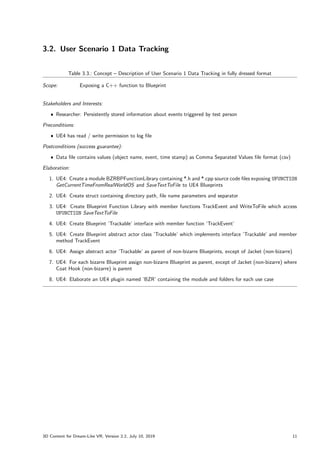
Before starting the project, some 3D objects have been described by the researcher and have been handed over
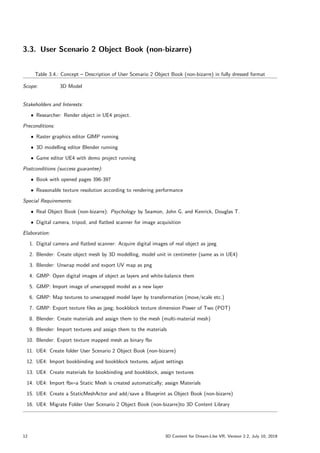
to the author at the kick-off meeting (see table 3.1). A use case can have several occurrences in the form of user
scenarios, therefore the deliveries were modelled in several iterations as shown in table 3.2.
Table 3.1.: Concept – 3D object description at kick-off meeting
Bild
Gemälde/Bild ist
verschwommen, sieht
trotzdem irgendwie wie
ein bekanntes Gemälde
"us,(Forr
ist verändert )
Telefon
Telefon ist gelb und
plüschig und stösst ab
und zu bunte
Rauchwolken aus
(+Geräusch?)
Jacke+Garderobe
Jacke hängt an
Garderobe; auf
Annäherung:
1) verschiebt sich die
Gravitation nur für die
Jacke in Laufrichtung
ODER 2) verwandelt
sich Jacke in einen Ast
oder lnstrufient
(+Geräusch?)
Meshes:
1) Verwendung der Asset-Library von Dejan Popic & Sebastian Strahm
2) Eigenes Erstellen durch Roland Bruggmann
Variationen:
1) Baked Animations - RB
2) Via Engine Features - SD
3D Content for Dream-Like VR, Version 2.2, July 10, 2019 9
Table 3.2.: Concept – User scenarios in brief format
User Scenario 1 Data Tracking: Module and assets for the use in UE4 blueprints.
For a description in fully dressed format see section 3.2.
User Scenario 2 Object Book (non-bizarre): Textured Mesh for the use in UE4.
For a description in fully dressed format see section 3.3.
User Scenario 3 Object Book (bizarre): Real-time animation of Object Book (non-bizarre) in UE4.
For a description in fully dressed format see section 3.4.
User Scenario 4 Object Telephone (non-bizarre): Textured Mesh for the use in UE4.
For a description in fully dressed format see section 3.5.
User Scenario 5 Object Telephone (bizarre): Real-time animation of Object Telephone (non-bizarre) in UE4.
For a description in fully dressed format see section 3.6.
User Scenario 6 Object Coat Hook (non-bizarre): Textured Mesh for the use in UE4.
For a description in fully dressed format see section 3.7.
User Scenario 7 Object Jacket (non-bizarre): Textured Mesh for the use in UE4.
For a description in fully dressed format see section 3.8.
User Scenario 8 Object Jacket (bizarre): Real-time animation of Object Jacket (non-bizarre) in UE4.
For a description in fully dressed format see section 3.9.
User Scenario 9 Object Marker Pen (non-bizarre): Textured Mesh for the use in UE4.
For a description in fully dressed format see section 3.10.
User Scenario 10 Object Marker Pen (bizarre): Real-time animation of Object Marker Pen (non-bizarre) in
UE4.
For a description in fully dressed format see section 3.11.
User Scenario 11 Object Art Print (non-bizarre): Textured Mesh for the use in UE4.
For a description in fully dressed format see section 3.12.
User Scenario 12 Object Art Print (bizarre): Real-time animation of Object Art Print (non-bizarre) in UE4.
For a description in fully dressed format see section 3.13.
10 3D Content for Dream-Like VR, Version 2.2, July 10, 2019
3.2. User Scenario 1 Data Tracking
Table 3.3.: Concept – Description of User Scenario 1 Data Tracking in fully dressed format
Scope: Exposing a C++ function to Blueprint
Stakeholders and Interests:
ˆ Researcher: Persistently stored information about events triggered by test person
Preconditions:
ˆ UE4 has read / write permission to log file
Postconditions (success guarantee):
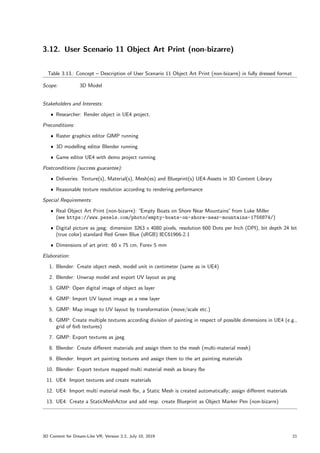
ˆ Data file contains values (object name, event, time stamp) as Comma Separated Values file format (csv)
Elaboration:
1. UE4: Create a module BZRBPFunctionLibrary containing *.h and *.cpp source code files exposing UFUNCTION
GetCurrentTimeFromRealWorldOS and SaveTextToFile to UE4 Blueprints
2. UE4: Create struct containing directory path, file name parameters and separator
3. UE4: Create Blueprint Function Library with member functions TrackEvent and WriteToFile which access
UFUNCTION SaveTextToFile
4. UE4: Create Blueprint ’Trackable’ interface with member function ’TrackEvent’
5. UE4: Create Blueprint abstract actor class ’Trackable’ which implements interface ’Trackable’ and member
method TrackEvent
6. UE4: Assign abstract actor ’Trackable’ as parent of non-bizarre Blueprints, except of Jacket (non-bizarre)
7. UE4: For each bizarre Blueprint assign non-bizarre Blueprint as parent, except of Jacket (non-bizarre) where
Coat Hook (non-bizarre) is parent
8. UE4: Elaborate an UE4 plugin named ’BZR’ containing the module and folders for each use case
3D Content for Dream-Like VR, Version 2.2, July 10, 2019 11
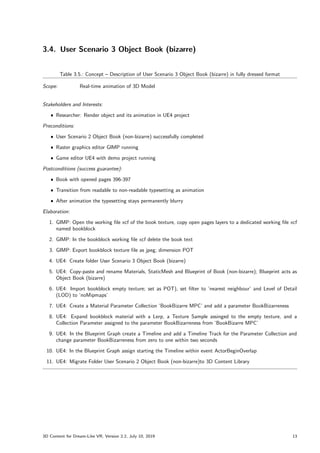
3.3. User Scenario 2 Object Book (non-bizarre)
Table 3.4.: Concept – Description of User Scenario 2 Object Book (non-bizarre) in fully dressed format
Scope: 3D Model
Stakeholders and Interests:
ˆ Researcher: Render object in UE4 project.
Preconditions:
ˆ Raster graphics editor GIMP running
ˆ 3D modelling editor Blender running
ˆ Game editor UE4 with demo project running
Postconditions (success guarantee):
ˆ Book with opened pages 396-397
ˆ Reasonable texture resolution according to rendering performance
Special Requirements:
ˆ Real Object Book (non-bizarre): Psychology by Seamon, John G. and Kenrick, Douglas T.
ˆ Digital camera, tripod, and flatbed scanner for image acquisition
Elaboration:
1. Digital camera and flatbed scanner: Acquire digital images of real object as jpeg
2. Blender: Create object mesh by 3D modelling, model unit in centimeter (same as in UE4)
3. Blender: Unwrap model and export UV map as png
4. GIMP: Open digital images of object as layers and white-balance them
5. GIMP: Import image of unwrapped model as a new layer
6. GIMP: Map textures to unwrapped model layer by transformation (move/scale etc.)
7. GIMP: Export texture files as jpeg; bookblock texture dimension Power of Two (POT)
8. Blender: Create materials and assign them to the mesh (multi-material mesh)
9. Blender: Import textures and assign them to the materials
10. Blender: Export texture mapped mesh as binary fbx
11. UE4: Create folder User Scenario 2 Object Book (non-bizarre)
12. UE4: Import bookbinding and bookblock textures, adjust settings
13. UE4: Create materials for bookbinding and bookblock, assign textures
14. UE4: Import fbx–a Static Mesh is created automatically; assign Materials
15. UE4: Create a StaticMeshActor and add/save a Blueprint as Object Book (non-bizarre)
16. UE4: Migrate Folder User Scenario 2 Object Book (non-bizarre)to 3D Content Library
12 3D Content for Dream-Like VR, Version 2.2, July 10, 2019
3.4. User Scenario 3 Object Book (bizarre)
Table 3.5.: Concept – Description of User Scenario 3 Object Book (bizarre) in fully dressed format
Scope: Real-time animation of 3D Model
Stakeholders and Interests:
ˆ Researcher: Render object and its animation in UE4 project
Preconditions:
ˆ User Scenario 2 Object Book (non-bizarre) successfully completed
ˆ Raster graphics editor GIMP running
ˆ Game editor UE4 with demo project running
Postconditions (success guarantee):
ˆ Book with opened pages 396-397
ˆ Transition from readable to non-readable typesetting as animation
ˆ After animation the typesetting stays permanently blurry
Elaboration:
1. GIMP: Open the working file xcf of the book texture, copy open pages layers to a dedicated working file xcf
named bookblock
2. GIMP: In the bookblock working file xcf delete the book text
3. GIMP: Export bookblock texture file as jpeg; dimension POT
4. UE4: Create folder User Scenario 3 Object Book (bizarre)
5. UE4: Copy-paste and rename Materials, StaticMesh and Blueprint of Book (non-bizarre); Blueprint acts as
Object Book (bizarre)
6. UE4: Import bookblock empty texture; set as POT), set filter to ’nearest neighbour’ and Level of Detail
(LOD) to ’noMipmaps’
7. UE4: Create a Material Parameter Collection ’BookBizarre MPC’ and add a parameter BookBizarreness
8. UE4: Expand bookblock material with a Lerp, a Texture Sample assinged to the empty texture, and a
Collection Parameter assigned to the parameter BookBizarreness from ’BookBizarre MPC’
9. UE4: In the Blueprint Graph create a Timeline and add a Timeline Track for the Parameter Collection and
change parameter BookBizarreness from zero to one within two seconds
10. UE4: In the Blueprint Graph assign starting the Timeline within event ActorBeginOverlap
11. UE4: Migrate Folder User Scenario 2 Object Book (non-bizarre)to 3D Content Library
3D Content for Dream-Like VR, Version 2.2, July 10, 2019 13
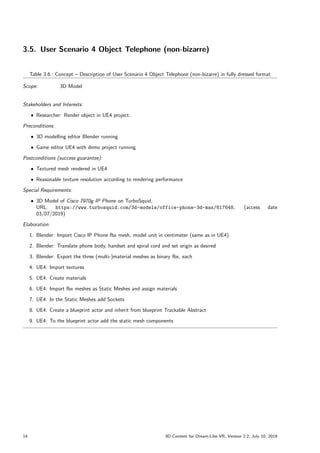
3.5. User Scenario 4 Object Telephone (non-bizarre)
Table 3.6.: Concept – Description of User Scenario 4 Object Telephone (non-bizarre) in fully dressed format
Scope: 3D Model
Stakeholders and Interests:
ˆ Researcher: Render object in UE4 project.
Preconditions:
ˆ 3D modelling editor Blender running
ˆ Game editor UE4 with demo project running
Postconditions (success guarantee):
ˆ Textured mesh rendered in UE4
ˆ Reasonable texture resolution according to rendering performance
Special Requirements:
ˆ 3D Model of Cisco 7970g IP Phone on TurboSquid,
URL: https://www.turbosquid.com/3d-models/office-phone-3d-max/617648, (access date
03/07/2019)
Elaboration:
1. Blender: Import Cisco IP Phone fbx mesh, model unit in centimeter (same as in UE4)
2. Blender: Translate phone body, handset and spiral cord and set origin as desired
3. Blender: Export the three (multi-)material meshes as binary fbx, each
4. UE4: Import textures
5. UE4: Create materials
6. UE4: Import fbx meshes as Static Meshes and assign materials
7. UE4: In the Static Meshes add Sockets
8. UE4: Create a blueprint actor and inherit from blueprint Trackable Abstract
9. UE4: To the blueprint actor add the static mesh components
14 3D Content for Dream-Like VR, Version 2.2, July 10, 2019
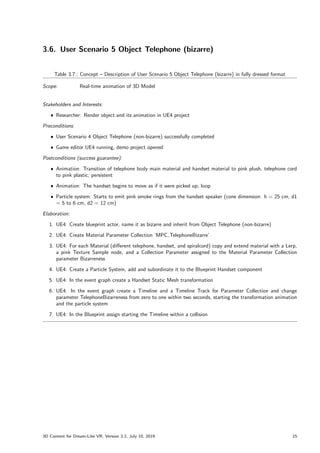
3.6. User Scenario 5 Object Telephone (bizarre)
Table 3.7.: Concept – Description of User Scenario 5 Object Telephone (bizarre) in fully dressed format
Scope: Real-time animation of 3D Model
Stakeholders and Interests:
ˆ Researcher: Render object and its animation in UE4 project
Preconditions:
ˆ User Scenario 4 Object Telephone (non-bizarre) successfully completed
ˆ Game editor UE4 running, demo project opened
Postconditions (success guarantee):
ˆ Animation: Transition of telephone body main material and handset material to pink plush, telephone cord
to pink plastic; persistent
ˆ Animation: The handset begins to move as if it were picked up; loop
ˆ Particle system: Starts to emit pink smoke rings from the handset speaker (cone dimension: h = 25 cm, d1
= 5 to 6 cm, d2 = 12 cm)
Elaboration:
1. UE4: Create blueprint actor, name it as bizarre and inherit from Object Telephone (non-bizarre)
2. UE4: Create Material Parameter Collection ’MPC TelephoneBizarre’
3. UE4: For each Material (different telephone, handset, and spiralcord) copy and extend material with a Lerp,
a pink Texture Sample node, and a Collection Parameter assigned to the Material Parameter Collection
parameter Bizarreness
4. UE4: Create a Particle System, add and subordinate it to the Blueprint Handset component
5. UE4: In the event graph create a Handset Static Mesh transformation
6. UE4: In the event graph create a Timeline and a Timeline Track for Parameter Collection and change
parameter TelephoneBizarreness from zero to one within two seconds, starting the transformation animation
and the particle system
7. UE4: In the Blueprint assign starting the Timeline within a collision
3D Content for Dream-Like VR, Version 2.2, July 10, 2019 15
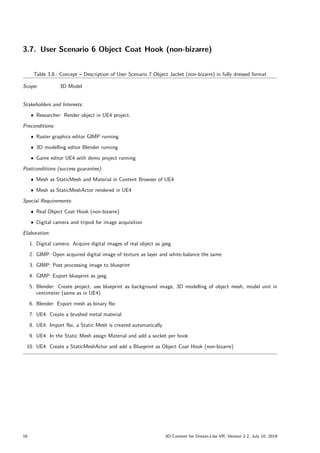
3.7. User Scenario 6 Object Coat Hook (non-bizarre)
Table 3.8.: Concept – Description of User Scenario 7 Object Jacket (non-bizarre) in fully dressed format
Scope: 3D Model
Stakeholders and Interests:
ˆ Researcher: Render object in UE4 project.
Preconditions:
ˆ Raster graphics editor GIMP running
ˆ 3D modelling editor Blender running
ˆ Game editor UE4 with demo project running
Postconditions (success guarantee):
ˆ Mesh as StaticMesh and Material in Content Browser of UE4
ˆ Mesh as StaticMeshActor rendered in UE4
Special Requirements:
ˆ Real Object Coat Hook (non-bizarre)
ˆ Digital camera and tripod for image acquisition
Elaboration:
1. Digital camera: Acquire digital images of real object as jpeg
2. GIMP: Open acquired digital image of texture as layer and white-balance the same
3. GIMP: Post processing image to blueprint
4. GIMP: Export blueprint as jpeg
5. Blender: Create project, use blueprint as background image, 3D modelling of object mesh, model unit in
centimeter (same as in UE4)
6. Blender: Export mesh as binary fbx
7. UE4: Create a brushed metal material
8. UE4: Import fbx, a Static Mesh is created automatically
9. UE4: In the Static Mesh assign Material and add a socket per hook
10. UE4: Create a StaticMeshActor and add a Blueprint as Object Coat Hook (non-bizarre)
16 3D Content for Dream-Like VR, Version 2.2, July 10, 2019
3.8. User Scenario 7 Object Jacket (non-bizarre)
Table 3.9.: Concept – Description of User Scenario 7 Object Jacket (non-bizarre) in fully dressed format
Scope: 3D Model
Stakeholders and Interests:
ˆ Researcher: Render object in UE4 project.
Preconditions:
ˆ Raster graphics editor GIMP running
ˆ 3D modelling editor Blender running
ˆ Game editor UE4 with demo project running
Postconditions (success guarantee):
ˆ Textured mesh, texture, and material in Content Browser of UE4
ˆ Textured mesh as Blueprint rendered in UE4
ˆ Reasonable texture resolution according to rendering performance
Special Requirements:
ˆ Real Object Jacket (non-bizarre)
ˆ Digital camera and tripod for image acquisition
Elaboration:
1. Digital camera and flatbed scanner: Acquire digital images of real object as jpeg
2. GIMP: Open acquired digital image of texture as layer, white-balance , and post processing the same
3. GIMP: Export texture as jpeg
4. Blender: Create object mesh by 3D modelling, model unit in centimeter (same as in UE4)
5. Blender: Create and assign material
6. Blender: Export mesh as binary fbx
7. Blender: Import textures
8. UE4: Create a material using the imported textures (repeat texture, two sided), name it the same as in
Blender
9. UE4: Import fbx as skeletal mesh—a mesh, a skeleton and a physics asset is created automatically
10. UE4: Using the UE4 Clothing Tool edit and config the mesh as cloth
11. UE4: From the Clothing Tool create a static mesh
12. UE4: Copy a Blueprint of Object Coat Hook (non-bizarre), rename it and drag-and-drop the static mesh as
component assigned to a Hook socket
3D Content for Dream-Like VR, Version 2.2, July 10, 2019 17
3.9. User Scenario 8 Object Jacket (bizarre)
Table 3.10.: Concept – Description of User Scenario 8 Object Jacket (bizarre) in fully dressed format
Scope: Real-time animation of 3D Model
Stakeholders and Interests:
ˆ Researcher: Render object and its animation in UE4 project
Preconditions:
ˆ User Scenario 7 Object Jacket (non-bizarre) successfully completed
ˆ Game editor UE4 running, demo project opened
Postconditions (success guarantee):
ˆ Animation: Transition of gravity; the object elevates to horizontal position
ˆ Horizontal position is persistent
Elaboration:
1. UE4: Copy the non-bizarre Blueprint and name it as bizarre
2. UE4: In the bizarre Blueprint add the skeletal mesh as component by drag-and-drop and in the details tab
’Rendering’ uncheck the value for ’visible’
3. UE4: In the Blueprint graph assign starting the animation ”
on component begin overlap”of the static mesh
4. UE4: In the Blueprint graph add a ’Set Visibility’ node for the skeletal mesh with ’New Visibility’ checked
5. UE4: In the Blueprint graph add a ’Set Visibility’ node for the static mesh with ’New Visibility’ unchecked
6. UE4: In the Blueprint graph add a ’Cast To ClothingSimulationInteractorNv’ node with ’Object’ assigned to
’Return Value’ of a ’Get Clothing Simulation Interactor’ node with ’Target’ ’Skeletal Mesh Jacket’
7. UE4: In the Blueprint graph add an ’Enable Gravity Override’ node and receive the ’Target’ from the cast
’As Clothing Simulation Interactor Nv’
8. UE4: Add a variable of type vector named as ’Direct Gravity Override Value’ and set its default value to
x = 50:0, y = 0:0 and z = 0:0
9. UE4: In the Blueprint graph ’Enable Gravity Override’ node assign the ’In Vector’ to the ’Direct Gravity
Override Value’
18 3D Content for Dream-Like VR, Version 2.2, July 10, 2019
3.10. User Scenario 9 Object Marker Pen (non-bizarre)
Table 3.11.: Concept – Description of User Scenario 9 Object Marker Pen (non-bizarre) in fully dressed format
Scope: 3D Model
Stakeholders and Interests:
ˆ Researcher: Render object in UE4 project.
Preconditions:
ˆ Raster graphics editor GIMP running
ˆ 3D modelling editor Blender running
ˆ Game editor UE4 with demo project running
Postconditions (success guarantee):
ˆ Deliveries: Texture(s), Material(s), Mesh(es) and Blueprint(s) UE4-Assets in 3D Content Library
ˆ Reasonable texture resolution according to rendering performance
Special Requirements:
ˆ Real Object Marker Pen (non-bizarre): edding 250 whiteboard marker, color red
(see https://www.edding.com/products/edding-250-whiteboard-marker-1/)
ˆ Photo studio with SfM setup for image acquisition
Elaboration:
1. Photo studio: Acquire digital imagesof real object as jpeg using rotating surface
2. Blender: Import existing object mesh, model unit in centimeter (same as in UE4)
3. Blender: Unwrap model and export UV map as png
4. GIMP: Open digital images of object as layers and white-balance them
5. GIMP: Import UV layout image as a new layer
6. GIMP: Map label images to UV layout by transformation (move/scale etc.)
7. GIMP: Export texture as jpeg
8. Blender: Create different materials and assign them to the mesh (multi-material mesh)
9. Blender: Import label texture and assign it to the label material
10. Blender: Export texture mapped multi material mesh as binary fbx
11. UE4: Import textures, create Material Parameter Collection and materials
12. UE4: Import multi material mesh fbx, a Static Mesh is created automatically; assign different materials
13. UE4: Create a StaticMeshActor and add resp. create Blueprint as Object Marker Pen (non-bizarre)
3D Content for Dream-Like VR, Version 2.2, July 10, 2019 19
3.11. User Scenario 10 Object Marker Pen (bizarre)
Table 3.12.: Concept – Description of User Scenario 10 Object Marker Pen (bizarre) in fully dressed format
Scope: Real-time animation of 3D Model
Stakeholders and Interests:
ˆ Researcher: Render object and its animation in UE4 project
Preconditions:
ˆ User Scenario 9 Object Marker Pen (non-bizarre) successfully completed
ˆ Game editor UE4 running, demo project opened
Postconditions (success guarantee):
ˆ Transition from real to huge dimension (diameter of existing round table) within two seconds; persistent
Elaboration:
1. UE4: Copy the non-bizarre assets and rename them as bizarre
2. UE4: In the Blueprint add variables: InitialActorScale3D (vector), FinalActorScale3D (vector), ScaleFactor
(float, default 4.0) and Bizarreness (float)
3. UE4: In the Blueprint construction script add .setter nodes for the vector variables
4. UE4: In the Blueprint event graph create a Timeline node and edit the Timeline Track ’MarkerPenBizarre-
nessTrack’ to change from value zero to one within two seconds
5. UE4: In the event graph connect the timeline update to setter for the Bizarreness variable to the value from
the timeline track
6. UE4: In the event graph connect the Setter node to a ’SetActorScale3D’ node which gets its ’New Scale 3D’
from a Lerp (A: InitialActorScale3D, B: FinalActorScale3D, Alpha: Bizarreness)
7. UE4: In the event graph assign starting the Timeline within an ’Event ActorBeginOverlap’
20 3D Content for Dream-Like VR, Version 2.2, July 10, 2019
3.12. User Scenario 11 Object Art Print (non-bizarre)
Table 3.13.: Concept – Description of User Scenario 11 Object Art Print (non-bizarre) in fully dressed format
Scope: 3D Model
Stakeholders and Interests:
ˆ Researcher: Render object in UE4 project.
Preconditions:
ˆ Raster graphics editor GIMP running
ˆ 3D modelling editor Blender running
ˆ Game editor UE4 with demo project running
Postconditions (success guarantee):
ˆ Deliveries: Texture(s), Material(s), Mesh(es) and Blueprint(s) UE4-Assets in 3D Content Library
ˆ Reasonable texture resolution according to rendering performance
Special Requirements:
ˆ Real Object Art Print (non-bizarre): ”
Empty Boats on Shore Near Mountains”from Luke Miller
(see https://www.pexels.com/photo/empty-boats-on-shore-near-mountains-1756874/)
ˆ Digital picture as jpeg: dimension 3263 x 4080 pixels, resolution 600 Dots per Inch (DPI), bit depth 24 bit
(true color) standard Red Green Blue (sRGB) IEC61966-2.1
ˆ Dimensions of art print: 60 x 75 cm, Forex 5 mm
Elaboration:
1. Blender: Create object mesh, model unit in centimeter (same as in UE4)
2. Blender: Unwrap model and export UV layout as png
3. GIMP: Open digital image of object as layer
4. GIMP: Import UV layout image as a new layer
5. GIMP: Map image to UV layout by transformation (move/scale etc.)
6. GIMP: Create multiple textures according division of painting in respect of possible dimensions in UE4 (e.g.,
grid of 6x6 textures)
7. GIMP: Export textures as jpeg
8. Blender: Create different materials and assign them to the mesh (multi-material mesh)
9. Blender: Import art painting textures and assign them to the art painting materials
10. Blender: Export texture mapped multi material mesh as binary fbx
11. UE4: Import textures and create materials
12. UE4: Import multi material mesh fbx, a Static Mesh is created automatically; assign different materials
13. UE4: Create a StaticMeshActor and add resp. create Blueprint as Object Marker Pen (non-bizarre)
3D Content for Dream-Like VR, Version 2.2, July 10, 2019 21
3.13. User Scenario 12 Object Art Print (bizarre)
Table 3.14.: Concept – Description of User Scenario 12 Object Art Print (bizarre) in fully dressed format
Scope: Real-time animation of 3D Model
Stakeholders and Interests:
ˆ Researcher: Render object and its animation in UE4 project
Preconditions:
ˆ User Scenario 11 Object Art Print (non-bizarre) successfully completed
ˆ 3D modelling editor Blender running
ˆ Game editor UE4 running, demo project opened
Postconditions (success guarantee):
ˆ Water is flowing from the Art Print to the floor
ˆ A maximum amount of water accumulates in the puddle on the floor
Special Requirements:
ˆ UE4 Package [WaterMaterials]
Elaboration:
1. UE4: Download package ”
Water Materials”
, copy-paste material M River and M Lake as well as related
material functions, material parameter collections and textures and resolve assignments
2. UE4: From package ”
Water Materials”export static mesh SM Waterfall Arc as fbx
3. Blender: Import fbx file SM Waterfall Arc, set origin on top of mesh and export the same as fbx
4. Blender: Create a mesh Lake as well as a mesh Puddle and export them as fbx
5. UE4: Import lake, waterfall and puddle meshes
6. UE4: Make material instances of M River and M Lake, assign them to the static meshes and configure the
parameters accordingly
7. UE4: Copy-paste Blueprint of Object Art Print (non-bizarre) and rename it as bizarre
8. UE4: To the bizarre Blueprint add components lake, waterfall (twice) and puddle static meshes, configure
transforms
9. UE4: In the Blueprint event graph assign starting the animation within an ’Event ActorBeginOverlap’ using
different transform related nodes and lerps
22 3D Content for Dream-Like VR, Version 2.2, July 10, 2019
4. Design
The design of the solution follows the Object Oriented Programming (OOP) paradigm. The structure of the system
is described by class diagrams in Unified Modeling Language (UML).
For ease distribution of the deliveries, an UE4 plugin named ’BZR’ was created. The plugin contains a stand-
alone module as well as folders for the content of each use case (cp. [UE4Wiki, An Introduction to UE4 Plugins]).
For installation instructions please refer to appendix section C.2.
Figure 4.1.: Design – Package diagram for plugin
In the context of Data Tracking in UE4 a stand-alone module was created. It contains a blueprint function
library ’BZRBPFunctionLibrary’ (see figure 4.1). The function library declares and implements the functions ’Get-
CurrentTimeFromRealWorldOS’ and ’SaveTextToFile’ which are BlueprintCallable UFUNCTIONs exposed to the
Blueprints Virtual Machine (cp. [UE4Man, Blueprint Function Libraries], [UE4Wiki, UFUNCTION] and [UE4Wiki,
Blueprint Function Library, Create Your Own to Share With Others]). The functions may be called from blueprint
event graphs, as shown in section 5.1.
Figure 4.2.: Design – Class diagram for module and Data Tracking
3D Content for Dream-Like VR, Version 2.2, July 10, 2019 23
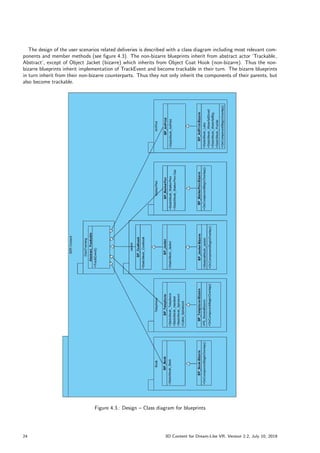
The design of the user scenarios related deliveries is described with a class diagram including most relevant com-
ponents and member methods (see figure 4.3). The non-bizarre blueprints inherit from abstract actor ’Trackable
Abstract’, except of Object Jacket (bizarre) which inherits from Object Coat Hook (non-bizarre). Thus the non-
bizarre blueprints inherit implementation of TrackEvent and become trackable in their turn. The bizarre blueprints
in turn inherit from their non-bizarre counterparts. Thus they not only inherit the components of their parents, but
also become trackable.
Figure 4.3.: Design – Class diagram for blueprints
24 3D Content for Dream-Like VR, Version 2.2, July 10, 2019
5. Elaboration
5.1. Elaboration of User Scenario 1 Data Tracking
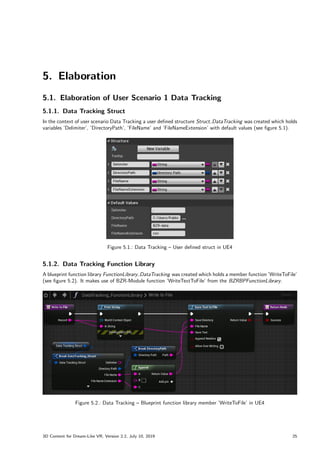
5.1.1. Data Tracking Struct
In the context of user scenario Data Tracking a user defined structure Struct DataTracking was created which holds
variables ’Delimiter’, ’DirectoryPath’, ’FileName’ and ’FileNameExtension’ with default values (see figure 5.1).
Figure 5.1.: Data Tracking – User defined struct in UE4
5.1.2. Data Tracking Function Library
A blueprint function library FunctionLibrary DataTracking was created which holds a member function ’WriteToFile’
(see figure 5.2). It makes use of BZR-Module function ’WriteTextToFile’ from the BZRBPFunctionLibrary.
Figure 5.2.: Data Tracking – Blueprint function library member ’WriteToFile’ in UE4
3D Content for Dream-Like VR, Version 2.2, July 10, 2019 25
5.1.3. Interface Trackable
A blueprint interface Interface Trackable was created which declares a member function ’TrackEvent’ (see fig-
ure 5.3).
Figure 5.3.: Data Tracking – Blueprint interface ’Trackable’ declares function ’TrackEvent’ in UE4
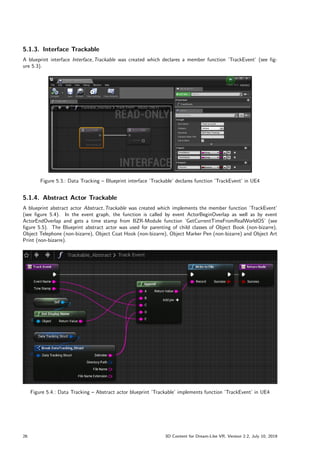
5.1.4. Abstract Actor Trackable
A blueprint abstract actor Abstract Trackable was created which implements the member function ’TrackEvent’
(see figure 5.4). In the event graph, the function is called by event ActorBeginOverlap as well as by event
ActorEndOverlap and gets a time stamp from BZR-Module function ’GetCurrentTimeFromRealWorldOS’ (see
figure 5.5). The Blueprint abstract actor was used for parenting of child classes of Object Book (non-bizarre),
Object Telephone (non-bizarre), Object Coat Hook (non-bizarre), Object Marker Pen (non-bizarre) and Object Art
Print (non-bizarre).
Figure 5.4.: Data Tracking – Abstract actor blueprint ’Trackable’ implements function ’TrackEvent’ in UE4
26 3D Content for Dream-Like VR, Version 2.2, July 10, 2019
Figure 5.5.: Data Tracking – Abstract actor blueprint event graph calls ’TrackEvent’ in UE4
Systems connected to the Internet can synchronize their system time with Time Servers via Network Time
Protocol (NTP) (cp. [METAS]). Access to time servers is very restricted, therefore the IT Services of the University
of Bern recommend the use of the internal time servers time.unibe.ch and time2.unibe.ch1
. To set the NTP server
in Windows 10, open Control Panel and go to section ’Clock and Region’ > ’Date and Time’ > Button ’Change
date and time. . . ’ > Tab ’Internet Time’ > Button ’Change settings. . . ’ > Server: time.unibe.ch (see figure 5.6).
Figure 5.6.: Data Tracking – Configure internet time options in Windows 10
For deliveries of Data Tracking see section 6.1, results are presented in section 7.1.
1Dienstleistungen der Informatikdienste. In: Uni Intern, University of Bern. URL: http://intern.unibe.ch/dienstleistungen/
informatik/dienstleistungen_der_informatikdienste/dienstleistungen___ressourcen/dns___dhcp/index_ger.html (ac-
cess date 10/07/2019)
3D Content for Dream-Like VR, Version 2.2, July 10, 2019 27
5.2. Elaboration of User Scenario 2 Object Book (non-bizarre)
5.2.1. Mesh and UV Layout
As elaboration of Object Book (non-bizarre)2
a 3D modelled mesh of an opened book was found on sketchfab3
.
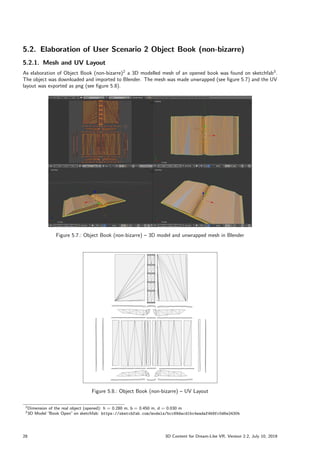
The object was downloaded and imported to Blender. The mesh was made unwrapped (see figure 5.7) and the UV
layout was exported as png (see figure 5.8).
Figure 5.7.: Object Book (non-bizarre) – 3D model and unwrapped mesh in Blender
Figure 5.8.: Object Book (non-bizarre) – UV Layout
2Dimension of the real object (opened): h = 0.280 m, b = 0.450 m, d = 0.030 m
33D Model ”
Book Open” on sketchfab: https://sketchfab.com/models/bcc69dacd1bc4eadaf4b9fc0d6e2430b
28 3D Content for Dream-Like VR, Version 2.2, July 10, 2019
5.2.2. Textures
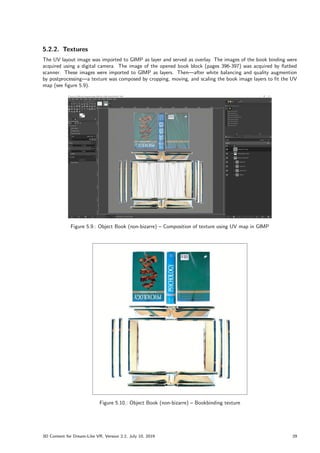
The UV layout image was imported to GIMP as layer and served as overlay. The images of the book binding were
acquired using a digital camera. The image of the opened book block (pages 396-397) was acquired by flatbed
scanner. These images were imported to GIMP as layers. Then—after white balancing and quality augmention
by postprocessing—a texture was composed by cropping, moving, and scaling the book image layers to fit the UV
map (see figure 5.9).
Figure 5.9.: Object Book (non-bizarre) – Composition of texture using UV map in GIMP
Figure 5.10.: Object Book (non-bizarre) – Bookbinding texture
3D Content for Dream-Like VR, Version 2.2, July 10, 2019 29
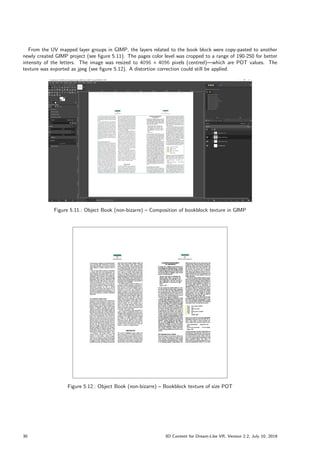
From the UV mapped layer groups in GIMP, the layers related to the book block were copy-pasted to another
newly created GIMP project (see figure 5.11). The pages color level was cropped to a range of 190-250 for better
intensity of the letters. The image was resized to 4096  4096 pixels (centred)—which are POT values. The
texture was exported as jpeg (see figure 5.12). A distortion correction could still be applied.
Figure 5.11.: Object Book (non-bizarre) – Composition of bookblock texture in GIMP
Figure 5.12.: Object Book (non-bizarre) – Bookblock texture of size POT
30 3D Content for Dream-Like VR, Version 2.2, July 10, 2019
5.2.3. Multi-Material Mesh
Back in Blender, a material was created to which the book binding texture was assigned. In the mesh, the
corresponding faces were selected and the book binding material was assigned to them. A second UV map was
created and the book block texture was imported and positioned accordingly. Furthermore, a second material was
created to which the book block texture was assigned. In the mesh, the corresponding book block faces were
selected and the book block material was assigned to them (see figure 5.13).
Figure 5.13.: Object Book (non-bizarre) – UV map and 3D rendering in Blender
Finally the UV mapped mesh was exported as binary fbx (cp. [UE4Man, FBX Material Pipeline], see figure 5.14).
Figure 5.14.: Object Book (non-bizarre) – ’Export FBX’ settings in Blender
3D Content for Dream-Like VR, Version 2.2, July 10, 2019 31
5.2.4. Rendering in UE4
Textures
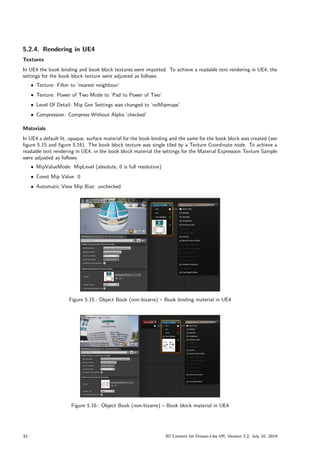
In UE4 the book binding and book block textures were imported. To achieve a readable text rendering in UE4, the
settings for the book block texture were adjusted as follows:
ˆ Texture: Filter to ’nearest neighbour’
ˆ Texture: Power of Two Mode to ’Pad to Power of Two’
ˆ Level Of Detail: Mip Gen Settings was changed to ’noMipmaps’
ˆ Compression: Compress Without Alpha ’checked’
Materials
In UE4 a default lit, opaque, surface material for the book binding and the same for the book block was created (see
figure 5.15 and figure 5.16). The book block texture was single tiled by a Texture Coordinate node. To achieve a
readable text rendering in UE4, in the book block material the settings for the Material Expression Texture Sample
were adjusted as follows:
ˆ MipValueMode: MipLevel (absolute, 0 is full resolution)
ˆ Const Mip Value: 0
ˆ Automatic View Mip Bias: unchecked
Figure 5.15.: Object Book (non-bizarre) – Book binding material in UE4
Figure 5.16.: Object Book (non-bizarre) – Book block material in UE4
32 3D Content for Dream-Like VR, Version 2.2, July 10, 2019
Static Mesh and Blueprint
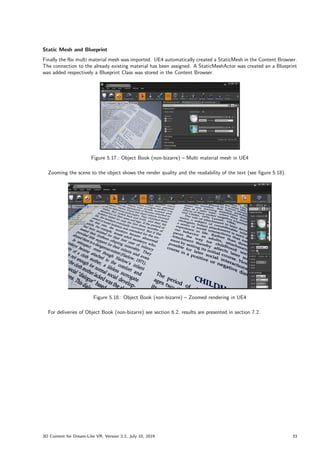
Finally the fbx multi material mesh was imported. UE4 automatically created a StaticMesh in the Content Browser.
The connection to the already existing material has been assigned. A StaticMeshActor was created an a Blueprint
was added respectively a Blueprint Class was stored in the Content Browser.
Figure 5.17.: Object Book (non-bizarre) – Multi material mesh in UE4
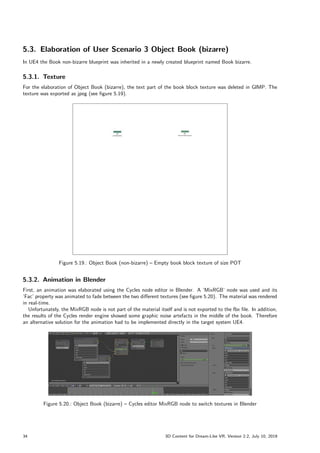
Zooming the scene to the object shows the render quality and the readability of the text (see figure 5.18).
Figure 5.18.: Object Book (non-bizarre) – Zoomed rendering in UE4
For deliveries of Object Book (non-bizarre) see section 6.2, results are presented in section 7.2.
3D Content for Dream-Like VR, Version 2.2, July 10, 2019 33
5.3. Elaboration of User Scenario 3 Object Book (bizarre)
In UE4 the Book non-bizarre blueprint was inherited in a newly created blueprint named Book bizarre.
5.3.1. Texture
For the elaboration of Object Book (bizarre), the text part of the book block texture was deleted in GIMP. The
texture was exported as jpeg (see figure 5.19).
Figure 5.19.: Object Book (non-bizarre) – Empty book block texture of size POT
5.3.2. Animation in Blender
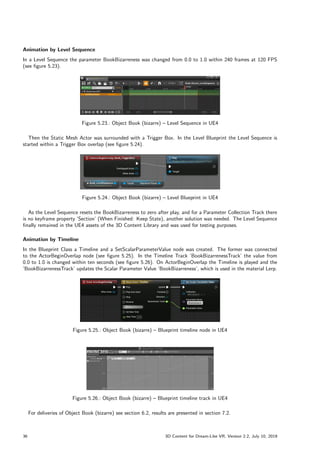
First, an animation was elaborated using the Cycles node editor in Blender. A ’MixRGB’ node was used and its
’Fac’ property was animated to fade between the two different textures (see figure 5.20). The material was rendered
in real-time.
Unfortunately, the MixRGB node is not part of the material itself and is not exported to the fbx file. In addition,
the results of the Cycles render engine showed some graphic noise artefacts in the middle of the book. Therefore
an alternative solution for the animation had to be implemented directly in the target system UE4.
Figure 5.20.: Object Book (bizarre) – Cycles editor MixRGB node to switch textures in Blender
34 3D Content for Dream-Like VR, Version 2.2, July 10, 2019
5.3.3. Animation in UE4
Back in UE4 the non-bizarre blueprint inherited in a newly created blueprint actor named as bizarre.
Texture
The empty book block texture was imported. As already seen in the book block texture, the settings for the empty
book block texture were adjusted as follows:
ˆ Texture: Filter to ’nearest neighbour’
ˆ Texture: Power of Two Mode to ’Pad to Power of Two’
ˆ Level Of Detail: Mip Gen Settings was changed to ’noMipmaps’
ˆ Compression: Compress Without Alpha ’checked’
Material
The rendering workflow as elaborated in the Blender Cycles node editor was replicated in UE4. Therefore, a
Material Parameter Collection ’BookBizarre MPC’ was created which holds a parameter named ’BookBizarreness’
(see figure 5.21).
Figure 5.21.: Object Book (bizarre) – Material Parameter Collection with parameter ’BookBizarreness’ in UE4
A copy of the existing material was made and was extended with a Lerp node (linear interpolation) for fading
from the non-bizarre to the bizarre book block texture. A second Texture Sample node was created and assigned
to the empty book block texture. The Lerp alpha value was assigned to a Collection Parameter node connected to
the Material Parameter Collection parameter named BookBizarreness (see figure 5.22). The constant adjustment
of the parameter BookBizarreness results in an animation.
Figure 5.22.: Object Book (bizarre) – Bizarre Book Block Material in UE4
3D Content for Dream-Like VR, Version 2.2, July 10, 2019 35
Animation by Level Sequence
In a Level Sequence the parameter BookBizarreness was changed from 0.0 to 1.0 within 240 frames at 120 FPS
(see figure 5.23).
Figure 5.23.: Object Book (bizarre) – Level Sequence in UE4
Then the Static Mesh Actor was surrounded with a Trigger Box. In the Level Blueprint the Level Sequence is
started within a Trigger Box overlap (see figure 5.24).
Figure 5.24.: Object Book (bizarre) – Level Blueprint in UE4
As the Level Sequence resets the BookBizarreness to zero after play, and for a Parameter Collection Track there
is no keyframe property ’Section’ (When Finished: Keep State), another solution was needed. The Level Sequence
finally remained in the UE4 assets of the 3D Content Library and was used for testing purposes.
Animation by Timeline
In the Blueprint Class a Timeline and a SetScalarParameterValue node was created. The former was connected
to the ActorBeginOverlap node (see figure 5.25). In the Timeline Track ’BookBizarrenessTrack’ the value from
0.0 to 1.0 is changed within ten seconds (see figure 5.26). On ActorBeginOverlap the Timeline is played and the
’BookBizarrenessTrack’ updates the Scalar Parameter Value ’BookBizarreness’, which is used in the material Lerp.
Figure 5.25.: Object Book (bizarre) – Blueprint timeline node in UE4
Figure 5.26.: Object Book (bizarre) – Blueprint timeline track in UE4
For deliveries of Object Book (bizarre) see section 6.2, results are presented in section 7.2.
36 3D Content for Dream-Like VR, Version 2.2, July 10, 2019
5.4. Elaboration of User Scenario 4 Object Telephone (non-bizarre)
5.4.1. Textured Meshes
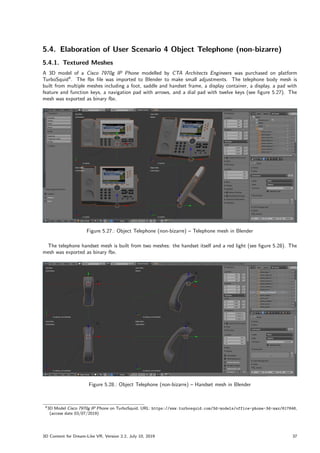
A 3D model of a Cisco 7970g IP Phone modelled by CTA Architects Engineers was purchased on platform
TurboSquid4
. The fbx file was imported to Blender to make small adjustments. The telephone body mesh is
built from multiple meshes including a foot, saddle and handset frame, a display container, a display, a pad with
feature and function keys, a navigation pad with arrows, and a dial pad with twelve keys (see figure 5.27). The
mesh was exported as binary fbx.
Figure 5.27.: Object Telephone (non-bizarre) – Telephone mesh in Blender
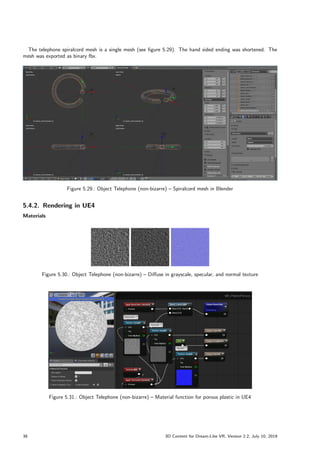
The telephone handset mesh is built from two meshes: the handset itself and a red light (see figure 5.28). The
mesh was exported as binary fbx.
Figure 5.28.: Object Telephone (non-bizarre) – Handset mesh in Blender
43D Model Cisco 7970g IP Phone on TurboSquid, URL: https://www.turbosquid.com/3d-models/office-phone-3d-max/617648,
(access date 03/07/2019)
3D Content for Dream-Like VR, Version 2.2, July 10, 2019 37
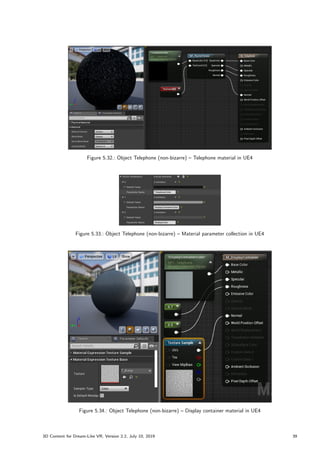
The telephone spiralcord mesh is a single mesh (see figure 5.29). The hand sided ending was shortened. The
mesh was exported as binary fbx.
Figure 5.29.: Object Telephone (non-bizarre) – Spiralcord mesh in Blender
5.4.2. Rendering in UE4
Materials
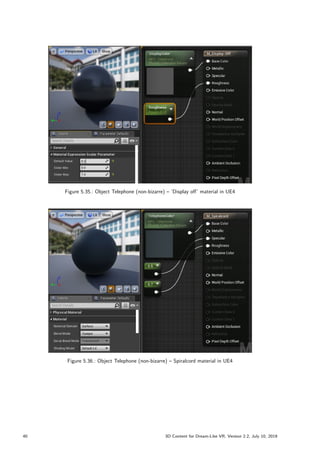
Figure 5.30.: Object Telephone (non-bizarre) – Diffuse in grayscale, specular, and normal texture
Figure 5.31.: Object Telephone (non-bizarre) – Material function for porous plastic in UE4
38 3D Content for Dream-Like VR, Version 2.2, July 10, 2019
Figure 5.32.: Object Telephone (non-bizarre) – Telephone material in UE4
Figure 5.33.: Object Telephone (non-bizarre) – Material parameter collection in UE4
Figure 5.34.: Object Telephone (non-bizarre) – Display container material in UE4
3D Content for Dream-Like VR, Version 2.2, July 10, 2019 39
Figure 5.35.: Object Telephone (non-bizarre) – ’Display off’ material in UE4
Figure 5.36.: Object Telephone (non-bizarre) – Spiralcord material in UE4
40 3D Content for Dream-Like VR, Version 2.2, July 10, 2019
Static Meshes
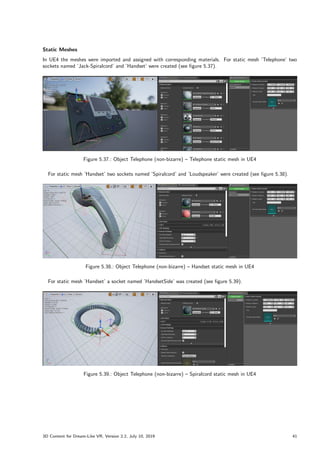
In UE4 the meshes were imported and assigned with corresponding materials. For static mesh ’Telephone’ two
sockets named ’Jack-Spiralcord’ and ’Handset’ were created (see figure 5.37).
Figure 5.37.: Object Telephone (non-bizarre) – Telephone static mesh in UE4
For static mesh ’Handset’ two sockets named ’Spiralcord’ and ’Loudspeaker’ were created (see figure 5.38).
Figure 5.38.: Object Telephone (non-bizarre) – Handset static mesh in UE4
For static mesh ’Handset’ a socket named ’HandsetSide’ was created (see figure 5.39).
Figure 5.39.: Object Telephone (non-bizarre) – Spiralcord static mesh in UE4
3D Content for Dream-Like VR, Version 2.2, July 10, 2019 41
Blueprint
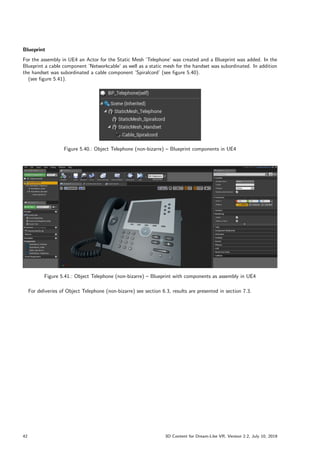
For the assembly in UE4 an Actor for the Static Mesh ’Telephone’ was created and a Blueprint was added. In the
Blueprint a cable component ’Networkcable’ as well as a static mesh for the handset was subordinated. In addition
the handset was subordinated a cable component ’Spiralcord’ (see figure 5.40).
(see figure 5.41).
Figure 5.40.: Object Telephone (non-bizarre) – Blueprint components in UE4
Figure 5.41.: Object Telephone (non-bizarre) – Blueprint with components as assembly in UE4
For deliveries of Object Telephone (non-bizarre) see section 6.3, results are presented in section 7.3.
42 3D Content for Dream-Like VR, Version 2.2, July 10, 2019
5.5. Elaboration of User Scenario 5 Object Telephone (bizarre)
5.5.1. Materials
For bizarreness, first the color pink was used which is defined as Hex triplet #FFC0CB or as Red Green Blue (RGB)
255,192,203 normalized to [0–255]. At a review in a weekly meeting the decision has been made to use not the
color pink but plum. The color is defined as Hex triplet #DDA0DD or as RGB 221,160,221—normalized to [0–255]
(cp. [W3C, CSS Color Module Level 3]). This corresponds to Hex sRGB DDA0DDFF in UE4.
To Material Parameter Collection ’MPC Telephone’ a scalar parameter ’Bizarreness’ and a vector parameter
’BizarreColor’ was added (see figure 5.42).
Figure 5.42.: Object Telephone (bizarre) – Material parameter collection in UE4
A texture for a fluffy terry cloth was found and texture maps were created (see figure 5.43) and used in an UE4
material function ’MF Plush’ (see figure 5.44).
Figure 5.43.: Object Telephone (bizarre) – Diffuse in grayscale, specular, and normal texture
Figure 5.44.: Object Telephone (bizarre) – Material function ’Plush’ in UE4
3D Content for Dream-Like VR, Version 2.2, July 10, 2019 43
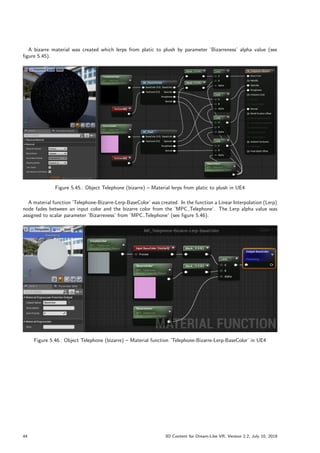
A bizarre material was created which lerps from platic to plush by parameter ’Bizarreness’ alpha value (see
figure 5.45).
Figure 5.45.: Object Telephone (bizarre) – Material lerps from platic to plush in UE4
A material function ’Telephone-Bizarre-Lerp-BaseColor’ was created. In the function a Linear Interpolation (Lerp)
node fades between an input color and the bizarre color from the ’MPC Telephone’. The Lerp alpha value was
assigned to scalar parameter ’Bizarreness’ from ’MPC Telephone’ (see figure 5.46).
Figure 5.46.: Object Telephone (bizarre) – Material function ’Telephone-Bizarre-Lerp-BaseColor’ in UE4
44 3D Content for Dream-Like VR, Version 2.2, July 10, 2019
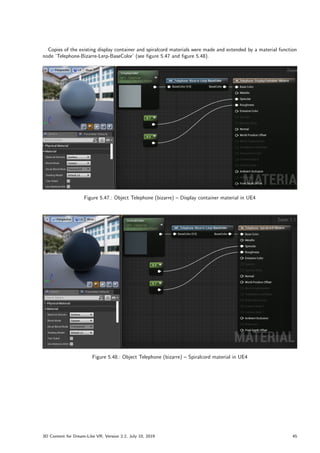
Copies of the existing display container and spiralcord materials were made and extended by a material function
node ’Telephone-Bizarre-Lerp-BaseColor’ (see figure 5.47 and figure 5.48).
Figure 5.47.: Object Telephone (bizarre) – Display container material in UE4
Figure 5.48.: Object Telephone (bizarre) – Spiralcord material in UE4
3D Content for Dream-Like VR, Version 2.2, July 10, 2019 45
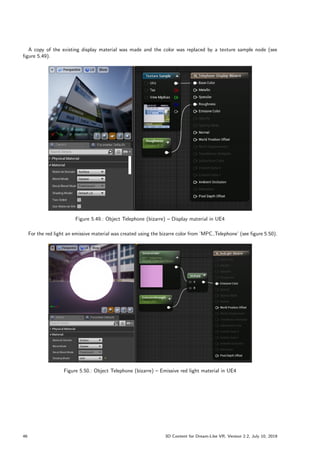
A copy of the existing display material was made and the color was replaced by a texture sample node (see
figure 5.49).
Figure 5.49.: Object Telephone (bizarre) – Display material in UE4
For the red light an emissive material was created using the bizarre color from ’MPC Telephone’ (see figure 5.50).
Figure 5.50.: Object Telephone (bizarre) – Emissive red light material in UE4
46 3D Content for Dream-Like VR, Version 2.2, July 10, 2019
5.5.2. Particle System
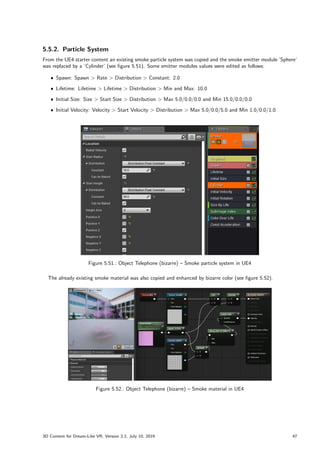
From the UE4 starter content an existing smoke particle system was copied and the smoke emitter module ’Sphere’
was replaced by a ’Cylinder’ (see figure 5.51). Some emitter modules values were edited as follows:
ˆ Spawn: Spawn  Rate  Distribution  Constant: 2.0
ˆ Lifetime: Lifetime  Lifetime  Distribution  Min and Max: 10.0
ˆ Initial Size: Size  Start Size  Distribution  Max 5.0/0.0/0.0 and Min 15.0/0.0/0.0
ˆ Initial Velocity: Velocity  Start Velocity  Distribution  Max 5.0/0.0/5.0 and Min 1.0/0.0/1.0
Figure 5.51.: Object Telephone (bizarre) – Smoke particle system in UE4
The already existing smoke material was also copied and enhanced by bizarre color (see figure 5.52).
Figure 5.52.: Object Telephone (bizarre) – Smoke material in UE4
3D Content for Dream-Like VR, Version 2.2, July 10, 2019 47
5.5.3. Blueprint
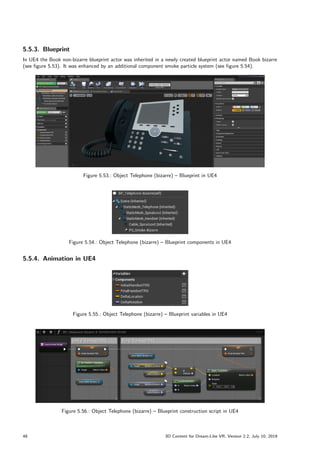
In UE4 the Book non-bizarre blueprint actor was inherited in a newly created blueprint actor named Book bizarre
(see figure 5.53). It was enhanced by an additional component smoke particle system (see figure 5.54).
Figure 5.53.: Object Telephone (bizarre) – Blueprint in UE4
Figure 5.54.: Object Telephone (bizarre) – Blueprint components in UE4
5.5.4. Animation in UE4
Figure 5.55.: Object Telephone (bizarre) – Blueprint variables in UE4
Figure 5.56.: Object Telephone (bizarre) – Blueprint construction script in UE4
48 3D Content for Dream-Like VR, Version 2.2, July 10, 2019
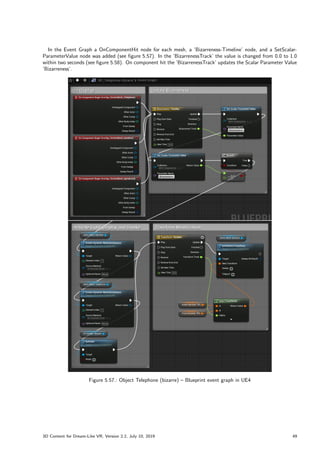
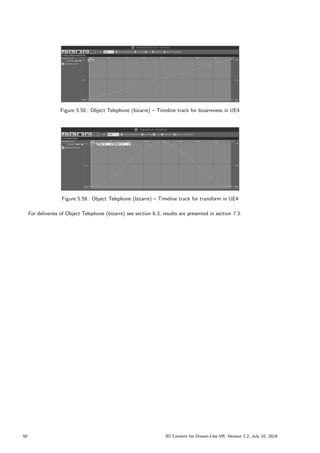
In the Event Graph a OnComponentHit node for each mesh, a ’Bizarreness-Timeline’ node, and a SetScalar-
ParameterValue node was added (see figure 5.57). In the ’BizarrenessTrack’ the value is changed from 0.0 to 1.0
within two seconds (see figure 5.58). On component hit the ’BizarrenessTrack’ updates the Scalar Parameter Value
’Bizarreness’.
Figure 5.57.: Object Telephone (bizarre) – Blueprint event graph in UE4
3D Content for Dream-Like VR, Version 2.2, July 10, 2019 49
Figure 5.58.: Object Telephone (bizarre) – Timeline track for bizarreness in UE4
Figure 5.59.: Object Telephone (bizarre) – Timeline track for transform in UE4
For deliveries of Object Telephone (bizarre) see section 6.3, results are presented in section 7.3.
50 3D Content for Dream-Like VR, Version 2.2, July 10, 2019
5.6. Elaboration of User Scenario 6 Object Coat Hook (non-bizarre)
5.6.1. Multi-Material Mesh
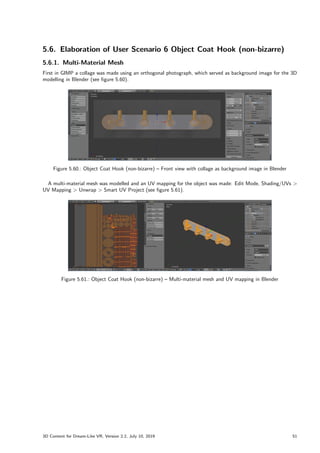
First in GIMP a collage was made using an orthogonal photograph, which served as background image for the 3D
modelling in Blender (see figure 5.60).
Figure 5.60.: Object Coat Hook (non-bizarre) – Front view with collage as background image in Blender
A multi-material mesh was modelled and an UV mapping for the object was made: Edit Mode, Shading/UVs 
UV Mapping  Unwrap  Smart UV Project (see figure 5.61).
Figure 5.61.: Object Coat Hook (non-bizarre) – Multi-material mesh and UV mapping in Blender
3D Content for Dream-Like VR, Version 2.2, July 10, 2019 51
5.6.2. Rendering in UE4
Textures and Materials
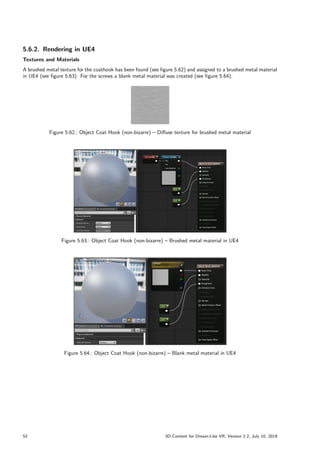
A brushed metal texture for the coathook has been found (see figure 5.62) and assigned to a brushed metal material
in UE4 (see figure 5.63). For the screws a blank metal material was created (see figure 5.64).
Figure 5.62.: Object Coat Hook (non-bizarre) – Diffuse texture for brushed metal material
Figure 5.63.: Object Coat Hook (non-bizarre) – Brushed metal material in UE4
Figure 5.64.: Object Coat Hook (non-bizarre) – Blank metal material in UE4
52 3D Content for Dream-Like VR, Version 2.2, July 10, 2019
Static Mesh
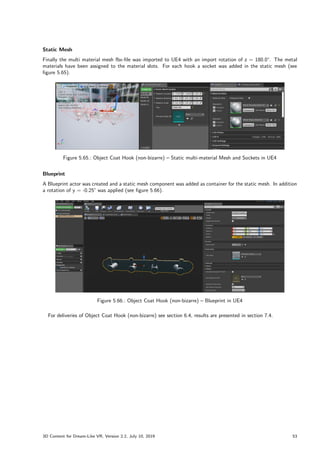
Finally the multi material mesh fbx-file was imported to UE4 with an import rotation of z = 180.0°. The metal
materials have been assigned to the material slots. For each hook a socket was added in the static mesh (see
figure 5.65).
Figure 5.65.: Object Coat Hook (non-bizarre) – Static multi-material Mesh and Sockets in UE4
Blueprint
A Blueprint actor was created and a static mesh component was added as container for the static mesh. In addition
a rotation of y = -0.25° was applied (see figure 5.66).
Figure 5.66.: Object Coat Hook (non-bizarre) – Blueprint in UE4
For deliveries of Object Coat Hook (non-bizarre) see section 6.4, results are presented in section 7.4.
3D Content for Dream-Like VR, Version 2.2, July 10, 2019 53
5.7. Elaboration of User Scenario 7 Object Jacket (non-bizarre)
5.7.1. Mesh and Texture
For the elaboration of Object Jacket (non-bizarre) a simple cutting pattern was made in Blender by a subdivided
and triangulated plane and the half of a ring as hanging loop (see figure 5.67). The mesh was exported as binary
fbx.
Figure 5.67.: Object Jacket (non-bizarre) – Front view of cutting pattern in Blender
Using an acquired image from the real jacket, a seamless texture was created in GIMP (see figure 5.68) and
exported as jpeg.
Figure 5.68.: Object Jacket (non-bizarre) – Seamless texture in GIMP
54 3D Content for Dream-Like VR, Version 2.2, July 10, 2019
5.7.2. Rendering in UE4
Textures and Material
Using the seamless texture a related normal, specular and displacement map was created (see figure 5.69).
Figure 5.69.: Object Jacket (non-bizarre) – Diffuse, normal, specular and displacement texture
In UE4 the textures were assigned to a jacket material (see figure 5.70). The jacket material is two sided, the
texture is repeated by U/V-tiling using a TexCoord node (see figure 5.71).
Figure 5.70.: Object Jacket (non-bizarre) – Cloth material in UE4
Figure 5.71.: Object Jacket (non-bizarre) – Cloth material tex coord for U/V-tiling in UE4
3D Content for Dream-Like VR, Version 2.2, July 10, 2019 55
Skeleton and Skeletal Mesh
In UE4 the mesh was imported as skeletal mesh (see figure 5.72). A skeleton asset and a skeletal mesh were created
automatically. The skeleton asset represents a hook of the Coat Hook (see figure 5.73). The skeletal mesh was
assigned with the corresponding materials (see figure 5.74).
Figure 5.72.: Object Jacket (non-bizarre) – FBX import options in UE4
Figure 5.73.: Object Jacket (non-bizarre) – Skeleton in UE4
Figure 5.74.: Object Jacket (non-bizarre) – Skeletal mesh in UE4
56 3D Content for Dream-Like VR, Version 2.2, July 10, 2019
Physics Asset
From the skeletal mesh a physics asset was created (see figure 5.75 and figure 5.76). To let the skeletal mesh collide
with surrounding world objects like the wall with a door and the door handle, these meshes were added as preview
assets in the physics editor and were replaced by collision geometry made of capsules and tapered capsules5
, as
cloth only collides with these kind of primitives (see figure 5.77). The physics asset was assigned to the skeletal
mesh Details  Physics tab, in addition ’Enable Per Poly Collision’ was checked (see figure 5.78).
Figure 5.75.: Object Jacket (non-bizarre) – Create physics asset from skeletal mesh in UE4
Figure 5.76.: Object Jacket (non-bizarre) – New physics asset dialogue in UE4
Figure 5.77.: Object Jacket (non-bizarre) – Physics asset with collision geometry in UE4
Figure 5.78.: Object Jacket (non-bizarre) – Physics asset assigned to skeletal mesh in UE4
5Jacket (non-bizarre) transform world position of hanger-loop or bone ’jacket’ respectively: x = 249, y = 7, z = 163
3D Content for Dream-Like VR, Version 2.2, July 10, 2019 57
Cloth Paint
”As of UE4 version 4.16, APEX Cloth [(based on PhysX Clothing, cp.[GameWorksDoc, APEX Clothing Module])]
has been replaced with Nvidia’s NvCloth solver which is a low-level clothing solver responsible for the particle
simulation that runs clothing. This clothing solver allows integrations to be lightweight and very extensible because
[of] direct access to the simulation data”(cp. [UE4Man, Clothing Tool]).
In the skeletal mesh editor the section selection as well as the cloth paint was activated. Then the whole jacket
was selected and painted (see figure 5.79)—except of parts of the coat hanger loop (see figure 5.80).
Figure 5.79.: Object Jacket (non-bizarre) – Cloth paint of cardigan in UE4
Figure 5.80.: Object Jacket (non-bizarre) – Cloth paint detail of cardigan (left) and hanger loop (right) in UE4
Both parts of the mesh have the same cloth configuration (see figure 5.81).
Figure 5.81.: Object Jacket (non-bizarre) – Cloth configuration in UE4
58 3D Content for Dream-Like VR, Version 2.2, July 10, 2019
Static Mesh
Afterwards, from the skeletal mesh menu, a static mesh was created by clicking ’Make Static Mesh’. Using the
static mesh menu Collision  Auto Convex Collision a convex Discrete Oriented Polytope (DOP) collision hull was
generated and in the Details tab  Collision parameter ’Double Sided Geometry’ was checked (see figure 5.82).
Figure 5.82.: Object Jacket (non-bizarre) – Static mesh with collision hull in UE4
Blueprint
In UE4 the blueprint Coat Hook (non-bizarre) was inherited in a newly created blueprint named Jacket (non-bizarre)
(see figure 5.83). In the components tab a static mesh component was added and the static mesh Jacket was
assigned. The components ’Parent Socket’ was set to ’Hook-RR’ and ’Generate Overlap Events’ was checked (see
figure 5.84).
Figure 5.83.: Object Jacket (non-bizarre) – Blueprint inheritance in UE4
Figure 5.84.: Object Jacket (non-bizarre) – Blueprint with component parameters for static mesh in UE4
For deliveries of Object Jacket (non-bizarre) see section 6.4, results are presented in section 7.4.
3D Content for Dream-Like VR, Version 2.2, July 10, 2019 59
5.8. Elaboration of User Scenario 8 Object Jacket (bizarre)
5.8.1. Blueprint
In UE4 the blueprint Jacket (non-bizarre) was inherited in a newly created blueprint named Jacket (bizarre) (see
figure 5.85).
Figure 5.85.: Object Jacket (bizarre) – Blueprint inheritance in UE4
In the components tab of blueprint Jacket (bizarre) a skeletal mesh component was added and the skeletal mesh
Jacket was assigned (see figure 5.86 and 5.87).
Figure 5.86.: Object Jacket (bizarre) – Blueprint components in UE4
Figure 5.87.: Object Jacket (bizarre) – Blueprint with component parameters for skeletal mesh in UE4
60 3D Content for Dream-Like VR, Version 2.2, July 10, 2019
The components ’Parent Socket’ was set to ’Hook-RR’ and its render visibility was unchecked (see figure 5.88).
Figure 5.88.: Object Jacket (bizarre) – Component parameters for skeletal mesh in UE4
3D Content for Dream-Like VR, Version 2.2, July 10, 2019 61
5.8.2. Animation in UE4
Variables
Then a vector variable ”
DirectGravityOverrideValue” was added and its default value was set to x = 50:0 (see
figure 5.89).
Figure 5.89.: Object Jacket (bizarre) – Blueprint variable and default value in UE4
Event Graph
In the Event Graph, an ’On Component Begin Overlap (StaticMesh Jacket)’ node was created (see figure 5.90).
First, the ’SkeletalMesh Jacket’ visibility and ’Generate Overlap Events’ get checked, then the ’StaticMesh Jacket’
visibility and ’Generate Overlap Events’ get unchecked—this results in switching between these two meshes. Af-
terwards the ’SkeletalMesh Jacket’s Clothing Simulation Interactor’s gravity override is enabled and its gravity is
overwritten with the ’Direct Gravity Override Value’.
Figure 5.90.: Object Jacket (bizarre) – Blueprint event graph in UE4
For deliveries of Object Jacket (bizarre) see section 6.4, results are presented in section 7.4.
62 3D Content for Dream-Like VR, Version 2.2, July 10, 2019
5.9. Elaboration of User Scenario 9 Object Marker Pen (non-bizarre)
5.9.1. Mesh and UV Layout
For the elaboration of Object Marker Pen (non-bizarre) an already existing 3D model of a whiteboard marker was
handed over from the developers of Project [VIRLA]. In Blender the fbx file was imported and unwrapped (see
figure 5.91). The UV layout was exported as png (see figure 5.92).
Figure 5.91.: Object Marker Pen (non-bizarre) – 3D model and unwrapped mesh in Blender
Figure 5.92.: Object Marker Pen (non-bizarre) – UV Layout
5.9.2. Texture
Images of the Marker Pen (non-bizarre) were acquired by rotating surface photography using a setup as described
in section 2.3. The Canon EOS 60D was set to focal length 21mm, sensor width 22.3mm, aperture F11, shutter
0.6s, ISO 125, and the image size was set to 5184  3456 pixels. Using a vertical angle of 0° the platform was
rotated evenly with an angle of 45° resulting in eight photographs (see figure 5.93). In GIMP a texture was created
from the images by stitching and uv mapping the stripes (see figure 5.94 and 5.95).
3D Content for Dream-Like VR, Version 2.2, July 10, 2019 63
Figure 5.93.: Object Marker Pen (non-bizarre) – Label image acquisition
Figure 5.94.: Object Marker Pen (non-bizarre) – Label texture stitching and UV layout mapping in GIMP
Figure 5.95.: Object Marker Pen (non-bizarre) – Label texture
5.9.3. Multi-Material Mesh
Back in Blender different materials for coloured felt, coloured plastic and for a textured label as well as a metal
material were created and assigned to individual parts of the mesh (see figure 5.96). For better handling later in
64 3D Content for Dream-Like VR, Version 2.2, July 10, 2019
the game engine, the object was rotated 90° and its origin was set at the bottom of the surface. The mesh was
exported as binary fbx.
Figure 5.96.: Object Marker Pen (non-bizarre) – Multi material 3D model of the pen in Blender
In addition in the same Blender project a cap was modelled and assigned with the already created coloured plastic
material (see figure 5.97). For better handling later in the game engine, the origin of the object was defined in the
middle of the opening. The cap mesh was seperately exported as binary fbx, too.
Figure 5.97.: Object Marker Pen (non-bizarre) – 3D model of the pen and its cap in Blender
5.9.4. Rendering in UE4
Textures and Materials
The label texture was imported to UE4 and was used to create an UV-mapped label material (see figure 5.98).
Figure 5.98.: Object Marker Pen (non-bizarre) – Textured material in UE4
3D Content for Dream-Like VR, Version 2.2, July 10, 2019 65
The color used in color related materials is hold in a Material Parameter Collection ’MPC MarkerPen’ as vector
parameter ’MarkerPenColor’ (see figure 5.99). It is used for a color related plastic and a color related felt material
(see figure 5.100 and figure 5.101).
Figure 5.99.: Object Marker Pen (non-bizarre) – Material Parameter Collection in UE4
Figure 5.100.: Object Marker Pen (non-bizarre) – Shiny plastic material in UE4
Figure 5.101.: Object Marker Pen (non-bizarre) – Matt felt material in UE4
Finally a metal material was created (see figure 5.102).
Figure 5.102.: Object Marker Pen (non-bizarre) – Metal material in UE4
66 3D Content for Dream-Like VR, Version 2.2, July 10, 2019
Meshes
In UE4 the fbx files were imported. For the cap a static mesh was created and the corresponding material has been
assigned (see figure 5.103).
Figure 5.103.: Object Marker Pen (non-bizarre) – Cap mesh in UE4
For the pen a multi material static mesh was created and corresponding materials have been assigned. A socket
’CapSocket’ has been added to the mesh, where the origin of the cap will be placed. In the socket parameters the
cap was assigned (see figure 5.104). A StaticMeshActor was created.
Figure 5.104.: Object Marker Pen (non-bizarre) – Multi material pen mesh in UE4
Blueprint
From the StaticMeshActor a Blueprint was added respectively a Blueprint Class was stored in the Content Browser.
In the Blueprint, a Component ’MarkerPenCapNonBizarre’ was added and its Parent Socket was assigned to the
’CapSocket’ (see figure 5.105).
Figure 5.105.: Object Marker Pen (non-bizarre) – Blueprint in UE4
For deliveries of Object Marker Pen (non-bizarre) see section 6.5, results are presented in section 7.5.
3D Content for Dream-Like VR, Version 2.2, July 10, 2019 67
5.10. Elaboration of User Scenario 10 Object Marker Pen (bizarre)
In UE4 the non-bizarre blueprint was inherited in newly created blueprint named Marker Pen bizarre.
5.10.1. Animation in UE4
Collision
The animation will be triggered by collision or overlap respectively. Therefore, In the Blueprint class for the two
static mesh components the ’Collision Presets’ was set to ’OverlapAll’ (see figure 5.106). the collision setting
’Generate Overlap Events’ was checked (see figure 5.107).
Figure 5.106.: Object Marker Pen (bizarre) – Static Mesh Collision settings in UE4
Figure 5.107.: Object Marker Pen (bizarre) – Blueprint Static Mesh Component Collision settings in UE4
Construction Script
In the bizarre Blueprint, two vector variables ’InitialActorScale3D’ and ’FinalActorScale3D’ as well as a float
variable ’ScaleFactor’ were added (see figure 5.108). The variable ’ScaleFactor’ default value was set to 4.0. In
the Construction Script the vector variable ’InitialActorScale3D’ is set to the value as found in the ’Actor Scale
3D’. The vector variable ’FinalActorScale3D’ is set to the value as found in the ’Actor Scale 3D’ multiplied by
’ScaleFactor’ (see figure 5.109).
Figure 5.108.: Object Marker Pen (bizarre) – Blueprint variables in UE4
68 3D Content for Dream-Like VR, Version 2.2, July 10, 2019
Figure 5.109.: Object Marker Pen (bizarre) – Blueprint construction script in UE4
Animation by Timeline
In the Blueprint, a scalar variable named ’Bizarreness’ was added (see figure 5.108). In the Event Graph, a Timeline
node was created (see figure 5.111) The Timeline Track ’MarkerPenBizarrenessTrack’ was edited to change from
value zero to one within two seconds (see figure 5.111). The timeline update was connected to a setter for
the Bizarreness variable, which gets its value from the timeline track. In the event graph a ’SetActorScale3D’
node was added which gets its ’New Scale 3D’ from a Lerp (A: InitialActorScale3D, B: FinalActorScale3D, Alpha:
Bizarreness). Finally, the Timeline was assigned starting within an ’Event ActorBeginOverlap’.
Figure 5.110.: Object Marker Pen (bizarre) – Blueprint event graph in UE4
Figure 5.111.: Object Marker Pen (bizarre) – Blueprint timeline track in UE4
For deliveries of Object Marker Pen (bizarre) see section 6.5, results are presented in section 7.5.
3D Content for Dream-Like VR, Version 2.2, July 10, 2019 69
5.11. Elaboration of User Scenario 11 Object Art Print (non-bizarre)
5.11.1. Texture
The Art Print image was imported to GIMP as layer, the image container was resized to 4096 pixels in square
which is a POT value supported by UE4 (see figure 5.112). The texture was exported as jpeg (see figure 5.113).
Figure 5.112.: Object Art Print (non-bizarre) – Texture composition of size POT in GIMP
Figure 5.113.: Object Art Print (non-bizarre) – Texture diffuse of size POT
5.11.2. Multi-Material Mesh and UV Mapping
In Blender a box of dimension z (RH-up) = 0.750 m, x (RH-right) = 0.600 m and y (RH-depth) = 0.005 m was
created. The mesh was unwrapped and an UV layout was created, to which the Art Print texture was imported
and mapped. A material was created to which the Art Print texture was assigned. In the mesh, the corresponding
face was selected and the material was assigned. The rest of the mesh was assigned with a second material for
PVC rigid foam ’Forex’ (see figure 5.114).
70 3D Content for Dream-Like VR, Version 2.2, July 10, 2019
Figure 5.114.: Object Art Print (non-bizarre) – Rendering of UV mapped multi-material 3D model in Blender
The UV mapped multi-material mesh was exported as binary fbx.
5.11.3. Rendering in UE4
Texture
In UE4 the Art Print texture was imported and the settings were adjusted as follows:
ˆ Texture: Filter to ’nearest neighbour’
ˆ Texture: Power of Two Mode to ’Pad to Power of Two’
ˆ Level Of Detail: Mip Gen Settings was changed to ’noMipmaps’
ˆ Compression: Compress Without Alpha ’checked’
Material
In UE4 a default lit, opaque, surface material was created (see figure 5.115). The texture was single tiled by a
Texture Coordinate node. To achieve best rendering quality in UE4, in the Art Print material the settings for the
Material Expression Texture Sample were adjusted as follows:
ˆ MipValueMode: MipLevel (absolute, 0 is full resolution)
ˆ Const Mip Value: 0
ˆ Automatic View Mip Bias: unchecked
Figure 5.115.: Object Art Print (non-bizarre) – Texture material in UE4
3D Content for Dream-Like VR, Version 2.2, July 10, 2019 71
A second material was created to imitate PVC rigid foam ’Forex’ (see figure 5.116).
Figure 5.116.: Object Art Print (non-bizarre) – PVC rigid foam ’Forex’ material in UE4
Static Mesh and Blueprint
Finally the fbx mesh was imported. UE4 automatically created a StaticMesh in the Content Browser. The
connection to the already existing material has been assigned (see figure 5.117). A Blueprint actor was created
and a static mesh component was added containing the Art Print. Its Lighting  Lightmap Type was set to ’Force
Surface’.
Figure 5.117.: Object Art Print (non-bizarre) – Multi-material mesh in UE4
For deliveries of Object Art Print (non-bizarre) see section 6.6, results are presented in section 7.6.
72 3D Content for Dream-Like VR, Version 2.2, July 10, 2019
5.12. Elaboration of User Scenario 12 Object Art Print (bizarre)
5.12.1. Water Simulation in UE4
Evaluation
First the content of the Art Print was discussed, whether a waterfall could be the subject. This because packages
for animation of waterfalls can already be found in the UE4 marketplace. However, as the project head and the
researcher wanted to present tear-like water, further research was carried out.
The author came across the simulation of liquid using Particle In Cell (PIC)/Fluid Implicit Particle (FLIP)
algorithms. The Nvidia Cataclysm software is such a [PIC and] FLIP based liquid solver. It can simulate ”
up to
two million liquid particles within the UE4 engine in real time. It uses a custom FLIP based GPU solver combined
with UE4’s Graphic Processing Unit (GPU) Particles with Distance Field Collisions. A FLIP solver is a hybrid
grid and particle technique for simulating fluids. All Information for the fluid simulation is carried on particles,
but the solution the physical simulation of the liquid is carried out on a grid. Once the grid solve is complete,
the particles gather back up the information they need from the grid to move forward in time to the next frame”
(cp. [Cataclysm]).
”Cataclysm is Windows 10 only. [This] is due to [the] use of Volume Tiled Resources, the 3D version of Tiled
Textures for which support was added in D3D11.36
. It is an RD experiment and not a supported product. It was
developed on a Titan X, and later on a 1080 GTX.”7
For a water simulation by FLIP an UE4 fork for Nvidia Cataclysm was downloaded and built using Microsoft
Visual Studio (MSVS) (cp. [Cataclysm], see appendix section B.3 and for the software see [NvUE4]). The real-time
water simulation worked well (see figure 5.118).
Figure 5.118.: Object Art Print (bizarre) – Nvidia cataclysm fluid simulation in UE4
The technology Cataclysm is currently available at Unreal Engine version 4.19 only, which was criticized in view of
future developments. The same applied to the newer technology NvFlow (see [GameWorks] and [GameWorksDoc]).
As an alternative the author therefore suggested to create a baked animation using the Blender built-in fluid
simulator (cp. [BlenderDoc, Fluid Simulation]) and import the same to UE4 as Almebic animation file as shown
in [UE4LiveTraining, Introduction to Alembic (39)].
Finally, at the researcher’s input, the decision was made to implement the water simulation in UE4 using meshes
and materials from the UE4 Package [WaterMaterials].
6Direct3D 11.3 introduces Shader Model 5.1 URL:https://docs.microsoft.com/en-gb/windows/desktop/direct3dhlsl/
shader-model-5-1 (access date 2019-05-13).
7In: [UE4Forum], Post: ”
NVIDIA Cataclysm Realtime Liquid Solver”
, page 5, November 2015, URL: https://forums.unrealengine.
com/development-discussion/content-creation/90418-nvidia-cataclysm-realtime-liquid-solver/page5, access date
2019-05-13).
3D Content for Dream-Like VR, Version 2.2, July 10, 2019 73
Wetness
The visibility of water depends on the wetting of an overflowed material. A material–if not entirely hydrophobic–
changes its properties if being overflowed by water. As described by [Brinck, 58ff] using the example of a puddle,
typically there are four characteristic rendering regions that wet surfaces are mixed of (see figure 5.119):
(A) Core of the puddle, the water surface is totally flat.
(B) Region where surface tension causes water to cling to the surface underneath, causing a shrink-wrapped look.
(C) Region where water has saturated the surface, causing a darkening of the albedo, but not significantly affecting
normals or specular response.
(D) Dry, unmodified surface.
Figure 5.119.: Object Art Print (bizarre) – Special case materials wetness
As decided in a meeting, the change of the darkening of the albedo was not implemented.
Meshes
For planning the meshes dimensions a sketch was made (see figure 5.120).
Figure 5.120.: Object Art Print (bizarre) – Sketch of dimensions for water simulation
74 3D Content for Dream-Like VR, Version 2.2, July 10, 2019
For the extension of the lake a dedicated mesh was created in Blender and exported as fbx (see figure 5.121).
Figure 5.121.: Object Art Print (bizarre) – Lake mesh in Blender
From the UE4 Pack ”
Water Materials” (cp. [WaterMaterials]) the static mesh SM Waterfall Arc was copied,
exported as fbx and adapted in Blender having the pivot on top of the mesh (see figure 5.122). The waterfall was
exported as fbx afterwards.
Figure 5.122.: Object Art Print (bizarre) – Waterfall mesh with pivot on top in Blender
A puddle was modelled in Blender and exported as fbx (see figure 5.123).
Figure 5.123.: Object Art Print (bizarre) – Puddle mesh in Blender
3D Content for Dream-Like VR, Version 2.2, July 10, 2019 75
Materials
From the UE4 package ”
Water Materials”the materials M Lake and M River as well as assigned material functions,
material parameter collection and textures were copied. From these materials different material instances were
created and adjusted to our needs:
ˆ Lake: M Lake Inst (see figure 5.125)
’Base’ parameters ’Colour’ (Hex sRGB 09303000) and ’ColourDeep’ (Hex sRGB 3FBCBC00) were adjusted,
’FadeDistance’ was set to 0:15.
’WPO’ parameters ’Lake1 intensity’, ’Lake2 intensity’, ’Speed1’, ’Speed2’ and ’Speed3’ were set to 0:0 and
’Lake Offset’ to 0:5.
ˆ Waterfall: M River Inst (see figure 5.124)
’Base’ parameters ’Colour’ (Hex sRGB 09303000) and ’ColourDeep’ (Hex sRGB 3FBCBC00) were adjusted,
’FadeDistance’ was set to 0:1 and ’River Speed’ to 1:0.
’WPO’ parameters ’Intensity1’, ’Intensity2’, ’Intensity3’, ’River1 intensity’, ’River2 intensity’, ’Speed1’, ’Speed2’
and ’Speed3’ were set to 0:0.
ˆ Puddle: M Lake Inst Puddle (see figure 5.125)
’Base’ parameters ’Colour’ (Hex sRGB 3FBCBC00) and ’ColourDeep’ (Hex sRGB 3FBCBC00) were adjusted,
’FadeDistance’ was set to 0:01.
’WPO’ parameters ’Intensity3’, ’Lake1 intensity’, ’Lake2 intensity’, ’Speed1’, ’Speed2’, ’Speed3’ and ’Lake Offset’
were set to 0:0.
Figure 5.124.: Object Art Print (bizarre) – Waterfall related material instance parameters in UE4
76 3D Content for Dream-Like VR, Version 2.2, July 10, 2019
Figure 5.125.: Object Art Print (bizarre) – Lake and puddle related material instance parameters in UE4
3D Content for Dream-Like VR, Version 2.2, July 10, 2019 77
Static Meshes
In the static mesh Art Print a ”
Shoreline”socket was added (see figure 5.126).
Figure 5.126.: Object Art Print (bizarre) – Mesh with shoreline socket in UE4
The water meshes were imported and the materials were assigned (see figure 5.127, figure 5.128 and figure 5.129).
Figure 5.127.: Object Art Print (bizarre) – Static mesh lake in UE4
Figure 5.128.: Object Art Print (bizarre) – Static mesh waterfall in UE4
Figure 5.129.: Object Art Print (bizarre) – Static mesh puddle in UE4
78 3D Content for Dream-Like VR, Version 2.2, July 10, 2019
Blueprint
An actor blueprint was created and named as Art Print bizarre. The blueprint inherits from the non-bizarre Art Print
blueprint. In the blueprint water related static meshes were added as movable components ”
Lake”
, ”
WaterfallSmall”
,
”WaterfallBig”and ”
Puddle”(see figure 5.130).
Figure 5.130.: Object Art Print (bizarre) – Blueprint with static mesh components in UE4
The concept of the animation is that these components initially do not generate hit events (unchecked) and
are not visible in the scene due to their Translate Rotate Scale (TRS) values. By running the animation these
values will change and the components become visible. The animation relevant basic settings of these components
different from default settings are as follows (see figure 5.131):
ˆ Lake: Relative location y = 1:0; will be lerped to y = 0:1
ˆ WaterfallSmall: Relative rotation x = 10; will be lerped to x = 0
ˆ WaterfallBig: Relative rotation x = 20; will be lerped to x = 0
ˆ Puddle: Relative scale x = y = z = 0:00; will be lerped to x = y = z = 1:00
Figure 5.131.: Object Art Print (bizarre) – Blueprint viewport with static mesh components in UE4
In the blueprint the three static mesh components ’WaterfallSmall’, ’WaterfallBig’ and ’Puddle’ have Lighting
 Static Shadow unchecked and Lighting  Volumetric Translucent Shadow checked. The blueprint event graph
was enhanced by nodes starting on event ’ActorBeginOverlap (ArtPrint)’ (see figure 5.132):
3D Content for Dream-Like VR, Version 2.2, July 10, 2019 79
Lake: The relative location is updated by a vector value calculated from between the initial relative location and
a final relative location, which is set in a Lerp. The Lerp alpha value is changed by a ’Water-Track’ in the
’Lake-Timeline’.
WaterfallSmall and WaterfallBig: The relative rotations are updated by rotator values calculated from between
the initial relative rotation and a final relative rotation, which are set in individual Lerps. The Lerps alpha
values are changed by a ’Water-Track’ in the ’Waterfall-Timeline’.
Puddle: The relative 3D-scale is updated by a vector value calculated from between the initial relative 3D-scale
and a final relative 3D-scale, which is set in a Lerp. The Lerp alpha value is changed by a ’Water-Track’ in
the ’Puddle-Timeline’.
Figure 5.132.: Object Art Print (bizarre) – Blueprint event graph in UE4
For deliveries of Object Art Print (bizarre) see section 6.6, results are presented in section 7.6.
80 3D Content for Dream-Like VR, Version 2.2, July 10, 2019
5.12.2. Lighting in UE4
The bizarreness of Object Art Print of is based on a real-time animation which simulates water. The visibility of
water depends highly on the lighting conditions and the resulting light reflection and absorption. Therefore lighting
in general is of great importance. The illumination of laboratory room D268 shows a characteristic appearance of
light and shadows produced by the two room lamps (see figure 5.133). Therefore already modelled virtual lamps
were adjusted and light sources became accordingly configured.
Figure 5.133.: Object Art Print (bizarre) – Real laboratory with lighting and shadows
Dynamic lights may cause an enormous drag on performance. It is recommended to implement static lighting
instead whenever possible (cp. [UE4Man, Lighting the Environment]). The performance will increase but without
special configuration, shadows will have a poor resolution. As described in [UE4Wiki, How to control Global
Illumination with Static Lighting . . . ]: ”
When using static lighting you will need to build lighting to see the results.
Lightmass is used to compile and generate textures that will store this light and shadow information for [a] scene
by baking this information into [lightmap textures].”For the existing room in the UE4 project a static lighting was
implemented as follows.
Project Settings
In the project settings the rendering of distance fields was enabled by checking Project Settings  Rendering 
Lighting: Generate Mesh Distance Fields (cp. [UE4Man, Mesh Distance Fields], see figure 5.134).
Figure 5.134.: Object Art Print (bizarre) – Project settings for mesh distance fields rendering in UE4
3D Content for Dream-Like VR, Version 2.2, July 10, 2019 81
World Settings
The World Settings  Lightmass was configured as follows (see figure 5.135): ’Num Indirect Lighting Bounces’:
4, ’Indirect Lighting Quality’: 4:0, ’Indirect Lighting Smoothness’: 0:75, ’Use Ambient Occlusion’: checked.
Figure 5.135.: Object Art Print (bizarre) – World settings for lightmass in UE4
Material Settings
In the materials details settings under ’Usage’ the value ’Used with Static Lighting’ was checked (see figure 5.136).
This ”indicates that the material and its instances can be used with static lighting. This will result in the shaders
required to support lighting being compiled which will increase shader compile time and memory usage.”
Figure 5.136.: Object Art Print (bizarre) – Material used with static lighting in UE4
Actor Settings
To generate static lighting by baked lightmaps including shadows from an actor, the actor Details  Transform 
Mobility must be configured as ”
Static”(see figure 5.137).
Figure 5.137.: Object Art Print (bizarre) – Actor configuration in UE4
Some actor have Details  Lighting configuration different from the default settings as seen in figure 5.137:
82 3D Content for Dream-Like VR, Version 2.2, July 10, 2019
ˆ The following objects have Lighting  ”
Cast Shadow”unchecked to avoid any influence of light sources from
outside of the room (cp. [UE4Man, Shadow Casting]):
RB Boden GEO, RB Decke GEO, RB Gang GEO, RB Storen GEO, RB WandH GEO, RB Wandleiste GEO,
RB Wandleiste GEO2, RB Wandleiste GEO3, RB Wandleiste GEO4, RB WandL GEO and RB WandL GEO2
ˆ The following object has Lighting  Lightmass Settings  ”
Use Two Sided Lighting”checked:
RB WandV GEO
ˆ The following objects have a Lighting  ”
Overridden Light Map Res[olution]”
(default value 64, use Optimization Viewmode  Lightmap Density for visualization, see figure 5.138):
– Room, value 256: RB Decke GEO
– Room, value 1024: RB WandL GEO, RB WandL GEO2, RB WandV GEO
– Room, value 2048: RB Wandschrank GEO
– Equipment, value 256: RB BuerotischSchrank GEO, RB Clipboard GEO, RB PC GEO
– Equipment, value 1024: RB Bueroschrank GEO, RB Bueroschrank GEO2, RB Tisch GEO, RB Tisch GEO2
Figure 5.138.: Object Art Print (bizarre) – Lightmap density visualisation in UE4
Lightmass Importance Volume
In the World Outliner a Lightmass Importance Volume was added to the scene and was adapted to the size of
the room. ”The Lightmass Importance Volume controls the area that Lightmass emits photons in, allowing you to
concentrate it only on the area that needs detailed indirect lighting. Areas outside the importance volume get only
one bounce of indirect lighting at a lower quality”(cp. [UE4Man, Lightmass Basics]).
Meshes
A lamp is installed in the corridor and two lamps are installed in the laboratory. The lamps are manufactured
by [ZumTobel], which are from its RTX II system. In the corridor this is mainly ZumTobel RTX II-T16 continuous
row luminaire 1-lamp, in the laboratory this is ZumTobel RTX II-T16 continuous row luminaire 2-lamp with
ZumTobel RTX II-C/ID Matt finish BIVERGENT reflector optic with grid (see figure 5.139).
Figure 5.139.: Object Art Print (bizarre) – ZumTobel RTX II-C/ID
3D Content for Dream-Like VR, Version 2.2, July 10, 2019 83
The lamp was already modelled and were extended using Blender by creating different meshes which were
exported as fbx (ZumTobel-RTX-II-T16.fbx, see figure 5.140, ZumTobel-RTX-II-C-Reflector.fbx, see figure 5.141,
ZumTobel-RTX-II-C-Grid.fbx, see figure 5.142). In addition a light tube mesh was created in Blender and exported
as fbx, too (FluorecentTube.fbx, see figure 5.143).
Figure 5.140.: Object Art Print (bizarre) – ZumTobel RTX II-T16 in Blender
Figure 5.141.: Object Art Print (bizarre) – ZumTobel RTX II-C reflector in Blender
Figure 5.142.: Object Art Print (bizarre) – ZumTobel RTX II-C grid in Blender
Figure 5.143.: Object Art Print (bizarre) – Fluorescent tube in Blender
84 3D Content for Dream-Like VR, Version 2.2, July 10, 2019
Materials
A matt metal material (see figure 5.144) and a refective metal material for the reflector and the grid was created
(see figure 5.145). Furthermore an unlit opaque surface material M FluorescentTube was created with emissive
color8
Hex sRGB FFE4CEFF for a temperature of 5000 K (see figure 5.146).
Figure 5.144.: Object Art Print (bizarre) – Matt metal material for ZumTobel RTX II-T16 in UE4
Figure 5.145.: Object Art Print (bizarre) – Reflective metal material for ZumTobel RTX II-C reflector and grid in
UE4
Figure 5.146.: Object Art Print (bizarre) – Emissive material for fluorescent tube in UE4
8Charity, Mitchell: Blackbody color datafile, Version 2001-06-22, URL: http://www.vendian.org/mncharity/dir3/blackbody/
UnstableURLs/bbr_color.html (access date 2019-06-07).
3D Content for Dream-Like VR, Version 2.2, July 10, 2019 85
Static Meshes
The meshes were imported as static meshes ZumTobel-RTX-II-T16 (see figure 5.147), ZumTobel-RTX-II-C-
Reflector (see figure 5.148), ZumTobel-RTX-II-C-Grid (see figure 5.149) and FluorecentTube (see figure 5.150).
Figure 5.147.: Object Art Print (bizarre) – Static mesh ZumTobel RTX II-T16 in UE4
Figure 5.148.: Object Art Print (bizarre) – Static mesh ZumTobel RTX II-C reflector in UE4
Figure 5.149.: Object Art Print (bizarre) – Static mesh ZumTobel RTX II-C grid in UE4
Figure 5.150.: Object Art Print (bizarre) – Fluorescent tube in UE4
86 3D Content for Dream-Like VR, Version 2.2, July 10, 2019
Blueprints
From combinations of the different ZumTobel static meshes and the fluorescent tube static mesh four blueprints
were created: Blueprint ZumTobel RTX II-T16 (Abstract), Blueprint ZumTobel RTX II-C (Abstract), Blueprint
ZumTobel RTX Continuous Row Luminaire 2 Lamp and Blueprint ZumTobel RTX II-C 2 Lamp.
Finally three lamp blueprints were created: BP Lamp-Corridor (see figure 5.151) as well as BP Lamp-Room-1
and BP Lamp-Room-2 respectively9
(see figure 5.152).
Figure 5.151.: Object Art Print (bizarre) – Blueprint for corridor lamp in UE4
Figure 5.152.: Object Art Print (bizarre) – Blueprint for room lamp with point light in UE4
The two room lamps mobility was set to static and they were positioned at x = 165, y = 370 or y = 145
respectively, and z = 305. The lamps were intended to illuminate the room, therefore each of them has a point
light attached, as those can be used for static lighting.
In the point lights details ’Dynamic Indirect Lighting’ was checked and the light sources were modelled or adjusted
respectively on that of the real world (see figure 5.153):
ˆ Intensity: not 3320:0 lm but 1500:0 lm (Intensity Units: Lumens)
ˆ Attenuation Radius ([cm]): 450:0
ˆ Source Radius ([cm]): 0:75; Soft Source Radius ([cm]): 5:0
ˆ Source Length ([cm]): 120:0
ˆ Temperature ([K]): 4000:0 (Use Temperature: checked)
Figure 5.153.: Object Art Print (bizarre) – Point light settings in UE4
9Osram FH HE 35W 840 Lumilux cool white,
URL: https://www.beleuchtungdirekt.ch/de/osram-fh-he-35w-840-lumilux-145cm-kaltweiss (access date: 21/6/2019).
3D Content for Dream-Like VR, Version 2.2, July 10, 2019 87
Measured Lux values (1 Lux equals 1 Lumen per m
2):
1. Lamp near door:
ˆ In front of lamp: 1500 Lux
ˆ Ceiling: 10 Lux
ˆ Table: 40 Lux
2. Lamp near window:
ˆ In front of lamp: 1500 Lux
ˆ Ceiling: 10 Lux
ˆ Table: 50 Lux
3. Art print location: 8 Lux
4. Bookshelf top: 3 Lux
The resulting ’lighting only’ (View Mode  Lighting Only) is shown in figure 5.154. The lit rendering results are
also presented in section 7.6.
Figure 5.154.: Object Art Print (bizarre) – Lighting only visualisation in UE4
88 3D Content for Dream-Like VR, Version 2.2, July 10, 2019
6. Deliveries
The deliveries were packaged in an UE4-Plugin (see figure 6.1, menu Edit  Plugins). For installation instructions
please refer to appendix section C.2.
Figure 6.1.: Deliveries – Plugin BZR listed in plugins tab of UE4
The content—123 assets such as Textures, Materials, Meshes and Blueprints—were sorted scenario wise in folders
named Data Tracking, Book, Telephone, Jacket, Marker Pen and Art Print (see figure 6.2).
Figure 6.2.: Deliveries – Plugin ’BZR’ in content browser of UE4
6.1. Deliveries for Use Case Data Tracking
For use case Data Tracking related UE4-assets see figure 6.3.
Figure 6.3.: Deliveries – Assets for use case Data Tracking in content browser of UE4
3D Content for Dream-Like VR, Version 2.2, July 10, 2019 89
6.2. Deliveries for Use Case Book
For use case Book related UE4-assets see figure 6.4.
Figure 6.4.: Deliveries – Assets for use case Book in content browser of UE4
6.3. Deliveries for Use Case Telephone
For use case Telephone related UE4-assets see figure 6.5.
Figure 6.5.: Deliveries – Assets for use case Telephone in content browser of UE4
90 3D Content for Dream-Like VR, Version 2.2, July 10, 2019
6.4. Deliveries for Use Case Jacket
For use case Jacket related UE4-assets see figure 6.6.
Figure 6.6.: Deliveries – Assets for use case Jacket in content browser of UE4
6.5. Deliveries for Use Case Marker Pen
For use case Marker Pen related UE4-assets see figure 6.7.
Figure 6.7.: Deliveries – Assets for use case Marker Pen in content browser of UE4
3D Content for Dream-Like VR, Version 2.2, July 10, 2019 91
6.6. Deliveries for Use Case Art Print
For use case Art Print related UE4-assets see figure 6.8.
Figure 6.8.: Deliveries – Assets for use case Art Print in content browser of UE4
92 3D Content for Dream-Like VR, Version 2.2, July 10, 2019
7. Results
7.1. Results for Use Case Data Tracking
As presentation of the results for Data Tracking an example of temporary and persistent output is shown (see
figure 7.1 and figure 7.2).
Figure 7.1.: Results for Data Tracking – Temporary data by directing output to viewport (prepend mode)
Figure 7.2.: Results for Data Tracking – Persistent data by directing output to file (append mode)
3D Content for Dream-Like VR, Version 2.2, July 10, 2019 93
7.2. Results for Use Case Book
As presentation of the results for Object Book (non-bizarre) a digital photograph of the real object may be compared
with a rendered image of the virtual object (see figure 7.3 and figure 7.4).
Figure 7.3.: Results for Object Book (non-bizarre) – Real object
Figure 7.4.: Results for Object Book (non-bizarre) – Virtual representation
94 3D Content for Dream-Like VR, Version 2.2, July 10, 2019
As presentation of the results for Object Book (bizarre) print screens before and after playing the animation in
UE4 are shown (see figure 7.5 and figure 7.6).
Figure 7.5.: Results for Object Book (bizarre) – Rendering before animation in UE4
Figure 7.6.: Results for Object Book (bizarre) – Rendering after animation in UE4
3D Content for Dream-Like VR, Version 2.2, July 10, 2019 95
7.3. Results for Use Case Telephone
As presentation of the results for Object Telephone (non-bizarre) a digital photograph of the real object may be
compared with a rendered image of the virtual object (see figure 7.7 and figure 7.8).
Figure 7.7.: Results for Object Telephone (non-bizarre) – Real object
Figure 7.8.: Results for Object Telephone (non-bizarre) – Virtual representation
96 3D Content for Dream-Like VR, Version 2.2, July 10, 2019
As presentation of the results for Object Telephone (bizarre) print screens before and after playing the animation
in UE4 are shown (see figure 7.9 and figure 7.10).
Figure 7.9.: Results for Object Telephone (bizarre) – Rendering before animation in UE4
Figure 7.10.: Results for Object Telephone (bizarre) – Rendering while running animation in UE4
3D Content for Dream-Like VR, Version 2.2, July 10, 2019 97
7.4. Results for Use Case Jacket
As presentation of the results for Object Coat Hook (non-bizarre) a digital photograph of the real object may be
compared with a rendered image of the virtual object (see figure 7.11 and figure 7.12).
Figure 7.11.: Results for Object Coat Hook (non-bizarre) – Real object
Figure 7.12.: Results for Object Coat Hook (non-bizarre) – Virtual representation
As presentation of the results for Object Jacket (non-bizarre) a digital photograph of the real object may be
compared with a screenshot of the rendered virtual object (see figure 7.13).
Figure 7.13.: Results for Object Jacket (non-bizarre) – Real object (l.) and virtual representation (r.)
98 3D Content for Dream-Like VR, Version 2.2, July 10, 2019
As presentation of the results of Object Jacket (bizarre) print screens before and after starting the animation in
UE4 are shown (see figure 7.14 and figure 7.15).
Figure 7.14.: Results for Object Jacket (bizarre) – Rendering before starting animation in UE4
Figure 7.15.: Results for Object Jacket (bizarre) – Rendering while running animation in UE4
3D Content for Dream-Like VR, Version 2.2, July 10, 2019 99
7.5. Results for Use Case Marker Pen
As presentation of the results for Object Marker Pen (non-bizarre) a digital photograph of the real object may be
compared with a rendered image of the virtual object (see figure 7.16 and figure 7.17).
Figure 7.16.: Results for Object Marker Pen (non-bizarre) – Real object
Figure 7.17.: Results for Object Marker Pen (non-bizarre) – Virtual representation
As presentation of the results for Object Marker Pen (bizarre) print screens before and after playing the animation
in UE4 are shown (see figure 7.18 and figure 7.19).
Figure 7.18.: Results for Object Marker Pen (bizarre) – Rendering before animation in UE4
Figure 7.19.: Results for Object Marker Pen (bizarre) – Rendering after animation in UE4
100 3D Content for Dream-Like VR, Version 2.2, July 10, 2019
7.6. Results for Use Case Art Print
As presentation of the results for Object Art Print (non-bizarre) a digital photograph of the real object may be
compared with a rendered image of the virtual object (see figure 7.20 and figure 7.21).
Figure 7.20.: Results for Object Art Print (non-bizarre) – Real object
Figure 7.21.: Results for Object Art Print (non-bizarre) – Virtual representation
3D Content for Dream-Like VR, Version 2.2, July 10, 2019 101
As presentation of the results for Object Art Print (bizarre) print screens before and after starting the animation
in UE4 are shown (see figure 7.22 and 7.23).
Figure 7.22.: Results for Object Art Print (bizarre) – Rendering before starting animation in UE4
Figure 7.23.: Results for Object Art Print (bizarre) – Rendering while running animation in UE4
102 3D Content for Dream-Like VR, Version 2.2, July 10, 2019
As presentation of the results for lighting a digital photograph of the real laboratory may be compared with a
rendered image of the virtual laboratory (see figure 7.24 and figure 7.25).
Figure 7.24.: Results for Object Art Print (bizarre) – Lighting and shadows of real laboratory
Figure 7.25.: Results for Object Art Print (bizarre) – Lighting and shadows of virtual laboratory
3D Content for Dream-Like VR, Version 2.2, July 10, 2019 103
104 3D Content for Dream-Like VR, Version 2.2, July 10, 2019
Acronyms
blend Blender file format
BZR Short for bizarre or bizarreness
CPF Circular Polarizing Filter
CPL Circular Polarizer/Linear
CPU Central Processing Unit
csv Comma Separated Values file format
CUDA Compute Unified Device Architecture
DFAO Distance Field Ambient Occlusion
DOP Discrete Oriented Polytope
DPI Dots per Inch
EEG Electroencephalography
fbx Filmbox mesh file format
FLIP Fluid Implicit Particle
FPS Frames per Second
GIMP GNU Image Manipulation Program
GPU Graphic Processing Unit
GUI Graphical User Interface
HMD Head Mounted Display
IO Input/Output
IR Infrared
jpeg Joint Photographic Experts Group file format
Lerp Linear Interpolation
LOD Level of Detail
MMZ Material und Multimedia-Zentrum
MSVS Microsoft Visual Studio
NTP Network Time Protocol
obj Wavefront OBJ format
OOAD Object Oriented Analysis and Design
OOP Object Oriented Programming
OpenGL Open Graphics Library
OS Operating System
PIC Particle In Cell
png Portable Network Graphics file format
POT Power of Two
RGB Red Green Blue
SfM Structure from Motion
sRGB standard Red Green Blue
TPF Technology Platform for Research
TRS Translate Rotate Scale
UE4 Unreal Engine 4
UML Unified Modeling Language
VR Virtual Reality
xcf eXperimental Computing Facility file format
ZPR Zoom Pan Rotate
3D Content for Dream-Like VR, Version 2.2, July 10, 2019 105
Glossary
Bizarreness Bizarre elements are defined as being incon-
gruent, impossible, vague or discontinuous in
relation to their context and may occur within
categories of dream content such as objects,
action, persons, and places.
Blueprint In UE4, the Blueprints Visual Scripting sys-
tem is a complete gameplay scripting system
based on the concept of using a node-based
interface to create gameplay elements from
within Unreal Editor. As with many common
scripting languages, it is used to define object-
oriented (OO) classes or objects in the engine.
([UE4Man])
Content Browser In the UE4 editor, the Content
Browser is the primary area for creating, im-
porting, organizing, viewing, and modifying
content assets within Unreal Editor. It also
provides the ability to manage content folders
and perform other useful operations on as-
sets, such as renaming, moving, copying, and
viewing references. The Content Browser can
search for and interact with all assets in the
game. ([UE4Man])
Details Panel In the UE4 editor, the Details Panel con-
tains information, utilities, and functions spe-
cific to the current selection in the viewport.
It contains transform edit boxes for moving,
rotating, and scaling Actors, displays all of
the editable properties for the selected Actors,
and provides quick access to additional editing
functionality depending on the type of Actor(s)
selected in the viewport. For instance, selected
Actors can be exported to FBX and converted
to another compatible type. The Selection De-
tails also allows you to view the materials used
by the selected Actors, if any, and quickly open
them for editing. ([UE4Man])
Edge An edge is a line connecting exactly two vertices.
Edges that connect a series of vertices as a
path of polygon edges is called an ”
edge loop”
.
A path of polygon edges that are connected in
sequence by their shared faces is called an edge
ring. ([MakeHumanWiki, Terminology])
Face A face is a plane or surface in 3D space described
by connecting three or more vertices. A face
that is created by only three vertices is called
a ”tri” and is strictly planar. A face created
by connecting 4 vertices is called a ”
quad”and
need not represent a true, flat planar surface.
[. . . ] Faces created by more than 5 vertices are
sometimes called ”
ngons”
. Faces can be ”
one-
surfaced’ (either side) or ”
two-surfaced’, and
the way light interacts with the surface of a
face depends on how the ”
surface normals”are
defined. ([MakeHumanWiki, Terminology])
Fluid Implicit Particle A Fluid Implicit Particle (FLIP)
solver is a hybrid grid and particle technique
for simulating fluids. All Information for the
fluid simulation is carried on particles, but the
solution the physical simulation of the liquid is
carried out on a grid. Once the grid solve is
complete, the particles gather back up the in-
formation they need from the grid to move for-
ward in time to the next frame. ([Cataclysm])
Framerate A frame is a single image displayed on the
monitor, several frames result in a sequence
of images and can be perceived as movement,
for example. A thumb cinema can serve as
a comparison, in which a movement can be
simulated by flipping several individual images
of a continuous image sequence. The frame
rate counts the number of Frames per Second
(FPS) in Hz.
See: Real-time Rendering.
Mesh A mesh is a collection of vertices, edges, and faces
connected together to form a virtual 3D object.
([MakeHumanWiki, Terminology])
Normal A normal is vector describing the direction that
is othrogonal (at 90 degrees) to a surface. The
normal direction is often described by a ”
normal
map”which can have a finer resolution than a
single face. This is done by using the value
(magnitude) of individual pixels or pixel color
channels in a bitmap image to describe the nor-
mal direction. Normals become important in
3D graphics to describe how light reflects off
objects in a virtual world. ([MakeHumanWiki,
Terminology])
Output Log Window In the UE4 editor, you can open
the Output Log from the ”
Window  De-
veloper Tools” menu. One can also run your
game with the ”
-log” command-line parameter
to summon a dedicated log window alongside
your game, which is really useful. ([UE4Man])
Real-time Interaction in runtime of a program.
See: Real-time Rendering.
Real-time Rendering Real-time rendering is the term
used to describe image synthesis at runtime,
106 3D Content for Dream-Like VR, Version 2.2, July 10, 2019
taking into account modification algorithms or
user interaction. The renderer synthesizes the
image data according to the current scenery.
In contrast, image synthesis on so-called render
farms can take hours, days, or weeks to render
predetermined scenes.
See: Rendering.
Rendering In computer graphics, rendering refers to the
process of image synthesis, i.e. the calcula-
tion of an image from raw data. Computer
programs for rendering images are called ren-
derers.
Scene A Scene is a virtual space model, determining
light sources, geometric objects and their ma-
terial properties as well as the position and view
direction of a player.
Scene Graph A Scene graph is an object oriented data
structure for the handling of data of a scene.
The objects of a scene (e.g., light source, cam-
eras, meshed objects etc.) are grouped hier-
achically as a tree structure.
See: Scene.
Texture The term texture refers to a mechanism for
describing surface characteristics of a 3D ob-
ject. A texture is only one component of a
material. Textures are typically of one of two
types. The most common textures are bitmap
images used to represent surfaces like skin or
the color of clothing. The other type of tex-
ture is a so-called procedural texture which is
defined by a mathematical function for alter-
ing light-material interactions. ([MakeHuman-
Wiki, Terminology])
UV Mapping UV, UV unwrap or UV mapping relates
to the process of flattening the surface of a 3d
object so it can be laid out on a 2d image, a
bit like a sewing pattern. ”
UV” is not an ac-
ronym. U and V is how you name axes on the
resulting 2d surface, instead of X/Y/Z. When
someone sloppily just say ”
UV”they most likely
mean a UV mapping. ([MakeHumanWiki, Ter-
minology])
Vertex A vertex is a single point in 3D space designated
by a set of coordinates typically designated, by
x, y, and z values relative to an origin des-
ignated with the spacial coordinates (0, 0, 0).
Interpretation of a vertexes coordinates depend
on the orientation of the coordinate system.
Vertices are the plural form of vertex. ([Make-
HumanWiki, Terminology])
Viewport In the UE4 editor, the Viewport shows the
visualization of the World Outliner and is the
location of user interactions such as Zoom Pan
Rotate (ZPR) and TRS, where editing is also
possible. ([UE4Man])
See: Scene
World Outliner the UE4 editor, the World Outliner
panel displays all of the Actors within the scene
in a hierarchical tree view. Actors can be se-
lected and modified directly from the World
Outliner. You can also use the Info drop down
menu to turn on an extra column that shows
Levels, Layers, or ID Names. ([UE4Man])
See: Scene Graph
3D Content for Dream-Like VR, Version 2.2, July 10, 2019 107
References
[Blender] Website of Blender. URL: https://www.blender.org/ (visited on 15/01/2019).
[BlenderDoc] Blender Documentation. Documentation. Blender Foundation, 2019. URL: https://docs.
blender.org/ (visited on 15/01/2019).
[Brinck] Andrew Brinck Waylon; Maximov. Technical Art of Uncharted 4 – SIGGRAPH 2016. 6th Aug.
2016. URL: http://advances.realtimerendering.com/other/2016/naughty_dog/
index.html (visited on 03/06/2019).
[Canon60D] Website of Canon, Imaging Product 60D. URL: https://www.usa.canon.com/internet/
portal/us/home/products/details/cameras/eos-dslr-and-mirrorless-cameras/
dslr/eos-60d (visited on 01/04/2019).
[Cataclysm] David Coombes. Cataclysm: a FLIP Solver with GPU Particles. Blog. NVIDIA Corporation, July
2006. URL: https://developer.nvidia.com/cataclysm-flip-solver-gpu-particles
(visited on 09/05/2019).
[GameWorks] NVIDIA Developer: GameWorks. URL: https://developer.nvidia.com/gameworks/
(visited on 13/05/2019).
[GameWorksDoc] NVIDIA Documentation: GameWorks. URL: https : / / docs . nvidia . com / gameworks/
(visited on 14/05/2019).
[GIMP] Website of GIMP. URL: https://www.gimp.org/ (visited on 16/01/2019).
[GTX1080Ti] Geforce GTX 1080 Ti. Specification. Nvidia, 2019. URL: https://www.nvidia.com/en-
gb/geforce/products/10series/geforce-gtx-1080-ti/ (visited on 21/01/2019).
[MakeHumanWiki] Website of MakeHuman Community Wiki. URL: http://www.makehumancommunity.org/
wiki (visited on 13/03/2019).
[METAS] Laboratory Photonics Time and Frequency: Time Dissemination Service via NTP. URL: https:
//www.metas.ch/metas/en/home/fabe/zeit-und-frequenz/time-dissemination.
html (visited on 10/07/2019).
[NikonD80] Website of Nikon, Imaging Product D80. URL: https://imaging.nikon.com/lineup/
dslr/d80/ (visited on 19/03/2019).
[NMG] Simon Wendsche. Normalmap Generator on github. URL: https://github.com/Theverat/
NormalmapGenerator (visited on 20/01/2019).
[NvUE4] NVIDIA Unreal Engine 4 Fork. URL: https://github.com/NvPhysX/UnrealEngine (visited
on 09/05/2019).
[PHBern] Website of Medienwerkstatt PHBern. URL: https://www.phbern.ch/studiengaenge/vp/
rund-ums-studium/medienwerkstatt.html (visited on 12/04/2019).
[RSWF] Sebastien Lachambre. Creating Assets with Photogrammetry using a rotating surface. Ex-
pert Guide. 2018. URL: https://docs.unity3d.com/uploads/ExpertGuides/Creating_
Assets_with_Photogrammetry_using_a_rotating_surface.pdf (visited on 19/03/2019).
[UE4] Website of Unreal Engine. URL: https://www.unrealengine.com/ (visited on 07/12/2018).
[UE4API] Unreal Engine 4 API Reference. Documentation. Epic Games, 2018. URL: http://api.
unrealengine.com/ (visited on 07/12/2018).
[UE4Forum] Unreal Engine Forums. URL: https://forums.unrealengine.com/ (visited on 13/05/2019).
[UE4LiveTraining] Unreal Engine, Live Training (on Youtube). URL: https://www.youtube.com/watch?v=
rDHxxk0y2D4list=PLZlv_N0_O1ga0aV9jVqJgog0VWz1cLL5f (visited on 29/05/2019).
[UE4Man] Unreal Engine 4 Documentation. Documentation. Epic Games, 2018. URL: https://docs.
unrealengine.com/ (visited on 07/12/2018).
108 3D Content for Dream-Like VR, Version 2.2, July 10, 2019
[UE4Wiki] Unreal Engine 4 Wiki. Documentation. Epic Games, 2018. URL: http://wiki.unrealengine.
com/ (visited on 07/12/2018).
[UEAnswerhub] Unreal Engine Answerhub. URL: https : / / answers . unrealengine . com/ (visited on
16/01/2019).
[VIRLA] Website of Project VIRLA. URL: https://fernuni.ch/forschung-und-entwicklung/fe-
e-learning/projekte/virla/ (visited on 12/04/2019).
[VIVE] VIVE Pro HMD. Specification. HTC Corporation, 2018. URL: https://www.vive.com/eu/
product/vive-pro/ (visited on 07/12/2018).
[W3C] World Wide Web Consortium (W3C). Tech. rep. URL: https://www.w3.org/ (visited on
19/02/2019).
[WaterMaterials] Thomas (T. Harle VFX) Harle. Unreal Marketplace - Water Materials. Epic Games, 2016.
URL: https://www.unrealengine.com/marketplace/en-US/slug/water-materials
(visited on 29/05/2018).
[ZumTobel] ZumTobel. RTX II – Design oriented Continuous row system. 10th Sept. 2010. URL: https:
//www.zumtobel.com/PDB/teaser/en/rtx.pdf (visited on 07/06/2019).
3D Content for Dream-Like VR, Version 2.2, July 10, 2019 109
Picture Reference
Titlepage: Screenshot of a virtual scene with elaborated 3D object in UE4.
Figure 2.1: Image of Lambda Labs Workstation (no caption)
URL: https://lambdalabs.com/static/images/products/quad.jpeg,
(access date: 21/08/2019).
Figure 2.2: GeForce GTX 1080 Ti Graphics Cards
In: [GTX1080Ti]
Figure 2.4.1: Image of Nikon D80 (no caption)
In: [NikonD80]
Figure 2.4.2: Image of Canon EOS 60D (no caption)
In: [Canon60D]
Figure 2.7: Screenshot of Normalmap Generator (no caption)
In: [NMG]
Figure 2.9: Screenshot of UE4 (no caption)
URL: https://answers.unrealengine.com/questions/565148/,
(access date: 21/06/2019).
Figure 5.43.1: Plush Purple Bathmat Texture
URL: http://www.photos-public-domain.com/2017/07/25/plush-purple-bathmat-texture/
(access date: 21/06/2019).
Figure 5.62: Brushed Metal Texture (edited with GIMP)
URL: http://www.aversis.be/textures/brushed-metal-texture.htm
(access date: 21/06/2019).
Figure 5.139: RTX II - Surface-mount and Pendant Luminaires.
In: [ZumTobel, p. 22]
Figure 5.119: Here are a few more examples. Note how the puddles show four characteristic regions.
In: [Brinck, p. 63]
Figure 7.7.1: Image of Cisco 7970g IP Phone (no caption)
URL: https://www.tonitrus.de/telefonie/ip-telefon/10102475-003-cp-7970g/
(access date: 21/06/2019).
Figure 7.20, 7.21, 7.22 and 7.23: Empty Boats on Shore Near Mountains by Luke Miller
URL: https://www.pexels.com/photo/empty-boats-on-shore-near-mountains-1756874/
(access date: 21/06/2019).
License: Free to use, no attribution required
All further illustration was created by the author.
110 3D Content for Dream-Like VR, Version 2.2, July 10, 2019
List of Figures
2.1. Target System – Lambda Labs Workstation for real-time rendering . . . . . . . . . . . . . . . . . . 4
2.2. Target System – nVidia GeForce GTX 1080 Ti Graphics Card . . . . . . . . . . . . . . . . . . . . . 4
2.3. Target System – HTC VIVE Pro HMD . . . . . . . . . . . . . . . . . . . . . . . . . . . . . . . . . 4
2.4. Image Acquisition – Digital reflex cameras Nikon D80 and Canon EOS 60D . . . . . . . . . . . . . 5
2.5. Image Acquisition – Photostudio setup for a rotating surface photography . . . . . . . . . . . . . . 5
2.6. Tools and Technology – Graphical User Interface of GIMP . . . . . . . . . . . . . . . . . . . . . . 6
2.7. Tools and Technology – Graphical User Interface of Normalmap Generator . . . . . . . . . . . . . . 6
2.8. Tools and Technology – Graphical User Interface of Blender . . . . . . . . . . . . . . . . . . . . . 7
2.9. Tools and Technology – Graphical User Interface of Unreal Engine 4 . . . . . . . . . . . . . . . . . 7
4.1. Design – Package diagram for plugin . . . . . . . . . . . . . . . . . . . . . . . . . . . . . . . . . . 23
4.2. Design – Class diagram for module and Data Tracking . . . . . . . . . . . . . . . . . . . . . . . . 23
4.3. Design – Class diagram for blueprints . . . . . . . . . . . . . . . . . . . . . . . . . . . . . . . . . . 24
5.1. Data Tracking – User defined struct in UE4 . . . . . . . . . . . . . . . . . . . . . . . . . . . . . . 25
5.2. Data Tracking – Blueprint function library member ’WriteToFile’ in UE4 . . . . . . . . . . . . . . . 25
5.3. Data Tracking – Blueprint interface ’Trackable’ declares function ’TrackEvent’ in UE4 . . . . . . . 26
5.4. Data Tracking – Abstract actor blueprint ’Trackable’ implements function ’TrackEvent’ in UE4 . . . 26
5.5. Data Tracking – Abstract actor blueprint event graph calls ’TrackEvent’ in UE4 . . . . . . . . . . . 27
5.6. Data Tracking – Configure internet time options in Windows 10 . . . . . . . . . . . . . . . . . . . 27
5.7. Object Book (non-bizarre) – 3D model and unwrapped mesh in Blender . . . . . . . . . . . . . . . 28
5.8. Object Book (non-bizarre) – UV Layout . . . . . . . . . . . . . . . . . . . . . . . . . . . . . . . . 28
5.9. Object Book (non-bizarre) – Composition of texture using UV map in GIMP . . . . . . . . . . . . 29
5.10. Object Book (non-bizarre) – Bookbinding texture . . . . . . . . . . . . . . . . . . . . . . . . . . . 29
5.11. Object Book (non-bizarre) – Composition of bookblock texture in GIMP . . . . . . . . . . . . . . . 30
5.12. Object Book (non-bizarre) – Bookblock texture of size POT . . . . . . . . . . . . . . . . . . . . . 30
5.13. Object Book (non-bizarre) – UV map and 3D rendering in Blender . . . . . . . . . . . . . . . . . . 31
5.14. Object Book (non-bizarre) – ’Export FBX’ settings in Blender . . . . . . . . . . . . . . . . . . . . 31
5.15. Object Book (non-bizarre) – Book binding material in UE4 . . . . . . . . . . . . . . . . . . . . . . 32
5.16. Object Book (non-bizarre) – Book block material in UE4 . . . . . . . . . . . . . . . . . . . . . . . 32
5.17. Object Book (non-bizarre) – Multi material mesh in UE4 . . . . . . . . . . . . . . . . . . . . . . . 33
5.18. Object Book (non-bizarre) – Zoomed rendering in UE4 . . . . . . . . . . . . . . . . . . . . . . . . 33
5.19. Object Book (non-bizarre) – Empty book block texture of size POT . . . . . . . . . . . . . . . . . 34
5.20. Object Book (bizarre) – Cycles editor MixRGB node to switch textures in Blender . . . . . . . . . . 34
5.21. Object Book (bizarre) – Material Parameter Collection with parameter ’BookBizarreness’ in UE4 . . 35
5.22. Object Book (bizarre) – Bizarre Book Block Material in UE4 . . . . . . . . . . . . . . . . . . . . . 35
5.23. Object Book (bizarre) – Level Sequence in UE4 . . . . . . . . . . . . . . . . . . . . . . . . . . . . 36
5.24. Object Book (bizarre) – Level Blueprint in UE4 . . . . . . . . . . . . . . . . . . . . . . . . . . . . 36
5.25. Object Book (bizarre) – Blueprint timeline node in UE4 . . . . . . . . . . . . . . . . . . . . . . . . 36
5.26. Object Book (bizarre) – Blueprint timeline track in UE4 . . . . . . . . . . . . . . . . . . . . . . . . 36
5.27. Object Telephone (non-bizarre) – Telephone mesh in Blender . . . . . . . . . . . . . . . . . . . . . 37
5.28. Object Telephone (non-bizarre) – Handset mesh in Blender . . . . . . . . . . . . . . . . . . . . . . 37
5.29. Object Telephone (non-bizarre) – Spiralcord mesh in Blender . . . . . . . . . . . . . . . . . . . . . 38
5.30. Object Telephone (non-bizarre) – Diffuse in grayscale, specular, and normal texture . . . . . . . . . 38
5.31. Object Telephone (non-bizarre) – Material function for porous plastic in UE4 . . . . . . . . . . . . 38
5.32. Object Telephone (non-bizarre) – Telephone material in UE4 . . . . . . . . . . . . . . . . . . . . . 39
5.33. Object Telephone (non-bizarre) – Material parameter collection in UE4 . . . . . . . . . . . . . . . 39
5.34. Object Telephone (non-bizarre) – Display container material in UE4 . . . . . . . . . . . . . . . . . 39
5.35. Object Telephone (non-bizarre) – ’Display off’ material in UE4 . . . . . . . . . . . . . . . . . . . . 40
5.36. Object Telephone (non-bizarre) – Spiralcord material in UE4 . . . . . . . . . . . . . . . . . . . . . 40
3D Content for Dream-Like VR, Version 2.2, July 10, 2019 111
5.37. Object Telephone (non-bizarre) – Telephone static mesh in UE4 . . . . . . . . . . . . . . . . . . . 41
5.38. Object Telephone (non-bizarre) – Handset static mesh in UE4 . . . . . . . . . . . . . . . . . . . . 41
5.39. Object Telephone (non-bizarre) – Spiralcord static mesh in UE4 . . . . . . . . . . . . . . . . . . . 41
5.40. Object Telephone (non-bizarre) – Blueprint components in UE4 . . . . . . . . . . . . . . . . . . . 42
5.41. Object Telephone (non-bizarre) – Blueprint with components as assembly in UE4 . . . . . . . . . . 42
5.42. Object Telephone (bizarre) – Material parameter collection in UE4 . . . . . . . . . . . . . . . . . . 43
5.43. Object Telephone (bizarre) – Diffuse in grayscale, specular, and normal texture . . . . . . . . . . . 43
5.44. Object Telephone (bizarre) – Material function ’Plush’ in UE4 . . . . . . . . . . . . . . . . . . . . 43
5.45. Object Telephone (bizarre) – Material lerps from platic to plush in UE4 . . . . . . . . . . . . . . . 44
5.46. Object Telephone (bizarre) – Material function ’Telephone-Bizarre-Lerp-BaseColor’ in UE4 . . . . . 44
5.47. Object Telephone (bizarre) – Display container material in UE4 . . . . . . . . . . . . . . . . . . . . 45
5.48. Object Telephone (bizarre) – Spiralcord material in UE4 . . . . . . . . . . . . . . . . . . . . . . . 45
5.49. Object Telephone (bizarre) – Display material in UE4 . . . . . . . . . . . . . . . . . . . . . . . . . 46
5.50. Object Telephone (bizarre) – Emissive red light material in UE4 . . . . . . . . . . . . . . . . . . . 46
5.51. Object Telephone (bizarre) – Smoke particle system in UE4 . . . . . . . . . . . . . . . . . . . . . . 47
5.52. Object Telephone (bizarre) – Smoke material in UE4 . . . . . . . . . . . . . . . . . . . . . . . . . 47
5.53. Object Telephone (bizarre) – Blueprint in UE4 . . . . . . . . . . . . . . . . . . . . . . . . . . . . . 48
5.54. Object Telephone (bizarre) – Blueprint components in UE4 . . . . . . . . . . . . . . . . . . . . . . 48
5.55. Object Telephone (bizarre) – Blueprint variables in UE4 . . . . . . . . . . . . . . . . . . . . . . . . 48
5.56. Object Telephone (bizarre) – Blueprint construction script in UE4 . . . . . . . . . . . . . . . . . . 48
5.57. Object Telephone (bizarre) – Blueprint event graph in UE4 . . . . . . . . . . . . . . . . . . . . . . 49
5.58. Object Telephone (bizarre) – Timeline track for bizarreness in UE4 . . . . . . . . . . . . . . . . . . 50
5.59. Object Telephone (bizarre) – Timeline track for transform in UE4 . . . . . . . . . . . . . . . . . . 50
5.60. Object Coat Hook (non-bizarre) – Front view with collage as background image in Blender . . . . . 51
5.61. Object Coat Hook (non-bizarre) – Multi-material mesh and UV mapping in Blender . . . . . . . . . 51
5.62. Object Coat Hook (non-bizarre) – Diffuse texture for brushed metal material . . . . . . . . . . . . 52
5.63. Object Coat Hook (non-bizarre) – Brushed metal material in UE4 . . . . . . . . . . . . . . . . . . 52
5.64. Object Coat Hook (non-bizarre) – Blank metal material in UE4 . . . . . . . . . . . . . . . . . . . . 52
5.65. Object Coat Hook (non-bizarre) – Static multi-material Mesh and Sockets in UE4 . . . . . . . . . 53
5.66. Object Coat Hook (non-bizarre) – Blueprint in UE4 . . . . . . . . . . . . . . . . . . . . . . . . . . 53
5.67. Object Jacket (non-bizarre) – Front view of cutting pattern in Blender . . . . . . . . . . . . . . . . 54
5.68. Object Jacket (non-bizarre) – Seamless texture in GIMP . . . . . . . . . . . . . . . . . . . . . . . 54
5.69. Object Jacket (non-bizarre) – Diffuse, normal, specular and displacement texture . . . . . . . . . . 55
5.70. Object Jacket (non-bizarre) – Cloth material in UE4 . . . . . . . . . . . . . . . . . . . . . . . . . . 55
5.71. Object Jacket (non-bizarre) – Cloth material tex coord for U/V-tiling in UE4 . . . . . . . . . . . . 55
5.72. Object Jacket (non-bizarre) – FBX import options in UE4 . . . . . . . . . . . . . . . . . . . . . . 56
5.73. Object Jacket (non-bizarre) – Skeleton in UE4 . . . . . . . . . . . . . . . . . . . . . . . . . . . . . 56
5.74. Object Jacket (non-bizarre) – Skeletal mesh in UE4 . . . . . . . . . . . . . . . . . . . . . . . . . . 56
5.75. Object Jacket (non-bizarre) – Create physics asset from skeletal mesh in UE4 . . . . . . . . . . . . 57
5.76. Object Jacket (non-bizarre) – New physics asset dialogue in UE4 . . . . . . . . . . . . . . . . . . . 57
5.77. Object Jacket (non-bizarre) – Physics asset with collision geometry in UE4 . . . . . . . . . . . . . 57
5.78. Object Jacket (non-bizarre) – Physics asset assigned to skeletal mesh in UE4 . . . . . . . . . . . . 57
5.79. Object Jacket (non-bizarre) – Cloth paint of cardigan in UE4 . . . . . . . . . . . . . . . . . . . . . 58
5.80. Object Jacket (non-bizarre) – Cloth paint detail of cardigan (left) and hanger loop (right) in UE4 . 58
5.81. Object Jacket (non-bizarre) – Cloth configuration in UE4 . . . . . . . . . . . . . . . . . . . . . . . 58
5.82. Object Jacket (non-bizarre) – Static mesh with collision hull in UE4 . . . . . . . . . . . . . . . . . 59
5.83. Object Jacket (non-bizarre) – Blueprint inheritance in UE4 . . . . . . . . . . . . . . . . . . . . . . 59
5.84. Object Jacket (non-bizarre) – Blueprint with component parameters for static mesh in UE4 . . . . 59
5.85. Object Jacket (bizarre) – Blueprint inheritance in UE4 . . . . . . . . . . . . . . . . . . . . . . . . 60
5.86. Object Jacket (bizarre) – Blueprint components in UE4 . . . . . . . . . . . . . . . . . . . . . . . . 60
5.87. Object Jacket (bizarre) – Blueprint with component parameters for skeletal mesh in UE4 . . . . . . 60
5.88. Object Jacket (bizarre) – Component parameters for skeletal mesh in UE4 . . . . . . . . . . . . . . 61
5.89. Object Jacket (bizarre) – Blueprint variable and default value in UE4 . . . . . . . . . . . . . . . . . 62
5.90. Object Jacket (bizarre) – Blueprint event graph in UE4 . . . . . . . . . . . . . . . . . . . . . . . . 62
5.91. Object Marker Pen (non-bizarre) – 3D model and unwrapped mesh in Blender . . . . . . . . . . . . 63
5.92. Object Marker Pen (non-bizarre) – UV Layout . . . . . . . . . . . . . . . . . . . . . . . . . . . . . 63
5.93. Object Marker Pen (non-bizarre) – Label image acquisition . . . . . . . . . . . . . . . . . . . . . . 64
112 3D Content for Dream-Like VR, Version 2.2, July 10, 2019
5.94. Object Marker Pen (non-bizarre) – Label texture stitching and UV layout mapping in GIMP . . . . 64
5.95. Object Marker Pen (non-bizarre) – Label texture . . . . . . . . . . . . . . . . . . . . . . . . . . . 64
5.96. Object Marker Pen (non-bizarre) – Multi material 3D model of the pen in Blender . . . . . . . . . 65
5.97. Object Marker Pen (non-bizarre) – 3D model of the pen and its cap in Blender . . . . . . . . . . . 65
5.98. Object Marker Pen (non-bizarre) – Textured material in UE4 . . . . . . . . . . . . . . . . . . . . . 65
5.99. Object Marker Pen (non-bizarre) – Material Parameter Collection in UE4 . . . . . . . . . . . . . . 66
5.100.
Object Marker Pen (non-bizarre) – Shiny plastic material in UE4 . . . . . . . . . . . . . . . . . . . 66
5.101.
Object Marker Pen (non-bizarre) – Matt felt material in UE4 . . . . . . . . . . . . . . . . . . . . . 66
5.102.
Object Marker Pen (non-bizarre) – Metal material in UE4 . . . . . . . . . . . . . . . . . . . . . . . 66
5.103.
Object Marker Pen (non-bizarre) – Cap mesh in UE4 . . . . . . . . . . . . . . . . . . . . . . . . . 67
5.104.
Object Marker Pen (non-bizarre) – Multi material pen mesh in UE4 . . . . . . . . . . . . . . . . . 67
5.105.
Object Marker Pen (non-bizarre) – Blueprint in UE4 . . . . . . . . . . . . . . . . . . . . . . . . . . 67
5.106.
Object Marker Pen (bizarre) – Static Mesh Collision settings in UE4 . . . . . . . . . . . . . . . . . 68
5.107.
Object Marker Pen (bizarre) – Blueprint Static Mesh Component Collision settings in UE4 . . . . . 68
5.108.
Object Marker Pen (bizarre) – Blueprint variables in UE4 . . . . . . . . . . . . . . . . . . . . . . . 68
5.109.
Object Marker Pen (bizarre) – Blueprint construction script in UE4 . . . . . . . . . . . . . . . . . . 69
5.110.
Object Marker Pen (bizarre) – Blueprint event graph in UE4 . . . . . . . . . . . . . . . . . . . . . 69
5.111.
Object Marker Pen (bizarre) – Blueprint timeline track in UE4 . . . . . . . . . . . . . . . . . . . . 69
5.112.
Object Art Print (non-bizarre) – Texture composition of size POT in GIMP . . . . . . . . . . . . . 70
5.113.
Object Art Print (non-bizarre) – Texture diffuse of size POT . . . . . . . . . . . . . . . . . . . . . 70
5.114.
Object Art Print (non-bizarre) – Rendering of UV mapped multi-material 3D model in Blender . . . 71
5.115.
Object Art Print (non-bizarre) – Texture material in UE4 . . . . . . . . . . . . . . . . . . . . . . . 71
5.116.
Object Art Print (non-bizarre) – PVC rigid foam ’Forex’ material in UE4 . . . . . . . . . . . . . . . 72
5.117.
Object Art Print (non-bizarre) – Multi-material mesh in UE4 . . . . . . . . . . . . . . . . . . . . . 72
5.118.
Object Art Print (bizarre) – Nvidia cataclysm fluid simulation in UE4 . . . . . . . . . . . . . . . . 73
5.119.
Object Art Print (bizarre) – Special case materials wetness . . . . . . . . . . . . . . . . . . . . . . 74
5.120.
Object Art Print (bizarre) – Sketch of dimensions for water simulation . . . . . . . . . . . . . . . . 74
5.121.
Object Art Print (bizarre) – Lake mesh in Blender . . . . . . . . . . . . . . . . . . . . . . . . . . . 75
5.122.
Object Art Print (bizarre) – Waterfall mesh with pivot on top in Blender . . . . . . . . . . . . . . 75
5.123.
Object Art Print (bizarre) – Puddle mesh in Blender . . . . . . . . . . . . . . . . . . . . . . . . . 75
5.124.
Object Art Print (bizarre) – Waterfall related material instance parameters in UE4 . . . . . . . . . 76
5.125.
Object Art Print (bizarre) – Lake and puddle related material instance parameters in UE4 . . . . . 77
5.126.
Object Art Print (bizarre) – Mesh with shoreline socket in UE4 . . . . . . . . . . . . . . . . . . . . 78
5.127.
Object Art Print (bizarre) – Static mesh lake in UE4 . . . . . . . . . . . . . . . . . . . . . . . . . 78
5.128.
Object Art Print (bizarre) – Static mesh waterfall in UE4 . . . . . . . . . . . . . . . . . . . . . . . 78
5.129.
Object Art Print (bizarre) – Static mesh puddle in UE4 . . . . . . . . . . . . . . . . . . . . . . . . 78
5.130.
Object Art Print (bizarre) – Blueprint with static mesh components in UE4 . . . . . . . . . . . . . 79
5.131.
Object Art Print (bizarre) – Blueprint viewport with static mesh components in UE4 . . . . . . . . 79
5.132.
Object Art Print (bizarre) – Blueprint event graph in UE4 . . . . . . . . . . . . . . . . . . . . . . 80
5.133.
Object Art Print (bizarre) – Real laboratory with lighting and shadows . . . . . . . . . . . . . . . . 81
5.134.
Object Art Print (bizarre) – Project settings for mesh distance fields rendering in UE4 . . . . . . . 81
5.135.
Object Art Print (bizarre) – World settings for lightmass in UE4 . . . . . . . . . . . . . . . . . . . 82
5.136.
Object Art Print (bizarre) – Material used with static lighting in UE4 . . . . . . . . . . . . . . . . 82
5.137.
Object Art Print (bizarre) – Actor configuration in UE4 . . . . . . . . . . . . . . . . . . . . . . . . 82
5.138.
Object Art Print (bizarre) – Lightmap density visualisation in UE4 . . . . . . . . . . . . . . . . . . 83
5.139.
Object Art Print (bizarre) – ZumTobel RTX II-C/ID . . . . . . . . . . . . . . . . . . . . . . . . . 83
5.140.
Object Art Print (bizarre) – ZumTobel RTX II-T16 in Blender . . . . . . . . . . . . . . . . . . . . 84
5.141.
Object Art Print (bizarre) – ZumTobel RTX II-C reflector in Blender . . . . . . . . . . . . . . . . . 84
5.142.
Object Art Print (bizarre) – ZumTobel RTX II-C grid in Blender . . . . . . . . . . . . . . . . . . . 84
5.143.
Object Art Print (bizarre) – Fluorescent tube in Blender . . . . . . . . . . . . . . . . . . . . . . . 84
5.144.
Object Art Print (bizarre) – Matt metal material for ZumTobel RTX II-T16 in UE4 . . . . . . . . . 85
5.145.
Object Art Print (bizarre) – Reflective metal material for ZumTobel RTX II-C reflector and grid in
UE4 . . . . . . . . . . . . . . . . . . . . . . . . . . . . . . . . . . . . . . . . . . . . . . . . . . . 85
5.146.
Object Art Print (bizarre) – Emissive material for fluorescent tube in UE4 . . . . . . . . . . . . . . 85
5.147.
Object Art Print (bizarre) – Static mesh ZumTobel RTX II-T16 in UE4 . . . . . . . . . . . . . . . 86
5.148.
Object Art Print (bizarre) – Static mesh ZumTobel RTX II-C reflector in UE4 . . . . . . . . . . . . 86
5.149.
Object Art Print (bizarre) – Static mesh ZumTobel RTX II-C grid in UE4 . . . . . . . . . . . . . . 86
3D Content for Dream-Like VR, Version 2.2, July 10, 2019 113
5.150.
Object Art Print (bizarre) – Fluorescent tube in UE4 . . . . . . . . . . . . . . . . . . . . . . . . . 86
5.151.
Object Art Print (bizarre) – Blueprint for corridor lamp in UE4 . . . . . . . . . . . . . . . . . . . . 87
5.152.
Object Art Print (bizarre) – Blueprint for room lamp with point light in UE4 . . . . . . . . . . . . 87
5.153.
Object Art Print (bizarre) – Point light settings in UE4 . . . . . . . . . . . . . . . . . . . . . . . . 87
5.154.
Object Art Print (bizarre) – Lighting only visualisation in UE4 . . . . . . . . . . . . . . . . . . . . 88
6.1. Deliveries – Plugin BZR listed in plugins tab of UE4 . . . . . . . . . . . . . . . . . . . . . . . . . . 89
6.2. Deliveries – Plugin ’BZR’ in content browser of UE4 . . . . . . . . . . . . . . . . . . . . . . . . . 89
6.3. Deliveries – Assets for use case Data Tracking in content browser of UE4 . . . . . . . . . . . . . . 89
6.4. Deliveries – Assets for use case Book in content browser of UE4 . . . . . . . . . . . . . . . . . . . 90
6.5. Deliveries – Assets for use case Telephone in content browser of UE4 . . . . . . . . . . . . . . . . . 90
6.6. Deliveries – Assets for use case Jacket in content browser of UE4 . . . . . . . . . . . . . . . . . . . 91
6.7. Deliveries – Assets for use case Marker Pen in content browser of UE4 . . . . . . . . . . . . . . . . 91
6.8. Deliveries – Assets for use case Art Print in content browser of UE4 . . . . . . . . . . . . . . . . . 92
7.1. Results for Data Tracking – Temporary data by directing output to viewport (prepend mode) . . . . 93
7.2. Results for Data Tracking – Persistent data by directing output to file (append mode) . . . . . . . 93
7.3. Results for Object Book (non-bizarre) – Real object . . . . . . . . . . . . . . . . . . . . . . . . . . 94
7.4. Results for Object Book (non-bizarre) – Virtual representation . . . . . . . . . . . . . . . . . . . . 94
7.5. Results for Object Book (bizarre) – Rendering before animation in UE4 . . . . . . . . . . . . . . . 95
7.6. Results for Object Book (bizarre) – Rendering after animation in UE4 . . . . . . . . . . . . . . . . 95
7.7. Results for Object Telephone (non-bizarre) – Real object . . . . . . . . . . . . . . . . . . . . . . . 96
7.8. Results for Object Telephone (non-bizarre) – Virtual representation . . . . . . . . . . . . . . . . . . 96
7.9. Results for Object Telephone (bizarre) – Rendering before animation in UE4 . . . . . . . . . . . . . 97
7.10. Results for Object Telephone (bizarre) – Rendering while running animation in UE4 . . . . . . . . . 97
7.11. Results for Object Coat Hook (non-bizarre) – Real object . . . . . . . . . . . . . . . . . . . . . . . 98
7.12. Results for Object Coat Hook (non-bizarre) – Virtual representation . . . . . . . . . . . . . . . . . 98
7.13. Results for Object Jacket (non-bizarre) – Real object (l.) and virtual representation (r.) . . . . . . . 98
7.14. Results for Object Jacket (bizarre) – Rendering before starting animation in UE4 . . . . . . . . . . 99
7.15. Results for Object Jacket (bizarre) – Rendering while running animation in UE4 . . . . . . . . . . . 99
7.16. Results for Object Marker Pen (non-bizarre) – Real object . . . . . . . . . . . . . . . . . . . . . . 100
7.17. Results for Object Marker Pen (non-bizarre) – Virtual representation . . . . . . . . . . . . . . . . . 100
7.18. Results for Object Marker Pen (bizarre) – Rendering before animation in UE4 . . . . . . . . . . . . 100
7.19. Results for Object Marker Pen (bizarre) – Rendering after animation in UE4 . . . . . . . . . . . . . 100
7.20. Results for Object Art Print (non-bizarre) – Real object . . . . . . . . . . . . . . . . . . . . . . . . 101
7.21. Results for Object Art Print (non-bizarre) – Virtual representation . . . . . . . . . . . . . . . . . . 101
7.22. Results for Object Art Print (bizarre) – Rendering before starting animation in UE4 . . . . . . . . . 102
7.23. Results for Object Art Print (bizarre) – Rendering while running animation in UE4 . . . . . . . . . 102
7.24. Results for Object Art Print (bizarre) – Lighting and shadows of real laboratory . . . . . . . . . . . 103
7.25. Results for Object Art Print (bizarre) – Lighting and shadows of virtual laboratory . . . . . . . . . 103
B.1. Rotating Surface Photography – Elaboration of turntable with regular scale . . . . . . . . . . . . . 122
B.2. Rotating Surface Photography – Turntable with regular scale . . . . . . . . . . . . . . . . . . . . . 122
B.3. Rotating Surface Photography – Telephone from vertical angles 30°, 0°and -15° . . . . . . . . . . . 123
B.4. Rotating Surface Photography – E-mail Telephones - Window cleaning - Construction work . . . . . 124
B.5. Rotating Surface Photography – Information letter renewal Telco vonRoll . . . . . . . . . . . . . . 125
C.1. Solution – Plugin BZR in Windows Explorer . . . . . . . . . . . . . . . . . . . . . . . . . . . . . . 127
C.2. Solution – VRLab Tour visitors in laboratory D268 . . . . . . . . . . . . . . . . . . . . . . . . . . 128
114 3D Content for Dream-Like VR, Version 2.2, July 10, 2019
List of Tables
3.1. Concept – 3D object description at kick-off meeting . . . . . . . . . . . . . . . . . . . . . . . . . . 9
3.2. Concept – User scenarios in brief format . . . . . . . . . . . . . . . . . . . . . . . . . . . . . . . . 10
3.3. Concept – Description of User Scenario 1 Data Tracking in fully dressed format . . . . . . . . . . . 11
3.4. Concept – Description of User Scenario 2 Object Book (non-bizarre) in fully dressed format . . . . 12
3.5. Concept – Description of User Scenario 3 Object Book (bizarre) in fully dressed format . . . . . . . 13
3.6. Concept – Description of User Scenario 4 Object Telephone (non-bizarre) in fully dressed format . . 14
3.7. Concept – Description of User Scenario 5 Object Telephone (bizarre) in fully dressed format . . . . 15
3.8. Concept – Description of User Scenario 7 Object Jacket (non-bizarre) in fully dressed format . . . . 16
3.9. Concept – Description of User Scenario 7 Object Jacket (non-bizarre) in fully dressed format . . . . 17
3.10. Concept – Description of User Scenario 8 Object Jacket (bizarre) in fully dressed format . . . . . . 18
3.11. Concept – Description of User Scenario 9 Object Marker Pen (non-bizarre) in fully dressed format . 19
3.12. Concept – Description of User Scenario 10 Object Marker Pen (bizarre) in fully dressed format . . . 20
3.13. Concept – Description of User Scenario 11 Object Art Print (non-bizarre) in fully dressed format . . 21
3.14. Concept – Description of User Scenario 12 Object Art Print (bizarre) in fully dressed format . . . . 22
B.1. Bizarreness – Objects and places . . . . . . . . . . . . . . . . . . . . . . . . . . . . . . . . . . . . 119
B.2. Bizarreness – Scoring system with locus and type . . . . . . . . . . . . . . . . . . . . . . . . . . . 120
B.3. Rotating Surface Photography – Calculations for regular scale mounted on turntable . . . . . . . . 121
3D Content for Dream-Like VR, Version 2.2, July 10, 2019 115
A. Project Management
A.1. Proposal
University of Bern, Institute of Psychology - Cognitive Psychology, Perception,  Methods 06.11.2018
Project: Modeling of bizarre and non-bizarre 3D objects and related animation sequences for the
use in a dream-like virtual environment eliciting altered states of reality experience
Project Head: Fred Mast (PI), Simone Denzer (PhD student)
Background
Experience of reality is highly flexible and unstable. This becomes apparent during the wake-sleep
cycle when dreams appear real to us. In addition, when patients with hallucinations see people,
which are not real, their experience of reality is distorted. To investigate alterations in the experience
of reality and its underlying mechanism, a bizarre virtual environment will be used to elicit altered
experiences.
The realistic virtual environment will contain a certain proportion of bizarre dream-like elements.
Bizarre elements are defined as being incongruent, impossible, vague or discontinuous in relation to
their context and they occur within the most frequent categories of dream content such as objects,
action, persons, and places. Specific elements will be chosen based on a cluster analysis applied to a
dream report database containing over 20,000 dream reports. Examples for these bizarre elements
are incongruent color, form or place of objects, impossible actions or transparency of objects. An
example for a discontinuous place could be a sudden switch of scenery, and a vague place could be a
foggy room or bad sight, while an incongruent place could be an unlikely combination of scenery.
In sum, the virtual environment shall provide a highly coherent narrative to the participants, but at
the same time contain bizarre elements that are highly incoherent. Participants will explore this
environment and perform a neuro-cognitive task (N400 evoked potentials with EEG during exposure
to congruent/incongruent word pairs). In a control condition consisting of the same environment
without the bizarre elements, participants again first explore the environment and then perform the
same neuro-cognitive task. In our experiment, we will present the virtual environment via a head-
mounted display, simultaneously record the electroencephalogram (EEG) via an electrode cap and
expect to find differences in subjective reality experience.
Aims
3D objects/environments need to be created in order to elicit the experience of bizarreness in the
altered experience condition, but not in the control condition. In a structured procedure, static
and/or skeleton meshes will be created for both conditions, such that the same 3D object will exist in
two variants: a) no bizarreness, and b) low/high bizarreness. Bizarreness will be equally distributed
over the dream content categories: 1) objects, 2) place, and 3) actions.
Ideally using the software Maya and Substance Painter, objects and place elements will be created
and their associated textures are painted. Then, if necessary, automatic animation sequences will be
created, rendered and associated with the object. 3D objects and their potential animation in the
FBX format will then be imported into the virtual environment provided by Unreal Engine 4.
If real time interaction with specific objects is possible and necessary in the virtual reality
environment, the animation sequences will be created within UE4, thus these specific skeletal
meshes need to be modifiable in UE4. However, since this kind of animation requires highly cost-
intensive processing, it will be used as little as possible to maintain the required frame rate of 90 fps
or higher. The final environment will be presented via the HTC vive pro HMD with a wireless adapter.
Therefore, all 3D models need to be optimized for the use in HMDs.
Finally, the aim still is to maintain a highly realistically appearing environment and thus it is necessary
to create the bizarre and non-bizarre objects consisting of realistic texture, geometry and shading.
116 3D Content for Dream-Like VR, Version 2.2, July 10, 2019
A.2. Schedule
January/February 2019, 29 days in calendar week (CW) 2–9:
ˆ January, CW 2/3 (7 days): System setup, kick-off meeting BZR, requirements workshop, concept
ˆ January, CW 4/5 (5 days): Elaboration of Book (non-bizarre) (see section 5.2)
ˆ January/February, CW 5/6 (5 days): Elaboration of Book (bizarre) (see section 5.3)
ˆ February, CW 7 (4 days): Elaboration of Telephone (non-bizarre) (see section 5.4)
ˆ February, CW 8 (4 days): Elaboration of Telephone (bizarre) (see section 5.5)
ˆ February, CW 9 (3 days): Elaboration of Jacket (non-bizarre) (see section 5.7) and Coat Hook (non-bizarre)
(see section 5.6)
ˆ February, CW 9 (1 day): Testing
March/April/May 2019, 45 days in CW 11–22:
ˆ March, CW 10 (1 day): Kick-off meeting BZR follow-up, schedule, concept
ˆ March, CW 11 (4 days): Increment of Book (non-bizarre), Book (bizarre), Telephone (non-bizarre) and
Telephone (bizarre); elaboration of Marker Pen (non-bizarre) (see section 5.9)
ˆ March, CW 12 (4 days): Increment of Book (non-bizarre), Book (bizarre), Telephone (non-bizarre) and
Telephone (bizarre)
ˆ March, CW 13 (4 days): Increment of Book (non-bizarre), Book (bizarre), Telephone (non-bizarre) and
Telephone (bizarre)
ˆ April, CW 14 (4 days): SfM; increment of Book (non-bizarre) and Book (bizarre)
ˆ April, CW 15 (4 days): SfM; elaboration of Marker Pen (non-bizarre) (see section 5.9)
ˆ April, CW 16 (3 days): Elaboration of Marker Pen (bizarre) (see section 5.10), increment of Coat Hook
(non-bizarre) and Jacket (non-bizarre)
ˆ April, CW 17 (2 days): Increment of Jacket (non-bizarre)
ˆ April/May, CW 18/19 (6 days): Elaboration of Jacket (bizarre) (see section 5.8)
ˆ May, CW 19/20/21/22 (15 days): Elaboration of Art Print (non-bizarre) (see section 5.11) and Art Print
(bizarre) (see section 5.12)
June 2019, 15 days in CW 23–26:
ˆ June, CW 23 (4 days): Iteration of Art Print (bizarre)
ˆ June, CW 24 (4 day): Elaboration of Data Tracking (see section 5.1)
ˆ June, CW 25 (4 days): Iteration of Coat Hook (non-bizarre), Jacket (non-bizarre) and Jacket (bizarre)
ˆ June, CW 26 (4 days): VRLab tour, iteration of Jacket (non-bizarre), Telephone (non-bizarre) and of Tele-
phone (bizarre), UE4-plugin and module, documentation, final meeting
July 2019, 5 days in CW 27:
ˆ July, CW 27 (5 days): Iteration of Jacket (bizarre), Telephone (non-bizarre) and of Telephone (bizarre),
documentation
3D Content for Dream-Like VR, Version 2.2, July 10, 2019 117
118 3D Content for Dream-Like VR, Version 2.2, July 10, 2019
B. Materials
B.1. Bizarreness
Table B.1.: Bizarreness – Objects and places
3
Vague
(very
little
elements)
Decke
2
lncongruent
(most
elements)
implausible
Brille
Brief
Schlüssel
stift
Ordner
Türe
Fenster
SchranURegal
We
focus
on
Objects
and
Places
(persons,
actions
and
time
of
the
subject
as
well
as
thinking
and
emotion
cannot
be
controlled
during
the
experiment)
impossible
Computer
Deckenlampe
Tisch
Buch
1
Discontinuous
(additionally)
Auto
o
Bus
(draussen
vor
Fenster)
Baum
(draussen
vor
Fenster)
Pflanze
(drinnen)
Stuhl
Wand+Whiteboard
Bizarreness
(Williams/Hobson)
Objects
Places
Persons
Actions
Time
Thinking
Emotion
A
B
c
3D Content for Dream-Like VR, Version 2.2, July 10, 2019 119
Table B.2.: Bizarreness – Scoring system with locus and type
Bizarreness
scoring
system
Locus
of
bizarreness.
A
Dream
plot
(object,
place,
person,
action,
time)
B
Thoughts
of
dreamer
or
dream
characters
C
Emotions/feelings
of
dreamer
(D
Ad
hoc
explanations
within
report)
Type
of
bizarreness
1
Discontinuity
(change
of
features)
2
lncongruity
(mismatching
features)
3
Uncertainty
(explicit
vagueness)
*
Williams,
J.,
Merritt,
J.,
Rittenhouse,
C.,

Hobson,
J.
A.
(1992).
Bizaneness
in
dreams
and
fantasies:
lmplications
for
the
activation-synthesis
hypothesis.
Consciousness
and
Cognition,
1(2),
172-185.
t77
EIZARRENESS
IN
DREAMS
AND
FANTASIES
TABLF
2
Independent
,-tests
of
tle
Difference
between
the
Mean
Bizarreness
Dcnsities
per
Category
in
Dreams
and
Fantasies
l)reams
(n
=
60)
Fantasies
1n=
60)
T-vpe
82
C2
D
Mean
.010
,001
.003
.223
,028
.00E
.014
.120
0
0
.00t
.089
SD
0
t)
.007
.
t8?
3.29
2.25
296
2.76
r.40
L07
4.7'7
.00t
.025
.mx
.00s
.10
t
.001
SD
Mean
p
Significance
NS
NS
Total
.017
003
Nole.
df
=
lt8.
120 3D Content for Dream-Like VR, Version 2.2, July 10, 2019
B.2. Rotating Surface Photography
Table B.3.: Rotating Surface Photography – Calculations for regular scale mounted on turntable
V [deg] D [mm] U [mm] mm/deg
360 391 1228,4 3,4
32 alpha [deg] b [mm] b[cm] mod 30
0 0 0 0 0
1 11,25 38 3,8 3,8
2 22,50 77 7,7 7,7
3 33,75 115 11,5 11,5
4 45,00 154 15,4 15,4
5 56,25 192 19,2 19,2
6 67,50 230 23,0 23,0
7 78,75 269 26,9 26,9
8 90,00 307 30,7 0,7
9 101,25 345 34,5 4,5
10 112,50 384 38,4 8,4
11 123,75 422 42,2 12,2
12 135,00 461 46,1 16,1
13 146,25 499 49,9 19,9
14 157,50 537 53,7 23,7
15 168,75 576 57,6 27,6
16 180,00 614 61,4 1,4
17 191,25 653 65,3 5,3
18 202,50 691 69,1 9,1
19 213,75 729 72,9 12,9
20 225,00 768 76,8 16,8
21 236,25 806 80,6 20,6
22 247,50 844 84,4 24,4
23 258,75 883 88,3 28,3
24 270,00 921 92,1 2,1
25 281,25 960 96,0 6,0
26 292,50 998 99,8 9,8
27 303,75 1036 103,6 13,6
28 315,00 1075 107,5 17,5
29 326,25 1113 111,3 21,3
30 337,50 1152 115,2 25,2
31 348,75 1190 119,0 29,0
32 360,00 1228 122,8 2,8
3D Content for Dream-Like VR, Version 2.2, July 10, 2019 121
Figure B.1.: Rotating Surface Photography – Elaboration of turntable with regular scale
Figure B.2.: Rotating Surface Photography – Turntable with regular scale
122 3D Content for Dream-Like VR, Version 2.2, July 10, 2019
Figure B.3.: Rotating Surface Photography – Telephone from vertical angles 30°, 0°and -15°
3D Content for Dream-Like VR, Version 2.2, July 10, 2019 123
Figure B.4.: Rotating Surface Photography – E-mail Telephones - Window cleaning - Construction work
124 3D Content for Dream-Like VR, Version 2.2, July 10, 2019
Figure B.5.: Rotating Surface Photography – Information letter renewal Telco vonRoll
3D Content for Dream-Like VR, Version 2.2, July 10, 2019 125
B.3. Fluid Simulation
Nvidia Cataclysm Fluid Simulation must be found in a fork of UE4 from Nvidia (cp. [GameWorks, NVIDIA Game-
Works and UE4]). To gain access one has to proceed following steps:
1. Sign up for a GitHub account
2. Create an Epic Games account
3. Create an NVIDIA Developer account
4. Join the Epic Games organization on GitHub
5. Join the NVIDIA GameWorks organization on GitHub
Get the code by clone UE4 nvidia fork from github (cp. [NvUE4]) and check out a branch:
git clone https://github.com/NvPhysX/UnrealEngine.git NvUE
cd NvUE
git checkout CataclysmDemo-4.19
Run Windows command promt:
cd NvUE
setup.bat
call GenerateProjectFiles.bat -2017
Open project UE4.sln with MSVS 2017 and wait for the files to be parsed. Right click on project UE4 and choose
’build’. The UE4 build may take about an hour.
Start the application:
ˆ Run UE4
ˆ Enable UE4’s Distance Field Ambient Occlusion (DFAO) in the project
(see [UE4Man, Distance Field Ambient Occlusion])
ˆ Asset for collision (art print, wall, floor): closed mesh, uniform scaling
(see [UEAnswerhub, GPU Particles  Mesh Distance Fields])
126 3D Content for Dream-Like VR, Version 2.2, July 10, 2019
C. Solution
C.1. Repositories
src: Elaboration of UE4-Plugin with module and deliveries (textures, meshes):
http://phhum-a209-cp.unibe.ch:10012/BZR/BZR-src
bin: UE4-Plugin with module and deliveries:
http://phhum-a209-cp.unibe.ch:10012/BZR/BZR-bin
tst: UE4-Project for elaboration and testing:
http://phhum-a209-cp.unibe.ch:10012/BZR/BZR-tst
doc: TPF-Project documentation:
http://phhum-a209-cp.unibe.ch:10012/BZR/BZR-doc
C.2. Plugin
The deliveries are distributed as UE4-Plugin which may be found in the repository ”
BZR-bin” (see section C.1).
Installation instructions:
1. In Windows Explorer find your UE4 project ”
MyProject”
2. From repository ”
BZR-bin”extract ”
BZR.zip”into folder ”
MyProject/Plugins”(see figure C.1)
3. Start up UE4 project ”
MyProject”
4. In the Content Browser a folder ”
BZR Content”and ”
BZR C++ Classes”will be found (see figure 6.2)
Figure C.1.: Solution – Plugin BZR in Windows Explorer
3D Content for Dream-Like VR, Version 2.2, July 10, 2019 127
C.3. VRLab Tour
A ’VRLab Tour’ through room D268, D269 and D270 was organised by Simone Denzer on Monday, 24/06/2019.
She explained the facilities and their equipment to visitors Richard Vetterli, Andrea Pfamatter, Lukas Schnyder
and Jörg Berkel from Medienwerkstatt at University of Teacher Education in Bern or PHBern respectively (see
figure C.2).
Figure C.2.: Solution – VRLab Tour visitors in laboratory D268
128 3D Content for Dream-Like VR, Version 2.2, July 10, 2019

3D Content for Dream-like VR

  • 1.
    Experience of realityis highly flexible and unstable. This becomes apparent during the wake-sleep cycle when dreams appear real to us. To investigate alterations in the experience of reality and its underlying mechanism, a bizarre virtual environment will be used to elicit altered experiences. Therefore, 3D objects and environments had to be created. Index terms: Dream Simulation, Virtual Reality, 3D Modelling, Animation, Rotating Surface Photography, Cloth Simulation, Fluid Simulation Technology: HTC VIVE Pro, Unreal Engine, UE C++-Plugin Development, Blender, GIMP, Nikon D80, Cannon EOS 60D, Nvidia Cloth, Nvidia Cataclysm Department: Cognitive Psychology, Perception and Research Methods, Institute of Psychology Project Head: Prof. Dr. Fred Mast, fred.mast@psy.unibe.ch Researcher: PhD student MSc Simone Denzer, simone.denzer@psy.unibe.ch Developer: Roland Bruggmann, roland.bruggmann@humdek.unibe.ch Date: July 10, 2019 Technology Platform for Research TPF – Faculty of Human Sciences, University of Bern 3D Content for Dream-Like VR Modelling and Animation of 3D Objects for Use in a Dream-Like Virtual Environment Project Documentation
  • 3.
    Management Summary Experience ofreality is highly flexible and unstable. This becomes apparent during the wake-sleep cycle when dreams appear real to us. In addition, when patients with hallucinations see people, which are not real, their experience of reality is distorted. To investigate alterations in the experience of reality and its underlying mechanism, a bizarre virtual environment will be used to elicit altered experiences. Therefore, 3D objects and environments were elaborated in order to elicit the experience of bizarreness in the altered experience condition, but not in the control condition. In a structured procedure, static and/or skeleton meshes were created for both conditions, such that the same 3D object exists in two variants. The created objects do not load a target system too much, so that a frame rate of 90 Frames per Second (FPS) or more should be achieved in the current target system. In order to store data generated during an experiment persistently, the game engine has been modularly exten- ded with the necessary functionality. The 3D objects and the module can be easily integrated into the existing application, as they were packaged as a plugin and made available for distribution. 3D Content for Dream-Like VR, Version 2.2, July 10, 2019 i
  • 5.
    Contents 1. Introduction 1 1.1.Vision . . . . . . . . . . . . . . . . . . . . . . . . . . . . . . . . . . . . . . . . . . . . . . . . . . 1 1.2. Problem Statement . . . . . . . . . . . . . . . . . . . . . . . . . . . . . . . . . . . . . . . . . . . 1 1.2.1. Content Creation Workflow . . . . . . . . . . . . . . . . . . . . . . . . . . . . . . . . . . . 1 1.2.2. Target System . . . . . . . . . . . . . . . . . . . . . . . . . . . . . . . . . . . . . . . . . . 1 1.2.3. Additional Conditions . . . . . . . . . . . . . . . . . . . . . . . . . . . . . . . . . . . . . . 1 1.3. Overview . . . . . . . . . . . . . . . . . . . . . . . . . . . . . . . . . . . . . . . . . . . . . . . . . 2 2. Methodology 3 2.1. Virtual Reality . . . . . . . . . . . . . . . . . . . . . . . . . . . . . . . . . . . . . . . . . . . . . . 3 2.1.1. 3D Objects . . . . . . . . . . . . . . . . . . . . . . . . . . . . . . . . . . . . . . . . . . . 3 2.1.2. Animation . . . . . . . . . . . . . . . . . . . . . . . . . . . . . . . . . . . . . . . . . . . . 3 2.1.3. Physics Simulation . . . . . . . . . . . . . . . . . . . . . . . . . . . . . . . . . . . . . . . 3 2.2. Target System . . . . . . . . . . . . . . . . . . . . . . . . . . . . . . . . . . . . . . . . . . . . . . 4 2.3. Image Acquisition . . . . . . . . . . . . . . . . . . . . . . . . . . . . . . . . . . . . . . . . . . . . 5 2.4. Tools . . . . . . . . . . . . . . . . . . . . . . . . . . . . . . . . . . . . . . . . . . . . . . . . . . . 6 2.4.1. Raster Graphics Editor . . . . . . . . . . . . . . . . . . . . . . . . . . . . . . . . . . . . . 6 2.4.2. Shader Maps Editor . . . . . . . . . . . . . . . . . . . . . . . . . . . . . . . . . . . . . . . 6 2.4.3. 3D Computer Graphics Editor . . . . . . . . . . . . . . . . . . . . . . . . . . . . . . . . . 7 2.4.4. Game Engine and Editor . . . . . . . . . . . . . . . . . . . . . . . . . . . . . . . . . . . . 7 3. Concept 9 3.1. Use Cases and User Scenarios . . . . . . . . . . . . . . . . . . . . . . . . . . . . . . . . . . . . . . 9 3.2. User Scenario 1 Data Tracking . . . . . . . . . . . . . . . . . . . . . . . . . . . . . . . . . . . . . 11 3.3. User Scenario 2 Object Book (non-bizarre) . . . . . . . . . . . . . . . . . . . . . . . . . . . . . . . 12 3.4. User Scenario 3 Object Book (bizarre) . . . . . . . . . . . . . . . . . . . . . . . . . . . . . . . . . 13 3.5. User Scenario 4 Object Telephone (non-bizarre) . . . . . . . . . . . . . . . . . . . . . . . . . . . . 14 3.6. User Scenario 5 Object Telephone (bizarre) . . . . . . . . . . . . . . . . . . . . . . . . . . . . . . 15 3.7. User Scenario 6 Object Coat Hook (non-bizarre) . . . . . . . . . . . . . . . . . . . . . . . . . . . . 16 3.8. User Scenario 7 Object Jacket (non-bizarre) . . . . . . . . . . . . . . . . . . . . . . . . . . . . . . 17 3.9. User Scenario 8 Object Jacket (bizarre) . . . . . . . . . . . . . . . . . . . . . . . . . . . . . . . . 18 3.10. User Scenario 9 Object Marker Pen (non-bizarre) . . . . . . . . . . . . . . . . . . . . . . . . . . . 19 3.11. User Scenario 10 Object Marker Pen (bizarre) . . . . . . . . . . . . . . . . . . . . . . . . . . . . . 20 3.12. User Scenario 11 Object Art Print (non-bizarre) . . . . . . . . . . . . . . . . . . . . . . . . . . . . 21 3.13. User Scenario 12 Object Art Print (bizarre) . . . . . . . . . . . . . . . . . . . . . . . . . . . . . . 22 4. Design 23 5. Elaboration 25 5.1. Elaboration of User Scenario 1 Data Tracking . . . . . . . . . . . . . . . . . . . . . . . . . . . . . 25 5.1.1. Data Tracking Struct . . . . . . . . . . . . . . . . . . . . . . . . . . . . . . . . . . . . . . 25 5.1.2. Data Tracking Function Library . . . . . . . . . . . . . . . . . . . . . . . . . . . . . . . . . 25 5.1.3. Interface Trackable . . . . . . . . . . . . . . . . . . . . . . . . . . . . . . . . . . . . . . . 26 5.1.4. Abstract Actor Trackable . . . . . . . . . . . . . . . . . . . . . . . . . . . . . . . . . . . . 26 5.2. Elaboration of User Scenario 2 Object Book (non-bizarre) . . . . . . . . . . . . . . . . . . . . . . . 28 5.2.1. Mesh and UV Layout . . . . . . . . . . . . . . . . . . . . . . . . . . . . . . . . . . . . . . 28 5.2.2. Textures . . . . . . . . . . . . . . . . . . . . . . . . . . . . . . . . . . . . . . . . . . . . . 29 5.2.3. Multi-Material Mesh . . . . . . . . . . . . . . . . . . . . . . . . . . . . . . . . . . . . . . 31 5.2.4. Rendering in UE4 . . . . . . . . . . . . . . . . . . . . . . . . . . . . . . . . . . . . . . . . 32 5.3. Elaboration of User Scenario 3 Object Book (bizarre) . . . . . . . . . . . . . . . . . . . . . . . . . 34 5.3.1. Texture . . . . . . . . . . . . . . . . . . . . . . . . . . . . . . . . . . . . . . . . . . . . . 34 3D Content for Dream-Like VR, Version 2.2, July 10, 2019 iii
  • 6.
    5.3.2. Animation inBlender . . . . . . . . . . . . . . . . . . . . . . . . . . . . . . . . . . . . . . 34 5.3.3. Animation in UE4 . . . . . . . . . . . . . . . . . . . . . . . . . . . . . . . . . . . . . . . . 35 5.4. Elaboration of User Scenario 4 Object Telephone (non-bizarre) . . . . . . . . . . . . . . . . . . . . 37 5.4.1. Textured Meshes . . . . . . . . . . . . . . . . . . . . . . . . . . . . . . . . . . . . . . . . 37 5.4.2. Rendering in UE4 . . . . . . . . . . . . . . . . . . . . . . . . . . . . . . . . . . . . . . . . 38 5.5. Elaboration of User Scenario 5 Object Telephone (bizarre) . . . . . . . . . . . . . . . . . . . . . . 43 5.5.1. Materials . . . . . . . . . . . . . . . . . . . . . . . . . . . . . . . . . . . . . . . . . . . . . 43 5.5.2. Particle System . . . . . . . . . . . . . . . . . . . . . . . . . . . . . . . . . . . . . . . . . 47 5.5.3. Blueprint . . . . . . . . . . . . . . . . . . . . . . . . . . . . . . . . . . . . . . . . . . . . . 48 5.5.4. Animation in UE4 . . . . . . . . . . . . . . . . . . . . . . . . . . . . . . . . . . . . . . . . 48 5.6. Elaboration of User Scenario 6 Object Coat Hook (non-bizarre) . . . . . . . . . . . . . . . . . . . . 51 5.6.1. Multi-Material Mesh . . . . . . . . . . . . . . . . . . . . . . . . . . . . . . . . . . . . . . 51 5.6.2. Rendering in UE4 . . . . . . . . . . . . . . . . . . . . . . . . . . . . . . . . . . . . . . . . 52 5.7. Elaboration of User Scenario 7 Object Jacket (non-bizarre) . . . . . . . . . . . . . . . . . . . . . . 54 5.7.1. Mesh and Texture . . . . . . . . . . . . . . . . . . . . . . . . . . . . . . . . . . . . . . . . 54 5.7.2. Rendering in UE4 . . . . . . . . . . . . . . . . . . . . . . . . . . . . . . . . . . . . . . . . 55 5.8. Elaboration of User Scenario 8 Object Jacket (bizarre) . . . . . . . . . . . . . . . . . . . . . . . . 60 5.8.1. Blueprint . . . . . . . . . . . . . . . . . . . . . . . . . . . . . . . . . . . . . . . . . . . . . 60 5.8.2. Animation in UE4 . . . . . . . . . . . . . . . . . . . . . . . . . . . . . . . . . . . . . . . . 62 5.9. Elaboration of User Scenario 9 Object Marker Pen (non-bizarre) . . . . . . . . . . . . . . . . . . . 63 5.9.1. Mesh and UV Layout . . . . . . . . . . . . . . . . . . . . . . . . . . . . . . . . . . . . . . 63 5.9.2. Texture . . . . . . . . . . . . . . . . . . . . . . . . . . . . . . . . . . . . . . . . . . . . . 63 5.9.3. Multi-Material Mesh . . . . . . . . . . . . . . . . . . . . . . . . . . . . . . . . . . . . . . 64 5.9.4. Rendering in UE4 . . . . . . . . . . . . . . . . . . . . . . . . . . . . . . . . . . . . . . . . 65 5.10. Elaboration of User Scenario 10 Object Marker Pen (bizarre) . . . . . . . . . . . . . . . . . . . . . 68 5.10.1. Animation in UE4 . . . . . . . . . . . . . . . . . . . . . . . . . . . . . . . . . . . . . . . . 68 5.11. Elaboration of User Scenario 11 Object Art Print (non-bizarre) . . . . . . . . . . . . . . . . . . . . 70 5.11.1. Texture . . . . . . . . . . . . . . . . . . . . . . . . . . . . . . . . . . . . . . . . . . . . . 70 5.11.2. Multi-Material Mesh and UV Mapping . . . . . . . . . . . . . . . . . . . . . . . . . . . . . 70 5.11.3. Rendering in UE4 . . . . . . . . . . . . . . . . . . . . . . . . . . . . . . . . . . . . . . . . 71 5.12. Elaboration of User Scenario 12 Object Art Print (bizarre) . . . . . . . . . . . . . . . . . . . . . . 73 5.12.1. Water Simulation in UE4 . . . . . . . . . . . . . . . . . . . . . . . . . . . . . . . . . . . . 73 5.12.2. Lighting in UE4 . . . . . . . . . . . . . . . . . . . . . . . . . . . . . . . . . . . . . . . . . 81 6. Deliveries 89 6.1. Deliveries for Use Case Data Tracking . . . . . . . . . . . . . . . . . . . . . . . . . . . . . . . . . 89 6.2. Deliveries for Use Case Book . . . . . . . . . . . . . . . . . . . . . . . . . . . . . . . . . . . . . . 90 6.3. Deliveries for Use Case Telephone . . . . . . . . . . . . . . . . . . . . . . . . . . . . . . . . . . . 90 6.4. Deliveries for Use Case Jacket . . . . . . . . . . . . . . . . . . . . . . . . . . . . . . . . . . . . . 91 6.5. Deliveries for Use Case Marker Pen . . . . . . . . . . . . . . . . . . . . . . . . . . . . . . . . . . . 91 6.6. Deliveries for Use Case Art Print . . . . . . . . . . . . . . . . . . . . . . . . . . . . . . . . . . . . 92 7. Results 93 7.1. Results for Use Case Data Tracking . . . . . . . . . . . . . . . . . . . . . . . . . . . . . . . . . . 93 7.2. Results for Use Case Book . . . . . . . . . . . . . . . . . . . . . . . . . . . . . . . . . . . . . . . 94 7.3. Results for Use Case Telephone . . . . . . . . . . . . . . . . . . . . . . . . . . . . . . . . . . . . . 96 7.4. Results for Use Case Jacket . . . . . . . . . . . . . . . . . . . . . . . . . . . . . . . . . . . . . . . 98 7.5. Results for Use Case Marker Pen . . . . . . . . . . . . . . . . . . . . . . . . . . . . . . . . . . . . 100 7.6. Results for Use Case Art Print . . . . . . . . . . . . . . . . . . . . . . . . . . . . . . . . . . . . . 101 Acronyms 105 Glossary 106 References 108 Picture Reference 109 iv 3D Content for Dream-Like VR, Version 2.2, July 10, 2019
  • 7.
    List of Figures111 List of Tables 114 A. Project Management 116 A.1. Proposal . . . . . . . . . . . . . . . . . . . . . . . . . . . . . . . . . . . . . . . . . . . . . . . . . 116 A.2. Schedule . . . . . . . . . . . . . . . . . . . . . . . . . . . . . . . . . . . . . . . . . . . . . . . . . 117 B. Materials 118 B.1. Bizarreness . . . . . . . . . . . . . . . . . . . . . . . . . . . . . . . . . . . . . . . . . . . . . . . . 119 B.2. Rotating Surface Photography . . . . . . . . . . . . . . . . . . . . . . . . . . . . . . . . . . . . . 121 B.3. Fluid Simulation . . . . . . . . . . . . . . . . . . . . . . . . . . . . . . . . . . . . . . . . . . . . . 126 C. Solution 127 C.1. Repositories . . . . . . . . . . . . . . . . . . . . . . . . . . . . . . . . . . . . . . . . . . . . . . . 127 C.2. Plugin . . . . . . . . . . . . . . . . . . . . . . . . . . . . . . . . . . . . . . . . . . . . . . . . . . 127 C.3. VRLab Tour . . . . . . . . . . . . . . . . . . . . . . . . . . . . . . . . . . . . . . . . . . . . . . . 128 3D Content for Dream-Like VR, Version 2.2, July 10, 2019 v
  • 8.
    vi 3D Contentfor Dream-Like VR, Version 2.2, July 10, 2019
  • 9.
    1. Introduction 1.1. Vision Experienceof reality is highly flexible and unstable. This becomes apparent during the wake-sleep cycle when dreams appear real to us. In addition, when patients with hallucinations see people, which are not real, their experience of reality is distorted. To investigate alterations in the experience of reality and its underlying mechanism, a bizarre virtual environment will be used to elicit altered experiences. The realistic virtual environment will contain a certain proportion of bizarre dream-like elements. Bizarre elements are defined as being incongruent, impossible, vague or discontinuous in relation to their context and they occur within the most frequent categories of dream content such as objects, action, persons, and places. Specific elements will be chosen based on a cluster analysis applied to a dream report database containing over 20,000 dream reports. Examples for these bizarre elements are incongruent color, form or place of objects, impossible actions or transparency of objects. An example for a discontinuous place could be a sudden switch of scenery, and a vague place could be a foggy room or bad sight, while an incongruent place could be an unlikely combination of scenery. In sum, the virtual environment shall provide a highly coherent narrative to the participants, but at the same time contain bizarre elements that are highly incoherent. Participants will explore this environment and perform a neuro-cognitive task (N400 evoked potentials with Electroencephalography (EEG) during exposure to congruent/in- congruent word pairs). In a control condition consisting of the same environment without the bizarre elements, participants again first explore the environment and then perform the same neuro-cognitive task. In our experiment, we will present the virtual environment via a head-mounted display, simultaneously record the EEG via an electrode cap and expect to find differences in subjective reality experience. 1.2. Problem Statement 3D objects and environments need to be created in order to elicit the experience of bizarreness in the altered experience condition, but not in the control condition. In a structured procedure, static and/or skeleton meshes will be created for both conditions, such that the same 3D object will exist in two variants: no bizarreness, and low/high bizarreness. Bizarreness will be equally distributed over the dream content categories objects, place, and actions. 1.2.1. Content Creation Workflow Ideally using the software Maya and Substance Painter, objects and place elements will be created and their associated textures are painted. Then, if necessary, automatic animation sequences will be created, rendered and associated with the object. 3D objects and their potential animation in the Filmbox mesh file format (fbx) will then be imported into the virtual environment provided by Unreal Engine 4 (UE4). If real-time interaction with specific objects is possible and necessary in the virtual reality environment, the animation sequences will be created within UE4, thus these specific skeletal meshes need to be modifiable in UE4. However, since this kind of animation requires highly cost-intensive processing, it will be used as little as possible to maintain the required frame rate of 90 FPS or higher. 1.2.2. Target System The final environment will be presented via the HTC VIVE Pro Head Mounted Display (HMD) with a wireless adapter. Therefore, all 3D models need to be optimized for the use in HMDs. 1.2.3. Additional Conditions Finally, the aim still is to maintain a highly realistically appearing environment and thus it is necessary to create the non-bizarre and bizarre objects consisting of realistic texture, geometry and shading. Details will have to be 3D Content for Dream-Like VR, Version 2.2, July 10, 2019 1
  • 10.
    discussed and agreedupon with the responsible persons for the project. 1.3. Overview This document serves as project documentation of the work done opposite the researcher authorized to give instructions, the project head, the commission as well as for future projects of the Technology Platform for Research (TPF). This document is also intended to serve as a communication tool during the iterative process of elaboration. Suggestions, ideas or corrections are very welcome. In the methodology chapter 2, a short description of background topics in the context of virtual reality may be found. The target system and the tools used are also briefly described. With a concept as shown in chapter 3 the use cases and user scenarios for 3D Content for Dream-Like VR were described. They were subsequently designed (see chapter 4) and elaborated as documented in chapter 5. An overview of the deliveries can be found in chapter 6. The results are presented in chapter 7. For further information on project management see appendix chapter A. 2 3D Content for Dream-Like VR, Version 2.2, July 10, 2019
  • 11.
    2. Methodology 2.1. VirtualReality 2.1.1. 3D Objects A variety of static or animated objects is needed to assemble a virtual scene. These objects are typically expressed by 3D-models containing information about the surface geometry of the objects (expressed by a set of triangles in space) and about the graphical representation of the surfaces (textures). 2.1.2. Animation In a further step, different sequences of motions can be created and associated to a 3D object—so called anima- tions—which can be played back in 3D graphics environments (e.g., in virtual reality environments) allowing for an interactive selection of motions during the experiments. Baked Animation In the case of animated objects, information about the time-related changes of the surface geometry and/or the textures may be stored inside the models as well. Typically, the animations are created and calculated in a 3D authoring software (e.g., Autodesk 3DS Max, Blender, SketchUp) and then firmly associated to the mesh—a process that is called baking. Real-time Animation Another approach for animation is to expose a model to the 3D graphics environment and allow for a real-time modification of its 3D-surface. Contrary to a baked animation, this process requires a real-time calculation of the positions and orientations of all triangles of the mesh, which is a calculation intensive procedure requiring powerful graphics hardware and a dedication of the process to the hardware (hardware skinning) and in addition optimized 3D-surface meshes for real-time calculations (low-poly meshes)). Particle System Moving content can be represented by a particle system. In this case the 3D model itself may not be animated. Particles are small, simple images or meshes that are displayed and moved in great numbers by a particle system. Each particle represents a small portion of a fluid or amorphous entity and the effect of all the particles together creates the impression of the complete entity. Using a smoke cloud as an example, each particle would have a small smoke texture resembling a tiny cloud in its own right. When many of these mini-clouds are arranged together in an area of the scene, the overall effect is of a larger, volume-filling cloud. 2.1.3. Physics Simulation To have convincing physical behaviour, an object in a game must accelerate correctly and be affected by collisions, gravity and other forces. Physics engines provide components that handle the physical simulation. In game engine editors, with few parameter settings, one can create objects that behave passively in a realistic way—i.e., they will be moved by collisions and falls but will not start moving by themselves. By controlling the physics from scripts, one can give an object the dynamics of a vehicle, or a machine. 3D Content for Dream-Like VR, Version 2.2, July 10, 2019 3
  • 12.
    2.2. Target System Inthe laboratory, a Lambda Labs workstation1 running Microsoft Windows 10 acts as a real-time rendering station (see figure 2.1). The rendering is driven by an nVidia GeForce GTX 1080 Ti graphics card (see figure 2.2). For a detailed specification refer to [GTX1080Ti]. As target system, a HTC VIVE Pro is in use which was released on January 2018 (see figure 2.3). The HMD comes with a resolution of 2880 x 1600 pixels or 1440 x 1600 pixels per eye respectively (cp. [VIVE]). Two SteamVR 2.0 Lighthouse base stations and a wireless adapter are in use. Figure 2.1.: Target System – Lambda Labs Workstation for real-time rendering Figure 2.2.: Target System – nVidia GeForce GTX 1080 Ti Graphics Card Figure 2.3.: Target System – HTC VIVE Pro HMD 1Lambda Labs, Inc., URL: https://lambdalabs.com/ 4 3D Content for Dream-Like VR, Version 2.2, July 10, 2019
  • 13.
    2.3. Image Acquisition Forimage acquisition a digital single-lens reflex camera Nikon D802 and specifications [NikonD80]) and a tripod from Material und Multimedia-Zentrum (MMZ) was used (see figure 2.4. The creation of complex 3D models was made by Structure from Motion (SfM) as described in a rotating surface workflow (cp. [RSWF]). The digital image acquisition was made by 360° surface rotation photography in a photo studio at [PHBern, Medienwerkstatt] with a digital single-lens reflex camera Canon EOS 60D3 (see figure 2.4 and specifications [Canon60D]). As recommended in the expert guide, the equipment was supplemented with further components like a polarizing foil mounted in front of the lighting lamp in combination with a Circular Polarizer/Linear (CPL) filter mounted on the camera lens. For color calibration a color checker for white/color balancing was used (see figure 2.5). For the surface rotation photography a rotating platform covered with blue foamed rubber was created (see appendix section B.2). Figure 2.4.: Image Acquisition – Digital reflex cameras Nikon D80 and Canon EOS 60D Figure 2.5.: Image Acquisition – Photostudio setup for a rotating surface photography 2Nikon D80, with AF-S DX Zoom-NIKKOR 18–70mm f/3.5–4.5G IF-ED (diameter 67mm). 3Canon EOS 60D, with Canon EF-S 18–55mm IS II lens f/3.5–5.6 (diameter 58mm). 3D Content for Dream-Like VR, Version 2.2, July 10, 2019 5
  • 14.
    2.4. Tools In generalfor meshes the file format fbx is used and for raster graphics the file format Joint Photographic Experts Group file format (jpeg) or Portable Network Graphics file format (png) was used. 2.4.1. Raster Graphics Editor The software GNU Image Manipulation Program (GIMP) is a freely distributed program for such tasks as photo retouching, image composition and image authoring (see figure 2.6). The workspace files are stored as eXperimental Computing Facility file format (xcf). We use GIMP version 2.10.8 (for the software see [GIMP]). Figure 2.6.: Tools and Technology – Graphical User Interface of GIMP 2.4.2. Shader Maps Editor The software product Normalmap Generator is a freely distributed program for generation of shader maps like normal, specular and displacement map (see figure 2.7). We use Normalmap Generator version 0.4.4 (for the software see [NMG]). Figure 2.7.: Tools and Technology – Graphical User Interface of Normalmap Generator 6 3D Content for Dream-Like VR, Version 2.2, July 10, 2019
  • 15.
    2.4.3. 3D ComputerGraphics Editor The software Blender is a free and open source 3D creation suite (see figure 2.8). It supports the entirety of the 3D pipeline-modeling, rigging, animation, simulation, rendering, compositing and motion tracking, even video editing and game creation (cp. documentation [BlenderDoc]). The workspace files are stored as Blender file format (blend). We use Blender version 2.79b (for the software see [Blender]). Figure 2.8.: Tools and Technology – Graphical User Interface of Blender 2.4.4. Game Engine and Editor The Unreal Engine software is a game engine and editor at the same time. The application with a graphical development environment (see figure 2.9) can be used to create interactive 3D applications or real-time animations, such as those known for visualizations in 3D computer games or architecture (cp. documentation [UE4Man] and API reference [UE4API]). We use UE4 version 4.21.2 (for the software see [UE4]). Figure 2.9.: Tools and Technology – Graphical User Interface of Unreal Engine 4 3D Content for Dream-Like VR, Version 2.2, July 10, 2019 7
  • 16.
    8 3D Contentfor Dream-Like VR, Version 2.2, July 10, 2019
  • 17.
    3. Concept 3.1. UseCases and User Scenarios The laboratory room Fab08-D268 is already modelled as virtual environment including some office equipment. The already existing virtual environment has to be supplemented with following objects: a Book, a Telephone, a Jacket on a Coat Hook, a Marker Pen and an Art Print. These shall be available in a static form (non-bizarre) as well as in an animated form (bizarre). In addition with the help of Data Tracking infrastructure, data must be collected during an experiment and stored persistently for further use. This results in the following use cases: ˆ Use Case Data Tracking, includes Module and Plugin ˆ Use Case Book (non-bizarre, bizarre) ˆ Use Case Telephone (non-bizarre, bizarre) ˆ Use Case Jacket (non-bizarre, bizarre), includes a Coat Hook (non-bizarre) ˆ Use Case Marker Pen (non-bizarre, bizarre), image acquisition by rotating surface photography ˆ Use Case Art Print (non-bizarre, bizarre), includes water simulation and lighting Before starting the project, some 3D objects have been described by the researcher and have been handed over to the author at the kick-off meeting (see table 3.1). A use case can have several occurrences in the form of user scenarios, therefore the deliveries were modelled in several iterations as shown in table 3.2. Table 3.1.: Concept – 3D object description at kick-off meeting Bild Gemälde/Bild ist verschwommen, sieht trotzdem irgendwie wie ein bekanntes Gemälde "us,(Forr ist verändert ) Telefon Telefon ist gelb und plüschig und stösst ab und zu bunte Rauchwolken aus (+Geräusch?) Jacke+Garderobe Jacke hängt an Garderobe; auf Annäherung: 1) verschiebt sich die Gravitation nur für die Jacke in Laufrichtung ODER 2) verwandelt sich Jacke in einen Ast oder lnstrufient (+Geräusch?) Meshes: 1) Verwendung der Asset-Library von Dejan Popic & Sebastian Strahm 2) Eigenes Erstellen durch Roland Bruggmann Variationen: 1) Baked Animations - RB 2) Via Engine Features - SD 3D Content for Dream-Like VR, Version 2.2, July 10, 2019 9
  • 18.
    Table 3.2.: Concept– User scenarios in brief format User Scenario 1 Data Tracking: Module and assets for the use in UE4 blueprints. For a description in fully dressed format see section 3.2. User Scenario 2 Object Book (non-bizarre): Textured Mesh for the use in UE4. For a description in fully dressed format see section 3.3. User Scenario 3 Object Book (bizarre): Real-time animation of Object Book (non-bizarre) in UE4. For a description in fully dressed format see section 3.4. User Scenario 4 Object Telephone (non-bizarre): Textured Mesh for the use in UE4. For a description in fully dressed format see section 3.5. User Scenario 5 Object Telephone (bizarre): Real-time animation of Object Telephone (non-bizarre) in UE4. For a description in fully dressed format see section 3.6. User Scenario 6 Object Coat Hook (non-bizarre): Textured Mesh for the use in UE4. For a description in fully dressed format see section 3.7. User Scenario 7 Object Jacket (non-bizarre): Textured Mesh for the use in UE4. For a description in fully dressed format see section 3.8. User Scenario 8 Object Jacket (bizarre): Real-time animation of Object Jacket (non-bizarre) in UE4. For a description in fully dressed format see section 3.9. User Scenario 9 Object Marker Pen (non-bizarre): Textured Mesh for the use in UE4. For a description in fully dressed format see section 3.10. User Scenario 10 Object Marker Pen (bizarre): Real-time animation of Object Marker Pen (non-bizarre) in UE4. For a description in fully dressed format see section 3.11. User Scenario 11 Object Art Print (non-bizarre): Textured Mesh for the use in UE4. For a description in fully dressed format see section 3.12. User Scenario 12 Object Art Print (bizarre): Real-time animation of Object Art Print (non-bizarre) in UE4. For a description in fully dressed format see section 3.13. 10 3D Content for Dream-Like VR, Version 2.2, July 10, 2019
  • 19.
    3.2. User Scenario1 Data Tracking Table 3.3.: Concept – Description of User Scenario 1 Data Tracking in fully dressed format Scope: Exposing a C++ function to Blueprint Stakeholders and Interests: ˆ Researcher: Persistently stored information about events triggered by test person Preconditions: ˆ UE4 has read / write permission to log file Postconditions (success guarantee): ˆ Data file contains values (object name, event, time stamp) as Comma Separated Values file format (csv) Elaboration: 1. UE4: Create a module BZRBPFunctionLibrary containing *.h and *.cpp source code files exposing UFUNCTION GetCurrentTimeFromRealWorldOS and SaveTextToFile to UE4 Blueprints 2. UE4: Create struct containing directory path, file name parameters and separator 3. UE4: Create Blueprint Function Library with member functions TrackEvent and WriteToFile which access UFUNCTION SaveTextToFile 4. UE4: Create Blueprint ’Trackable’ interface with member function ’TrackEvent’ 5. UE4: Create Blueprint abstract actor class ’Trackable’ which implements interface ’Trackable’ and member method TrackEvent 6. UE4: Assign abstract actor ’Trackable’ as parent of non-bizarre Blueprints, except of Jacket (non-bizarre) 7. UE4: For each bizarre Blueprint assign non-bizarre Blueprint as parent, except of Jacket (non-bizarre) where Coat Hook (non-bizarre) is parent 8. UE4: Elaborate an UE4 plugin named ’BZR’ containing the module and folders for each use case 3D Content for Dream-Like VR, Version 2.2, July 10, 2019 11
  • 20.
    3.3. User Scenario2 Object Book (non-bizarre) Table 3.4.: Concept – Description of User Scenario 2 Object Book (non-bizarre) in fully dressed format Scope: 3D Model Stakeholders and Interests: ˆ Researcher: Render object in UE4 project. Preconditions: ˆ Raster graphics editor GIMP running ˆ 3D modelling editor Blender running ˆ Game editor UE4 with demo project running Postconditions (success guarantee): ˆ Book with opened pages 396-397 ˆ Reasonable texture resolution according to rendering performance Special Requirements: ˆ Real Object Book (non-bizarre): Psychology by Seamon, John G. and Kenrick, Douglas T. ˆ Digital camera, tripod, and flatbed scanner for image acquisition Elaboration: 1. Digital camera and flatbed scanner: Acquire digital images of real object as jpeg 2. Blender: Create object mesh by 3D modelling, model unit in centimeter (same as in UE4) 3. Blender: Unwrap model and export UV map as png 4. GIMP: Open digital images of object as layers and white-balance them 5. GIMP: Import image of unwrapped model as a new layer 6. GIMP: Map textures to unwrapped model layer by transformation (move/scale etc.) 7. GIMP: Export texture files as jpeg; bookblock texture dimension Power of Two (POT) 8. Blender: Create materials and assign them to the mesh (multi-material mesh) 9. Blender: Import textures and assign them to the materials 10. Blender: Export texture mapped mesh as binary fbx 11. UE4: Create folder User Scenario 2 Object Book (non-bizarre) 12. UE4: Import bookbinding and bookblock textures, adjust settings 13. UE4: Create materials for bookbinding and bookblock, assign textures 14. UE4: Import fbx–a Static Mesh is created automatically; assign Materials 15. UE4: Create a StaticMeshActor and add/save a Blueprint as Object Book (non-bizarre) 16. UE4: Migrate Folder User Scenario 2 Object Book (non-bizarre)to 3D Content Library 12 3D Content for Dream-Like VR, Version 2.2, July 10, 2019
  • 21.
    3.4. User Scenario3 Object Book (bizarre) Table 3.5.: Concept – Description of User Scenario 3 Object Book (bizarre) in fully dressed format Scope: Real-time animation of 3D Model Stakeholders and Interests: ˆ Researcher: Render object and its animation in UE4 project Preconditions: ˆ User Scenario 2 Object Book (non-bizarre) successfully completed ˆ Raster graphics editor GIMP running ˆ Game editor UE4 with demo project running Postconditions (success guarantee): ˆ Book with opened pages 396-397 ˆ Transition from readable to non-readable typesetting as animation ˆ After animation the typesetting stays permanently blurry Elaboration: 1. GIMP: Open the working file xcf of the book texture, copy open pages layers to a dedicated working file xcf named bookblock 2. GIMP: In the bookblock working file xcf delete the book text 3. GIMP: Export bookblock texture file as jpeg; dimension POT 4. UE4: Create folder User Scenario 3 Object Book (bizarre) 5. UE4: Copy-paste and rename Materials, StaticMesh and Blueprint of Book (non-bizarre); Blueprint acts as Object Book (bizarre) 6. UE4: Import bookblock empty texture; set as POT), set filter to ’nearest neighbour’ and Level of Detail (LOD) to ’noMipmaps’ 7. UE4: Create a Material Parameter Collection ’BookBizarre MPC’ and add a parameter BookBizarreness 8. UE4: Expand bookblock material with a Lerp, a Texture Sample assinged to the empty texture, and a Collection Parameter assigned to the parameter BookBizarreness from ’BookBizarre MPC’ 9. UE4: In the Blueprint Graph create a Timeline and add a Timeline Track for the Parameter Collection and change parameter BookBizarreness from zero to one within two seconds 10. UE4: In the Blueprint Graph assign starting the Timeline within event ActorBeginOverlap 11. UE4: Migrate Folder User Scenario 2 Object Book (non-bizarre)to 3D Content Library 3D Content for Dream-Like VR, Version 2.2, July 10, 2019 13
  • 22.
    3.5. User Scenario4 Object Telephone (non-bizarre) Table 3.6.: Concept – Description of User Scenario 4 Object Telephone (non-bizarre) in fully dressed format Scope: 3D Model Stakeholders and Interests: ˆ Researcher: Render object in UE4 project. Preconditions: ˆ 3D modelling editor Blender running ˆ Game editor UE4 with demo project running Postconditions (success guarantee): ˆ Textured mesh rendered in UE4 ˆ Reasonable texture resolution according to rendering performance Special Requirements: ˆ 3D Model of Cisco 7970g IP Phone on TurboSquid, URL: https://www.turbosquid.com/3d-models/office-phone-3d-max/617648, (access date 03/07/2019) Elaboration: 1. Blender: Import Cisco IP Phone fbx mesh, model unit in centimeter (same as in UE4) 2. Blender: Translate phone body, handset and spiral cord and set origin as desired 3. Blender: Export the three (multi-)material meshes as binary fbx, each 4. UE4: Import textures 5. UE4: Create materials 6. UE4: Import fbx meshes as Static Meshes and assign materials 7. UE4: In the Static Meshes add Sockets 8. UE4: Create a blueprint actor and inherit from blueprint Trackable Abstract 9. UE4: To the blueprint actor add the static mesh components 14 3D Content for Dream-Like VR, Version 2.2, July 10, 2019
  • 23.
    3.6. User Scenario5 Object Telephone (bizarre) Table 3.7.: Concept – Description of User Scenario 5 Object Telephone (bizarre) in fully dressed format Scope: Real-time animation of 3D Model Stakeholders and Interests: ˆ Researcher: Render object and its animation in UE4 project Preconditions: ˆ User Scenario 4 Object Telephone (non-bizarre) successfully completed ˆ Game editor UE4 running, demo project opened Postconditions (success guarantee): ˆ Animation: Transition of telephone body main material and handset material to pink plush, telephone cord to pink plastic; persistent ˆ Animation: The handset begins to move as if it were picked up; loop ˆ Particle system: Starts to emit pink smoke rings from the handset speaker (cone dimension: h = 25 cm, d1 = 5 to 6 cm, d2 = 12 cm) Elaboration: 1. UE4: Create blueprint actor, name it as bizarre and inherit from Object Telephone (non-bizarre) 2. UE4: Create Material Parameter Collection ’MPC TelephoneBizarre’ 3. UE4: For each Material (different telephone, handset, and spiralcord) copy and extend material with a Lerp, a pink Texture Sample node, and a Collection Parameter assigned to the Material Parameter Collection parameter Bizarreness 4. UE4: Create a Particle System, add and subordinate it to the Blueprint Handset component 5. UE4: In the event graph create a Handset Static Mesh transformation 6. UE4: In the event graph create a Timeline and a Timeline Track for Parameter Collection and change parameter TelephoneBizarreness from zero to one within two seconds, starting the transformation animation and the particle system 7. UE4: In the Blueprint assign starting the Timeline within a collision 3D Content for Dream-Like VR, Version 2.2, July 10, 2019 15
  • 24.
    3.7. User Scenario6 Object Coat Hook (non-bizarre) Table 3.8.: Concept – Description of User Scenario 7 Object Jacket (non-bizarre) in fully dressed format Scope: 3D Model Stakeholders and Interests: ˆ Researcher: Render object in UE4 project. Preconditions: ˆ Raster graphics editor GIMP running ˆ 3D modelling editor Blender running ˆ Game editor UE4 with demo project running Postconditions (success guarantee): ˆ Mesh as StaticMesh and Material in Content Browser of UE4 ˆ Mesh as StaticMeshActor rendered in UE4 Special Requirements: ˆ Real Object Coat Hook (non-bizarre) ˆ Digital camera and tripod for image acquisition Elaboration: 1. Digital camera: Acquire digital images of real object as jpeg 2. GIMP: Open acquired digital image of texture as layer and white-balance the same 3. GIMP: Post processing image to blueprint 4. GIMP: Export blueprint as jpeg 5. Blender: Create project, use blueprint as background image, 3D modelling of object mesh, model unit in centimeter (same as in UE4) 6. Blender: Export mesh as binary fbx 7. UE4: Create a brushed metal material 8. UE4: Import fbx, a Static Mesh is created automatically 9. UE4: In the Static Mesh assign Material and add a socket per hook 10. UE4: Create a StaticMeshActor and add a Blueprint as Object Coat Hook (non-bizarre) 16 3D Content for Dream-Like VR, Version 2.2, July 10, 2019
  • 25.
    3.8. User Scenario7 Object Jacket (non-bizarre) Table 3.9.: Concept – Description of User Scenario 7 Object Jacket (non-bizarre) in fully dressed format Scope: 3D Model Stakeholders and Interests: ˆ Researcher: Render object in UE4 project. Preconditions: ˆ Raster graphics editor GIMP running ˆ 3D modelling editor Blender running ˆ Game editor UE4 with demo project running Postconditions (success guarantee): ˆ Textured mesh, texture, and material in Content Browser of UE4 ˆ Textured mesh as Blueprint rendered in UE4 ˆ Reasonable texture resolution according to rendering performance Special Requirements: ˆ Real Object Jacket (non-bizarre) ˆ Digital camera and tripod for image acquisition Elaboration: 1. Digital camera and flatbed scanner: Acquire digital images of real object as jpeg 2. GIMP: Open acquired digital image of texture as layer, white-balance , and post processing the same 3. GIMP: Export texture as jpeg 4. Blender: Create object mesh by 3D modelling, model unit in centimeter (same as in UE4) 5. Blender: Create and assign material 6. Blender: Export mesh as binary fbx 7. Blender: Import textures 8. UE4: Create a material using the imported textures (repeat texture, two sided), name it the same as in Blender 9. UE4: Import fbx as skeletal mesh—a mesh, a skeleton and a physics asset is created automatically 10. UE4: Using the UE4 Clothing Tool edit and config the mesh as cloth 11. UE4: From the Clothing Tool create a static mesh 12. UE4: Copy a Blueprint of Object Coat Hook (non-bizarre), rename it and drag-and-drop the static mesh as component assigned to a Hook socket 3D Content for Dream-Like VR, Version 2.2, July 10, 2019 17
  • 26.
    3.9. User Scenario8 Object Jacket (bizarre) Table 3.10.: Concept – Description of User Scenario 8 Object Jacket (bizarre) in fully dressed format Scope: Real-time animation of 3D Model Stakeholders and Interests: ˆ Researcher: Render object and its animation in UE4 project Preconditions: ˆ User Scenario 7 Object Jacket (non-bizarre) successfully completed ˆ Game editor UE4 running, demo project opened Postconditions (success guarantee): ˆ Animation: Transition of gravity; the object elevates to horizontal position ˆ Horizontal position is persistent Elaboration: 1. UE4: Copy the non-bizarre Blueprint and name it as bizarre 2. UE4: In the bizarre Blueprint add the skeletal mesh as component by drag-and-drop and in the details tab ’Rendering’ uncheck the value for ’visible’ 3. UE4: In the Blueprint graph assign starting the animation ” on component begin overlap”of the static mesh 4. UE4: In the Blueprint graph add a ’Set Visibility’ node for the skeletal mesh with ’New Visibility’ checked 5. UE4: In the Blueprint graph add a ’Set Visibility’ node for the static mesh with ’New Visibility’ unchecked 6. UE4: In the Blueprint graph add a ’Cast To ClothingSimulationInteractorNv’ node with ’Object’ assigned to ’Return Value’ of a ’Get Clothing Simulation Interactor’ node with ’Target’ ’Skeletal Mesh Jacket’ 7. UE4: In the Blueprint graph add an ’Enable Gravity Override’ node and receive the ’Target’ from the cast ’As Clothing Simulation Interactor Nv’ 8. UE4: Add a variable of type vector named as ’Direct Gravity Override Value’ and set its default value to x = 50:0, y = 0:0 and z = 0:0 9. UE4: In the Blueprint graph ’Enable Gravity Override’ node assign the ’In Vector’ to the ’Direct Gravity Override Value’ 18 3D Content for Dream-Like VR, Version 2.2, July 10, 2019
  • 27.
    3.10. User Scenario9 Object Marker Pen (non-bizarre) Table 3.11.: Concept – Description of User Scenario 9 Object Marker Pen (non-bizarre) in fully dressed format Scope: 3D Model Stakeholders and Interests: ˆ Researcher: Render object in UE4 project. Preconditions: ˆ Raster graphics editor GIMP running ˆ 3D modelling editor Blender running ˆ Game editor UE4 with demo project running Postconditions (success guarantee): ˆ Deliveries: Texture(s), Material(s), Mesh(es) and Blueprint(s) UE4-Assets in 3D Content Library ˆ Reasonable texture resolution according to rendering performance Special Requirements: ˆ Real Object Marker Pen (non-bizarre): edding 250 whiteboard marker, color red (see https://www.edding.com/products/edding-250-whiteboard-marker-1/) ˆ Photo studio with SfM setup for image acquisition Elaboration: 1. Photo studio: Acquire digital imagesof real object as jpeg using rotating surface 2. Blender: Import existing object mesh, model unit in centimeter (same as in UE4) 3. Blender: Unwrap model and export UV map as png 4. GIMP: Open digital images of object as layers and white-balance them 5. GIMP: Import UV layout image as a new layer 6. GIMP: Map label images to UV layout by transformation (move/scale etc.) 7. GIMP: Export texture as jpeg 8. Blender: Create different materials and assign them to the mesh (multi-material mesh) 9. Blender: Import label texture and assign it to the label material 10. Blender: Export texture mapped multi material mesh as binary fbx 11. UE4: Import textures, create Material Parameter Collection and materials 12. UE4: Import multi material mesh fbx, a Static Mesh is created automatically; assign different materials 13. UE4: Create a StaticMeshActor and add resp. create Blueprint as Object Marker Pen (non-bizarre) 3D Content for Dream-Like VR, Version 2.2, July 10, 2019 19
  • 28.
    3.11. User Scenario10 Object Marker Pen (bizarre) Table 3.12.: Concept – Description of User Scenario 10 Object Marker Pen (bizarre) in fully dressed format Scope: Real-time animation of 3D Model Stakeholders and Interests: ˆ Researcher: Render object and its animation in UE4 project Preconditions: ˆ User Scenario 9 Object Marker Pen (non-bizarre) successfully completed ˆ Game editor UE4 running, demo project opened Postconditions (success guarantee): ˆ Transition from real to huge dimension (diameter of existing round table) within two seconds; persistent Elaboration: 1. UE4: Copy the non-bizarre assets and rename them as bizarre 2. UE4: In the Blueprint add variables: InitialActorScale3D (vector), FinalActorScale3D (vector), ScaleFactor (float, default 4.0) and Bizarreness (float) 3. UE4: In the Blueprint construction script add .setter nodes for the vector variables 4. UE4: In the Blueprint event graph create a Timeline node and edit the Timeline Track ’MarkerPenBizarre- nessTrack’ to change from value zero to one within two seconds 5. UE4: In the event graph connect the timeline update to setter for the Bizarreness variable to the value from the timeline track 6. UE4: In the event graph connect the Setter node to a ’SetActorScale3D’ node which gets its ’New Scale 3D’ from a Lerp (A: InitialActorScale3D, B: FinalActorScale3D, Alpha: Bizarreness) 7. UE4: In the event graph assign starting the Timeline within an ’Event ActorBeginOverlap’ 20 3D Content for Dream-Like VR, Version 2.2, July 10, 2019
  • 29.
    3.12. User Scenario11 Object Art Print (non-bizarre) Table 3.13.: Concept – Description of User Scenario 11 Object Art Print (non-bizarre) in fully dressed format Scope: 3D Model Stakeholders and Interests: ˆ Researcher: Render object in UE4 project. Preconditions: ˆ Raster graphics editor GIMP running ˆ 3D modelling editor Blender running ˆ Game editor UE4 with demo project running Postconditions (success guarantee): ˆ Deliveries: Texture(s), Material(s), Mesh(es) and Blueprint(s) UE4-Assets in 3D Content Library ˆ Reasonable texture resolution according to rendering performance Special Requirements: ˆ Real Object Art Print (non-bizarre): ” Empty Boats on Shore Near Mountains”from Luke Miller (see https://www.pexels.com/photo/empty-boats-on-shore-near-mountains-1756874/) ˆ Digital picture as jpeg: dimension 3263 x 4080 pixels, resolution 600 Dots per Inch (DPI), bit depth 24 bit (true color) standard Red Green Blue (sRGB) IEC61966-2.1 ˆ Dimensions of art print: 60 x 75 cm, Forex 5 mm Elaboration: 1. Blender: Create object mesh, model unit in centimeter (same as in UE4) 2. Blender: Unwrap model and export UV layout as png 3. GIMP: Open digital image of object as layer 4. GIMP: Import UV layout image as a new layer 5. GIMP: Map image to UV layout by transformation (move/scale etc.) 6. GIMP: Create multiple textures according division of painting in respect of possible dimensions in UE4 (e.g., grid of 6x6 textures) 7. GIMP: Export textures as jpeg 8. Blender: Create different materials and assign them to the mesh (multi-material mesh) 9. Blender: Import art painting textures and assign them to the art painting materials 10. Blender: Export texture mapped multi material mesh as binary fbx 11. UE4: Import textures and create materials 12. UE4: Import multi material mesh fbx, a Static Mesh is created automatically; assign different materials 13. UE4: Create a StaticMeshActor and add resp. create Blueprint as Object Marker Pen (non-bizarre) 3D Content for Dream-Like VR, Version 2.2, July 10, 2019 21
  • 30.
    3.13. User Scenario12 Object Art Print (bizarre) Table 3.14.: Concept – Description of User Scenario 12 Object Art Print (bizarre) in fully dressed format Scope: Real-time animation of 3D Model Stakeholders and Interests: ˆ Researcher: Render object and its animation in UE4 project Preconditions: ˆ User Scenario 11 Object Art Print (non-bizarre) successfully completed ˆ 3D modelling editor Blender running ˆ Game editor UE4 running, demo project opened Postconditions (success guarantee): ˆ Water is flowing from the Art Print to the floor ˆ A maximum amount of water accumulates in the puddle on the floor Special Requirements: ˆ UE4 Package [WaterMaterials] Elaboration: 1. UE4: Download package ” Water Materials” , copy-paste material M River and M Lake as well as related material functions, material parameter collections and textures and resolve assignments 2. UE4: From package ” Water Materials”export static mesh SM Waterfall Arc as fbx 3. Blender: Import fbx file SM Waterfall Arc, set origin on top of mesh and export the same as fbx 4. Blender: Create a mesh Lake as well as a mesh Puddle and export them as fbx 5. UE4: Import lake, waterfall and puddle meshes 6. UE4: Make material instances of M River and M Lake, assign them to the static meshes and configure the parameters accordingly 7. UE4: Copy-paste Blueprint of Object Art Print (non-bizarre) and rename it as bizarre 8. UE4: To the bizarre Blueprint add components lake, waterfall (twice) and puddle static meshes, configure transforms 9. UE4: In the Blueprint event graph assign starting the animation within an ’Event ActorBeginOverlap’ using different transform related nodes and lerps 22 3D Content for Dream-Like VR, Version 2.2, July 10, 2019
  • 31.
    4. Design The designof the solution follows the Object Oriented Programming (OOP) paradigm. The structure of the system is described by class diagrams in Unified Modeling Language (UML). For ease distribution of the deliveries, an UE4 plugin named ’BZR’ was created. The plugin contains a stand- alone module as well as folders for the content of each use case (cp. [UE4Wiki, An Introduction to UE4 Plugins]). For installation instructions please refer to appendix section C.2. Figure 4.1.: Design – Package diagram for plugin In the context of Data Tracking in UE4 a stand-alone module was created. It contains a blueprint function library ’BZRBPFunctionLibrary’ (see figure 4.1). The function library declares and implements the functions ’Get- CurrentTimeFromRealWorldOS’ and ’SaveTextToFile’ which are BlueprintCallable UFUNCTIONs exposed to the Blueprints Virtual Machine (cp. [UE4Man, Blueprint Function Libraries], [UE4Wiki, UFUNCTION] and [UE4Wiki, Blueprint Function Library, Create Your Own to Share With Others]). The functions may be called from blueprint event graphs, as shown in section 5.1. Figure 4.2.: Design – Class diagram for module and Data Tracking 3D Content for Dream-Like VR, Version 2.2, July 10, 2019 23
  • 32.
    The design ofthe user scenarios related deliveries is described with a class diagram including most relevant com- ponents and member methods (see figure 4.3). The non-bizarre blueprints inherit from abstract actor ’Trackable Abstract’, except of Object Jacket (bizarre) which inherits from Object Coat Hook (non-bizarre). Thus the non- bizarre blueprints inherit implementation of TrackEvent and become trackable in their turn. The bizarre blueprints in turn inherit from their non-bizarre counterparts. Thus they not only inherit the components of their parents, but also become trackable. Figure 4.3.: Design – Class diagram for blueprints 24 3D Content for Dream-Like VR, Version 2.2, July 10, 2019
  • 33.
    5. Elaboration 5.1. Elaborationof User Scenario 1 Data Tracking 5.1.1. Data Tracking Struct In the context of user scenario Data Tracking a user defined structure Struct DataTracking was created which holds variables ’Delimiter’, ’DirectoryPath’, ’FileName’ and ’FileNameExtension’ with default values (see figure 5.1). Figure 5.1.: Data Tracking – User defined struct in UE4 5.1.2. Data Tracking Function Library A blueprint function library FunctionLibrary DataTracking was created which holds a member function ’WriteToFile’ (see figure 5.2). It makes use of BZR-Module function ’WriteTextToFile’ from the BZRBPFunctionLibrary. Figure 5.2.: Data Tracking – Blueprint function library member ’WriteToFile’ in UE4 3D Content for Dream-Like VR, Version 2.2, July 10, 2019 25
  • 34.
    5.1.3. Interface Trackable Ablueprint interface Interface Trackable was created which declares a member function ’TrackEvent’ (see fig- ure 5.3). Figure 5.3.: Data Tracking – Blueprint interface ’Trackable’ declares function ’TrackEvent’ in UE4 5.1.4. Abstract Actor Trackable A blueprint abstract actor Abstract Trackable was created which implements the member function ’TrackEvent’ (see figure 5.4). In the event graph, the function is called by event ActorBeginOverlap as well as by event ActorEndOverlap and gets a time stamp from BZR-Module function ’GetCurrentTimeFromRealWorldOS’ (see figure 5.5). The Blueprint abstract actor was used for parenting of child classes of Object Book (non-bizarre), Object Telephone (non-bizarre), Object Coat Hook (non-bizarre), Object Marker Pen (non-bizarre) and Object Art Print (non-bizarre). Figure 5.4.: Data Tracking – Abstract actor blueprint ’Trackable’ implements function ’TrackEvent’ in UE4 26 3D Content for Dream-Like VR, Version 2.2, July 10, 2019
  • 35.
    Figure 5.5.: DataTracking – Abstract actor blueprint event graph calls ’TrackEvent’ in UE4 Systems connected to the Internet can synchronize their system time with Time Servers via Network Time Protocol (NTP) (cp. [METAS]). Access to time servers is very restricted, therefore the IT Services of the University of Bern recommend the use of the internal time servers time.unibe.ch and time2.unibe.ch1 . To set the NTP server in Windows 10, open Control Panel and go to section ’Clock and Region’ > ’Date and Time’ > Button ’Change date and time. . . ’ > Tab ’Internet Time’ > Button ’Change settings. . . ’ > Server: time.unibe.ch (see figure 5.6). Figure 5.6.: Data Tracking – Configure internet time options in Windows 10 For deliveries of Data Tracking see section 6.1, results are presented in section 7.1. 1Dienstleistungen der Informatikdienste. In: Uni Intern, University of Bern. URL: http://intern.unibe.ch/dienstleistungen/ informatik/dienstleistungen_der_informatikdienste/dienstleistungen___ressourcen/dns___dhcp/index_ger.html (ac- cess date 10/07/2019) 3D Content for Dream-Like VR, Version 2.2, July 10, 2019 27
  • 36.
    5.2. Elaboration ofUser Scenario 2 Object Book (non-bizarre) 5.2.1. Mesh and UV Layout As elaboration of Object Book (non-bizarre)2 a 3D modelled mesh of an opened book was found on sketchfab3 . The object was downloaded and imported to Blender. The mesh was made unwrapped (see figure 5.7) and the UV layout was exported as png (see figure 5.8). Figure 5.7.: Object Book (non-bizarre) – 3D model and unwrapped mesh in Blender Figure 5.8.: Object Book (non-bizarre) – UV Layout 2Dimension of the real object (opened): h = 0.280 m, b = 0.450 m, d = 0.030 m 33D Model ” Book Open” on sketchfab: https://sketchfab.com/models/bcc69dacd1bc4eadaf4b9fc0d6e2430b 28 3D Content for Dream-Like VR, Version 2.2, July 10, 2019
  • 37.
    5.2.2. Textures The UVlayout image was imported to GIMP as layer and served as overlay. The images of the book binding were acquired using a digital camera. The image of the opened book block (pages 396-397) was acquired by flatbed scanner. These images were imported to GIMP as layers. Then—after white balancing and quality augmention by postprocessing—a texture was composed by cropping, moving, and scaling the book image layers to fit the UV map (see figure 5.9). Figure 5.9.: Object Book (non-bizarre) – Composition of texture using UV map in GIMP Figure 5.10.: Object Book (non-bizarre) – Bookbinding texture 3D Content for Dream-Like VR, Version 2.2, July 10, 2019 29
  • 38.
    From the UVmapped layer groups in GIMP, the layers related to the book block were copy-pasted to another newly created GIMP project (see figure 5.11). The pages color level was cropped to a range of 190-250 for better intensity of the letters. The image was resized to 4096 4096 pixels (centred)—which are POT values. The texture was exported as jpeg (see figure 5.12). A distortion correction could still be applied. Figure 5.11.: Object Book (non-bizarre) – Composition of bookblock texture in GIMP Figure 5.12.: Object Book (non-bizarre) – Bookblock texture of size POT 30 3D Content for Dream-Like VR, Version 2.2, July 10, 2019
  • 39.
    5.2.3. Multi-Material Mesh Backin Blender, a material was created to which the book binding texture was assigned. In the mesh, the corresponding faces were selected and the book binding material was assigned to them. A second UV map was created and the book block texture was imported and positioned accordingly. Furthermore, a second material was created to which the book block texture was assigned. In the mesh, the corresponding book block faces were selected and the book block material was assigned to them (see figure 5.13). Figure 5.13.: Object Book (non-bizarre) – UV map and 3D rendering in Blender Finally the UV mapped mesh was exported as binary fbx (cp. [UE4Man, FBX Material Pipeline], see figure 5.14). Figure 5.14.: Object Book (non-bizarre) – ’Export FBX’ settings in Blender 3D Content for Dream-Like VR, Version 2.2, July 10, 2019 31
  • 40.
    5.2.4. Rendering inUE4 Textures In UE4 the book binding and book block textures were imported. To achieve a readable text rendering in UE4, the settings for the book block texture were adjusted as follows: ˆ Texture: Filter to ’nearest neighbour’ ˆ Texture: Power of Two Mode to ’Pad to Power of Two’ ˆ Level Of Detail: Mip Gen Settings was changed to ’noMipmaps’ ˆ Compression: Compress Without Alpha ’checked’ Materials In UE4 a default lit, opaque, surface material for the book binding and the same for the book block was created (see figure 5.15 and figure 5.16). The book block texture was single tiled by a Texture Coordinate node. To achieve a readable text rendering in UE4, in the book block material the settings for the Material Expression Texture Sample were adjusted as follows: ˆ MipValueMode: MipLevel (absolute, 0 is full resolution) ˆ Const Mip Value: 0 ˆ Automatic View Mip Bias: unchecked Figure 5.15.: Object Book (non-bizarre) – Book binding material in UE4 Figure 5.16.: Object Book (non-bizarre) – Book block material in UE4 32 3D Content for Dream-Like VR, Version 2.2, July 10, 2019
  • 41.
    Static Mesh andBlueprint Finally the fbx multi material mesh was imported. UE4 automatically created a StaticMesh in the Content Browser. The connection to the already existing material has been assigned. A StaticMeshActor was created an a Blueprint was added respectively a Blueprint Class was stored in the Content Browser. Figure 5.17.: Object Book (non-bizarre) – Multi material mesh in UE4 Zooming the scene to the object shows the render quality and the readability of the text (see figure 5.18). Figure 5.18.: Object Book (non-bizarre) – Zoomed rendering in UE4 For deliveries of Object Book (non-bizarre) see section 6.2, results are presented in section 7.2. 3D Content for Dream-Like VR, Version 2.2, July 10, 2019 33
  • 42.
    5.3. Elaboration ofUser Scenario 3 Object Book (bizarre) In UE4 the Book non-bizarre blueprint was inherited in a newly created blueprint named Book bizarre. 5.3.1. Texture For the elaboration of Object Book (bizarre), the text part of the book block texture was deleted in GIMP. The texture was exported as jpeg (see figure 5.19). Figure 5.19.: Object Book (non-bizarre) – Empty book block texture of size POT 5.3.2. Animation in Blender First, an animation was elaborated using the Cycles node editor in Blender. A ’MixRGB’ node was used and its ’Fac’ property was animated to fade between the two different textures (see figure 5.20). The material was rendered in real-time. Unfortunately, the MixRGB node is not part of the material itself and is not exported to the fbx file. In addition, the results of the Cycles render engine showed some graphic noise artefacts in the middle of the book. Therefore an alternative solution for the animation had to be implemented directly in the target system UE4. Figure 5.20.: Object Book (bizarre) – Cycles editor MixRGB node to switch textures in Blender 34 3D Content for Dream-Like VR, Version 2.2, July 10, 2019
  • 43.
    5.3.3. Animation inUE4 Back in UE4 the non-bizarre blueprint inherited in a newly created blueprint actor named as bizarre. Texture The empty book block texture was imported. As already seen in the book block texture, the settings for the empty book block texture were adjusted as follows: ˆ Texture: Filter to ’nearest neighbour’ ˆ Texture: Power of Two Mode to ’Pad to Power of Two’ ˆ Level Of Detail: Mip Gen Settings was changed to ’noMipmaps’ ˆ Compression: Compress Without Alpha ’checked’ Material The rendering workflow as elaborated in the Blender Cycles node editor was replicated in UE4. Therefore, a Material Parameter Collection ’BookBizarre MPC’ was created which holds a parameter named ’BookBizarreness’ (see figure 5.21). Figure 5.21.: Object Book (bizarre) – Material Parameter Collection with parameter ’BookBizarreness’ in UE4 A copy of the existing material was made and was extended with a Lerp node (linear interpolation) for fading from the non-bizarre to the bizarre book block texture. A second Texture Sample node was created and assigned to the empty book block texture. The Lerp alpha value was assigned to a Collection Parameter node connected to the Material Parameter Collection parameter named BookBizarreness (see figure 5.22). The constant adjustment of the parameter BookBizarreness results in an animation. Figure 5.22.: Object Book (bizarre) – Bizarre Book Block Material in UE4 3D Content for Dream-Like VR, Version 2.2, July 10, 2019 35
  • 44.
    Animation by LevelSequence In a Level Sequence the parameter BookBizarreness was changed from 0.0 to 1.0 within 240 frames at 120 FPS (see figure 5.23). Figure 5.23.: Object Book (bizarre) – Level Sequence in UE4 Then the Static Mesh Actor was surrounded with a Trigger Box. In the Level Blueprint the Level Sequence is started within a Trigger Box overlap (see figure 5.24). Figure 5.24.: Object Book (bizarre) – Level Blueprint in UE4 As the Level Sequence resets the BookBizarreness to zero after play, and for a Parameter Collection Track there is no keyframe property ’Section’ (When Finished: Keep State), another solution was needed. The Level Sequence finally remained in the UE4 assets of the 3D Content Library and was used for testing purposes. Animation by Timeline In the Blueprint Class a Timeline and a SetScalarParameterValue node was created. The former was connected to the ActorBeginOverlap node (see figure 5.25). In the Timeline Track ’BookBizarrenessTrack’ the value from 0.0 to 1.0 is changed within ten seconds (see figure 5.26). On ActorBeginOverlap the Timeline is played and the ’BookBizarrenessTrack’ updates the Scalar Parameter Value ’BookBizarreness’, which is used in the material Lerp. Figure 5.25.: Object Book (bizarre) – Blueprint timeline node in UE4 Figure 5.26.: Object Book (bizarre) – Blueprint timeline track in UE4 For deliveries of Object Book (bizarre) see section 6.2, results are presented in section 7.2. 36 3D Content for Dream-Like VR, Version 2.2, July 10, 2019
  • 45.
    5.4. Elaboration ofUser Scenario 4 Object Telephone (non-bizarre) 5.4.1. Textured Meshes A 3D model of a Cisco 7970g IP Phone modelled by CTA Architects Engineers was purchased on platform TurboSquid4 . The fbx file was imported to Blender to make small adjustments. The telephone body mesh is built from multiple meshes including a foot, saddle and handset frame, a display container, a display, a pad with feature and function keys, a navigation pad with arrows, and a dial pad with twelve keys (see figure 5.27). The mesh was exported as binary fbx. Figure 5.27.: Object Telephone (non-bizarre) – Telephone mesh in Blender The telephone handset mesh is built from two meshes: the handset itself and a red light (see figure 5.28). The mesh was exported as binary fbx. Figure 5.28.: Object Telephone (non-bizarre) – Handset mesh in Blender 43D Model Cisco 7970g IP Phone on TurboSquid, URL: https://www.turbosquid.com/3d-models/office-phone-3d-max/617648, (access date 03/07/2019) 3D Content for Dream-Like VR, Version 2.2, July 10, 2019 37
  • 46.
    The telephone spiralcordmesh is a single mesh (see figure 5.29). The hand sided ending was shortened. The mesh was exported as binary fbx. Figure 5.29.: Object Telephone (non-bizarre) – Spiralcord mesh in Blender 5.4.2. Rendering in UE4 Materials Figure 5.30.: Object Telephone (non-bizarre) – Diffuse in grayscale, specular, and normal texture Figure 5.31.: Object Telephone (non-bizarre) – Material function for porous plastic in UE4 38 3D Content for Dream-Like VR, Version 2.2, July 10, 2019
  • 47.
    Figure 5.32.: ObjectTelephone (non-bizarre) – Telephone material in UE4 Figure 5.33.: Object Telephone (non-bizarre) – Material parameter collection in UE4 Figure 5.34.: Object Telephone (non-bizarre) – Display container material in UE4 3D Content for Dream-Like VR, Version 2.2, July 10, 2019 39
  • 48.
    Figure 5.35.: ObjectTelephone (non-bizarre) – ’Display off’ material in UE4 Figure 5.36.: Object Telephone (non-bizarre) – Spiralcord material in UE4 40 3D Content for Dream-Like VR, Version 2.2, July 10, 2019
  • 49.
    Static Meshes In UE4the meshes were imported and assigned with corresponding materials. For static mesh ’Telephone’ two sockets named ’Jack-Spiralcord’ and ’Handset’ were created (see figure 5.37). Figure 5.37.: Object Telephone (non-bizarre) – Telephone static mesh in UE4 For static mesh ’Handset’ two sockets named ’Spiralcord’ and ’Loudspeaker’ were created (see figure 5.38). Figure 5.38.: Object Telephone (non-bizarre) – Handset static mesh in UE4 For static mesh ’Handset’ a socket named ’HandsetSide’ was created (see figure 5.39). Figure 5.39.: Object Telephone (non-bizarre) – Spiralcord static mesh in UE4 3D Content for Dream-Like VR, Version 2.2, July 10, 2019 41
  • 50.
    Blueprint For the assemblyin UE4 an Actor for the Static Mesh ’Telephone’ was created and a Blueprint was added. In the Blueprint a cable component ’Networkcable’ as well as a static mesh for the handset was subordinated. In addition the handset was subordinated a cable component ’Spiralcord’ (see figure 5.40). (see figure 5.41). Figure 5.40.: Object Telephone (non-bizarre) – Blueprint components in UE4 Figure 5.41.: Object Telephone (non-bizarre) – Blueprint with components as assembly in UE4 For deliveries of Object Telephone (non-bizarre) see section 6.3, results are presented in section 7.3. 42 3D Content for Dream-Like VR, Version 2.2, July 10, 2019
  • 51.
    5.5. Elaboration ofUser Scenario 5 Object Telephone (bizarre) 5.5.1. Materials For bizarreness, first the color pink was used which is defined as Hex triplet #FFC0CB or as Red Green Blue (RGB) 255,192,203 normalized to [0–255]. At a review in a weekly meeting the decision has been made to use not the color pink but plum. The color is defined as Hex triplet #DDA0DD or as RGB 221,160,221—normalized to [0–255] (cp. [W3C, CSS Color Module Level 3]). This corresponds to Hex sRGB DDA0DDFF in UE4. To Material Parameter Collection ’MPC Telephone’ a scalar parameter ’Bizarreness’ and a vector parameter ’BizarreColor’ was added (see figure 5.42). Figure 5.42.: Object Telephone (bizarre) – Material parameter collection in UE4 A texture for a fluffy terry cloth was found and texture maps were created (see figure 5.43) and used in an UE4 material function ’MF Plush’ (see figure 5.44). Figure 5.43.: Object Telephone (bizarre) – Diffuse in grayscale, specular, and normal texture Figure 5.44.: Object Telephone (bizarre) – Material function ’Plush’ in UE4 3D Content for Dream-Like VR, Version 2.2, July 10, 2019 43
  • 52.
    A bizarre materialwas created which lerps from platic to plush by parameter ’Bizarreness’ alpha value (see figure 5.45). Figure 5.45.: Object Telephone (bizarre) – Material lerps from platic to plush in UE4 A material function ’Telephone-Bizarre-Lerp-BaseColor’ was created. In the function a Linear Interpolation (Lerp) node fades between an input color and the bizarre color from the ’MPC Telephone’. The Lerp alpha value was assigned to scalar parameter ’Bizarreness’ from ’MPC Telephone’ (see figure 5.46). Figure 5.46.: Object Telephone (bizarre) – Material function ’Telephone-Bizarre-Lerp-BaseColor’ in UE4 44 3D Content for Dream-Like VR, Version 2.2, July 10, 2019
  • 53.
    Copies of theexisting display container and spiralcord materials were made and extended by a material function node ’Telephone-Bizarre-Lerp-BaseColor’ (see figure 5.47 and figure 5.48). Figure 5.47.: Object Telephone (bizarre) – Display container material in UE4 Figure 5.48.: Object Telephone (bizarre) – Spiralcord material in UE4 3D Content for Dream-Like VR, Version 2.2, July 10, 2019 45
  • 54.
    A copy ofthe existing display material was made and the color was replaced by a texture sample node (see figure 5.49). Figure 5.49.: Object Telephone (bizarre) – Display material in UE4 For the red light an emissive material was created using the bizarre color from ’MPC Telephone’ (see figure 5.50). Figure 5.50.: Object Telephone (bizarre) – Emissive red light material in UE4 46 3D Content for Dream-Like VR, Version 2.2, July 10, 2019
  • 55.
    5.5.2. Particle System Fromthe UE4 starter content an existing smoke particle system was copied and the smoke emitter module ’Sphere’ was replaced by a ’Cylinder’ (see figure 5.51). Some emitter modules values were edited as follows: ˆ Spawn: Spawn Rate Distribution Constant: 2.0 ˆ Lifetime: Lifetime Lifetime Distribution Min and Max: 10.0 ˆ Initial Size: Size Start Size Distribution Max 5.0/0.0/0.0 and Min 15.0/0.0/0.0 ˆ Initial Velocity: Velocity Start Velocity Distribution Max 5.0/0.0/5.0 and Min 1.0/0.0/1.0 Figure 5.51.: Object Telephone (bizarre) – Smoke particle system in UE4 The already existing smoke material was also copied and enhanced by bizarre color (see figure 5.52). Figure 5.52.: Object Telephone (bizarre) – Smoke material in UE4 3D Content for Dream-Like VR, Version 2.2, July 10, 2019 47
  • 56.
    5.5.3. Blueprint In UE4the Book non-bizarre blueprint actor was inherited in a newly created blueprint actor named Book bizarre (see figure 5.53). It was enhanced by an additional component smoke particle system (see figure 5.54). Figure 5.53.: Object Telephone (bizarre) – Blueprint in UE4 Figure 5.54.: Object Telephone (bizarre) – Blueprint components in UE4 5.5.4. Animation in UE4 Figure 5.55.: Object Telephone (bizarre) – Blueprint variables in UE4 Figure 5.56.: Object Telephone (bizarre) – Blueprint construction script in UE4 48 3D Content for Dream-Like VR, Version 2.2, July 10, 2019
  • 57.
    In the EventGraph a OnComponentHit node for each mesh, a ’Bizarreness-Timeline’ node, and a SetScalar- ParameterValue node was added (see figure 5.57). In the ’BizarrenessTrack’ the value is changed from 0.0 to 1.0 within two seconds (see figure 5.58). On component hit the ’BizarrenessTrack’ updates the Scalar Parameter Value ’Bizarreness’. Figure 5.57.: Object Telephone (bizarre) – Blueprint event graph in UE4 3D Content for Dream-Like VR, Version 2.2, July 10, 2019 49
  • 58.
    Figure 5.58.: ObjectTelephone (bizarre) – Timeline track for bizarreness in UE4 Figure 5.59.: Object Telephone (bizarre) – Timeline track for transform in UE4 For deliveries of Object Telephone (bizarre) see section 6.3, results are presented in section 7.3. 50 3D Content for Dream-Like VR, Version 2.2, July 10, 2019
  • 59.
    5.6. Elaboration ofUser Scenario 6 Object Coat Hook (non-bizarre) 5.6.1. Multi-Material Mesh First in GIMP a collage was made using an orthogonal photograph, which served as background image for the 3D modelling in Blender (see figure 5.60). Figure 5.60.: Object Coat Hook (non-bizarre) – Front view with collage as background image in Blender A multi-material mesh was modelled and an UV mapping for the object was made: Edit Mode, Shading/UVs UV Mapping Unwrap Smart UV Project (see figure 5.61). Figure 5.61.: Object Coat Hook (non-bizarre) – Multi-material mesh and UV mapping in Blender 3D Content for Dream-Like VR, Version 2.2, July 10, 2019 51
  • 60.
    5.6.2. Rendering inUE4 Textures and Materials A brushed metal texture for the coathook has been found (see figure 5.62) and assigned to a brushed metal material in UE4 (see figure 5.63). For the screws a blank metal material was created (see figure 5.64). Figure 5.62.: Object Coat Hook (non-bizarre) – Diffuse texture for brushed metal material Figure 5.63.: Object Coat Hook (non-bizarre) – Brushed metal material in UE4 Figure 5.64.: Object Coat Hook (non-bizarre) – Blank metal material in UE4 52 3D Content for Dream-Like VR, Version 2.2, July 10, 2019
  • 61.
    Static Mesh Finally themulti material mesh fbx-file was imported to UE4 with an import rotation of z = 180.0°. The metal materials have been assigned to the material slots. For each hook a socket was added in the static mesh (see figure 5.65). Figure 5.65.: Object Coat Hook (non-bizarre) – Static multi-material Mesh and Sockets in UE4 Blueprint A Blueprint actor was created and a static mesh component was added as container for the static mesh. In addition a rotation of y = -0.25° was applied (see figure 5.66). Figure 5.66.: Object Coat Hook (non-bizarre) – Blueprint in UE4 For deliveries of Object Coat Hook (non-bizarre) see section 6.4, results are presented in section 7.4. 3D Content for Dream-Like VR, Version 2.2, July 10, 2019 53
  • 62.
    5.7. Elaboration ofUser Scenario 7 Object Jacket (non-bizarre) 5.7.1. Mesh and Texture For the elaboration of Object Jacket (non-bizarre) a simple cutting pattern was made in Blender by a subdivided and triangulated plane and the half of a ring as hanging loop (see figure 5.67). The mesh was exported as binary fbx. Figure 5.67.: Object Jacket (non-bizarre) – Front view of cutting pattern in Blender Using an acquired image from the real jacket, a seamless texture was created in GIMP (see figure 5.68) and exported as jpeg. Figure 5.68.: Object Jacket (non-bizarre) – Seamless texture in GIMP 54 3D Content for Dream-Like VR, Version 2.2, July 10, 2019
  • 63.
    5.7.2. Rendering inUE4 Textures and Material Using the seamless texture a related normal, specular and displacement map was created (see figure 5.69). Figure 5.69.: Object Jacket (non-bizarre) – Diffuse, normal, specular and displacement texture In UE4 the textures were assigned to a jacket material (see figure 5.70). The jacket material is two sided, the texture is repeated by U/V-tiling using a TexCoord node (see figure 5.71). Figure 5.70.: Object Jacket (non-bizarre) – Cloth material in UE4 Figure 5.71.: Object Jacket (non-bizarre) – Cloth material tex coord for U/V-tiling in UE4 3D Content for Dream-Like VR, Version 2.2, July 10, 2019 55
  • 64.
    Skeleton and SkeletalMesh In UE4 the mesh was imported as skeletal mesh (see figure 5.72). A skeleton asset and a skeletal mesh were created automatically. The skeleton asset represents a hook of the Coat Hook (see figure 5.73). The skeletal mesh was assigned with the corresponding materials (see figure 5.74). Figure 5.72.: Object Jacket (non-bizarre) – FBX import options in UE4 Figure 5.73.: Object Jacket (non-bizarre) – Skeleton in UE4 Figure 5.74.: Object Jacket (non-bizarre) – Skeletal mesh in UE4 56 3D Content for Dream-Like VR, Version 2.2, July 10, 2019
  • 65.
    Physics Asset From theskeletal mesh a physics asset was created (see figure 5.75 and figure 5.76). To let the skeletal mesh collide with surrounding world objects like the wall with a door and the door handle, these meshes were added as preview assets in the physics editor and were replaced by collision geometry made of capsules and tapered capsules5 , as cloth only collides with these kind of primitives (see figure 5.77). The physics asset was assigned to the skeletal mesh Details Physics tab, in addition ’Enable Per Poly Collision’ was checked (see figure 5.78). Figure 5.75.: Object Jacket (non-bizarre) – Create physics asset from skeletal mesh in UE4 Figure 5.76.: Object Jacket (non-bizarre) – New physics asset dialogue in UE4 Figure 5.77.: Object Jacket (non-bizarre) – Physics asset with collision geometry in UE4 Figure 5.78.: Object Jacket (non-bizarre) – Physics asset assigned to skeletal mesh in UE4 5Jacket (non-bizarre) transform world position of hanger-loop or bone ’jacket’ respectively: x = 249, y = 7, z = 163 3D Content for Dream-Like VR, Version 2.2, July 10, 2019 57
  • 66.
    Cloth Paint ”As ofUE4 version 4.16, APEX Cloth [(based on PhysX Clothing, cp.[GameWorksDoc, APEX Clothing Module])] has been replaced with Nvidia’s NvCloth solver which is a low-level clothing solver responsible for the particle simulation that runs clothing. This clothing solver allows integrations to be lightweight and very extensible because [of] direct access to the simulation data”(cp. [UE4Man, Clothing Tool]). In the skeletal mesh editor the section selection as well as the cloth paint was activated. Then the whole jacket was selected and painted (see figure 5.79)—except of parts of the coat hanger loop (see figure 5.80). Figure 5.79.: Object Jacket (non-bizarre) – Cloth paint of cardigan in UE4 Figure 5.80.: Object Jacket (non-bizarre) – Cloth paint detail of cardigan (left) and hanger loop (right) in UE4 Both parts of the mesh have the same cloth configuration (see figure 5.81). Figure 5.81.: Object Jacket (non-bizarre) – Cloth configuration in UE4 58 3D Content for Dream-Like VR, Version 2.2, July 10, 2019
  • 67.
    Static Mesh Afterwards, fromthe skeletal mesh menu, a static mesh was created by clicking ’Make Static Mesh’. Using the static mesh menu Collision Auto Convex Collision a convex Discrete Oriented Polytope (DOP) collision hull was generated and in the Details tab Collision parameter ’Double Sided Geometry’ was checked (see figure 5.82). Figure 5.82.: Object Jacket (non-bizarre) – Static mesh with collision hull in UE4 Blueprint In UE4 the blueprint Coat Hook (non-bizarre) was inherited in a newly created blueprint named Jacket (non-bizarre) (see figure 5.83). In the components tab a static mesh component was added and the static mesh Jacket was assigned. The components ’Parent Socket’ was set to ’Hook-RR’ and ’Generate Overlap Events’ was checked (see figure 5.84). Figure 5.83.: Object Jacket (non-bizarre) – Blueprint inheritance in UE4 Figure 5.84.: Object Jacket (non-bizarre) – Blueprint with component parameters for static mesh in UE4 For deliveries of Object Jacket (non-bizarre) see section 6.4, results are presented in section 7.4. 3D Content for Dream-Like VR, Version 2.2, July 10, 2019 59
  • 68.
    5.8. Elaboration ofUser Scenario 8 Object Jacket (bizarre) 5.8.1. Blueprint In UE4 the blueprint Jacket (non-bizarre) was inherited in a newly created blueprint named Jacket (bizarre) (see figure 5.85). Figure 5.85.: Object Jacket (bizarre) – Blueprint inheritance in UE4 In the components tab of blueprint Jacket (bizarre) a skeletal mesh component was added and the skeletal mesh Jacket was assigned (see figure 5.86 and 5.87). Figure 5.86.: Object Jacket (bizarre) – Blueprint components in UE4 Figure 5.87.: Object Jacket (bizarre) – Blueprint with component parameters for skeletal mesh in UE4 60 3D Content for Dream-Like VR, Version 2.2, July 10, 2019
  • 69.
    The components ’ParentSocket’ was set to ’Hook-RR’ and its render visibility was unchecked (see figure 5.88). Figure 5.88.: Object Jacket (bizarre) – Component parameters for skeletal mesh in UE4 3D Content for Dream-Like VR, Version 2.2, July 10, 2019 61
  • 70.
    5.8.2. Animation inUE4 Variables Then a vector variable ” DirectGravityOverrideValue” was added and its default value was set to x = 50:0 (see figure 5.89). Figure 5.89.: Object Jacket (bizarre) – Blueprint variable and default value in UE4 Event Graph In the Event Graph, an ’On Component Begin Overlap (StaticMesh Jacket)’ node was created (see figure 5.90). First, the ’SkeletalMesh Jacket’ visibility and ’Generate Overlap Events’ get checked, then the ’StaticMesh Jacket’ visibility and ’Generate Overlap Events’ get unchecked—this results in switching between these two meshes. Af- terwards the ’SkeletalMesh Jacket’s Clothing Simulation Interactor’s gravity override is enabled and its gravity is overwritten with the ’Direct Gravity Override Value’. Figure 5.90.: Object Jacket (bizarre) – Blueprint event graph in UE4 For deliveries of Object Jacket (bizarre) see section 6.4, results are presented in section 7.4. 62 3D Content for Dream-Like VR, Version 2.2, July 10, 2019
  • 71.
    5.9. Elaboration ofUser Scenario 9 Object Marker Pen (non-bizarre) 5.9.1. Mesh and UV Layout For the elaboration of Object Marker Pen (non-bizarre) an already existing 3D model of a whiteboard marker was handed over from the developers of Project [VIRLA]. In Blender the fbx file was imported and unwrapped (see figure 5.91). The UV layout was exported as png (see figure 5.92). Figure 5.91.: Object Marker Pen (non-bizarre) – 3D model and unwrapped mesh in Blender Figure 5.92.: Object Marker Pen (non-bizarre) – UV Layout 5.9.2. Texture Images of the Marker Pen (non-bizarre) were acquired by rotating surface photography using a setup as described in section 2.3. The Canon EOS 60D was set to focal length 21mm, sensor width 22.3mm, aperture F11, shutter 0.6s, ISO 125, and the image size was set to 5184 3456 pixels. Using a vertical angle of 0° the platform was rotated evenly with an angle of 45° resulting in eight photographs (see figure 5.93). In GIMP a texture was created from the images by stitching and uv mapping the stripes (see figure 5.94 and 5.95). 3D Content for Dream-Like VR, Version 2.2, July 10, 2019 63
  • 72.
    Figure 5.93.: ObjectMarker Pen (non-bizarre) – Label image acquisition Figure 5.94.: Object Marker Pen (non-bizarre) – Label texture stitching and UV layout mapping in GIMP Figure 5.95.: Object Marker Pen (non-bizarre) – Label texture 5.9.3. Multi-Material Mesh Back in Blender different materials for coloured felt, coloured plastic and for a textured label as well as a metal material were created and assigned to individual parts of the mesh (see figure 5.96). For better handling later in 64 3D Content for Dream-Like VR, Version 2.2, July 10, 2019
  • 73.
    the game engine,the object was rotated 90° and its origin was set at the bottom of the surface. The mesh was exported as binary fbx. Figure 5.96.: Object Marker Pen (non-bizarre) – Multi material 3D model of the pen in Blender In addition in the same Blender project a cap was modelled and assigned with the already created coloured plastic material (see figure 5.97). For better handling later in the game engine, the origin of the object was defined in the middle of the opening. The cap mesh was seperately exported as binary fbx, too. Figure 5.97.: Object Marker Pen (non-bizarre) – 3D model of the pen and its cap in Blender 5.9.4. Rendering in UE4 Textures and Materials The label texture was imported to UE4 and was used to create an UV-mapped label material (see figure 5.98). Figure 5.98.: Object Marker Pen (non-bizarre) – Textured material in UE4 3D Content for Dream-Like VR, Version 2.2, July 10, 2019 65
  • 74.
    The color usedin color related materials is hold in a Material Parameter Collection ’MPC MarkerPen’ as vector parameter ’MarkerPenColor’ (see figure 5.99). It is used for a color related plastic and a color related felt material (see figure 5.100 and figure 5.101). Figure 5.99.: Object Marker Pen (non-bizarre) – Material Parameter Collection in UE4 Figure 5.100.: Object Marker Pen (non-bizarre) – Shiny plastic material in UE4 Figure 5.101.: Object Marker Pen (non-bizarre) – Matt felt material in UE4 Finally a metal material was created (see figure 5.102). Figure 5.102.: Object Marker Pen (non-bizarre) – Metal material in UE4 66 3D Content for Dream-Like VR, Version 2.2, July 10, 2019
  • 75.
    Meshes In UE4 thefbx files were imported. For the cap a static mesh was created and the corresponding material has been assigned (see figure 5.103). Figure 5.103.: Object Marker Pen (non-bizarre) – Cap mesh in UE4 For the pen a multi material static mesh was created and corresponding materials have been assigned. A socket ’CapSocket’ has been added to the mesh, where the origin of the cap will be placed. In the socket parameters the cap was assigned (see figure 5.104). A StaticMeshActor was created. Figure 5.104.: Object Marker Pen (non-bizarre) – Multi material pen mesh in UE4 Blueprint From the StaticMeshActor a Blueprint was added respectively a Blueprint Class was stored in the Content Browser. In the Blueprint, a Component ’MarkerPenCapNonBizarre’ was added and its Parent Socket was assigned to the ’CapSocket’ (see figure 5.105). Figure 5.105.: Object Marker Pen (non-bizarre) – Blueprint in UE4 For deliveries of Object Marker Pen (non-bizarre) see section 6.5, results are presented in section 7.5. 3D Content for Dream-Like VR, Version 2.2, July 10, 2019 67
  • 76.
    5.10. Elaboration ofUser Scenario 10 Object Marker Pen (bizarre) In UE4 the non-bizarre blueprint was inherited in newly created blueprint named Marker Pen bizarre. 5.10.1. Animation in UE4 Collision The animation will be triggered by collision or overlap respectively. Therefore, In the Blueprint class for the two static mesh components the ’Collision Presets’ was set to ’OverlapAll’ (see figure 5.106). the collision setting ’Generate Overlap Events’ was checked (see figure 5.107). Figure 5.106.: Object Marker Pen (bizarre) – Static Mesh Collision settings in UE4 Figure 5.107.: Object Marker Pen (bizarre) – Blueprint Static Mesh Component Collision settings in UE4 Construction Script In the bizarre Blueprint, two vector variables ’InitialActorScale3D’ and ’FinalActorScale3D’ as well as a float variable ’ScaleFactor’ were added (see figure 5.108). The variable ’ScaleFactor’ default value was set to 4.0. In the Construction Script the vector variable ’InitialActorScale3D’ is set to the value as found in the ’Actor Scale 3D’. The vector variable ’FinalActorScale3D’ is set to the value as found in the ’Actor Scale 3D’ multiplied by ’ScaleFactor’ (see figure 5.109). Figure 5.108.: Object Marker Pen (bizarre) – Blueprint variables in UE4 68 3D Content for Dream-Like VR, Version 2.2, July 10, 2019
  • 77.
    Figure 5.109.: ObjectMarker Pen (bizarre) – Blueprint construction script in UE4 Animation by Timeline In the Blueprint, a scalar variable named ’Bizarreness’ was added (see figure 5.108). In the Event Graph, a Timeline node was created (see figure 5.111) The Timeline Track ’MarkerPenBizarrenessTrack’ was edited to change from value zero to one within two seconds (see figure 5.111). The timeline update was connected to a setter for the Bizarreness variable, which gets its value from the timeline track. In the event graph a ’SetActorScale3D’ node was added which gets its ’New Scale 3D’ from a Lerp (A: InitialActorScale3D, B: FinalActorScale3D, Alpha: Bizarreness). Finally, the Timeline was assigned starting within an ’Event ActorBeginOverlap’. Figure 5.110.: Object Marker Pen (bizarre) – Blueprint event graph in UE4 Figure 5.111.: Object Marker Pen (bizarre) – Blueprint timeline track in UE4 For deliveries of Object Marker Pen (bizarre) see section 6.5, results are presented in section 7.5. 3D Content for Dream-Like VR, Version 2.2, July 10, 2019 69
  • 78.
    5.11. Elaboration ofUser Scenario 11 Object Art Print (non-bizarre) 5.11.1. Texture The Art Print image was imported to GIMP as layer, the image container was resized to 4096 pixels in square which is a POT value supported by UE4 (see figure 5.112). The texture was exported as jpeg (see figure 5.113). Figure 5.112.: Object Art Print (non-bizarre) – Texture composition of size POT in GIMP Figure 5.113.: Object Art Print (non-bizarre) – Texture diffuse of size POT 5.11.2. Multi-Material Mesh and UV Mapping In Blender a box of dimension z (RH-up) = 0.750 m, x (RH-right) = 0.600 m and y (RH-depth) = 0.005 m was created. The mesh was unwrapped and an UV layout was created, to which the Art Print texture was imported and mapped. A material was created to which the Art Print texture was assigned. In the mesh, the corresponding face was selected and the material was assigned. The rest of the mesh was assigned with a second material for PVC rigid foam ’Forex’ (see figure 5.114). 70 3D Content for Dream-Like VR, Version 2.2, July 10, 2019
  • 79.
    Figure 5.114.: ObjectArt Print (non-bizarre) – Rendering of UV mapped multi-material 3D model in Blender The UV mapped multi-material mesh was exported as binary fbx. 5.11.3. Rendering in UE4 Texture In UE4 the Art Print texture was imported and the settings were adjusted as follows: ˆ Texture: Filter to ’nearest neighbour’ ˆ Texture: Power of Two Mode to ’Pad to Power of Two’ ˆ Level Of Detail: Mip Gen Settings was changed to ’noMipmaps’ ˆ Compression: Compress Without Alpha ’checked’ Material In UE4 a default lit, opaque, surface material was created (see figure 5.115). The texture was single tiled by a Texture Coordinate node. To achieve best rendering quality in UE4, in the Art Print material the settings for the Material Expression Texture Sample were adjusted as follows: ˆ MipValueMode: MipLevel (absolute, 0 is full resolution) ˆ Const Mip Value: 0 ˆ Automatic View Mip Bias: unchecked Figure 5.115.: Object Art Print (non-bizarre) – Texture material in UE4 3D Content for Dream-Like VR, Version 2.2, July 10, 2019 71
  • 80.
    A second materialwas created to imitate PVC rigid foam ’Forex’ (see figure 5.116). Figure 5.116.: Object Art Print (non-bizarre) – PVC rigid foam ’Forex’ material in UE4 Static Mesh and Blueprint Finally the fbx mesh was imported. UE4 automatically created a StaticMesh in the Content Browser. The connection to the already existing material has been assigned (see figure 5.117). A Blueprint actor was created and a static mesh component was added containing the Art Print. Its Lighting Lightmap Type was set to ’Force Surface’. Figure 5.117.: Object Art Print (non-bizarre) – Multi-material mesh in UE4 For deliveries of Object Art Print (non-bizarre) see section 6.6, results are presented in section 7.6. 72 3D Content for Dream-Like VR, Version 2.2, July 10, 2019
  • 81.
    5.12. Elaboration ofUser Scenario 12 Object Art Print (bizarre) 5.12.1. Water Simulation in UE4 Evaluation First the content of the Art Print was discussed, whether a waterfall could be the subject. This because packages for animation of waterfalls can already be found in the UE4 marketplace. However, as the project head and the researcher wanted to present tear-like water, further research was carried out. The author came across the simulation of liquid using Particle In Cell (PIC)/Fluid Implicit Particle (FLIP) algorithms. The Nvidia Cataclysm software is such a [PIC and] FLIP based liquid solver. It can simulate ” up to two million liquid particles within the UE4 engine in real time. It uses a custom FLIP based GPU solver combined with UE4’s Graphic Processing Unit (GPU) Particles with Distance Field Collisions. A FLIP solver is a hybrid grid and particle technique for simulating fluids. All Information for the fluid simulation is carried on particles, but the solution the physical simulation of the liquid is carried out on a grid. Once the grid solve is complete, the particles gather back up the information they need from the grid to move forward in time to the next frame” (cp. [Cataclysm]). ”Cataclysm is Windows 10 only. [This] is due to [the] use of Volume Tiled Resources, the 3D version of Tiled Textures for which support was added in D3D11.36 . It is an RD experiment and not a supported product. It was developed on a Titan X, and later on a 1080 GTX.”7 For a water simulation by FLIP an UE4 fork for Nvidia Cataclysm was downloaded and built using Microsoft Visual Studio (MSVS) (cp. [Cataclysm], see appendix section B.3 and for the software see [NvUE4]). The real-time water simulation worked well (see figure 5.118). Figure 5.118.: Object Art Print (bizarre) – Nvidia cataclysm fluid simulation in UE4 The technology Cataclysm is currently available at Unreal Engine version 4.19 only, which was criticized in view of future developments. The same applied to the newer technology NvFlow (see [GameWorks] and [GameWorksDoc]). As an alternative the author therefore suggested to create a baked animation using the Blender built-in fluid simulator (cp. [BlenderDoc, Fluid Simulation]) and import the same to UE4 as Almebic animation file as shown in [UE4LiveTraining, Introduction to Alembic (39)]. Finally, at the researcher’s input, the decision was made to implement the water simulation in UE4 using meshes and materials from the UE4 Package [WaterMaterials]. 6Direct3D 11.3 introduces Shader Model 5.1 URL:https://docs.microsoft.com/en-gb/windows/desktop/direct3dhlsl/ shader-model-5-1 (access date 2019-05-13). 7In: [UE4Forum], Post: ” NVIDIA Cataclysm Realtime Liquid Solver” , page 5, November 2015, URL: https://forums.unrealengine. com/development-discussion/content-creation/90418-nvidia-cataclysm-realtime-liquid-solver/page5, access date 2019-05-13). 3D Content for Dream-Like VR, Version 2.2, July 10, 2019 73
  • 82.
    Wetness The visibility ofwater depends on the wetting of an overflowed material. A material–if not entirely hydrophobic– changes its properties if being overflowed by water. As described by [Brinck, 58ff] using the example of a puddle, typically there are four characteristic rendering regions that wet surfaces are mixed of (see figure 5.119): (A) Core of the puddle, the water surface is totally flat. (B) Region where surface tension causes water to cling to the surface underneath, causing a shrink-wrapped look. (C) Region where water has saturated the surface, causing a darkening of the albedo, but not significantly affecting normals or specular response. (D) Dry, unmodified surface. Figure 5.119.: Object Art Print (bizarre) – Special case materials wetness As decided in a meeting, the change of the darkening of the albedo was not implemented. Meshes For planning the meshes dimensions a sketch was made (see figure 5.120). Figure 5.120.: Object Art Print (bizarre) – Sketch of dimensions for water simulation 74 3D Content for Dream-Like VR, Version 2.2, July 10, 2019
  • 83.
    For the extensionof the lake a dedicated mesh was created in Blender and exported as fbx (see figure 5.121). Figure 5.121.: Object Art Print (bizarre) – Lake mesh in Blender From the UE4 Pack ” Water Materials” (cp. [WaterMaterials]) the static mesh SM Waterfall Arc was copied, exported as fbx and adapted in Blender having the pivot on top of the mesh (see figure 5.122). The waterfall was exported as fbx afterwards. Figure 5.122.: Object Art Print (bizarre) – Waterfall mesh with pivot on top in Blender A puddle was modelled in Blender and exported as fbx (see figure 5.123). Figure 5.123.: Object Art Print (bizarre) – Puddle mesh in Blender 3D Content for Dream-Like VR, Version 2.2, July 10, 2019 75
  • 84.
    Materials From the UE4package ” Water Materials”the materials M Lake and M River as well as assigned material functions, material parameter collection and textures were copied. From these materials different material instances were created and adjusted to our needs: ˆ Lake: M Lake Inst (see figure 5.125) ’Base’ parameters ’Colour’ (Hex sRGB 09303000) and ’ColourDeep’ (Hex sRGB 3FBCBC00) were adjusted, ’FadeDistance’ was set to 0:15. ’WPO’ parameters ’Lake1 intensity’, ’Lake2 intensity’, ’Speed1’, ’Speed2’ and ’Speed3’ were set to 0:0 and ’Lake Offset’ to 0:5. ˆ Waterfall: M River Inst (see figure 5.124) ’Base’ parameters ’Colour’ (Hex sRGB 09303000) and ’ColourDeep’ (Hex sRGB 3FBCBC00) were adjusted, ’FadeDistance’ was set to 0:1 and ’River Speed’ to 1:0. ’WPO’ parameters ’Intensity1’, ’Intensity2’, ’Intensity3’, ’River1 intensity’, ’River2 intensity’, ’Speed1’, ’Speed2’ and ’Speed3’ were set to 0:0. ˆ Puddle: M Lake Inst Puddle (see figure 5.125) ’Base’ parameters ’Colour’ (Hex sRGB 3FBCBC00) and ’ColourDeep’ (Hex sRGB 3FBCBC00) were adjusted, ’FadeDistance’ was set to 0:01. ’WPO’ parameters ’Intensity3’, ’Lake1 intensity’, ’Lake2 intensity’, ’Speed1’, ’Speed2’, ’Speed3’ and ’Lake Offset’ were set to 0:0. Figure 5.124.: Object Art Print (bizarre) – Waterfall related material instance parameters in UE4 76 3D Content for Dream-Like VR, Version 2.2, July 10, 2019
  • 85.
    Figure 5.125.: ObjectArt Print (bizarre) – Lake and puddle related material instance parameters in UE4 3D Content for Dream-Like VR, Version 2.2, July 10, 2019 77
  • 86.
    Static Meshes In thestatic mesh Art Print a ” Shoreline”socket was added (see figure 5.126). Figure 5.126.: Object Art Print (bizarre) – Mesh with shoreline socket in UE4 The water meshes were imported and the materials were assigned (see figure 5.127, figure 5.128 and figure 5.129). Figure 5.127.: Object Art Print (bizarre) – Static mesh lake in UE4 Figure 5.128.: Object Art Print (bizarre) – Static mesh waterfall in UE4 Figure 5.129.: Object Art Print (bizarre) – Static mesh puddle in UE4 78 3D Content for Dream-Like VR, Version 2.2, July 10, 2019
  • 87.
    Blueprint An actor blueprintwas created and named as Art Print bizarre. The blueprint inherits from the non-bizarre Art Print blueprint. In the blueprint water related static meshes were added as movable components ” Lake” , ” WaterfallSmall” , ”WaterfallBig”and ” Puddle”(see figure 5.130). Figure 5.130.: Object Art Print (bizarre) – Blueprint with static mesh components in UE4 The concept of the animation is that these components initially do not generate hit events (unchecked) and are not visible in the scene due to their Translate Rotate Scale (TRS) values. By running the animation these values will change and the components become visible. The animation relevant basic settings of these components different from default settings are as follows (see figure 5.131): ˆ Lake: Relative location y = 1:0; will be lerped to y = 0:1 ˆ WaterfallSmall: Relative rotation x = 10; will be lerped to x = 0 ˆ WaterfallBig: Relative rotation x = 20; will be lerped to x = 0 ˆ Puddle: Relative scale x = y = z = 0:00; will be lerped to x = y = z = 1:00 Figure 5.131.: Object Art Print (bizarre) – Blueprint viewport with static mesh components in UE4 In the blueprint the three static mesh components ’WaterfallSmall’, ’WaterfallBig’ and ’Puddle’ have Lighting Static Shadow unchecked and Lighting Volumetric Translucent Shadow checked. The blueprint event graph was enhanced by nodes starting on event ’ActorBeginOverlap (ArtPrint)’ (see figure 5.132): 3D Content for Dream-Like VR, Version 2.2, July 10, 2019 79
  • 88.
    Lake: The relativelocation is updated by a vector value calculated from between the initial relative location and a final relative location, which is set in a Lerp. The Lerp alpha value is changed by a ’Water-Track’ in the ’Lake-Timeline’. WaterfallSmall and WaterfallBig: The relative rotations are updated by rotator values calculated from between the initial relative rotation and a final relative rotation, which are set in individual Lerps. The Lerps alpha values are changed by a ’Water-Track’ in the ’Waterfall-Timeline’. Puddle: The relative 3D-scale is updated by a vector value calculated from between the initial relative 3D-scale and a final relative 3D-scale, which is set in a Lerp. The Lerp alpha value is changed by a ’Water-Track’ in the ’Puddle-Timeline’. Figure 5.132.: Object Art Print (bizarre) – Blueprint event graph in UE4 For deliveries of Object Art Print (bizarre) see section 6.6, results are presented in section 7.6. 80 3D Content for Dream-Like VR, Version 2.2, July 10, 2019
  • 89.
    5.12.2. Lighting inUE4 The bizarreness of Object Art Print of is based on a real-time animation which simulates water. The visibility of water depends highly on the lighting conditions and the resulting light reflection and absorption. Therefore lighting in general is of great importance. The illumination of laboratory room D268 shows a characteristic appearance of light and shadows produced by the two room lamps (see figure 5.133). Therefore already modelled virtual lamps were adjusted and light sources became accordingly configured. Figure 5.133.: Object Art Print (bizarre) – Real laboratory with lighting and shadows Dynamic lights may cause an enormous drag on performance. It is recommended to implement static lighting instead whenever possible (cp. [UE4Man, Lighting the Environment]). The performance will increase but without special configuration, shadows will have a poor resolution. As described in [UE4Wiki, How to control Global Illumination with Static Lighting . . . ]: ” When using static lighting you will need to build lighting to see the results. Lightmass is used to compile and generate textures that will store this light and shadow information for [a] scene by baking this information into [lightmap textures].”For the existing room in the UE4 project a static lighting was implemented as follows. Project Settings In the project settings the rendering of distance fields was enabled by checking Project Settings Rendering Lighting: Generate Mesh Distance Fields (cp. [UE4Man, Mesh Distance Fields], see figure 5.134). Figure 5.134.: Object Art Print (bizarre) – Project settings for mesh distance fields rendering in UE4 3D Content for Dream-Like VR, Version 2.2, July 10, 2019 81
  • 90.
    World Settings The WorldSettings Lightmass was configured as follows (see figure 5.135): ’Num Indirect Lighting Bounces’: 4, ’Indirect Lighting Quality’: 4:0, ’Indirect Lighting Smoothness’: 0:75, ’Use Ambient Occlusion’: checked. Figure 5.135.: Object Art Print (bizarre) – World settings for lightmass in UE4 Material Settings In the materials details settings under ’Usage’ the value ’Used with Static Lighting’ was checked (see figure 5.136). This ”indicates that the material and its instances can be used with static lighting. This will result in the shaders required to support lighting being compiled which will increase shader compile time and memory usage.” Figure 5.136.: Object Art Print (bizarre) – Material used with static lighting in UE4 Actor Settings To generate static lighting by baked lightmaps including shadows from an actor, the actor Details Transform Mobility must be configured as ” Static”(see figure 5.137). Figure 5.137.: Object Art Print (bizarre) – Actor configuration in UE4 Some actor have Details Lighting configuration different from the default settings as seen in figure 5.137: 82 3D Content for Dream-Like VR, Version 2.2, July 10, 2019
  • 91.
    ˆ The followingobjects have Lighting ” Cast Shadow”unchecked to avoid any influence of light sources from outside of the room (cp. [UE4Man, Shadow Casting]): RB Boden GEO, RB Decke GEO, RB Gang GEO, RB Storen GEO, RB WandH GEO, RB Wandleiste GEO, RB Wandleiste GEO2, RB Wandleiste GEO3, RB Wandleiste GEO4, RB WandL GEO and RB WandL GEO2 ˆ The following object has Lighting Lightmass Settings ” Use Two Sided Lighting”checked: RB WandV GEO ˆ The following objects have a Lighting ” Overridden Light Map Res[olution]” (default value 64, use Optimization Viewmode Lightmap Density for visualization, see figure 5.138): – Room, value 256: RB Decke GEO – Room, value 1024: RB WandL GEO, RB WandL GEO2, RB WandV GEO – Room, value 2048: RB Wandschrank GEO – Equipment, value 256: RB BuerotischSchrank GEO, RB Clipboard GEO, RB PC GEO – Equipment, value 1024: RB Bueroschrank GEO, RB Bueroschrank GEO2, RB Tisch GEO, RB Tisch GEO2 Figure 5.138.: Object Art Print (bizarre) – Lightmap density visualisation in UE4 Lightmass Importance Volume In the World Outliner a Lightmass Importance Volume was added to the scene and was adapted to the size of the room. ”The Lightmass Importance Volume controls the area that Lightmass emits photons in, allowing you to concentrate it only on the area that needs detailed indirect lighting. Areas outside the importance volume get only one bounce of indirect lighting at a lower quality”(cp. [UE4Man, Lightmass Basics]). Meshes A lamp is installed in the corridor and two lamps are installed in the laboratory. The lamps are manufactured by [ZumTobel], which are from its RTX II system. In the corridor this is mainly ZumTobel RTX II-T16 continuous row luminaire 1-lamp, in the laboratory this is ZumTobel RTX II-T16 continuous row luminaire 2-lamp with ZumTobel RTX II-C/ID Matt finish BIVERGENT reflector optic with grid (see figure 5.139). Figure 5.139.: Object Art Print (bizarre) – ZumTobel RTX II-C/ID 3D Content for Dream-Like VR, Version 2.2, July 10, 2019 83
  • 92.
    The lamp wasalready modelled and were extended using Blender by creating different meshes which were exported as fbx (ZumTobel-RTX-II-T16.fbx, see figure 5.140, ZumTobel-RTX-II-C-Reflector.fbx, see figure 5.141, ZumTobel-RTX-II-C-Grid.fbx, see figure 5.142). In addition a light tube mesh was created in Blender and exported as fbx, too (FluorecentTube.fbx, see figure 5.143). Figure 5.140.: Object Art Print (bizarre) – ZumTobel RTX II-T16 in Blender Figure 5.141.: Object Art Print (bizarre) – ZumTobel RTX II-C reflector in Blender Figure 5.142.: Object Art Print (bizarre) – ZumTobel RTX II-C grid in Blender Figure 5.143.: Object Art Print (bizarre) – Fluorescent tube in Blender 84 3D Content for Dream-Like VR, Version 2.2, July 10, 2019
  • 93.
    Materials A matt metalmaterial (see figure 5.144) and a refective metal material for the reflector and the grid was created (see figure 5.145). Furthermore an unlit opaque surface material M FluorescentTube was created with emissive color8 Hex sRGB FFE4CEFF for a temperature of 5000 K (see figure 5.146). Figure 5.144.: Object Art Print (bizarre) – Matt metal material for ZumTobel RTX II-T16 in UE4 Figure 5.145.: Object Art Print (bizarre) – Reflective metal material for ZumTobel RTX II-C reflector and grid in UE4 Figure 5.146.: Object Art Print (bizarre) – Emissive material for fluorescent tube in UE4 8Charity, Mitchell: Blackbody color datafile, Version 2001-06-22, URL: http://www.vendian.org/mncharity/dir3/blackbody/ UnstableURLs/bbr_color.html (access date 2019-06-07). 3D Content for Dream-Like VR, Version 2.2, July 10, 2019 85
  • 94.
    Static Meshes The mesheswere imported as static meshes ZumTobel-RTX-II-T16 (see figure 5.147), ZumTobel-RTX-II-C- Reflector (see figure 5.148), ZumTobel-RTX-II-C-Grid (see figure 5.149) and FluorecentTube (see figure 5.150). Figure 5.147.: Object Art Print (bizarre) – Static mesh ZumTobel RTX II-T16 in UE4 Figure 5.148.: Object Art Print (bizarre) – Static mesh ZumTobel RTX II-C reflector in UE4 Figure 5.149.: Object Art Print (bizarre) – Static mesh ZumTobel RTX II-C grid in UE4 Figure 5.150.: Object Art Print (bizarre) – Fluorescent tube in UE4 86 3D Content for Dream-Like VR, Version 2.2, July 10, 2019
  • 95.
    Blueprints From combinations ofthe different ZumTobel static meshes and the fluorescent tube static mesh four blueprints were created: Blueprint ZumTobel RTX II-T16 (Abstract), Blueprint ZumTobel RTX II-C (Abstract), Blueprint ZumTobel RTX Continuous Row Luminaire 2 Lamp and Blueprint ZumTobel RTX II-C 2 Lamp. Finally three lamp blueprints were created: BP Lamp-Corridor (see figure 5.151) as well as BP Lamp-Room-1 and BP Lamp-Room-2 respectively9 (see figure 5.152). Figure 5.151.: Object Art Print (bizarre) – Blueprint for corridor lamp in UE4 Figure 5.152.: Object Art Print (bizarre) – Blueprint for room lamp with point light in UE4 The two room lamps mobility was set to static and they were positioned at x = 165, y = 370 or y = 145 respectively, and z = 305. The lamps were intended to illuminate the room, therefore each of them has a point light attached, as those can be used for static lighting. In the point lights details ’Dynamic Indirect Lighting’ was checked and the light sources were modelled or adjusted respectively on that of the real world (see figure 5.153): ˆ Intensity: not 3320:0 lm but 1500:0 lm (Intensity Units: Lumens) ˆ Attenuation Radius ([cm]): 450:0 ˆ Source Radius ([cm]): 0:75; Soft Source Radius ([cm]): 5:0 ˆ Source Length ([cm]): 120:0 ˆ Temperature ([K]): 4000:0 (Use Temperature: checked) Figure 5.153.: Object Art Print (bizarre) – Point light settings in UE4 9Osram FH HE 35W 840 Lumilux cool white, URL: https://www.beleuchtungdirekt.ch/de/osram-fh-he-35w-840-lumilux-145cm-kaltweiss (access date: 21/6/2019). 3D Content for Dream-Like VR, Version 2.2, July 10, 2019 87
  • 96.
    Measured Lux values(1 Lux equals 1 Lumen per m 2): 1. Lamp near door: ˆ In front of lamp: 1500 Lux ˆ Ceiling: 10 Lux ˆ Table: 40 Lux 2. Lamp near window: ˆ In front of lamp: 1500 Lux ˆ Ceiling: 10 Lux ˆ Table: 50 Lux 3. Art print location: 8 Lux 4. Bookshelf top: 3 Lux The resulting ’lighting only’ (View Mode Lighting Only) is shown in figure 5.154. The lit rendering results are also presented in section 7.6. Figure 5.154.: Object Art Print (bizarre) – Lighting only visualisation in UE4 88 3D Content for Dream-Like VR, Version 2.2, July 10, 2019
  • 97.
    6. Deliveries The deliverieswere packaged in an UE4-Plugin (see figure 6.1, menu Edit Plugins). For installation instructions please refer to appendix section C.2. Figure 6.1.: Deliveries – Plugin BZR listed in plugins tab of UE4 The content—123 assets such as Textures, Materials, Meshes and Blueprints—were sorted scenario wise in folders named Data Tracking, Book, Telephone, Jacket, Marker Pen and Art Print (see figure 6.2). Figure 6.2.: Deliveries – Plugin ’BZR’ in content browser of UE4 6.1. Deliveries for Use Case Data Tracking For use case Data Tracking related UE4-assets see figure 6.3. Figure 6.3.: Deliveries – Assets for use case Data Tracking in content browser of UE4 3D Content for Dream-Like VR, Version 2.2, July 10, 2019 89
  • 98.
    6.2. Deliveries forUse Case Book For use case Book related UE4-assets see figure 6.4. Figure 6.4.: Deliveries – Assets for use case Book in content browser of UE4 6.3. Deliveries for Use Case Telephone For use case Telephone related UE4-assets see figure 6.5. Figure 6.5.: Deliveries – Assets for use case Telephone in content browser of UE4 90 3D Content for Dream-Like VR, Version 2.2, July 10, 2019
  • 99.
    6.4. Deliveries forUse Case Jacket For use case Jacket related UE4-assets see figure 6.6. Figure 6.6.: Deliveries – Assets for use case Jacket in content browser of UE4 6.5. Deliveries for Use Case Marker Pen For use case Marker Pen related UE4-assets see figure 6.7. Figure 6.7.: Deliveries – Assets for use case Marker Pen in content browser of UE4 3D Content for Dream-Like VR, Version 2.2, July 10, 2019 91
  • 100.
    6.6. Deliveries forUse Case Art Print For use case Art Print related UE4-assets see figure 6.8. Figure 6.8.: Deliveries – Assets for use case Art Print in content browser of UE4 92 3D Content for Dream-Like VR, Version 2.2, July 10, 2019
  • 101.
    7. Results 7.1. Resultsfor Use Case Data Tracking As presentation of the results for Data Tracking an example of temporary and persistent output is shown (see figure 7.1 and figure 7.2). Figure 7.1.: Results for Data Tracking – Temporary data by directing output to viewport (prepend mode) Figure 7.2.: Results for Data Tracking – Persistent data by directing output to file (append mode) 3D Content for Dream-Like VR, Version 2.2, July 10, 2019 93
  • 102.
    7.2. Results forUse Case Book As presentation of the results for Object Book (non-bizarre) a digital photograph of the real object may be compared with a rendered image of the virtual object (see figure 7.3 and figure 7.4). Figure 7.3.: Results for Object Book (non-bizarre) – Real object Figure 7.4.: Results for Object Book (non-bizarre) – Virtual representation 94 3D Content for Dream-Like VR, Version 2.2, July 10, 2019
  • 103.
    As presentation ofthe results for Object Book (bizarre) print screens before and after playing the animation in UE4 are shown (see figure 7.5 and figure 7.6). Figure 7.5.: Results for Object Book (bizarre) – Rendering before animation in UE4 Figure 7.6.: Results for Object Book (bizarre) – Rendering after animation in UE4 3D Content for Dream-Like VR, Version 2.2, July 10, 2019 95
  • 104.
    7.3. Results forUse Case Telephone As presentation of the results for Object Telephone (non-bizarre) a digital photograph of the real object may be compared with a rendered image of the virtual object (see figure 7.7 and figure 7.8). Figure 7.7.: Results for Object Telephone (non-bizarre) – Real object Figure 7.8.: Results for Object Telephone (non-bizarre) – Virtual representation 96 3D Content for Dream-Like VR, Version 2.2, July 10, 2019
  • 105.
    As presentation ofthe results for Object Telephone (bizarre) print screens before and after playing the animation in UE4 are shown (see figure 7.9 and figure 7.10). Figure 7.9.: Results for Object Telephone (bizarre) – Rendering before animation in UE4 Figure 7.10.: Results for Object Telephone (bizarre) – Rendering while running animation in UE4 3D Content for Dream-Like VR, Version 2.2, July 10, 2019 97
  • 106.
    7.4. Results forUse Case Jacket As presentation of the results for Object Coat Hook (non-bizarre) a digital photograph of the real object may be compared with a rendered image of the virtual object (see figure 7.11 and figure 7.12). Figure 7.11.: Results for Object Coat Hook (non-bizarre) – Real object Figure 7.12.: Results for Object Coat Hook (non-bizarre) – Virtual representation As presentation of the results for Object Jacket (non-bizarre) a digital photograph of the real object may be compared with a screenshot of the rendered virtual object (see figure 7.13). Figure 7.13.: Results for Object Jacket (non-bizarre) – Real object (l.) and virtual representation (r.) 98 3D Content for Dream-Like VR, Version 2.2, July 10, 2019
  • 107.
    As presentation ofthe results of Object Jacket (bizarre) print screens before and after starting the animation in UE4 are shown (see figure 7.14 and figure 7.15). Figure 7.14.: Results for Object Jacket (bizarre) – Rendering before starting animation in UE4 Figure 7.15.: Results for Object Jacket (bizarre) – Rendering while running animation in UE4 3D Content for Dream-Like VR, Version 2.2, July 10, 2019 99
  • 108.
    7.5. Results forUse Case Marker Pen As presentation of the results for Object Marker Pen (non-bizarre) a digital photograph of the real object may be compared with a rendered image of the virtual object (see figure 7.16 and figure 7.17). Figure 7.16.: Results for Object Marker Pen (non-bizarre) – Real object Figure 7.17.: Results for Object Marker Pen (non-bizarre) – Virtual representation As presentation of the results for Object Marker Pen (bizarre) print screens before and after playing the animation in UE4 are shown (see figure 7.18 and figure 7.19). Figure 7.18.: Results for Object Marker Pen (bizarre) – Rendering before animation in UE4 Figure 7.19.: Results for Object Marker Pen (bizarre) – Rendering after animation in UE4 100 3D Content for Dream-Like VR, Version 2.2, July 10, 2019
  • 109.
    7.6. Results forUse Case Art Print As presentation of the results for Object Art Print (non-bizarre) a digital photograph of the real object may be compared with a rendered image of the virtual object (see figure 7.20 and figure 7.21). Figure 7.20.: Results for Object Art Print (non-bizarre) – Real object Figure 7.21.: Results for Object Art Print (non-bizarre) – Virtual representation 3D Content for Dream-Like VR, Version 2.2, July 10, 2019 101
  • 110.
    As presentation ofthe results for Object Art Print (bizarre) print screens before and after starting the animation in UE4 are shown (see figure 7.22 and 7.23). Figure 7.22.: Results for Object Art Print (bizarre) – Rendering before starting animation in UE4 Figure 7.23.: Results for Object Art Print (bizarre) – Rendering while running animation in UE4 102 3D Content for Dream-Like VR, Version 2.2, July 10, 2019
  • 111.
    As presentation ofthe results for lighting a digital photograph of the real laboratory may be compared with a rendered image of the virtual laboratory (see figure 7.24 and figure 7.25). Figure 7.24.: Results for Object Art Print (bizarre) – Lighting and shadows of real laboratory Figure 7.25.: Results for Object Art Print (bizarre) – Lighting and shadows of virtual laboratory 3D Content for Dream-Like VR, Version 2.2, July 10, 2019 103
  • 112.
    104 3D Contentfor Dream-Like VR, Version 2.2, July 10, 2019
  • 113.
    Acronyms blend Blender fileformat BZR Short for bizarre or bizarreness CPF Circular Polarizing Filter CPL Circular Polarizer/Linear CPU Central Processing Unit csv Comma Separated Values file format CUDA Compute Unified Device Architecture DFAO Distance Field Ambient Occlusion DOP Discrete Oriented Polytope DPI Dots per Inch EEG Electroencephalography fbx Filmbox mesh file format FLIP Fluid Implicit Particle FPS Frames per Second GIMP GNU Image Manipulation Program GPU Graphic Processing Unit GUI Graphical User Interface HMD Head Mounted Display IO Input/Output IR Infrared jpeg Joint Photographic Experts Group file format Lerp Linear Interpolation LOD Level of Detail MMZ Material und Multimedia-Zentrum MSVS Microsoft Visual Studio NTP Network Time Protocol obj Wavefront OBJ format OOAD Object Oriented Analysis and Design OOP Object Oriented Programming OpenGL Open Graphics Library OS Operating System PIC Particle In Cell png Portable Network Graphics file format POT Power of Two RGB Red Green Blue SfM Structure from Motion sRGB standard Red Green Blue TPF Technology Platform for Research TRS Translate Rotate Scale UE4 Unreal Engine 4 UML Unified Modeling Language VR Virtual Reality xcf eXperimental Computing Facility file format ZPR Zoom Pan Rotate 3D Content for Dream-Like VR, Version 2.2, July 10, 2019 105
  • 114.
    Glossary Bizarreness Bizarre elementsare defined as being incon- gruent, impossible, vague or discontinuous in relation to their context and may occur within categories of dream content such as objects, action, persons, and places. Blueprint In UE4, the Blueprints Visual Scripting sys- tem is a complete gameplay scripting system based on the concept of using a node-based interface to create gameplay elements from within Unreal Editor. As with many common scripting languages, it is used to define object- oriented (OO) classes or objects in the engine. ([UE4Man]) Content Browser In the UE4 editor, the Content Browser is the primary area for creating, im- porting, organizing, viewing, and modifying content assets within Unreal Editor. It also provides the ability to manage content folders and perform other useful operations on as- sets, such as renaming, moving, copying, and viewing references. The Content Browser can search for and interact with all assets in the game. ([UE4Man]) Details Panel In the UE4 editor, the Details Panel con- tains information, utilities, and functions spe- cific to the current selection in the viewport. It contains transform edit boxes for moving, rotating, and scaling Actors, displays all of the editable properties for the selected Actors, and provides quick access to additional editing functionality depending on the type of Actor(s) selected in the viewport. For instance, selected Actors can be exported to FBX and converted to another compatible type. The Selection De- tails also allows you to view the materials used by the selected Actors, if any, and quickly open them for editing. ([UE4Man]) Edge An edge is a line connecting exactly two vertices. Edges that connect a series of vertices as a path of polygon edges is called an ” edge loop” . A path of polygon edges that are connected in sequence by their shared faces is called an edge ring. ([MakeHumanWiki, Terminology]) Face A face is a plane or surface in 3D space described by connecting three or more vertices. A face that is created by only three vertices is called a ”tri” and is strictly planar. A face created by connecting 4 vertices is called a ” quad”and need not represent a true, flat planar surface. [. . . ] Faces created by more than 5 vertices are sometimes called ” ngons” . Faces can be ” one- surfaced’ (either side) or ” two-surfaced’, and the way light interacts with the surface of a face depends on how the ” surface normals”are defined. ([MakeHumanWiki, Terminology]) Fluid Implicit Particle A Fluid Implicit Particle (FLIP) solver is a hybrid grid and particle technique for simulating fluids. All Information for the fluid simulation is carried on particles, but the solution the physical simulation of the liquid is carried out on a grid. Once the grid solve is complete, the particles gather back up the in- formation they need from the grid to move for- ward in time to the next frame. ([Cataclysm]) Framerate A frame is a single image displayed on the monitor, several frames result in a sequence of images and can be perceived as movement, for example. A thumb cinema can serve as a comparison, in which a movement can be simulated by flipping several individual images of a continuous image sequence. The frame rate counts the number of Frames per Second (FPS) in Hz. See: Real-time Rendering. Mesh A mesh is a collection of vertices, edges, and faces connected together to form a virtual 3D object. ([MakeHumanWiki, Terminology]) Normal A normal is vector describing the direction that is othrogonal (at 90 degrees) to a surface. The normal direction is often described by a ” normal map”which can have a finer resolution than a single face. This is done by using the value (magnitude) of individual pixels or pixel color channels in a bitmap image to describe the nor- mal direction. Normals become important in 3D graphics to describe how light reflects off objects in a virtual world. ([MakeHumanWiki, Terminology]) Output Log Window In the UE4 editor, you can open the Output Log from the ” Window De- veloper Tools” menu. One can also run your game with the ” -log” command-line parameter to summon a dedicated log window alongside your game, which is really useful. ([UE4Man]) Real-time Interaction in runtime of a program. See: Real-time Rendering. Real-time Rendering Real-time rendering is the term used to describe image synthesis at runtime, 106 3D Content for Dream-Like VR, Version 2.2, July 10, 2019
  • 115.
    taking into accountmodification algorithms or user interaction. The renderer synthesizes the image data according to the current scenery. In contrast, image synthesis on so-called render farms can take hours, days, or weeks to render predetermined scenes. See: Rendering. Rendering In computer graphics, rendering refers to the process of image synthesis, i.e. the calcula- tion of an image from raw data. Computer programs for rendering images are called ren- derers. Scene A Scene is a virtual space model, determining light sources, geometric objects and their ma- terial properties as well as the position and view direction of a player. Scene Graph A Scene graph is an object oriented data structure for the handling of data of a scene. The objects of a scene (e.g., light source, cam- eras, meshed objects etc.) are grouped hier- achically as a tree structure. See: Scene. Texture The term texture refers to a mechanism for describing surface characteristics of a 3D ob- ject. A texture is only one component of a material. Textures are typically of one of two types. The most common textures are bitmap images used to represent surfaces like skin or the color of clothing. The other type of tex- ture is a so-called procedural texture which is defined by a mathematical function for alter- ing light-material interactions. ([MakeHuman- Wiki, Terminology]) UV Mapping UV, UV unwrap or UV mapping relates to the process of flattening the surface of a 3d object so it can be laid out on a 2d image, a bit like a sewing pattern. ” UV” is not an ac- ronym. U and V is how you name axes on the resulting 2d surface, instead of X/Y/Z. When someone sloppily just say ” UV”they most likely mean a UV mapping. ([MakeHumanWiki, Ter- minology]) Vertex A vertex is a single point in 3D space designated by a set of coordinates typically designated, by x, y, and z values relative to an origin des- ignated with the spacial coordinates (0, 0, 0). Interpretation of a vertexes coordinates depend on the orientation of the coordinate system. Vertices are the plural form of vertex. ([Make- HumanWiki, Terminology]) Viewport In the UE4 editor, the Viewport shows the visualization of the World Outliner and is the location of user interactions such as Zoom Pan Rotate (ZPR) and TRS, where editing is also possible. ([UE4Man]) See: Scene World Outliner the UE4 editor, the World Outliner panel displays all of the Actors within the scene in a hierarchical tree view. Actors can be se- lected and modified directly from the World Outliner. You can also use the Info drop down menu to turn on an extra column that shows Levels, Layers, or ID Names. ([UE4Man]) See: Scene Graph 3D Content for Dream-Like VR, Version 2.2, July 10, 2019 107
  • 116.
    References [Blender] Website ofBlender. URL: https://www.blender.org/ (visited on 15/01/2019). [BlenderDoc] Blender Documentation. Documentation. Blender Foundation, 2019. URL: https://docs. blender.org/ (visited on 15/01/2019). [Brinck] Andrew Brinck Waylon; Maximov. Technical Art of Uncharted 4 – SIGGRAPH 2016. 6th Aug. 2016. URL: http://advances.realtimerendering.com/other/2016/naughty_dog/ index.html (visited on 03/06/2019). [Canon60D] Website of Canon, Imaging Product 60D. URL: https://www.usa.canon.com/internet/ portal/us/home/products/details/cameras/eos-dslr-and-mirrorless-cameras/ dslr/eos-60d (visited on 01/04/2019). [Cataclysm] David Coombes. Cataclysm: a FLIP Solver with GPU Particles. Blog. NVIDIA Corporation, July 2006. URL: https://developer.nvidia.com/cataclysm-flip-solver-gpu-particles (visited on 09/05/2019). [GameWorks] NVIDIA Developer: GameWorks. URL: https://developer.nvidia.com/gameworks/ (visited on 13/05/2019). [GameWorksDoc] NVIDIA Documentation: GameWorks. URL: https : / / docs . nvidia . com / gameworks/ (visited on 14/05/2019). [GIMP] Website of GIMP. URL: https://www.gimp.org/ (visited on 16/01/2019). [GTX1080Ti] Geforce GTX 1080 Ti. Specification. Nvidia, 2019. URL: https://www.nvidia.com/en- gb/geforce/products/10series/geforce-gtx-1080-ti/ (visited on 21/01/2019). [MakeHumanWiki] Website of MakeHuman Community Wiki. URL: http://www.makehumancommunity.org/ wiki (visited on 13/03/2019). [METAS] Laboratory Photonics Time and Frequency: Time Dissemination Service via NTP. URL: https: //www.metas.ch/metas/en/home/fabe/zeit-und-frequenz/time-dissemination. html (visited on 10/07/2019). [NikonD80] Website of Nikon, Imaging Product D80. URL: https://imaging.nikon.com/lineup/ dslr/d80/ (visited on 19/03/2019). [NMG] Simon Wendsche. Normalmap Generator on github. URL: https://github.com/Theverat/ NormalmapGenerator (visited on 20/01/2019). [NvUE4] NVIDIA Unreal Engine 4 Fork. URL: https://github.com/NvPhysX/UnrealEngine (visited on 09/05/2019). [PHBern] Website of Medienwerkstatt PHBern. URL: https://www.phbern.ch/studiengaenge/vp/ rund-ums-studium/medienwerkstatt.html (visited on 12/04/2019). [RSWF] Sebastien Lachambre. Creating Assets with Photogrammetry using a rotating surface. Ex- pert Guide. 2018. URL: https://docs.unity3d.com/uploads/ExpertGuides/Creating_ Assets_with_Photogrammetry_using_a_rotating_surface.pdf (visited on 19/03/2019). [UE4] Website of Unreal Engine. URL: https://www.unrealengine.com/ (visited on 07/12/2018). [UE4API] Unreal Engine 4 API Reference. Documentation. Epic Games, 2018. URL: http://api. unrealengine.com/ (visited on 07/12/2018). [UE4Forum] Unreal Engine Forums. URL: https://forums.unrealengine.com/ (visited on 13/05/2019). [UE4LiveTraining] Unreal Engine, Live Training (on Youtube). URL: https://www.youtube.com/watch?v= rDHxxk0y2D4list=PLZlv_N0_O1ga0aV9jVqJgog0VWz1cLL5f (visited on 29/05/2019). [UE4Man] Unreal Engine 4 Documentation. Documentation. Epic Games, 2018. URL: https://docs. unrealengine.com/ (visited on 07/12/2018). 108 3D Content for Dream-Like VR, Version 2.2, July 10, 2019
  • 117.
    [UE4Wiki] Unreal Engine4 Wiki. Documentation. Epic Games, 2018. URL: http://wiki.unrealengine. com/ (visited on 07/12/2018). [UEAnswerhub] Unreal Engine Answerhub. URL: https : / / answers . unrealengine . com/ (visited on 16/01/2019). [VIRLA] Website of Project VIRLA. URL: https://fernuni.ch/forschung-und-entwicklung/fe- e-learning/projekte/virla/ (visited on 12/04/2019). [VIVE] VIVE Pro HMD. Specification. HTC Corporation, 2018. URL: https://www.vive.com/eu/ product/vive-pro/ (visited on 07/12/2018). [W3C] World Wide Web Consortium (W3C). Tech. rep. URL: https://www.w3.org/ (visited on 19/02/2019). [WaterMaterials] Thomas (T. Harle VFX) Harle. Unreal Marketplace - Water Materials. Epic Games, 2016. URL: https://www.unrealengine.com/marketplace/en-US/slug/water-materials (visited on 29/05/2018). [ZumTobel] ZumTobel. RTX II – Design oriented Continuous row system. 10th Sept. 2010. URL: https: //www.zumtobel.com/PDB/teaser/en/rtx.pdf (visited on 07/06/2019). 3D Content for Dream-Like VR, Version 2.2, July 10, 2019 109
  • 118.
    Picture Reference Titlepage: Screenshotof a virtual scene with elaborated 3D object in UE4. Figure 2.1: Image of Lambda Labs Workstation (no caption) URL: https://lambdalabs.com/static/images/products/quad.jpeg, (access date: 21/08/2019). Figure 2.2: GeForce GTX 1080 Ti Graphics Cards In: [GTX1080Ti] Figure 2.4.1: Image of Nikon D80 (no caption) In: [NikonD80] Figure 2.4.2: Image of Canon EOS 60D (no caption) In: [Canon60D] Figure 2.7: Screenshot of Normalmap Generator (no caption) In: [NMG] Figure 2.9: Screenshot of UE4 (no caption) URL: https://answers.unrealengine.com/questions/565148/, (access date: 21/06/2019). Figure 5.43.1: Plush Purple Bathmat Texture URL: http://www.photos-public-domain.com/2017/07/25/plush-purple-bathmat-texture/ (access date: 21/06/2019). Figure 5.62: Brushed Metal Texture (edited with GIMP) URL: http://www.aversis.be/textures/brushed-metal-texture.htm (access date: 21/06/2019). Figure 5.139: RTX II - Surface-mount and Pendant Luminaires. In: [ZumTobel, p. 22] Figure 5.119: Here are a few more examples. Note how the puddles show four characteristic regions. In: [Brinck, p. 63] Figure 7.7.1: Image of Cisco 7970g IP Phone (no caption) URL: https://www.tonitrus.de/telefonie/ip-telefon/10102475-003-cp-7970g/ (access date: 21/06/2019). Figure 7.20, 7.21, 7.22 and 7.23: Empty Boats on Shore Near Mountains by Luke Miller URL: https://www.pexels.com/photo/empty-boats-on-shore-near-mountains-1756874/ (access date: 21/06/2019). License: Free to use, no attribution required All further illustration was created by the author. 110 3D Content for Dream-Like VR, Version 2.2, July 10, 2019
  • 119.
    List of Figures 2.1.Target System – Lambda Labs Workstation for real-time rendering . . . . . . . . . . . . . . . . . . 4 2.2. Target System – nVidia GeForce GTX 1080 Ti Graphics Card . . . . . . . . . . . . . . . . . . . . . 4 2.3. Target System – HTC VIVE Pro HMD . . . . . . . . . . . . . . . . . . . . . . . . . . . . . . . . . 4 2.4. Image Acquisition – Digital reflex cameras Nikon D80 and Canon EOS 60D . . . . . . . . . . . . . 5 2.5. Image Acquisition – Photostudio setup for a rotating surface photography . . . . . . . . . . . . . . 5 2.6. Tools and Technology – Graphical User Interface of GIMP . . . . . . . . . . . . . . . . . . . . . . 6 2.7. Tools and Technology – Graphical User Interface of Normalmap Generator . . . . . . . . . . . . . . 6 2.8. Tools and Technology – Graphical User Interface of Blender . . . . . . . . . . . . . . . . . . . . . 7 2.9. Tools and Technology – Graphical User Interface of Unreal Engine 4 . . . . . . . . . . . . . . . . . 7 4.1. Design – Package diagram for plugin . . . . . . . . . . . . . . . . . . . . . . . . . . . . . . . . . . 23 4.2. Design – Class diagram for module and Data Tracking . . . . . . . . . . . . . . . . . . . . . . . . 23 4.3. Design – Class diagram for blueprints . . . . . . . . . . . . . . . . . . . . . . . . . . . . . . . . . . 24 5.1. Data Tracking – User defined struct in UE4 . . . . . . . . . . . . . . . . . . . . . . . . . . . . . . 25 5.2. Data Tracking – Blueprint function library member ’WriteToFile’ in UE4 . . . . . . . . . . . . . . . 25 5.3. Data Tracking – Blueprint interface ’Trackable’ declares function ’TrackEvent’ in UE4 . . . . . . . 26 5.4. Data Tracking – Abstract actor blueprint ’Trackable’ implements function ’TrackEvent’ in UE4 . . . 26 5.5. Data Tracking – Abstract actor blueprint event graph calls ’TrackEvent’ in UE4 . . . . . . . . . . . 27 5.6. Data Tracking – Configure internet time options in Windows 10 . . . . . . . . . . . . . . . . . . . 27 5.7. Object Book (non-bizarre) – 3D model and unwrapped mesh in Blender . . . . . . . . . . . . . . . 28 5.8. Object Book (non-bizarre) – UV Layout . . . . . . . . . . . . . . . . . . . . . . . . . . . . . . . . 28 5.9. Object Book (non-bizarre) – Composition of texture using UV map in GIMP . . . . . . . . . . . . 29 5.10. Object Book (non-bizarre) – Bookbinding texture . . . . . . . . . . . . . . . . . . . . . . . . . . . 29 5.11. Object Book (non-bizarre) – Composition of bookblock texture in GIMP . . . . . . . . . . . . . . . 30 5.12. Object Book (non-bizarre) – Bookblock texture of size POT . . . . . . . . . . . . . . . . . . . . . 30 5.13. Object Book (non-bizarre) – UV map and 3D rendering in Blender . . . . . . . . . . . . . . . . . . 31 5.14. Object Book (non-bizarre) – ’Export FBX’ settings in Blender . . . . . . . . . . . . . . . . . . . . 31 5.15. Object Book (non-bizarre) – Book binding material in UE4 . . . . . . . . . . . . . . . . . . . . . . 32 5.16. Object Book (non-bizarre) – Book block material in UE4 . . . . . . . . . . . . . . . . . . . . . . . 32 5.17. Object Book (non-bizarre) – Multi material mesh in UE4 . . . . . . . . . . . . . . . . . . . . . . . 33 5.18. Object Book (non-bizarre) – Zoomed rendering in UE4 . . . . . . . . . . . . . . . . . . . . . . . . 33 5.19. Object Book (non-bizarre) – Empty book block texture of size POT . . . . . . . . . . . . . . . . . 34 5.20. Object Book (bizarre) – Cycles editor MixRGB node to switch textures in Blender . . . . . . . . . . 34 5.21. Object Book (bizarre) – Material Parameter Collection with parameter ’BookBizarreness’ in UE4 . . 35 5.22. Object Book (bizarre) – Bizarre Book Block Material in UE4 . . . . . . . . . . . . . . . . . . . . . 35 5.23. Object Book (bizarre) – Level Sequence in UE4 . . . . . . . . . . . . . . . . . . . . . . . . . . . . 36 5.24. Object Book (bizarre) – Level Blueprint in UE4 . . . . . . . . . . . . . . . . . . . . . . . . . . . . 36 5.25. Object Book (bizarre) – Blueprint timeline node in UE4 . . . . . . . . . . . . . . . . . . . . . . . . 36 5.26. Object Book (bizarre) – Blueprint timeline track in UE4 . . . . . . . . . . . . . . . . . . . . . . . . 36 5.27. Object Telephone (non-bizarre) – Telephone mesh in Blender . . . . . . . . . . . . . . . . . . . . . 37 5.28. Object Telephone (non-bizarre) – Handset mesh in Blender . . . . . . . . . . . . . . . . . . . . . . 37 5.29. Object Telephone (non-bizarre) – Spiralcord mesh in Blender . . . . . . . . . . . . . . . . . . . . . 38 5.30. Object Telephone (non-bizarre) – Diffuse in grayscale, specular, and normal texture . . . . . . . . . 38 5.31. Object Telephone (non-bizarre) – Material function for porous plastic in UE4 . . . . . . . . . . . . 38 5.32. Object Telephone (non-bizarre) – Telephone material in UE4 . . . . . . . . . . . . . . . . . . . . . 39 5.33. Object Telephone (non-bizarre) – Material parameter collection in UE4 . . . . . . . . . . . . . . . 39 5.34. Object Telephone (non-bizarre) – Display container material in UE4 . . . . . . . . . . . . . . . . . 39 5.35. Object Telephone (non-bizarre) – ’Display off’ material in UE4 . . . . . . . . . . . . . . . . . . . . 40 5.36. Object Telephone (non-bizarre) – Spiralcord material in UE4 . . . . . . . . . . . . . . . . . . . . . 40 3D Content for Dream-Like VR, Version 2.2, July 10, 2019 111
  • 120.
    5.37. Object Telephone(non-bizarre) – Telephone static mesh in UE4 . . . . . . . . . . . . . . . . . . . 41 5.38. Object Telephone (non-bizarre) – Handset static mesh in UE4 . . . . . . . . . . . . . . . . . . . . 41 5.39. Object Telephone (non-bizarre) – Spiralcord static mesh in UE4 . . . . . . . . . . . . . . . . . . . 41 5.40. Object Telephone (non-bizarre) – Blueprint components in UE4 . . . . . . . . . . . . . . . . . . . 42 5.41. Object Telephone (non-bizarre) – Blueprint with components as assembly in UE4 . . . . . . . . . . 42 5.42. Object Telephone (bizarre) – Material parameter collection in UE4 . . . . . . . . . . . . . . . . . . 43 5.43. Object Telephone (bizarre) – Diffuse in grayscale, specular, and normal texture . . . . . . . . . . . 43 5.44. Object Telephone (bizarre) – Material function ’Plush’ in UE4 . . . . . . . . . . . . . . . . . . . . 43 5.45. Object Telephone (bizarre) – Material lerps from platic to plush in UE4 . . . . . . . . . . . . . . . 44 5.46. Object Telephone (bizarre) – Material function ’Telephone-Bizarre-Lerp-BaseColor’ in UE4 . . . . . 44 5.47. Object Telephone (bizarre) – Display container material in UE4 . . . . . . . . . . . . . . . . . . . . 45 5.48. Object Telephone (bizarre) – Spiralcord material in UE4 . . . . . . . . . . . . . . . . . . . . . . . 45 5.49. Object Telephone (bizarre) – Display material in UE4 . . . . . . . . . . . . . . . . . . . . . . . . . 46 5.50. Object Telephone (bizarre) – Emissive red light material in UE4 . . . . . . . . . . . . . . . . . . . 46 5.51. Object Telephone (bizarre) – Smoke particle system in UE4 . . . . . . . . . . . . . . . . . . . . . . 47 5.52. Object Telephone (bizarre) – Smoke material in UE4 . . . . . . . . . . . . . . . . . . . . . . . . . 47 5.53. Object Telephone (bizarre) – Blueprint in UE4 . . . . . . . . . . . . . . . . . . . . . . . . . . . . . 48 5.54. Object Telephone (bizarre) – Blueprint components in UE4 . . . . . . . . . . . . . . . . . . . . . . 48 5.55. Object Telephone (bizarre) – Blueprint variables in UE4 . . . . . . . . . . . . . . . . . . . . . . . . 48 5.56. Object Telephone (bizarre) – Blueprint construction script in UE4 . . . . . . . . . . . . . . . . . . 48 5.57. Object Telephone (bizarre) – Blueprint event graph in UE4 . . . . . . . . . . . . . . . . . . . . . . 49 5.58. Object Telephone (bizarre) – Timeline track for bizarreness in UE4 . . . . . . . . . . . . . . . . . . 50 5.59. Object Telephone (bizarre) – Timeline track for transform in UE4 . . . . . . . . . . . . . . . . . . 50 5.60. Object Coat Hook (non-bizarre) – Front view with collage as background image in Blender . . . . . 51 5.61. Object Coat Hook (non-bizarre) – Multi-material mesh and UV mapping in Blender . . . . . . . . . 51 5.62. Object Coat Hook (non-bizarre) – Diffuse texture for brushed metal material . . . . . . . . . . . . 52 5.63. Object Coat Hook (non-bizarre) – Brushed metal material in UE4 . . . . . . . . . . . . . . . . . . 52 5.64. Object Coat Hook (non-bizarre) – Blank metal material in UE4 . . . . . . . . . . . . . . . . . . . . 52 5.65. Object Coat Hook (non-bizarre) – Static multi-material Mesh and Sockets in UE4 . . . . . . . . . 53 5.66. Object Coat Hook (non-bizarre) – Blueprint in UE4 . . . . . . . . . . . . . . . . . . . . . . . . . . 53 5.67. Object Jacket (non-bizarre) – Front view of cutting pattern in Blender . . . . . . . . . . . . . . . . 54 5.68. Object Jacket (non-bizarre) – Seamless texture in GIMP . . . . . . . . . . . . . . . . . . . . . . . 54 5.69. Object Jacket (non-bizarre) – Diffuse, normal, specular and displacement texture . . . . . . . . . . 55 5.70. Object Jacket (non-bizarre) – Cloth material in UE4 . . . . . . . . . . . . . . . . . . . . . . . . . . 55 5.71. Object Jacket (non-bizarre) – Cloth material tex coord for U/V-tiling in UE4 . . . . . . . . . . . . 55 5.72. Object Jacket (non-bizarre) – FBX import options in UE4 . . . . . . . . . . . . . . . . . . . . . . 56 5.73. Object Jacket (non-bizarre) – Skeleton in UE4 . . . . . . . . . . . . . . . . . . . . . . . . . . . . . 56 5.74. Object Jacket (non-bizarre) – Skeletal mesh in UE4 . . . . . . . . . . . . . . . . . . . . . . . . . . 56 5.75. Object Jacket (non-bizarre) – Create physics asset from skeletal mesh in UE4 . . . . . . . . . . . . 57 5.76. Object Jacket (non-bizarre) – New physics asset dialogue in UE4 . . . . . . . . . . . . . . . . . . . 57 5.77. Object Jacket (non-bizarre) – Physics asset with collision geometry in UE4 . . . . . . . . . . . . . 57 5.78. Object Jacket (non-bizarre) – Physics asset assigned to skeletal mesh in UE4 . . . . . . . . . . . . 57 5.79. Object Jacket (non-bizarre) – Cloth paint of cardigan in UE4 . . . . . . . . . . . . . . . . . . . . . 58 5.80. Object Jacket (non-bizarre) – Cloth paint detail of cardigan (left) and hanger loop (right) in UE4 . 58 5.81. Object Jacket (non-bizarre) – Cloth configuration in UE4 . . . . . . . . . . . . . . . . . . . . . . . 58 5.82. Object Jacket (non-bizarre) – Static mesh with collision hull in UE4 . . . . . . . . . . . . . . . . . 59 5.83. Object Jacket (non-bizarre) – Blueprint inheritance in UE4 . . . . . . . . . . . . . . . . . . . . . . 59 5.84. Object Jacket (non-bizarre) – Blueprint with component parameters for static mesh in UE4 . . . . 59 5.85. Object Jacket (bizarre) – Blueprint inheritance in UE4 . . . . . . . . . . . . . . . . . . . . . . . . 60 5.86. Object Jacket (bizarre) – Blueprint components in UE4 . . . . . . . . . . . . . . . . . . . . . . . . 60 5.87. Object Jacket (bizarre) – Blueprint with component parameters for skeletal mesh in UE4 . . . . . . 60 5.88. Object Jacket (bizarre) – Component parameters for skeletal mesh in UE4 . . . . . . . . . . . . . . 61 5.89. Object Jacket (bizarre) – Blueprint variable and default value in UE4 . . . . . . . . . . . . . . . . . 62 5.90. Object Jacket (bizarre) – Blueprint event graph in UE4 . . . . . . . . . . . . . . . . . . . . . . . . 62 5.91. Object Marker Pen (non-bizarre) – 3D model and unwrapped mesh in Blender . . . . . . . . . . . . 63 5.92. Object Marker Pen (non-bizarre) – UV Layout . . . . . . . . . . . . . . . . . . . . . . . . . . . . . 63 5.93. Object Marker Pen (non-bizarre) – Label image acquisition . . . . . . . . . . . . . . . . . . . . . . 64 112 3D Content for Dream-Like VR, Version 2.2, July 10, 2019
  • 121.
    5.94. Object MarkerPen (non-bizarre) – Label texture stitching and UV layout mapping in GIMP . . . . 64 5.95. Object Marker Pen (non-bizarre) – Label texture . . . . . . . . . . . . . . . . . . . . . . . . . . . 64 5.96. Object Marker Pen (non-bizarre) – Multi material 3D model of the pen in Blender . . . . . . . . . 65 5.97. Object Marker Pen (non-bizarre) – 3D model of the pen and its cap in Blender . . . . . . . . . . . 65 5.98. Object Marker Pen (non-bizarre) – Textured material in UE4 . . . . . . . . . . . . . . . . . . . . . 65 5.99. Object Marker Pen (non-bizarre) – Material Parameter Collection in UE4 . . . . . . . . . . . . . . 66 5.100. Object Marker Pen (non-bizarre) – Shiny plastic material in UE4 . . . . . . . . . . . . . . . . . . . 66 5.101. Object Marker Pen (non-bizarre) – Matt felt material in UE4 . . . . . . . . . . . . . . . . . . . . . 66 5.102. Object Marker Pen (non-bizarre) – Metal material in UE4 . . . . . . . . . . . . . . . . . . . . . . . 66 5.103. Object Marker Pen (non-bizarre) – Cap mesh in UE4 . . . . . . . . . . . . . . . . . . . . . . . . . 67 5.104. Object Marker Pen (non-bizarre) – Multi material pen mesh in UE4 . . . . . . . . . . . . . . . . . 67 5.105. Object Marker Pen (non-bizarre) – Blueprint in UE4 . . . . . . . . . . . . . . . . . . . . . . . . . . 67 5.106. Object Marker Pen (bizarre) – Static Mesh Collision settings in UE4 . . . . . . . . . . . . . . . . . 68 5.107. Object Marker Pen (bizarre) – Blueprint Static Mesh Component Collision settings in UE4 . . . . . 68 5.108. Object Marker Pen (bizarre) – Blueprint variables in UE4 . . . . . . . . . . . . . . . . . . . . . . . 68 5.109. Object Marker Pen (bizarre) – Blueprint construction script in UE4 . . . . . . . . . . . . . . . . . . 69 5.110. Object Marker Pen (bizarre) – Blueprint event graph in UE4 . . . . . . . . . . . . . . . . . . . . . 69 5.111. Object Marker Pen (bizarre) – Blueprint timeline track in UE4 . . . . . . . . . . . . . . . . . . . . 69 5.112. Object Art Print (non-bizarre) – Texture composition of size POT in GIMP . . . . . . . . . . . . . 70 5.113. Object Art Print (non-bizarre) – Texture diffuse of size POT . . . . . . . . . . . . . . . . . . . . . 70 5.114. Object Art Print (non-bizarre) – Rendering of UV mapped multi-material 3D model in Blender . . . 71 5.115. Object Art Print (non-bizarre) – Texture material in UE4 . . . . . . . . . . . . . . . . . . . . . . . 71 5.116. Object Art Print (non-bizarre) – PVC rigid foam ’Forex’ material in UE4 . . . . . . . . . . . . . . . 72 5.117. Object Art Print (non-bizarre) – Multi-material mesh in UE4 . . . . . . . . . . . . . . . . . . . . . 72 5.118. Object Art Print (bizarre) – Nvidia cataclysm fluid simulation in UE4 . . . . . . . . . . . . . . . . 73 5.119. Object Art Print (bizarre) – Special case materials wetness . . . . . . . . . . . . . . . . . . . . . . 74 5.120. Object Art Print (bizarre) – Sketch of dimensions for water simulation . . . . . . . . . . . . . . . . 74 5.121. Object Art Print (bizarre) – Lake mesh in Blender . . . . . . . . . . . . . . . . . . . . . . . . . . . 75 5.122. Object Art Print (bizarre) – Waterfall mesh with pivot on top in Blender . . . . . . . . . . . . . . 75 5.123. Object Art Print (bizarre) – Puddle mesh in Blender . . . . . . . . . . . . . . . . . . . . . . . . . 75 5.124. Object Art Print (bizarre) – Waterfall related material instance parameters in UE4 . . . . . . . . . 76 5.125. Object Art Print (bizarre) – Lake and puddle related material instance parameters in UE4 . . . . . 77 5.126. Object Art Print (bizarre) – Mesh with shoreline socket in UE4 . . . . . . . . . . . . . . . . . . . . 78 5.127. Object Art Print (bizarre) – Static mesh lake in UE4 . . . . . . . . . . . . . . . . . . . . . . . . . 78 5.128. Object Art Print (bizarre) – Static mesh waterfall in UE4 . . . . . . . . . . . . . . . . . . . . . . . 78 5.129. Object Art Print (bizarre) – Static mesh puddle in UE4 . . . . . . . . . . . . . . . . . . . . . . . . 78 5.130. Object Art Print (bizarre) – Blueprint with static mesh components in UE4 . . . . . . . . . . . . . 79 5.131. Object Art Print (bizarre) – Blueprint viewport with static mesh components in UE4 . . . . . . . . 79 5.132. Object Art Print (bizarre) – Blueprint event graph in UE4 . . . . . . . . . . . . . . . . . . . . . . 80 5.133. Object Art Print (bizarre) – Real laboratory with lighting and shadows . . . . . . . . . . . . . . . . 81 5.134. Object Art Print (bizarre) – Project settings for mesh distance fields rendering in UE4 . . . . . . . 81 5.135. Object Art Print (bizarre) – World settings for lightmass in UE4 . . . . . . . . . . . . . . . . . . . 82 5.136. Object Art Print (bizarre) – Material used with static lighting in UE4 . . . . . . . . . . . . . . . . 82 5.137. Object Art Print (bizarre) – Actor configuration in UE4 . . . . . . . . . . . . . . . . . . . . . . . . 82 5.138. Object Art Print (bizarre) – Lightmap density visualisation in UE4 . . . . . . . . . . . . . . . . . . 83 5.139. Object Art Print (bizarre) – ZumTobel RTX II-C/ID . . . . . . . . . . . . . . . . . . . . . . . . . 83 5.140. Object Art Print (bizarre) – ZumTobel RTX II-T16 in Blender . . . . . . . . . . . . . . . . . . . . 84 5.141. Object Art Print (bizarre) – ZumTobel RTX II-C reflector in Blender . . . . . . . . . . . . . . . . . 84 5.142. Object Art Print (bizarre) – ZumTobel RTX II-C grid in Blender . . . . . . . . . . . . . . . . . . . 84 5.143. Object Art Print (bizarre) – Fluorescent tube in Blender . . . . . . . . . . . . . . . . . . . . . . . 84 5.144. Object Art Print (bizarre) – Matt metal material for ZumTobel RTX II-T16 in UE4 . . . . . . . . . 85 5.145. Object Art Print (bizarre) – Reflective metal material for ZumTobel RTX II-C reflector and grid in UE4 . . . . . . . . . . . . . . . . . . . . . . . . . . . . . . . . . . . . . . . . . . . . . . . . . . . 85 5.146. Object Art Print (bizarre) – Emissive material for fluorescent tube in UE4 . . . . . . . . . . . . . . 85 5.147. Object Art Print (bizarre) – Static mesh ZumTobel RTX II-T16 in UE4 . . . . . . . . . . . . . . . 86 5.148. Object Art Print (bizarre) – Static mesh ZumTobel RTX II-C reflector in UE4 . . . . . . . . . . . . 86 5.149. Object Art Print (bizarre) – Static mesh ZumTobel RTX II-C grid in UE4 . . . . . . . . . . . . . . 86 3D Content for Dream-Like VR, Version 2.2, July 10, 2019 113
  • 122.
    5.150. Object Art Print(bizarre) – Fluorescent tube in UE4 . . . . . . . . . . . . . . . . . . . . . . . . . 86 5.151. Object Art Print (bizarre) – Blueprint for corridor lamp in UE4 . . . . . . . . . . . . . . . . . . . . 87 5.152. Object Art Print (bizarre) – Blueprint for room lamp with point light in UE4 . . . . . . . . . . . . 87 5.153. Object Art Print (bizarre) – Point light settings in UE4 . . . . . . . . . . . . . . . . . . . . . . . . 87 5.154. Object Art Print (bizarre) – Lighting only visualisation in UE4 . . . . . . . . . . . . . . . . . . . . 88 6.1. Deliveries – Plugin BZR listed in plugins tab of UE4 . . . . . . . . . . . . . . . . . . . . . . . . . . 89 6.2. Deliveries – Plugin ’BZR’ in content browser of UE4 . . . . . . . . . . . . . . . . . . . . . . . . . 89 6.3. Deliveries – Assets for use case Data Tracking in content browser of UE4 . . . . . . . . . . . . . . 89 6.4. Deliveries – Assets for use case Book in content browser of UE4 . . . . . . . . . . . . . . . . . . . 90 6.5. Deliveries – Assets for use case Telephone in content browser of UE4 . . . . . . . . . . . . . . . . . 90 6.6. Deliveries – Assets for use case Jacket in content browser of UE4 . . . . . . . . . . . . . . . . . . . 91 6.7. Deliveries – Assets for use case Marker Pen in content browser of UE4 . . . . . . . . . . . . . . . . 91 6.8. Deliveries – Assets for use case Art Print in content browser of UE4 . . . . . . . . . . . . . . . . . 92 7.1. Results for Data Tracking – Temporary data by directing output to viewport (prepend mode) . . . . 93 7.2. Results for Data Tracking – Persistent data by directing output to file (append mode) . . . . . . . 93 7.3. Results for Object Book (non-bizarre) – Real object . . . . . . . . . . . . . . . . . . . . . . . . . . 94 7.4. Results for Object Book (non-bizarre) – Virtual representation . . . . . . . . . . . . . . . . . . . . 94 7.5. Results for Object Book (bizarre) – Rendering before animation in UE4 . . . . . . . . . . . . . . . 95 7.6. Results for Object Book (bizarre) – Rendering after animation in UE4 . . . . . . . . . . . . . . . . 95 7.7. Results for Object Telephone (non-bizarre) – Real object . . . . . . . . . . . . . . . . . . . . . . . 96 7.8. Results for Object Telephone (non-bizarre) – Virtual representation . . . . . . . . . . . . . . . . . . 96 7.9. Results for Object Telephone (bizarre) – Rendering before animation in UE4 . . . . . . . . . . . . . 97 7.10. Results for Object Telephone (bizarre) – Rendering while running animation in UE4 . . . . . . . . . 97 7.11. Results for Object Coat Hook (non-bizarre) – Real object . . . . . . . . . . . . . . . . . . . . . . . 98 7.12. Results for Object Coat Hook (non-bizarre) – Virtual representation . . . . . . . . . . . . . . . . . 98 7.13. Results for Object Jacket (non-bizarre) – Real object (l.) and virtual representation (r.) . . . . . . . 98 7.14. Results for Object Jacket (bizarre) – Rendering before starting animation in UE4 . . . . . . . . . . 99 7.15. Results for Object Jacket (bizarre) – Rendering while running animation in UE4 . . . . . . . . . . . 99 7.16. Results for Object Marker Pen (non-bizarre) – Real object . . . . . . . . . . . . . . . . . . . . . . 100 7.17. Results for Object Marker Pen (non-bizarre) – Virtual representation . . . . . . . . . . . . . . . . . 100 7.18. Results for Object Marker Pen (bizarre) – Rendering before animation in UE4 . . . . . . . . . . . . 100 7.19. Results for Object Marker Pen (bizarre) – Rendering after animation in UE4 . . . . . . . . . . . . . 100 7.20. Results for Object Art Print (non-bizarre) – Real object . . . . . . . . . . . . . . . . . . . . . . . . 101 7.21. Results for Object Art Print (non-bizarre) – Virtual representation . . . . . . . . . . . . . . . . . . 101 7.22. Results for Object Art Print (bizarre) – Rendering before starting animation in UE4 . . . . . . . . . 102 7.23. Results for Object Art Print (bizarre) – Rendering while running animation in UE4 . . . . . . . . . 102 7.24. Results for Object Art Print (bizarre) – Lighting and shadows of real laboratory . . . . . . . . . . . 103 7.25. Results for Object Art Print (bizarre) – Lighting and shadows of virtual laboratory . . . . . . . . . 103 B.1. Rotating Surface Photography – Elaboration of turntable with regular scale . . . . . . . . . . . . . 122 B.2. Rotating Surface Photography – Turntable with regular scale . . . . . . . . . . . . . . . . . . . . . 122 B.3. Rotating Surface Photography – Telephone from vertical angles 30°, 0°and -15° . . . . . . . . . . . 123 B.4. Rotating Surface Photography – E-mail Telephones - Window cleaning - Construction work . . . . . 124 B.5. Rotating Surface Photography – Information letter renewal Telco vonRoll . . . . . . . . . . . . . . 125 C.1. Solution – Plugin BZR in Windows Explorer . . . . . . . . . . . . . . . . . . . . . . . . . . . . . . 127 C.2. Solution – VRLab Tour visitors in laboratory D268 . . . . . . . . . . . . . . . . . . . . . . . . . . 128 114 3D Content for Dream-Like VR, Version 2.2, July 10, 2019
  • 123.
    List of Tables 3.1.Concept – 3D object description at kick-off meeting . . . . . . . . . . . . . . . . . . . . . . . . . . 9 3.2. Concept – User scenarios in brief format . . . . . . . . . . . . . . . . . . . . . . . . . . . . . . . . 10 3.3. Concept – Description of User Scenario 1 Data Tracking in fully dressed format . . . . . . . . . . . 11 3.4. Concept – Description of User Scenario 2 Object Book (non-bizarre) in fully dressed format . . . . 12 3.5. Concept – Description of User Scenario 3 Object Book (bizarre) in fully dressed format . . . . . . . 13 3.6. Concept – Description of User Scenario 4 Object Telephone (non-bizarre) in fully dressed format . . 14 3.7. Concept – Description of User Scenario 5 Object Telephone (bizarre) in fully dressed format . . . . 15 3.8. Concept – Description of User Scenario 7 Object Jacket (non-bizarre) in fully dressed format . . . . 16 3.9. Concept – Description of User Scenario 7 Object Jacket (non-bizarre) in fully dressed format . . . . 17 3.10. Concept – Description of User Scenario 8 Object Jacket (bizarre) in fully dressed format . . . . . . 18 3.11. Concept – Description of User Scenario 9 Object Marker Pen (non-bizarre) in fully dressed format . 19 3.12. Concept – Description of User Scenario 10 Object Marker Pen (bizarre) in fully dressed format . . . 20 3.13. Concept – Description of User Scenario 11 Object Art Print (non-bizarre) in fully dressed format . . 21 3.14. Concept – Description of User Scenario 12 Object Art Print (bizarre) in fully dressed format . . . . 22 B.1. Bizarreness – Objects and places . . . . . . . . . . . . . . . . . . . . . . . . . . . . . . . . . . . . 119 B.2. Bizarreness – Scoring system with locus and type . . . . . . . . . . . . . . . . . . . . . . . . . . . 120 B.3. Rotating Surface Photography – Calculations for regular scale mounted on turntable . . . . . . . . 121 3D Content for Dream-Like VR, Version 2.2, July 10, 2019 115
  • 124.
    A. Project Management A.1.Proposal University of Bern, Institute of Psychology - Cognitive Psychology, Perception, Methods 06.11.2018 Project: Modeling of bizarre and non-bizarre 3D objects and related animation sequences for the use in a dream-like virtual environment eliciting altered states of reality experience Project Head: Fred Mast (PI), Simone Denzer (PhD student) Background Experience of reality is highly flexible and unstable. This becomes apparent during the wake-sleep cycle when dreams appear real to us. In addition, when patients with hallucinations see people, which are not real, their experience of reality is distorted. To investigate alterations in the experience of reality and its underlying mechanism, a bizarre virtual environment will be used to elicit altered experiences. The realistic virtual environment will contain a certain proportion of bizarre dream-like elements. Bizarre elements are defined as being incongruent, impossible, vague or discontinuous in relation to their context and they occur within the most frequent categories of dream content such as objects, action, persons, and places. Specific elements will be chosen based on a cluster analysis applied to a dream report database containing over 20,000 dream reports. Examples for these bizarre elements are incongruent color, form or place of objects, impossible actions or transparency of objects. An example for a discontinuous place could be a sudden switch of scenery, and a vague place could be a foggy room or bad sight, while an incongruent place could be an unlikely combination of scenery. In sum, the virtual environment shall provide a highly coherent narrative to the participants, but at the same time contain bizarre elements that are highly incoherent. Participants will explore this environment and perform a neuro-cognitive task (N400 evoked potentials with EEG during exposure to congruent/incongruent word pairs). In a control condition consisting of the same environment without the bizarre elements, participants again first explore the environment and then perform the same neuro-cognitive task. In our experiment, we will present the virtual environment via a head- mounted display, simultaneously record the electroencephalogram (EEG) via an electrode cap and expect to find differences in subjective reality experience. Aims 3D objects/environments need to be created in order to elicit the experience of bizarreness in the altered experience condition, but not in the control condition. In a structured procedure, static and/or skeleton meshes will be created for both conditions, such that the same 3D object will exist in two variants: a) no bizarreness, and b) low/high bizarreness. Bizarreness will be equally distributed over the dream content categories: 1) objects, 2) place, and 3) actions. Ideally using the software Maya and Substance Painter, objects and place elements will be created and their associated textures are painted. Then, if necessary, automatic animation sequences will be created, rendered and associated with the object. 3D objects and their potential animation in the FBX format will then be imported into the virtual environment provided by Unreal Engine 4. If real time interaction with specific objects is possible and necessary in the virtual reality environment, the animation sequences will be created within UE4, thus these specific skeletal meshes need to be modifiable in UE4. However, since this kind of animation requires highly cost- intensive processing, it will be used as little as possible to maintain the required frame rate of 90 fps or higher. The final environment will be presented via the HTC vive pro HMD with a wireless adapter. Therefore, all 3D models need to be optimized for the use in HMDs. Finally, the aim still is to maintain a highly realistically appearing environment and thus it is necessary to create the bizarre and non-bizarre objects consisting of realistic texture, geometry and shading. 116 3D Content for Dream-Like VR, Version 2.2, July 10, 2019
  • 125.
    A.2. Schedule January/February 2019,29 days in calendar week (CW) 2–9: ˆ January, CW 2/3 (7 days): System setup, kick-off meeting BZR, requirements workshop, concept ˆ January, CW 4/5 (5 days): Elaboration of Book (non-bizarre) (see section 5.2) ˆ January/February, CW 5/6 (5 days): Elaboration of Book (bizarre) (see section 5.3) ˆ February, CW 7 (4 days): Elaboration of Telephone (non-bizarre) (see section 5.4) ˆ February, CW 8 (4 days): Elaboration of Telephone (bizarre) (see section 5.5) ˆ February, CW 9 (3 days): Elaboration of Jacket (non-bizarre) (see section 5.7) and Coat Hook (non-bizarre) (see section 5.6) ˆ February, CW 9 (1 day): Testing March/April/May 2019, 45 days in CW 11–22: ˆ March, CW 10 (1 day): Kick-off meeting BZR follow-up, schedule, concept ˆ March, CW 11 (4 days): Increment of Book (non-bizarre), Book (bizarre), Telephone (non-bizarre) and Telephone (bizarre); elaboration of Marker Pen (non-bizarre) (see section 5.9) ˆ March, CW 12 (4 days): Increment of Book (non-bizarre), Book (bizarre), Telephone (non-bizarre) and Telephone (bizarre) ˆ March, CW 13 (4 days): Increment of Book (non-bizarre), Book (bizarre), Telephone (non-bizarre) and Telephone (bizarre) ˆ April, CW 14 (4 days): SfM; increment of Book (non-bizarre) and Book (bizarre) ˆ April, CW 15 (4 days): SfM; elaboration of Marker Pen (non-bizarre) (see section 5.9) ˆ April, CW 16 (3 days): Elaboration of Marker Pen (bizarre) (see section 5.10), increment of Coat Hook (non-bizarre) and Jacket (non-bizarre) ˆ April, CW 17 (2 days): Increment of Jacket (non-bizarre) ˆ April/May, CW 18/19 (6 days): Elaboration of Jacket (bizarre) (see section 5.8) ˆ May, CW 19/20/21/22 (15 days): Elaboration of Art Print (non-bizarre) (see section 5.11) and Art Print (bizarre) (see section 5.12) June 2019, 15 days in CW 23–26: ˆ June, CW 23 (4 days): Iteration of Art Print (bizarre) ˆ June, CW 24 (4 day): Elaboration of Data Tracking (see section 5.1) ˆ June, CW 25 (4 days): Iteration of Coat Hook (non-bizarre), Jacket (non-bizarre) and Jacket (bizarre) ˆ June, CW 26 (4 days): VRLab tour, iteration of Jacket (non-bizarre), Telephone (non-bizarre) and of Tele- phone (bizarre), UE4-plugin and module, documentation, final meeting July 2019, 5 days in CW 27: ˆ July, CW 27 (5 days): Iteration of Jacket (bizarre), Telephone (non-bizarre) and of Telephone (bizarre), documentation 3D Content for Dream-Like VR, Version 2.2, July 10, 2019 117
  • 126.
    118 3D Contentfor Dream-Like VR, Version 2.2, July 10, 2019
  • 127.
    B. Materials B.1. Bizarreness TableB.1.: Bizarreness – Objects and places 3 Vague (very little elements) Decke 2 lncongruent (most elements) implausible Brille Brief Schlüssel stift Ordner Türe Fenster SchranURegal We focus on Objects and Places (persons, actions and time of the subject as well as thinking and emotion cannot be controlled during the experiment) impossible Computer Deckenlampe Tisch Buch 1 Discontinuous (additionally) Auto o Bus (draussen vor Fenster) Baum (draussen vor Fenster) Pflanze (drinnen) Stuhl Wand+Whiteboard Bizarreness (Williams/Hobson) Objects Places Persons Actions Time Thinking Emotion A B c 3D Content for Dream-Like VR, Version 2.2, July 10, 2019 119
  • 128.
    Table B.2.: Bizarreness– Scoring system with locus and type Bizarreness scoring system Locus of bizarreness. A Dream plot (object, place, person, action, time) B Thoughts of dreamer or dream characters C Emotions/feelings of dreamer (D Ad hoc explanations within report) Type of bizarreness 1 Discontinuity (change of features) 2 lncongruity (mismatching features) 3 Uncertainty (explicit vagueness) * Williams, J., Merritt, J., Rittenhouse, C., Hobson, J. A. (1992). Bizaneness in dreams and fantasies: lmplications for the activation-synthesis hypothesis. Consciousness and Cognition, 1(2), 172-185. t77 EIZARRENESS IN DREAMS AND FANTASIES TABLF 2 Independent ,-tests of tle Difference between the Mean Bizarreness Dcnsities per Category in Dreams and Fantasies l)reams (n = 60) Fantasies 1n= 60) T-vpe 82 C2 D Mean .010 ,001 .003 .223 ,028 .00E .014 .120 0 0 .00t .089 SD 0 t) .007 . t8? 3.29 2.25 296 2.76 r.40 L07 4.7'7 .00t .025 .mx .00s .10 t .001 SD Mean p Significance NS NS Total .017 003 Nole. df = lt8. 120 3D Content for Dream-Like VR, Version 2.2, July 10, 2019
  • 129.
    B.2. Rotating SurfacePhotography Table B.3.: Rotating Surface Photography – Calculations for regular scale mounted on turntable V [deg] D [mm] U [mm] mm/deg 360 391 1228,4 3,4 32 alpha [deg] b [mm] b[cm] mod 30 0 0 0 0 0 1 11,25 38 3,8 3,8 2 22,50 77 7,7 7,7 3 33,75 115 11,5 11,5 4 45,00 154 15,4 15,4 5 56,25 192 19,2 19,2 6 67,50 230 23,0 23,0 7 78,75 269 26,9 26,9 8 90,00 307 30,7 0,7 9 101,25 345 34,5 4,5 10 112,50 384 38,4 8,4 11 123,75 422 42,2 12,2 12 135,00 461 46,1 16,1 13 146,25 499 49,9 19,9 14 157,50 537 53,7 23,7 15 168,75 576 57,6 27,6 16 180,00 614 61,4 1,4 17 191,25 653 65,3 5,3 18 202,50 691 69,1 9,1 19 213,75 729 72,9 12,9 20 225,00 768 76,8 16,8 21 236,25 806 80,6 20,6 22 247,50 844 84,4 24,4 23 258,75 883 88,3 28,3 24 270,00 921 92,1 2,1 25 281,25 960 96,0 6,0 26 292,50 998 99,8 9,8 27 303,75 1036 103,6 13,6 28 315,00 1075 107,5 17,5 29 326,25 1113 111,3 21,3 30 337,50 1152 115,2 25,2 31 348,75 1190 119,0 29,0 32 360,00 1228 122,8 2,8 3D Content for Dream-Like VR, Version 2.2, July 10, 2019 121
  • 130.
    Figure B.1.: RotatingSurface Photography – Elaboration of turntable with regular scale Figure B.2.: Rotating Surface Photography – Turntable with regular scale 122 3D Content for Dream-Like VR, Version 2.2, July 10, 2019
  • 131.
    Figure B.3.: RotatingSurface Photography – Telephone from vertical angles 30°, 0°and -15° 3D Content for Dream-Like VR, Version 2.2, July 10, 2019 123
  • 132.
    Figure B.4.: RotatingSurface Photography – E-mail Telephones - Window cleaning - Construction work 124 3D Content for Dream-Like VR, Version 2.2, July 10, 2019
  • 133.
    Figure B.5.: RotatingSurface Photography – Information letter renewal Telco vonRoll 3D Content for Dream-Like VR, Version 2.2, July 10, 2019 125
  • 134.
    B.3. Fluid Simulation NvidiaCataclysm Fluid Simulation must be found in a fork of UE4 from Nvidia (cp. [GameWorks, NVIDIA Game- Works and UE4]). To gain access one has to proceed following steps: 1. Sign up for a GitHub account 2. Create an Epic Games account 3. Create an NVIDIA Developer account 4. Join the Epic Games organization on GitHub 5. Join the NVIDIA GameWorks organization on GitHub Get the code by clone UE4 nvidia fork from github (cp. [NvUE4]) and check out a branch: git clone https://github.com/NvPhysX/UnrealEngine.git NvUE cd NvUE git checkout CataclysmDemo-4.19 Run Windows command promt: cd NvUE setup.bat call GenerateProjectFiles.bat -2017 Open project UE4.sln with MSVS 2017 and wait for the files to be parsed. Right click on project UE4 and choose ’build’. The UE4 build may take about an hour. Start the application: ˆ Run UE4 ˆ Enable UE4’s Distance Field Ambient Occlusion (DFAO) in the project (see [UE4Man, Distance Field Ambient Occlusion]) ˆ Asset for collision (art print, wall, floor): closed mesh, uniform scaling (see [UEAnswerhub, GPU Particles Mesh Distance Fields]) 126 3D Content for Dream-Like VR, Version 2.2, July 10, 2019
  • 135.
    C. Solution C.1. Repositories src:Elaboration of UE4-Plugin with module and deliveries (textures, meshes): http://phhum-a209-cp.unibe.ch:10012/BZR/BZR-src bin: UE4-Plugin with module and deliveries: http://phhum-a209-cp.unibe.ch:10012/BZR/BZR-bin tst: UE4-Project for elaboration and testing: http://phhum-a209-cp.unibe.ch:10012/BZR/BZR-tst doc: TPF-Project documentation: http://phhum-a209-cp.unibe.ch:10012/BZR/BZR-doc C.2. Plugin The deliveries are distributed as UE4-Plugin which may be found in the repository ” BZR-bin” (see section C.1). Installation instructions: 1. In Windows Explorer find your UE4 project ” MyProject” 2. From repository ” BZR-bin”extract ” BZR.zip”into folder ” MyProject/Plugins”(see figure C.1) 3. Start up UE4 project ” MyProject” 4. In the Content Browser a folder ” BZR Content”and ” BZR C++ Classes”will be found (see figure 6.2) Figure C.1.: Solution – Plugin BZR in Windows Explorer 3D Content for Dream-Like VR, Version 2.2, July 10, 2019 127
  • 136.
    C.3. VRLab Tour A’VRLab Tour’ through room D268, D269 and D270 was organised by Simone Denzer on Monday, 24/06/2019. She explained the facilities and their equipment to visitors Richard Vetterli, Andrea Pfamatter, Lukas Schnyder and Jörg Berkel from Medienwerkstatt at University of Teacher Education in Bern or PHBern respectively (see figure C.2). Figure C.2.: Solution – VRLab Tour visitors in laboratory D268 128 3D Content for Dream-Like VR, Version 2.2, July 10, 2019