

Pajek
   Program for Analysis and
Visualization of Large Networks

        Reference Manual
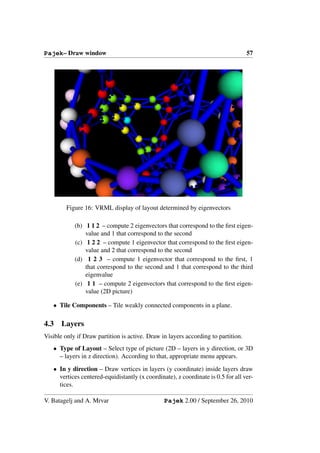
 List of commands with short explanation
              version 2.00


 Vladimir Batagelj and Andrej Mrvar


   Ljubljana, September 26, 2010
c 1996, 2010 V. Batagelj, A. Mrvar. Free for noncommercial use.
PdfLaTex version October 1, 2003


Vladimir Batagelj
Department of Mathematics, FMF
University of Ljubljana, Slovenia
http://vlado.fmf.uni-lj.si/
vladimir.batagelj@fmf.uni-lj.si


Andrej Mrvar
Faculty of Social Sciences
University of Ljubljana, Slovenia
http://mrvar.fdv.uni-lj.si/
andrej.mrvar@fdv.uni-lj.si
Contents
1 Pajek                                                                                                                                  3

2   Data objects                                                                                                                         6

3   Main Window Tools                                                                                                                    8
    3.1 File . . . . . .    .   .   .   .   .   .   .   .   .   .   .   .   .   .   .   .   .   .   .   .   .   .   .   .   .   .   .    8
    3.2 Net . . . . . .     .   .   .   .   .   .   .   .   .   .   .   .   .   .   .   .   .   .   .   .   .   .   .   .   .   .   .   12
    3.3 Nets . . . . . .    .   .   .   .   .   .   .   .   .   .   .   .   .   .   .   .   .   .   .   .   .   .   .   .   .   .   .   31
    3.4 Operations . .      .   .   .   .   .   .   .   .   .   .   .   .   .   .   .   .   .   .   .   .   .   .   .   .   .   .   .   33
    3.5 Partition . . .     .   .   .   .   .   .   .   .   .   .   .   .   .   .   .   .   .   .   .   .   .   .   .   .   .   .   .   42
    3.6 Partitions . . .    .   .   .   .   .   .   .   .   .   .   .   .   .   .   .   .   .   .   .   .   .   .   .   .   .   .   .   43
    3.7 Vector . . . . .    .   .   .   .   .   .   .   .   .   .   .   .   .   .   .   .   .   .   .   .   .   .   .   .   .   .   .   44
    3.8 Vectors . . . .     .   .   .   .   .   .   .   .   .   .   .   .   .   .   .   .   .   .   .   .   .   .   .   .   .   .   .   45
    3.9 Permutation .       .   .   .   .   .   .   .   .   .   .   .   .   .   .   .   .   .   .   .   .   .   .   .   .   .   .   .   46
    3.10 Permutations .     .   .   .   .   .   .   .   .   .   .   .   .   .   .   .   .   .   .   .   .   .   .   .   .   .   .   .   47
    3.11 Cluster . . . .    .   .   .   .   .   .   .   .   .   .   .   .   .   .   .   .   .   .   .   .   .   .   .   .   .   .   .   47
    3.12 Hierarchy . . .    .   .   .   .   .   .   .   .   .   .   .   .   .   .   .   .   .   .   .   .   .   .   .   .   .   .   .   47
    3.13 Options . . . .    .   .   .   .   .   .   .   .   .   .   .   .   .   .   .   .   .   .   .   .   .   .   .   .   .   .   .   48
    3.14 Info . . . . . .   .   .   .   .   .   .   .   .   .   .   .   .   .   .   .   .   .   .   .   .   .   .   .   .   .   .   .   51
    3.15 Tools . . . . .    .   .   .   .   .   .   .   .   .   .   .   .   .   .   .   .   .   .   .   .   .   .   .   .   .   .   .   52

4   Draw Window Tools                                                                                                                   55
    4.1 Main Window Draw Tool                   .   .   .   .   .   .   .   .   .   .   .   .   .   .   .   .   .   .   .   .   .   .   55
    4.2 Layout . . . . . . . . .                .   .   .   .   .   .   .   .   .   .   .   .   .   .   .   .   .   .   .   .   .   .   55
    4.3 Layers . . . . . . . . . .              .   .   .   .   .   .   .   .   .   .   .   .   .   .   .   .   .   .   .   .   .   .   57
    4.4 GraphOnly . . . . . . .                 .   .   .   .   .   .   .   .   .   .   .   .   .   .   .   .   .   .   .   .   .   .   59
    4.5 Previous . . . . . . . . .              .   .   .   .   .   .   .   .   .   .   .   .   .   .   .   .   .   .   .   .   .   .   59
    4.6 Redraw . . . . . . . . .                .   .   .   .   .   .   .   .   .   .   .   .   .   .   .   .   .   .   .   .   .   .   59
    4.7 Next . . . . . . . . . . .              .   .   .   .   .   .   .   .   .   .   .   .   .   .   .   .   .   .   .   .   .   .   59
    4.8 ZoomOut . . . . . . . .                 .   .   .   .   .   .   .   .   .   .   .   .   .   .   .   .   .   .   .   .   .   .   59
    4.9 Options . . . . . . . . .               .   .   .   .   .   .   .   .   .   .   .   .   .   .   .   .   .   .   .   .   .   .   59
    4.10 Export . . . . . . . . .               .   .   .   .   .   .   .   .   .   .   .   .   .   .   .   .   .   .   .   .   .   .   63
    4.11 Spin . . . . . . . . . . .             .   .   .   .   .   .   .   .   .   .   .   .   .   .   .   .   .   .   .   .   .   .   66
    4.12 Move . . . . . . . . . .               .   .   .   .   .   .   .   .   .   .   .   .   .   .   .   .   .   .   .   .   .   .   66
    4.13 Info . . . . . . . . . . .             .   .   .   .   .   .   .   .   .   .   .   .   .   .   .   .   .   .   .   .   .   .   66

5   Exports to EPS/SVG/X3D/VRML                                                68
    5.1 Defaults . . . . . . . . . . . . . . . . . . . . . . . . . . . . . . . 68
    5.2 Parameters in EPS, SVG, X3D, and VRML Defaults Window . . . 68

                                                        1
5.3   Exporting pictures to EPS/SVG – defining parameters in input file 72
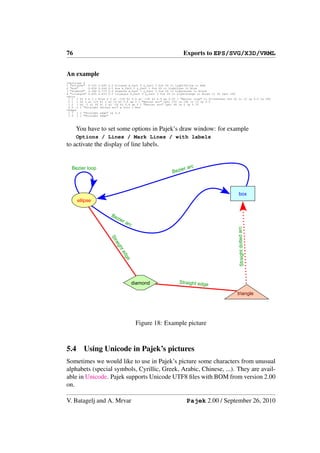
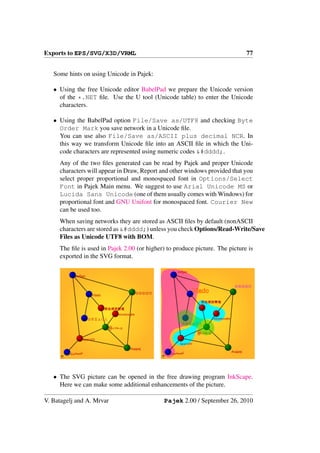
    5.4   Using Unicode in Pajek’s pictures . . . . . . . . . . . . . . . . . 76

6   Using Macros in Pajek                                                                  79
    6.1 What is a Macro? . . . . . . . . . . . . . . . . . . . . . . . . . .               79
    6.2 How to record a Macro? . . . . . . . . . . . . . . . . . . . . . .                 79
    6.3 How to execute the Macro? . . . . . . . . . . . . . . . . . . . . .                79
    6.4 Example . . . . . . . . . . . . . . . . . . . . . . . . . . . . . . .              79
    6.5 List of macros available in installation file . . . . . . . . . . . . .             80
         6.5.1 Macros prepared for genealogies and other acyclic networks                  80
         6.5.2 Macros prepared for computing derived kinship relations .                   81
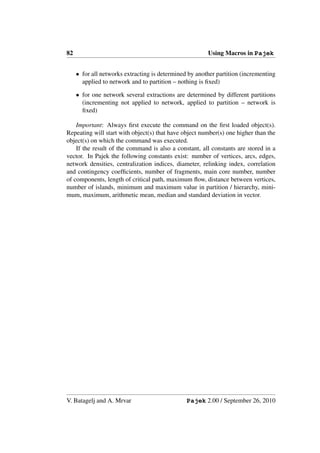
    6.6 Repeating last command . . . . . . . . . . . . . . . . . . . . . .                 81

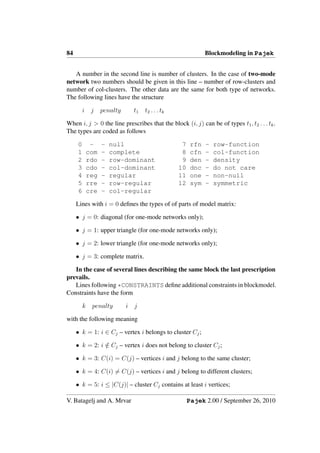
7   Blockmodeling in Pajek                                                                 83
    7.1 MDL files . . . . . . . . . . . . . . . . . . . . . . . .   .   .   .   .   .   .   83
    7.2 Examples of MDL files . . . . . . . . . . . . . . . . .     .   .   .   .   .   .   85
         7.2.1 Regular blocks . . . . . . . . . . . . . . . . .    .   .   .   .   .   .   85
         7.2.2 Diagonal blocks (clustering) . . . . . . . . . .    .   .   .   .   .   .   85
         7.2.3 Acyclic model (up) . . . . . . . . . . . . . . .    .   .   .   .   .   .   85
         7.2.4 Acyclic model with symmetric clusters (down)        .   .   .   .   .   .   85
         7.2.5 Center-Periphery . . . . . . . . . . . . . . . .    .   .   .   .   .   .   86
         7.2.6 Regular path . . . . . . . . . . . . . . . . . .    .   .   .   .   .   .   86
         7.2.7 Regular chain . . . . . . . . . . . . . . . . . .   .   .   .   .   .   .   86
         7.2.8 2-mode ’standard model’ for Davis.net . . . .       .   .   .   .   .   .   87

8   Colors in Pajek                                                                        88

9   Citing Pajek                                                                           90


                                        2
Pajek– Manual                                                                   3


1 Pajek
                         Pajek is a program, for Windows, for analysis and visu-
                         alization of large networks having some thousands or even
                         millions of vertices. In Slovenian language the word pa-
                         jek means spider. The latest version of Pajek is freely
                         available, for noncommercial use, at its home page:
    http://vlado.fmf.uni-lj.si/pub/networks/pajek/
    We started the development of Pajek in November 1996. Pajek is im-
plemented in Delphi (Pascal). Some procedures were contributed by Matjaˇ Za- z
verˇnik.
   s
    The main motivation for development of Pajek was the observation that
there exist several sources of large networks that are already in machine-readable
form. Pajek should provide tools for analysis and visualization of such net-
works: collaboration networks, organic molecule in chemistry, protein-receptor
interaction networks, genealogies, Internet networks, citation networks, diffusion
(AIDS, news, innovations) networks, data-mining (2-mode networks), etc. See
also collection of large networks at:
    http://vlado.fmf.uni-lj.si/pub/networks/data/
    The design of Pajek is based on our previous experiences gained in devel-
opment of graph data structure and algorithms libraries Graph and X-graph, col-
lection of network analysis and visualization programs STRAN, RelCalc, Draw,
Energ, and SGML-based graph description markup language NetML.
    http://vlado.fmf.uni-lj.si/pub/networks/default.htm


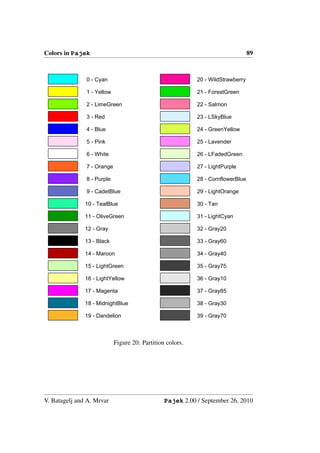
                            Figure 1: Pajek/Spider


V. Batagelj and A. Mrvar                       Pajek 2.00 / September 26, 2010
4                                                               Pajek– Manual


                                              global
                                                            hierarchy


                    local
                                                          reduction


                                            inter-links
          cut-out           context


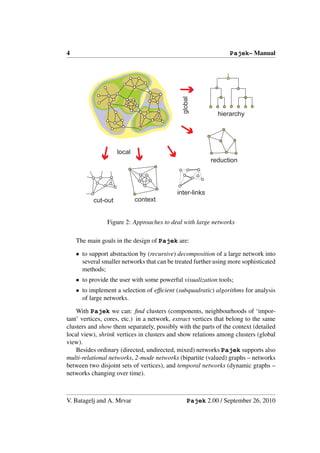
                Figure 2: Approaches to deal with large networks

    The main goals in the design of Pajek are:

    • to support abstraction by (recursive) decomposition of a large network into
      several smaller networks that can be treated further using more sophisticated
      methods;
    • to provide the user with some powerful visualization tools;
    • to implement a selection of efficient (subquadratic) algorithms for analysis
      of large networks.

    With Pajek we can: find clusters (components, neighbourhoods of ‘impor-
tant’ vertices, cores, etc.) in a network, extract vertices that belong to the same
clusters and show them separately, possibly with the parts of the context (detailed
local view), shrink vertices in clusters and show relations among clusters (global
view).
    Besides ordinary (directed, undirected, mixed) networks Pajek supports also
multi-relational networks, 2-mode networks (bipartite (valued) graphs – networks
between two disjoint sets of vertices), and temporal networks (dynamic graphs –
networks changing over time).


V. Batagelj and A. Mrvar                         Pajek 2.00 / September 26, 2010
Pajek– Manual                                                                 5


                           Figure 3: Pajek textbook

    This manual provides short explanations of all procedures implemented in the
last version of Pajek. The novice users we advise to read the Pajek textbook
[31]

      de Nooy W., Mrvar A., Batagelj V. (2002) Exploratory Social Net-
      work Analysis With Pajek. Structural Analysis in the Social Sci-
      ences 27, Cambridge University Press, 2005.

For an overview of network analysis with Pajek see the NICTA workshop slides
[5].


V. Batagelj and A. Mrvar                      Pajek 2.00 / September 26, 2010
6                                                                  Pajek– Manual


2     Data objects
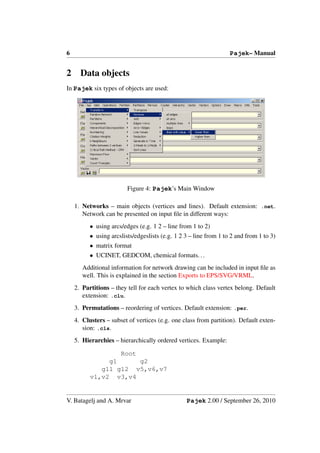
In Pajek six types of objects are used:


                         Figure 4: Pajek’s Main Window

    1. Networks – main objects (vertices and lines). Default extension: .net.
       Network can be presented on input file in different ways:
          • using arcs/edges (e.g. 1 2 – line from 1 to 2)
          • using arcslists/edgeslists (e.g. 1 2 3 – line from 1 to 2 and from 1 to 3)
          • matrix format
          • UCINET, GEDCOM, chemical formats. . .
       Additional information for network drawing can be included in input file as
       well. This is explained in the section Exports to EPS/SVG/VRML.
    2. Partitions – they tell for each vertex to which class vertex belong. Default
       extension: .clu.
    3. Permutations – reordering of vertices. Default extension: .per.
    4. Clusters – subset of vertices (e.g. one class from partition). Default exten-
       sion: .cls.
    5. Hierarchies – hierarchically ordered vertices. Example:

                  Root
               g1      g2
             g11 g12 v5,v6,v7
          v1,v2 v3,v4


V. Batagelj and A. Mrvar                         Pajek 2.00 / September 26, 2010
Pajek– Manual                                                                     7


      Root has two subgroups – g1 and g2. g2 is a leaf – cluster with vertices
      v5,v6 and v7. g1 has two subgroups – g11 and g12. . . Default extension:
      .hie.

   6. Vectors – they tell for each vertex some numerical property (real number).
      Default extension: .vec.

    By double clicking on selected network, partition,... you can show the object
on screen.
    The procedures in Pajek’s main window (see Figure 4) are organized accord-
ing to the types of data objects they use as input.
    Permutations, partitions and vectors can be used to store properties of vertices
measured in different scales: ordered, nominal (categorical) and numeric.


                Figure 5: Spider web; Photo: Vladimir Batagelj.


V. Batagelj and A. Mrvar                        Pajek 2.00 / September 26, 2010
8                                                               Pajek– Manual


3     Main Window Tools
3.1   File
Input/Output manipulation with the six data objects.

    • Network – N

         – Read – Read network from Ascii file.
         – Edit – Edit network. Choose vertex, show its neighbors and then:
             ∗ add new lines to/from selected vertex (by left mouse double click-
               ing on Newline);
             ∗ delete lines (by left mouse double clicking);
             ∗ change value of line (by single right mouse clicking);
             ∗ subdivide line to two orthogonal lines using new invisible vertex
               (by single middle mouse clicking).
         – Save – Save selected network to Ascii file.
           If network represents Ore graph with the following five relations (arcs):
           1. Wi→Hu, 2. Mo→Da, 3. Mo→So, 4. Fa→Da, 5. Fa→So
           it can be stored as GEDCOM file.
           The other possibility is Pajek Ore graph: 1.Fa→Ch, 2.Mo→Ch, 3.Hu-
           Wi (edge), or 1.Pa→Ch, 3.Hu-Wi (edge).
         – Export Matrix to EPS – write matrix in EPS format:
             ∗ Original – using default numbering (for 1-mode and 2-mode net-
               works).
             ∗ Using Permutation – using current permutation. Additionally
               lines can be drawn to divide different classes defined by selected
               partition. Option can be used for 1-mode and 2-mode networks.
             ∗ Using Partition – using current partition. In the text window
               number and density of lines among classes (and vertices in se-
               lected two classes) are displayed. Additionally matrix is exported
               to EPS where density is expressed using shadowing:
                 1. Structural – Densities are normalized according to maxi-
                    mum possible number of lines among classes (suitable for
                    dense networks).
                 2. Delta – Densities are normalized according to vertices having
                    the highest number of input and output neighbors in classes
                    (suitable for sparse networks).

V. Batagelj and A. Mrvar                       Pajek 2.00 / September 26, 2010
Pajek – Manual                                                                   9


            ∗ Diamonds for Negative Values – Squares are used for posititive
              values, diamonds for negative (useful for black and white print-
              ing).
            ∗ Diamonds and Lines in GreyScale – Diamonds and dividing
              lines are drawn in greyscale (not in red and blue).
            ∗ Labels on Top/Right – Labels are written on the top and on the
              right of the matrix - suitable for longer labels.
            ∗ Only Black Borders – All squares in matrix have black borders,
              otherwise dark squares will have white and light squares will have
              black borders.
            ∗ Thick Boundary Line – Use thicker line for dividing clusters.
            ∗ Large Squares/Diamonds – Use larger or smaller squares (and
              diamonds).
        – Change Label of selected network.
        – Dispose selected network from memory.

   • Time Events Network – N

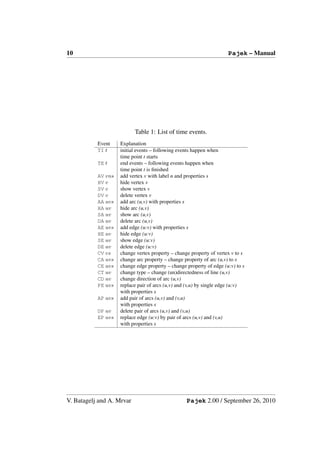
        – Read Time Events – Read time network described using time events.
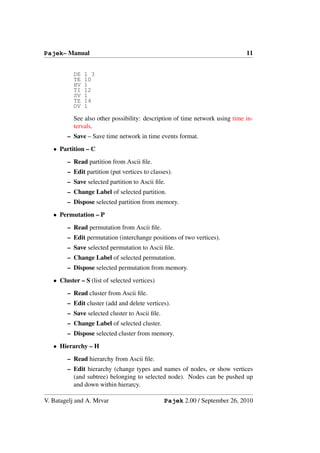
          See Table 1.
          List of properties s can be empty as well. If several edges (arcs) can
          connect two vertices, additional tag like :k (k-th line) must be given to
          determine to which line the command applies. E.g. command HE:3
          14 37 results in hiding the third edge connecting vertices 14 and 37.
          Example of time network described using time events:


          *Vertices 3
          *Events
          TI 1
          AV 2 "b"
          TE 3
          HV 2
          TI 4
          AV 3 "e"
          TI 5
          AV 1 "a"
          TI 6
          AE 1 3 1
          TI 7
          SV 2
          AE 1 2 1
          TE 7
          DE 1 2
          DV 2
          TE 8

V. Batagelj and A. Mrvar                       Pajek 2.00 / September 26, 2010
10                                                                   Pajek – Manual


                           Table 1: List of time events.
           Event    Explanation
           TI t     initial events – following events happen when
                    time point t starts
           TE t     end events – following events happen when
                    time point t is finished
           AV vns   add vertex v with label n and properties s
           HV v     hide vertex v
           SV v     show vertex v
           DV v     delete vertex v
           AA uvs   add arc (u,v) with properties s
           HA uv    hide arc (u,v)
           SA uv    show arc (u,v)
           DA uv    delete arc (u,v)
           AE uvs   add edge (u:v) with properties s
           HE uv    hide edge (u:v)
           SE uv    show edge (u:v)
           DE uv    delete edge (u:v)
           CV vs    change vertex property – change property of vertex v to s
           CA uvs   change arc property – change property of arc (u,v) to s
           CE uvs   change edge property – change property of edge (u:v) to s
           CT uv    change type – change (un)directedness of line (u,v)
           CD uv    change direction of arc (u,v)
           PE uvs   replace pair of arcs (u,v) and (v,u) by single edge (u:v)
                    with properties s
           AP uvs   add pair of arcs (u,v) and (v,u)
                    with properties s
           DP uv    delete pair of arcs (u,v) and (v,u)
           EP uvs   replace edge (u:v) by pair of arcs (u,v) and (v,u)
                    with properties s


V. Batagelj and A. Mrvar                          Pajek 2.00 / September 26, 2010
Pajek– Manual                                                                 11


           DE   1 3
           TE   10
           HV   1
           TI   12
           SV   1
           TE   14
           DV   1

           See also other possibility: description of time network using time in-
           tervals.
        – Save – Save time network in time events format.
   • Partition – C
        – Read partition from Ascii file.
        – Edit partition (put vertices to classes).
        – Save selected partition to Ascii file.
        – Change Label of selected partition.
        – Dispose selected partition from memory.
   • Permutation – P
        – Read permutation from Ascii file.
        – Edit permutation (interchange positions of two vertices).
        – Save selected permutation to Ascii file.
        – Change Label of selected permutation.
        – Dispose selected permutation from memory.
   • Cluster – S (list of selected vertices)
        – Read cluster from Ascii file.
        – Edit cluster (add and delete vertices).
        – Save selected cluster to Ascii file.
        – Change Label of selected cluster.
        – Dispose selected cluster from memory.
   • Hierarchy – H
        – Read hierarchy from Ascii file.
        – Edit hierarchy (change types and names of nodes, or show vertices
          (and subtree) belonging to selected node). Nodes can be pushed up
          and down within hierarcy.

V. Batagelj and A. Mrvar                        Pajek 2.00 / September 26, 2010
12                                                                Pajek– Manual


          – Save selected hierarchy to Ascii file.
          – Change Label of selected hierarchy.
          – Dispose selected hierarchy from memory.

     • Vector – V

          – Read vector from Ascii file.
          – Edit vector (change components of vector).
          – Save selected vector(s) to Ascii file. If cluster representing vector id’s
            is present, all vectors with corresponding id numbers will be saved to
            the same output file. Vector’s id can be added to cluster by pressing
            V on the selected vector (empty cluster should be created first). All
            vectors must have the same dimensions.
          – Change Label of selected vector.
          – Dispose selected vector from memory.

     • Pajek Project File – *.paj

          – Read Pajek project file (file containing all possible Pajek data ob-
            jects – networks, partitions, permutations, clusters, hierarchies and
            vectors).
          – Save all currently loaded objects as a Pajek project file.

     • Repeat session – During program execution all commands are written to
       file *.log. In this way you can repeat any execution by running selected
       log file. If you change in the log file a name of a file to ?, program will
       ask for name when running logfile next time (so you can repeat the same
       sequence of steps – logfile with different input data). If startup logfile (Pa-
       jek.log) exists (in the same directory as Pajek.exe), it is automatically exe-
       cuted every time when Pajek is run.

     • Show Report Window – Bring the report window in the front in the case
       that it was closed or is not visible.

     • Exit program.

3.2     Net
Operations, for which only a network is needed as input.

     • Transform

V. Batagelj and A. Mrvar                         Pajek 2.00 / September 26, 2010
Pajek– Manual                                                                   13


        – Transpose – Transposed network of selected network:
            ∗ 1-Mode - Change direction of arrows.
            ∗ 2-Mode - Interchange Rows and Cols.
        – Remove
            ∗   Selected Vertices – Remove selected vertices from network.
            ∗   all Edges – Remove all edges from selected network.
            ∗   all Arcs – Remove all arcs from selected network.
            ∗   Multiple Lines – Remove all multiple lines from selected net-
                work.
                 1. Sum Values – Values of all deleted lines are added to not
                     deleted line between corresponding two vertices.
                 2. Number of Lines – Value of line between two vertices in a
                     new network correspond to the number of lines between the
                     two vertices in original network.
                 3. Min Value – Minimum value of all lines between two vertices
                     is selected.
                 4. Max Value – Maximum value of all lines between two ver-
                     tices is selected.
                 5. Single Line – Value of line between two vertices in a new
                     network is 1.
            ∗   Loops – Remove all loops from selected network.
            ∗   Lines with Value
                 1. lower than – Remove all lines with value lower than specified
                     value.
                 2. higher than – Remove all lines with value higher than speci-
                     fied value.
                 3. within interval – Remove all lines with values within speci-
                     fied interval.
            ∗   all Arcs from each Vertex except
                 1. k with Lowest Line Values – Sort lines around vertices in
                     ascending order according to output line values. Keep only
                     selected number of lines with lowest values.
                 2. k with Highest Line Values – Sort lines around vertices in
                     descending order according to output line values. Keep only
                     selected number of lines with highest values.
            ∗   Triangle – Remove arcs belonging to lower or upper triangle.
        – Add additional vertices, lines or vertices/lines labels to network.

V. Batagelj and A. Mrvar                      Pajek 2.00 / September 26, 2010
14                                                            Pajek– Manual


            ∗ Vertices – Copy network to new network. Dimension can be en-
              larged for selected number of vertices (additional vertices without
              lines are added).
            ∗ Source and Sink – If network is acyclic, add unique first and last
              vertex (new network has two artificial vertices).
            ∗ Default Vertex Labels – Replace current labels of vertices by
              default vertices labels (v1, v2...).
            ∗ Vertex Labels from File – Replace the default vertices labels (v1,
              v2...) by labels given in a file.
            ∗ Line Labels as Line Values – replace labels of lines (or create
              new if there are no) with line values. Number of decimal places
              is the same as used in Draw window for marking lines with line
              values.
            ∗ Sibling edges – Add sibling edges to vertices with a common
                1. Input – arc-ancestor
                2. Output – arc-descendant
        – Edges → Arcs – Convert all edges to arcs (in both directions) (make
          directed network).
        – Arcs → Edges
            ∗ All – Convert all arcs to edges (make undirected network).
            ∗ Bidirected only – Convert only arcs in both directions to edges:
               1. Sum Values – Value of the new edge is the sum of values of
                  both arcs.
               2. Min Value – Value of the new edge is the smaller of values
                  of arcs.
               3. Max Value – Value of the new edge is the larger of values of
                  arcs.
        – Bidirected Arcs → Arc
            ∗ Select Min Value – If there exist bidirected arcs between two
              vertices retain only the arc with lower value and remove the arc
              with higher value. If both values are equal replace both arcs with
              an edge.
            ∗ Select Max Value – If there exist bidirected arcs between two
              vertices retain only the arc with higher value and remove the arc
              with lower value. If both values are equal replace both arcs with
              an edge.
        – Line Values – Transformations of line values:

V. Batagelj and A. Mrvar                     Pajek 2.00 / September 26, 2010
Pajek – Manual                                                                 15


            ∗ Recode – Display frequency distribution of line values according
              to selected intervals and recode line values in this way.
            ∗ Multiply by a constant.
            ∗ Add Constant to line values.
            ∗ Constant – min or max of line value and selected constant.
            ∗ Absolute line values.
            ∗ Absolute + Sqrt – square root of line values.
            ∗ Truncate – truncated line values.
            ∗ Exp – exponent of line values.
            ∗ Ln – natural logarithm of line values.
            ∗ Power – selected power of line values.
            ∗ Normalize
               1. Sum – normalize so that the sum of line values will be 1
               2. Max – normalize so that the maximum line value will be 1
        – Reduction
            ∗ Degree – (Recursively) delete from network all vertices with de-
              gree lower than selected value (according to Input, Output or All
              degree). Operation can be limited to selected cluster.
            ∗ Hierarchical – Recursively delete from network all vertices that
              have only 0 or 1 neighbor. Results: simpler network and hierarchy
              with deleted vertices. Original network can be later restored (if we
              forget directions of lines).
            ∗ Subdivisions – Recursively delete from network all vertices that
              have exactly 2 neighbors (together with corresponding two lines)
              and (instead of that) add direct line between these two neighbors.
              Result is simpler network (for drawing). Original network cannot
              be restored!
            ∗ Design (flow graph) Reduction of all structural parts of network
              according to McCabe (for programs – flow graphs) [49].
        – Generate in Time – Generate network in specified time(s) or interval.
          Input first time, last time and step (integers).
           Additional parameters when vertices and lines are active should be
          given in network to perform this operation. They must be given be-
          tween signs [ and ]:
          - is used to divide lower and upper limit of interval,
          , is used to separate intervals,
          * means infinity. Example:


V. Batagelj and A. Mrvar                      Pajek 2.00 / September 26, 2010
16                                                          Pajek – Manual


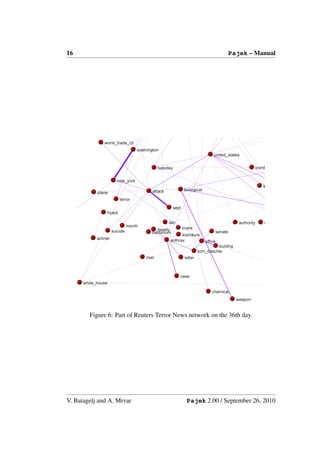
        Figure 6: Part of Reuters Terror News network on the 36th day.


V. Batagelj and A. Mrvar                    Pajek 2.00 / September 26, 2010
Pajek– Manual                                                                    17


                     *Vertices 3
                     1 "a" [5-10,12-14]
                     2 "b" [1-3,7]
                     3 "e" [4-*]
                     *Edges
                     1 2 1 [7]
                     1 3 1 [6-8]


          Vertex ’a’ is active from times 5 to 10, and 12 to 14, vertex ’b’ in times
          1 to 3 and in time 7, vertex ’e’ from time 4 on. Line from 1 to 2 is ac-
          tive only in time 7, line from 1 to 3 in times 6 to 8.
          The lines and vertices in a temporal network should satisfy the consis-
          tency condition: if a line is active in time t then also its end-vertices
          are active in time t. When generating time slices of a given temporal
          network only ’consistent’ lines are generated.
          Note that time records should always be written as last in the row
          where vertices / lines are defined.
          See also other possibility of describing time network: description of
          time network using time events.
            ∗ All – Generate all networks in specified times.
            ∗ Only Different – Generate network in specified time only if the
              new network will differ in at least one vertex or line from the last
              network which was generated.
            ∗ Interval – Generate network with vertices and lines present in
              selected interval.
        – 1-Mode to 2-Mode – Generate 2-mode network from any network.
        – 2-Mode to 1-Mode – Generate an ordinary (1-mode) network from
          2-mode (affiliation) network. Result is a valued network. To store
          a 2-mode network in input file use Pajek or Ucinet format (look at
          Davis.dat from Ucinet dataset).
            ∗ Rows – Result is a network with relations among row elements
              (actors). The value of line tells number of common events of the
              two actors.
            ∗ Columns – Result is network with relations among column ele-
              ments (events). The value of a line tells number of actors that took
              part in both events.
            ∗ Include Loops – If checked, loops with value telling the total
              number of events for each actor (total number of actors for each
              event), are added.

V. Batagelj and A. Mrvar                       Pajek 2.00 / September 26, 2010
18                                                             Pajek– Manual


            ∗ Multiple Lines – Generate nonvalued 1-mode network, where
              multiple lines among vertices can exist. The label of the gen-
              erated line corresponds to the label of the event/actor that served
              to induce the line. If partition of the same dimension is present,
              multirelational network can be generated.
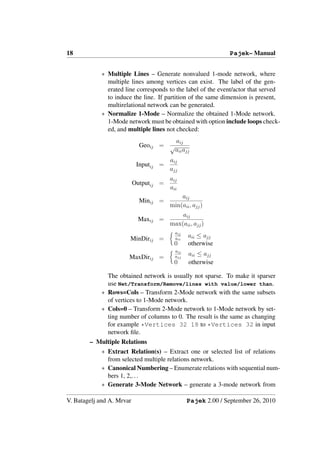
            ∗ Normalize 1-Mode – Normalize the obtained 1-Mode network.
              1-Mode network must be obtained with option include loops check-
              ed, and multiple lines not checked:
                                          aij
                             Geoij = √
                                          aii ajj
                                        aij
                            Inputij =
                                        ajj
                                        aij
                           Outputij =
                                        aii
                                            aij
                             Minij =
                                        min(aii , ajj )
                                            aij
                            Maxij =
                                        max(aii , ajj )
                                          aij
                       MinDirij =         aii
                                                aii ≤ ajj
                                          0     otherwise
                                          aij
                                                aii ≤ ajj
                       MaxDirij =         ajj
                                          0     otherwise

              The obtained network is usually not sparse. To make it sparser
              use Net/Transform/Remove/lines with value/lower than.
            ∗ Rows=Cols – Transform 2-Mode network with the same subsets
              of vertices to 1-Mode network.
            ∗ Cols=0 – Transform 2-Mode network to 1-Mode network by set-
              ting number of columns to 0. The result is the same as changing
              for example *Vertices 32 18 to *Vertices 32 in input
              network file.
        – Multiple Relations
            ∗ Extract Relation(s) – Extract one or selected list of relations
              from selected multiple relations network.
            ∗ Canonical Numbering – Enumerate relations with sequential num-
              bers 1, 2,. . .
            ∗ Generate 3-Mode Network – generate a 3-mode network from

V. Batagelj and A. Mrvar                        Pajek 2.00 / September 26, 2010
Pajek– Manual                                                                  19


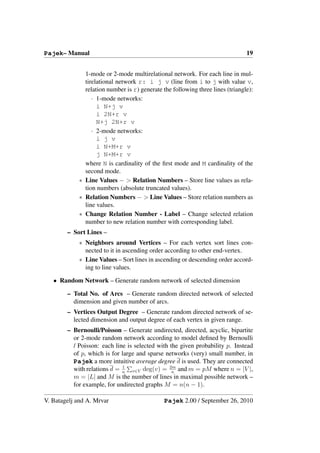
              1-mode or 2-mode multirelational network. For each line in mul-
              tirelational network r: i j v (line from i to j with value v,
              relation number is r) generate the following three lines (triangle):
                 · 1-mode networks:
                   i N+j v
                   i 2N+r v
                   N+j 2N+r v
                 · 2-mode networks:
                   i j v
                   i N+M+r v
                   j N+M+r v
              where N is cardinality of the first mode and M cardinality of the
              second mode.
            ∗ Line Values − > Relation Numbers – Store line values as rela-
              tion numbers (absolute truncated values).
            ∗ Relation Numbers − > Line Values – Store relation numbers as
              line values.
            ∗ Change Relation Number - Label – Change selected relation
              number to new relation number with corresponding label.
        – Sort Lines –
            ∗ Neighbors around Vertices – For each vertex sort lines con-
              nected to it in ascending order according to other end-vertex.
            ∗ Line Values – Sort lines in ascending or descending order accord-
              ing to line values.

   • Random Network – Generate random network of selected dimension

        – Total No. of Arcs – Generate random directed network of selected
          dimension and given number of arcs.
        – Vertices Output Degree – Generate random directed network of se-
          lected dimension and output degree of each vertex in given range.
        – Bernoulli/Poisson – Generate undirected, directed, acyclic, bipartite
          or 2-mode random network according to model defined by Bernoulli
          / Poisson: each line is selected with the given probability p. Instead
          of p, which is for large and sparse networks (very) small number, in
          Pajek a more intuitive average degree d is used. They are connected
                             1
          with relations d = n v∈V deg(v) = 2m and m = pM where n = |V |,
                                                 n
          m = |L| and M is the number of lines in maximal possible network –
          for example, for undirected graphs M = n(n − 1).

V. Batagelj and A. Mrvar                      Pajek 2.00 / September 26, 2010
20                                                                 Pajek– Manual


          – Scale Free – Generate scale free undirected, directed or acyclic net-
            work. The procedure is based on a refinement of the model for gener-
            ating scale free networks, proposed in [54]. At each step of the growth
            a new vertex and k edges are added to the network N . The endpoints
            of the edges are randomly selected among all vertices according to the
            probability

                                       indeg(v)    outdeg(v)     1
                           Pr(v) = α            +β           +γ
                                          |E|         |E|       |V |

            where α + β + γ = 1. It is easy to check that    v∈V   Pr(v) = 1.
          – Small World – Generate Small world random network. See [12].
          – Extended Model – Generate random network according to extended
            model defined by Albert and Barabasi [3].


     • Partitions – Partitioning Network. Result is a Partition.

          – Degree
               ∗ Input – Number of lines into vertices.
               ∗ Output – Number of lines out of vertices.
               ∗ All – Number of neighbors of vertices.
          – Domain – For each vertex compute its domain according to input,
            output or all neighbors. Results are:
               ∗ Partition containing size of domain - number of reachable ver-
                 tices.
               ∗ Vector containing the normalized size of domain - normalization
                 is done by total number of vertices – 1.
               ∗ Vector containing the average distance from/to domain.
            Proximity Prestige index can be computed by dividing the normalized
            size of domain by average distance.
          – Core – k-core is a subnetwork of given network where each vertex has
            at least k neighbors in the same core according to:
               ∗   Input ... lines coming into vertex.
               ∗   Output ... lines going out of vertex.
               ∗   All ... all neighbors.
               ∗   2-Mode – core partition of a 2-mode network. Given minimum
                   degree in first (k1 ) and minimum degree in second subset (k2 )

V. Batagelj and A. Mrvar                         Pajek 2.00 / September 26, 2010
Pajek– Manual                                                                                                                            21


                                                                                                                                   4456712


                                                                                                                                   5555116


  5124824                                                           5171469                                                        5283677


                5016988                                             5122295                                                        5016989


  4957349                                                           4877547                             4820839                    4832462


  4770503                 4795579                                   4797228                             4752414                    4721367


  4709030                 4719032                4695131            4710315         4713197             4704227                    4657695


  4630896                                                           4659502         4621901


            4583826              4510069         4558151                            4550981


                                                                    4526704         4502974                   4514044


            4460770                              4480117            4472293         4472592                   4455443


                                                 4419263            4422951


                                                                                              4415470         4400293              4386007


                                       4349452         4368135                       4340498


      4387039         4387038          4293434         4290905          4361494                4302352        4330426              4357078


                                                       4195916                       4229315                                       4261652


                                       4202791                                       4149413                                  4198130


                             4154697              4113647               4130502      4032470            4083797        4082428     4118335


                             4013582              4029595            4077260      4017416      3975286              4011173        4000084


                      3954653                                                     3947375                    3960752               3876286


  3891307       3697150         3636168      3767289      3666948       3322485   3773747     3796479     3795436       2682562    3691755


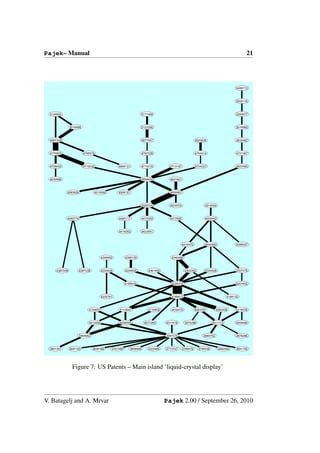
                 Figure 7: US Patents – Main island ’liquid-crystal display’


V. Batagelj and A. Mrvar                                                          Pajek 2.00 / September 26, 2010
22                                                            Pajek– Manual


              a new partition is generated where 0 means that vertex does not
              belong to the core of prespecified k1 and k2 , 1 means that vertex
              belongs to that core.
            ∗ 2-Mode Review – Given starting values of k1 and k2 the follow-
              ing list is computed:
              k1 k2 Rows Cols Comp
              where k1 is minimum degree in the first, k2 minimum degree in
              the second subset, Rows and Cols are number of vertices in first
              and second subset respectivelly and Comp, number of connected
              components in network induced by k1 and k2 . k1 and k2 are in-
              cremented until the resulting network is empty.
            ∗ 2-Mode Border – Compute only border values of k1 and k2 for
              a given 2-mode network.
        – Valued Core – Generalized k-core: Instead of counting lines (neigh-
          bors) use values of lines. sum of lines or maximum value can be used
          when computing valued core:
          Sum valued core of threshold val is a subnetwork of given network
          where the sum of values of lines to (from) the members of the same
          core is at least val.
          Max valued core of threshold val is a subnetwork of given network
          where the maximum value of all lines to (from) the members of the
          same core is at least val.
          Threshold values must be given in advance. Two different ways to
          determine thresholds:
            ∗ First Threshold and Step – Select first threshold value and step
              in which to increase threshold.
            ∗ Selected Thresholds – Thresholds (increasing numbers) are given
              using vector.
            ∗ 2-Mode – valued core (according to line values) partition of a 2-
              mode network. Given minimum valued degree in first (k1 ) and
              minimum valued degree in second subset (k2 ) a new partition is
              generated where 0 means that vertex does not belong to the valued
              core of prespecified k1 and k2 , 1 means that vertex belongs to that
              core.
          Additionally (for 1-mode networks), Input, Output or All valued cores
          can be used.
        – Depth
            ∗ Acyclic – Partition acyclic network according to depths of ver-
              tices.

V. Batagelj and A. Mrvar                     Pajek 2.00 / September 26, 2010
Pajek– Manual                                                                  23


            ∗ Genealogical – Partition network that represents genealogy ac-
              cording to layers of vertices.
            ∗ Generational – Partition network that represents genealogy ac-
              cording to layers of vertices. The same as genealogical partition
              but with less layers.
        – p-Cliques Partition network according to p-Cliques (partition to clus-
          ters where vertices have at least proportion p (number between 0 and
          1) neighbors inside the cluster.
            ∗ Strong ... for directed network.
            ∗ Weak ... for undirected network.
        – Vertex Labels – Partition vertices with same labels to the same class
          numbers (for molecule).
        – Vertex Shapes – Partition vertices with same shapes (ellipse, box, dia-
          mond) to the same class numbers (used in genealogy to show gender).
        – Islands – Partition vertices of network with values on lines (weights)
          to cohesive clusters (weights inside clusters must be larger than weights
          to neighborhood): the height of vertex (vector) is defined as the maxi-
          mum weight of the neighbor lines. Two options:
            ∗ Line Weights
            ∗ Line Weights [Simple]
          New network with only lines constituting islands can be generated if
          Generate Network with Islands is checked.
        – Bow-Tie – Partition vertices of directed network (graph structure of
          the web) to the following classes: 1 – LSCC, 2 – IN, 3 – OUT, 4 –
          TUBES, 5 – TENDRILS, 0 – OTHERS.
        – 2-Mode – Partition of vertices of a 2-mode network into two subsets.

   • Components

        – Strong – Strong Components of selected network.
        – Strong-Periodic – Strong Periodic Components of selected network -
          strongly connected components are further divided according to peri-
          ods.
        – Weak – Weak Components of selected network.
        – Bi-Components – Biconnected Components of selected network. Ar-
          ticulation points belong to several classes, so the result cannot be
          stored in partition – biconnected components are stored in hierarchy!

V. Batagelj and A. Mrvar                      Pajek 2.00 / September 26, 2010
24                                                            Pajek– Manual


              Figure 8: Bow-tie – Graph structure in the web [26]


           Minimal number of vertices in components can be selected. Addition-
           ally, partition containing articulation points is produced: number of
           biconnected components to which each vertex belongs is given. Par-
           tition containing vertices belonging to exactly one bicomponent, ver-
           tices outside bicomponents and articulation points is also produced:
           vertices outside bicomponents get class zero, each bicomponent is
           numbered consecutively (from 1 to number of bicomponents) and ar-
           ticulation points get class number 9999998.

     • Hierarchical Decomposition

         – Clustering* – Hierarchical clustering procedure. Input is dissimilar-
           ity network (matrix), which can be obtained using
           Operations/Dissimilarity/Network based or read from input file.
             ∗ Run – Hierarchical clustering procedure. Result is hierarchy with
               nested clusters and dendrogram in EPS.
             ∗ Options – Select method for hierarchical clustering procedure
               (general, minimum, maximum, average, ward, squared ward).
         – Symmetric-Acyclic – Symmetric-Acyclic decomposition of network.
           Result is hierarchy with nested clusters [33].

V. Batagelj and A. Mrvar                      Pajek 2.00 / September 26, 2010
Pajek– Manual                                                                   25


        – Clustering with Relational Constraint – Hierarchical clustering with
          relational constraint procedure. See:
          Ferligoj A., Batagelj V. (1983): Some types of clustering with rela-
          tional constraints. Psychometrika, 48(4), 541-552.
          Only dissimilarities among vertices that are linked are taken into ac-
          count what enables to find clusterings very fast also for large networks.
          Input is network with dissimilarities, which can be obtained using
          Operations/Dissimilarity/Network or Vector based or read from input
          file.
            ∗ Run – Results are: a partition representing tree: fathers of nodes;
              and two vectors: describing heights of nodes and number of ver-
              tices in subtree respectivelly. If network has n vertices then ob-
              tained partitions and vectors have dimension 2*n-1. Note that
              this objects are not compatible with original network, you must
              use Make Partition to get compatible results.
            ∗ Make Partition – From obtained partition representing tree gen-
              erate partition compatible with original network
                 · using Threshold determined by Vector – From obtained
                   partition representing tree and one of the two vectors (all have
                   dimension 2*n-1) generate partition compatible with original
                   network by giving threshold value.
                 · with selected Size of Clusters – From obtained partition rep-
                   resenting tree and given number of vertices in clusters gener-
                   ate partition compatible with original network.
            ∗ Extract Subtree as Hierarchy – Extract subtree from obtained
              Partition by giving the root as Pajek Hierarchy.
            ∗ Options – Select method for hierarchical clustering with rela-
              tional constraint (minimum, maximum, or average) and strategy
              (strict, leader, or tolerant).
   • Numbering
        – Depth First – Depth first numbering of selected network...
            ∗ Strong ... taking directions of arcs into account.
            ∗ Weak ... forget directions (or undirected network).
        – Breadth First – Breadth first numbering of selected network...
            ∗ Strong ... taking directions of arcs into account.
            ∗ Weak ... forget directions (or undirected network).
        – Reverse Cuthill-McKee – RCM numbering. See paper.

V. Batagelj and A. Mrvar                      Pajek 2.00 / September 26, 2010
26                                                                Pajek– Manual


          – Core + Degree – Numbering in decreasing order according to all core
            partition. Within the same core number vertices are ordered in de-
            creasing order according to number of neighbors which have the same
            or higher core number.
     • Citation Weights – If a network represents citation network, weights of
       lines (citations) and vertices (articles) can be computed. Results are:
          – Network with values on lines representing importance of citations.
          – Binary partition with vertices on the main path.
          – Network containing only main path.
          – Vector with importance of vertices (articles).
       Different methods of assigning weights [43]:
          – Search Path Count (SPC) – method. Compute from Source to Sink.
          – Search Path Link Count (SPLC) – method. Each vertex is consid-
            ered as Source.
          – Search Path Node Pair (SPNP) – method.
       Weights can also be normalized (using flow or maximum value) or logged.
     • k-neighbors – Select all vertices
          – Input ...from which we can reach selected vertex in at most k-steps.
          – Output ...that can be reached from selected vertex in at most k-steps.
          – All ...Input + Output (forget direction of lines)
            Result is partition where vertices are in class numbers equal to the dis-
            tance from given vertex, vertices that cannot be reached from selected
            vertex are in class number 9999998. After you have a partition you
            can extract subnetwork.

          – From Clusters – Compute selected distances according to each vertex
            in Cluster. Results consist of so many partitions as is the number of
            vertices in cluster. Instead of storing results in partitions they can be
            stored in vectors as well.

     • Paths between 2 vertices
          – One Shortest – Find the shortest path between two vertices. Result
            is new network. Values on lines can be taken into account (if they
            present distances between vertices) or not (graph theoretical distance).
            The latter possibility is faster.

V. Batagelj and A. Mrvar                         Pajek 2.00 / September 26, 2010
Pajek– Manual                                                                   27


        – All Shortest – Find all shortest paths between two vertices. Result
          is new network. Values on lines can be taken into account (if they
          present distances between vertices) or not (graph theoretical distance).
          The latter possibility is faster.
        – Walks with Limited Length – Find all walks between two vertices
          with limited maximum length.
        – Diameter – Find diameter – the length of the longest shortest path in
          network and corresponding two vertices. Full search is performed, so
          the operation may be slow for very large networks (number of vertices
          larger than 2000).
        – Geodesics Matrices* – Compute the shortest path length matrix and
          the geodesics count matrix (for small networks only!).
        – Distribution of Distances – Compute distribution of lengths of the
          shortest paths and average path length among all reachable pairs of
          vertices in network.
             ∗ From All Vertices – Take all vertices as starting points.
             ∗ From Vertices in Cluster – Only distances from vertices selected
               by Cluster are computed.
   • Critical Path Method (CPM) – Find the critical path in acyclic network –
     result is new network containing the critical path. Algorithm can be used
     in the area of project planning but also for analysing acyclic graphs. Addi-
     tional networks containing total and free delay times of activities are gener-
     ated. Two vectors (partitions) are generated, too: First containing the earli-
     est possible times of coming into given states and the second containing the
     latest feasible times of coming into given states.

   • Maximum Flow among vertices.

        – Selected Pair – Find maximum flow between selected two vertices
          (algorithm looks for paths to be saturated and among them it always
          selects the shortest path). Algorithm can be used in the technical area
          (actual flow, values on lines mean capacities) or for analysing graphs
          (if all values are 1). Result is a new network, containing the two ver-
          tices and lines contributing to maximum flow between them.
        – Pairs in Cluster – Find maximum flow among vertices determined by
          cluster. Result is a new network, where a value on line means max-
          imum flow between corresponding two vertices. Algorithm is slow:
          Use it on smaller networks or clusters with limited number of vertices
          only!

V. Batagelj and A. Mrvar                       Pajek 2.00 / September 26, 2010
28                                                                Pajek– Manual


     • Vector – Get vector from network
         – Centrality – Result is a vector containing selected centrality measure
           of each vertex and centralisation index of the whole network [63, p.
           169-219].
              ∗ Closeness centrality (Sabidussi).
                 1. Input – centrality of each vertex according to distances of
                    other vertices to selected vertex.
                 2. Output – centrality of each vertex according to distances of
                    selected vertex to all other vertices.
                 3. All – forget direction of lines – consider network as undi-
                    rected.
              ∗ Betweenness centrality (Freeman).
         – Get Loops – store values of loops to vector.
         – Get Coordinate – x, y, or z coordinate of network. You can also get
           all coordinates at once - possibility to have more than 3 coordinates,
           coordinates must contain character . (dot).
         – Important Vertices – Find important vertices in directed network
           (e.g. web pages, scientific citations) or 2-mode network. Result are
           vectors with weights and partition with selected number of important
           vertices.
              ∗ 1-Mode: Hubs-Authorities – In directed networks we can usu-
                ally identify two types of important vertices: hubs and authorities
                [46]. A vertex is a good hub, if it points to many good authorities,
                and it is a good authority, if it is pointed to by many good hubs. In
                obtained partition value 1 means, that the vertex is a good author-
                ity, value 2 means, that the vertex is a good authority and a good
                hub, and value 3 means, that the vertex is a good hub.
              ∗ 2-Mode: Important Vertices – Generalization of algorithm for
                2-mode networks – find important vertices from first and second
                subset.
         – Structural Holes – Burt’s measure of constraint (structural holes) [27,
           page 54-55]. Results are:
              ∗ network pij : the proportion of the value of i’s relation(s) with j
                compared to the total value of all relations of i. where aij is the
                value of the line from i to j
                                                 aij + aji
                                       pij =
                                                k (aik + aki )


V. Batagelj and A. Mrvar                        Pajek 2.00 / September 26, 2010
Pajek– Manual                                                                          29


            ∗ network containing dyadic constraint cij – the constraint of absent
              primary holes around j on i: Explanation: Contact j constrains
              your i’s entrepreneurial opportunities to the extent that:
              (a) you’ve made a large investment of time and energy to reach j,
              and
              (b) j is surrounded by few structural holes with which you could
              negotiate to get a favorable return on the investment.

                                 cij = (pij +               pik pkj )2
                                                k,k=i,k=j

            ∗ vector containing aggregate constraint Ci : Ci =             j   cij ,
              Ci = 1 for isolated vertices.
        – Clustering Coefficients – Compute different inherent tendency coef-
          ficients in undirected network:

          Let deg(v) denotes degree of vertex v, |E(G1 (v))| number of lines
          among vertices in 1-neighborhood of vertex v, MaxDeg maximum
          degree of vertex in a network, and |E(G2 (v))|, number of lines among
          vertices in 1 and 2-neighborhood of vertex v.
            ∗ CC1 – coefficients considering only 1-neighborhood:
                               2|E(G1 (v))|                              deg(v)
               CC1 (v) =                              CC1 (v) =                 CC1 (v)
                           deg(v) · (deg(v) − 1)                         MaxDeg
            ∗ CC2 – coefficients considering 2-neighborhood
                               |E(G1 (v))|                        deg(v)
                   CC2 (v) =                      CC2 (v) =              CC2 (v)
                               |E(G2 (v))|                        MaxDeg
          If deg(v) ≤ 1 all coefficients for vertex v get missing value (9999998).
          Watts-Strogatz Clustering Coefficient (Transitivity) and Network Clus-
          tering Coefficient are also reported.
        – Summing up Values of Lines – Sum values of all incoming, outgoing
          or all lines connected to selected vertex.
        – Min of Values of Lines – Find minimum value of incoming, outgoing
          or all lines connected to selected vertex.
        – Max of Values of Lines – Find maximum value of incoming, outgoing
          or all lines connected to selected vertex.
        – Centers – Find centers in a graph using ’robbery’ algorithm: vertices
          that have higher degrees (are stronger) than their neighbors steal from
          them:

V. Batagelj and A. Mrvar                        Pajek 2.00 / September 26, 2010
30                                                                Pajek– Manual


                           cyclic               transitive

        Figure 9: Lines belonging to cyclic and transitive (shortcut) 3-rings


              ∗ at the beginning give to vertices initial strength according to their
                degrees, or start with value 1
              ∗ when ’weak’ vertex is found, neighbors steal from it according to
                their strengths, or they steal the same amount
          – PCore – generalized cores.
              ∗ Degree – ordinary cores.
              ∗ Sum – taking values of lines into account (sum of values of lines
                inside pcore).
              ∗ Max – taking values of lines into account (max of values of lines
                inside pcore).

     • Count - how many times each line belongs to predefined rings

          – 3-Rings – For each line count number of 3-rings to which the line
            belongs.
              ∗ Undirected – for undirected networks – count undirected 3-rings.
              ∗ Directed – for directed networks – count cyclic, transitive, or all
                3-rings, or count how many times each line is a transitive shortcut
                (see Figure 9).
          – 4-Rings – For each line count number of 4-rings to which the line
            belongs.
              ∗ Undirected – for undirected networks – count undirected 4-rings.
              ∗ Directed – for directed networks – count cyclic, diamonds, genea-
                logical, transitive, or all 4-rings, or count how many times each
                line is a transitive shortcut (see Figure 10).


V. Batagelj and A. Mrvar                        Pajek 2.00 / September 26, 2010
Pajek– Manual                                                                  31


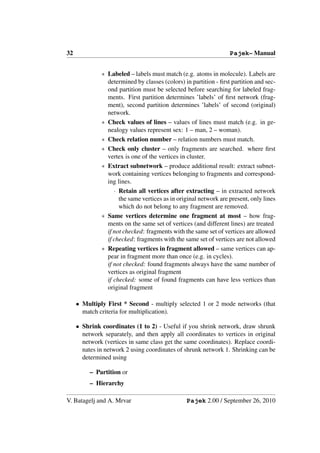
             cyclic        transitive     genealogical      diamond

                  Figure 10: Types of directed 4-rings on arcs


3.3   Nets
Operations on two networks.
   • Union of lines – Fuse selected networks. Result is a multiple relations
     network. If you want to get union of networks, multiple lines must still
     be deleted. Networks must match in dimension or: If one network has m
     vertices and other n vertices and m < n then in network with n vertices first
     m vertices must match with vertices in network with m vertices.
   • Cross-Intersection – Intersection of selected networks. Networks must
     match in dimension or: If one network has m vertices and other n ver-
     tices and m < n then in network with n vertices first m vertices must match
     with vertices in network with m vertices. Values of lines in intercept can be
     sum, difference, product, quotient, min, or max of both values.
   • Intersection – Intersection of selected networks where relation numbers are
     taken into account.
   • Cross-Difference – Difference of selected networks.
   • Difference – Difference of selected networks where relation numbers are
     taken into account.
   • Union of vertices – Add the second network at the end of first network.
   • Fragment (1 in 2) – Find all instances of fragment (determined by network
     1) in network 2.
        – Find – Execute command.
        – Options Select appropriate model of fragment.
             ∗ Induced – there should be no additional lines between vertices
               in instance of fragment to match (stronger condition) otherwise
               additional lines can be present (weaker).

V. Batagelj and A. Mrvar                      Pajek 2.00 / September 26, 2010
32                                                                Pajek– Manual


              ∗ Labeled – labels must match (e.g. atoms in molecule). Labels are
                determined by classes (colors) in partition - first partition and sec-
                ond partition must be selected before searching for labeled frag-
                ments. First partition determines ’labels’ of first network (frag-
                ment), second partition determines ’labels’ of second (original)
                network.
              ∗ Check values of lines – values of lines must match (e.g. in ge-
                nealogy values represent sex: 1 – man, 2 – woman).
              ∗ Check relation number – relation numbers must match.
              ∗ Check only cluster – only fragments are searched. where first
                vertex is one of the vertices in cluster.
              ∗ Extract subnetwork – produce additional result: extract subnet-
                work containing vertices belonging to fragments and correspond-
                ing lines.
                   · Retain all vertices after extracting – in extracted network
                     the same vertices as in original network are present, only lines
                     which do not belong to any fragment are removed.
              ∗ Same vertices determine one fragment at most – how frag-
                ments on the same set of vertices (and different lines) are treated
                if not checked: fragments with the same set of vertices are allowed
                if checked: fragments with the same set of vertices are not allowed
              ∗ Repeating vertices in fragment allowed – same vertices can ap-
                pear in fragment more than once (e.g. in cycles).
                if not checked: found fragments always have the same number of
                vertices as original fragment
                if checked: some of found fragments can have less vertices than
                original fragment

     • Multiply First * Second - multiply selected 1 or 2 mode networks (that
       match criteria for multiplication).

     • Shrink coordinates (1 to 2) - Useful if you shrink network, draw shrunk
       network separately, and then apply all coordinates to vertices in original
       network (vertices in same class get the same coordinates). Replace coordi-
       nates in network 2 using coordinates of shrunk network 1. Shrinking can be
       determined using

          – Partition or
          – Hierarchy

V. Batagelj and A. Mrvar                        Pajek 2.00 / September 26, 2010
Pajek– Manual                                                                       33


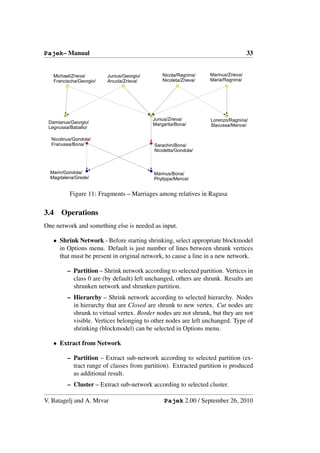
   Michael/Zrieva/       Junius/Georgio/       Nicola/Ragnina/    Marinus/Zrieva/
   Francischa/Georgio/   Anucla/Zrieva/        Nicoleta/Zrieva/   Maria/Ragnina/


                                           Junius/Zrieva/         Lorenzo/Ragnina/
 Damianus/Georgio/                         Margarita/Bona/
 Legnussa/Babalio/                                                Slavussa/Mence/

  Nicolinus/Gondola/
  Franussa/Bona/                           Sarachin/Bona/
                                           Nicoletta/Gondola/


  Marin/Gondola/                           Marinus/Bona/
  Magdalena/Grede/                         Phylippa/Mence/


          Figure 11: Fragments – Marriages among relatives in Ragusa

3.4   Operations
One network and something else is needed as input.

   • Shrink Network - Before starting shrinking, select appropriate blockmodel
     in Options menu. Default is just number of lines between shrunk vertices
     that must be present in original network, to cause a line in a new network.

         – Partition – Shrink network according to selected partition. Vertices in
           class 0 are (by default) left unchanged, others are shrunk. Results are
           shrunken network and shrunken partition.
         – Hierarchy – Shrink network according to selected hierarchy. Nodes
           in hierarchy that are Closed are shrunk to new vertex. Cut nodes are
           shrunk to virtual vertex. Border nodes are not shrunk, but they are not
           visible. Vertices belonging to other nodes are left unchanged. Type of
           shrinking (blockmodel) can be selected in Options menu.

   • Extract from Network

         – Partition – Extract sub-network according to selected partition (ex-
           tract range of classes from partition). Extracted partition is produced
           as additional result.
         – Cluster – Extract sub-network according to selected cluster.

V. Batagelj and A. Mrvar                        Pajek 2.00 / September 26, 2010
34                                                                                  Pajek– Manual


          – 2-Mode Network – Extract 2-mode network from 1-mode network:
            first and second mode are determined by given set of clusters in parti-
            tion.
          – to GEDCOM – Extract sub-genealogy according to selected parti-
            tion (weakly connected component) to new GEDCOM file (genealogy
            must be read as Ore graph).

     • Brokerage Roles - For each vertex j count five brokerage roles (coordi-
       nator, itinerant broker, representative, gatekeeper and liaison) according to
       given partition.
                   j                j                 j                    j                 j


          i             k    i            k     i          k       i            k     i             k


              coordinator   itinerant broker   representative          gatekeeper         liaison


     • Dissimilarity*

          – Network based – Compute selected dissimilarity matrix (d1 , d2 , d3 or
            d4 ) among vertices in cluster according to number of common neigh-
            bors. Corrected Euclidean-like d5 and Manhattan-like d6 dissimilari-
            ties can be computed as well [13]. The obtained matrix can be used
            further for hierarchical clustering procedure.
            You can include vertex v to its own neighborhood or not and display
            in report window only upper triangle / undirected or complete matrix
            /directed (if number of vertices is low).

                Nv is a set of input, output or all neighbors of vertex v; + stands for
                symmetric sum, ∪ stands for set union and  stands for set difference;
                | stands for set cardinality; 1st maxdegree and 2nd maxdegree are the
                largest degree and the second largest degree in network, respectively.


                                         |Nu + Nv |
                d1 (u, v) =
                            1st maxdegree + 2nd maxdegree
                            |Nu + Nv |
                d2 (u, v) =
                            |Nu ∪ Nv |
                             |Nu + Nv |
                d3 (u, v) =
                            |Nu | + |Nv |

V. Batagelj and A. Mrvar                                       Pajek 2.00 / September 26, 2010
Pajek– Manual                                                                            35

                           max(|Nu  Nv |, |Nv  Nu |)
          d4 (u, v) =
                               max(|Nu |, |Nv |)
                                n
          d5 (u, v) =                ((qus − qvs )2 + (qsu − qsv )2 ) + p · ((quu − qvv )2 + (quv − qvu )2 )
                              s=1
                             s=u,v

                            n
          d6 (u, v) =              (|qus − qvs | + |qsu − qsv |) + p · (|quu − qvv | + |quv − qvu |)
                            s=1
                           s=u,v


          Dissimilarities d5 and d6 are based on some matrix Q = [quv ] on ver-
          tices – for example on adjacency matrix or on distance matrix. The
          parameter p is usually set to value 1 or 2. In the case Nu = Nv = 0
          we set all dissimilarities d1 - d4 to 1.
          If Among all linked Vertices only is checked dissimilarities are com-
          puted as line values of given network.
        – Vector based – Euclidean, Manhattan, Canberra, or (1-Cosine)/2
          dissimilarities among Vectors determined by Cluster are computed as
          line values of given network.

   • Vector – Operations on network and vector.
        – Network * Vector – Ordinary multiplication of matrix (network) by
          vector. Result is a new vector.
        – Vector # Network – Result is a new network:
            ∗ Input – Multiplying incoming arcs in network by corresponding
              vector values - multiplying i-th column of matrix by i-th compo-
              nent of vector.
            ∗ Output – Multiplying outgoing arcs in network by corresponding
              vector values - multiplying i-th row of matrix by i-th component
              of vector.
        – Harmonic Function – See Bollobas [25, page 328].
          Let (G, a) be a connected weighted graph, with weight function a(x, y),
          and let S is subset of vertices V (G). A function f : V (G) → IR is
          said to be harmonic on (G, a), with boundary S, if
                                 1
                   f (x) =                  (a(x, y)f (y)),        ∀x ∈ V (G)  S
                                A(x)    y

                                            A(x) =       a(x, y)
                                                     y

          Implementation in Pajek:

V. Batagelj and A. Mrvar                             Pajek 2.00 / September 26, 2010
36                                                             Pajek– Manual


            ∗ function f is determined by vector
            ∗ weight function a(x, y) is given by (valued) network
            ∗ subset S is determined by partition – vertices in class 1 are in
              subset S (fixed vertices), other vertices are in V (G)  S
            ∗ additionally, permutation determines the order of vertices in com-
              putations.
          In Pajek you can compute the harmonic function once or iterativelly
          - as long as difference between successive functions become small
          enough. Components of vector that represents function f can be mod-
          ified immediately when they are computed or only at the end of each
          iteration (after all components are computed). Procedure can be run
          according to:
            ∗ Input – neighbors
            ∗ Output – neighbors
            ∗ All – neighbors
        – Summing up neighbors – For each vertex compute the sum of class
          numbers of its neighbors according to
            ∗ Input – neighbors
            ∗ Output – neighbors
            ∗ All – neighbors
        – Min of neighbors – For each vertex compute the minimum class num-
          ber of its neighbors according to
            ∗ Input – neighbors
            ∗ Output – neighbors
            ∗ All – neighbors
        – Max of neighbors – For each vertex compute the maximum class
          number of its neighbors according to
            ∗ Input – neighbors
            ∗ Output – neighbors
            ∗ All – neighbors
        – Put Loops – put vector values as loops (arcs or edges) in current net-
          work.
        – Put Coordinate – put vector as x, y, or z coordinate, or put it as polar
          radius or polar angle of vertices in network layout.
        – Diffusion Partition – Compute diffusion partition according to thresh-
          olds given in vector. Vertices in selected cluster are considered to
          adopt in time 1.

V. Batagelj and A. Mrvar                      Pajek 2.00 / September 26, 2010
Pajek– Manual                                                                37


        – Islands – Partition vertices to cohesive clusters according to weights
          of vertices determined by a vector.
            ∗ Vertex Weights – Vertex island is a cluster of vertices of given
              network with weighted vertices where the weights of the vertices
              on the island are larger than the weights of the vertices in the
              neighborhood. The weights are also called heights.
            ∗ Vertex Weights [Simple] – Simple vertex island is vertex island
              with only one top.

   • Transform – Transformations of network according to Partition, Cluster
     and/or Vector.

        – Remove Lines – Removing lines according to partition.
            ∗ Inside Clusters – Remove all lines with incident vertices in the
              same (selected) cluster(s).
            ∗ Between Clusters – Remove all lines with incident vertices in
              different clusters.
            ∗ Between Two Clusters
               1. Arcs – Remove all arcs pointing from first to second cluster.
               2. Edges – Remove all edges between the selected two clusters.
            ∗ Inside Clusters with value
               1. lower than Vector value – Remove all lines inside clusters
                   (determined by a Partition) with value lower than the value
                   specified in a Vector.
               2. higher than Vector value – Remove all lines inside clusters
                   (determined by a Partition) with value higher than the value
                   specified in a Vector.
              Dimension of a Vector must be equal to the highest cluster number
              in a Partition.
        – Add – some elements to network
            ∗ Arcs from Vertex to Cluster – add arcs from selected vertex to
              all vertices in Cluster.
            ∗ Arcs from Cluster to Vertex – add arcs from all vertices in Clus-
              ter to selected vertex.
            ∗ Time Intervals determined by Partitions – change network to
              temporal network using two partitions: first partition determines
              initial time point, second determines terminal time point of each
              vertex.

V. Batagelj and A. Mrvar                     Pajek 2.00 / September 26, 2010
38                                                               Pajek– Manual


          – Direction – Convert to directed network where all arcs are pointing
            from
               ∗ Lower->Higher class number.
               ∗ Higher->Lower class number.
             Lines inside classes may be deleted or not.
          – Vector(s) -> Line Values – Replace line values with result of selected
            operation (sum, difference, multiplication, division) on vector(s) val-
            ues in corresponding terminal and initial vertices.

     • Reorder

          – Network – Reorder vertices in network according to selected permu-
            tation.
          – Partition – Reorder vertices in partition according to selected permu-
            tation.
          – Vector – Reorder vertices in vector according to selected permutation.

     • Count neighbor Colors – For selected network and partition a new parti-
       tion is generated where for each vertex the frequency of vertices of selected
       color in the neighborhood is given. Colors to be counted are determined
       using cluster.

     • Coloring

          – Create New – Sequential coloring of vertices in order determined by
            permutation. Result depends on selected permutation significantly.
          – Complete Old – Complete partial coloring of vertices in order deter-
            mined by permutation. For example some vertices can be colored by
            hand, but most of the vertices are still uncolored (in class 0). In this
            way you can help program to produce better coloring.

     • Balance* – Relocation algorithm for partitioning signed graphs (graphs
       with positive and negative values on lines representing friends and enemies,
       for example). Given partition is optimized to get as much as possible pos-
       itive lines inside classes and negative lines between classes. Another algo-
       rithm does not distinguish between diagonal and off-diagonal blocks: each
       block can be positive, negative, or null. If number of repetitions is higher
       than 1, initial partitions into given number of classes are chosen randomly
       for every repetition separately. If program finds several optimal solutions,
       all are reported. For more details about algorithm see Doreian and Mrvar
       [32].

V. Batagelj and A. Mrvar                        Pajek 2.00 / September 26, 2010
Pajek– Manual                                                                                                               39
 Pajek - shadow 0.00,1.00                             Sep- 5-1998   Pajek - shadow 0.00,1.00                      Sep- 5-1998
 World trade - alphabetic order                                     World Trade (Snyder and Kick, 1979) - cores
 afg                                                                uki
 alb                                                                net
 alg                                                                bel
 arg                                                                lux
 aus                                                                fra
 aut                                                                ita
 bel                                                                den
 bol                                                                jap
 bra                                                                usa
 brm                                                                can
 bul                                                                bra
 bur                                                                arg
 cam                                                                ire
 can                                                                swi
 car                                                                spa
 cha                                                                por
 chd                                                                wge
 chi                                                                ege
 col                                                                pol
 con                                                                aus
 cos                                                                hun
 cub                                                                cze
 cyp                                                                yug
 cze                                                                gre
 dah                                                                bul
 den                                                                rum
 dom                                                                usr
 ecu                                                                fin
 ege                                                                swe
 egy                                                                nor
 els                                                                irn
 eth                                                                tur
 fin                                                                irq
 fra                                                                egy
 gab                                                                leb
 gha                                                                cha
 gre                                                                ind
 gua                                                                pak
 gui                                                                aut
 hai                                                                cub
 hon                                                                mex
 hun                                                                uru
 ice                                                                nig
 ind                                                                ken
 ins                                                                saf
 ire                                                                mor
 irn                                                                sud
 irq                                                                syr
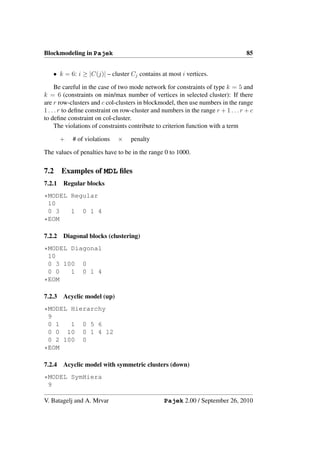
 isr                                                                isr
 ita                                                                sau
 ivo                                                                kuw
 jam                                                                sri
 jap                                                                tha
 jor                                                                mla
 ken                                                                gua
 kmr                                                                hon
 kod                                                                els
 kor                                                                nic
 kuw                                                                cos
 lao                                                                pan
 leb                                                                col
 lib                                                                ven
 liy                                                                ecu
 lux                                                                per
 maa                                                                chi
 mat                                                                tai
 mex                                                                kor
 mla                                                                vnr
 mli                                                                phi
 mon                                                                ins
 mor                                                                nze
 nau                                                                mli
 nep                                                                sen
 net                                                                nir
 nic                                                                ivo
 nig                                                                upv
 nir                                                                gha
 nor                                                                cam
 nze                                                                gab
 pak                                                                maa
 pan                                                                alg
 par                                                                hai
 per                                                                dom
 phi                                                                jam
 pol                                                                tri
 por                                                                bol
 rum                                                                par
 rwa                                                                mat
 saf                                                                alb
 sau                                                                cyp
 sen                                                                ice
 sie                                                                dah
 som                                                                nau
 spa                                                                gui
 sri                                                                lib
 sud                                                                sie
 swe                                                                tog
 swi                                                                car
 syr                                                                chd
 tai                                                                con
 tha                                                                zai
 tog                                                                uga
 tri                                                                bur
 tun                                                                rwa
 tur                                                                som
 uga                                                                eth
 uki                                                                tun
 upv                                                                liy
 uru                                                                jor
 usa                                                                yem
 usr                                                                afg
 ven                                                                mon
 vnd                                                                kod
 vnr                                                                brm
 wge                                                                nep
 yem                                                                kmr
 yug                                                                lao
 zai                                                                vnd
        dom


        maa


        mon


                                                                           maa


                                                                           dom


                                                                           mon
        cam


        mex


        som


        yem


                                                                           mex


                                                                           cam


                                                                           som


                                                                           yem
        wge


                                                                           wge
        kuw


        swe


                                                                           swe


                                                                           kuw
        brm


        mor


        rum


                                                                           rum


                                                                           mor


                                                                           brm
        dah
        den


        ege


        gab
        gha

        gua


        hon
        hun


        kmr


        mat


        nau
        nep


        pan


        uga


                                                                           den


                                                                           ege


                                                                           hun


                                                                           gua
                                                                           hon


                                                                           pan


                                                                           gha

                                                                           gab


                                                                           mat


                                                                           dah
                                                                           nau


                                                                           uga


                                                                           nep
                                                                           kmr
        aus


        can

        cha
        chd


        con

        cub


        ecu

        egy


        jam


        ken

        kod


        mla


        nze
        pak


        rwa

        sau
        sen


        spa

        sud


        upv

        usa

        ven
        vnd


        yug


                                                                           usa
                                                                           can


                                                                           spa


                                                                           aus


                                                                           yug


                                                                           egy

                                                                           cha

                                                                           pak

                                                                           cub


                                                                           ken


                                                                           sud


                                                                           sau


                                                                           mla


                                                                           ven
                                                                           ecu


                                                                           nze

                                                                           sen


                                                                           upv


                                                                           jam


                                                                           chd
                                                                           con


                                                                           rwa


                                                                           kod


                                                                           vnd
        cos

        cyp
        cze


                                                                           cze


                                                                           cos


                                                                           cyp
        arg


        bra


        bur


        gre


        nor


        par
        per


        por


        swi


        uru


                                                                           bra
                                                                           arg

                                                                           swi

                                                                           por


                                                                           gre


                                                                           nor


                                                                           uru


                                                                           per


                                                                           par


                                                                           bur
        afg


        aut


        car


        eth


        kor


        net


        tha
        tog

        tun


        usr


        vnr


                                                                           net


                                                                           usr


                                                                           aut


                                                                           tha


                                                                           kor
                                                                           vnr


                                                                           tog
                                                                           car


                                                                           eth
                                                                           tun


                                                                           afg
        alb
        alg


        bel
        bol


        bul


        gui
        hai


        ind


        jap


        lao
        leb


        nig


        phi
        pol


        saf


        syr


                                                                           bel


                                                                           jap


                                                                           pol


                                                                           bul


                                                                           leb

                                                                           ind


                                                                           nig

                                                                           saf


                                                                           syr


                                                                           phi


                                                                           alg
                                                                           hai


                                                                           bol


                                                                           alb


                                                                           gui


                                                                           lao
        chi
        col


        els


        ice

        ins


        ivo


        lux


        mli


        nic


        sie


        uki


        zai


                                                                           uki


                                                                           lux


                                                                           els
                                                                           nic


                                                                           col


                                                                           chi


                                                                           ins

                                                                           mli


                                                                           ivo


                                                                           ice


                                                                           sie


                                                                           zai
        fra


        tur


                                                                           fra


                                                                           tur
        ire
        irn
        irq


        jor


        nir


                                                                           ire


                                                                           irn

                                                                           irq


                                                                           nir


                                                                           jor
        fin


        isr
        ita


        sri


        tai


                                                                           ita


                                                                           fin


                                                                           isr


                                                                           sri


                                                                           tai
        lib


                                                                           lib
        liy


                                                                           liy
        tri


                                                                           tri
       Figure 12: World trade. Orderings: alphabetical and determined by clustering


                  Option can be used for two mode signed graphs as well: input is two mode
                  partition. In this case algorithm tries to find as ’clear’ as possible positive,
                  negative, and null blocks.
                  If Prespecification is checked user can define a prespecified model by en-
                  tering letters P, N, or 0 to cells (to require positive, negative or null blocks)
                  or leave cells empty (in this case the block can be of any type).
                  By setting penalty for small null blocks to some nonzero value, we try to
                  get null blocks as large as possible.

         • Blockmodeling* – Generalized blockmodeling of 1-mode and 2-mode net-
           works [7, 35]. For details see Section 7 on page 83. Descriptions of models
           are stored on MDL files. See also block types on page 49.

                             – Random Start – Start the optimization with random partition(s).
                             – Optimize Partition – Show the criterion function for selected parti-
                               tion and optimize it.
                             – Restricted Options – Show only selected part of options (sufficient
                               for most users) or all options.
                             – Short Report – Show only main results of optimization in Report
                               window (sufficient for most users) or detailed, long report.

         • Genetic Structure – Compute genetic structure of given acyclic network
           according to given partition (of minimal vertices). As result we get as many

V. Batagelj and A. Mrvar                                                                Pajek 2.00 / September 26, 2010
40                                                                 Pajek– Manual


       vectors as is different clusters in partition, and the dominant gene partition.

     • Permutation* – Improve given permutation according to network.

          – Travelling Salesman – Can be applied to dissimilarity matrix, or mod-
            ified matrix representing network (fill diagonal and change 0 in the
            matrix with some large numbers):
               ∗ Run – Run 3-OPT algorithm for solving Travelling Salesman
                 Problem.
               ∗ Options – Put selected value on diagonal, add some artificial ver-
                 tices, and incident lines with large values, change value 0 with
                 selected (large) value.
          – Seriaton – Starting with network and (random) permutation improve
            the permutation using seriation algorithm from Murtagh [52, page 11-
            16].
               ∗ 1-Mode – for ordinary (1-Mode) networks
               ∗ 2-Mode – for 2-Mode networks
          – Clumping – Starting with network and (random) permutation improve
            the permutation using clumping algorithm from Murtagh [52, page 11-
            16].
               ∗ 1-Mode – for ordinary (1-Mode) networks
               ∗ 2-Mode – for 2-Mode networks
          – R-Enumeration – Starting with network and (random) permutation
            find such permutation that enumeration of neighbor vertices are as
            close to each other as possible.

     • Functional Composition – Let f be a partition or a permutation and g a
       partition, a permutation, or a vector. The result is new partition, permutation
       or vector r defined in the following way: r[v] = (f ∗ g)[v] = g[f [v]].

     • Expand Partition

          – Greedy Partition – Put vertices with unknown class number (0) in the
            same class as selected vertices in partition if
               ∗ Input ...we can reach selected vertices in at most k-steps.
               ∗ Output ...we can come to vertices from selected vertices in at
                 most k-steps.
               ∗ All ...Input + Output (forget direction of lines)
             Classes are joined if one vertex should belong to more classes.

V. Batagelj and A. Mrvar                         Pajek 2.00 / September 26, 2010
Pajek– Manual                                                                     41


                                                 E5


                        E4         .
                                  C4


                                         .           .   C5
                              .   M4    M5


                     C3   .                 M1   .              E1


                              .   M3
                                        .
                                        M2
                                                     .
                                  .
                                                         C1
                   E3
                                  C2

                                                 E2


                              Figure 13: Petri net


        – Influence Partition – Put every vertex with unknown class number (0)
          in given partition in the same class as is the class of the closest vertex.
          If several vertices with known class number have the same distance,
          the highest value is used.
        – Make Multiple Relations Network – Transform network to a mul-
          tiple relation network using a partition: if both endvertices of a line
          belong to the same class in partition the multiple relations tag will be
          equal to the class number of endvertices, otherwise it will be 0.

   • Expand Reduction – Restore original network from reduced network (hier-
     archical reduction!) and appropriate hierarchy (result is always undirected
     network).

   • Identify – Identify (reorder and/or join some units).

   • Petri – Execute Petri net according to starting marking of places determined
     by partition. Number of places in network is equal to dimension of partition.

V. Batagelj and A. Mrvar                             Pajek 2.00 / September 26, 2010
42                                                                 Pajek– Manual


       Places must be defined first (1..m) then transitions (m + 1..n). What to do
       if more than one transition can fire? Two possibilities:
          – Random – Transition is chosen randomly.
          – Complete – Complete tree of all possible transitions is built - result is
            hierarchy. You can choose the maximum depth of the tree, or execute
            Petri net as long as possible.
       Try for example petri2 from the book of Peterson [55, page 21] or petri52
       (see Figure 13) data.
     • Refine Partition Refine partition according to selected network (reachabil-
       ity).
          – Strong ... for directed network.
          – Weak ... for undirected network.
     • Leader Partition – find clusters of vertices of network inside layers.

3.5     Partition
Only Partition is needed as input.
     • Create Constant Partition – Create constant partition of selected dimen-
       sion. Default dimension is the size of selected network (if there is one in
       memory).
     • Create Random Partition – Create random one or two mode partition.
     • Binarize – Make binary (0-1) partition from selected partition.
     • Fuse Clusters – Fuse selected cluster numbers to a new cluster.
     • Canonical Partition – Transform partition to its canonical (unique) form
       (vertex 1 is always in class 1, the next vertex with smallest number that is
       not in the same class as vertex 1 is in class 2...).
     • Canonical Partition [Decreasing frequencies] – Transform partition to its
       canonical (unique) form (in class 1 the old class with the highest frequency
       will be set, in class 2 the old class with the second highest frequency. . . ).
     • Make Network – Generate network from partition.
          – Random Network – Generate random network where degrees of ver-
            tices are determined using partition.

V. Batagelj and A. Mrvar                         Pajek 2.00 / September 26, 2010
Pajek– Manual                                                                            43


             ∗ Undirected – partition gives degrees of vertices in undirected net-
               work.
             ∗ Input – partition gives input degrees of vertices.
             ∗ Output – partition gives output degrees of vertices.
        – 2-Mode Network – Generate 2-mode network: first set consists of
          vertices (v1 . . . vn ), second set consists of clusters (c0 . . . cm ). If vertex
          i is in cluster j the line from vi to cj is generated. If option Existing
          Clusters only is selected only clusters containing at least one vertex
          are generated as vertices in the second set.
   • Make Permutation – Make permutation from selected partition. (first all
     vertices with the lowest class number, ...)
   • Make Cluster – Transform partition to cluster.
   • Make Hierarchy – Transform partition to hierarchy (nested or not).
   • Make Vector – Transform partition to vector (V [i] := C[i]).
   • Count, Min-Max Vector – info about cluster frequencies and minimum
     and maximum vector value according to given partition.

3.6   Partitions
Operations on two partitions. Two partitions must be selected before performing
operations.
   • Extract second from first – Extract from first partition vertices that satisfy
     criterion (are on specified interval) determined by second partition. This
     operation is useful when we have partition that actually saves some infor-
     mation about vertices (for example gender). When you get (extract) some
     smaller part of the network (for example vertices that are on distances less
     than 3 from selected vertex), information about gender would be lost with-
     out performing the same operation (extraction) on partition.
   • Add Partitions – Add two partitions (useful for example when combining
     Input and Output neighbors in acyclic networks).
   • Min (C1, C2) – Minimum of two partitions.
   • Max (C1, C2) – Maximum of two partitions.
   • Fuse Partitions – Fuse two partitions – add second to the end of the first
     (useful for 2-mode networks).

V. Batagelj and A. Mrvar                           Pajek 2.00 / September 26, 2010
44                                                                 Pajek– Manual


     • Expand – Expand partition to higher (original) dimension.
          – First according to Second (Shrink) – Expand first partition accord-
            ing to shrinking determined by second partition.
          – Insert First into Second according to Third (Extract) – The current
            partition was obtained by extracting selected classes defined by the
            second partition from the first partition. This sub-partition was mod-
            ified. Using this operation we can insert this modified sub-partition
            back to the first partition.
     • Intersection – of selected partitions.
     • Cover with – Let p be a partition, b a binary partition, and c selected cluster
       number. Result is new partition q determined in the following way:
       if b(v) = 0 then q(v) = p(v) else q(v) = c.
     • Merge – Let p and q be partitions and b a binary partition. Result is new
       partition s determined in the following way:
       if b(v) = 0 then s(v) = p(v) else s(v) = q(v).
     • Make Random Network – generate random network with input degrees
       determined by the first and output degrees by the second partition.
     • Info – Bivariate statistical measures between selected partitions:
          – Cramer’s V, Rajski – Report contingency table, compute Cramer’s V
            and Rajski coefficients.
          – Spearman Rank correlation coefficient.

3.7     Vector
Operations using vector.
     • Create Constant Vector – Create constant vector (vector with all values
       equal to selected value) of selected dimension. Default dimension is the
       size of selected network (if there is one in memory).
     • Extract Subvector – Extract subvector from given vector - criterion is class
       in the selected partition.
     • Shrink Vector – Shrink vector values according to clusters of partition to
       new vector – adjusting vector to shrunken network. When shrinking several
       values to one value, sum of values, mean, min, max or median value can be
       used.

V. Batagelj and A. Mrvar                         Pajek 2.00 / September 26, 2010
Pajek– Manual                                                                 45


   • Make Partition – Convert vector to partition:

        – by Intervals – according to selected dividing numbers in vector ver-
          tices get appropriate class numbers. Intervals can be given by:
             ∗ First Threshold and Step – Select first threshold and step in
               which to increase threshold.
             ∗ Selected Thresholds – Select all thresholds or number of classes
               (#) in advance.
        – by Truncating (Abs) – partition is absolute and truncated vector.

   • Make Permutation – Convert vector to permutation - sorting permutation.

   • Make 2-Mode Network – Convert vector to 2-mode network (row or col).

   • Transform – Transformations of given vector:

        – Multiply by a constant.
        – Add Constant to vector values.
        – Absolute values of its elements.
        – Absolute + Sqrt – square root of its absolute components.
        – Truncate – truncated vector.
        – Exp – exponential of vector.
        – Ln – natural logarithm of vector.
        – Power – selected power of vector.
        – Normalize
             ∗ Sum – normalize so that the sum of elements is 1.
             ∗ Max – normalize so that the maximum element will have value 1.
             ∗ Standardize – normalize so that arithmetic mean will be 0 and
               standard deviation 1.
        – Invert – inverse values of vector (exception is that 0 stays 0).

3.8   Vectors
Operations on two vectors. Two vectors must be selected before performing oper-
ations.
   • Add Vectors – sum of selected vectors.

   • Subtract Second from First – difference of selected vectors.

V. Batagelj and A. Mrvar                       Pajek 2.00 / September 26, 2010
46                                                               Pajek– Manual


     • Multiply Vectors – product of selected vectors.

     • Divide First by Second – division of selected vectors.

     • Linear Regression – fit the two vectors using linear regression. Results are:
       regression line, linear estimates of second vector and corresponding errors.

     • Min (V1, V2) – smaller elements in selected vectors.

     • Max (V1, V2) – bigger elements in selected vectors.

     • Fuse Vectors – fusion of vectors.

     • Transform – two vectors to another two vectors:

          – Cartesian → Polar – First vector must contain x-coordinates second
            y-coordinates. Results are: vector containing polar radius and vector
            containing polar angles in degrees.
          – Polar → Cartesian – First vector must contain polar radius second
            polar angles in degrees. Results are: vector containing x-coordinates
            and vector containing y-coordinates.

       Results can be (de)normalized to enable direct use in Draw window.

     • Info – Pearson correlation coefficient between selected vectors.

3.9     Permutation
Only permutation is needed as input.

     • Identity – Create identity permutation of selected dimension. Default di-
       mension is the size of selected network (if there is one in memory).

     • Random – Create random permutation of selected dimension. Default di-
       mension is the size of selected network (if there is one in memory).

     • Random 2-Mode – Create random permutation of selected dimension and
       number of vertices in the first subset of 2-mode network. Default dimension
       is the size of selected network and number of vertices in the first subset (if
       there is network and corresponding partition in memory).

     • Inverse – Create inverse permutation of selected permutation.

     • Mirror – Create mirroring permutation of selected permutation (sort in op-
       posite direction).

V. Batagelj and A. Mrvar                        Pajek 2.00 / September 26, 2010
Pajek– Manual                                                                   47


   • Make Partition – Create partition into selected number of clusters from
     given permutation.

   • Make Vector – Transform permutation to vector.


3.10    Permutations
Operation on two permutations.

   • Fuse Permuations – Fuse two permutations – add second to the end of the
     first (useful for 2-mode networks).


3.11    Cluster
Only cluster (and partition) is needed as input.

   • Create Empty Cluster – Create cluster without vertices.

   • Create Complete Cluster – Create cluster with values 1..n.

   • Make Partition – Transform cluster to partition.

   • Binarize Partition – Binarize partition according to cluster - make binary
     partition of the same dimension as the given partition, vertices that are in
     cluster numbers determined by the cluster will go to class 1 other to class 0.
     This allows noncontiguous ranges to be selected (other choices in Pajek
     need contiguous ranges). Note the exception: In this case cluster represents
     set of cluster numbers and not set of vertices numbers.


3.12    Hierarchy
Only hierarchy is needed as input.

   • Extract Cluster – Extract cluster from hierarchy - the cluster is whole sub-
     tree of selected node in hierarchy.

   • Make Network – Converts hierarchy to network (use it for example to draw
     hierarchy – drawing by layers). Closed nodes are also taken into account.

   • Make Partition – Converts hierarchy to partition (according to closed nodes).

   • Make Permutation – Converts hierarchy to permutation.

V. Batagelj and A. Mrvar                           Pajek 2.00 / September 26, 2010
48                                                                Pajek– Manual


3.13    Options
     • Read - Write
         – Threshold – Value of line must be higher (absolutely) than the given
           threshold to generate line between two vertices.
         – Max. vertices to draw – Maximum number of vertices in network to
           allow drawing (to prevent long waiting).
         – Large Network (Vertices) – Select the threshold number of vertices
           that defines very large network. For such networks Pajek (for some
           operations), asks if the old network can be destroyed and replaced by
           the network that is obtained as a result. In this way we can spare a lot
           of memory.
         – Read - Save vertices labels? – Read / Save also labels, coordinates,
           and other descriptions of vertices or not. If vertices labels are not read
           (recommended if network is very large and vertices labels are long)
           they can be imported later from input file using
           Net/Transform/Add/Vertex Labels from File.
         – Save coordinates of vertices? – Save coordinates of vertices to net-
           work file (or not).
         – Save complete vertex description? – When saving network to out-
           put file for each vertex complete description will be written, even if
           consequent vertices have the same descriptions (e.g. shapes, time in-
           tervals...).
         – Check equality of vertex descriptions by reading? – Enables users
           to speed up reading large network files according to descriptions of
           vertices: Check this option to save space when exactly the same de-
           scriptions of vertices are repeated often (e.g. shapes of vertices). Un-
           check this option to save time when there are several different desctrip-
           tions of vertices in input file (e.g. time stamps in temporal networks).
         – Check equality of line descriptions by reading? – Enables users to
           speed up reading large network files according to descriptions of lines:
           Check this option to save space when exactly the same descriptions of
           lines are repeated often (e.g. line pattern Dots/Solid). Uncheck this
           option to save time when there are several different desctriptions of
           lines in input file (e.g. time stamps in temporal networks).
         – Auto Report? – Automatically report all text results to file rep1.rep.
         – Ore: Different relations for male and female links – When reading
           genealogy as Ore graph generate 2 different types of arcs: arc with re-
           lation number 1 (also value 1) represents (god)father to child relation,

V. Batagelj and A. Mrvar                        Pajek 2.00 / September 26, 2010
Pajek– Manual                                                                    49


          arc with with relation number 2 (also value 2) represents (god)mother
          to child relation.
        – Ore: Generate Godparent relation – When reading genealogy as
          Ore graph generate also godparent relation (relation number 4) or god-
          father (relation number 4) and godmother (relation number 5) rela-
          tions.
        – GEDCOM – Pgraph – Use pgraph format (nodes are couples or indi-
          viduals) when reading genealogies (D. R. White), otherwise nodes are
          only individuals.
        – Bipartite Pgraph – Generate bipartite pgraph that has squares for
          marriages, triangles and circles for individuals.
        – Pgraph+labels – Attach also labels of lines to pgraph, when reading
          GEDCOM file.
        – x / 0 = Specify the result when dividing nonzero value with 0.
        – 0 / 0 = Specify the result when dividing 0 with 0.
        – Ignore Missing Values in Info/Vector? – When computing descrip-
          tive statistics on Vector treat missing values (values larger that 9999997)
          as valid numbers.
        – Save Files as Unicode UTF8 with BOM? – Instead of saving to
          ASCII files save files as Unicode UTF8 files.

   • Select Font

        – Select Proportional Font – Select proportional font for displaying
          Unicode characters (e.g. in Draw window).
        – Select Monospaced Font – Select non-proportional font for display-
          ing Unicode characters (e.g. in Report window).
        – Default Fonts – Use MS Sans Serif for proportional, and Courier New
          for monospaced font.

   • Blockmodel – Select type of blockmodel for shrinking. Possibilities are:

        – 0..Min Number of Links
        – 1..Null
        – 2..Complete
        – 3..Row-Dominant
        – 4..Col-Dominant

V. Batagelj and A. Mrvar                       Pajek 2.00 / September 26, 2010
50                                                        Pajek– Manual


                     Figure 14: Generalized block types


V. Batagelj and A. Mrvar                   Pajek 2.00 / September 26, 2010
Pajek– Manual                                                                     51


         – 5..Row-Regular
         – 6..Col-Regular
         – 7..Regular
         – 8..Row-Functional
         – 9..Col-Functional
         – 10..Degree Density

       Look in Batagelj [7] and Doreian, Batagelj, Ferligoj [35].

   • Ini File

         – Load – Use selected configuration of Pajek which is stored in the
           file (*.ini).
         – Save – Save the current configuration of Pajek into a file (*.ini).

   • Use Old Style Dialogs – If Windows 7 have problems with opening/saving
     files check this option.


3.14     Info
   • Network – Information about network

         – General – General information about network
                ∗   number of vertices
                ∗   number of arcs, edges and loops
                ∗   density of lines
                ∗   average degree
                ∗   sort lines according to their values (ascending or descending) to
                    find the most/least important lines.
         – Line Values – Frequency distribution of line values.
         – Indices – Different indices on network (chemical and genealogical).
         – Triadic Census – Number of different triads in network. See book of
           Faust and Wasserman [63] and Figure 15 on page 54.
         – Multiple Relations – General information about multiple relations
           network
                ∗ number of relations
                ∗ number of arcs, edges and total number of lines for each relation

V. Batagelj and A. Mrvar                          Pajek 2.00 / September 26, 2010
52                                                                Pajek– Manual


           – Vertex Label -> Vertex Number – Find vertex number by giving
             (part of) its label, or find vertex label for given vertex number.
     • Partition – General information about partition. Sort vertices according
       to their class numbers (ascending or descending) to see the most important
       vertices. Frequency distribution of class numbers. Average, median and
       standard deviation of class numbers are also given.
     • Hierarchy – General information about hierarchy. Operation is possible
       only if node numbers are integers. It returns number of vertices in nodes of
       hierarchy (on first level).
     • Vector – General information about vector: Vertices sorted according to
       their values, average, median, standard deviation and frequency distribution
       of vector values into given number of classes (# – number of classes or
       selected dividing values can be given).
     • Memory – Available memory. Not very accurate.
     • About – Information about Pajek version, authors, copyrights. . .

3.15       Tools
     • R
           – Send to R – Call statistical package R [56] with one vector/network,
             vectors/networks selected by cluster or all currently available vectors
             and/or networks.
           – Locate R – locate position of statistical program R (Rgui.exe or Rterm.exe)
             on the disk.
     • SPSS
           – Send to SPSS – Call statistical package SPSS with one partition, vec-
             tor or network, partitions/vectors selected by cluster or all currently
             available partitions and vectors.
           – Locate SPSS – locate position of statistical program SPSS (runsyntx.exe)
             on the disk.
     • Web Browser – Select which web browser to open when clicking on vertex
       with Shift and Right mouse button.
     • Add Program – add new executable program with specified parameters to
       the tools menu.

V. Batagelj and A. Mrvar                         Pajek 2.00 / September 26, 2010
Pajek– Manual                                                           53


   • Edit Parameters – edit parameters of selected external program.

   • Remove Program – remove selected external program from the tools menu.


V. Batagelj and A. Mrvar                    Pajek 2.00 / September 26, 2010
54                                                              Pajek– Manual


      1 - 003               2 - 012                3 - 102           4 - 021D


     5 - 021U              6 - 021C               7 - 111D           8 - 111U


     9 - 030T              10 - 030C               11 - 201         12 - 120D


     13 - 120U             14 - 120C               15 - 210          16 - 300


                           Figure 15: All different triads.


V. Batagelj and A. Mrvar                         Pajek 2.00 / September 26, 2010
Pajek– Draw window                                                                55


4     Draw Window Tools
4.1    Main Window Draw Tool
    • Draw - Draw Network. A new window is open, where a new menu appears.
      You can edit network by hand (move vertices using left mouse button), se-
      lect a part of the picture (using right mouse button and select the area), edit
      lines that belong to selected vertex by clicking on vertex using right mouse
      button, spin picture using keys X, Y, Z, S, x, y, z, s. Description of Draw
      window menu:

    • Draw-Partition – Similar to Draw. Colors of vertices represent the classes
      in selected partition. Additionally you can put selected vertex or selected
      vertices into given class in partition (classes are shown using different col-
      ors) by clicking on middle mouse button (or Shift+left button) (increment
      class), or together with Alt (or Alt+left button) - decrement class number.
      In Figure 20 on page 89 you can see which color represents selected class.
      Some additional menu items that were already described appeared (you can
      draw network according to layers from partition and optimise energy using
      fixed vertices determined using partition). It is also possible to move the
      selected class (by clicking close to vertex from that partition).

    • Draw-Vector – Sizes of vertices are determined using selected vector.

    • Draw-2Vectors – Sizes of vertices are determined using selected two vec-
      tors (first for width second for height).

    • Draw-Partition-Vector – Colors of vertices are determined using selected
      partition, sizes of vertices are determined using selected vector.

    • Draw-Partition-2Vectors – Colors of vertices are determined using se-
      lected partition, sizes of vertices are determined using selected two vectors
      (first for width second for height).

    • Draw-SelectAll – Create null partition and draw network using it.

4.2    Layout
Generate layout of the network.

    • Circular – Position vertices on circle

        1. Original – in order determined by the network.

V. Batagelj and A. Mrvar                        Pajek 2.00 / September 26, 2010
56                                                        Pajek– Draw window


         2. using Permutation – in order determined by current permutation.
         3. using Partition – create separate circles for clusters in selected par-
            tition. Center of the circle is determined by the arithmetic mean of
            positions of vertices in the cluster.
         4. Random – in random order.
     • Energy – Automatic layout generation.
         1. Kamada-Kawai – algorithm for automatic layout generation in the
            plane.
            (a) Free – Every position in the plane is possible.
            (b) Separate Components – Optimize each component separatelly
                 and tile components at the end.
            (c) Fix first and last – First and last vertex are fixed in opposite cor-
                 ners.
            (d) Fix one vertex in the middle - Select vertex which will be fixed
                 in the middle of the picture.
            (e) Selected group only – Only selected part of the picture is taking
                 into account during optimisation.
             (f) Fix selected vertices - Selected vertices (from partition) are fixed
                 on given positions). This item is visible only if Draw partition is
                 active.
         2. Fruchterman Reingold – another algorithm for automatic layout
            generation (faster than Kamada-Kawai).
            (a) 2D – optimisation in plane.
            (b) 3D – optimisation in space.
            (c) Factor – Input factor for optimal distance among vertices when
                using Fruchterman Reingold optimisation.
         3. Starting positions – for energy drawing (random, circular, given po-
            sitions on plane xy, given z coordinates).
     • EigenValues – Drawing using eigenvalues/eigenvectors (Lanczos algorithm).
       Values of lines can be taken into account or not.

         1. 1 1 1 – Select 2 or 3 eigenvalues and algorithm will compute cor-
            responding eigenvectors. Eigenvalues may be multiple so there are
            many possibilities. Some examples
             (a) 1 1 1 – compute 3 eigenvectors that correspond to the first eigen-
                 value

V. Batagelj and A. Mrvar                        Pajek 2.00 / September 26, 2010
Pajek– Draw window                                                                 57


        Figure 16: VRML display of layout determined by eigenvectors

            (b) 1 1 2 – compute 2 eigenvectors that correspond to the first eigen-
                value and 1 that correspond to the second
            (c) 1 2 2 – compute 1 eigenvector that correspond to the first eigen-
                value and 2 that correspond to the second
            (d) 1 2 3 – compute 1 eigenvector that correspond to the first, 1
                that correspond to the second and 1 that correspond to the third
                eigenvalue
            (e) 1 1 – compute 2 eigenvectors that correspond to the first eigen-
                value (2D picture)

   • Tile Components – Tile weakly connected components in a plane.

4.3   Layers
Visible only if Draw partition is active. Draw in layers according to partition.
   • Type of Layout – Select type of picture (2D – layers in y direction, or 3D
     – layers in z direction). According to that, appropriate menu appears.
   • In y direction – Draw vertices in layers (y coordinate) inside layers draw
     vertices centered-equidistantly (x coordinate), z coordinate is 0.5 for all ver-
     tices.

V. Batagelj and A. Mrvar                        Pajek 2.00 / September 26, 2010
58                                                          Pajek– Draw window


     • In y direction+random in x – Same as first option, only vertices are put on
       layers in random order not according to vertex numbers.

     • In z direction – Draw layers in z direction, live x and y coordinates as they
       are.

     • In z direction + random in xy – Draw layers in z direction, x and y coor-
       dinates get random values

     • Averaging x coordinate – Use it after vertices are put on layers in 2D.
       Iterativelly compute average x-coordinate of all neighbors and normalize.
       Good approximation of global picture, but vertices are put to close to each
       other. Use it on all vertices or only on selected one.

     • Averaging x and y coordinates – Use it after vertices are put on layers in
       3D. Iterativelly compute average x and y coordinates of all neighbors and
       normalize. Good approximation of global picture, but vertices are put to
       close to each other. Use it on all vertices or only on selected one.

     • Tile in x direction – After averaging x coordinate vertices are put to close to
       each other, so using this option vertices are repositioned to minimal distance
       described in resolution.

     • Tile in xy plane – Same as previous, only this option is used when drawing
       3D pictures.

     • Optimize layers in x direction – Optimize layout in layers using minimiza-
       tion of the total length of lines.

         1. Forward – go from first to last layer. In the current layer optimize
            only layers having numbers equal or one smaller as the current layer
            number.
         2. Backward – go from last to first layer. In the current layer optimize
            only layers having numbers equal or one larger as the current layer
            number.
         3. Complete – go from first to last layer. In the current layer optimize
            only layers having numbers equal or one smaller or one larger as the
            current layer number.

     • Optimize layers in xy plane – Same as previous, only this option is used
       when drawing 3D pictures.

V. Batagelj and A. Mrvar                         Pajek 2.00 / September 26, 2010
Pajek– Draw window                                                               59


   • Resolution – How many additional positions are available on layers. Works
     only if Pgraph is selected. The higher the resolution, the better is the result
     of optimization, but also slower.


4.4   GraphOnly
Show complete picture without labels and arrows.


4.5   Previous
Draw previous network, and/or partition and/or vector which are loaded in Pajek
(depending on selection in Options/PreviousNext/Apply to).


4.6   Redraw
Redraw network.


4.7   Next
Draw next network, and/or partition and/or vector which are loaded in Pajek
(depending on selection in Options/ PreviousNext/ Apply to).


4.8   ZoomOut
Zoom out (visible only when zooming in layout).


4.9   Options
Additional options for picture layout.

   • Transform – Transformations of picture.

        1. Fit area
            (a) max(x), max(y), max(z) – Draw picture as big as possible to fit
                area (resize each coordinate to fit in picture independently).
            (b) max(x,y,z) – Resize to fit in area but keep real proportions (re-
                size according to largest distance in all three coordinates, e.g.
                molecule).
        2. Resize – Resize picture (or selected part of it) in all three directions
           for selected factor.

V. Batagelj and A. Mrvar                       Pajek 2.00 / September 26, 2010
60                                                           Pajek– Draw window


         3. Translate – Translate picture (or selected part of it) in space.
         4. Reflect y axis – Reflect picture (or selected part of it) around y axis.
         5. Rotate 2D – Rotate picture (or selected part of it) in xy plane.
         6. Fisheye – Fisheye transformation (cartesian or polar) of picture. If no
            vertex is selected the middle point of picture (or selected part of it) is
            used as focus, otherwise first selected vertex will be used as focus.

     • Values of lines – Meaning of values of lines during energy drawing or
       eigenvectors computing (no meaning, similarities, dissimilarities (distances)).

     • Mark vertices using – Labels can be marked using

         1. labels
         2. numbers
         3. partition clusters (if partition of the same size is also selected)
         4. vector values (if vector of the same size is also selected)
         5. without labels
         6. without labels and arrows
         7. cluster only – only vertices belonging to the current Cluster are labeled
            in the layout.

     • Lines – Select the way the lines are drawn:

         1. Draw Lines
             (a) Edges – draw edges or not
             (b) Arcs – draw arcs or not
             (c) Relations – draw all lines (leave empty string) or just lines be-
                 longing to selected relations, e.g. 1-3,6,10-15.
         2. Mark Lines
             (a) No – do not mark lines
             (b) with Labels
             (c) with Values
         3. Different Widths – if checked, the width of the lines will be deter-
            mined by their line values.
         4. GreyScale – if checked, the color in grayscale of lines will be deter-
            mined by their line values.

V. Batagelj and A. Mrvar                          Pajek 2.00 / September 26, 2010
Pajek– Draw window                                                              61


   • Size – Determine size of vertices, width of vertices border, width of lines,
     size of arrows, size of font or turn them to default values.
     Sizes of vertices can be set to autosize (0-average). They can be read from
     input file (x fact and y fact) or determined by one vector (currently selected)
     or the two currently selected vectors. FontSize can be proportional to values
     stored in third partition.

   • Colors – Determine color of background, vertices, border of vertices, edges,
     arcs and font (of vertices labels and lines labels) or turn them to default
     values. Colors of edges/arcs can represent relation number of lines. You
     can select which color should represent given class using Relation Colors.
     You can also use colors of vertices (ic Red), border of vertices (bc Blue),
     arcs and edges (c Green) as defined on input file (see Figure 19, page 88).
     FontColor can be determined by values stored in second partition.
     Example NET file:

     *Vertices              9
           1 "a"     ic    Pink        bc   Black
           2 "b"     ic    Yellow      bc   Cyan
           3 "c"     ic    Cyan        bc   Yellow
           4 "d"     ic    Purple      bc   Orange
           5 "e"     ic    Orange      bc   Brown
           6 "f"     ic    Magenta     bc   Green
           7 "g"     ic    Brown       bc   Magenta
           8 "h"     ic    Red         bc   Blue
           9 "i"     ic    Green       bc   Magenta
     *Arcs
            1          2           1   c   Blue
            2          3           1   c   Red
            3          4           1   c   Black
            4          5           1   c   Yellow
            5          6           1   c   Gray
            6          7           1   c   Cyan
            7          8           1   c   Magenta
            8          9           1   c   Purple
            9          1           1   c   Brown

   • Layout – Layout options

        1. Redraw – Redraw whole network during or/and after moving of se-
           lected vertex, and/or redraw if draw window is paint.
        2. Real xy proportions – The draw window has always square shape or
           not.
        3. Arrows in the Middle – Draw arrows in the middle of lines – not at
           terminal vertices.
        4. Size of vertex 0 – How to handle vertices of size 0 (size of vertex is
           determined in input file or using vector)?

V. Batagelj and A. Mrvar                       Pajek 2.00 / September 26, 2010
62                                                         Pajek– Draw window


             (a) Hide vertex – vertices of size 0 are shown or not.
             (b) Hide attached lines – lines with one end in vertex of size 0 are
                 shown or not.
         5. Decimal Places – How many decimal places to use when marking
            vertices using vectors.
         6. Show SubLabel – Select the position of the vertices sublabel that is
            shown in network layouts.
     • ScrollBar On/Off – Show/Hide the scrollbars in the top left corner of Draw
       window. When part of picture is selected, scrollbar is used for moving.
       When whole picture is selected, scrollbar is used for spinning (like pressing
       keys X, Y, Z, x, y, z – spinning around axis defined by the key, and S – spin
       around selected normal)
     • Interrupt – Interrupt period during optimisation (stop every ? second, or
       not)
     • Previous/Next – Select parameters when using Previous or Next commands
       for drawing sequence of networks in draw window:
         1. Max. number – How many networks to show in sequence. If the
            number is higher than number of existing networks the sequence will
            stop earlier.
         2. Seconds to wait – Seconds to wait between the two layouts.
         3. Optimize Layouts – Optimize the current layout or not. If the se-
            quence of networks is obtained from the same network, it is useful to
            choose Energy/Starting Positions/ Given xy to start optimization with
            existing coordinates.
             (a) Kamada-Kawai – Optimize the current layout using
                 Kamada-Kawai algorithm.
             (b) 2D Frucht. Rein. – Optimize the current layout using 2D Frucht.
                 Rein. algorithm.
             (c) 3D Frucht. Rein. – Optimize the current layout using 3D Frucht.
                 Rein. algorithm.
             (d) No – Do not optimize the layout, just show the picture.
         4. Apply to – Which object (Network, Partition, Vector) will change
            when Previous or Next is selected:
             (a) Network – The previous / next network in memory is drawn. If
                 Draw-Partition is selected and the new network matches in di-
                 mension with selected partition, the same partition will determine

V. Batagelj and A. Mrvar                        Pajek 2.00 / September 26, 2010
Pajek– Draw window                                                             63


               colors of vertices of the new network. If Draw-Vector is selected
               and the new network matches in dimension with selected vector,
               the same vector will determine sizes of vertices of the new net-
               work.
               Option can be used to show several networks of equal size using
               the same partition/vector.
           (b) Partition – The previous / next partition in memory is selected. If
               Draw-Partition is selected: The same network is drawn using pre-
               vious / next partition (network and partition must match in size).
               Option can be used to show several partitions of selected network.
           (c) Vector – The previous / next vector in memory is selected. If
               Draw-Vector is selected: The same network is drawn using previ-
               ous / next vector (network and vector must match in size).
               Option can be used to show several vectors of selected network.
          By checking several objects (Network, Partition, Vector) at the same
          time previous / next networks will be drawn using previous / next parti-
          tions and (or) vectors at the same time. All consequent selected objects
          must match in size.

   • Select all – Select all vertices in window (then possible to put vertices in
     given class).


4.10   Export
Export layout of the network to one of the following two or three dimensional
formats:

   • 2D – two dimensional exports:

        – EPS/PS – Export to EPS format (with or without Clip, or WYSIWYG
          [What You See Is What You Get – exported EPS picture is similar to
          picture in Draw window – except that colors are Black/White or color
          determined by partition]). PS – Export to PS format (similar to EPS
          but without header).
        – SVG – Export to SVG (Scalable Vector Graphics) format. Additional
          controls over layout can be included in SVG or HTML. The plugin for
          examining layouts can be obtained from Adobe [1].
          Linear or radial gradients (continuously smooth color transitions from
          one color to another) can be selected as well – up to three background
          colors can be selected in Export/Options window.

V. Batagelj and A. Mrvar                      Pajek 2.00 / September 26, 2010
64                                                       Pajek– Draw window


            1. General – Export to SVG without possibility to choose parts of
               the picture.
            2. Labels/Arcs/Edges – Export with possibility to turn labels, arcs
               and/or edges on/off.
            3. Partition – Export to SVG using one or two partitions. One parti-
               tion is used by default: the same partition determines classes and
               colors. But, if two partitions are defined by Partitions menu, first
               partition will determine classes, the second colors of vertices.
               (a) Classes – User can turn selected classes and lines among
                   classes on/off.
               (b) Classes with semi-lines – User can turn selected classes on/off.
                   Lines among classes are drawn as semi-lines.
               (c) Nested Classes – Upper classes are nested in lower – when-
                   ever selected class is turned on all higher classes are turned on
                   too, and all lower classes are turned off (suitable for showing
                   cores, for example).
            4. Line Values – Export to SVG using values of lines. Threshold
               values or number of classes must be given. If you input #n, n
               classes of equal size will be generated. According to obtained
               thresholds, subsets of lines (and incident vertices) are defined and
               can be turned on/off inside web browser.
               (a) Classes – User can turn lines of selected value and incident
                   vertices on/off.
               (b) Nested classes – User can turn lines of selected value or
                   higher (lower) and incident vertices on (off).
               (c) Options – Additional options to emphasize the values of lines
                   using some visual properties.
                   Different Colors – Subsets of lines are drawn using colors
                   which are used for partitioning vertices too.
                   Using GreyScale – The darkness of a line corresponds to its
                   value.
                   Different Widths – The width of a line corresponds to its
                   value.
            5. Multiple Relations Network – Export multiple relations network
               to SVG. User can show/hide one or more relations in the layout.
            6. Current and all Subsequent – If checked the current network
               and all subsequent networks will be exported to SVG. For each
               network separate html file is generated. Files are given the fol-
               lowing names: file001.htm, file002.htm,... Generated html files

V. Batagelj and A. Mrvar                      Pajek 2.00 / September 26, 2010
Pajek– Draw window                                                              65


               get additional links (Previous/Next) to transition among them. If
               also next partitions / vectors fit in dimension to dimension of net-
               works, partitions will determine color of vertices, vectors will de-
               termine sizes of vertices. Subsequent is applied to any combina-
               tion of [Network, Partition, Vector] (one of the three objects only,
               any pair of them or all three of them) according to selection in
               Options/Previous/Next/ Apply to in Draw window.
        – Bitmap – Export to Windows bitmap (bmp) format.

   • 3D – three dimensional exports:

        – X3D – Export to X3D (XML based 3D computer graphics, the suc-
          cessor of VRML) format.
        – Kinemages – Export to Kinemages format with balls or labels. You
          need Mage or King viewer to watch it. A free copy of the Mage soft-
          ware can be downloaded from its site [57].
            1. Current Network Only – Export only current network to Kine-
               mages. Two partitions defined by Partitions menu can be used -
               one for generations one for colors.
            2. Current and all Subsequent – Export current network and all
               subsequent networks (use commands KINEMAGE/Next or Ctrl
               N in Mage). If also next partitions/vectors fit in dimension to di-
               mension of networks, partitions will determine color of vertices,
               vectors will determine sizes of vertices. Subsequent is applied to
               any combination of [Network, Partition, Vector] (one of the three
               objects only, any pair of them or all three of them) according to
               selection in Options/Previous/Next/ Apply to in Draw window.
            3. Multiple Relations Network – Export with possibility to hide /
               show selected relations.
        – VRML – Export to VRML (Virtual Reality) format. For examining
          it you need a VRML viewer such as Cortona [29] or (older) Cosmo
          player [30].
        – MDL MOL file – Export to MDL Molfile format. You need Chime
          plugin (Chemscape Chime) for Netscape to explore it [50].

   • Options – EPS, SVG, X3D and VRML default options (see section on Ex-
     ports to EPS/SVG/X3D/VRML).
   • Append to Pajek project file – Add current network to the end of selected
     project file (used by program PajekToSvgAnim).

V. Batagelj and A. Mrvar                      Pajek 2.00 / September 26, 2010
66                                                         Pajek– Draw window


          – Select file – Select project file.
          – Append – Append to project file.

4.11     Spin
     • Spin around – Spin network around selected normal.

     • Perspective – Distant vertices are drawn smaller (or not).

     • Normal – Normal vector to spin around.

     • Step in degrees – Step in degrees when showing rotation.

4.12     Move
Give additional constraints on hand vertex moving:

     • Fix – Fix (do not allow) moving in x or y direction, or do not allow changing
       distance from center (circulating).

     • Grid – Define (x, y) positions on grid, these become feasible positions for
       vertices during moving by hand.

     • Circle – Define (x, y) positions on concentric circles, these become feasible
       positions for vertices during moving by hand.

     • Grasp – Determine which additional vertices are moving when clicking
       with left mouse button close to vertex in given class. Vertices that will be
       moved are in the:

         1. Closest Class Only
         2. Closest Class and Higher
         3. Closest Class and Lower

4.13     Info
– Select aesthetic properties of the current layout to compute:

     • Closest Vertices

     • Smallest Angle

     • Shortest/Longest Line

V. Batagelj and A. Mrvar                        Pajek 2.00 / September 26, 2010
Pajek– Draw window                                                      67


   • Number of crossings if lines

   • Vertex Closest to Line

   • All Properties

   Remember that coordinates of vertices must be between 0 and 1!


V. Batagelj and A. Mrvar                    Pajek 2.00 / September 26, 2010
68                                              Exports to EPS/SVG/X3D/VRML


5     Exports to EPS/SVG/X3D/VRML
5.1     Defaults
If you have no labels in Draw window when you call Export there will also be no
labels in EPS/SVG picture, otherwise numbers/labels like in Draw window will
be shown. If you are looking at the picture using Draw/Partition, the same colors
will be automatically used in EPS/SVG picture too.

5.2     Parameters in EPS, SVG, X3D, and VRML Defaults Win-
        dow
Window is divided into 5 frames, two on the left and three on the right.
    Note that settings you made in this window are overwritten if the parameters
are specified in Pajek input (NET) file.

Top frame on the left – EPS/SVG Vertex Default
This frame defines default drawing of vertices when we export layouts to EPS and
SVG:

     • Interior Color – interior color of vertices (see Figure 19, page 88). If
       drawing using Partition is used, partition colors will overwrite the specified
       interior color.

     • Border Color – color of the borderline of vertices.

     • Label Color – color of label of vertices.

     • Border Width – width of the borderline of vertices.

     • Label Position: Radius /Angle – position where the label will be dis-
       played:

          – Radius – distance of beginning of vertex label from vertex center –
            first polar parameter.
          – Angle – position of vertex label in degrees - second polar parameter
            (0..360).

       If radius is equal to 0, the label will be centered, otherwise it will be left
       aligned on the specified position.

     • Fontsize – size of font of vertices labels.

V. Batagelj and A. Mrvar                           Pajek 2.00 / September 26, 2010
Exports to EPS/SVG/X3D/VRML                                                       69


   • Label Angle – angle in which vertex labels will be displayed: if angle is
     smaller than 360, it means relative according to horizontal line (0 – horizon-
     tally); otherwise it is relative to center of the layout (360 – concentrically).
     The latter is useful when all vertices are drawn in concentric circle(s) using
     Layout/Circular.
   • x/y Ratio – ratio between size of vertex in x and y direction (e.g., value 1
     for circle, value larger/smaller than 1 for ellipse).
   • Shape – default shape of vertex (ellipse, box, or diamond).
   • Shapes file – default shapes file, double click to change it.
   • Export options overwrite shapes file – if checked: options selected in this
     window overwrite options defined in shapes file, otherwise default values
     for each shape are defined in selected shapes file.

Bottom frame on the left – EPS/SVG Line Default
This frame defines default drawing of lines when we export layouts to EPS and
SVG:

   • Edge Color – color of edges.
   • Edge Width – width of edges.
   • Arc Color – color of arcs.
   • Arc Width – width of arcs.
   • Pattern – pattern for drawing lines (Solid or Dots).
   • Arrow Size – size of arrows.
   • Arrow Position – distance of arrow from terminal vertex: If distance is
     between 0 and 1, it means relative distance according to arc length, e.g.: 0 –
     arrow touching the terminal vertex; 0.5 – arrow in the middle of the arc. If
     distance is larger than 1 it means absolute distance from the terminal vertex
     (this is useful if you want to have all arcs on the same distance from terminal
     vertex, regardless of arcs length)
   • Label Color – color of line labels.
   • Label Angle – angle in which label of line will be displayed: if angle is
     smaller than 360, it means relative to direction of line (0 – parallel to line);
     otherwise it is relative to horizontal line (360 – horizontally).

V. Batagelj and A. Mrvar                        Pajek 2.00 / September 26, 2010
70                                               Exports to EPS/SVG/X3D/VRML


     • Label Position – position of the center of line label – position is point on
       the line - distance of the center of line label from terminal vertex (see also
       Arrow Position)
     • Fontsize – size of font of line labels.
     • Label Position: Radius /Angle – position where the center of line label
       will be displayed according (relative) to Label Position:
          – Radius – distance of center of line label from point defined by Label
            Position - first polar parameter.
          – Angle – position of label in degrees - second polar parameter (0..360).
     • Only straight lines – drawing bidireced and multiple lines without curves.

Top frame on the right
This frame defines some additional defaults when we export layouts to EPS, SVG,
X3D, or VRML:
     • EPS, SVG, X3D, VRML Size of Vertices – default size of vertices when
       exporting to X3D/VRML (valid for EPS and SVG exports as well).
     • X3D/VRML Size of Lines – width of lines in X3D/VRML.
     • EPS: Use RGB colors instead of CMYK – in description of colors in EPS
       file RGB is used (default is CMYK).
     • SVG: 3D Effect on Vertices – if selected, gradient will be applied to get
       3D look of vertices.

Middle frame on the right – Background Colors
This frame defines background color when exporting to EPS/SVG/X3D/VRML
and gradients (continuously smooth color transitions from one color to another)
when exporting layouts to SVG/X3D:
     • Bckg. Color 1 – Background color for layout in EPS/SVG/X3D/VRML.
     • Bckg. Color 2 – the second color for SVG/X3D export. No – means without
       second color, otherwise selected gradient will be used.
     • Bckg. Color 3 – the third color for SVG/X3D export – gradient.
     • Gradients – type of gradient to use in SVG (No, Linear, or Radial). In X3D
       only Radial gradient is supported.

V. Batagelj and A. Mrvar                         Pajek 2.00 / September 26, 2010
Exports to EPS/SVG/X3D/VRML                                                 71


Bottom frame on the right
This frame defines some additional defaults when we export layouts to EPS:

   • Left, Right, Top, Bottom – additional border around layout when exporting
     to EPS (only when EPS Clip format is selected)

   • Border Color – color of borderline of layout. It is used for export to SVG
     as well. No – means without borderline.

   • Border Radius – radius of borderline of layout (if greater than 0 it means
     oval instead of rectangle).

   • Border Width – width of borderline of layout.


                  Figure 17: Spider / Kriˇevec; Photo: Stana.
                                         z


V. Batagelj and A. Mrvar                     Pajek 2.00 / September 26, 2010
72                                              Exports to EPS/SVG/X3D/VRML


5.3     Exporting pictures to EPS/SVG – defining parameters in
        input file
Definition of Network (and its picture) on Input ASCII File
For every vertex and line we can specify in details how it should be drawn (colors,
shapes, sizes, patterns, rotations, widths...).
    A kind of standardized language is used for describing networks. The follow-
ing reserved words are used:
     1. *Vertices n – definition of vertices follows. n is number of vertices. Each
        vertex is described using following description line:
        vertex num label [x y z] [shape] [changes of default parameters]
        Explanation:

          • vertex num – vertex number (1, 2, 3 . . . n)
          • label – if label starts with character A..Z or 0..9 first blank determines
            end of the label (e.g., vertex1), labels consisting of more words must
            be enclosed in pair of special characters (e.g., ”vertex 1”)
          • x, y, z – coordinates of vertex (between 0 and 1)
          • shape – shape of object which represents vertex. Shapes are defined
            in file SHAPES.CFG (ellipse, box, diamond, triangle, cross, empty)
            Description of parameters in shapes.cfg:
               – SHAPE s – s is external name of vertex (used in Pajek network
                 file)
               – sh – sh can be ellipse, box, diamond, triangle, cross, empty. This
                 is the name of PostScript procedure that actually draws object
                 (procedure is defined in drawnet.pro).
               – s size – default size
               – x fact – magnification in x direction
               – y fact – magnification in y direction
               – phi – rotation in degrees of object in + direction (0..360)
               – r – parameter used for rectangle and diamond for describing ra-
                 dius of corners (r = 0 – rectangle, r > 0 – roundangle)
               – q – parameter used for diamonds – ratio between top and middle
                 side of diamond (try q 0.01, q 0.5, q 2, ...)
               – ic – interior color of vertex. See Figure 19, page 88 for the list of
                 possible colors.
               – bc – boundary color of vertex

V. Batagelj and A. Mrvar                         Pajek 2.00 / September 26, 2010
Exports to EPS/SVG/X3D/VRML                                                     73


            –   bw – boundary width of vertex
            –   lc – label color
            –   la – label angle in degrees (0..360)
            –   lr – distance of beginning of vertex label from vertex center (ra-
                dius – first polar parameter)
            –   lphi – position of label in degrees (0..360) (angle phi – second
                polar parameter)
            –   fos – font size
            –   font – PostScript font used for writing labels (Helvetica, Courier,
                ...)
            –   HOOKS – positions where edges can join the selected shape - ac-
                cording to s size. Three different ways to specify these positions:
                (a) CART – x y – positions in Cartesian coordinates (x,y)
                (b) POLAR – r phi – positions in polar coordinates, phi is posi-
                     tive angle (0..360)
                (c) CIRC – r phi1 – iteration of positions in polar coordinates r
                     – radius, phi = k ∗ phi1, k = 1, 2, ..; k ∗ phi1 ≤ 360

     Default values can be changed for each vertex in definition line, example:
     1 ”vertex one” 0.3456 0.1234 0.5 box ic White fos 20
     Explanation: White box will represent vertex 1, label (vertex one) will be
     displayed using font size 20.

  2. *Arcs (or *Edges) – definition of arcs (edges). Format:
     v1 v2 value [additional parameters]
     Explanation:

        • v1 – initial vertex number
        • v2 – terminal vertex number
        • value – value of arc from v1 to v2

     These three parameters must always be present. If no other parameter is
     specified, the default arc will be black, straight, solid arc with following
     exceptions:

        • if value is negative, dotted line will be used instead of solid,
        • if arc is a loop (arc to itself) bezier loop will be drawn,
        • if bidirected arc exists two curved bezier arcs will be drawn.

V. Batagelj and A. Mrvar                        Pajek 2.00 / September 26, 2010
74                                             Exports to EPS/SVG/X3D/VRML


     Arrow will be drawn at the end of the edge (at terminal vertex).
     As we mentioned, hooks are used to specify exact position where line joins
     vertices.
     Additional parameters:

        • w – width of line
        • c – color of line
        • p – pattern of line (Solid, Dots)
        • s – size of arrow
        • a – type (shape) of arrow (A or B)
        • ap – position of arrow
            – ap = 0 – arrow at terminal vertex
            – 0 < ap ≤ 1 – proportional distance from terminal vertex (accord-
              ing to line length)
            – ap > 1 – absolute distance
        • l – line label (e.g. ”line 1 2”)
        • lp – label position (look at ap)
        • lr – label radius (position of center text from point on edge )
        • lphi – label radius (angle of center text according to point on edge ) (lr
          and lphi are polar coordinates)
        • lc – label color
        • la – label angle
          (0 < la < 360 – relative to edge, la ≥ 360 – absolute angle according
          to x axis)
        • fos – font size of label
        • font – PostScript font used for writing labels (Helvetica, Courier, ...)
        • h1 – hook at initial vertex (0 – center, -1 the closest, 1, 2.. user defined)
        • h2 – hook at terminal vertex
        • a1 – angle at initial vertex (Bezier)
        • k1 – velocity at initial vertex (Bezier)
        • k2 – velocity at terminal vertex (Bezier)
        • a2 – angle at terminal vertex (Bezier)

V. Batagelj and A. Mrvar                          Pajek 2.00 / September 26, 2010
Exports to EPS/SVG/X3D/VRML                                                        75


     Special shapes of lines can be defined using combinations of alpha1, k1,
     alpha2, k2:

        • alpha1 = alpha2 = 0, k1 ≥ 0, k2 ≥ 0 – straight line (default)
        • alpha1 = alpha2 = 0, k1 = −1, k2 > 0 – oval edge with radius k2
          (measure of radius is absolute as explained above)
        • alpha1 = alpha2 = 0, k1 = −1, k2 < 0 – second possible oval edge
          with radius −k2
        • alpha1 = alpha2 = 0, k1 = −2, k2 > 0 – circular arc with radius k2
          in positive direction
        • alpha1 = alpha2 = 0, k1 = −2, k2 < 0 – second possible circular
          arc with radius −k2 in positive direction
        • alpha1 = alpha2 = 0, k1 = −3, k2 > 0 – circular arc with radius k2
          in negative direction
        • alpha1 = alpha2 = 0, k1 = −3, k2 < 0 – second possible circular
          arc with radius −k2 in negative direction
        • alpha1 = alpha2 = 0, k1 = −4 – double edge
        • alpha1 or alpha2 = 0, k1 > 0, k2 > 0 – Bezier curve (if alpha1
          and alpha2 have different signs line goes from one to another side of
          straight line connecting both vertices, if alpha1 and alpha2 have the
          same sign – line stays on the same side of straight line connecting both
          vertices)

  3. *Edges – definition of edges.
     The same parameters as for arcs can be used, except that type (a), size (s)
     and position (ap) have no meaning for edges.

PS and EPS
   • PS – Export to Postscript (.PS) without header (drawnet.pro). Use it to spare
     space, if you have many pictures and your word processor enables you to
     define the header separately (like in LTEX).
                                          A


   • EPS – Export into file with Encapsulated PostScript description (.EPS).
     Drawnet.pro is already inserted in the beginning. The picture is complete,
     you can include it into text, make it bigger or smaller (without losing qual-
     ity), rotate it, print it on Postscript printer, view it with GhostScript viewer,
     convert it to PDF, JPG...

V. Batagelj and A. Mrvar                         Pajek 2.00 / September 26, 2010
76                                                                    Exports to EPS/SVG/X3D/VRML


An example
*Vertices 4
1 "ellipse" 0.120 0.285 0.5 ellipse x_fact 5 y_fact 3 fos 20 ic LightYellow lc Red
2 "box"      0.818 0.246 0.5 box x_fact 5 y_fact 3 fos 20 ic LightCyan lc Blue
3 "diamond" 0.368 0.779 0.5 diamond x_fact 7 y_fact 3 fos 20 ic LightGreen lc Black
4 "triangle" 0.835 0.833 0.5 triangle x_fact 9 y_fact 3 fos 20 ic LightOrange lc Brown lr 30 lphi 200
*Arcs
 1 1 1 h2 0 w 3 c Blue s 2 a1 -130 k1 0.6 a2 -130 k2 0.6 ap 0.25 l "Bezier loop" lc OliveGreen fos 20 lr 13 lp 0.5 la 360
 2 1 1 h2 1 a1 120 k1 1 a2 10 k2 0.8 ap 0 l "Bezier arc" lphi 270 la 180 lr 13 lp 0.5
 1 2 1 h2 -1 a1 40 k1 2 a2 -30 k2 0.8 ap 0 l "Bezier arc" lphi 90 la 0 lp 0.75
 4 2 -1 l "Straight dotted arc" p Dots c Red
*Edges
 1 3 1 l "Straight edge" lp 0.4
 3 4 1 l "Straight edge"


     You have to set some options in Pajek’s draw window: for example
     Options / Lines / Mark Lines / with labels
to activate the display of line labels.


                                                                         c
   Bezier loop                                                      er ar
                                                               Bezi


                                                                                                      box
      ellipse

                          Be
                             zi   er
                                       arc


                                                                                                     Straight dotted arc
                          St
                            ra
                              igh
                               te
                                 dg
                                   e


                                             diamond              Straight edge

                                                                                                     triangle


                                              Figure 18: Example picture


5.4       Using Unicode in Pajek’s pictures
Sometimes we would like to use in Pajek’s picture some characters from unusual
alphabets (special symbols, Cyrillic, Greek, Arabic, Chinese, ...). They are avail-
able in Unicode. Pajek supports Unicode UTF8 files with BOM from version 2.00
on.

V. Batagelj and A. Mrvar                                               Pajek 2.00 / September 26, 2010
Exports to EPS/SVG/X3D/VRML                                                                                   77


   Some hints on using Unicode in Pajek:

   • Using the free Unicode editor BabelPad we prepare the Unicode version
     of the *.NET file. Use the U tool (Unicode table) to enter the Unicode
     characters.

   • Using the BabelPad option File/Save as/UTF8 and checking Byte
     Order Mark you save network in a Unicode file.
     You can use also File/Save as/ASCII plus decimal NCR. In
     this way we transform Unicode file into an ASCII file in which the Uni-
     code characters are represented using numeric codes &#dddd;.
     Any of the two files generated can be read by Pajek and proper Unicode
     characters will appear in Draw, Report and other windows provided that you
     select proper proportional and monospaced font in Options/Select
     Font in Pajek Main menu. We suggest to use Arial Unicode MS or
     Lucida Sans Unicode (one of them usually comes with Windows) for
     proportional font and GNU Unifont for monospaced font. Courier New
     can be used too.
     When saving networks they are stored as ASCII files by default (nonASCII
     characters are stored as &#dddd;) unless you check Options/Read-Write/Save
     Files as Unicode UTF8 with BOM.
     The file is used in Pajek 2.00 (or higher) to produce picture. The picture is
     exported in the SVG format.

                                                                      ανδρει
                 ανδρει


                                                                                                      ⑤⑨④②⑦

                                                  ⑤⑨④②⑦                          Vlado
                           Vlado

                                                                                   焹焓燝牕犫獨

                                   焹焓燝牕犫獨
                                        गङथफञऑक
                          ♔♕♖♗♘♙                                                           गङथफञऑक
                                                                        ♔♕♖♗♘♙
                                    ∰∈∀≋∞⊚
                                                                                  ∰∈∀≋∞⊚
                     ‫זלגהשעצ‬
                                                                       ‫זלגהשעצ‬
                                             Андреј
              ‫ﻛﺼﺘﺒﺨﻴﺮي‬                                            ‫ﻛﺼﺘﺒﺨﻴﺮي‬                           Андреј
      Pajek                                               Pajek


   • The SVG picture can be opened in the free drawing program InkScape.
     Here we can make some additional enhancements of the picture.

V. Batagelj and A. Mrvar                                      Pajek 2.00 / September 26, 2010
78                                             Exports to EPS/SVG/X3D/VRML


     • In InkScape we can, using the option File/Save as/pdf or eps, save
       the picture in the desired format PDF or EPS or some other) with labels con-
       taining Unicode characters. Note that the PDF (1.4 or higher) also supports
       the transparency. The EPS file can be inserted in Word document.

   A set of example files is available in ZIP.
   Similar approach can be used also for 3D models in X3D. For their inspection
we recommend the use of Instant Player.


V. Batagelj and A. Mrvar                        Pajek 2.00 / September 26, 2010
Using Macros in Pajek                                                         79


6     Using Macros in Pajek
6.1    What is a Macro?
A macro enables you to record a sequence of primitive Pajek commands into a
file. You can use this file later to execute the saved sequence of commands without
selecting one by one.

6.2    How to record a Macro?
    1. First load all objects (networks, partitions,...) which will be used by a
       macro.

    2. Select objects which will be used in macro (for example, network which
       will be first used must be shown in Network ComboBox).

    3. Choose Macro/Record and select the name of macro file (default extension
       is .mcr).

    4. Use Pajek as usual to define a sequence of commands. We advise to
       add additional comments to macro file using Macro/Add Message. When
       running macro this comments are displayed in Report window and help you
       to follow the macro execution.

    5. At the end select Macro/Record again to stop recording.

6.3    How to execute the Macro?
    1. First load object(s) that will be used as input in macro execution.

    2. Choose Macro/Play and select the macro file.

6.4    Example
The following macro performs topological sort of an acyclic network:

NETBEGIN      2
CLUBEGIN      1
PERBEGIN      1
CLSBEGIN      1
HIEBEGIN      1
VECBEGIN      1
NETPARAM      1

V. Batagelj and A. Mrvar                         Pajek 2.00 / September 26, 2010
80                                                       Using Macros in Pajek


Msg     Depth Partition
C 1     DEP 1 (10)
Msg     Make Permutation
P 1     MPER 1 (10)
Msg     Reordering network
N 2     REOR 1 1 (10)
   The first seven commands store the current state of ComboBoxes. The acyclic
network on which we want to execute topological sort must be at the top of Net-
work ComboBox before starting the macro.

6.5     List of macros available in installation file
6.5.1   Macros prepared for genealogies and other acyclic networks
     • Path – find shortest chain (undirected path) between the two vertices.
     • Descendants – find all vertices ’later’ than selected vertex (in a p-graph).
     • Ancestors – find all vertices ’before’ the selected vertex (in a p-graph).
     • Cognatic3 – find vertices three generations ’before’ and three generations
       ’after’ the selected vertex (in a p-graph).
     • Cognatic – find all reachable vertices ’before’ and all ’after’ the selected
       vertex (in a p-graph).
     • Layers, Layers1, Layers2 – draw acyclic network in layers (different al-
       gorithms).
     • zLayers – draw acyclic network in layers in z direction.
     • LongestPatrilineage – find the longest patrilineage in Ore-genealogy. The
       genealogy must be read with the option Ore graph: 1-Male, 2-Female
       links checked.

     • LongestMatrilineage – find the longest matrilineage in Ore-genealogy. The
       genealogy must be read with the option Ore graph: 1-Male, 2-Female
       links checked.

     • NumDescendants – for each vertex compute the size of output domain
       (number of descendants in Ore-graph).
     • NumAncestors – for each vertex compute the size of input domain (number
       of ancestors in Ore-graph).

V. Batagelj and A. Mrvar                        Pajek 2.00 / September 26, 2010
Using Macros in Pajek                                                             81


6.5.2       Macros prepared for computing derived kinship relations
Pajek generates three relations when reading genealogy as Ore graph with the
option Ore graph: 1-Male, 2-Female links checked:
   1 : is a father of
   2 : is a mother of
   3 : is a spouse of
   Other kinship relations can be obtained from these relations by running macros.
Gender partition is also result of reading genealogy and is input to the following
macros.

   4    :   is a parent of
   5    :   is a child of
   6    :   is a son of
   7    :   is a daughter of
   8    :   is a husband of
   9    :   is a wife of
  10    :   is a sibling of
  11    :   is a brother of
  12    :   is a sister of
  13    :   is an uncle of
  14    :   is an aunt of
  15    :   is a semisibling of

   Using macro add all relations you can add all above relations at once.
   As a test/example file you can use */pajek/data/family.ged

6.6     Repeating last command
Macro submenu enables to run the last command executed by Pajek several times
applied to different successive objects, as well.
    Example: after loading 100 networks in Pajek, execute degree partition on
the first network and run Repeat Last Command by typing 99 to compute degree
partition on all other networks.
    Commands that include several objects can be run as well (e.g. extracting sub-
networks according to selected partition(s)). There are 3 different possibilities for
extracting from the set of networks (possibilities are selected by fixing appropriate
objects):

   • for all networks extracting is determined by the same partition (increment-
     ing applied to network, not applied to partition – partition is fixed)

V. Batagelj and A. Mrvar                        Pajek 2.00 / September 26, 2010
82                                                      Using Macros in Pajek


     • for all networks extracting is determined by another partition (incrementing
       applied to network and to partition – nothing is fixed)

     • for one network several extractions are determined by different partitions
       (incrementing not applied to network, applied to partition – network is
       fixed)

    Important: Always first execute the command on the first loaded object(s).
Repeating will start with object(s) that have object number(s) one higher than the
object(s) on which the command was executed.
    If the result of the command is also a constant, all constants are stored in a
vector. In Pajek the following constants exist: number of vertices, arcs, edges,
network densities, centralization indices, diameter, relinking index, correlation
and contingency coefficients, number of fragments, main core number, number
of components, length of critical path, maximum flow, distance between vertices,
number of islands, minimum and maximum value in partition / hierarchy, mini-
mum, maximum, arithmetic mean, median and standard deviation in vector.


V. Batagelj and A. Mrvar                        Pajek 2.00 / September 26, 2010
Blockmodeling in Pajek                                                          83


7     Blockmodeling in Pajek
The blockmodeling option is an embedding of the programs for optimization ap-
proach to generalized blockmodeling MODEL2 and TwoMODEL from package
STRAN – STRucture ANalysis [9] into Pajek.
    The blockmodeling command seeks for the best partition of a given network
satisfying given types of blocks – generalized blockmodeling [7, 35]. The block-
model can be built inside Pajek (if User Defined is selected) and/or its description
can be stored in MDL file. The impact of errors in each block can be controlled
using penalty weights.
    The option supports also generalized blockmodeling of two-mode networks
[34].
    The maximum size of a network on which the command can be applied is 250
vertices. But the real limit is time complexity – already on 100 vertices optimiza-
tion can last some hours.
    The results of the command are stored as partitions. They can be displayed as
a picture
    Draw / Draw-Partition
    and
    Layout / Energy / Kamada-Kawai / Free
    or
    Layout / Circular / using Partition
The result can be displayed also in the matrix form. This requires two steps:
    Partition / Make Permutation
    File / Network / Export Matrix to EPS /
          Using Permutation enter file name; yes


7.1   MDL files
The structure of a MDL file is evident from the following example

*MODEL Tina
 9
 0 3 100 0 1 2 3 4
*CONSTRAINTS
 1 100 2 1
 4 100 1 3
*EOM
    The first character in each line should be a star * or a blank.
    The last character in a line should not be a blank.

V. Batagelj and A. Mrvar                       Pajek 2.00 / September 26, 2010
84                                                              Blockmodeling in Pajek


   A number in the second line is number of clusters. In the case of two-mode
network two numbers should be given in this line – number of row-clusters and
number of col-clusters. The other data are the same for both type of networks.
The following lines have the structure

         i    j    penalty       t1   t2 . . . tk

When i, j > 0 the line prescribes that the block (i, j) can be of types t1 , t2 . . . tk .
The types are coded as follows

     0        -    -   null                          7    rfn   -   row-function
     1       com   -   complete                      8    cfn   -   col-function
     2       rdo   -   row-dominant                  9    den   -   density
     3       cdo   -   col-dominant                 10    dnc   -   do not care
     4       reg   -   regular                      11    one   -   non-null
     5       rre   -   row-regular                  12    sym   -   symmetric
     6       cre   -   col-regular

     Lines with i = 0 defines the types of of parts of model matrix:

     • j = 0: diagonal (for one-mode networks only);

     • j = 1: upper triangle (for one-mode networks only);

     • j = 2: lower triangle (for one-mode networks only);

     • j = 3: complete matrix.

   In the case of several lines describing the same block the last prescription
prevails.
   Lines following *CONSTRAINTS define additional constraints in blockmodel.
Constraints have the form

         k    penalty        i   j

with the following meaning

     • k = 1: i ∈ Cj – vertex i belongs to cluster Cj ;

     • k = 2: i ∈ Cj – vertex i does not belong to cluster Cj ;
                /

     • k = 3: C(i) = C(j) – vertices i and j belong to the same cluster;

     • k = 4: C(i) = C(j) – vertices i and j belong to different clusters;

     • k = 5: i ≤ |C(j)| – cluster Cj contains at least i vertices;

V. Batagelj and A. Mrvar                                 Pajek 2.00 / September 26, 2010
Blockmodeling in Pajek                                                              85


   • k = 6: i ≥ |C(j)| – cluster Cj contains at most i vertices.

      Be careful in the case of two mode network for constraints of type k = 5 and
k = 6 (constraints on min/max number of vertices in selected cluster): If there
are r row-clusters and c col-clusters in blockmodel, then use numbers in the range
1 . . . r to define constraint on row-cluster and numbers in the range r + 1 . . . r + c
to define constraint on col-cluster.
      The violations of constraints contribute to criterion function with a term

        +   # of violations   ×     penalty

The values of penalties have to be in the range 0 to 1000.

7.2     Examples of MDL files
7.2.1   Regular blocks

*MODEL Regular
 10
 0 3   1 0 1 4
*EOM

7.2.2   Diagonal blocks (clustering)

*MODEL Diagonal
 10
 0 3 100 0
 0 0   1 0 1 4
*EOM

7.2.3   Acyclic model (up)

*MODEL Hierarchy
 9
 0 1   1 0 5 6
 0 0 10 0 1 4 12
 0 2 100 0
*EOM

7.2.4   Acyclic model with symmetric clusters (down)

*MODEL SymHiera
 9

V. Batagelj and A. Mrvar                          Pajek 2.00 / September 26, 2010
86                               Blockmodeling in Pajek


 0 0 10       0 1 12
 0 1 100      0
 0 2   1      0 11
*EOM

7.2.5   Center-Periphery

*MODEL Center-Periphery
 2
 0 3   1   0 11
 2 2 10    0
 1 1 100   0 1 4
*EOM

7.2.6   Regular path

*MODEL Regular Path
 9
 0 0 10 0 1 4
 1 2 10 0 1 4
 2 3 10 0 1 4
 3 4 10 0 1 4
 4 5 10 0 1 4
 5 6 10 0 1 4
 6 7 10 0 1 4
 7 8 10 0 1 4
 8 9 10 0 1 4
*EOM

7.2.7   Regular chain

*MODEL Regular Chain
 9
 0 0 10 0 1 4
 1 2 10 0 1 4
 2 3 10 0 1 4
 3 4 10 0 1 4
 4 5 10 0 1 4
 5 6 10 0 1 4
 6 7 10 0 1 4
 7 8 10 0 1 4

V. Batagelj and A. Mrvar   Pajek 2.00 / September 26, 2010
Blockmodeling in Pajek                                                 87


 8 9    10   0   1   4
 2 1    10   0   1   4
 3 2    10   0   1   4
 4 3    10   0   1   4
 5 4    10   0   1   4
 6 5    10   0   1   4
 7 6    10   0   1   4
 8 7    10   0   1   4
 9 8    10   0   1   4
*EOM

7.2.8   2-mode ’standard model’ for Davis.net

*MODEL UserDefined
 2 3
  1 1          1 1
  1 2          1 1
  1 3        100 0
  2 1        100 0
  2 2          1 1
  2 3          1 1
*EOM


V. Batagelj and A. Mrvar                   Pajek 2.00 / September 26, 2010
88                                                            Colors in Pajek


8    Colors in Pajek

          GreenYellow                    Fuchsia                    JungleGreen
          Yellow                         Lavender                   SeaGreen
          Goldenrod                      Thistle                    Green
          Dandelion                      Orchid                     ForestGreen
          Apricot                        DarkOrchid                 PineGreen
          Peach                          Purple                     LimeGreen
          Melon                          Plum                       YellowGreen
          YellowOrange                   Violet                     SpringGreen
          Orange                         RoyalPurple                OliveGreen
          BurntOrange                    BlueViolet                 RawSienna
          Bittersweet                    Periwinkle                 Sepia
          RedOrange                      CadetBlue                  Brown
          Mahogany                       CornflowerBlue             Tan
          Maroon                         MidnightBlue               Gray
          BrickRed                       NavyBlue                   Black
          Red                            RoyalBlue                  White
          OrangeRed                      Blue                       LightYellow
          RubineRed                      Cerulean                   LightCyan
          WildStrawberry                 Cyan                       LightMagenta
          Salmon                         ProcessBlue                LightPurple
          CarnationPink                  SkyBlue                    LightGreen
          Magenta                        Turquoise                  LightOrange
          VioletRed                      TealBlue                   Canary
          Rhodamine                      Aquamarine                 LFadedGreen
          Mulberry                       BlueGreen                  Pink
          RedViolet                      Emerald                    LSkyBlue
          Gray05                         Gray10                     Gray15
          Gray20                         Gray25                     Gray30
          Gray35                         Gray40                     Gray45
          Gray55                         Gray60                     Gray65
          Gray70                         Gray75                     Gray80
          Gray85                         Gray90                     Gray95


                           Figure 19: Colors in Pajek.


V. Batagelj and A. Mrvar                        Pajek 2.00 / September 26, 2010
Colors in Pajek                                                                  89


               0 - Cyan                                    20 - WildStrawberry

               1 - Yellow                                  21 - ForestGreen

               2 - LimeGreen                               22 - Salmon

               3 - Red                                     23 - LSkyBlue

               4 - Blue                                    24 - GreenYellow

               5 - Pink                                    25 - Lavender

               6 - White                                   26 - LFadedGreen

               7 - Orange                                  27 - LightPurple

               8 - Purple                                  28 - CornflowerBlue

               9 - CadetBlue                               29 - LightOrange

               10 - TealBlue                               30 - Tan

               11 - OliveGreen                             31 - LightCyan

               12 - Gray                                   32 - Gray20

               13 - Black                                  33 - Gray60

               14 - Maroon                                 34 - Gray40

               15 - LightGreen                             35 - Gray75

               16 - LightYellow                            36 - Gray10

               17 - Magenta                                37 - Gray85

               18 - MidnightBlue                           38 - Gray30

               19 - Dandelion                              39 - Gray70


                            Figure 20: Partition colors.


V. Batagelj and A. Mrvar                        Pajek 2.00 / September 26, 2010
90                                                               Citing Pajek


9      Citing Pajek
For citing Pajek you may consider:

     • V. Batagelj, A. Mrvar: Pajek – Program for Large Network Analysis.
       Home page: http://vlado.fmf.uni-lj.si/pub/networks/pajek/

     • W. de Nooy, A. Mrvar, V. Batagelj: Exploratory Social Network Analysis
       with Pajek, Structural Analysis in the Social Sciences 27, Cambridge Uni-
       versity Press, 2005. ISBN:0521602629. CUP, Amazon.

     • V. Batagelj, A. Mrvar: Pajek – Analysis and Visualization of Large Net-
       works. In J¨ nger, M., Mutzel, P. (Eds.): Graph Drawing Software. Springer
                  u
       (series Mathematics and Visualization), Berlin 2003. 77-103. ISBN 3-540-
       00881-0. Springer, Amazon, preprint

     • V. Batagelj, A. Mrvar: Pajek – Program for Large Network Analysis. Con-
       nections, 21(1998)2, 47-57. preprint


    Figure 21: Gartenkreuzspinne / Araneus diadematus; Photo: Stefan Ernst


V. Batagelj and A. Mrvar                       Pajek 2.00 / September 26, 2010
References                                                                     91


References
 [1] Adobe SVG viewer. http://www.adobe.com/svg/
     http://www.adobe.com/svg/viewer/install

 [2] Ahmed, A., Batagelj, V., Fu, X., Hong, S.-H., Merrick, D., Mrvar, A. (2007):
     Visualisation and analysis of the Internet movie database. Asia-Pacific Sym-
     posium on Visualisation 2007 (IEEE Cat. No. 07EX1615), 17-24.

 [3] Albert R., Barabasi A.L.: Topology of evolving networks: local events and
     universality.
     http://xxx.lanl.gov/abs/cond-mat/0005085

 [4] Batagelj V.: Papers on network analysis.
     http://vlado.fmf.uni-lj.si/pub/networks/doc/


 [5] Batagelj V.: Workshop on Network Analysis, Sydney, Australia: 14th to
     17th June 2005; at Nicta (National ICT Australia).
     http://vlado.fmf.uni-lj.si/pub/networks/doc/#NICTA

 [6] Batagelj V.: Some new procedures in Pajek. Dagstuhl seminar 05361,
     Dagstuhl, Germany, Sept 5-9, 2005.
     http://vlado.fmf.uni-lj.si/pub/networks/doc/dagstuhl/NewProcs.pdf

 [7] Batagelj, V. (1997) Notes on blockmodeling. Social Networks 19, 143-155.

 [8] Batagelj V.: Efficient Algorithms for Citation Network Analysis.
     http://arxiv.org/abs/cs.DL/0309023

 [9] Batagelj V.: MODEL 2. http://vlado.fmf.uni-lj.si/pub/networks/

[10] Batagelj V. (2009): Social Network Analysis, Large-Scale. R.A. Meyers, ed.,
     Encyclopedia of Complexity and Systems Science, Springer 2009: 8245-
     8265. http://www.springerlink.com/content/tp3w7237m4624462/

[11] Batagelj V. (2009): Complex Networks, Visualization of. R.A. Meyers, ed.,
     Encyclopedia of Complexity and Systems Science, Springer 2009: 1253-
     1268. http://www.springerlink.com/content/m472707688618h17/

[12] Batagelj V., Brandes U. (2005): Efficient Generation of Large Random Net-
     works. Physical Review E 71, 036113, 1-5.

[13] Batagelj, V., Ferligoj, A., and Doreian, P. (1992), Direct and Indirect Meth-
     ods for Structural Equivalence, Social Networks, 14, 63–90.

V. Batagelj and A. Mrvar                        Pajek 2.00 / September 26, 2010
92                                                                     References


[14] Batagelj, V., Doreian, P., and Ferligoj, A. (1992) An Optimizational Ap-
     proach to Regular Equivalence. Social Networks 14, 121-135.

[15] Batagelj, V, Ferligoj, A, Doreian, P (2007): Indirect blockmodeling of 3-way
     networks. Selected contributions in data analysis and classification, Springer,
     Berlin, 151-159.

[16] Batagelj, V., Kejar, N., Korenjak-erne, S. (2008): Analysis of the Cus-
     tomers? Choice Networks: An Application on Amazon Books and CDs
     Data. Metodoloˇki zvezki/Advances in Methodology and Statistics 4 (2):
                    s
     191-204.

[17] Batagelj V., Mrvar A.: Pajek.
     http://vlado.fmf.uni-lj.si/pub/networks/pajek/

[18] Batagelj V., Mrvar A. (2000) Some Analyses of Erd˝ s Collaboration Graph.
                                                      o
     Social Networks, 22, 173-186

[19] Batagelj V., Mrvar A. (2001) A Subquadratic Triad Census Algorithm for
     Large Sparse Networks with Small Maximum Degree. Social Networks, 23,
     237-243

[20] Batagelj V., Mrvar A. (2008) Analysis of Kinship Relations With Pajek. So-
     cial Science Computer Review 26(2), 224-246, 2008.

[21] Batagelj V., Mrvar A., Zaverˇnik M. (1999) Partitioning Approach to Visual-
                                  s
                                                             ˇ r
     ization of Large Graphs. In: Kratochvil J. (Ed.) GD’99, Stiˇin Castle, Czech
     Republic. LNCS 1731. Springer-Verlag, 90-97.

[22] Batagelj V., Mrvar A., Zaverˇnik M. (2002) Network analysis of texts. Lan-
                                 s
     guage Technologies, Ljubljana, p. 143-148.
     http://nl.ijs.si/isjt02/zbornik/sdjt02-24bbatagelj.pdf

[23] Batagelj V., Zaverˇnik M. (2002): Generalized Cores.
                       s
     http://arxiv.org/abs/cs.DS/0202039

[24] Batagelj, V. and Zaverˇnik, M. (2007): Short Cycles Connectivity. Discrete
                           s
     Math 307 (3-5): 310-318.
     http://arxiv.org/abs/cs.DS/0308011

[25] Bollobas B.: Random Walks on Graphs,

[26] Broder A. etal. (2000): Graph structure in the web.
     http://www.almaden.ibm.com/cs/k53/www9.final/

V. Batagelj and A. Mrvar                       Pajek 2.00 / September 26, 2010
References                                                                   93


[27] Burt R.S. (1992): Structural Holes. The Social Structure of Competition.
     Cambridge MA: Harvard University Press.

[28] Butts, C.T. (2002) sna: Tools for Social Network Analysis.
     http://cran.at.r-project.org/src/contrib/PACKAGES.html#sna

[29] Cortona Player (2006)
     http://www.parallelgraphics.com/products/cortona/

[30] Cosmo Player (2002) http://ca.com/cosmo/

[31] de Nooy W., Mrvar A., Batagelj V. (2002) Exploratory Social Network Anal-
     ysis With Pajek. Structural Analysis in the Social Sciences 27, Cambridge
     University Press, 2005. ISBN:0521602629. CUP, Amazon.

[32] Doreian P., Mrvar A. (1996) A Partitioning Approach to Structural Balance.
     Social Networks, 18. 149-168

[33] Doreian, P., Batagelj, V., Ferligoj, A. (2000) Symmetric-acyclic decomposi-
     tions of networks. J. classif., 17(1), 3-28.

[34] Doreian P., Batagelj V., Ferligoj A. (2004) Generalized blockmodeling of
     two-mode network data. Social Networks 26, 29-53.

[35] Doreian P., Batagelj V., Ferligoj A.: Generalized Blockmodeling, Struc-
     tural Analysis in the Social Sciences 25, Cambridge University Press, 2005.
     ISBN:0521840856. CUP, Amazon.

[36] Dremelj P., Mrvar A., Batagelj V. (2002) Analiza rodoslova dubrovaˇ kog
                                                                       c
     vlasteoskog kruga pomo´ u programa Pajek. Anali Dubrovnik XL, HAZU,
                           c
     Zagreb, Dubrovnik, 105-126 (in Croat).

[37] GEDCOM 5.5.
     http://homepages.rootsweb.com/˜pmcbride/gedcom/55gctoc.htm

[38] Ghostscript, Ghostview and GSview. http://www.cs.wisc.edu/˜ghost/

[39] Gibbons A. (1985) Algorithmic Graph Theory. Cambridge University Press.

[40] Grossman J. (2002) The Erd˝ s Number Project.
                               o
     http://www.oakland.edu/˜grossman/erdoshp.html

[41] Hall, B.H., Jaffe, A.B. and Tratjenberg M.: The NBER U.S. Patent Citations
     Data File. NBER Working Paper 8498 (2001).
     http://www.nber.org/patents/

V. Batagelj and A. Mrvar                      Pajek 2.00 / September 26, 2010
94                                                                   References


[42] Hamberger, K., Houseman, M., Daillant, I., White, D.R., Barry, L. (2004)
     Matrimonial Ring Structures. Math. & Sci. hum. / Mathematics and Social
     Sciences, 42(4), 83-119.
     http://www.ehess.fr/revue-msh/pdf/N168R965.pdf

[43] Hummon, N.P., Doreian, P. (1989) Connectivity in a citation network: The
     development of DNA theory. Social Networks, 11, 39–63.

[44] Jones B. (2002). Computational geometry database.
     http://compgeom.cs.uiuc.edu/˜jeffe/compgeom/biblios.html

[45] Kejˇ ar, N., Nikoloski, Z., Batagelj, V. (2008): Probabilistic Inductive
        z
     Classes of Graphs. Journal of Mathematical Sociology 32: 85-109.

[46] Kleinberg J. (1998) Authoritative sources in a hyperlinked environment. In
     Proc 9th ACMSIAM Symposium on Discrete Algorithms, p. 668-677.
     http://www.cs.cornell.edu/home/kleinber/auth.ps

[47] Knuth, D. E. (1993) The Stanford GraphBase. Stanford University, ACM
     Press, New York. ftp://labrea.stanford.edu/pub/sgb/

[48] LOCKS: CRA Analyses of News Stories on the Terrorist Attack. Arizona
     State University. http://locks.asu.edu/terror/

[49] McCabe, T. Computer Science Approaches: Visualization Tools and
     Software Metrics. in Survey Automation. NAP, 2003, p. 116-136.
     http://books.nap.edu/books/0309089301/html/116.html

[50] MDL Information Systems, Inc. (2002) http://www.mdli.com/

[51] James Moody home page (2002)
     http://www.soc.sbs.ohio-state.edu/jwm/

[52] Murtagh, F. (1985) Multidimensional Clustering Algorithms, Compstat lec-
     tures, 4, Vienna: Physica-Verlag.

[53] Pajek’s datasets:
     http://vlado.fmf.uni-lj.si/pub/networks/data/

[54] D.M. Pennock etal. (2002) Winners dont’t take all, PNAS, 99/8, 5207-5211.

[55] Peterson J. L.: Petri Net Theory and the Modeling of Systems.

[56] The R Project for Statistical Computing. http://www.r-project.org/

V. Batagelj and A. Mrvar                     Pajek 2.00 / September 26, 2010
References                                                                 95


[57] Richardson D.C., Richardson J.S. (2002) The Mage Page.
     http://kinemage.biochem.duke.edu/index.html

[58] Scott, J. (2000) Social Network Analysis: A Handbook, 2nd edition. Lon-
     don: Sage Publications.

[59] Seidman S. B. (1983) Network structure and minimum degree, Social Net-
     works, 5, 269–287.

[60] Tarjan, R. E. (1983) Data Structures and Network Algorithms. Society for
     Industrial and Applied Mathematics Philadelphia, Pennsylvania.

[61] UCINET (2002) http://www.analytictech.com/

[62] The United States Patent and Trademark Office.
     http://patft.uspto.gov/netahtml/srchnum.htm

[63] Wasserman S., Faust K. (1994). Social Network Analysis: Methods and Ap-
     plications. Cambridge University Press, Cambridge.

[64] White D.R., Batagelj V., Mrvar A. (1999) Analyzing Large Kinship and Mar-
     riage Networks with Pgraph and Pajek. Social Science Computer Review,
     17 (3), 245-274

[65] Wilson, R.J., Watkins, J.J. (1990) Graphs: An Introductory Approach. New
     York: John Wiley and Sons.

[66] W3C SVG page. http://www.w3.org/Graphics/SVG


V. Batagelj and A. Mrvar                    Pajek 2.00 / September 26, 2010

PajekManual

  • 1.
    Pajek Program for Analysis and Visualization of Large Networks Reference Manual List of commands with short explanation version 2.00 Vladimir Batagelj and Andrej Mrvar Ljubljana, September 26, 2010
  • 2.
    c 1996, 2010V. Batagelj, A. Mrvar. Free for noncommercial use. PdfLaTex version October 1, 2003 Vladimir Batagelj Department of Mathematics, FMF University of Ljubljana, Slovenia http://vlado.fmf.uni-lj.si/ vladimir.batagelj@fmf.uni-lj.si Andrej Mrvar Faculty of Social Sciences University of Ljubljana, Slovenia http://mrvar.fdv.uni-lj.si/ andrej.mrvar@fdv.uni-lj.si
  • 3.
    Contents 1 Pajek 3 2 Data objects 6 3 Main Window Tools 8 3.1 File . . . . . . . . . . . . . . . . . . . . . . . . . . . . . . . . . 8 3.2 Net . . . . . . . . . . . . . . . . . . . . . . . . . . . . . . . . . 12 3.3 Nets . . . . . . . . . . . . . . . . . . . . . . . . . . . . . . . . . 31 3.4 Operations . . . . . . . . . . . . . . . . . . . . . . . . . . . . . 33 3.5 Partition . . . . . . . . . . . . . . . . . . . . . . . . . . . . . . 42 3.6 Partitions . . . . . . . . . . . . . . . . . . . . . . . . . . . . . . 43 3.7 Vector . . . . . . . . . . . . . . . . . . . . . . . . . . . . . . . . 44 3.8 Vectors . . . . . . . . . . . . . . . . . . . . . . . . . . . . . . . 45 3.9 Permutation . . . . . . . . . . . . . . . . . . . . . . . . . . . . 46 3.10 Permutations . . . . . . . . . . . . . . . . . . . . . . . . . . . . 47 3.11 Cluster . . . . . . . . . . . . . . . . . . . . . . . . . . . . . . . 47 3.12 Hierarchy . . . . . . . . . . . . . . . . . . . . . . . . . . . . . . 47 3.13 Options . . . . . . . . . . . . . . . . . . . . . . . . . . . . . . . 48 3.14 Info . . . . . . . . . . . . . . . . . . . . . . . . . . . . . . . . . 51 3.15 Tools . . . . . . . . . . . . . . . . . . . . . . . . . . . . . . . . 52 4 Draw Window Tools 55 4.1 Main Window Draw Tool . . . . . . . . . . . . . . . . . . . . . . 55 4.2 Layout . . . . . . . . . . . . . . . . . . . . . . . . . . . . . . . 55 4.3 Layers . . . . . . . . . . . . . . . . . . . . . . . . . . . . . . . . 57 4.4 GraphOnly . . . . . . . . . . . . . . . . . . . . . . . . . . . . . 59 4.5 Previous . . . . . . . . . . . . . . . . . . . . . . . . . . . . . . . 59 4.6 Redraw . . . . . . . . . . . . . . . . . . . . . . . . . . . . . . . 59 4.7 Next . . . . . . . . . . . . . . . . . . . . . . . . . . . . . . . . . 59 4.8 ZoomOut . . . . . . . . . . . . . . . . . . . . . . . . . . . . . . 59 4.9 Options . . . . . . . . . . . . . . . . . . . . . . . . . . . . . . . 59 4.10 Export . . . . . . . . . . . . . . . . . . . . . . . . . . . . . . . 63 4.11 Spin . . . . . . . . . . . . . . . . . . . . . . . . . . . . . . . . . 66 4.12 Move . . . . . . . . . . . . . . . . . . . . . . . . . . . . . . . . 66 4.13 Info . . . . . . . . . . . . . . . . . . . . . . . . . . . . . . . . . 66 5 Exports to EPS/SVG/X3D/VRML 68 5.1 Defaults . . . . . . . . . . . . . . . . . . . . . . . . . . . . . . . 68 5.2 Parameters in EPS, SVG, X3D, and VRML Defaults Window . . . 68 1
  • 4.
    5.3 Exporting pictures to EPS/SVG – defining parameters in input file 72 5.4 Using Unicode in Pajek’s pictures . . . . . . . . . . . . . . . . . 76 6 Using Macros in Pajek 79 6.1 What is a Macro? . . . . . . . . . . . . . . . . . . . . . . . . . . 79 6.2 How to record a Macro? . . . . . . . . . . . . . . . . . . . . . . 79 6.3 How to execute the Macro? . . . . . . . . . . . . . . . . . . . . . 79 6.4 Example . . . . . . . . . . . . . . . . . . . . . . . . . . . . . . . 79 6.5 List of macros available in installation file . . . . . . . . . . . . . 80 6.5.1 Macros prepared for genealogies and other acyclic networks 80 6.5.2 Macros prepared for computing derived kinship relations . 81 6.6 Repeating last command . . . . . . . . . . . . . . . . . . . . . . 81 7 Blockmodeling in Pajek 83 7.1 MDL files . . . . . . . . . . . . . . . . . . . . . . . . . . . . . . 83 7.2 Examples of MDL files . . . . . . . . . . . . . . . . . . . . . . . 85 7.2.1 Regular blocks . . . . . . . . . . . . . . . . . . . . . . . 85 7.2.2 Diagonal blocks (clustering) . . . . . . . . . . . . . . . . 85 7.2.3 Acyclic model (up) . . . . . . . . . . . . . . . . . . . . . 85 7.2.4 Acyclic model with symmetric clusters (down) . . . . . . 85 7.2.5 Center-Periphery . . . . . . . . . . . . . . . . . . . . . . 86 7.2.6 Regular path . . . . . . . . . . . . . . . . . . . . . . . . 86 7.2.7 Regular chain . . . . . . . . . . . . . . . . . . . . . . . . 86 7.2.8 2-mode ’standard model’ for Davis.net . . . . . . . . . . 87 8 Colors in Pajek 88 9 Citing Pajek 90 2
  • 5.
    Pajek– Manual 3 1 Pajek Pajek is a program, for Windows, for analysis and visu- alization of large networks having some thousands or even millions of vertices. In Slovenian language the word pa- jek means spider. The latest version of Pajek is freely available, for noncommercial use, at its home page: http://vlado.fmf.uni-lj.si/pub/networks/pajek/ We started the development of Pajek in November 1996. Pajek is im- plemented in Delphi (Pascal). Some procedures were contributed by Matjaˇ Za- z verˇnik. s The main motivation for development of Pajek was the observation that there exist several sources of large networks that are already in machine-readable form. Pajek should provide tools for analysis and visualization of such net- works: collaboration networks, organic molecule in chemistry, protein-receptor interaction networks, genealogies, Internet networks, citation networks, diffusion (AIDS, news, innovations) networks, data-mining (2-mode networks), etc. See also collection of large networks at: http://vlado.fmf.uni-lj.si/pub/networks/data/ The design of Pajek is based on our previous experiences gained in devel- opment of graph data structure and algorithms libraries Graph and X-graph, col- lection of network analysis and visualization programs STRAN, RelCalc, Draw, Energ, and SGML-based graph description markup language NetML. http://vlado.fmf.uni-lj.si/pub/networks/default.htm Figure 1: Pajek/Spider V. Batagelj and A. Mrvar Pajek 2.00 / September 26, 2010
  • 6.
    4 Pajek– Manual global hierarchy local reduction inter-links cut-out context Figure 2: Approaches to deal with large networks The main goals in the design of Pajek are: • to support abstraction by (recursive) decomposition of a large network into several smaller networks that can be treated further using more sophisticated methods; • to provide the user with some powerful visualization tools; • to implement a selection of efficient (subquadratic) algorithms for analysis of large networks. With Pajek we can: find clusters (components, neighbourhoods of ‘impor- tant’ vertices, cores, etc.) in a network, extract vertices that belong to the same clusters and show them separately, possibly with the parts of the context (detailed local view), shrink vertices in clusters and show relations among clusters (global view). Besides ordinary (directed, undirected, mixed) networks Pajek supports also multi-relational networks, 2-mode networks (bipartite (valued) graphs – networks between two disjoint sets of vertices), and temporal networks (dynamic graphs – networks changing over time). V. Batagelj and A. Mrvar Pajek 2.00 / September 26, 2010
  • 7.
    Pajek– Manual 5 Figure 3: Pajek textbook This manual provides short explanations of all procedures implemented in the last version of Pajek. The novice users we advise to read the Pajek textbook [31] de Nooy W., Mrvar A., Batagelj V. (2002) Exploratory Social Net- work Analysis With Pajek. Structural Analysis in the Social Sci- ences 27, Cambridge University Press, 2005. For an overview of network analysis with Pajek see the NICTA workshop slides [5]. V. Batagelj and A. Mrvar Pajek 2.00 / September 26, 2010
  • 8.
    6 Pajek– Manual 2 Data objects In Pajek six types of objects are used: Figure 4: Pajek’s Main Window 1. Networks – main objects (vertices and lines). Default extension: .net. Network can be presented on input file in different ways: • using arcs/edges (e.g. 1 2 – line from 1 to 2) • using arcslists/edgeslists (e.g. 1 2 3 – line from 1 to 2 and from 1 to 3) • matrix format • UCINET, GEDCOM, chemical formats. . . Additional information for network drawing can be included in input file as well. This is explained in the section Exports to EPS/SVG/VRML. 2. Partitions – they tell for each vertex to which class vertex belong. Default extension: .clu. 3. Permutations – reordering of vertices. Default extension: .per. 4. Clusters – subset of vertices (e.g. one class from partition). Default exten- sion: .cls. 5. Hierarchies – hierarchically ordered vertices. Example: Root g1 g2 g11 g12 v5,v6,v7 v1,v2 v3,v4 V. Batagelj and A. Mrvar Pajek 2.00 / September 26, 2010
  • 9.
    Pajek– Manual 7 Root has two subgroups – g1 and g2. g2 is a leaf – cluster with vertices v5,v6 and v7. g1 has two subgroups – g11 and g12. . . Default extension: .hie. 6. Vectors – they tell for each vertex some numerical property (real number). Default extension: .vec. By double clicking on selected network, partition,... you can show the object on screen. The procedures in Pajek’s main window (see Figure 4) are organized accord- ing to the types of data objects they use as input. Permutations, partitions and vectors can be used to store properties of vertices measured in different scales: ordered, nominal (categorical) and numeric. Figure 5: Spider web; Photo: Vladimir Batagelj. V. Batagelj and A. Mrvar Pajek 2.00 / September 26, 2010
  • 10.
    8 Pajek– Manual 3 Main Window Tools 3.1 File Input/Output manipulation with the six data objects. • Network – N – Read – Read network from Ascii file. – Edit – Edit network. Choose vertex, show its neighbors and then: ∗ add new lines to/from selected vertex (by left mouse double click- ing on Newline); ∗ delete lines (by left mouse double clicking); ∗ change value of line (by single right mouse clicking); ∗ subdivide line to two orthogonal lines using new invisible vertex (by single middle mouse clicking). – Save – Save selected network to Ascii file. If network represents Ore graph with the following five relations (arcs): 1. Wi→Hu, 2. Mo→Da, 3. Mo→So, 4. Fa→Da, 5. Fa→So it can be stored as GEDCOM file. The other possibility is Pajek Ore graph: 1.Fa→Ch, 2.Mo→Ch, 3.Hu- Wi (edge), or 1.Pa→Ch, 3.Hu-Wi (edge). – Export Matrix to EPS – write matrix in EPS format: ∗ Original – using default numbering (for 1-mode and 2-mode net- works). ∗ Using Permutation – using current permutation. Additionally lines can be drawn to divide different classes defined by selected partition. Option can be used for 1-mode and 2-mode networks. ∗ Using Partition – using current partition. In the text window number and density of lines among classes (and vertices in se- lected two classes) are displayed. Additionally matrix is exported to EPS where density is expressed using shadowing: 1. Structural – Densities are normalized according to maxi- mum possible number of lines among classes (suitable for dense networks). 2. Delta – Densities are normalized according to vertices having the highest number of input and output neighbors in classes (suitable for sparse networks). V. Batagelj and A. Mrvar Pajek 2.00 / September 26, 2010
  • 11.
    Pajek – Manual 9 ∗ Diamonds for Negative Values – Squares are used for posititive values, diamonds for negative (useful for black and white print- ing). ∗ Diamonds and Lines in GreyScale – Diamonds and dividing lines are drawn in greyscale (not in red and blue). ∗ Labels on Top/Right – Labels are written on the top and on the right of the matrix - suitable for longer labels. ∗ Only Black Borders – All squares in matrix have black borders, otherwise dark squares will have white and light squares will have black borders. ∗ Thick Boundary Line – Use thicker line for dividing clusters. ∗ Large Squares/Diamonds – Use larger or smaller squares (and diamonds). – Change Label of selected network. – Dispose selected network from memory. • Time Events Network – N – Read Time Events – Read time network described using time events. See Table 1. List of properties s can be empty as well. If several edges (arcs) can connect two vertices, additional tag like :k (k-th line) must be given to determine to which line the command applies. E.g. command HE:3 14 37 results in hiding the third edge connecting vertices 14 and 37. Example of time network described using time events: *Vertices 3 *Events TI 1 AV 2 "b" TE 3 HV 2 TI 4 AV 3 "e" TI 5 AV 1 "a" TI 6 AE 1 3 1 TI 7 SV 2 AE 1 2 1 TE 7 DE 1 2 DV 2 TE 8 V. Batagelj and A. Mrvar Pajek 2.00 / September 26, 2010
  • 12.
    10 Pajek – Manual Table 1: List of time events. Event Explanation TI t initial events – following events happen when time point t starts TE t end events – following events happen when time point t is finished AV vns add vertex v with label n and properties s HV v hide vertex v SV v show vertex v DV v delete vertex v AA uvs add arc (u,v) with properties s HA uv hide arc (u,v) SA uv show arc (u,v) DA uv delete arc (u,v) AE uvs add edge (u:v) with properties s HE uv hide edge (u:v) SE uv show edge (u:v) DE uv delete edge (u:v) CV vs change vertex property – change property of vertex v to s CA uvs change arc property – change property of arc (u,v) to s CE uvs change edge property – change property of edge (u:v) to s CT uv change type – change (un)directedness of line (u,v) CD uv change direction of arc (u,v) PE uvs replace pair of arcs (u,v) and (v,u) by single edge (u:v) with properties s AP uvs add pair of arcs (u,v) and (v,u) with properties s DP uv delete pair of arcs (u,v) and (v,u) EP uvs replace edge (u:v) by pair of arcs (u,v) and (v,u) with properties s V. Batagelj and A. Mrvar Pajek 2.00 / September 26, 2010
  • 13.
    Pajek– Manual 11 DE 1 3 TE 10 HV 1 TI 12 SV 1 TE 14 DV 1 See also other possibility: description of time network using time in- tervals. – Save – Save time network in time events format. • Partition – C – Read partition from Ascii file. – Edit partition (put vertices to classes). – Save selected partition to Ascii file. – Change Label of selected partition. – Dispose selected partition from memory. • Permutation – P – Read permutation from Ascii file. – Edit permutation (interchange positions of two vertices). – Save selected permutation to Ascii file. – Change Label of selected permutation. – Dispose selected permutation from memory. • Cluster – S (list of selected vertices) – Read cluster from Ascii file. – Edit cluster (add and delete vertices). – Save selected cluster to Ascii file. – Change Label of selected cluster. – Dispose selected cluster from memory. • Hierarchy – H – Read hierarchy from Ascii file. – Edit hierarchy (change types and names of nodes, or show vertices (and subtree) belonging to selected node). Nodes can be pushed up and down within hierarcy. V. Batagelj and A. Mrvar Pajek 2.00 / September 26, 2010
  • 14.
    12 Pajek– Manual – Save selected hierarchy to Ascii file. – Change Label of selected hierarchy. – Dispose selected hierarchy from memory. • Vector – V – Read vector from Ascii file. – Edit vector (change components of vector). – Save selected vector(s) to Ascii file. If cluster representing vector id’s is present, all vectors with corresponding id numbers will be saved to the same output file. Vector’s id can be added to cluster by pressing V on the selected vector (empty cluster should be created first). All vectors must have the same dimensions. – Change Label of selected vector. – Dispose selected vector from memory. • Pajek Project File – *.paj – Read Pajek project file (file containing all possible Pajek data ob- jects – networks, partitions, permutations, clusters, hierarchies and vectors). – Save all currently loaded objects as a Pajek project file. • Repeat session – During program execution all commands are written to file *.log. In this way you can repeat any execution by running selected log file. If you change in the log file a name of a file to ?, program will ask for name when running logfile next time (so you can repeat the same sequence of steps – logfile with different input data). If startup logfile (Pa- jek.log) exists (in the same directory as Pajek.exe), it is automatically exe- cuted every time when Pajek is run. • Show Report Window – Bring the report window in the front in the case that it was closed or is not visible. • Exit program. 3.2 Net Operations, for which only a network is needed as input. • Transform V. Batagelj and A. Mrvar Pajek 2.00 / September 26, 2010
  • 15.
    Pajek– Manual 13 – Transpose – Transposed network of selected network: ∗ 1-Mode - Change direction of arrows. ∗ 2-Mode - Interchange Rows and Cols. – Remove ∗ Selected Vertices – Remove selected vertices from network. ∗ all Edges – Remove all edges from selected network. ∗ all Arcs – Remove all arcs from selected network. ∗ Multiple Lines – Remove all multiple lines from selected net- work. 1. Sum Values – Values of all deleted lines are added to not deleted line between corresponding two vertices. 2. Number of Lines – Value of line between two vertices in a new network correspond to the number of lines between the two vertices in original network. 3. Min Value – Minimum value of all lines between two vertices is selected. 4. Max Value – Maximum value of all lines between two ver- tices is selected. 5. Single Line – Value of line between two vertices in a new network is 1. ∗ Loops – Remove all loops from selected network. ∗ Lines with Value 1. lower than – Remove all lines with value lower than specified value. 2. higher than – Remove all lines with value higher than speci- fied value. 3. within interval – Remove all lines with values within speci- fied interval. ∗ all Arcs from each Vertex except 1. k with Lowest Line Values – Sort lines around vertices in ascending order according to output line values. Keep only selected number of lines with lowest values. 2. k with Highest Line Values – Sort lines around vertices in descending order according to output line values. Keep only selected number of lines with highest values. ∗ Triangle – Remove arcs belonging to lower or upper triangle. – Add additional vertices, lines or vertices/lines labels to network. V. Batagelj and A. Mrvar Pajek 2.00 / September 26, 2010
  • 16.
    14 Pajek– Manual ∗ Vertices – Copy network to new network. Dimension can be en- larged for selected number of vertices (additional vertices without lines are added). ∗ Source and Sink – If network is acyclic, add unique first and last vertex (new network has two artificial vertices). ∗ Default Vertex Labels – Replace current labels of vertices by default vertices labels (v1, v2...). ∗ Vertex Labels from File – Replace the default vertices labels (v1, v2...) by labels given in a file. ∗ Line Labels as Line Values – replace labels of lines (or create new if there are no) with line values. Number of decimal places is the same as used in Draw window for marking lines with line values. ∗ Sibling edges – Add sibling edges to vertices with a common 1. Input – arc-ancestor 2. Output – arc-descendant – Edges → Arcs – Convert all edges to arcs (in both directions) (make directed network). – Arcs → Edges ∗ All – Convert all arcs to edges (make undirected network). ∗ Bidirected only – Convert only arcs in both directions to edges: 1. Sum Values – Value of the new edge is the sum of values of both arcs. 2. Min Value – Value of the new edge is the smaller of values of arcs. 3. Max Value – Value of the new edge is the larger of values of arcs. – Bidirected Arcs → Arc ∗ Select Min Value – If there exist bidirected arcs between two vertices retain only the arc with lower value and remove the arc with higher value. If both values are equal replace both arcs with an edge. ∗ Select Max Value – If there exist bidirected arcs between two vertices retain only the arc with higher value and remove the arc with lower value. If both values are equal replace both arcs with an edge. – Line Values – Transformations of line values: V. Batagelj and A. Mrvar Pajek 2.00 / September 26, 2010
  • 17.
    Pajek – Manual 15 ∗ Recode – Display frequency distribution of line values according to selected intervals and recode line values in this way. ∗ Multiply by a constant. ∗ Add Constant to line values. ∗ Constant – min or max of line value and selected constant. ∗ Absolute line values. ∗ Absolute + Sqrt – square root of line values. ∗ Truncate – truncated line values. ∗ Exp – exponent of line values. ∗ Ln – natural logarithm of line values. ∗ Power – selected power of line values. ∗ Normalize 1. Sum – normalize so that the sum of line values will be 1 2. Max – normalize so that the maximum line value will be 1 – Reduction ∗ Degree – (Recursively) delete from network all vertices with de- gree lower than selected value (according to Input, Output or All degree). Operation can be limited to selected cluster. ∗ Hierarchical – Recursively delete from network all vertices that have only 0 or 1 neighbor. Results: simpler network and hierarchy with deleted vertices. Original network can be later restored (if we forget directions of lines). ∗ Subdivisions – Recursively delete from network all vertices that have exactly 2 neighbors (together with corresponding two lines) and (instead of that) add direct line between these two neighbors. Result is simpler network (for drawing). Original network cannot be restored! ∗ Design (flow graph) Reduction of all structural parts of network according to McCabe (for programs – flow graphs) [49]. – Generate in Time – Generate network in specified time(s) or interval. Input first time, last time and step (integers). Additional parameters when vertices and lines are active should be given in network to perform this operation. They must be given be- tween signs [ and ]: - is used to divide lower and upper limit of interval, , is used to separate intervals, * means infinity. Example: V. Batagelj and A. Mrvar Pajek 2.00 / September 26, 2010
  • 18.
    16 Pajek – Manual Figure 6: Part of Reuters Terror News network on the 36th day. V. Batagelj and A. Mrvar Pajek 2.00 / September 26, 2010
  • 19.
    Pajek– Manual 17 *Vertices 3 1 "a" [5-10,12-14] 2 "b" [1-3,7] 3 "e" [4-*] *Edges 1 2 1 [7] 1 3 1 [6-8] Vertex ’a’ is active from times 5 to 10, and 12 to 14, vertex ’b’ in times 1 to 3 and in time 7, vertex ’e’ from time 4 on. Line from 1 to 2 is ac- tive only in time 7, line from 1 to 3 in times 6 to 8. The lines and vertices in a temporal network should satisfy the consis- tency condition: if a line is active in time t then also its end-vertices are active in time t. When generating time slices of a given temporal network only ’consistent’ lines are generated. Note that time records should always be written as last in the row where vertices / lines are defined. See also other possibility of describing time network: description of time network using time events. ∗ All – Generate all networks in specified times. ∗ Only Different – Generate network in specified time only if the new network will differ in at least one vertex or line from the last network which was generated. ∗ Interval – Generate network with vertices and lines present in selected interval. – 1-Mode to 2-Mode – Generate 2-mode network from any network. – 2-Mode to 1-Mode – Generate an ordinary (1-mode) network from 2-mode (affiliation) network. Result is a valued network. To store a 2-mode network in input file use Pajek or Ucinet format (look at Davis.dat from Ucinet dataset). ∗ Rows – Result is a network with relations among row elements (actors). The value of line tells number of common events of the two actors. ∗ Columns – Result is network with relations among column ele- ments (events). The value of a line tells number of actors that took part in both events. ∗ Include Loops – If checked, loops with value telling the total number of events for each actor (total number of actors for each event), are added. V. Batagelj and A. Mrvar Pajek 2.00 / September 26, 2010
  • 20.
    18 Pajek– Manual ∗ Multiple Lines – Generate nonvalued 1-mode network, where multiple lines among vertices can exist. The label of the gen- erated line corresponds to the label of the event/actor that served to induce the line. If partition of the same dimension is present, multirelational network can be generated. ∗ Normalize 1-Mode – Normalize the obtained 1-Mode network. 1-Mode network must be obtained with option include loops check- ed, and multiple lines not checked: aij Geoij = √ aii ajj aij Inputij = ajj aij Outputij = aii aij Minij = min(aii , ajj ) aij Maxij = max(aii , ajj ) aij MinDirij = aii aii ≤ ajj 0 otherwise aij aii ≤ ajj MaxDirij = ajj 0 otherwise The obtained network is usually not sparse. To make it sparser use Net/Transform/Remove/lines with value/lower than. ∗ Rows=Cols – Transform 2-Mode network with the same subsets of vertices to 1-Mode network. ∗ Cols=0 – Transform 2-Mode network to 1-Mode network by set- ting number of columns to 0. The result is the same as changing for example *Vertices 32 18 to *Vertices 32 in input network file. – Multiple Relations ∗ Extract Relation(s) – Extract one or selected list of relations from selected multiple relations network. ∗ Canonical Numbering – Enumerate relations with sequential num- bers 1, 2,. . . ∗ Generate 3-Mode Network – generate a 3-mode network from V. Batagelj and A. Mrvar Pajek 2.00 / September 26, 2010
  • 21.
    Pajek– Manual 19 1-mode or 2-mode multirelational network. For each line in mul- tirelational network r: i j v (line from i to j with value v, relation number is r) generate the following three lines (triangle): · 1-mode networks: i N+j v i 2N+r v N+j 2N+r v · 2-mode networks: i j v i N+M+r v j N+M+r v where N is cardinality of the first mode and M cardinality of the second mode. ∗ Line Values − > Relation Numbers – Store line values as rela- tion numbers (absolute truncated values). ∗ Relation Numbers − > Line Values – Store relation numbers as line values. ∗ Change Relation Number - Label – Change selected relation number to new relation number with corresponding label. – Sort Lines – ∗ Neighbors around Vertices – For each vertex sort lines con- nected to it in ascending order according to other end-vertex. ∗ Line Values – Sort lines in ascending or descending order accord- ing to line values. • Random Network – Generate random network of selected dimension – Total No. of Arcs – Generate random directed network of selected dimension and given number of arcs. – Vertices Output Degree – Generate random directed network of se- lected dimension and output degree of each vertex in given range. – Bernoulli/Poisson – Generate undirected, directed, acyclic, bipartite or 2-mode random network according to model defined by Bernoulli / Poisson: each line is selected with the given probability p. Instead of p, which is for large and sparse networks (very) small number, in Pajek a more intuitive average degree d is used. They are connected 1 with relations d = n v∈V deg(v) = 2m and m = pM where n = |V |, n m = |L| and M is the number of lines in maximal possible network – for example, for undirected graphs M = n(n − 1). V. Batagelj and A. Mrvar Pajek 2.00 / September 26, 2010
  • 22.
    20 Pajek– Manual – Scale Free – Generate scale free undirected, directed or acyclic net- work. The procedure is based on a refinement of the model for gener- ating scale free networks, proposed in [54]. At each step of the growth a new vertex and k edges are added to the network N . The endpoints of the edges are randomly selected among all vertices according to the probability indeg(v) outdeg(v) 1 Pr(v) = α +β +γ |E| |E| |V | where α + β + γ = 1. It is easy to check that v∈V Pr(v) = 1. – Small World – Generate Small world random network. See [12]. – Extended Model – Generate random network according to extended model defined by Albert and Barabasi [3]. • Partitions – Partitioning Network. Result is a Partition. – Degree ∗ Input – Number of lines into vertices. ∗ Output – Number of lines out of vertices. ∗ All – Number of neighbors of vertices. – Domain – For each vertex compute its domain according to input, output or all neighbors. Results are: ∗ Partition containing size of domain - number of reachable ver- tices. ∗ Vector containing the normalized size of domain - normalization is done by total number of vertices – 1. ∗ Vector containing the average distance from/to domain. Proximity Prestige index can be computed by dividing the normalized size of domain by average distance. – Core – k-core is a subnetwork of given network where each vertex has at least k neighbors in the same core according to: ∗ Input ... lines coming into vertex. ∗ Output ... lines going out of vertex. ∗ All ... all neighbors. ∗ 2-Mode – core partition of a 2-mode network. Given minimum degree in first (k1 ) and minimum degree in second subset (k2 ) V. Batagelj and A. Mrvar Pajek 2.00 / September 26, 2010
  • 23.
    Pajek– Manual 21 4456712 5555116 5124824 5171469 5283677 5016988 5122295 5016989 4957349 4877547 4820839 4832462 4770503 4795579 4797228 4752414 4721367 4709030 4719032 4695131 4710315 4713197 4704227 4657695 4630896 4659502 4621901 4583826 4510069 4558151 4550981 4526704 4502974 4514044 4460770 4480117 4472293 4472592 4455443 4419263 4422951 4415470 4400293 4386007 4349452 4368135 4340498 4387039 4387038 4293434 4290905 4361494 4302352 4330426 4357078 4195916 4229315 4261652 4202791 4149413 4198130 4154697 4113647 4130502 4032470 4083797 4082428 4118335 4013582 4029595 4077260 4017416 3975286 4011173 4000084 3954653 3947375 3960752 3876286 3891307 3697150 3636168 3767289 3666948 3322485 3773747 3796479 3795436 2682562 3691755 Figure 7: US Patents – Main island ’liquid-crystal display’ V. Batagelj and A. Mrvar Pajek 2.00 / September 26, 2010
  • 24.
    22 Pajek– Manual a new partition is generated where 0 means that vertex does not belong to the core of prespecified k1 and k2 , 1 means that vertex belongs to that core. ∗ 2-Mode Review – Given starting values of k1 and k2 the follow- ing list is computed: k1 k2 Rows Cols Comp where k1 is minimum degree in the first, k2 minimum degree in the second subset, Rows and Cols are number of vertices in first and second subset respectivelly and Comp, number of connected components in network induced by k1 and k2 . k1 and k2 are in- cremented until the resulting network is empty. ∗ 2-Mode Border – Compute only border values of k1 and k2 for a given 2-mode network. – Valued Core – Generalized k-core: Instead of counting lines (neigh- bors) use values of lines. sum of lines or maximum value can be used when computing valued core: Sum valued core of threshold val is a subnetwork of given network where the sum of values of lines to (from) the members of the same core is at least val. Max valued core of threshold val is a subnetwork of given network where the maximum value of all lines to (from) the members of the same core is at least val. Threshold values must be given in advance. Two different ways to determine thresholds: ∗ First Threshold and Step – Select first threshold value and step in which to increase threshold. ∗ Selected Thresholds – Thresholds (increasing numbers) are given using vector. ∗ 2-Mode – valued core (according to line values) partition of a 2- mode network. Given minimum valued degree in first (k1 ) and minimum valued degree in second subset (k2 ) a new partition is generated where 0 means that vertex does not belong to the valued core of prespecified k1 and k2 , 1 means that vertex belongs to that core. Additionally (for 1-mode networks), Input, Output or All valued cores can be used. – Depth ∗ Acyclic – Partition acyclic network according to depths of ver- tices. V. Batagelj and A. Mrvar Pajek 2.00 / September 26, 2010
  • 25.
    Pajek– Manual 23 ∗ Genealogical – Partition network that represents genealogy ac- cording to layers of vertices. ∗ Generational – Partition network that represents genealogy ac- cording to layers of vertices. The same as genealogical partition but with less layers. – p-Cliques Partition network according to p-Cliques (partition to clus- ters where vertices have at least proportion p (number between 0 and 1) neighbors inside the cluster. ∗ Strong ... for directed network. ∗ Weak ... for undirected network. – Vertex Labels – Partition vertices with same labels to the same class numbers (for molecule). – Vertex Shapes – Partition vertices with same shapes (ellipse, box, dia- mond) to the same class numbers (used in genealogy to show gender). – Islands – Partition vertices of network with values on lines (weights) to cohesive clusters (weights inside clusters must be larger than weights to neighborhood): the height of vertex (vector) is defined as the maxi- mum weight of the neighbor lines. Two options: ∗ Line Weights ∗ Line Weights [Simple] New network with only lines constituting islands can be generated if Generate Network with Islands is checked. – Bow-Tie – Partition vertices of directed network (graph structure of the web) to the following classes: 1 – LSCC, 2 – IN, 3 – OUT, 4 – TUBES, 5 – TENDRILS, 0 – OTHERS. – 2-Mode – Partition of vertices of a 2-mode network into two subsets. • Components – Strong – Strong Components of selected network. – Strong-Periodic – Strong Periodic Components of selected network - strongly connected components are further divided according to peri- ods. – Weak – Weak Components of selected network. – Bi-Components – Biconnected Components of selected network. Ar- ticulation points belong to several classes, so the result cannot be stored in partition – biconnected components are stored in hierarchy! V. Batagelj and A. Mrvar Pajek 2.00 / September 26, 2010
  • 26.
    24 Pajek– Manual Figure 8: Bow-tie – Graph structure in the web [26] Minimal number of vertices in components can be selected. Addition- ally, partition containing articulation points is produced: number of biconnected components to which each vertex belongs is given. Par- tition containing vertices belonging to exactly one bicomponent, ver- tices outside bicomponents and articulation points is also produced: vertices outside bicomponents get class zero, each bicomponent is numbered consecutively (from 1 to number of bicomponents) and ar- ticulation points get class number 9999998. • Hierarchical Decomposition – Clustering* – Hierarchical clustering procedure. Input is dissimilar- ity network (matrix), which can be obtained using Operations/Dissimilarity/Network based or read from input file. ∗ Run – Hierarchical clustering procedure. Result is hierarchy with nested clusters and dendrogram in EPS. ∗ Options – Select method for hierarchical clustering procedure (general, minimum, maximum, average, ward, squared ward). – Symmetric-Acyclic – Symmetric-Acyclic decomposition of network. Result is hierarchy with nested clusters [33]. V. Batagelj and A. Mrvar Pajek 2.00 / September 26, 2010
  • 27.
    Pajek– Manual 25 – Clustering with Relational Constraint – Hierarchical clustering with relational constraint procedure. See: Ferligoj A., Batagelj V. (1983): Some types of clustering with rela- tional constraints. Psychometrika, 48(4), 541-552. Only dissimilarities among vertices that are linked are taken into ac- count what enables to find clusterings very fast also for large networks. Input is network with dissimilarities, which can be obtained using Operations/Dissimilarity/Network or Vector based or read from input file. ∗ Run – Results are: a partition representing tree: fathers of nodes; and two vectors: describing heights of nodes and number of ver- tices in subtree respectivelly. If network has n vertices then ob- tained partitions and vectors have dimension 2*n-1. Note that this objects are not compatible with original network, you must use Make Partition to get compatible results. ∗ Make Partition – From obtained partition representing tree gen- erate partition compatible with original network · using Threshold determined by Vector – From obtained partition representing tree and one of the two vectors (all have dimension 2*n-1) generate partition compatible with original network by giving threshold value. · with selected Size of Clusters – From obtained partition rep- resenting tree and given number of vertices in clusters gener- ate partition compatible with original network. ∗ Extract Subtree as Hierarchy – Extract subtree from obtained Partition by giving the root as Pajek Hierarchy. ∗ Options – Select method for hierarchical clustering with rela- tional constraint (minimum, maximum, or average) and strategy (strict, leader, or tolerant). • Numbering – Depth First – Depth first numbering of selected network... ∗ Strong ... taking directions of arcs into account. ∗ Weak ... forget directions (or undirected network). – Breadth First – Breadth first numbering of selected network... ∗ Strong ... taking directions of arcs into account. ∗ Weak ... forget directions (or undirected network). – Reverse Cuthill-McKee – RCM numbering. See paper. V. Batagelj and A. Mrvar Pajek 2.00 / September 26, 2010
  • 28.
    26 Pajek– Manual – Core + Degree – Numbering in decreasing order according to all core partition. Within the same core number vertices are ordered in de- creasing order according to number of neighbors which have the same or higher core number. • Citation Weights – If a network represents citation network, weights of lines (citations) and vertices (articles) can be computed. Results are: – Network with values on lines representing importance of citations. – Binary partition with vertices on the main path. – Network containing only main path. – Vector with importance of vertices (articles). Different methods of assigning weights [43]: – Search Path Count (SPC) – method. Compute from Source to Sink. – Search Path Link Count (SPLC) – method. Each vertex is consid- ered as Source. – Search Path Node Pair (SPNP) – method. Weights can also be normalized (using flow or maximum value) or logged. • k-neighbors – Select all vertices – Input ...from which we can reach selected vertex in at most k-steps. – Output ...that can be reached from selected vertex in at most k-steps. – All ...Input + Output (forget direction of lines) Result is partition where vertices are in class numbers equal to the dis- tance from given vertex, vertices that cannot be reached from selected vertex are in class number 9999998. After you have a partition you can extract subnetwork. – From Clusters – Compute selected distances according to each vertex in Cluster. Results consist of so many partitions as is the number of vertices in cluster. Instead of storing results in partitions they can be stored in vectors as well. • Paths between 2 vertices – One Shortest – Find the shortest path between two vertices. Result is new network. Values on lines can be taken into account (if they present distances between vertices) or not (graph theoretical distance). The latter possibility is faster. V. Batagelj and A. Mrvar Pajek 2.00 / September 26, 2010
  • 29.
    Pajek– Manual 27 – All Shortest – Find all shortest paths between two vertices. Result is new network. Values on lines can be taken into account (if they present distances between vertices) or not (graph theoretical distance). The latter possibility is faster. – Walks with Limited Length – Find all walks between two vertices with limited maximum length. – Diameter – Find diameter – the length of the longest shortest path in network and corresponding two vertices. Full search is performed, so the operation may be slow for very large networks (number of vertices larger than 2000). – Geodesics Matrices* – Compute the shortest path length matrix and the geodesics count matrix (for small networks only!). – Distribution of Distances – Compute distribution of lengths of the shortest paths and average path length among all reachable pairs of vertices in network. ∗ From All Vertices – Take all vertices as starting points. ∗ From Vertices in Cluster – Only distances from vertices selected by Cluster are computed. • Critical Path Method (CPM) – Find the critical path in acyclic network – result is new network containing the critical path. Algorithm can be used in the area of project planning but also for analysing acyclic graphs. Addi- tional networks containing total and free delay times of activities are gener- ated. Two vectors (partitions) are generated, too: First containing the earli- est possible times of coming into given states and the second containing the latest feasible times of coming into given states. • Maximum Flow among vertices. – Selected Pair – Find maximum flow between selected two vertices (algorithm looks for paths to be saturated and among them it always selects the shortest path). Algorithm can be used in the technical area (actual flow, values on lines mean capacities) or for analysing graphs (if all values are 1). Result is a new network, containing the two ver- tices and lines contributing to maximum flow between them. – Pairs in Cluster – Find maximum flow among vertices determined by cluster. Result is a new network, where a value on line means max- imum flow between corresponding two vertices. Algorithm is slow: Use it on smaller networks or clusters with limited number of vertices only! V. Batagelj and A. Mrvar Pajek 2.00 / September 26, 2010
  • 30.
    28 Pajek– Manual • Vector – Get vector from network – Centrality – Result is a vector containing selected centrality measure of each vertex and centralisation index of the whole network [63, p. 169-219]. ∗ Closeness centrality (Sabidussi). 1. Input – centrality of each vertex according to distances of other vertices to selected vertex. 2. Output – centrality of each vertex according to distances of selected vertex to all other vertices. 3. All – forget direction of lines – consider network as undi- rected. ∗ Betweenness centrality (Freeman). – Get Loops – store values of loops to vector. – Get Coordinate – x, y, or z coordinate of network. You can also get all coordinates at once - possibility to have more than 3 coordinates, coordinates must contain character . (dot). – Important Vertices – Find important vertices in directed network (e.g. web pages, scientific citations) or 2-mode network. Result are vectors with weights and partition with selected number of important vertices. ∗ 1-Mode: Hubs-Authorities – In directed networks we can usu- ally identify two types of important vertices: hubs and authorities [46]. A vertex is a good hub, if it points to many good authorities, and it is a good authority, if it is pointed to by many good hubs. In obtained partition value 1 means, that the vertex is a good author- ity, value 2 means, that the vertex is a good authority and a good hub, and value 3 means, that the vertex is a good hub. ∗ 2-Mode: Important Vertices – Generalization of algorithm for 2-mode networks – find important vertices from first and second subset. – Structural Holes – Burt’s measure of constraint (structural holes) [27, page 54-55]. Results are: ∗ network pij : the proportion of the value of i’s relation(s) with j compared to the total value of all relations of i. where aij is the value of the line from i to j aij + aji pij = k (aik + aki ) V. Batagelj and A. Mrvar Pajek 2.00 / September 26, 2010
  • 31.
    Pajek– Manual 29 ∗ network containing dyadic constraint cij – the constraint of absent primary holes around j on i: Explanation: Contact j constrains your i’s entrepreneurial opportunities to the extent that: (a) you’ve made a large investment of time and energy to reach j, and (b) j is surrounded by few structural holes with which you could negotiate to get a favorable return on the investment. cij = (pij + pik pkj )2 k,k=i,k=j ∗ vector containing aggregate constraint Ci : Ci = j cij , Ci = 1 for isolated vertices. – Clustering Coefficients – Compute different inherent tendency coef- ficients in undirected network: Let deg(v) denotes degree of vertex v, |E(G1 (v))| number of lines among vertices in 1-neighborhood of vertex v, MaxDeg maximum degree of vertex in a network, and |E(G2 (v))|, number of lines among vertices in 1 and 2-neighborhood of vertex v. ∗ CC1 – coefficients considering only 1-neighborhood: 2|E(G1 (v))| deg(v) CC1 (v) = CC1 (v) = CC1 (v) deg(v) · (deg(v) − 1) MaxDeg ∗ CC2 – coefficients considering 2-neighborhood |E(G1 (v))| deg(v) CC2 (v) = CC2 (v) = CC2 (v) |E(G2 (v))| MaxDeg If deg(v) ≤ 1 all coefficients for vertex v get missing value (9999998). Watts-Strogatz Clustering Coefficient (Transitivity) and Network Clus- tering Coefficient are also reported. – Summing up Values of Lines – Sum values of all incoming, outgoing or all lines connected to selected vertex. – Min of Values of Lines – Find minimum value of incoming, outgoing or all lines connected to selected vertex. – Max of Values of Lines – Find maximum value of incoming, outgoing or all lines connected to selected vertex. – Centers – Find centers in a graph using ’robbery’ algorithm: vertices that have higher degrees (are stronger) than their neighbors steal from them: V. Batagelj and A. Mrvar Pajek 2.00 / September 26, 2010
  • 32.
    30 Pajek– Manual cyclic transitive Figure 9: Lines belonging to cyclic and transitive (shortcut) 3-rings ∗ at the beginning give to vertices initial strength according to their degrees, or start with value 1 ∗ when ’weak’ vertex is found, neighbors steal from it according to their strengths, or they steal the same amount – PCore – generalized cores. ∗ Degree – ordinary cores. ∗ Sum – taking values of lines into account (sum of values of lines inside pcore). ∗ Max – taking values of lines into account (max of values of lines inside pcore). • Count - how many times each line belongs to predefined rings – 3-Rings – For each line count number of 3-rings to which the line belongs. ∗ Undirected – for undirected networks – count undirected 3-rings. ∗ Directed – for directed networks – count cyclic, transitive, or all 3-rings, or count how many times each line is a transitive shortcut (see Figure 9). – 4-Rings – For each line count number of 4-rings to which the line belongs. ∗ Undirected – for undirected networks – count undirected 4-rings. ∗ Directed – for directed networks – count cyclic, diamonds, genea- logical, transitive, or all 4-rings, or count how many times each line is a transitive shortcut (see Figure 10). V. Batagelj and A. Mrvar Pajek 2.00 / September 26, 2010
  • 33.
    Pajek– Manual 31 cyclic transitive genealogical diamond Figure 10: Types of directed 4-rings on arcs 3.3 Nets Operations on two networks. • Union of lines – Fuse selected networks. Result is a multiple relations network. If you want to get union of networks, multiple lines must still be deleted. Networks must match in dimension or: If one network has m vertices and other n vertices and m < n then in network with n vertices first m vertices must match with vertices in network with m vertices. • Cross-Intersection – Intersection of selected networks. Networks must match in dimension or: If one network has m vertices and other n ver- tices and m < n then in network with n vertices first m vertices must match with vertices in network with m vertices. Values of lines in intercept can be sum, difference, product, quotient, min, or max of both values. • Intersection – Intersection of selected networks where relation numbers are taken into account. • Cross-Difference – Difference of selected networks. • Difference – Difference of selected networks where relation numbers are taken into account. • Union of vertices – Add the second network at the end of first network. • Fragment (1 in 2) – Find all instances of fragment (determined by network 1) in network 2. – Find – Execute command. – Options Select appropriate model of fragment. ∗ Induced – there should be no additional lines between vertices in instance of fragment to match (stronger condition) otherwise additional lines can be present (weaker). V. Batagelj and A. Mrvar Pajek 2.00 / September 26, 2010
  • 34.
    32 Pajek– Manual ∗ Labeled – labels must match (e.g. atoms in molecule). Labels are determined by classes (colors) in partition - first partition and sec- ond partition must be selected before searching for labeled frag- ments. First partition determines ’labels’ of first network (frag- ment), second partition determines ’labels’ of second (original) network. ∗ Check values of lines – values of lines must match (e.g. in ge- nealogy values represent sex: 1 – man, 2 – woman). ∗ Check relation number – relation numbers must match. ∗ Check only cluster – only fragments are searched. where first vertex is one of the vertices in cluster. ∗ Extract subnetwork – produce additional result: extract subnet- work containing vertices belonging to fragments and correspond- ing lines. · Retain all vertices after extracting – in extracted network the same vertices as in original network are present, only lines which do not belong to any fragment are removed. ∗ Same vertices determine one fragment at most – how frag- ments on the same set of vertices (and different lines) are treated if not checked: fragments with the same set of vertices are allowed if checked: fragments with the same set of vertices are not allowed ∗ Repeating vertices in fragment allowed – same vertices can ap- pear in fragment more than once (e.g. in cycles). if not checked: found fragments always have the same number of vertices as original fragment if checked: some of found fragments can have less vertices than original fragment • Multiply First * Second - multiply selected 1 or 2 mode networks (that match criteria for multiplication). • Shrink coordinates (1 to 2) - Useful if you shrink network, draw shrunk network separately, and then apply all coordinates to vertices in original network (vertices in same class get the same coordinates). Replace coordi- nates in network 2 using coordinates of shrunk network 1. Shrinking can be determined using – Partition or – Hierarchy V. Batagelj and A. Mrvar Pajek 2.00 / September 26, 2010
  • 35.
    Pajek– Manual 33 Michael/Zrieva/ Junius/Georgio/ Nicola/Ragnina/ Marinus/Zrieva/ Francischa/Georgio/ Anucla/Zrieva/ Nicoleta/Zrieva/ Maria/Ragnina/ Junius/Zrieva/ Lorenzo/Ragnina/ Damianus/Georgio/ Margarita/Bona/ Legnussa/Babalio/ Slavussa/Mence/ Nicolinus/Gondola/ Franussa/Bona/ Sarachin/Bona/ Nicoletta/Gondola/ Marin/Gondola/ Marinus/Bona/ Magdalena/Grede/ Phylippa/Mence/ Figure 11: Fragments – Marriages among relatives in Ragusa 3.4 Operations One network and something else is needed as input. • Shrink Network - Before starting shrinking, select appropriate blockmodel in Options menu. Default is just number of lines between shrunk vertices that must be present in original network, to cause a line in a new network. – Partition – Shrink network according to selected partition. Vertices in class 0 are (by default) left unchanged, others are shrunk. Results are shrunken network and shrunken partition. – Hierarchy – Shrink network according to selected hierarchy. Nodes in hierarchy that are Closed are shrunk to new vertex. Cut nodes are shrunk to virtual vertex. Border nodes are not shrunk, but they are not visible. Vertices belonging to other nodes are left unchanged. Type of shrinking (blockmodel) can be selected in Options menu. • Extract from Network – Partition – Extract sub-network according to selected partition (ex- tract range of classes from partition). Extracted partition is produced as additional result. – Cluster – Extract sub-network according to selected cluster. V. Batagelj and A. Mrvar Pajek 2.00 / September 26, 2010
  • 36.
    34 Pajek– Manual – 2-Mode Network – Extract 2-mode network from 1-mode network: first and second mode are determined by given set of clusters in parti- tion. – to GEDCOM – Extract sub-genealogy according to selected parti- tion (weakly connected component) to new GEDCOM file (genealogy must be read as Ore graph). • Brokerage Roles - For each vertex j count five brokerage roles (coordi- nator, itinerant broker, representative, gatekeeper and liaison) according to given partition. j j j j j i k i k i k i k i k coordinator itinerant broker representative gatekeeper liaison • Dissimilarity* – Network based – Compute selected dissimilarity matrix (d1 , d2 , d3 or d4 ) among vertices in cluster according to number of common neigh- bors. Corrected Euclidean-like d5 and Manhattan-like d6 dissimilari- ties can be computed as well [13]. The obtained matrix can be used further for hierarchical clustering procedure. You can include vertex v to its own neighborhood or not and display in report window only upper triangle / undirected or complete matrix /directed (if number of vertices is low). Nv is a set of input, output or all neighbors of vertex v; + stands for symmetric sum, ∪ stands for set union and stands for set difference; | stands for set cardinality; 1st maxdegree and 2nd maxdegree are the largest degree and the second largest degree in network, respectively. |Nu + Nv | d1 (u, v) = 1st maxdegree + 2nd maxdegree |Nu + Nv | d2 (u, v) = |Nu ∪ Nv | |Nu + Nv | d3 (u, v) = |Nu | + |Nv | V. Batagelj and A. Mrvar Pajek 2.00 / September 26, 2010
  • 37.
    Pajek– Manual 35 max(|Nu Nv |, |Nv Nu |) d4 (u, v) = max(|Nu |, |Nv |) n d5 (u, v) = ((qus − qvs )2 + (qsu − qsv )2 ) + p · ((quu − qvv )2 + (quv − qvu )2 ) s=1 s=u,v n d6 (u, v) = (|qus − qvs | + |qsu − qsv |) + p · (|quu − qvv | + |quv − qvu |) s=1 s=u,v Dissimilarities d5 and d6 are based on some matrix Q = [quv ] on ver- tices – for example on adjacency matrix or on distance matrix. The parameter p is usually set to value 1 or 2. In the case Nu = Nv = 0 we set all dissimilarities d1 - d4 to 1. If Among all linked Vertices only is checked dissimilarities are com- puted as line values of given network. – Vector based – Euclidean, Manhattan, Canberra, or (1-Cosine)/2 dissimilarities among Vectors determined by Cluster are computed as line values of given network. • Vector – Operations on network and vector. – Network * Vector – Ordinary multiplication of matrix (network) by vector. Result is a new vector. – Vector # Network – Result is a new network: ∗ Input – Multiplying incoming arcs in network by corresponding vector values - multiplying i-th column of matrix by i-th compo- nent of vector. ∗ Output – Multiplying outgoing arcs in network by corresponding vector values - multiplying i-th row of matrix by i-th component of vector. – Harmonic Function – See Bollobas [25, page 328]. Let (G, a) be a connected weighted graph, with weight function a(x, y), and let S is subset of vertices V (G). A function f : V (G) → IR is said to be harmonic on (G, a), with boundary S, if 1 f (x) = (a(x, y)f (y)), ∀x ∈ V (G) S A(x) y A(x) = a(x, y) y Implementation in Pajek: V. Batagelj and A. Mrvar Pajek 2.00 / September 26, 2010
  • 38.
    36 Pajek– Manual ∗ function f is determined by vector ∗ weight function a(x, y) is given by (valued) network ∗ subset S is determined by partition – vertices in class 1 are in subset S (fixed vertices), other vertices are in V (G) S ∗ additionally, permutation determines the order of vertices in com- putations. In Pajek you can compute the harmonic function once or iterativelly - as long as difference between successive functions become small enough. Components of vector that represents function f can be mod- ified immediately when they are computed or only at the end of each iteration (after all components are computed). Procedure can be run according to: ∗ Input – neighbors ∗ Output – neighbors ∗ All – neighbors – Summing up neighbors – For each vertex compute the sum of class numbers of its neighbors according to ∗ Input – neighbors ∗ Output – neighbors ∗ All – neighbors – Min of neighbors – For each vertex compute the minimum class num- ber of its neighbors according to ∗ Input – neighbors ∗ Output – neighbors ∗ All – neighbors – Max of neighbors – For each vertex compute the maximum class number of its neighbors according to ∗ Input – neighbors ∗ Output – neighbors ∗ All – neighbors – Put Loops – put vector values as loops (arcs or edges) in current net- work. – Put Coordinate – put vector as x, y, or z coordinate, or put it as polar radius or polar angle of vertices in network layout. – Diffusion Partition – Compute diffusion partition according to thresh- olds given in vector. Vertices in selected cluster are considered to adopt in time 1. V. Batagelj and A. Mrvar Pajek 2.00 / September 26, 2010
  • 39.
    Pajek– Manual 37 – Islands – Partition vertices to cohesive clusters according to weights of vertices determined by a vector. ∗ Vertex Weights – Vertex island is a cluster of vertices of given network with weighted vertices where the weights of the vertices on the island are larger than the weights of the vertices in the neighborhood. The weights are also called heights. ∗ Vertex Weights [Simple] – Simple vertex island is vertex island with only one top. • Transform – Transformations of network according to Partition, Cluster and/or Vector. – Remove Lines – Removing lines according to partition. ∗ Inside Clusters – Remove all lines with incident vertices in the same (selected) cluster(s). ∗ Between Clusters – Remove all lines with incident vertices in different clusters. ∗ Between Two Clusters 1. Arcs – Remove all arcs pointing from first to second cluster. 2. Edges – Remove all edges between the selected two clusters. ∗ Inside Clusters with value 1. lower than Vector value – Remove all lines inside clusters (determined by a Partition) with value lower than the value specified in a Vector. 2. higher than Vector value – Remove all lines inside clusters (determined by a Partition) with value higher than the value specified in a Vector. Dimension of a Vector must be equal to the highest cluster number in a Partition. – Add – some elements to network ∗ Arcs from Vertex to Cluster – add arcs from selected vertex to all vertices in Cluster. ∗ Arcs from Cluster to Vertex – add arcs from all vertices in Clus- ter to selected vertex. ∗ Time Intervals determined by Partitions – change network to temporal network using two partitions: first partition determines initial time point, second determines terminal time point of each vertex. V. Batagelj and A. Mrvar Pajek 2.00 / September 26, 2010
  • 40.
    38 Pajek– Manual – Direction – Convert to directed network where all arcs are pointing from ∗ Lower->Higher class number. ∗ Higher->Lower class number. Lines inside classes may be deleted or not. – Vector(s) -> Line Values – Replace line values with result of selected operation (sum, difference, multiplication, division) on vector(s) val- ues in corresponding terminal and initial vertices. • Reorder – Network – Reorder vertices in network according to selected permu- tation. – Partition – Reorder vertices in partition according to selected permu- tation. – Vector – Reorder vertices in vector according to selected permutation. • Count neighbor Colors – For selected network and partition a new parti- tion is generated where for each vertex the frequency of vertices of selected color in the neighborhood is given. Colors to be counted are determined using cluster. • Coloring – Create New – Sequential coloring of vertices in order determined by permutation. Result depends on selected permutation significantly. – Complete Old – Complete partial coloring of vertices in order deter- mined by permutation. For example some vertices can be colored by hand, but most of the vertices are still uncolored (in class 0). In this way you can help program to produce better coloring. • Balance* – Relocation algorithm for partitioning signed graphs (graphs with positive and negative values on lines representing friends and enemies, for example). Given partition is optimized to get as much as possible pos- itive lines inside classes and negative lines between classes. Another algo- rithm does not distinguish between diagonal and off-diagonal blocks: each block can be positive, negative, or null. If number of repetitions is higher than 1, initial partitions into given number of classes are chosen randomly for every repetition separately. If program finds several optimal solutions, all are reported. For more details about algorithm see Doreian and Mrvar [32]. V. Batagelj and A. Mrvar Pajek 2.00 / September 26, 2010
  • 41.
    Pajek– Manual 39 Pajek - shadow 0.00,1.00 Sep- 5-1998 Pajek - shadow 0.00,1.00 Sep- 5-1998 World trade - alphabetic order World Trade (Snyder and Kick, 1979) - cores afg uki alb net alg bel arg lux aus fra aut ita bel den bol jap bra usa brm can bul bra bur arg cam ire can swi car spa cha por chd wge chi ege col pol con aus cos hun cub cze cyp yug cze gre dah bul den rum dom usr ecu fin ege swe egy nor els irn eth tur fin irq fra egy gab leb gha cha gre ind gua pak gui aut hai cub hon mex hun uru ice nig ind ken ins saf ire mor irn sud irq syr isr isr ita sau ivo kuw jam sri jap tha jor mla ken gua kmr hon kod els kor nic kuw cos lao pan leb col lib ven liy ecu lux per maa chi mat tai mex kor mla vnr mli phi mon ins mor nze nau mli nep sen net nir nic ivo nig upv nir gha nor cam nze gab pak maa pan alg par hai per dom phi jam pol tri por bol rum par rwa mat saf alb sau cyp sen ice sie dah som nau spa gui sri lib sud sie swe tog swi car syr chd tai con tha zai tog uga tri bur tun rwa tur som uga eth uki tun upv liy uru jor usa yem usr afg ven mon vnd kod vnr brm wge nep yem kmr yug lao zai vnd dom maa mon maa dom mon cam mex som yem mex cam som yem wge wge kuw swe swe kuw brm mor rum rum mor brm dah den ege gab gha gua hon hun kmr mat nau nep pan uga den ege hun gua hon pan gha gab mat dah nau uga nep kmr aus can cha chd con cub ecu egy jam ken kod mla nze pak rwa sau sen spa sud upv usa ven vnd yug usa can spa aus yug egy cha pak cub ken sud sau mla ven ecu nze sen upv jam chd con rwa kod vnd cos cyp cze cze cos cyp arg bra bur gre nor par per por swi uru bra arg swi por gre nor uru per par bur afg aut car eth kor net tha tog tun usr vnr net usr aut tha kor vnr tog car eth tun afg alb alg bel bol bul gui hai ind jap lao leb nig phi pol saf syr bel jap pol bul leb ind nig saf syr phi alg hai bol alb gui lao chi col els ice ins ivo lux mli nic sie uki zai uki lux els nic col chi ins mli ivo ice sie zai fra tur fra tur ire irn irq jor nir ire irn irq nir jor fin isr ita sri tai ita fin isr sri tai lib lib liy liy tri tri Figure 12: World trade. Orderings: alphabetical and determined by clustering Option can be used for two mode signed graphs as well: input is two mode partition. In this case algorithm tries to find as ’clear’ as possible positive, negative, and null blocks. If Prespecification is checked user can define a prespecified model by en- tering letters P, N, or 0 to cells (to require positive, negative or null blocks) or leave cells empty (in this case the block can be of any type). By setting penalty for small null blocks to some nonzero value, we try to get null blocks as large as possible. • Blockmodeling* – Generalized blockmodeling of 1-mode and 2-mode net- works [7, 35]. For details see Section 7 on page 83. Descriptions of models are stored on MDL files. See also block types on page 49. – Random Start – Start the optimization with random partition(s). – Optimize Partition – Show the criterion function for selected parti- tion and optimize it. – Restricted Options – Show only selected part of options (sufficient for most users) or all options. – Short Report – Show only main results of optimization in Report window (sufficient for most users) or detailed, long report. • Genetic Structure – Compute genetic structure of given acyclic network according to given partition (of minimal vertices). As result we get as many V. Batagelj and A. Mrvar Pajek 2.00 / September 26, 2010
  • 42.
    40 Pajek– Manual vectors as is different clusters in partition, and the dominant gene partition. • Permutation* – Improve given permutation according to network. – Travelling Salesman – Can be applied to dissimilarity matrix, or mod- ified matrix representing network (fill diagonal and change 0 in the matrix with some large numbers): ∗ Run – Run 3-OPT algorithm for solving Travelling Salesman Problem. ∗ Options – Put selected value on diagonal, add some artificial ver- tices, and incident lines with large values, change value 0 with selected (large) value. – Seriaton – Starting with network and (random) permutation improve the permutation using seriation algorithm from Murtagh [52, page 11- 16]. ∗ 1-Mode – for ordinary (1-Mode) networks ∗ 2-Mode – for 2-Mode networks – Clumping – Starting with network and (random) permutation improve the permutation using clumping algorithm from Murtagh [52, page 11- 16]. ∗ 1-Mode – for ordinary (1-Mode) networks ∗ 2-Mode – for 2-Mode networks – R-Enumeration – Starting with network and (random) permutation find such permutation that enumeration of neighbor vertices are as close to each other as possible. • Functional Composition – Let f be a partition or a permutation and g a partition, a permutation, or a vector. The result is new partition, permutation or vector r defined in the following way: r[v] = (f ∗ g)[v] = g[f [v]]. • Expand Partition – Greedy Partition – Put vertices with unknown class number (0) in the same class as selected vertices in partition if ∗ Input ...we can reach selected vertices in at most k-steps. ∗ Output ...we can come to vertices from selected vertices in at most k-steps. ∗ All ...Input + Output (forget direction of lines) Classes are joined if one vertex should belong to more classes. V. Batagelj and A. Mrvar Pajek 2.00 / September 26, 2010
  • 43.
    Pajek– Manual 41 E5 E4 . C4 . . C5 . M4 M5 C3 . M1 . E1 . M3 . M2 . . C1 E3 C2 E2 Figure 13: Petri net – Influence Partition – Put every vertex with unknown class number (0) in given partition in the same class as is the class of the closest vertex. If several vertices with known class number have the same distance, the highest value is used. – Make Multiple Relations Network – Transform network to a mul- tiple relation network using a partition: if both endvertices of a line belong to the same class in partition the multiple relations tag will be equal to the class number of endvertices, otherwise it will be 0. • Expand Reduction – Restore original network from reduced network (hier- archical reduction!) and appropriate hierarchy (result is always undirected network). • Identify – Identify (reorder and/or join some units). • Petri – Execute Petri net according to starting marking of places determined by partition. Number of places in network is equal to dimension of partition. V. Batagelj and A. Mrvar Pajek 2.00 / September 26, 2010
  • 44.
    42 Pajek– Manual Places must be defined first (1..m) then transitions (m + 1..n). What to do if more than one transition can fire? Two possibilities: – Random – Transition is chosen randomly. – Complete – Complete tree of all possible transitions is built - result is hierarchy. You can choose the maximum depth of the tree, or execute Petri net as long as possible. Try for example petri2 from the book of Peterson [55, page 21] or petri52 (see Figure 13) data. • Refine Partition Refine partition according to selected network (reachabil- ity). – Strong ... for directed network. – Weak ... for undirected network. • Leader Partition – find clusters of vertices of network inside layers. 3.5 Partition Only Partition is needed as input. • Create Constant Partition – Create constant partition of selected dimen- sion. Default dimension is the size of selected network (if there is one in memory). • Create Random Partition – Create random one or two mode partition. • Binarize – Make binary (0-1) partition from selected partition. • Fuse Clusters – Fuse selected cluster numbers to a new cluster. • Canonical Partition – Transform partition to its canonical (unique) form (vertex 1 is always in class 1, the next vertex with smallest number that is not in the same class as vertex 1 is in class 2...). • Canonical Partition [Decreasing frequencies] – Transform partition to its canonical (unique) form (in class 1 the old class with the highest frequency will be set, in class 2 the old class with the second highest frequency. . . ). • Make Network – Generate network from partition. – Random Network – Generate random network where degrees of ver- tices are determined using partition. V. Batagelj and A. Mrvar Pajek 2.00 / September 26, 2010
  • 45.
    Pajek– Manual 43 ∗ Undirected – partition gives degrees of vertices in undirected net- work. ∗ Input – partition gives input degrees of vertices. ∗ Output – partition gives output degrees of vertices. – 2-Mode Network – Generate 2-mode network: first set consists of vertices (v1 . . . vn ), second set consists of clusters (c0 . . . cm ). If vertex i is in cluster j the line from vi to cj is generated. If option Existing Clusters only is selected only clusters containing at least one vertex are generated as vertices in the second set. • Make Permutation – Make permutation from selected partition. (first all vertices with the lowest class number, ...) • Make Cluster – Transform partition to cluster. • Make Hierarchy – Transform partition to hierarchy (nested or not). • Make Vector – Transform partition to vector (V [i] := C[i]). • Count, Min-Max Vector – info about cluster frequencies and minimum and maximum vector value according to given partition. 3.6 Partitions Operations on two partitions. Two partitions must be selected before performing operations. • Extract second from first – Extract from first partition vertices that satisfy criterion (are on specified interval) determined by second partition. This operation is useful when we have partition that actually saves some infor- mation about vertices (for example gender). When you get (extract) some smaller part of the network (for example vertices that are on distances less than 3 from selected vertex), information about gender would be lost with- out performing the same operation (extraction) on partition. • Add Partitions – Add two partitions (useful for example when combining Input and Output neighbors in acyclic networks). • Min (C1, C2) – Minimum of two partitions. • Max (C1, C2) – Maximum of two partitions. • Fuse Partitions – Fuse two partitions – add second to the end of the first (useful for 2-mode networks). V. Batagelj and A. Mrvar Pajek 2.00 / September 26, 2010
  • 46.
    44 Pajek– Manual • Expand – Expand partition to higher (original) dimension. – First according to Second (Shrink) – Expand first partition accord- ing to shrinking determined by second partition. – Insert First into Second according to Third (Extract) – The current partition was obtained by extracting selected classes defined by the second partition from the first partition. This sub-partition was mod- ified. Using this operation we can insert this modified sub-partition back to the first partition. • Intersection – of selected partitions. • Cover with – Let p be a partition, b a binary partition, and c selected cluster number. Result is new partition q determined in the following way: if b(v) = 0 then q(v) = p(v) else q(v) = c. • Merge – Let p and q be partitions and b a binary partition. Result is new partition s determined in the following way: if b(v) = 0 then s(v) = p(v) else s(v) = q(v). • Make Random Network – generate random network with input degrees determined by the first and output degrees by the second partition. • Info – Bivariate statistical measures between selected partitions: – Cramer’s V, Rajski – Report contingency table, compute Cramer’s V and Rajski coefficients. – Spearman Rank correlation coefficient. 3.7 Vector Operations using vector. • Create Constant Vector – Create constant vector (vector with all values equal to selected value) of selected dimension. Default dimension is the size of selected network (if there is one in memory). • Extract Subvector – Extract subvector from given vector - criterion is class in the selected partition. • Shrink Vector – Shrink vector values according to clusters of partition to new vector – adjusting vector to shrunken network. When shrinking several values to one value, sum of values, mean, min, max or median value can be used. V. Batagelj and A. Mrvar Pajek 2.00 / September 26, 2010
  • 47.
    Pajek– Manual 45 • Make Partition – Convert vector to partition: – by Intervals – according to selected dividing numbers in vector ver- tices get appropriate class numbers. Intervals can be given by: ∗ First Threshold and Step – Select first threshold and step in which to increase threshold. ∗ Selected Thresholds – Select all thresholds or number of classes (#) in advance. – by Truncating (Abs) – partition is absolute and truncated vector. • Make Permutation – Convert vector to permutation - sorting permutation. • Make 2-Mode Network – Convert vector to 2-mode network (row or col). • Transform – Transformations of given vector: – Multiply by a constant. – Add Constant to vector values. – Absolute values of its elements. – Absolute + Sqrt – square root of its absolute components. – Truncate – truncated vector. – Exp – exponential of vector. – Ln – natural logarithm of vector. – Power – selected power of vector. – Normalize ∗ Sum – normalize so that the sum of elements is 1. ∗ Max – normalize so that the maximum element will have value 1. ∗ Standardize – normalize so that arithmetic mean will be 0 and standard deviation 1. – Invert – inverse values of vector (exception is that 0 stays 0). 3.8 Vectors Operations on two vectors. Two vectors must be selected before performing oper- ations. • Add Vectors – sum of selected vectors. • Subtract Second from First – difference of selected vectors. V. Batagelj and A. Mrvar Pajek 2.00 / September 26, 2010
  • 48.
    46 Pajek– Manual • Multiply Vectors – product of selected vectors. • Divide First by Second – division of selected vectors. • Linear Regression – fit the two vectors using linear regression. Results are: regression line, linear estimates of second vector and corresponding errors. • Min (V1, V2) – smaller elements in selected vectors. • Max (V1, V2) – bigger elements in selected vectors. • Fuse Vectors – fusion of vectors. • Transform – two vectors to another two vectors: – Cartesian → Polar – First vector must contain x-coordinates second y-coordinates. Results are: vector containing polar radius and vector containing polar angles in degrees. – Polar → Cartesian – First vector must contain polar radius second polar angles in degrees. Results are: vector containing x-coordinates and vector containing y-coordinates. Results can be (de)normalized to enable direct use in Draw window. • Info – Pearson correlation coefficient between selected vectors. 3.9 Permutation Only permutation is needed as input. • Identity – Create identity permutation of selected dimension. Default di- mension is the size of selected network (if there is one in memory). • Random – Create random permutation of selected dimension. Default di- mension is the size of selected network (if there is one in memory). • Random 2-Mode – Create random permutation of selected dimension and number of vertices in the first subset of 2-mode network. Default dimension is the size of selected network and number of vertices in the first subset (if there is network and corresponding partition in memory). • Inverse – Create inverse permutation of selected permutation. • Mirror – Create mirroring permutation of selected permutation (sort in op- posite direction). V. Batagelj and A. Mrvar Pajek 2.00 / September 26, 2010
  • 49.
    Pajek– Manual 47 • Make Partition – Create partition into selected number of clusters from given permutation. • Make Vector – Transform permutation to vector. 3.10 Permutations Operation on two permutations. • Fuse Permuations – Fuse two permutations – add second to the end of the first (useful for 2-mode networks). 3.11 Cluster Only cluster (and partition) is needed as input. • Create Empty Cluster – Create cluster without vertices. • Create Complete Cluster – Create cluster with values 1..n. • Make Partition – Transform cluster to partition. • Binarize Partition – Binarize partition according to cluster - make binary partition of the same dimension as the given partition, vertices that are in cluster numbers determined by the cluster will go to class 1 other to class 0. This allows noncontiguous ranges to be selected (other choices in Pajek need contiguous ranges). Note the exception: In this case cluster represents set of cluster numbers and not set of vertices numbers. 3.12 Hierarchy Only hierarchy is needed as input. • Extract Cluster – Extract cluster from hierarchy - the cluster is whole sub- tree of selected node in hierarchy. • Make Network – Converts hierarchy to network (use it for example to draw hierarchy – drawing by layers). Closed nodes are also taken into account. • Make Partition – Converts hierarchy to partition (according to closed nodes). • Make Permutation – Converts hierarchy to permutation. V. Batagelj and A. Mrvar Pajek 2.00 / September 26, 2010
  • 50.
    48 Pajek– Manual 3.13 Options • Read - Write – Threshold – Value of line must be higher (absolutely) than the given threshold to generate line between two vertices. – Max. vertices to draw – Maximum number of vertices in network to allow drawing (to prevent long waiting). – Large Network (Vertices) – Select the threshold number of vertices that defines very large network. For such networks Pajek (for some operations), asks if the old network can be destroyed and replaced by the network that is obtained as a result. In this way we can spare a lot of memory. – Read - Save vertices labels? – Read / Save also labels, coordinates, and other descriptions of vertices or not. If vertices labels are not read (recommended if network is very large and vertices labels are long) they can be imported later from input file using Net/Transform/Add/Vertex Labels from File. – Save coordinates of vertices? – Save coordinates of vertices to net- work file (or not). – Save complete vertex description? – When saving network to out- put file for each vertex complete description will be written, even if consequent vertices have the same descriptions (e.g. shapes, time in- tervals...). – Check equality of vertex descriptions by reading? – Enables users to speed up reading large network files according to descriptions of vertices: Check this option to save space when exactly the same de- scriptions of vertices are repeated often (e.g. shapes of vertices). Un- check this option to save time when there are several different desctrip- tions of vertices in input file (e.g. time stamps in temporal networks). – Check equality of line descriptions by reading? – Enables users to speed up reading large network files according to descriptions of lines: Check this option to save space when exactly the same descriptions of lines are repeated often (e.g. line pattern Dots/Solid). Uncheck this option to save time when there are several different desctriptions of lines in input file (e.g. time stamps in temporal networks). – Auto Report? – Automatically report all text results to file rep1.rep. – Ore: Different relations for male and female links – When reading genealogy as Ore graph generate 2 different types of arcs: arc with re- lation number 1 (also value 1) represents (god)father to child relation, V. Batagelj and A. Mrvar Pajek 2.00 / September 26, 2010
  • 51.
    Pajek– Manual 49 arc with with relation number 2 (also value 2) represents (god)mother to child relation. – Ore: Generate Godparent relation – When reading genealogy as Ore graph generate also godparent relation (relation number 4) or god- father (relation number 4) and godmother (relation number 5) rela- tions. – GEDCOM – Pgraph – Use pgraph format (nodes are couples or indi- viduals) when reading genealogies (D. R. White), otherwise nodes are only individuals. – Bipartite Pgraph – Generate bipartite pgraph that has squares for marriages, triangles and circles for individuals. – Pgraph+labels – Attach also labels of lines to pgraph, when reading GEDCOM file. – x / 0 = Specify the result when dividing nonzero value with 0. – 0 / 0 = Specify the result when dividing 0 with 0. – Ignore Missing Values in Info/Vector? – When computing descrip- tive statistics on Vector treat missing values (values larger that 9999997) as valid numbers. – Save Files as Unicode UTF8 with BOM? – Instead of saving to ASCII files save files as Unicode UTF8 files. • Select Font – Select Proportional Font – Select proportional font for displaying Unicode characters (e.g. in Draw window). – Select Monospaced Font – Select non-proportional font for display- ing Unicode characters (e.g. in Report window). – Default Fonts – Use MS Sans Serif for proportional, and Courier New for monospaced font. • Blockmodel – Select type of blockmodel for shrinking. Possibilities are: – 0..Min Number of Links – 1..Null – 2..Complete – 3..Row-Dominant – 4..Col-Dominant V. Batagelj and A. Mrvar Pajek 2.00 / September 26, 2010
  • 52.
    50 Pajek– Manual Figure 14: Generalized block types V. Batagelj and A. Mrvar Pajek 2.00 / September 26, 2010
  • 53.
    Pajek– Manual 51 – 5..Row-Regular – 6..Col-Regular – 7..Regular – 8..Row-Functional – 9..Col-Functional – 10..Degree Density Look in Batagelj [7] and Doreian, Batagelj, Ferligoj [35]. • Ini File – Load – Use selected configuration of Pajek which is stored in the file (*.ini). – Save – Save the current configuration of Pajek into a file (*.ini). • Use Old Style Dialogs – If Windows 7 have problems with opening/saving files check this option. 3.14 Info • Network – Information about network – General – General information about network ∗ number of vertices ∗ number of arcs, edges and loops ∗ density of lines ∗ average degree ∗ sort lines according to their values (ascending or descending) to find the most/least important lines. – Line Values – Frequency distribution of line values. – Indices – Different indices on network (chemical and genealogical). – Triadic Census – Number of different triads in network. See book of Faust and Wasserman [63] and Figure 15 on page 54. – Multiple Relations – General information about multiple relations network ∗ number of relations ∗ number of arcs, edges and total number of lines for each relation V. Batagelj and A. Mrvar Pajek 2.00 / September 26, 2010
  • 54.
    52 Pajek– Manual – Vertex Label -> Vertex Number – Find vertex number by giving (part of) its label, or find vertex label for given vertex number. • Partition – General information about partition. Sort vertices according to their class numbers (ascending or descending) to see the most important vertices. Frequency distribution of class numbers. Average, median and standard deviation of class numbers are also given. • Hierarchy – General information about hierarchy. Operation is possible only if node numbers are integers. It returns number of vertices in nodes of hierarchy (on first level). • Vector – General information about vector: Vertices sorted according to their values, average, median, standard deviation and frequency distribution of vector values into given number of classes (# – number of classes or selected dividing values can be given). • Memory – Available memory. Not very accurate. • About – Information about Pajek version, authors, copyrights. . . 3.15 Tools • R – Send to R – Call statistical package R [56] with one vector/network, vectors/networks selected by cluster or all currently available vectors and/or networks. – Locate R – locate position of statistical program R (Rgui.exe or Rterm.exe) on the disk. • SPSS – Send to SPSS – Call statistical package SPSS with one partition, vec- tor or network, partitions/vectors selected by cluster or all currently available partitions and vectors. – Locate SPSS – locate position of statistical program SPSS (runsyntx.exe) on the disk. • Web Browser – Select which web browser to open when clicking on vertex with Shift and Right mouse button. • Add Program – add new executable program with specified parameters to the tools menu. V. Batagelj and A. Mrvar Pajek 2.00 / September 26, 2010
  • 55.
    Pajek– Manual 53 • Edit Parameters – edit parameters of selected external program. • Remove Program – remove selected external program from the tools menu. V. Batagelj and A. Mrvar Pajek 2.00 / September 26, 2010
  • 56.
    54 Pajek– Manual 1 - 003 2 - 012 3 - 102 4 - 021D 5 - 021U 6 - 021C 7 - 111D 8 - 111U 9 - 030T 10 - 030C 11 - 201 12 - 120D 13 - 120U 14 - 120C 15 - 210 16 - 300 Figure 15: All different triads. V. Batagelj and A. Mrvar Pajek 2.00 / September 26, 2010
  • 57.
    Pajek– Draw window 55 4 Draw Window Tools 4.1 Main Window Draw Tool • Draw - Draw Network. A new window is open, where a new menu appears. You can edit network by hand (move vertices using left mouse button), se- lect a part of the picture (using right mouse button and select the area), edit lines that belong to selected vertex by clicking on vertex using right mouse button, spin picture using keys X, Y, Z, S, x, y, z, s. Description of Draw window menu: • Draw-Partition – Similar to Draw. Colors of vertices represent the classes in selected partition. Additionally you can put selected vertex or selected vertices into given class in partition (classes are shown using different col- ors) by clicking on middle mouse button (or Shift+left button) (increment class), or together with Alt (or Alt+left button) - decrement class number. In Figure 20 on page 89 you can see which color represents selected class. Some additional menu items that were already described appeared (you can draw network according to layers from partition and optimise energy using fixed vertices determined using partition). It is also possible to move the selected class (by clicking close to vertex from that partition). • Draw-Vector – Sizes of vertices are determined using selected vector. • Draw-2Vectors – Sizes of vertices are determined using selected two vec- tors (first for width second for height). • Draw-Partition-Vector – Colors of vertices are determined using selected partition, sizes of vertices are determined using selected vector. • Draw-Partition-2Vectors – Colors of vertices are determined using se- lected partition, sizes of vertices are determined using selected two vectors (first for width second for height). • Draw-SelectAll – Create null partition and draw network using it. 4.2 Layout Generate layout of the network. • Circular – Position vertices on circle 1. Original – in order determined by the network. V. Batagelj and A. Mrvar Pajek 2.00 / September 26, 2010
  • 58.
    56 Pajek– Draw window 2. using Permutation – in order determined by current permutation. 3. using Partition – create separate circles for clusters in selected par- tition. Center of the circle is determined by the arithmetic mean of positions of vertices in the cluster. 4. Random – in random order. • Energy – Automatic layout generation. 1. Kamada-Kawai – algorithm for automatic layout generation in the plane. (a) Free – Every position in the plane is possible. (b) Separate Components – Optimize each component separatelly and tile components at the end. (c) Fix first and last – First and last vertex are fixed in opposite cor- ners. (d) Fix one vertex in the middle - Select vertex which will be fixed in the middle of the picture. (e) Selected group only – Only selected part of the picture is taking into account during optimisation. (f) Fix selected vertices - Selected vertices (from partition) are fixed on given positions). This item is visible only if Draw partition is active. 2. Fruchterman Reingold – another algorithm for automatic layout generation (faster than Kamada-Kawai). (a) 2D – optimisation in plane. (b) 3D – optimisation in space. (c) Factor – Input factor for optimal distance among vertices when using Fruchterman Reingold optimisation. 3. Starting positions – for energy drawing (random, circular, given po- sitions on plane xy, given z coordinates). • EigenValues – Drawing using eigenvalues/eigenvectors (Lanczos algorithm). Values of lines can be taken into account or not. 1. 1 1 1 – Select 2 or 3 eigenvalues and algorithm will compute cor- responding eigenvectors. Eigenvalues may be multiple so there are many possibilities. Some examples (a) 1 1 1 – compute 3 eigenvectors that correspond to the first eigen- value V. Batagelj and A. Mrvar Pajek 2.00 / September 26, 2010
  • 59.
    Pajek– Draw window 57 Figure 16: VRML display of layout determined by eigenvectors (b) 1 1 2 – compute 2 eigenvectors that correspond to the first eigen- value and 1 that correspond to the second (c) 1 2 2 – compute 1 eigenvector that correspond to the first eigen- value and 2 that correspond to the second (d) 1 2 3 – compute 1 eigenvector that correspond to the first, 1 that correspond to the second and 1 that correspond to the third eigenvalue (e) 1 1 – compute 2 eigenvectors that correspond to the first eigen- value (2D picture) • Tile Components – Tile weakly connected components in a plane. 4.3 Layers Visible only if Draw partition is active. Draw in layers according to partition. • Type of Layout – Select type of picture (2D – layers in y direction, or 3D – layers in z direction). According to that, appropriate menu appears. • In y direction – Draw vertices in layers (y coordinate) inside layers draw vertices centered-equidistantly (x coordinate), z coordinate is 0.5 for all ver- tices. V. Batagelj and A. Mrvar Pajek 2.00 / September 26, 2010
  • 60.
    58 Pajek– Draw window • In y direction+random in x – Same as first option, only vertices are put on layers in random order not according to vertex numbers. • In z direction – Draw layers in z direction, live x and y coordinates as they are. • In z direction + random in xy – Draw layers in z direction, x and y coor- dinates get random values • Averaging x coordinate – Use it after vertices are put on layers in 2D. Iterativelly compute average x-coordinate of all neighbors and normalize. Good approximation of global picture, but vertices are put to close to each other. Use it on all vertices or only on selected one. • Averaging x and y coordinates – Use it after vertices are put on layers in 3D. Iterativelly compute average x and y coordinates of all neighbors and normalize. Good approximation of global picture, but vertices are put to close to each other. Use it on all vertices or only on selected one. • Tile in x direction – After averaging x coordinate vertices are put to close to each other, so using this option vertices are repositioned to minimal distance described in resolution. • Tile in xy plane – Same as previous, only this option is used when drawing 3D pictures. • Optimize layers in x direction – Optimize layout in layers using minimiza- tion of the total length of lines. 1. Forward – go from first to last layer. In the current layer optimize only layers having numbers equal or one smaller as the current layer number. 2. Backward – go from last to first layer. In the current layer optimize only layers having numbers equal or one larger as the current layer number. 3. Complete – go from first to last layer. In the current layer optimize only layers having numbers equal or one smaller or one larger as the current layer number. • Optimize layers in xy plane – Same as previous, only this option is used when drawing 3D pictures. V. Batagelj and A. Mrvar Pajek 2.00 / September 26, 2010
  • 61.
    Pajek– Draw window 59 • Resolution – How many additional positions are available on layers. Works only if Pgraph is selected. The higher the resolution, the better is the result of optimization, but also slower. 4.4 GraphOnly Show complete picture without labels and arrows. 4.5 Previous Draw previous network, and/or partition and/or vector which are loaded in Pajek (depending on selection in Options/PreviousNext/Apply to). 4.6 Redraw Redraw network. 4.7 Next Draw next network, and/or partition and/or vector which are loaded in Pajek (depending on selection in Options/ PreviousNext/ Apply to). 4.8 ZoomOut Zoom out (visible only when zooming in layout). 4.9 Options Additional options for picture layout. • Transform – Transformations of picture. 1. Fit area (a) max(x), max(y), max(z) – Draw picture as big as possible to fit area (resize each coordinate to fit in picture independently). (b) max(x,y,z) – Resize to fit in area but keep real proportions (re- size according to largest distance in all three coordinates, e.g. molecule). 2. Resize – Resize picture (or selected part of it) in all three directions for selected factor. V. Batagelj and A. Mrvar Pajek 2.00 / September 26, 2010
  • 62.
    60 Pajek– Draw window 3. Translate – Translate picture (or selected part of it) in space. 4. Reflect y axis – Reflect picture (or selected part of it) around y axis. 5. Rotate 2D – Rotate picture (or selected part of it) in xy plane. 6. Fisheye – Fisheye transformation (cartesian or polar) of picture. If no vertex is selected the middle point of picture (or selected part of it) is used as focus, otherwise first selected vertex will be used as focus. • Values of lines – Meaning of values of lines during energy drawing or eigenvectors computing (no meaning, similarities, dissimilarities (distances)). • Mark vertices using – Labels can be marked using 1. labels 2. numbers 3. partition clusters (if partition of the same size is also selected) 4. vector values (if vector of the same size is also selected) 5. without labels 6. without labels and arrows 7. cluster only – only vertices belonging to the current Cluster are labeled in the layout. • Lines – Select the way the lines are drawn: 1. Draw Lines (a) Edges – draw edges or not (b) Arcs – draw arcs or not (c) Relations – draw all lines (leave empty string) or just lines be- longing to selected relations, e.g. 1-3,6,10-15. 2. Mark Lines (a) No – do not mark lines (b) with Labels (c) with Values 3. Different Widths – if checked, the width of the lines will be deter- mined by their line values. 4. GreyScale – if checked, the color in grayscale of lines will be deter- mined by their line values. V. Batagelj and A. Mrvar Pajek 2.00 / September 26, 2010
  • 63.
    Pajek– Draw window 61 • Size – Determine size of vertices, width of vertices border, width of lines, size of arrows, size of font or turn them to default values. Sizes of vertices can be set to autosize (0-average). They can be read from input file (x fact and y fact) or determined by one vector (currently selected) or the two currently selected vectors. FontSize can be proportional to values stored in third partition. • Colors – Determine color of background, vertices, border of vertices, edges, arcs and font (of vertices labels and lines labels) or turn them to default values. Colors of edges/arcs can represent relation number of lines. You can select which color should represent given class using Relation Colors. You can also use colors of vertices (ic Red), border of vertices (bc Blue), arcs and edges (c Green) as defined on input file (see Figure 19, page 88). FontColor can be determined by values stored in second partition. Example NET file: *Vertices 9 1 "a" ic Pink bc Black 2 "b" ic Yellow bc Cyan 3 "c" ic Cyan bc Yellow 4 "d" ic Purple bc Orange 5 "e" ic Orange bc Brown 6 "f" ic Magenta bc Green 7 "g" ic Brown bc Magenta 8 "h" ic Red bc Blue 9 "i" ic Green bc Magenta *Arcs 1 2 1 c Blue 2 3 1 c Red 3 4 1 c Black 4 5 1 c Yellow 5 6 1 c Gray 6 7 1 c Cyan 7 8 1 c Magenta 8 9 1 c Purple 9 1 1 c Brown • Layout – Layout options 1. Redraw – Redraw whole network during or/and after moving of se- lected vertex, and/or redraw if draw window is paint. 2. Real xy proportions – The draw window has always square shape or not. 3. Arrows in the Middle – Draw arrows in the middle of lines – not at terminal vertices. 4. Size of vertex 0 – How to handle vertices of size 0 (size of vertex is determined in input file or using vector)? V. Batagelj and A. Mrvar Pajek 2.00 / September 26, 2010
  • 64.
    62 Pajek– Draw window (a) Hide vertex – vertices of size 0 are shown or not. (b) Hide attached lines – lines with one end in vertex of size 0 are shown or not. 5. Decimal Places – How many decimal places to use when marking vertices using vectors. 6. Show SubLabel – Select the position of the vertices sublabel that is shown in network layouts. • ScrollBar On/Off – Show/Hide the scrollbars in the top left corner of Draw window. When part of picture is selected, scrollbar is used for moving. When whole picture is selected, scrollbar is used for spinning (like pressing keys X, Y, Z, x, y, z – spinning around axis defined by the key, and S – spin around selected normal) • Interrupt – Interrupt period during optimisation (stop every ? second, or not) • Previous/Next – Select parameters when using Previous or Next commands for drawing sequence of networks in draw window: 1. Max. number – How many networks to show in sequence. If the number is higher than number of existing networks the sequence will stop earlier. 2. Seconds to wait – Seconds to wait between the two layouts. 3. Optimize Layouts – Optimize the current layout or not. If the se- quence of networks is obtained from the same network, it is useful to choose Energy/Starting Positions/ Given xy to start optimization with existing coordinates. (a) Kamada-Kawai – Optimize the current layout using Kamada-Kawai algorithm. (b) 2D Frucht. Rein. – Optimize the current layout using 2D Frucht. Rein. algorithm. (c) 3D Frucht. Rein. – Optimize the current layout using 3D Frucht. Rein. algorithm. (d) No – Do not optimize the layout, just show the picture. 4. Apply to – Which object (Network, Partition, Vector) will change when Previous or Next is selected: (a) Network – The previous / next network in memory is drawn. If Draw-Partition is selected and the new network matches in di- mension with selected partition, the same partition will determine V. Batagelj and A. Mrvar Pajek 2.00 / September 26, 2010
  • 65.
    Pajek– Draw window 63 colors of vertices of the new network. If Draw-Vector is selected and the new network matches in dimension with selected vector, the same vector will determine sizes of vertices of the new net- work. Option can be used to show several networks of equal size using the same partition/vector. (b) Partition – The previous / next partition in memory is selected. If Draw-Partition is selected: The same network is drawn using pre- vious / next partition (network and partition must match in size). Option can be used to show several partitions of selected network. (c) Vector – The previous / next vector in memory is selected. If Draw-Vector is selected: The same network is drawn using previ- ous / next vector (network and vector must match in size). Option can be used to show several vectors of selected network. By checking several objects (Network, Partition, Vector) at the same time previous / next networks will be drawn using previous / next parti- tions and (or) vectors at the same time. All consequent selected objects must match in size. • Select all – Select all vertices in window (then possible to put vertices in given class). 4.10 Export Export layout of the network to one of the following two or three dimensional formats: • 2D – two dimensional exports: – EPS/PS – Export to EPS format (with or without Clip, or WYSIWYG [What You See Is What You Get – exported EPS picture is similar to picture in Draw window – except that colors are Black/White or color determined by partition]). PS – Export to PS format (similar to EPS but without header). – SVG – Export to SVG (Scalable Vector Graphics) format. Additional controls over layout can be included in SVG or HTML. The plugin for examining layouts can be obtained from Adobe [1]. Linear or radial gradients (continuously smooth color transitions from one color to another) can be selected as well – up to three background colors can be selected in Export/Options window. V. Batagelj and A. Mrvar Pajek 2.00 / September 26, 2010
  • 66.
    64 Pajek– Draw window 1. General – Export to SVG without possibility to choose parts of the picture. 2. Labels/Arcs/Edges – Export with possibility to turn labels, arcs and/or edges on/off. 3. Partition – Export to SVG using one or two partitions. One parti- tion is used by default: the same partition determines classes and colors. But, if two partitions are defined by Partitions menu, first partition will determine classes, the second colors of vertices. (a) Classes – User can turn selected classes and lines among classes on/off. (b) Classes with semi-lines – User can turn selected classes on/off. Lines among classes are drawn as semi-lines. (c) Nested Classes – Upper classes are nested in lower – when- ever selected class is turned on all higher classes are turned on too, and all lower classes are turned off (suitable for showing cores, for example). 4. Line Values – Export to SVG using values of lines. Threshold values or number of classes must be given. If you input #n, n classes of equal size will be generated. According to obtained thresholds, subsets of lines (and incident vertices) are defined and can be turned on/off inside web browser. (a) Classes – User can turn lines of selected value and incident vertices on/off. (b) Nested classes – User can turn lines of selected value or higher (lower) and incident vertices on (off). (c) Options – Additional options to emphasize the values of lines using some visual properties. Different Colors – Subsets of lines are drawn using colors which are used for partitioning vertices too. Using GreyScale – The darkness of a line corresponds to its value. Different Widths – The width of a line corresponds to its value. 5. Multiple Relations Network – Export multiple relations network to SVG. User can show/hide one or more relations in the layout. 6. Current and all Subsequent – If checked the current network and all subsequent networks will be exported to SVG. For each network separate html file is generated. Files are given the fol- lowing names: file001.htm, file002.htm,... Generated html files V. Batagelj and A. Mrvar Pajek 2.00 / September 26, 2010
  • 67.
    Pajek– Draw window 65 get additional links (Previous/Next) to transition among them. If also next partitions / vectors fit in dimension to dimension of net- works, partitions will determine color of vertices, vectors will de- termine sizes of vertices. Subsequent is applied to any combina- tion of [Network, Partition, Vector] (one of the three objects only, any pair of them or all three of them) according to selection in Options/Previous/Next/ Apply to in Draw window. – Bitmap – Export to Windows bitmap (bmp) format. • 3D – three dimensional exports: – X3D – Export to X3D (XML based 3D computer graphics, the suc- cessor of VRML) format. – Kinemages – Export to Kinemages format with balls or labels. You need Mage or King viewer to watch it. A free copy of the Mage soft- ware can be downloaded from its site [57]. 1. Current Network Only – Export only current network to Kine- mages. Two partitions defined by Partitions menu can be used - one for generations one for colors. 2. Current and all Subsequent – Export current network and all subsequent networks (use commands KINEMAGE/Next or Ctrl N in Mage). If also next partitions/vectors fit in dimension to di- mension of networks, partitions will determine color of vertices, vectors will determine sizes of vertices. Subsequent is applied to any combination of [Network, Partition, Vector] (one of the three objects only, any pair of them or all three of them) according to selection in Options/Previous/Next/ Apply to in Draw window. 3. Multiple Relations Network – Export with possibility to hide / show selected relations. – VRML – Export to VRML (Virtual Reality) format. For examining it you need a VRML viewer such as Cortona [29] or (older) Cosmo player [30]. – MDL MOL file – Export to MDL Molfile format. You need Chime plugin (Chemscape Chime) for Netscape to explore it [50]. • Options – EPS, SVG, X3D and VRML default options (see section on Ex- ports to EPS/SVG/X3D/VRML). • Append to Pajek project file – Add current network to the end of selected project file (used by program PajekToSvgAnim). V. Batagelj and A. Mrvar Pajek 2.00 / September 26, 2010
  • 68.
    66 Pajek– Draw window – Select file – Select project file. – Append – Append to project file. 4.11 Spin • Spin around – Spin network around selected normal. • Perspective – Distant vertices are drawn smaller (or not). • Normal – Normal vector to spin around. • Step in degrees – Step in degrees when showing rotation. 4.12 Move Give additional constraints on hand vertex moving: • Fix – Fix (do not allow) moving in x or y direction, or do not allow changing distance from center (circulating). • Grid – Define (x, y) positions on grid, these become feasible positions for vertices during moving by hand. • Circle – Define (x, y) positions on concentric circles, these become feasible positions for vertices during moving by hand. • Grasp – Determine which additional vertices are moving when clicking with left mouse button close to vertex in given class. Vertices that will be moved are in the: 1. Closest Class Only 2. Closest Class and Higher 3. Closest Class and Lower 4.13 Info – Select aesthetic properties of the current layout to compute: • Closest Vertices • Smallest Angle • Shortest/Longest Line V. Batagelj and A. Mrvar Pajek 2.00 / September 26, 2010
  • 69.
    Pajek– Draw window 67 • Number of crossings if lines • Vertex Closest to Line • All Properties Remember that coordinates of vertices must be between 0 and 1! V. Batagelj and A. Mrvar Pajek 2.00 / September 26, 2010
  • 70.
    68 Exports to EPS/SVG/X3D/VRML 5 Exports to EPS/SVG/X3D/VRML 5.1 Defaults If you have no labels in Draw window when you call Export there will also be no labels in EPS/SVG picture, otherwise numbers/labels like in Draw window will be shown. If you are looking at the picture using Draw/Partition, the same colors will be automatically used in EPS/SVG picture too. 5.2 Parameters in EPS, SVG, X3D, and VRML Defaults Win- dow Window is divided into 5 frames, two on the left and three on the right. Note that settings you made in this window are overwritten if the parameters are specified in Pajek input (NET) file. Top frame on the left – EPS/SVG Vertex Default This frame defines default drawing of vertices when we export layouts to EPS and SVG: • Interior Color – interior color of vertices (see Figure 19, page 88). If drawing using Partition is used, partition colors will overwrite the specified interior color. • Border Color – color of the borderline of vertices. • Label Color – color of label of vertices. • Border Width – width of the borderline of vertices. • Label Position: Radius /Angle – position where the label will be dis- played: – Radius – distance of beginning of vertex label from vertex center – first polar parameter. – Angle – position of vertex label in degrees - second polar parameter (0..360). If radius is equal to 0, the label will be centered, otherwise it will be left aligned on the specified position. • Fontsize – size of font of vertices labels. V. Batagelj and A. Mrvar Pajek 2.00 / September 26, 2010
  • 71.
    Exports to EPS/SVG/X3D/VRML 69 • Label Angle – angle in which vertex labels will be displayed: if angle is smaller than 360, it means relative according to horizontal line (0 – horizon- tally); otherwise it is relative to center of the layout (360 – concentrically). The latter is useful when all vertices are drawn in concentric circle(s) using Layout/Circular. • x/y Ratio – ratio between size of vertex in x and y direction (e.g., value 1 for circle, value larger/smaller than 1 for ellipse). • Shape – default shape of vertex (ellipse, box, or diamond). • Shapes file – default shapes file, double click to change it. • Export options overwrite shapes file – if checked: options selected in this window overwrite options defined in shapes file, otherwise default values for each shape are defined in selected shapes file. Bottom frame on the left – EPS/SVG Line Default This frame defines default drawing of lines when we export layouts to EPS and SVG: • Edge Color – color of edges. • Edge Width – width of edges. • Arc Color – color of arcs. • Arc Width – width of arcs. • Pattern – pattern for drawing lines (Solid or Dots). • Arrow Size – size of arrows. • Arrow Position – distance of arrow from terminal vertex: If distance is between 0 and 1, it means relative distance according to arc length, e.g.: 0 – arrow touching the terminal vertex; 0.5 – arrow in the middle of the arc. If distance is larger than 1 it means absolute distance from the terminal vertex (this is useful if you want to have all arcs on the same distance from terminal vertex, regardless of arcs length) • Label Color – color of line labels. • Label Angle – angle in which label of line will be displayed: if angle is smaller than 360, it means relative to direction of line (0 – parallel to line); otherwise it is relative to horizontal line (360 – horizontally). V. Batagelj and A. Mrvar Pajek 2.00 / September 26, 2010
  • 72.
    70 Exports to EPS/SVG/X3D/VRML • Label Position – position of the center of line label – position is point on the line - distance of the center of line label from terminal vertex (see also Arrow Position) • Fontsize – size of font of line labels. • Label Position: Radius /Angle – position where the center of line label will be displayed according (relative) to Label Position: – Radius – distance of center of line label from point defined by Label Position - first polar parameter. – Angle – position of label in degrees - second polar parameter (0..360). • Only straight lines – drawing bidireced and multiple lines without curves. Top frame on the right This frame defines some additional defaults when we export layouts to EPS, SVG, X3D, or VRML: • EPS, SVG, X3D, VRML Size of Vertices – default size of vertices when exporting to X3D/VRML (valid for EPS and SVG exports as well). • X3D/VRML Size of Lines – width of lines in X3D/VRML. • EPS: Use RGB colors instead of CMYK – in description of colors in EPS file RGB is used (default is CMYK). • SVG: 3D Effect on Vertices – if selected, gradient will be applied to get 3D look of vertices. Middle frame on the right – Background Colors This frame defines background color when exporting to EPS/SVG/X3D/VRML and gradients (continuously smooth color transitions from one color to another) when exporting layouts to SVG/X3D: • Bckg. Color 1 – Background color for layout in EPS/SVG/X3D/VRML. • Bckg. Color 2 – the second color for SVG/X3D export. No – means without second color, otherwise selected gradient will be used. • Bckg. Color 3 – the third color for SVG/X3D export – gradient. • Gradients – type of gradient to use in SVG (No, Linear, or Radial). In X3D only Radial gradient is supported. V. Batagelj and A. Mrvar Pajek 2.00 / September 26, 2010
  • 73.
    Exports to EPS/SVG/X3D/VRML 71 Bottom frame on the right This frame defines some additional defaults when we export layouts to EPS: • Left, Right, Top, Bottom – additional border around layout when exporting to EPS (only when EPS Clip format is selected) • Border Color – color of borderline of layout. It is used for export to SVG as well. No – means without borderline. • Border Radius – radius of borderline of layout (if greater than 0 it means oval instead of rectangle). • Border Width – width of borderline of layout. Figure 17: Spider / Kriˇevec; Photo: Stana. z V. Batagelj and A. Mrvar Pajek 2.00 / September 26, 2010
  • 74.
    72 Exports to EPS/SVG/X3D/VRML 5.3 Exporting pictures to EPS/SVG – defining parameters in input file Definition of Network (and its picture) on Input ASCII File For every vertex and line we can specify in details how it should be drawn (colors, shapes, sizes, patterns, rotations, widths...). A kind of standardized language is used for describing networks. The follow- ing reserved words are used: 1. *Vertices n – definition of vertices follows. n is number of vertices. Each vertex is described using following description line: vertex num label [x y z] [shape] [changes of default parameters] Explanation: • vertex num – vertex number (1, 2, 3 . . . n) • label – if label starts with character A..Z or 0..9 first blank determines end of the label (e.g., vertex1), labels consisting of more words must be enclosed in pair of special characters (e.g., ”vertex 1”) • x, y, z – coordinates of vertex (between 0 and 1) • shape – shape of object which represents vertex. Shapes are defined in file SHAPES.CFG (ellipse, box, diamond, triangle, cross, empty) Description of parameters in shapes.cfg: – SHAPE s – s is external name of vertex (used in Pajek network file) – sh – sh can be ellipse, box, diamond, triangle, cross, empty. This is the name of PostScript procedure that actually draws object (procedure is defined in drawnet.pro). – s size – default size – x fact – magnification in x direction – y fact – magnification in y direction – phi – rotation in degrees of object in + direction (0..360) – r – parameter used for rectangle and diamond for describing ra- dius of corners (r = 0 – rectangle, r > 0 – roundangle) – q – parameter used for diamonds – ratio between top and middle side of diamond (try q 0.01, q 0.5, q 2, ...) – ic – interior color of vertex. See Figure 19, page 88 for the list of possible colors. – bc – boundary color of vertex V. Batagelj and A. Mrvar Pajek 2.00 / September 26, 2010
  • 75.
    Exports to EPS/SVG/X3D/VRML 73 – bw – boundary width of vertex – lc – label color – la – label angle in degrees (0..360) – lr – distance of beginning of vertex label from vertex center (ra- dius – first polar parameter) – lphi – position of label in degrees (0..360) (angle phi – second polar parameter) – fos – font size – font – PostScript font used for writing labels (Helvetica, Courier, ...) – HOOKS – positions where edges can join the selected shape - ac- cording to s size. Three different ways to specify these positions: (a) CART – x y – positions in Cartesian coordinates (x,y) (b) POLAR – r phi – positions in polar coordinates, phi is posi- tive angle (0..360) (c) CIRC – r phi1 – iteration of positions in polar coordinates r – radius, phi = k ∗ phi1, k = 1, 2, ..; k ∗ phi1 ≤ 360 Default values can be changed for each vertex in definition line, example: 1 ”vertex one” 0.3456 0.1234 0.5 box ic White fos 20 Explanation: White box will represent vertex 1, label (vertex one) will be displayed using font size 20. 2. *Arcs (or *Edges) – definition of arcs (edges). Format: v1 v2 value [additional parameters] Explanation: • v1 – initial vertex number • v2 – terminal vertex number • value – value of arc from v1 to v2 These three parameters must always be present. If no other parameter is specified, the default arc will be black, straight, solid arc with following exceptions: • if value is negative, dotted line will be used instead of solid, • if arc is a loop (arc to itself) bezier loop will be drawn, • if bidirected arc exists two curved bezier arcs will be drawn. V. Batagelj and A. Mrvar Pajek 2.00 / September 26, 2010
  • 76.
    74 Exports to EPS/SVG/X3D/VRML Arrow will be drawn at the end of the edge (at terminal vertex). As we mentioned, hooks are used to specify exact position where line joins vertices. Additional parameters: • w – width of line • c – color of line • p – pattern of line (Solid, Dots) • s – size of arrow • a – type (shape) of arrow (A or B) • ap – position of arrow – ap = 0 – arrow at terminal vertex – 0 < ap ≤ 1 – proportional distance from terminal vertex (accord- ing to line length) – ap > 1 – absolute distance • l – line label (e.g. ”line 1 2”) • lp – label position (look at ap) • lr – label radius (position of center text from point on edge ) • lphi – label radius (angle of center text according to point on edge ) (lr and lphi are polar coordinates) • lc – label color • la – label angle (0 < la < 360 – relative to edge, la ≥ 360 – absolute angle according to x axis) • fos – font size of label • font – PostScript font used for writing labels (Helvetica, Courier, ...) • h1 – hook at initial vertex (0 – center, -1 the closest, 1, 2.. user defined) • h2 – hook at terminal vertex • a1 – angle at initial vertex (Bezier) • k1 – velocity at initial vertex (Bezier) • k2 – velocity at terminal vertex (Bezier) • a2 – angle at terminal vertex (Bezier) V. Batagelj and A. Mrvar Pajek 2.00 / September 26, 2010
  • 77.
    Exports to EPS/SVG/X3D/VRML 75 Special shapes of lines can be defined using combinations of alpha1, k1, alpha2, k2: • alpha1 = alpha2 = 0, k1 ≥ 0, k2 ≥ 0 – straight line (default) • alpha1 = alpha2 = 0, k1 = −1, k2 > 0 – oval edge with radius k2 (measure of radius is absolute as explained above) • alpha1 = alpha2 = 0, k1 = −1, k2 < 0 – second possible oval edge with radius −k2 • alpha1 = alpha2 = 0, k1 = −2, k2 > 0 – circular arc with radius k2 in positive direction • alpha1 = alpha2 = 0, k1 = −2, k2 < 0 – second possible circular arc with radius −k2 in positive direction • alpha1 = alpha2 = 0, k1 = −3, k2 > 0 – circular arc with radius k2 in negative direction • alpha1 = alpha2 = 0, k1 = −3, k2 < 0 – second possible circular arc with radius −k2 in negative direction • alpha1 = alpha2 = 0, k1 = −4 – double edge • alpha1 or alpha2 = 0, k1 > 0, k2 > 0 – Bezier curve (if alpha1 and alpha2 have different signs line goes from one to another side of straight line connecting both vertices, if alpha1 and alpha2 have the same sign – line stays on the same side of straight line connecting both vertices) 3. *Edges – definition of edges. The same parameters as for arcs can be used, except that type (a), size (s) and position (ap) have no meaning for edges. PS and EPS • PS – Export to Postscript (.PS) without header (drawnet.pro). Use it to spare space, if you have many pictures and your word processor enables you to define the header separately (like in LTEX). A • EPS – Export into file with Encapsulated PostScript description (.EPS). Drawnet.pro is already inserted in the beginning. The picture is complete, you can include it into text, make it bigger or smaller (without losing qual- ity), rotate it, print it on Postscript printer, view it with GhostScript viewer, convert it to PDF, JPG... V. Batagelj and A. Mrvar Pajek 2.00 / September 26, 2010
  • 78.
    76 Exports to EPS/SVG/X3D/VRML An example *Vertices 4 1 "ellipse" 0.120 0.285 0.5 ellipse x_fact 5 y_fact 3 fos 20 ic LightYellow lc Red 2 "box" 0.818 0.246 0.5 box x_fact 5 y_fact 3 fos 20 ic LightCyan lc Blue 3 "diamond" 0.368 0.779 0.5 diamond x_fact 7 y_fact 3 fos 20 ic LightGreen lc Black 4 "triangle" 0.835 0.833 0.5 triangle x_fact 9 y_fact 3 fos 20 ic LightOrange lc Brown lr 30 lphi 200 *Arcs 1 1 1 h2 0 w 3 c Blue s 2 a1 -130 k1 0.6 a2 -130 k2 0.6 ap 0.25 l "Bezier loop" lc OliveGreen fos 20 lr 13 lp 0.5 la 360 2 1 1 h2 1 a1 120 k1 1 a2 10 k2 0.8 ap 0 l "Bezier arc" lphi 270 la 180 lr 13 lp 0.5 1 2 1 h2 -1 a1 40 k1 2 a2 -30 k2 0.8 ap 0 l "Bezier arc" lphi 90 la 0 lp 0.75 4 2 -1 l "Straight dotted arc" p Dots c Red *Edges 1 3 1 l "Straight edge" lp 0.4 3 4 1 l "Straight edge" You have to set some options in Pajek’s draw window: for example Options / Lines / Mark Lines / with labels to activate the display of line labels. c Bezier loop er ar Bezi box ellipse Be zi er arc Straight dotted arc St ra igh te dg e diamond Straight edge triangle Figure 18: Example picture 5.4 Using Unicode in Pajek’s pictures Sometimes we would like to use in Pajek’s picture some characters from unusual alphabets (special symbols, Cyrillic, Greek, Arabic, Chinese, ...). They are avail- able in Unicode. Pajek supports Unicode UTF8 files with BOM from version 2.00 on. V. Batagelj and A. Mrvar Pajek 2.00 / September 26, 2010
  • 79.
    Exports to EPS/SVG/X3D/VRML 77 Some hints on using Unicode in Pajek: • Using the free Unicode editor BabelPad we prepare the Unicode version of the *.NET file. Use the U tool (Unicode table) to enter the Unicode characters. • Using the BabelPad option File/Save as/UTF8 and checking Byte Order Mark you save network in a Unicode file. You can use also File/Save as/ASCII plus decimal NCR. In this way we transform Unicode file into an ASCII file in which the Uni- code characters are represented using numeric codes &#dddd;. Any of the two files generated can be read by Pajek and proper Unicode characters will appear in Draw, Report and other windows provided that you select proper proportional and monospaced font in Options/Select Font in Pajek Main menu. We suggest to use Arial Unicode MS or Lucida Sans Unicode (one of them usually comes with Windows) for proportional font and GNU Unifont for monospaced font. Courier New can be used too. When saving networks they are stored as ASCII files by default (nonASCII characters are stored as &#dddd;) unless you check Options/Read-Write/Save Files as Unicode UTF8 with BOM. The file is used in Pajek 2.00 (or higher) to produce picture. The picture is exported in the SVG format. ανδρει ανδρει ⑤⑨④②⑦ ⑤⑨④②⑦ Vlado Vlado 焹焓燝牕犫獨 焹焓燝牕犫獨 गङथफञऑक ♔♕♖♗♘♙ गङथफञऑक ♔♕♖♗♘♙ ∰∈∀≋∞⊚ ∰∈∀≋∞⊚ ‫זלגהשעצ‬ ‫זלגהשעצ‬ Андреј ‫ﻛﺼﺘﺒﺨﻴﺮي‬ ‫ﻛﺼﺘﺒﺨﻴﺮي‬ Андреј Pajek Pajek • The SVG picture can be opened in the free drawing program InkScape. Here we can make some additional enhancements of the picture. V. Batagelj and A. Mrvar Pajek 2.00 / September 26, 2010
  • 80.
    78 Exports to EPS/SVG/X3D/VRML • In InkScape we can, using the option File/Save as/pdf or eps, save the picture in the desired format PDF or EPS or some other) with labels con- taining Unicode characters. Note that the PDF (1.4 or higher) also supports the transparency. The EPS file can be inserted in Word document. A set of example files is available in ZIP. Similar approach can be used also for 3D models in X3D. For their inspection we recommend the use of Instant Player. V. Batagelj and A. Mrvar Pajek 2.00 / September 26, 2010
  • 81.
    Using Macros inPajek 79 6 Using Macros in Pajek 6.1 What is a Macro? A macro enables you to record a sequence of primitive Pajek commands into a file. You can use this file later to execute the saved sequence of commands without selecting one by one. 6.2 How to record a Macro? 1. First load all objects (networks, partitions,...) which will be used by a macro. 2. Select objects which will be used in macro (for example, network which will be first used must be shown in Network ComboBox). 3. Choose Macro/Record and select the name of macro file (default extension is .mcr). 4. Use Pajek as usual to define a sequence of commands. We advise to add additional comments to macro file using Macro/Add Message. When running macro this comments are displayed in Report window and help you to follow the macro execution. 5. At the end select Macro/Record again to stop recording. 6.3 How to execute the Macro? 1. First load object(s) that will be used as input in macro execution. 2. Choose Macro/Play and select the macro file. 6.4 Example The following macro performs topological sort of an acyclic network: NETBEGIN 2 CLUBEGIN 1 PERBEGIN 1 CLSBEGIN 1 HIEBEGIN 1 VECBEGIN 1 NETPARAM 1 V. Batagelj and A. Mrvar Pajek 2.00 / September 26, 2010
  • 82.
    80 Using Macros in Pajek Msg Depth Partition C 1 DEP 1 (10) Msg Make Permutation P 1 MPER 1 (10) Msg Reordering network N 2 REOR 1 1 (10) The first seven commands store the current state of ComboBoxes. The acyclic network on which we want to execute topological sort must be at the top of Net- work ComboBox before starting the macro. 6.5 List of macros available in installation file 6.5.1 Macros prepared for genealogies and other acyclic networks • Path – find shortest chain (undirected path) between the two vertices. • Descendants – find all vertices ’later’ than selected vertex (in a p-graph). • Ancestors – find all vertices ’before’ the selected vertex (in a p-graph). • Cognatic3 – find vertices three generations ’before’ and three generations ’after’ the selected vertex (in a p-graph). • Cognatic – find all reachable vertices ’before’ and all ’after’ the selected vertex (in a p-graph). • Layers, Layers1, Layers2 – draw acyclic network in layers (different al- gorithms). • zLayers – draw acyclic network in layers in z direction. • LongestPatrilineage – find the longest patrilineage in Ore-genealogy. The genealogy must be read with the option Ore graph: 1-Male, 2-Female links checked. • LongestMatrilineage – find the longest matrilineage in Ore-genealogy. The genealogy must be read with the option Ore graph: 1-Male, 2-Female links checked. • NumDescendants – for each vertex compute the size of output domain (number of descendants in Ore-graph). • NumAncestors – for each vertex compute the size of input domain (number of ancestors in Ore-graph). V. Batagelj and A. Mrvar Pajek 2.00 / September 26, 2010
  • 83.
    Using Macros inPajek 81 6.5.2 Macros prepared for computing derived kinship relations Pajek generates three relations when reading genealogy as Ore graph with the option Ore graph: 1-Male, 2-Female links checked: 1 : is a father of 2 : is a mother of 3 : is a spouse of Other kinship relations can be obtained from these relations by running macros. Gender partition is also result of reading genealogy and is input to the following macros. 4 : is a parent of 5 : is a child of 6 : is a son of 7 : is a daughter of 8 : is a husband of 9 : is a wife of 10 : is a sibling of 11 : is a brother of 12 : is a sister of 13 : is an uncle of 14 : is an aunt of 15 : is a semisibling of Using macro add all relations you can add all above relations at once. As a test/example file you can use */pajek/data/family.ged 6.6 Repeating last command Macro submenu enables to run the last command executed by Pajek several times applied to different successive objects, as well. Example: after loading 100 networks in Pajek, execute degree partition on the first network and run Repeat Last Command by typing 99 to compute degree partition on all other networks. Commands that include several objects can be run as well (e.g. extracting sub- networks according to selected partition(s)). There are 3 different possibilities for extracting from the set of networks (possibilities are selected by fixing appropriate objects): • for all networks extracting is determined by the same partition (increment- ing applied to network, not applied to partition – partition is fixed) V. Batagelj and A. Mrvar Pajek 2.00 / September 26, 2010
  • 84.
    82 Using Macros in Pajek • for all networks extracting is determined by another partition (incrementing applied to network and to partition – nothing is fixed) • for one network several extractions are determined by different partitions (incrementing not applied to network, applied to partition – network is fixed) Important: Always first execute the command on the first loaded object(s). Repeating will start with object(s) that have object number(s) one higher than the object(s) on which the command was executed. If the result of the command is also a constant, all constants are stored in a vector. In Pajek the following constants exist: number of vertices, arcs, edges, network densities, centralization indices, diameter, relinking index, correlation and contingency coefficients, number of fragments, main core number, number of components, length of critical path, maximum flow, distance between vertices, number of islands, minimum and maximum value in partition / hierarchy, mini- mum, maximum, arithmetic mean, median and standard deviation in vector. V. Batagelj and A. Mrvar Pajek 2.00 / September 26, 2010
  • 85.
    Blockmodeling in Pajek 83 7 Blockmodeling in Pajek The blockmodeling option is an embedding of the programs for optimization ap- proach to generalized blockmodeling MODEL2 and TwoMODEL from package STRAN – STRucture ANalysis [9] into Pajek. The blockmodeling command seeks for the best partition of a given network satisfying given types of blocks – generalized blockmodeling [7, 35]. The block- model can be built inside Pajek (if User Defined is selected) and/or its description can be stored in MDL file. The impact of errors in each block can be controlled using penalty weights. The option supports also generalized blockmodeling of two-mode networks [34]. The maximum size of a network on which the command can be applied is 250 vertices. But the real limit is time complexity – already on 100 vertices optimiza- tion can last some hours. The results of the command are stored as partitions. They can be displayed as a picture Draw / Draw-Partition and Layout / Energy / Kamada-Kawai / Free or Layout / Circular / using Partition The result can be displayed also in the matrix form. This requires two steps: Partition / Make Permutation File / Network / Export Matrix to EPS / Using Permutation enter file name; yes 7.1 MDL files The structure of a MDL file is evident from the following example *MODEL Tina 9 0 3 100 0 1 2 3 4 *CONSTRAINTS 1 100 2 1 4 100 1 3 *EOM The first character in each line should be a star * or a blank. The last character in a line should not be a blank. V. Batagelj and A. Mrvar Pajek 2.00 / September 26, 2010
  • 86.
    84 Blockmodeling in Pajek A number in the second line is number of clusters. In the case of two-mode network two numbers should be given in this line – number of row-clusters and number of col-clusters. The other data are the same for both type of networks. The following lines have the structure i j penalty t1 t2 . . . tk When i, j > 0 the line prescribes that the block (i, j) can be of types t1 , t2 . . . tk . The types are coded as follows 0 - - null 7 rfn - row-function 1 com - complete 8 cfn - col-function 2 rdo - row-dominant 9 den - density 3 cdo - col-dominant 10 dnc - do not care 4 reg - regular 11 one - non-null 5 rre - row-regular 12 sym - symmetric 6 cre - col-regular Lines with i = 0 defines the types of of parts of model matrix: • j = 0: diagonal (for one-mode networks only); • j = 1: upper triangle (for one-mode networks only); • j = 2: lower triangle (for one-mode networks only); • j = 3: complete matrix. In the case of several lines describing the same block the last prescription prevails. Lines following *CONSTRAINTS define additional constraints in blockmodel. Constraints have the form k penalty i j with the following meaning • k = 1: i ∈ Cj – vertex i belongs to cluster Cj ; • k = 2: i ∈ Cj – vertex i does not belong to cluster Cj ; / • k = 3: C(i) = C(j) – vertices i and j belong to the same cluster; • k = 4: C(i) = C(j) – vertices i and j belong to different clusters; • k = 5: i ≤ |C(j)| – cluster Cj contains at least i vertices; V. Batagelj and A. Mrvar Pajek 2.00 / September 26, 2010
  • 87.
    Blockmodeling in Pajek 85 • k = 6: i ≥ |C(j)| – cluster Cj contains at most i vertices. Be careful in the case of two mode network for constraints of type k = 5 and k = 6 (constraints on min/max number of vertices in selected cluster): If there are r row-clusters and c col-clusters in blockmodel, then use numbers in the range 1 . . . r to define constraint on row-cluster and numbers in the range r + 1 . . . r + c to define constraint on col-cluster. The violations of constraints contribute to criterion function with a term + # of violations × penalty The values of penalties have to be in the range 0 to 1000. 7.2 Examples of MDL files 7.2.1 Regular blocks *MODEL Regular 10 0 3 1 0 1 4 *EOM 7.2.2 Diagonal blocks (clustering) *MODEL Diagonal 10 0 3 100 0 0 0 1 0 1 4 *EOM 7.2.3 Acyclic model (up) *MODEL Hierarchy 9 0 1 1 0 5 6 0 0 10 0 1 4 12 0 2 100 0 *EOM 7.2.4 Acyclic model with symmetric clusters (down) *MODEL SymHiera 9 V. Batagelj and A. Mrvar Pajek 2.00 / September 26, 2010
  • 88.
    86 Blockmodeling in Pajek 0 0 10 0 1 12 0 1 100 0 0 2 1 0 11 *EOM 7.2.5 Center-Periphery *MODEL Center-Periphery 2 0 3 1 0 11 2 2 10 0 1 1 100 0 1 4 *EOM 7.2.6 Regular path *MODEL Regular Path 9 0 0 10 0 1 4 1 2 10 0 1 4 2 3 10 0 1 4 3 4 10 0 1 4 4 5 10 0 1 4 5 6 10 0 1 4 6 7 10 0 1 4 7 8 10 0 1 4 8 9 10 0 1 4 *EOM 7.2.7 Regular chain *MODEL Regular Chain 9 0 0 10 0 1 4 1 2 10 0 1 4 2 3 10 0 1 4 3 4 10 0 1 4 4 5 10 0 1 4 5 6 10 0 1 4 6 7 10 0 1 4 7 8 10 0 1 4 V. Batagelj and A. Mrvar Pajek 2.00 / September 26, 2010
  • 89.
    Blockmodeling in Pajek 87 8 9 10 0 1 4 2 1 10 0 1 4 3 2 10 0 1 4 4 3 10 0 1 4 5 4 10 0 1 4 6 5 10 0 1 4 7 6 10 0 1 4 8 7 10 0 1 4 9 8 10 0 1 4 *EOM 7.2.8 2-mode ’standard model’ for Davis.net *MODEL UserDefined 2 3 1 1 1 1 1 2 1 1 1 3 100 0 2 1 100 0 2 2 1 1 2 3 1 1 *EOM V. Batagelj and A. Mrvar Pajek 2.00 / September 26, 2010
  • 90.
    88 Colors in Pajek 8 Colors in Pajek GreenYellow Fuchsia JungleGreen Yellow Lavender SeaGreen Goldenrod Thistle Green Dandelion Orchid ForestGreen Apricot DarkOrchid PineGreen Peach Purple LimeGreen Melon Plum YellowGreen YellowOrange Violet SpringGreen Orange RoyalPurple OliveGreen BurntOrange BlueViolet RawSienna Bittersweet Periwinkle Sepia RedOrange CadetBlue Brown Mahogany CornflowerBlue Tan Maroon MidnightBlue Gray BrickRed NavyBlue Black Red RoyalBlue White OrangeRed Blue LightYellow RubineRed Cerulean LightCyan WildStrawberry Cyan LightMagenta Salmon ProcessBlue LightPurple CarnationPink SkyBlue LightGreen Magenta Turquoise LightOrange VioletRed TealBlue Canary Rhodamine Aquamarine LFadedGreen Mulberry BlueGreen Pink RedViolet Emerald LSkyBlue Gray05 Gray10 Gray15 Gray20 Gray25 Gray30 Gray35 Gray40 Gray45 Gray55 Gray60 Gray65 Gray70 Gray75 Gray80 Gray85 Gray90 Gray95 Figure 19: Colors in Pajek. V. Batagelj and A. Mrvar Pajek 2.00 / September 26, 2010
  • 91.
    Colors in Pajek 89 0 - Cyan 20 - WildStrawberry 1 - Yellow 21 - ForestGreen 2 - LimeGreen 22 - Salmon 3 - Red 23 - LSkyBlue 4 - Blue 24 - GreenYellow 5 - Pink 25 - Lavender 6 - White 26 - LFadedGreen 7 - Orange 27 - LightPurple 8 - Purple 28 - CornflowerBlue 9 - CadetBlue 29 - LightOrange 10 - TealBlue 30 - Tan 11 - OliveGreen 31 - LightCyan 12 - Gray 32 - Gray20 13 - Black 33 - Gray60 14 - Maroon 34 - Gray40 15 - LightGreen 35 - Gray75 16 - LightYellow 36 - Gray10 17 - Magenta 37 - Gray85 18 - MidnightBlue 38 - Gray30 19 - Dandelion 39 - Gray70 Figure 20: Partition colors. V. Batagelj and A. Mrvar Pajek 2.00 / September 26, 2010
  • 92.
    90 Citing Pajek 9 Citing Pajek For citing Pajek you may consider: • V. Batagelj, A. Mrvar: Pajek – Program for Large Network Analysis. Home page: http://vlado.fmf.uni-lj.si/pub/networks/pajek/ • W. de Nooy, A. Mrvar, V. Batagelj: Exploratory Social Network Analysis with Pajek, Structural Analysis in the Social Sciences 27, Cambridge Uni- versity Press, 2005. ISBN:0521602629. CUP, Amazon. • V. Batagelj, A. Mrvar: Pajek – Analysis and Visualization of Large Net- works. In J¨ nger, M., Mutzel, P. (Eds.): Graph Drawing Software. Springer u (series Mathematics and Visualization), Berlin 2003. 77-103. ISBN 3-540- 00881-0. Springer, Amazon, preprint • V. Batagelj, A. Mrvar: Pajek – Program for Large Network Analysis. Con- nections, 21(1998)2, 47-57. preprint Figure 21: Gartenkreuzspinne / Araneus diadematus; Photo: Stefan Ernst V. Batagelj and A. Mrvar Pajek 2.00 / September 26, 2010
  • 93.
    References 91 References [1] Adobe SVG viewer. http://www.adobe.com/svg/ http://www.adobe.com/svg/viewer/install [2] Ahmed, A., Batagelj, V., Fu, X., Hong, S.-H., Merrick, D., Mrvar, A. (2007): Visualisation and analysis of the Internet movie database. Asia-Pacific Sym- posium on Visualisation 2007 (IEEE Cat. No. 07EX1615), 17-24. [3] Albert R., Barabasi A.L.: Topology of evolving networks: local events and universality. http://xxx.lanl.gov/abs/cond-mat/0005085 [4] Batagelj V.: Papers on network analysis. http://vlado.fmf.uni-lj.si/pub/networks/doc/ [5] Batagelj V.: Workshop on Network Analysis, Sydney, Australia: 14th to 17th June 2005; at Nicta (National ICT Australia). http://vlado.fmf.uni-lj.si/pub/networks/doc/#NICTA [6] Batagelj V.: Some new procedures in Pajek. Dagstuhl seminar 05361, Dagstuhl, Germany, Sept 5-9, 2005. http://vlado.fmf.uni-lj.si/pub/networks/doc/dagstuhl/NewProcs.pdf [7] Batagelj, V. (1997) Notes on blockmodeling. Social Networks 19, 143-155. [8] Batagelj V.: Efficient Algorithms for Citation Network Analysis. http://arxiv.org/abs/cs.DL/0309023 [9] Batagelj V.: MODEL 2. http://vlado.fmf.uni-lj.si/pub/networks/ [10] Batagelj V. (2009): Social Network Analysis, Large-Scale. R.A. Meyers, ed., Encyclopedia of Complexity and Systems Science, Springer 2009: 8245- 8265. http://www.springerlink.com/content/tp3w7237m4624462/ [11] Batagelj V. (2009): Complex Networks, Visualization of. R.A. Meyers, ed., Encyclopedia of Complexity and Systems Science, Springer 2009: 1253- 1268. http://www.springerlink.com/content/m472707688618h17/ [12] Batagelj V., Brandes U. (2005): Efficient Generation of Large Random Net- works. Physical Review E 71, 036113, 1-5. [13] Batagelj, V., Ferligoj, A., and Doreian, P. (1992), Direct and Indirect Meth- ods for Structural Equivalence, Social Networks, 14, 63–90. V. Batagelj and A. Mrvar Pajek 2.00 / September 26, 2010
  • 94.
    92 References [14] Batagelj, V., Doreian, P., and Ferligoj, A. (1992) An Optimizational Ap- proach to Regular Equivalence. Social Networks 14, 121-135. [15] Batagelj, V, Ferligoj, A, Doreian, P (2007): Indirect blockmodeling of 3-way networks. Selected contributions in data analysis and classification, Springer, Berlin, 151-159. [16] Batagelj, V., Kejar, N., Korenjak-erne, S. (2008): Analysis of the Cus- tomers? Choice Networks: An Application on Amazon Books and CDs Data. Metodoloˇki zvezki/Advances in Methodology and Statistics 4 (2): s 191-204. [17] Batagelj V., Mrvar A.: Pajek. http://vlado.fmf.uni-lj.si/pub/networks/pajek/ [18] Batagelj V., Mrvar A. (2000) Some Analyses of Erd˝ s Collaboration Graph. o Social Networks, 22, 173-186 [19] Batagelj V., Mrvar A. (2001) A Subquadratic Triad Census Algorithm for Large Sparse Networks with Small Maximum Degree. Social Networks, 23, 237-243 [20] Batagelj V., Mrvar A. (2008) Analysis of Kinship Relations With Pajek. So- cial Science Computer Review 26(2), 224-246, 2008. [21] Batagelj V., Mrvar A., Zaverˇnik M. (1999) Partitioning Approach to Visual- s ˇ r ization of Large Graphs. In: Kratochvil J. (Ed.) GD’99, Stiˇin Castle, Czech Republic. LNCS 1731. Springer-Verlag, 90-97. [22] Batagelj V., Mrvar A., Zaverˇnik M. (2002) Network analysis of texts. Lan- s guage Technologies, Ljubljana, p. 143-148. http://nl.ijs.si/isjt02/zbornik/sdjt02-24bbatagelj.pdf [23] Batagelj V., Zaverˇnik M. (2002): Generalized Cores. s http://arxiv.org/abs/cs.DS/0202039 [24] Batagelj, V. and Zaverˇnik, M. (2007): Short Cycles Connectivity. Discrete s Math 307 (3-5): 310-318. http://arxiv.org/abs/cs.DS/0308011 [25] Bollobas B.: Random Walks on Graphs, [26] Broder A. etal. (2000): Graph structure in the web. http://www.almaden.ibm.com/cs/k53/www9.final/ V. Batagelj and A. Mrvar Pajek 2.00 / September 26, 2010
  • 95.
    References 93 [27] Burt R.S. (1992): Structural Holes. The Social Structure of Competition. Cambridge MA: Harvard University Press. [28] Butts, C.T. (2002) sna: Tools for Social Network Analysis. http://cran.at.r-project.org/src/contrib/PACKAGES.html#sna [29] Cortona Player (2006) http://www.parallelgraphics.com/products/cortona/ [30] Cosmo Player (2002) http://ca.com/cosmo/ [31] de Nooy W., Mrvar A., Batagelj V. (2002) Exploratory Social Network Anal- ysis With Pajek. Structural Analysis in the Social Sciences 27, Cambridge University Press, 2005. ISBN:0521602629. CUP, Amazon. [32] Doreian P., Mrvar A. (1996) A Partitioning Approach to Structural Balance. Social Networks, 18. 149-168 [33] Doreian, P., Batagelj, V., Ferligoj, A. (2000) Symmetric-acyclic decomposi- tions of networks. J. classif., 17(1), 3-28. [34] Doreian P., Batagelj V., Ferligoj A. (2004) Generalized blockmodeling of two-mode network data. Social Networks 26, 29-53. [35] Doreian P., Batagelj V., Ferligoj A.: Generalized Blockmodeling, Struc- tural Analysis in the Social Sciences 25, Cambridge University Press, 2005. ISBN:0521840856. CUP, Amazon. [36] Dremelj P., Mrvar A., Batagelj V. (2002) Analiza rodoslova dubrovaˇ kog c vlasteoskog kruga pomo´ u programa Pajek. Anali Dubrovnik XL, HAZU, c Zagreb, Dubrovnik, 105-126 (in Croat). [37] GEDCOM 5.5. http://homepages.rootsweb.com/˜pmcbride/gedcom/55gctoc.htm [38] Ghostscript, Ghostview and GSview. http://www.cs.wisc.edu/˜ghost/ [39] Gibbons A. (1985) Algorithmic Graph Theory. Cambridge University Press. [40] Grossman J. (2002) The Erd˝ s Number Project. o http://www.oakland.edu/˜grossman/erdoshp.html [41] Hall, B.H., Jaffe, A.B. and Tratjenberg M.: The NBER U.S. Patent Citations Data File. NBER Working Paper 8498 (2001). http://www.nber.org/patents/ V. Batagelj and A. Mrvar Pajek 2.00 / September 26, 2010
  • 96.
    94 References [42] Hamberger, K., Houseman, M., Daillant, I., White, D.R., Barry, L. (2004) Matrimonial Ring Structures. Math. & Sci. hum. / Mathematics and Social Sciences, 42(4), 83-119. http://www.ehess.fr/revue-msh/pdf/N168R965.pdf [43] Hummon, N.P., Doreian, P. (1989) Connectivity in a citation network: The development of DNA theory. Social Networks, 11, 39–63. [44] Jones B. (2002). Computational geometry database. http://compgeom.cs.uiuc.edu/˜jeffe/compgeom/biblios.html [45] Kejˇ ar, N., Nikoloski, Z., Batagelj, V. (2008): Probabilistic Inductive z Classes of Graphs. Journal of Mathematical Sociology 32: 85-109. [46] Kleinberg J. (1998) Authoritative sources in a hyperlinked environment. In Proc 9th ACMSIAM Symposium on Discrete Algorithms, p. 668-677. http://www.cs.cornell.edu/home/kleinber/auth.ps [47] Knuth, D. E. (1993) The Stanford GraphBase. Stanford University, ACM Press, New York. ftp://labrea.stanford.edu/pub/sgb/ [48] LOCKS: CRA Analyses of News Stories on the Terrorist Attack. Arizona State University. http://locks.asu.edu/terror/ [49] McCabe, T. Computer Science Approaches: Visualization Tools and Software Metrics. in Survey Automation. NAP, 2003, p. 116-136. http://books.nap.edu/books/0309089301/html/116.html [50] MDL Information Systems, Inc. (2002) http://www.mdli.com/ [51] James Moody home page (2002) http://www.soc.sbs.ohio-state.edu/jwm/ [52] Murtagh, F. (1985) Multidimensional Clustering Algorithms, Compstat lec- tures, 4, Vienna: Physica-Verlag. [53] Pajek’s datasets: http://vlado.fmf.uni-lj.si/pub/networks/data/ [54] D.M. Pennock etal. (2002) Winners dont’t take all, PNAS, 99/8, 5207-5211. [55] Peterson J. L.: Petri Net Theory and the Modeling of Systems. [56] The R Project for Statistical Computing. http://www.r-project.org/ V. Batagelj and A. Mrvar Pajek 2.00 / September 26, 2010
  • 97.
    References 95 [57] Richardson D.C., Richardson J.S. (2002) The Mage Page. http://kinemage.biochem.duke.edu/index.html [58] Scott, J. (2000) Social Network Analysis: A Handbook, 2nd edition. Lon- don: Sage Publications. [59] Seidman S. B. (1983) Network structure and minimum degree, Social Net- works, 5, 269–287. [60] Tarjan, R. E. (1983) Data Structures and Network Algorithms. Society for Industrial and Applied Mathematics Philadelphia, Pennsylvania. [61] UCINET (2002) http://www.analytictech.com/ [62] The United States Patent and Trademark Office. http://patft.uspto.gov/netahtml/srchnum.htm [63] Wasserman S., Faust K. (1994). Social Network Analysis: Methods and Ap- plications. Cambridge University Press, Cambridge. [64] White D.R., Batagelj V., Mrvar A. (1999) Analyzing Large Kinship and Mar- riage Networks with Pgraph and Pajek. Social Science Computer Review, 17 (3), 245-274 [65] Wilson, R.J., Watkins, J.J. (1990) Graphs: An Introductory Approach. New York: John Wiley and Sons. [66] W3C SVG page. http://www.w3.org/Graphics/SVG V. Batagelj and A. Mrvar Pajek 2.00 / September 26, 2010