UiPath Document
Understanding
Automation Technical Lead,
Accelirate
Process documents intelligently
UiPath Document
Understanding
Process documents intelligently
Day 2 DU Series
VINOLIVAN NADAR
Automation Technical Lead, Accelirate
Agenda
Quick Recap on DU basics
DU Architecture
DU Framework
GenAI Capabilities
Hands-on
3
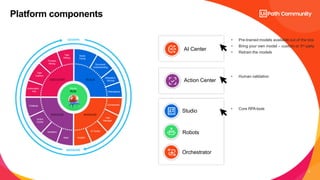
Platform components
Studio
Robots
Orchestrator
AI Center
Action Center
• Pre-trained models available out of the box
• Bring your own model – custom or 3rd party
• Retrain the models
• Core RPAtools
• Human validation
Automation
Hub
Process
Mining
Task
Mining
Studio
Family
Test
Manager
Chatbots
Action
Center
Assistant
DISCOVER
ENGAGE
BUILD
Document
Understanding
Marketplace
AI Center
Orchestrator
Apps
Task
Capture
Insights
MANAGE
GOVERN
MEASURE
Robots
RUN
Integration
Service
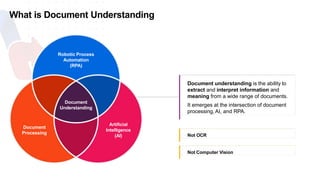
What is Document Understanding
Document
Understanding
Artificial
Intelligence
(AI)
Document
Processing
Robotic Process
Automation
(RPA)
Document understanding is the ability to
extract and interpret information and
meaning from a wide range of documents.
It emerges at the intersection of document
processing, AI, and RPA.
Not OCR
Not Computer Vision
5
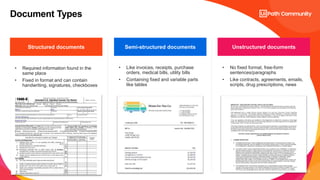
Document Types
• Required information found in the
same place
• Fixed in format and can contain
handwriting, signatures, checkboxes​
• Like invoices, receipts, purchase
orders, medical bills, utility bills
• Containing fixed and variable parts
like tables
• No fixed format, free-form
sentences/paragraphs
• Like contracts, agreements, emails,
scripts, drug prescriptions, news
Structured documents Semi-structured documents Unstructured documents
6
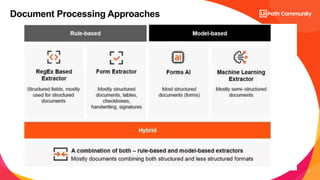
Document Processing Approaches
7
Document Processing Approaches
 Relies on ML models
 Processes less structured
varying layouts like invoices or
receipts
 Understands even unknown
complex documents
ǃ Requires pre-trained ML
models with further retraining
capabilities
Model-based
[template-less approach]
 Relies on rules and templates
 Processes fixed in format
structured data like forms or
licenses
 High accuracy for already
known documents
ǃ Requires extra costs for
addition of templates/rules and
ongoing maintenance
ǃ Doesn’t work with unknown
documents
Rule-based
[template-based approach]
8
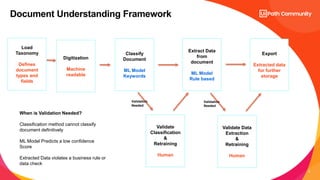
Document Understanding Framework
Load
Taxonomy
Defines
document
types and
fields
Classify
Document
ML Model
Keywords
Extract Data
from
document
ML Model
Rule based
Export
Extracted data
for further
storage
Validate
Classification
&
Retraining
Human
Validate Data
Extraction
&
Retraining
Human
Validation
Needed
Validation
Needed
Digitization
Machine
readable
When is Validation Needed?
Classification method cannot classify
document definitively
ML Model Predicts a low confidence
Score
Extracted Data violates a business rule or
data check
9
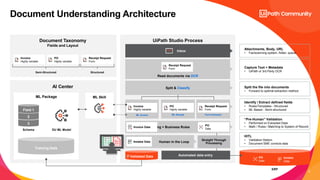
Document Understanding Architecture
UiPath Studio Process
ERP
Receipt Request
Data 1
PO
Data
Post-Processing + Business Rules
Extraction Method 1
ML Invoice
AI Center
Document Taxonomy
Fields and Layout
Semi-Structured Structured
Capture Text + Metadata
• UiPath or 3rd Party OCR
Split the file into documents
• Forward to optimal extraction method
Identify / Extract defined fields
• Rules/Templates - Structured
• ML Based - Semi-structured
HITL
• Validation Station
• Document SME corrects data
Inbox
Read documents via OCR
Split & Classify
Automated data entry
Extraction Method 2
ML Receipt
Extraction Method 3
Form Extractor
Validated Data
Human in the Loop
Receipt Request
Form
Receipt Request
Form
Receipt Request
Form
ML Skill
PO
Highly variable
PO
Highly variable
“Pre-Human” Validation
• Performed on Extracted Data
• Math / Rules / Matching to System of Record
Invoice
Highly variable
Invoice
Highly variable
Invoice Data
ML Package
Training Data
3
2
Field 1
Schema DU ML Model
Invoice Data
Receipt Request
Data 1
Invoice
Invoice Data
PO
Data
Invoice Data
Invoice Data
Invoice
Data
Attachments, Body, URL
• Fax/scanning system, folder, queue
Straight Through
Processing
10
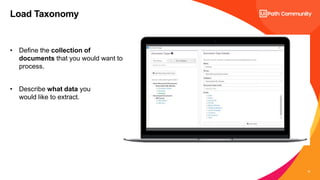
Load Taxonomy
• Define the collection of
documents that you would want to
process.
• Describe what data you
would like to extract.
11
• Obtaining the machine-readable text from a given file, OCR
• It detects all the words in the document and their x-y coordinates
• It can also detect other things on documents, such as handwritten text,
checkboxes, signatures, or barcodes/QR codes, depending on the OCR
engine used.
• Output is raw text and metadata about the text. Raw text can be used for GPT
processing
Digitization
12
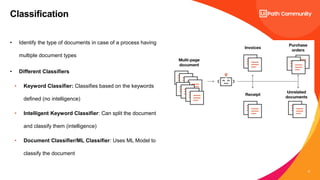
• Identify the type of documents in case of a process having
multiple document types
• Different Classifiers
• Keyword Classifier: Classifies based on the keywords
defined (no intelligence)
• Intelligent Keyword Classifier: Can split the document
and classify them (intelligence)
• Document Classifier/ML Classifier: Uses ML Model to
classify the document
Classification
13
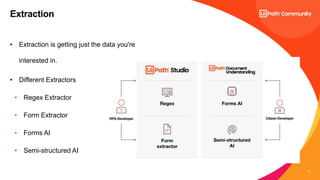
• Extraction is getting just the data you're
interested in.
• Different Extractors
• Regex Extractor
• Form Extractor
• Forms AI
• Semi-structured AI
Extraction
14
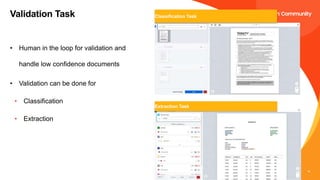
• Human in the loop for validation and
handle low confidence documents
• Validation can be done for
• Classification
• Extraction
Validation Task Classification Task
Extraction Task
15
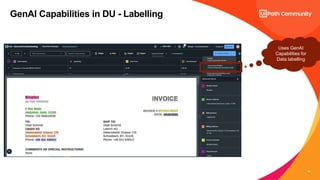
GenAI Capabilities in DU - Labelling
Uses GenAI
Capabilities for
Data labelling
16
GenAI Capabilities in DU – Extraction
Using OpenAI Package
Using Generate Text Completion Task by
using Prompts and documentText from
Digitization
17
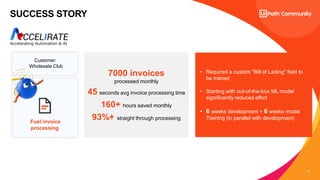
SUCCESS STORY
7000 invoices
processed monthly
45 seconds avg invoice processing time
160+ hours saved monthly
93%+ straight through processing
• Required a custom "Bill of Lading" field to
be trained
• Starting with out-of-the-box ML model
significantly reduced effort
• 6 weeks development + 6 weeks model
Training (in parallel with development)
Fuel invoice
processing
Customer:
Wholesale Club
18
Use Case Architecture
Shared Inbox
Download Invoice
Upload to
Sharepoint
Dispatcher Queue
ML Extractor
PDF Splitter Validate Results
Ifrules or
confidence not
meet?
HiTL
Reconciliation
Queue
Get Item &
Download
Digitize [OCR]
Load Taxonomy
Yes
No
Get Item From
Reconciliation
Queue
Add records to
Salesforce
FS_Dispatcher
FS_DU Performer
FS_ProcessReconciliation
Document Understanding
Product Demo
20
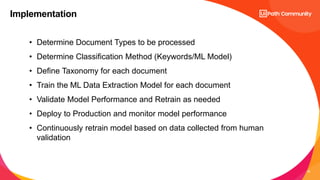
Implementation
• Determine Document Types to be processed
• Determine Classification Method (Keywords/ML Model)
• Define Taxonomy for each document
• Train the ML Data Extraction Model for each document
• Validate Model Performance and Retrain as needed
• Deploy to Production and monitor model performance
• Continuously retrain model based on data collected from human
validation
21
Ask me Anything
Vinolivan.nadar@accelirate.com
VINOLIVAN NADAR

UiPath Document Understanding_Day 2.pptx

  • 1.
    UiPath Document Understanding Automation TechnicalLead, Accelirate Process documents intelligently UiPath Document Understanding Process documents intelligently Day 2 DU Series VINOLIVAN NADAR Automation Technical Lead, Accelirate
  • 2.
    Agenda Quick Recap onDU basics DU Architecture DU Framework GenAI Capabilities Hands-on
  • 3.
    3 Platform components Studio Robots Orchestrator AI Center ActionCenter • Pre-trained models available out of the box • Bring your own model – custom or 3rd party • Retrain the models • Core RPAtools • Human validation Automation Hub Process Mining Task Mining Studio Family Test Manager Chatbots Action Center Assistant DISCOVER ENGAGE BUILD Document Understanding Marketplace AI Center Orchestrator Apps Task Capture Insights MANAGE GOVERN MEASURE Robots RUN Integration Service
  • 4.
    What is DocumentUnderstanding Document Understanding Artificial Intelligence (AI) Document Processing Robotic Process Automation (RPA) Document understanding is the ability to extract and interpret information and meaning from a wide range of documents. It emerges at the intersection of document processing, AI, and RPA. Not OCR Not Computer Vision
  • 5.
    5 Document Types • Requiredinformation found in the same place • Fixed in format and can contain handwriting, signatures, checkboxes​ • Like invoices, receipts, purchase orders, medical bills, utility bills • Containing fixed and variable parts like tables • No fixed format, free-form sentences/paragraphs • Like contracts, agreements, emails, scripts, drug prescriptions, news Structured documents Semi-structured documents Unstructured documents
  • 6.
  • 7.
    7 Document Processing Approaches Relies on ML models  Processes less structured varying layouts like invoices or receipts  Understands even unknown complex documents ǃ Requires pre-trained ML models with further retraining capabilities Model-based [template-less approach]  Relies on rules and templates  Processes fixed in format structured data like forms or licenses  High accuracy for already known documents ǃ Requires extra costs for addition of templates/rules and ongoing maintenance ǃ Doesn’t work with unknown documents Rule-based [template-based approach]
  • 8.
    8 Document Understanding Framework Load Taxonomy Defines document typesand fields Classify Document ML Model Keywords Extract Data from document ML Model Rule based Export Extracted data for further storage Validate Classification & Retraining Human Validate Data Extraction & Retraining Human Validation Needed Validation Needed Digitization Machine readable When is Validation Needed? Classification method cannot classify document definitively ML Model Predicts a low confidence Score Extracted Data violates a business rule or data check
  • 9.
    9 Document Understanding Architecture UiPathStudio Process ERP Receipt Request Data 1 PO Data Post-Processing + Business Rules Extraction Method 1 ML Invoice AI Center Document Taxonomy Fields and Layout Semi-Structured Structured Capture Text + Metadata • UiPath or 3rd Party OCR Split the file into documents • Forward to optimal extraction method Identify / Extract defined fields • Rules/Templates - Structured • ML Based - Semi-structured HITL • Validation Station • Document SME corrects data Inbox Read documents via OCR Split & Classify Automated data entry Extraction Method 2 ML Receipt Extraction Method 3 Form Extractor Validated Data Human in the Loop Receipt Request Form Receipt Request Form Receipt Request Form ML Skill PO Highly variable PO Highly variable “Pre-Human” Validation • Performed on Extracted Data • Math / Rules / Matching to System of Record Invoice Highly variable Invoice Highly variable Invoice Data ML Package Training Data 3 2 Field 1 Schema DU ML Model Invoice Data Receipt Request Data 1 Invoice Invoice Data PO Data Invoice Data Invoice Data Invoice Data Attachments, Body, URL • Fax/scanning system, folder, queue Straight Through Processing
  • 10.
    10 Load Taxonomy • Definethe collection of documents that you would want to process. • Describe what data you would like to extract.
  • 11.
    11 • Obtaining themachine-readable text from a given file, OCR • It detects all the words in the document and their x-y coordinates • It can also detect other things on documents, such as handwritten text, checkboxes, signatures, or barcodes/QR codes, depending on the OCR engine used. • Output is raw text and metadata about the text. Raw text can be used for GPT processing Digitization
  • 12.
    12 • Identify thetype of documents in case of a process having multiple document types • Different Classifiers • Keyword Classifier: Classifies based on the keywords defined (no intelligence) • Intelligent Keyword Classifier: Can split the document and classify them (intelligence) • Document Classifier/ML Classifier: Uses ML Model to classify the document Classification
  • 13.
    13 • Extraction isgetting just the data you're interested in. • Different Extractors • Regex Extractor • Form Extractor • Forms AI • Semi-structured AI Extraction
  • 14.
    14 • Human inthe loop for validation and handle low confidence documents • Validation can be done for • Classification • Extraction Validation Task Classification Task Extraction Task
  • 15.
    15 GenAI Capabilities inDU - Labelling Uses GenAI Capabilities for Data labelling
  • 16.
    16 GenAI Capabilities inDU – Extraction Using OpenAI Package Using Generate Text Completion Task by using Prompts and documentText from Digitization
  • 17.
    17 SUCCESS STORY 7000 invoices processedmonthly 45 seconds avg invoice processing time 160+ hours saved monthly 93%+ straight through processing • Required a custom "Bill of Lading" field to be trained • Starting with out-of-the-box ML model significantly reduced effort • 6 weeks development + 6 weeks model Training (in parallel with development) Fuel invoice processing Customer: Wholesale Club
  • 18.
    18 Use Case Architecture SharedInbox Download Invoice Upload to Sharepoint Dispatcher Queue ML Extractor PDF Splitter Validate Results Ifrules or confidence not meet? HiTL Reconciliation Queue Get Item & Download Digitize [OCR] Load Taxonomy Yes No Get Item From Reconciliation Queue Add records to Salesforce FS_Dispatcher FS_DU Performer FS_ProcessReconciliation
  • 19.
  • 20.
    20 Implementation • Determine DocumentTypes to be processed • Determine Classification Method (Keywords/ML Model) • Define Taxonomy for each document • Train the ML Data Extraction Model for each document • Validate Model Performance and Retrain as needed • Deploy to Production and monitor model performance • Continuously retrain model based on data collected from human validation
  • 21.

Editor's Notes

  • #4 Daniel to Talk through components – High Level
  • #5 Ahmed Little intro to Document Processing Hand Over to Daniel for More Color.
  • #6 Ahmed to Explain this flow.
  • #7 Ahmed to Explain this flow.
  • #8 Ahmed to Explain this flow.
  • #9 Ahmed to Explain this flow.
  • #10 Daniel
  • #21 Ahmed