TUTORIAL SCREENGRAB USING MAPS GOOGLE
                  Helping your handle the Earth


                        AGUS ARIS
                        G051110011


 INFORMATION TECHONOLOGY FOR NATURAL RESOURCE MANAGEMENT

                     SEAMEO – BIOTROP

              BOGOR AGRICULTURAL UNIVERSITY
HOW TO USING SCREENGAB

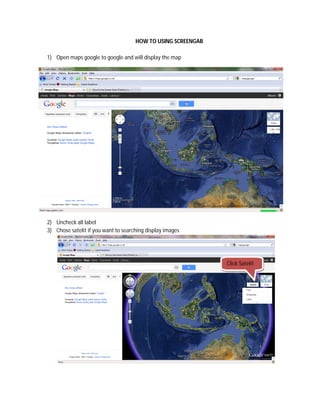
1) Open maps google to google and will display the map


2) Uncheck all label
3) Chose satelit if you want to searching display images


                                                              Click Satelit
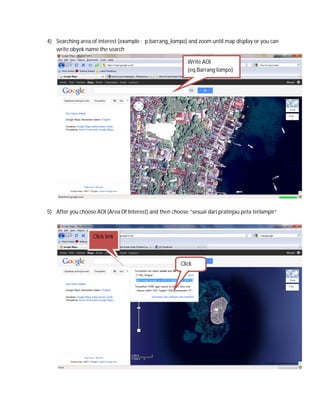
4) Searching area of interest (example : p.barrang_lompo) and zoom until map display or you can
   write obyek name the search

                                                           Write AOI
                                                           (eq.Barrang lompo)


5) After you choose AOI (Area Of Interest) and then choose “sesuai dari pratinjau peta terlampir”


                   Click link


                                                        Click
                                                        this
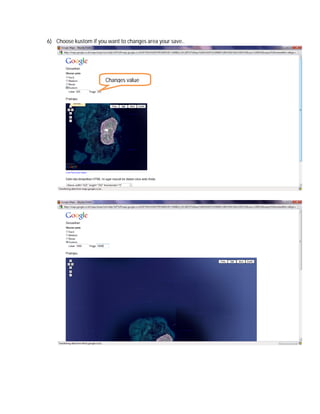
6) Choose kustom if you want to changes area your save..


                       Changes value
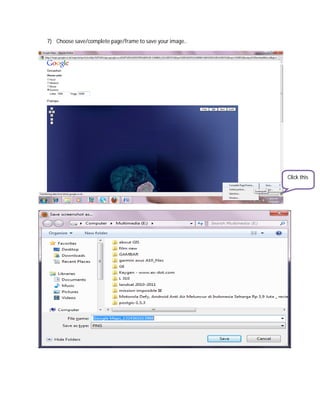
7) Choose save/complete page/frame to save your image..


                                                          Click this
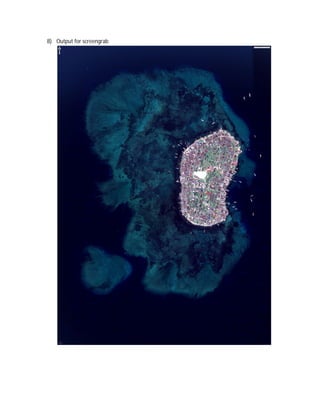
8) Output for screengrab

Tutorial how to use screengrab

  • 1.
    TUTORIAL SCREENGRAB USINGMAPS GOOGLE Helping your handle the Earth AGUS ARIS G051110011 INFORMATION TECHONOLOGY FOR NATURAL RESOURCE MANAGEMENT SEAMEO – BIOTROP BOGOR AGRICULTURAL UNIVERSITY
  • 2.
    HOW TO USINGSCREENGAB 1) Open maps google to google and will display the map 2) Uncheck all label 3) Chose satelit if you want to searching display images Click Satelit
  • 3.
    4) Searching areaof interest (example : p.barrang_lompo) and zoom until map display or you can write obyek name the search Write AOI (eq.Barrang lompo) 5) After you choose AOI (Area Of Interest) and then choose “sesuai dari pratinjau peta terlampir” Click link Click this
  • 4.
    6) Choose kustomif you want to changes area your save.. Changes value
  • 5.
    7) Choose save/completepage/frame to save your image.. Click this
  • 6.
    8) Output forscreengrab