 Razieh Akbari
 Julio Cèsar Carrasquel
Spring 2017
Project Idea
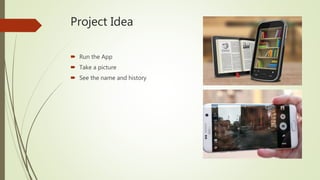
 Run the App
 Take a picture
 See the name and history
User Experience
We talked to 5 people
User Experience
 their reaction
 Marzi (girl) : I think google has this, I want to use it offline
 Fatemeh (girl) : it is a useless and unnecessary Idea
 Kami (boy) : since I like to travel a lot, and I love history, not paying the
tour leader is fantastic, so make it free
 Hadis ( girl) : I find it pretty useful for all kind of people specially those with the
love for history
 Sohiel (boy) : Hmmm… you know I`m not a history guy
User Experience
 Do you find it useful?
 Marzi (girl) : 100 percent useful
 Fatemeh (girl) : there is no use in it other than making many guides jobless
 Kami (boy) : I use to search Wikipedia to find the history when I`m there, but using
the camera is perfect, having my picture, knowing history and not
paying any money
 Hadis (girl) : it is really useful, since I don`t have access to a guide all the times
and there are so many places that I don’t know the history
 Soheil (boy) : I don’t know if I`m going to use it or not, I don’t like history that
much, most of the time I rather googling If I know the name
User Experience
 Do you have any suggestion?
 Marzi (girl) : I like to save the picture I take and I want the app to suggest me best
ways to take pictures from the place
 Fatemeh (girl) : give up and let it go
 Kami (boy) : having different languages is great
 Hadis (girl) : I suggest you add the possibility of searching for a place with the
name, sometimes the quality of the picture is not good, sometimes I
know the name, just want to type and know the history
 Soheil (boy) : Just keep the main page simple, I don’t like so many details
UX Summary
 Keep it simple
 Search with name
 Free of charge
 Support different languages ( connecting to wiki API)
 Design of the main page
 View suggestion for taking a picture
 Google vision API
 color
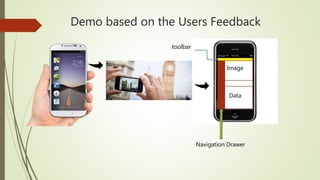
Demo based on the Users Feedback
Image
Data
Navigation Drawer
toolbar
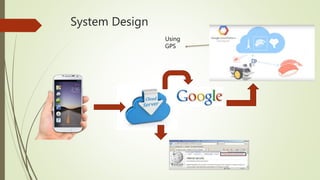
System Design
System Design
Using
GPS
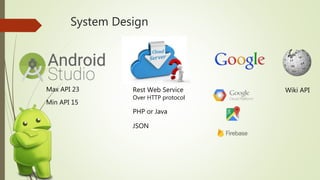
System Design
Max API 23
Min API 15
Rest Web Service
Over HTTP protocol
PHP or Java
JSON
Wiki API

Minerva second presentation

  • 1.
     Razieh Akbari Julio Cèsar Carrasquel Spring 2017
  • 2.
    Project Idea  Runthe App  Take a picture  See the name and history
  • 3.
  • 4.
    User Experience  theirreaction  Marzi (girl) : I think google has this, I want to use it offline  Fatemeh (girl) : it is a useless and unnecessary Idea  Kami (boy) : since I like to travel a lot, and I love history, not paying the tour leader is fantastic, so make it free  Hadis ( girl) : I find it pretty useful for all kind of people specially those with the love for history  Sohiel (boy) : Hmmm… you know I`m not a history guy
  • 5.
    User Experience  Doyou find it useful?  Marzi (girl) : 100 percent useful  Fatemeh (girl) : there is no use in it other than making many guides jobless  Kami (boy) : I use to search Wikipedia to find the history when I`m there, but using the camera is perfect, having my picture, knowing history and not paying any money  Hadis (girl) : it is really useful, since I don`t have access to a guide all the times and there are so many places that I don’t know the history  Soheil (boy) : I don’t know if I`m going to use it or not, I don’t like history that much, most of the time I rather googling If I know the name
  • 6.
    User Experience  Doyou have any suggestion?  Marzi (girl) : I like to save the picture I take and I want the app to suggest me best ways to take pictures from the place  Fatemeh (girl) : give up and let it go  Kami (boy) : having different languages is great  Hadis (girl) : I suggest you add the possibility of searching for a place with the name, sometimes the quality of the picture is not good, sometimes I know the name, just want to type and know the history  Soheil (boy) : Just keep the main page simple, I don’t like so many details
  • 7.
    UX Summary  Keepit simple  Search with name  Free of charge  Support different languages ( connecting to wiki API)  Design of the main page  View suggestion for taking a picture  Google vision API  color
  • 8.
    Demo based onthe Users Feedback Image Data Navigation Drawer toolbar
  • 9.
  • 10.
  • 11.
    System Design Max API23 Min API 15 Rest Web Service Over HTTP protocol PHP or Java JSON Wiki API