PYTHON TUPLE
T.PRIYA AP/CS Page 1
Tuple:
 Tuple is one of the built-in data types in Python.
 A tuple is a sequence data type
 In tuples comma separated items & enclosed in parentheses ().
 The items in a Python tuple need not be of same data type.
 It is an ordered collection of items. Each item in the tuple has a
unique position index, starting from 0.
 Python tuple and list both are sequences. One major difference
between the two is, Python list is mutable, whereas tuple is
immutable.
 Although any item from the tuple can be accessed using its index,
and cannot be modified, removed or added.
Create Tuples :
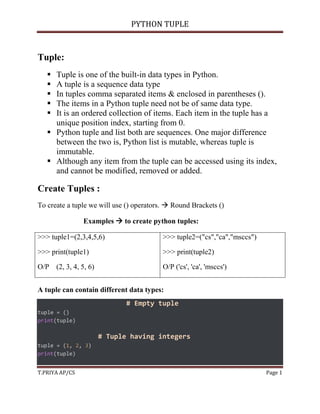
To create a tuple we will use () operators.  Round Brackets ()
Examples  to create python tuples:
>>> tuple1=(2,3,4,5,6)
>>> print(tuple1)
O/P (2, 3, 4, 5, 6)
>>> tuple2=("cs","ca","msccs")
>>> print(tuple2)
O/P ('cs', 'ca', 'msccs')
A tuple can contain different data types:
# Empty tuple
tuple = ()
print(tuple)
# Tuple having integers
tuple = (1, 2, 3)
print(tuple)
PYTHON TUPLE
T.PRIYA AP/CS Page 2
# tuple with mixed datatypes
tuple = (1, "Hello", 3.4)
print(tuple)
# nested tuple
tuple = ("mouse", [8, 4, 6], (1, 2, 3))
print(tuple)
Output
()
(1, 2, 3)
(1, 'Hello', 3.4)
('mouse', [8, 4, 6], (1, 2, 3))
Accessing Tuple Elements
Access value in tuples:
There are different ways to accessing the tuple in python (index and value).
Example (index value)
>>> tuple=("CS","CA","MSC")
>>> print(tuple[0])
CS
>>> print(tuple[1])
CA
>>> print(tuple[2])
MSC
tuple.index() Return the index value
>>> tuple=("CS","CA","MSC")
>>> tuple.index("CA")
O/P
1
PYTHON TUPLE
T.PRIYA AP/CS Page 3
Basic Operation in tuple :
1. Length 2.Sum 3. Indexing 4. Count 5. Slicing
6. Sorted 7. Max 8. Min 9. Delete
NOTE : Append & Insert  Immutable (cannot be change)
1.Length:
The len() function is used to return the number of elements in a tuple. It returns
an integer value representing the length of the tuple.
Example:
>>> tuple=()
>>> print(len(tuple))
O/P  0
>>> tuple=("CS","CA","MSC")
>>> print(len(tuple))
O/P  3
2. Sum:
The sum() function is used to return the sum of all elements in a tuple.
Example:
>>> a=(2,5,9,7,8)
>>> print(sum(a))
O/P
31
3. Indexing:
It returns the index of a specified element in a tuple.
Example:
>>> a=("sweatha","priya","rakshita")
>>> print(a[1])
O/P
priya
PYTHON TUPLE
T.PRIYA AP/CS Page 4
4.Count:
It returns the number of times a specified element appears in a tuple
Example:
a=("sweatha","priya","rakshita","priya")
>>> a.count("priya")
O/P
2
5. Slicing :
Slicing of a Tuple is done to fetch a specific range or slice of sub-elements
from a Tuple. Slicing can also be done to lists and arrays.
Example:
>>> a=("computer science")
>>> print(a[3:7])
O/P
pute
6. Sorted:
Python sorted() function returns a sorted list.
Example:
>>> a=(2,1,8,4,7)
>>> print(sorted(a))
O/P
[1, 2, 4, 7, 8]
7. Max :
The method used to find the maximum value in the tuple.
Example:
>>> >>> s1=(56,76,34,90,46)
>>> max(s1)
O/P
90
PYTHON TUPLE
T.PRIYA AP/CS Page 5
8. Min:
The method used to find the minimum value in the tuple.
Example:
>>> >>> s1=(56,76,34,90,46)
>>> min(s1)
O/P
34
9.Delete:
The del operator in the tuple is used to delete the entire tuple. As tuples are
immutable they cannot delete a particular element in a tuple.
Syntax
del object_name
Example:
>> a=("sweatha","priya","rakshita")
>>> print(a)
('sweatha', 'priya', 'rakshita')
>>> del(a)
>>> print(a)
O/P
Traceback (most recent call last):
File "<pyshell#36>", line 1, in
<module>
print(a)
NameError: name 'a' is not defined
PYTHON TUPLE
T.PRIYA AP/CS Page 6
Difference Between List and Tuple in Python
S. No
List Tuple
1 Lists are mutable. Tuples are immutable.
2 Iteration in lists is time consuming. Iteration in tuples is faster
3 Lists are better for insertion and
deletion operations
Tuples
are appropriate for accessing the
elements
4 Lists consume more memory Tuples consume lesser memory
5 Lists have several built-in methods Tuples have comparatively
lesser built-in methods.
6 Lists are more prone to unexpected
errors
Tuples operations are safe and
chances of error are very less
7 Creating a list is slower because two
memory blocks need to be accessed.
Creating a tuple is faster than
creating a list.
8 Lists are initialized using square brackets
[].
Tuples are initialized using
parentheses ().
9 List objects cannot be used as keys for
dictionaries because keys should be
hashable and immutable.
Tuple objects can be used as
keys for dictionaries because
keys should be hashable and
mutable.
10. List have order. Tuple have structure.

Python Tuple.pdf

  • 1.
    PYTHON TUPLE T.PRIYA AP/CSPage 1 Tuple:  Tuple is one of the built-in data types in Python.  A tuple is a sequence data type  In tuples comma separated items & enclosed in parentheses ().  The items in a Python tuple need not be of same data type.  It is an ordered collection of items. Each item in the tuple has a unique position index, starting from 0.  Python tuple and list both are sequences. One major difference between the two is, Python list is mutable, whereas tuple is immutable.  Although any item from the tuple can be accessed using its index, and cannot be modified, removed or added. Create Tuples : To create a tuple we will use () operators.  Round Brackets () Examples  to create python tuples: >>> tuple1=(2,3,4,5,6) >>> print(tuple1) O/P (2, 3, 4, 5, 6) >>> tuple2=("cs","ca","msccs") >>> print(tuple2) O/P ('cs', 'ca', 'msccs') A tuple can contain different data types: # Empty tuple tuple = () print(tuple) # Tuple having integers tuple = (1, 2, 3) print(tuple)
  • 2.
    PYTHON TUPLE T.PRIYA AP/CSPage 2 # tuple with mixed datatypes tuple = (1, "Hello", 3.4) print(tuple) # nested tuple tuple = ("mouse", [8, 4, 6], (1, 2, 3)) print(tuple) Output () (1, 2, 3) (1, 'Hello', 3.4) ('mouse', [8, 4, 6], (1, 2, 3)) Accessing Tuple Elements Access value in tuples: There are different ways to accessing the tuple in python (index and value). Example (index value) >>> tuple=("CS","CA","MSC") >>> print(tuple[0]) CS >>> print(tuple[1]) CA >>> print(tuple[2]) MSC tuple.index() Return the index value >>> tuple=("CS","CA","MSC") >>> tuple.index("CA") O/P 1
  • 3.
    PYTHON TUPLE T.PRIYA AP/CSPage 3 Basic Operation in tuple : 1. Length 2.Sum 3. Indexing 4. Count 5. Slicing 6. Sorted 7. Max 8. Min 9. Delete NOTE : Append & Insert  Immutable (cannot be change) 1.Length: The len() function is used to return the number of elements in a tuple. It returns an integer value representing the length of the tuple. Example: >>> tuple=() >>> print(len(tuple)) O/P  0 >>> tuple=("CS","CA","MSC") >>> print(len(tuple)) O/P  3 2. Sum: The sum() function is used to return the sum of all elements in a tuple. Example: >>> a=(2,5,9,7,8) >>> print(sum(a)) O/P 31 3. Indexing: It returns the index of a specified element in a tuple. Example: >>> a=("sweatha","priya","rakshita") >>> print(a[1]) O/P priya
  • 4.
    PYTHON TUPLE T.PRIYA AP/CSPage 4 4.Count: It returns the number of times a specified element appears in a tuple Example: a=("sweatha","priya","rakshita","priya") >>> a.count("priya") O/P 2 5. Slicing : Slicing of a Tuple is done to fetch a specific range or slice of sub-elements from a Tuple. Slicing can also be done to lists and arrays. Example: >>> a=("computer science") >>> print(a[3:7]) O/P pute 6. Sorted: Python sorted() function returns a sorted list. Example: >>> a=(2,1,8,4,7) >>> print(sorted(a)) O/P [1, 2, 4, 7, 8] 7. Max : The method used to find the maximum value in the tuple. Example: >>> >>> s1=(56,76,34,90,46) >>> max(s1) O/P 90
  • 5.
    PYTHON TUPLE T.PRIYA AP/CSPage 5 8. Min: The method used to find the minimum value in the tuple. Example: >>> >>> s1=(56,76,34,90,46) >>> min(s1) O/P 34 9.Delete: The del operator in the tuple is used to delete the entire tuple. As tuples are immutable they cannot delete a particular element in a tuple. Syntax del object_name Example: >> a=("sweatha","priya","rakshita") >>> print(a) ('sweatha', 'priya', 'rakshita') >>> del(a) >>> print(a) O/P Traceback (most recent call last): File "<pyshell#36>", line 1, in <module> print(a) NameError: name 'a' is not defined
  • 6.
    PYTHON TUPLE T.PRIYA AP/CSPage 6 Difference Between List and Tuple in Python S. No List Tuple 1 Lists are mutable. Tuples are immutable. 2 Iteration in lists is time consuming. Iteration in tuples is faster 3 Lists are better for insertion and deletion operations Tuples are appropriate for accessing the elements 4 Lists consume more memory Tuples consume lesser memory 5 Lists have several built-in methods Tuples have comparatively lesser built-in methods. 6 Lists are more prone to unexpected errors Tuples operations are safe and chances of error are very less 7 Creating a list is slower because two memory blocks need to be accessed. Creating a tuple is faster than creating a list. 8 Lists are initialized using square brackets []. Tuples are initialized using parentheses (). 9 List objects cannot be used as keys for dictionaries because keys should be hashable and immutable. Tuple objects can be used as keys for dictionaries because keys should be hashable and mutable. 10. List have order. Tuple have structure.