Microsoft identity platform
March18, 2021 | 9:00AM PST
Developer community call
Microsoft Identity platform –
Do’s and Don’t
Harish Suresh
Program Manager
Sahil Malik
Program Manager
2.
Introduction
• First thingsfirst
• Please note: We are recording this call so those unable to attend can benefit from the recording.
• This call is designed for developers who implement or are interested in implementing Microsoft identity platform
solutions.
• What kind of topics will we discuss?
• We will address development related topics submitted to us by the community for discussion.
• We build a pipeline of topics for the next few weeks, please submit your feedback and topic suggestions -
https://aka.ms/IDDevCommunityCallSurvey
• View recordings on the Microsoft 365 Developer YouTube channel - https://aka.ms/M365DevYouTube
• Follow us on Twitter @Microsoft365Dev and @azuread
• This is NOT a support channel. Please use Stack Overflow to ask your immediate support related questions.
• When is the next session?
• Community Calls: Monthly – 3rd Thursday of every month
• Next Identity Developer Community Call: Feb 18th
3.
Microsoft identity platform
March18, 2021 | 9:00AM PST
Developer community call
Microsoft Identity platform –
Do’s and Don’t
Harish Suresh
Program Manager
Sahil Malik
Program Manager
4.
Microsoft Confidential. Sharedunder NDA.
Agenda
• Microsoft Identity platform for developers
• Microsoft Authentication Library (MSAL)
• Top Developer mistakes
• Q & A
5.
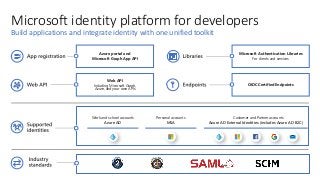
Microsoft identity platformfor developers
Build applications and integrate identity with one unified toolkit
Microsoft Authentication Libraries
For clients and services
Azure portal and
Microsoft Graph App API
OIDC Certified Endpoints
Web API
Including Microsoft Graph,
Azure, and your own APIs
Work and school accounts
Azure AD
Personal accounts
MSA
Customer and Partner accounts
Azure AD External Identities (includes Azure AD B2C)
6.
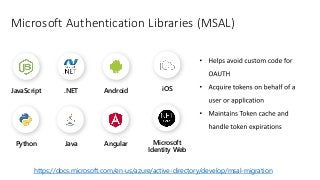
Microsoft Authentication Libraries(MSAL)
iOS
Python
Android
.NET
JavaScript
Angular
Java Microsoft
Identity Web
https://docs.microsoft.com/en-us/azure/active-directory/develop/msal-migration
7.
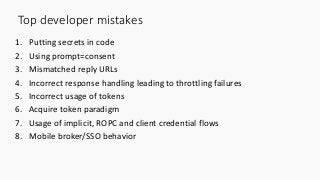
Top developer mistakes
1.Putting secrets in code
2. Using prompt=consent
3. Mismatched reply URLs
4. Incorrect response handling leading to throttling failures
5. Incorrect usage of tokens
6. Acquire token paradigm
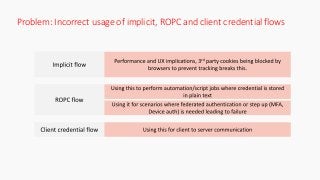
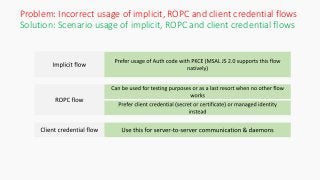
7. Usage of implicit, ROPC and client credential flows
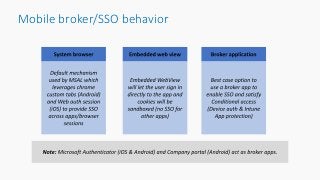
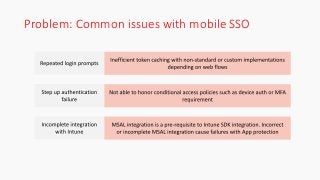
8. Mobile broker/SSO behavior
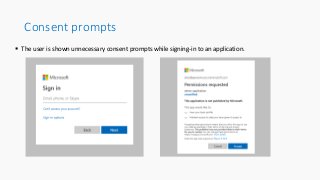
Consent prompts
Theuser is shown unnecessary consent prompts while signing-in to an application.
11.
Problem: Using prompt=consent
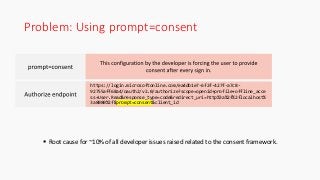
Root cause for ~10% of all developer issues raised related to the consent framework.
https://login.microsoftonline.com/ea4db1e7-6f2f-427f-a7c8-
92755aff68a4/oauth2/v2.0/authorize?scope=openid+profile+offline_acce
ss+User.Read&response_type=code&redirect_uri=http%3a%2f%2flocalhost%
3a8080%2f&prompt=consent&client_id
12.
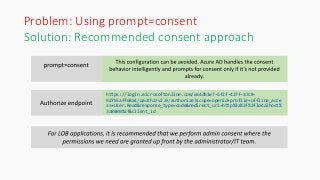
Solution: Recommended consentapproach
https://login.microsoftonline.com/ea4db1e7-6f2f-427f-a7c8-
92755aff68a4/oauth2/v2.0/authorize?scope=openid+profile+offline_acce
ss+User.Read&response_type=code&redirect_uri=http%3a%2f%2flocalhost%
3a8080%2f&client_id
Problem: Using prompt=consent
13.
Reply URLs
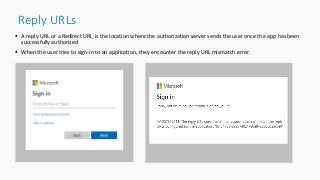
Areply URL or a Redirect URI, is the location where the authorization server sends the user once the app has been
successfully authorized
When the user tries to sign-in to an application, they encounter the reply URL mismatch error.
14.
Problem: Mismatched replyURLs
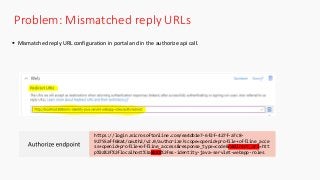
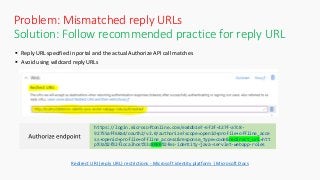
Mismatched reply URL configuration in portal and in the authorize api call.
https://login.microsoftonline.com/ea4db1e7-6f2f-427f-a7c8-
92755aff68a4/oauth2/v2.0/authorize?scope=openid+profile+offline_acce
ss+openid+profile+offline_access&response_type=code&redirect_uri=htt
p%3a%2f%2flocalhost%3a8888%2fms-identity-java-servlet-webapp-roles
15.
Solution: Follow recommendedpractice for reply URL
Reply URL specified in portal and the actual Authorize API call matches
Avoid using wildcard reply URLs
Azure Portal
Redirect URI (reply URL) restrictions - Microsoft identity platform | Microsoft Docs
https://login.microsoftonline.com/ea4db1e7-6f2f-427f-a7c8-
92755aff68a4/oauth2/v2.0/authorize?scope=openid+profile+offline_acce
ss+openid+profile+offline_access&response_type=code&redirect_uri=htt
p%3a%2f%2flocalhost%3a8080%2fms-identity-java-servlet-webapp-roles
Problem: Mismatched reply URLs
16.
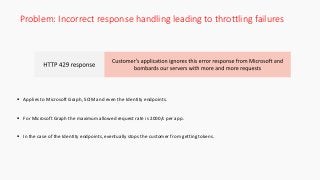
Problem: Incorrect responsehandling leading to throttling failures
Applies to Microsoft Graph, SCIM and even the Identity endpoints.
For Microsoft Graph the maximum allowed request rate is 2000/s per app.
In the case of the Identity endpoints, eventually stops the customer from getting tokens.
17.
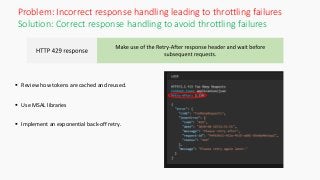
Solution: Correct responsehandling to avoid throttling failures
Review how tokens are cached and reused.
Use MSAL libraries
Implement an exponential back-off retry.
Problem: Incorrect response handling leading to throttling failures
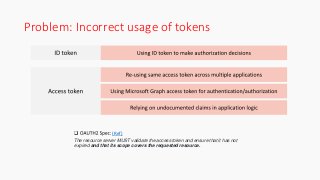
Problem: Incorrect usageof tokens
(Ref)
The resource server MUST validate the access token and ensure that it has not
expired and that its scope covers the requested resource.
Need help withMicrosoft Identity?
Find it on Q&A – the home for technical questions and answers at Microsoft.
Join the Community on Microsoft Q&A!
Get Answers from Microsoft Experts
Affiliations for Microsoft employees and MVPs show in
the user’s card
Follow for Updates
Refine your search and follow posts, tags and people
Become a Product Expert
Share your expertise and earn reputation points with
Accepted Answers
Private Comments
Have a private conversation with Microsoft Support to
help troubleshoot
Instant Answers
Start typing and see similar questions already answered
on Microsoft Q&A, MSDN and TechNet Forums
Many more features available now and coming soon!
Head to https://aka.ms/AzureIdentityQnA to
engage with the Microsoft Identity
Community!
Microsoft Q&A is a natural extension of the
docs.microsoft.com experience you’ve come to love.
29.
Help options fordevelopers
• Post a query on Microsoft Q&A with the right tags: Link
• Create a GitHub issue against the MSAL library : Link
• Submit feedback for new feature requests: Link
• Create an Azure Support Request: Link
30.
Microsoft Confidential. Sharedunder NDA.
Thank you
Microsoft Identity platform for developers
Microsoft Authentication Library (MSAL)
Top Developer mistakes
Developer Roadmap
Recording will beavailable soon on our
Microsoft 365 Developer YouTube channel
https://aka.ms/M365DevYouTube
(subscribe today)
Follow us on Twitter
@Microsoft365Dev and @azuread
Next call: Apr 15th at 9:00am PST
https://aka.ms/IDDevCommunityCalendar
Thank you
Editor's Notes
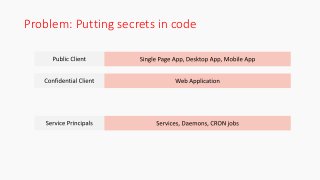
#9 First, lets define what we mean by secrets. Here I am referring to client secrets, or client credentials. By client credentials, I mean that long string you set in an app registration or a x509 cert.
A common scenario we run into is developers who are otherwise great at their field of work, are frequently confused about the nuances of different kinds of applications from an identity perspective.
From an identity perspective, we see three kinds of applications.
Public clients, that live on surfaces you do not control. A browser’s page, a desktop that the user uses, a mobile phone etc. We do not trust these devices, and you should never store secrets on those devices. In fact, by default Azure AD app registrations are not public clients, you have to explicitly opt in for them to be a public client. And when you do, we treat them differently. For instance, we will issue shorter lived refresh tokens to public clients, depending upon the client type.
Confidential clients on the other hand, do have the capability to store secrets securely because the secret never leaves the server. Since the user has no direct access to the server, you can feel confident that the secret is safe. Typically developers will put secrets in appconfig.json or web.config, which is a good start, although it could be better.
Finally, you have service principals. These are typically used for background tasks, and they do not have refresh tokens. They only use a client id and client secret to get an access token. When the token expires, they ask for a new token. Therefore they _rely_ on a client secret (or certificate)
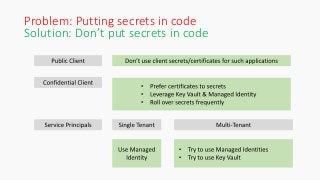
#10 So what is the solution?
For public clients, never ever put secrets in code. There is never a situation where this is acceptable. And therefore it is important to understand the difference between public client and confidential client. As a rule of thumb, if there is a surface you do not control – mobile phone, client desktop, browser page – that is NOT the right place for a secret.
For confidential clients, the appsetting.json and web.config is a good start, but we recommend storing any such secrets in key vault, and leveraging managed identities to read from the kev vault
<<<<DESCRIBE WHAT MANAGED IDENTITY IS>>>>
For service principals, if you are working in a single tenant, you should never have a need to use a service principal credential directly. Always prefer to use managed identities. If you do have specific single tenant situations where you must use a service principal for long running tasks, we want to hear from you.
For multi-tenant scenarios however, managed identities currently do not span multiple tenants. Well technically neither do service principals. But since the credential of the service principal is visible to you, you can chose to store it in a different tenant, or different cloud, or really anywhere. We do highly highly recommend though to keep that secret safe. So try to use managed identities there as well, or use key vault.
#11 The next topic we will be discussing is the usage of the prompt=consent configuration
Before we jump into the problem let me explain what consent really is
Consent is the process of a user granting authorization to an application to access protected resources on their behalf. For example, application A is granted consent to have access to users' calendar, or App B is consented to users onedrive data. One thing to note is that an admin can provide consent on behalf of their organization.
Okay, coming back to the problem, the issue here is that the user is shown unnecessary consent prompts while signing-in to an application
There are several normal reasons why a consent prompt might be shown to a user.
The set of permissions required by the application has changed.
The application is using incremental and dynamic consent to request additional permissions.
Consent was revoked after being granted initially.
But there is one abnormal scenario that we strongly recommend our developers to stay away from and that is the usage of prompt=consent query parameter in the authorize end point call that they make to azure ad.
Let us now take a deeper dive into this problem.
Suppose I am a global administrator and in the Azure portal I have granted consent to all the permissions that my app needs on behalf of the entire organization. Ideally, the users shouldn’t be shown any consent prompts, but unfortunately, they are shown the prompt every time they sign in as you can see on the screen here.
#12
As I mentioned earlier this is happening because of the unnecessary prompt equals consent authorize endpoint query parameter highlighted on the screen.
This configuration is the root cause for ~10% of all developer issues related to the consent framework raised across our platforms.
Recently one of our top customers had entirely disabled user consents for security reasons and enabled only admin consents but because the developer inadvertently made this consent prompt configuration , the users were being shown the prompts which came as a surprise and did lead to some confusions.
#13
Let’s now look at the right way to handle consent.
The prompt equals consent configuration should be avoided.
Azure AD has the capability to handle consent behavior intelligently and prompts for consent only if it’s not provided already.
Also, you can see the Authorize endpoint call doesn’t have the prompt consent query param.
Developers should always try to provide the end users the most minimal sign in experience.
However, there is a scenario where we have seen developers deliberately use the consent prompt.
It is when the developer wants to inform the user about the permissions for the first time and take consent explicitly.
Ok now to To summarize:
As much as 10% of all consent related issues raised by developers are because of the consent prompt configuration. Because of this configuration, users are again and again prompted to provide consent unnecessarily.
We strongly recommend developers not to use prompt = consent and leave the consent behavior to Azure AD which has the capability to handle it intelligently.
#14 Let's now look at the next problem of mismatched reply urls.
Before we go any further lets see What a reply url or a redirect URI really is ?
A reply URL or a Redirect URI, is the location where the authorization server sends the user once the app has been successfully authorized and granted an auth code or an access token.
And there is a need for a allow list of reply URLs. Lets understand why
The developer needs to inform Azure AD about the trusted URL where the auth code or access token can be safely shared without any malicious parties getting access to sensitive data. If its not predefined, then Azure ad has no way of knowing if the auth code or access token is being handed over to a malicious entity. Therefore, Reply URL is a mandatory configuration in the azure portal.
Now let's look at this issue.
When the user tries to sign into an app, they encounter the error The reply URL specified in the request doesn’t match the reply URLs configured for the application as you can see on the screen
In the next slide we will see why its occurring.
#15
This problem is happening because of the mismatch between the reply URL configured in the azure portal and in the application.
First let's look at the azure portal configuration
The screenshot you see is the Redirect URI configuration in the azure portal, app registrations page.
As you can see, the admin, or a developer has defined the redirect URI in the textbox
Please note that the url has a port number of 8080.
Below that we can see the actual redirect URI passed by the application to Azure AD and this time the port number is double 8 double 8 for the redirect uri.
This mismatch is leading to the error which prevents users from signing in.
Suppose in a hypothetical situation there was a malicious software running in the user's machines port double 8 double 8, it would have gotten the auth code or tokens had azure ad not flagged the mismatched reply url as an error.
The next slide will show us how this can be corrected.
#16 <Talk about the article we have on reply url schemes we support and specifically about using localhoist, http vs https and Ips>
The screen is like the one which you already seen earlier.
The screenshot is from app registration page in the azure portal, we have the redirect Uri specified and it has a port number of 8080
In the actual authorize end point call below , the redirect URL is exactly the same as the one mentioned in the portal and has the same port number of 8080. users will be able to sign in this time around.
This is a frequent issue that out customers face, and it has a simple solution as well!
Quick recap,
When the user tries sign into an app, they encounter the reply URL mismatch error if the reply URL mentioned in the azure portal and the application are different. Developers should ensure the urls defined in portal and and application are the same to solve this error.
#17 Let’s now move on to the next problem for the session and that is Incorrect response handling leading to throttling failures
This issue happens when the Customer’s application receives an HTTP 429 (too many requests) response code but continues to make more requests.
429 status code is given to a customer when they make way too many requests which kicks in the throttling mechanism that is put in place to protect our Microsoft services.
Applies to Microsoft Graph, SCIM and even the Identity endpoints.
For Microsoft Graph the maximum allowed request rate is 2000 req/s per app. Anything beyond that and the requests will start getting throttled and if the application doesn’t handle this gracefully this can lead to serious resiliency issues for the customers application.
In the case of the Identity endpoints, eventually this prevents the customer from getting any tokens all.
Let’s now look at the best way to handle the 429 response.
#18 When you start getting 429 too many requests you should really look for the Retry-After response header and wait for that amount of time in seconds before making the subsequent requests.
This Retry-After header there to tell the API caller that, hey you are calling us way too frequently , why don’t you wait for this given amount of time before you call us again!
You can see an example for a 429 too many requests response on the screen on the right and the Retry-After header value is 2.128. This means that the application should wait for at least 2.128 seconds before making any subsequent requests.
For the identity endpoints additionally
Receiving a 429 response is often an indication that the application is not caching and reusing tokens correctly.
And it’s a good time for developers to review how tokens are cached and reused in the application.
Application develops should use MSALs because MSALs have all the token caching, token refresh and retry mechanisms implemented out of the box.
Summarize
To summarize, customers applications resiliency will be impacted if they don’t handle 429 too many requests response gracefully. They should look for the retry after header and wait for that amount of time before making more requests.
With that we come to end of the segment thank you, over to you Harish
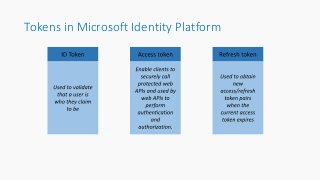
#19 <<Talk about the token types we have in Microsoft Identity Platform and their intended purpose>>
#20 Using ID token to make authorization decisions in application is incorrect. It is to be used to identity who the user is and how they authenticated if needed. it can be used to provide access to your client application if needed. ID token from v2 endpoint have signature and can be validated.
Access token generated for MS Graph is being piggybacked by developers as access tokens for their own resources. Same applies to other services (Microsoft or 3rd party)
This is WRONG because the intended audience for MS Graph tokens is MS Graph and validation of this access token is not possible for customers and its ONLY intended for MS Graph.
MS Graph access tokens have a nonce which can only be validated by our service (Used as an additional security measure)
Depending on undocumented claims in application is unsupported. Building business logic on such claims will lead to serious problems. For e.g., We might encrypt the access token in the future, add/remove claims and that will applications broken.
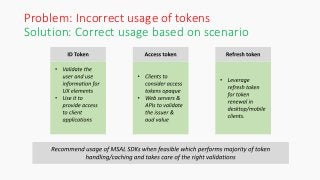
#21 Use ID tokens to validate the user and provide access to client apps. If needed, use the info to populate UX elements
Access tokens are opaque blobs of text that are for the resource only. Client applications should not validate it
MS Graph token MUST not be re-used for any other purpose apart from calling Microsoft Graph endpoint. The service will perform the validation
Server to validate the “issuer” and "aud" claim to make sure it authorizes access to requests with the correct identifier only
Reference:
Using the ID Token - Microsoft identity platform ID tokens - Microsoft identity platform | Microsoft Docs
Validating access tokens - Microsoft identity platform ID tokens - Microsoft identity platform | Microsoft Docs
#22
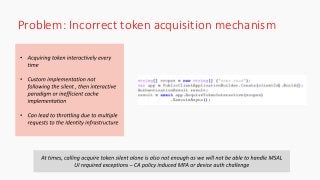
Developers are confused about the right mechanism to get tokens and the importance of silent token acquisition is often overlooked.
Without the usage of the silent token acquisition mechanism, the user will be repeatedly asked to authorize for resources that they have already given access to.
Negligence of the silent token acquisition mechanism eventually leads to Microsoft identity throttling the requests coming in from the application and potentially leading to resiliency issues.
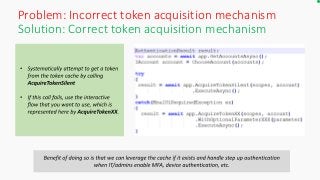
#23 Some developers don’t use MSALs and then miss out on the silent token acquisition mechanism that comes bundled with it. ALWAYS try to acquire token silently before going for user interaction.
Acquiring a token silently starts with using a valid token from the app's token cache.
If there is no valid token available, the app should attempt to acquire a token using a refresh token, if available, and the token endpoint.
If neither of these options is available, the app should acquire a token using the "prompt=none" parameter. This will use the authorization endpoint, but not show any UI to the user. If the Microsoft Identity can provide a token to the app without interacting with the user, it will.
If none of these methods result in a token, then a user will need to re-authenticate interactively.
#24 <Explain the 3 different flows to begin with>
Implicit flow: A flow that depends on OAUTH hybrid flow where id token and code is returned by hitting the authorize endpoint instead of token endpoint. When doing implicit flow, lack of refresh tokens forces multiple token requests to the backend. Apple for instance blocks 3rd party cookies (cookies on requests that cross domains) which in turns blocks these calls resulting in a failure. Chromium project has announced they will follow suit in future.
ROPC flow: Using this flow force end user to store the plain text password which is considered insecure and we strongly recommend not using this. Federated authentication with ADFS or 3rd party providers, MFA, device auth scenarios fail when using this as ROPC cannot support these.
Client credential flow: There has been scenarios where CC flow was used on a public client like a mobile or end user machine. The nature of the flow requires a secret which in turn needs to be stored in secure way instead of exposing it on the client
#25 Prefer Auth code with PKCE flow when building SPA apps or even mobile clients which prevents the attack vector of authorization code from being stolen in transit. Secure token storage is still important to prevent stealing of tokens which exists irrespective of implicit or auth code with PKCE
ROPC: look at leveraging CC flow or using managed identity instead of using ROPC flows
CC flow: mainly uses for daemons and server to server communications (web app to web api or web api to web api)
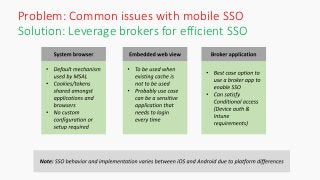
#26 <Spend time on talking about the 3 options we have on Android and iOS. Do not delve into deeper aspects of system browser and broker due to differences in iOS and Android>
#27 Using non-standard or custom implementations instead of using MSAL can cause repeated login prompts. Certain implementations just perform a web-based redirect to Microsoft identity endpoint which has no caching benefit
Not using broker auth can cause failures when CA policies enforce device auth or app protection
Intune SDK integration requires successful integration with Azure AD. In case of incorrect MSAL integration, Intune SDK apps might not work as expected
#28
MSAL uses system browser mechanism as default in both platforms (iOS and Android). It is best to leverage this as the cookie/tokens are shared across sessions and applications. No additional configurations or applications are required to set this up making it the simplest option
Embedded web view is a sandboxed setup where login and tokens are managed inside the application. Not ideal if there are multiple applications where the user needs to manage the session individually
Broker application-based setup is the recommended and best-case scenario where we can get SSO, account management, device auth and app protection support. Company portal acts as broker in iOS and both Company portal and authenticator act as broker in Android. <Use case for Intune SDK integration is different>