Data Wolf
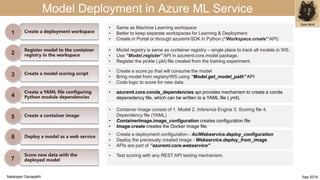
Model Deployment in Azure ML Service
Score new data with the
deployed model
7
Create a deployment workspace
Register model to the container
registry in the workspace
Create a model scoring script
Create a YAML file configuring
Python module dependencies
Create a container image
Deploy a model as a web service
1
2
3
4
5
6
7
• Same as Machine Learning workspace
• Better to keep separate workspaces for Learning & Deployment
• Create in Portal or through azureml-SDK in Python (“Workspace.create” API)
• Test scoring with any REST API testing mechanism.
• Container image consist of 1. Model 2. Inference Engine 3. Scoring file 4.
Dependency file (YAML)
• ContainerImage.image_configuration creates configuration file
• Image.create creates the Docker image file.
• azureml.core.image contains Image & ContainerImage sub packages
• azureml.core.conda_dependencies api provides mechanism to create a conda
depenedency file, which can be written to a YAML file (.yml).
• Create a deployment configuration - AciWebservice.deploy_configuration
• Deploy the previously created image - Webservice.deploy_from_image
• APIs are part of “azureml.core.webservice”
• Model registry is same as container registry – single place to track all models in WS.
• Use “Model.register” API in azureml.core.model package.
• Register the pickle (.pkl) file created from the training experiment.
• Create a score.py that will consume the model
• Bring model from registry/WS using “Model.get_model_path” API
• Code logic to score for new data.
Natarajan Ganapathi Sep 2019

Azure ML Services - model deployment in 1 slide

  • 1.
    Data Wolf Model Deploymentin Azure ML Service Score new data with the deployed model 7 Create a deployment workspace Register model to the container registry in the workspace Create a model scoring script Create a YAML file configuring Python module dependencies Create a container image Deploy a model as a web service 1 2 3 4 5 6 7 • Same as Machine Learning workspace • Better to keep separate workspaces for Learning & Deployment • Create in Portal or through azureml-SDK in Python (“Workspace.create” API) • Test scoring with any REST API testing mechanism. • Container image consist of 1. Model 2. Inference Engine 3. Scoring file 4. Dependency file (YAML) • ContainerImage.image_configuration creates configuration file • Image.create creates the Docker image file. • azureml.core.image contains Image & ContainerImage sub packages • azureml.core.conda_dependencies api provides mechanism to create a conda depenedency file, which can be written to a YAML file (.yml). • Create a deployment configuration - AciWebservice.deploy_configuration • Deploy the previously created image - Webservice.deploy_from_image • APIs are part of “azureml.core.webservice” • Model registry is same as container registry – single place to track all models in WS. • Use “Model.register” API in azureml.core.model package. • Register the pickle (.pkl) file created from the training experiment. • Create a score.py that will consume the model • Bring model from registry/WS using “Model.get_model_path” API • Code logic to score for new data. Natarajan Ganapathi Sep 2019