An Overview of Maryland’s
ZoomProspector System
James Palma, AICP
Senior Research Manager
Office of Policy, Research & Government Affairs
Maryland ZoomProspector
2
http://maryland.zoomprospector.com/
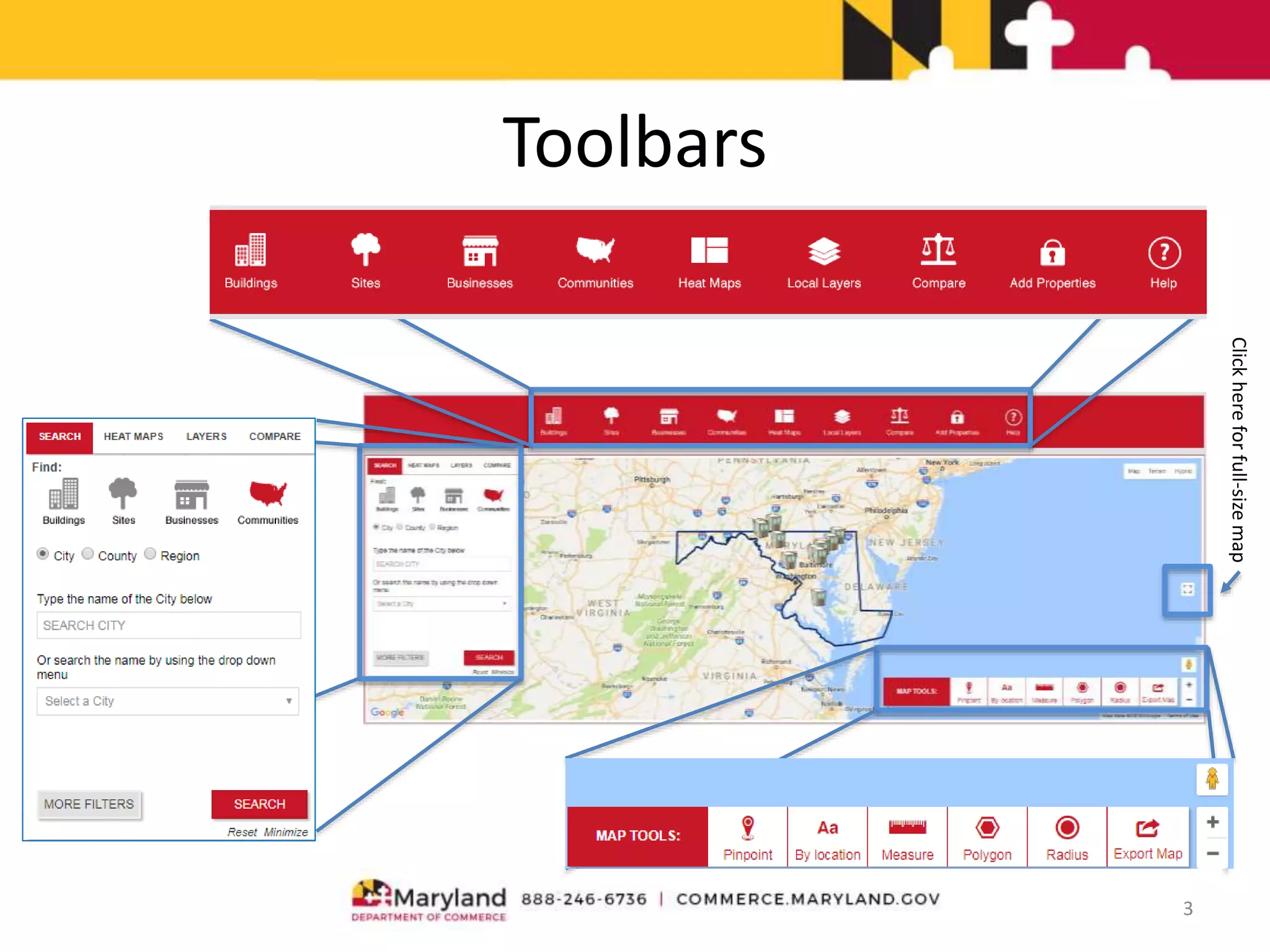
Toolbars
3
Clickhereforfull-sizemap
Reach Your Market
Site selectors, businesses, and neighborhood
groups all use Maryland.zoomprospector.com to
research communities. The system offers:
• Free marketing
• Increased traffic
• Direct, qualified leads
• Expanded lead generation
Most Effective EDO Marketing Strategies
Effectiveness of marketing methods according to site selectors:
Marketing Strategy Rating Effective
Website 82%
Out-of-Town Meetings with Businesses 74%
Site Selection Consultants and Familiarization Tours 68%
Public Relations 65%
Special Events 60%
E-Mail 50%
Social Media 47%
Targeted Lead Development Databases 42%
Trade Shows and Conferences 42%
Slogans, Logo and Graphic Identity 41%
Online Videos (YouTube, etc.) 32%
Online Advertising 31%
Company Blog 21%
Brochures 21%
Direct Mail 19%
Print Advertising 17%
TV/Radio Advertising 11%
Videos (VHS, DVD, etc) 10%
Telemarketing 5%
Source: National Survey of Economic Developers and Site Selection Professionals by Ubalde & Simundza. 2011
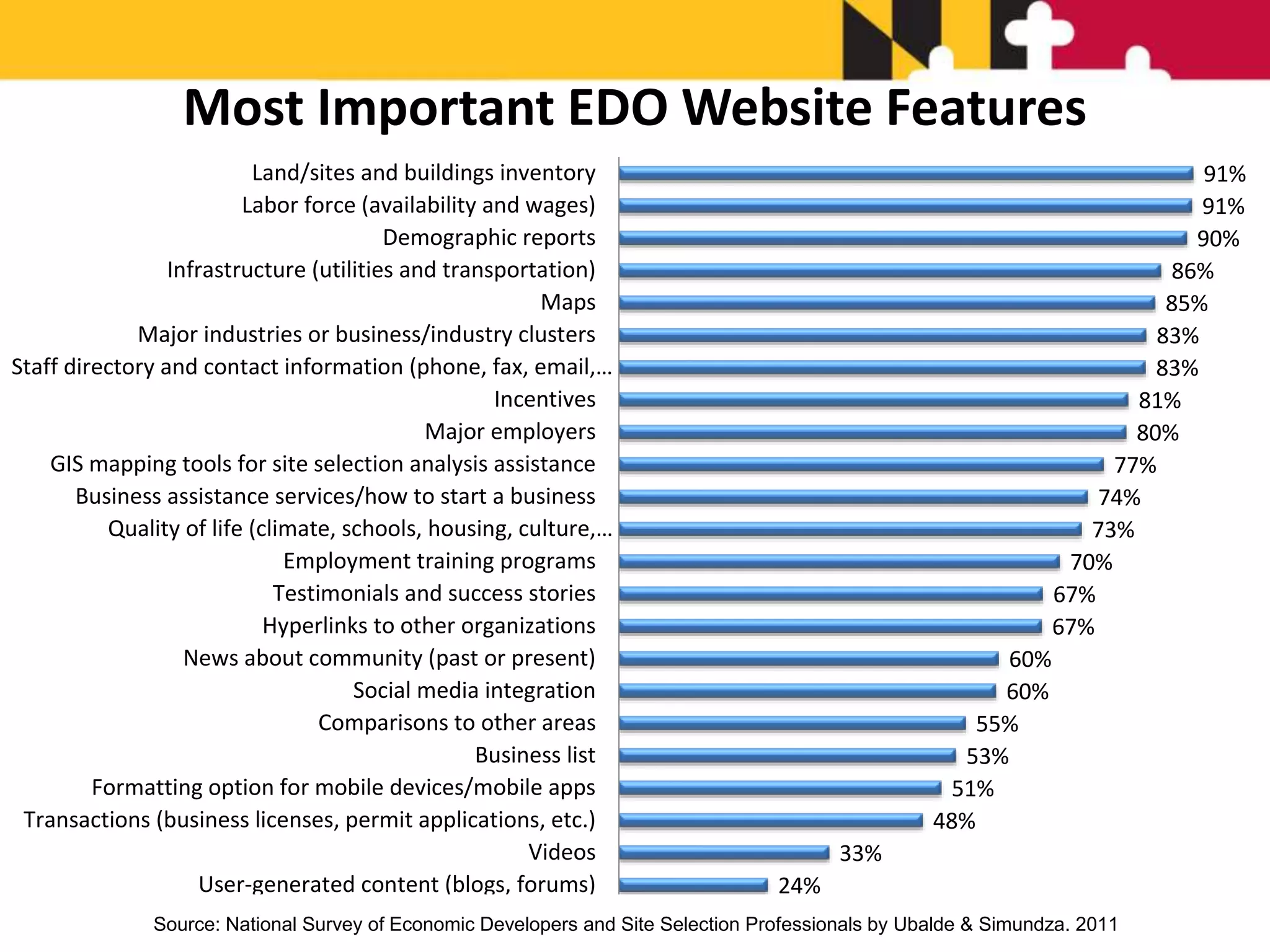
24%
33%
48%
51%
53%
55%
60%
60%
67%
67%
70%
73%
74%
77%
80%
81%
83%
83%
85%
86%
90%
91%
91%
User-generated content (blogs, forums)
Videos
Transactions (business licenses, permit applications, etc.)
Formatting option for mobile devices/mobile apps
Business list
Comparisons to other areas
Social media integration
News about community (past or present)
Hyperlinks to other organizations
Testimonials and success stories
Employment training programs
Quality of life (climate, schools, housing, culture,…
Business assistance services/how to start a business
GIS mapping tools for site selection analysis assistance
Major employers
Incentives
Staff directory and contact information (phone, fax, email,…
Major industries or business/industry clusters
Maps
Infrastructure (utilities and transportation)
Demographic reports
Labor force (availability and wages)
Land/sites and buildings inventory
Most Important EDO Website Features
Source: National Survey of Economic Developers and Site Selection Professionals by Ubalde & Simundza. 2011
@GIS Planning Inc. 2018
Maryland.zoomprospector.com
speeds up, simplifies and
expands the research process
5 Fundamental Questions
1. Is there available property?
2. Is there a market for a product or service?
3. What is the local competition or synergy for
at a specific site?
4. What are the geographic advantages?
5. How can I document and share my
research?
1. Available Property
• A new or expanding business needs either a
vacant building or developable land in your
community
• Web GIS provides user-defined property
searches in seconds
• The ability of users to find properties or land
depends on the efforts taken by State and
local partners to input the data
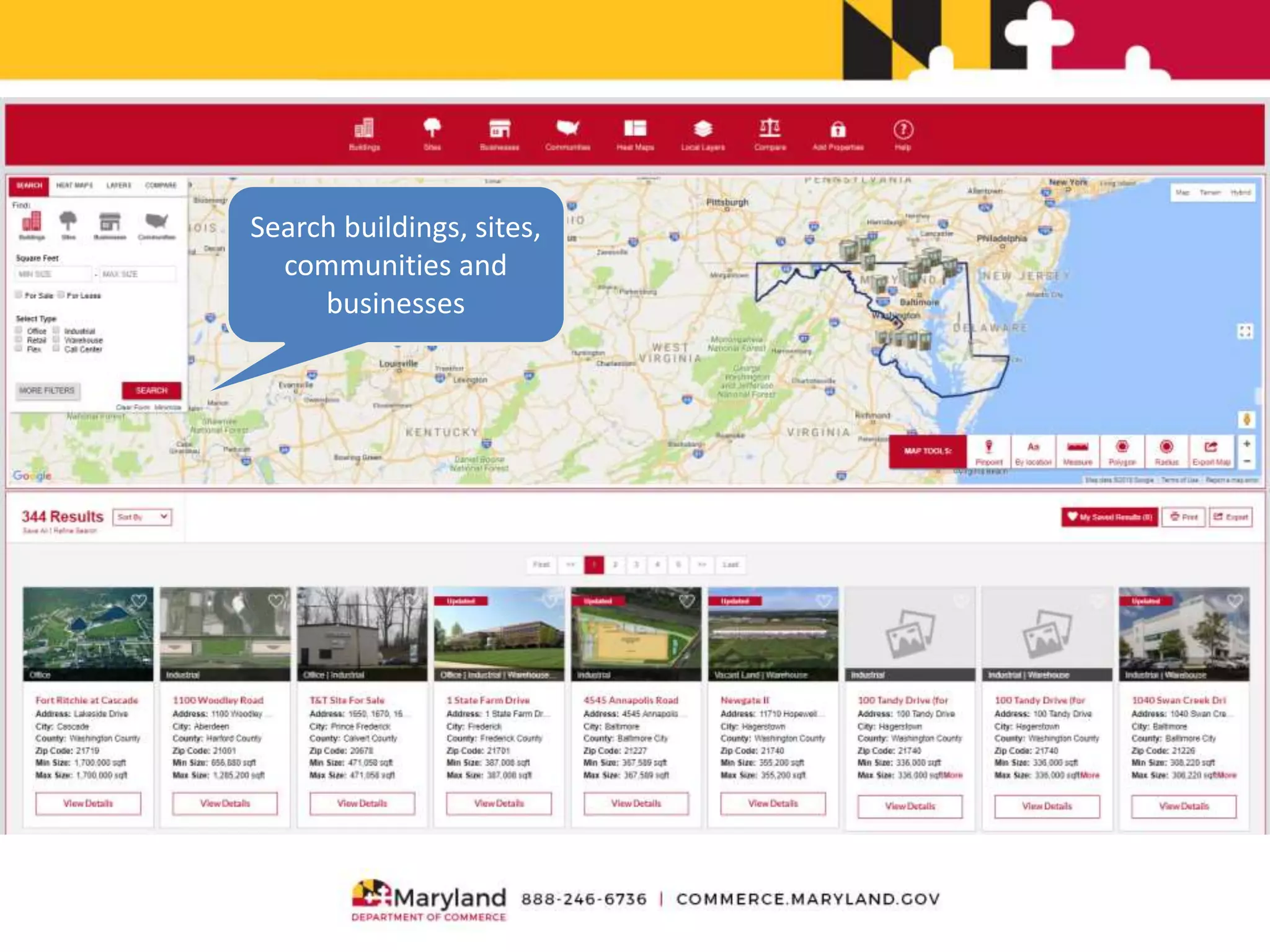
Search buildings, sites,
communities and
businesses
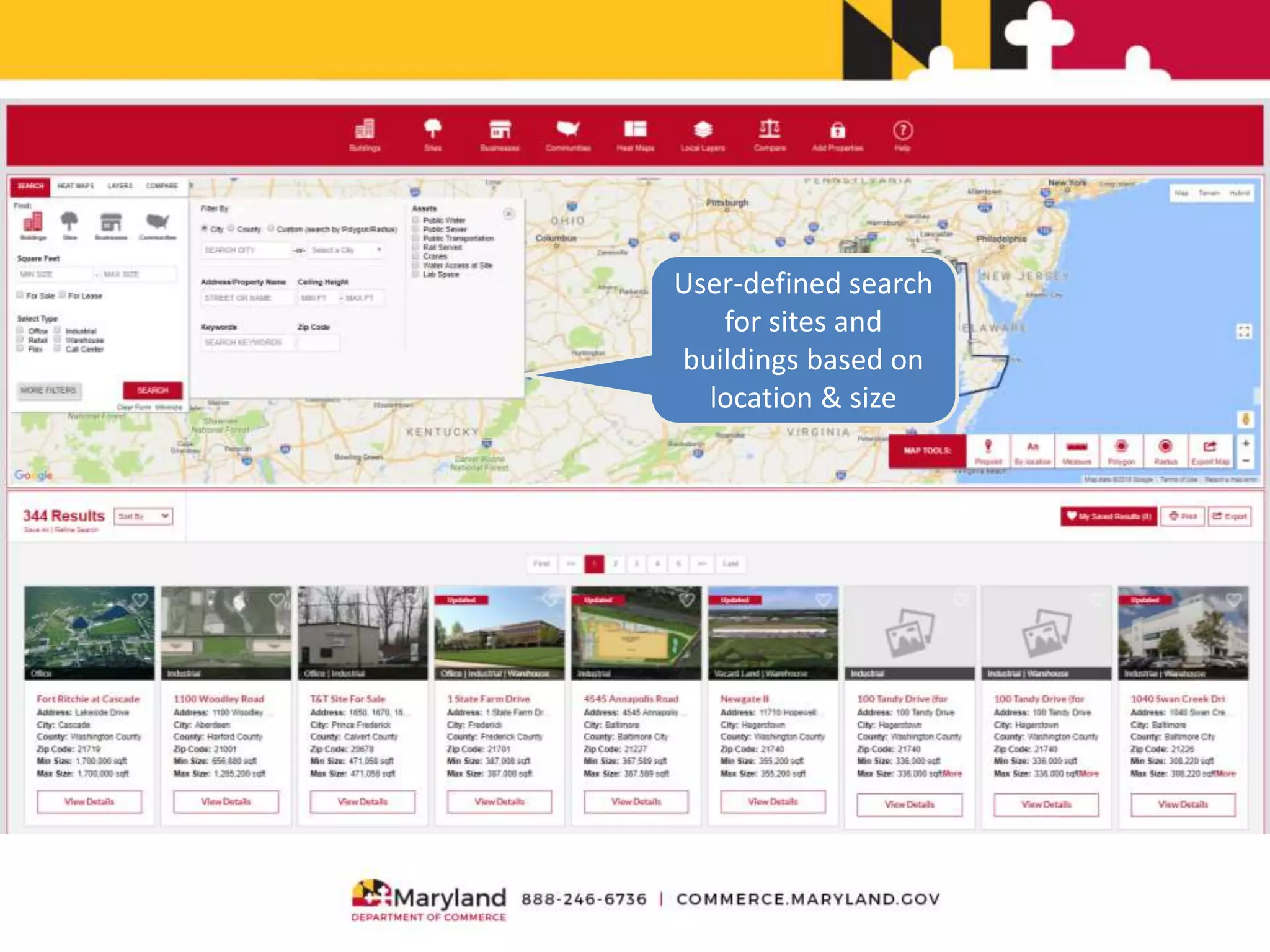
User-defined search
for sites and
buildings based on
location & size
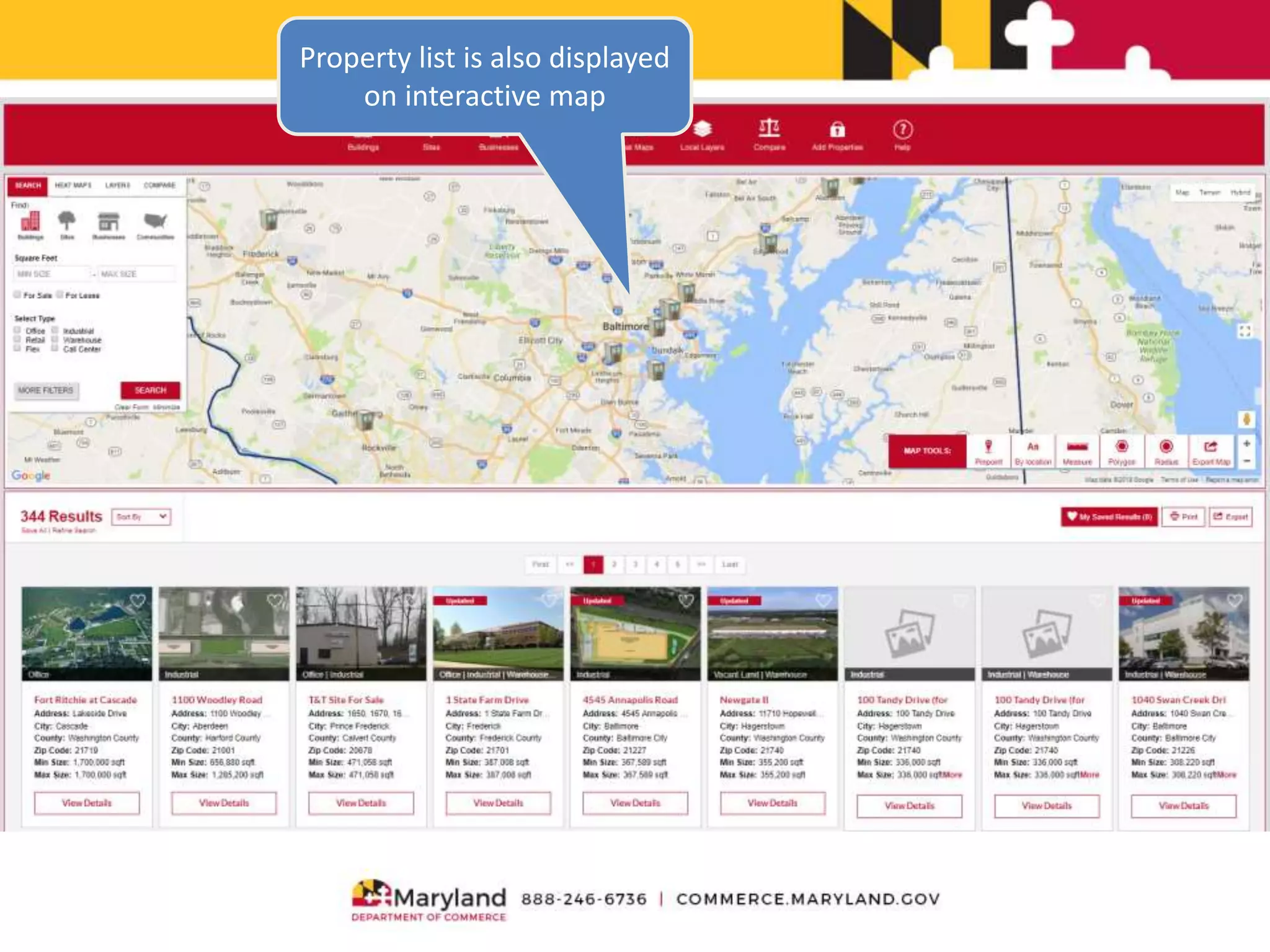
Property list is also displayed
on interactive map
Interactive map tools allow
users to refine their search
Click to view individual
property reports
2. Market Research
• A new or expanding business needs to know if
there are enough clients, shoppers or quality
employees for its business to succeed.
• The Maryland ZoomProspector website
provides site-specific demographic, consumer
spending, and workforce data reports in
seconds.
Analyze the available
labor force
Modify reports by
radius or drive time
Use dynamic report
variables to create
thematic heat maps
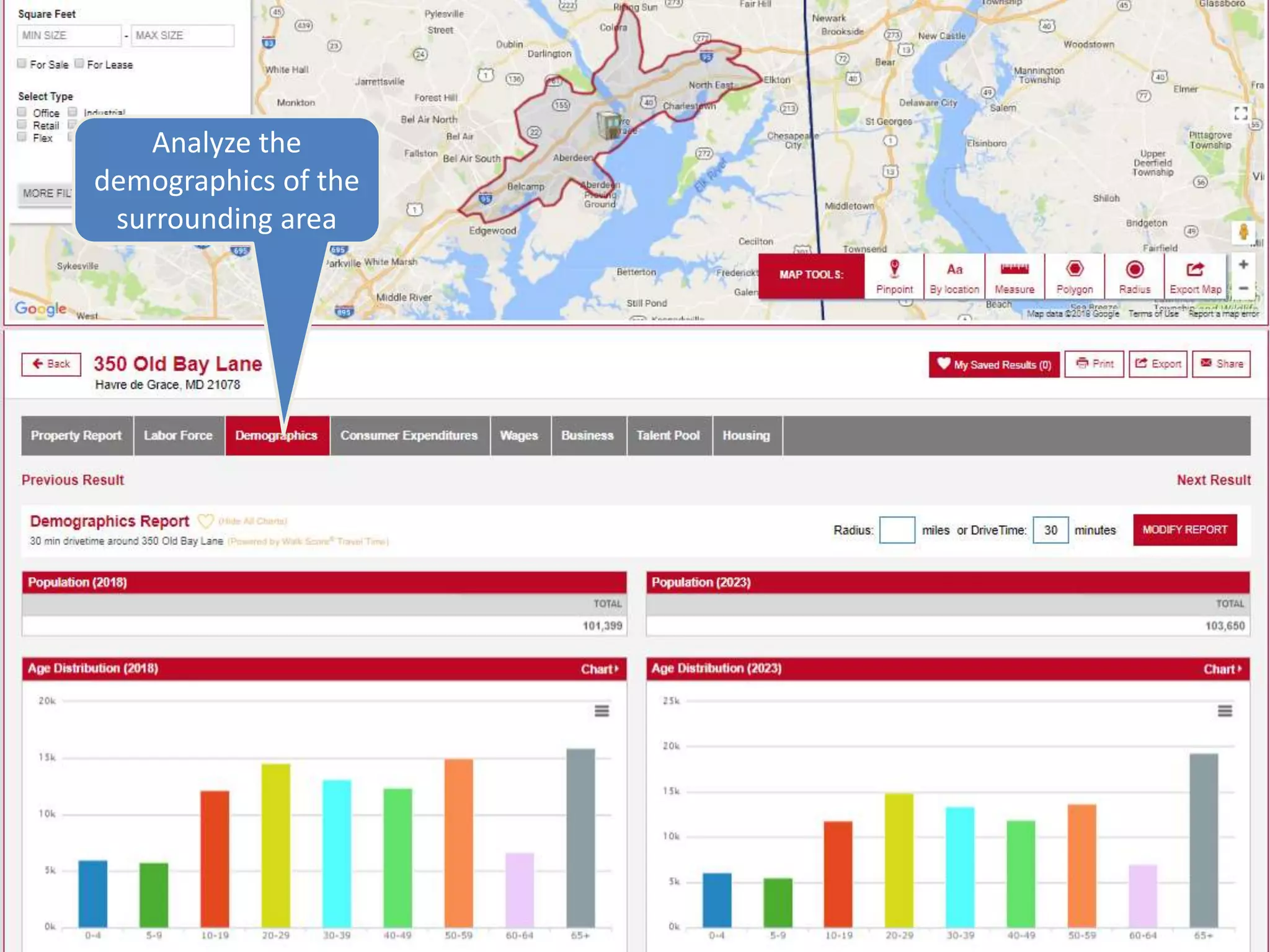
Analyze the
demographics of the
surrounding area
Find out how much
consumers are
spending
3. Local Competition or Synergies
• Nearby businesses may be potential
customers, suppliers or competition. A
prospective business needs to know the
opportunities of a business location.
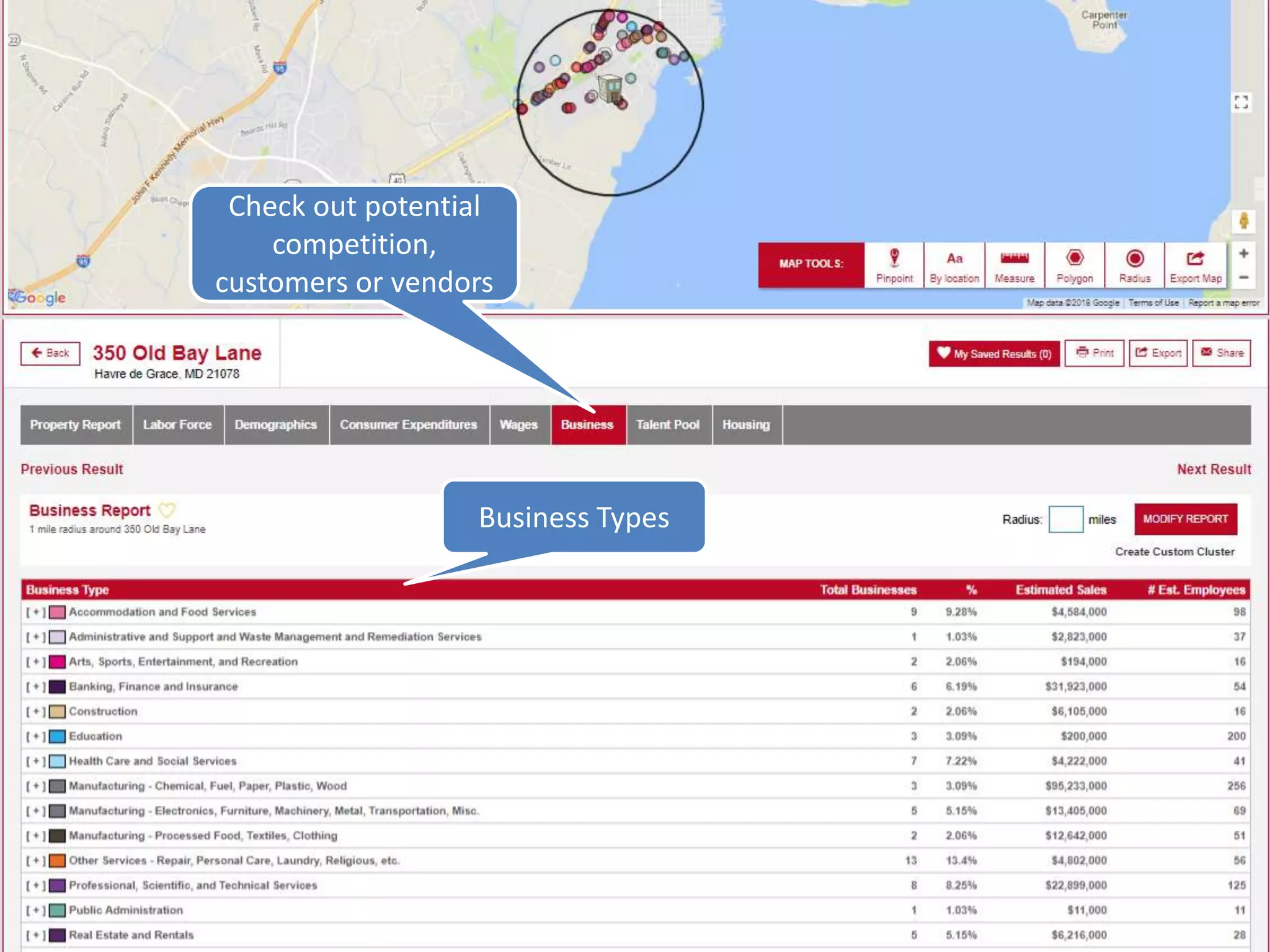
• Web GIS provides site-specific business and
industry reports in seconds.
Check out potential
competition,
customers or vendors
Business Types
Sub-Industries Business Names
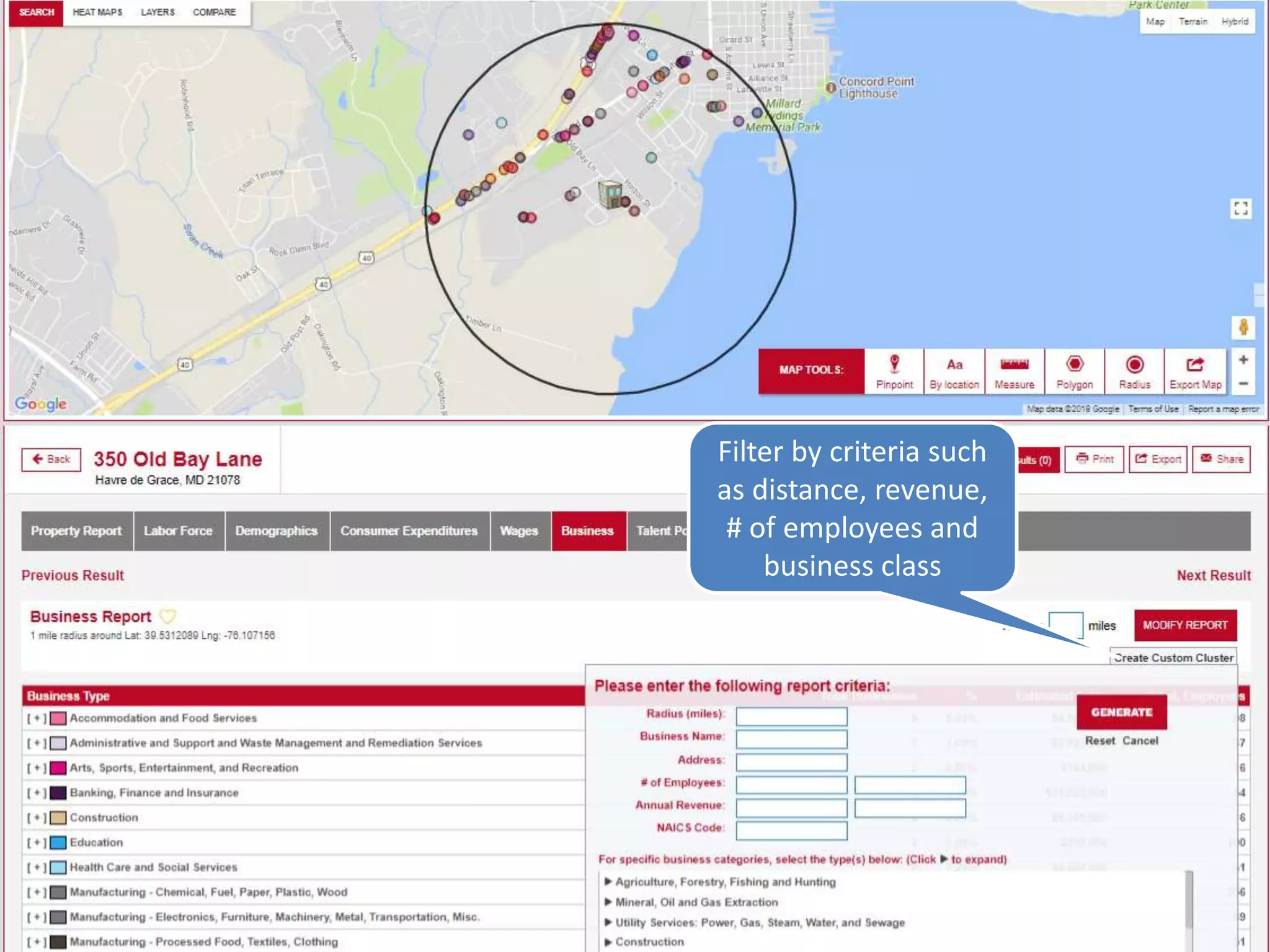
Filter by criteria such
as distance, revenue,
# of employees and
business class
4. Geographic Advantages
• Airports
• Ports
• Hospitals
• Colleges
• Towns
• Counties
• Railroads
• Energy
@GIS Planning Inc. 2018
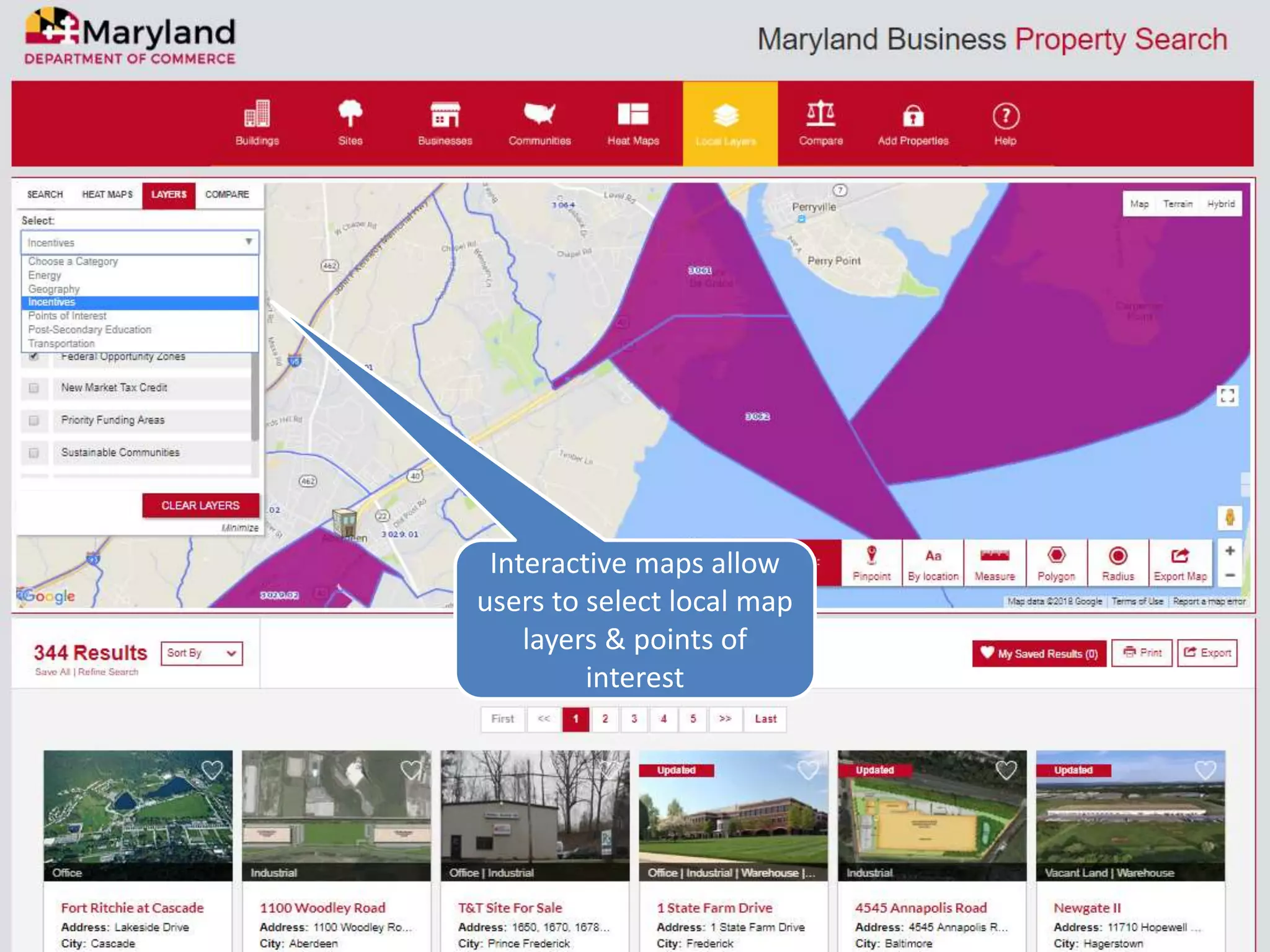
Interactive maps allow
users to select local map
layers & points of
interest
Heat maps help you
visualize how data
works across different
geographies
View the heat map
legend here
5. Documenting and Sharing
• Research needs to be easily accessible on
demand and easily distributed to
stakeholders.
• Maryland.zoomprospector.com allows users to
save, export, print and share reports as well as
properties in a just a few clicks.
Save reports by
clicking on the
heart symbol
View saved results,
right-click to clear
Export reports as
a PDF or Excel
document
Community Research
• Maryland.zoomprospector.com also has the
ability to perform community research, in
addition to performing research around and
on properties.
• Communities are defined as Census
Designated Places (CDPs), Incorporated Places
(IPs), Baltimore City Community Areas, and
Counties.
Community Search
31
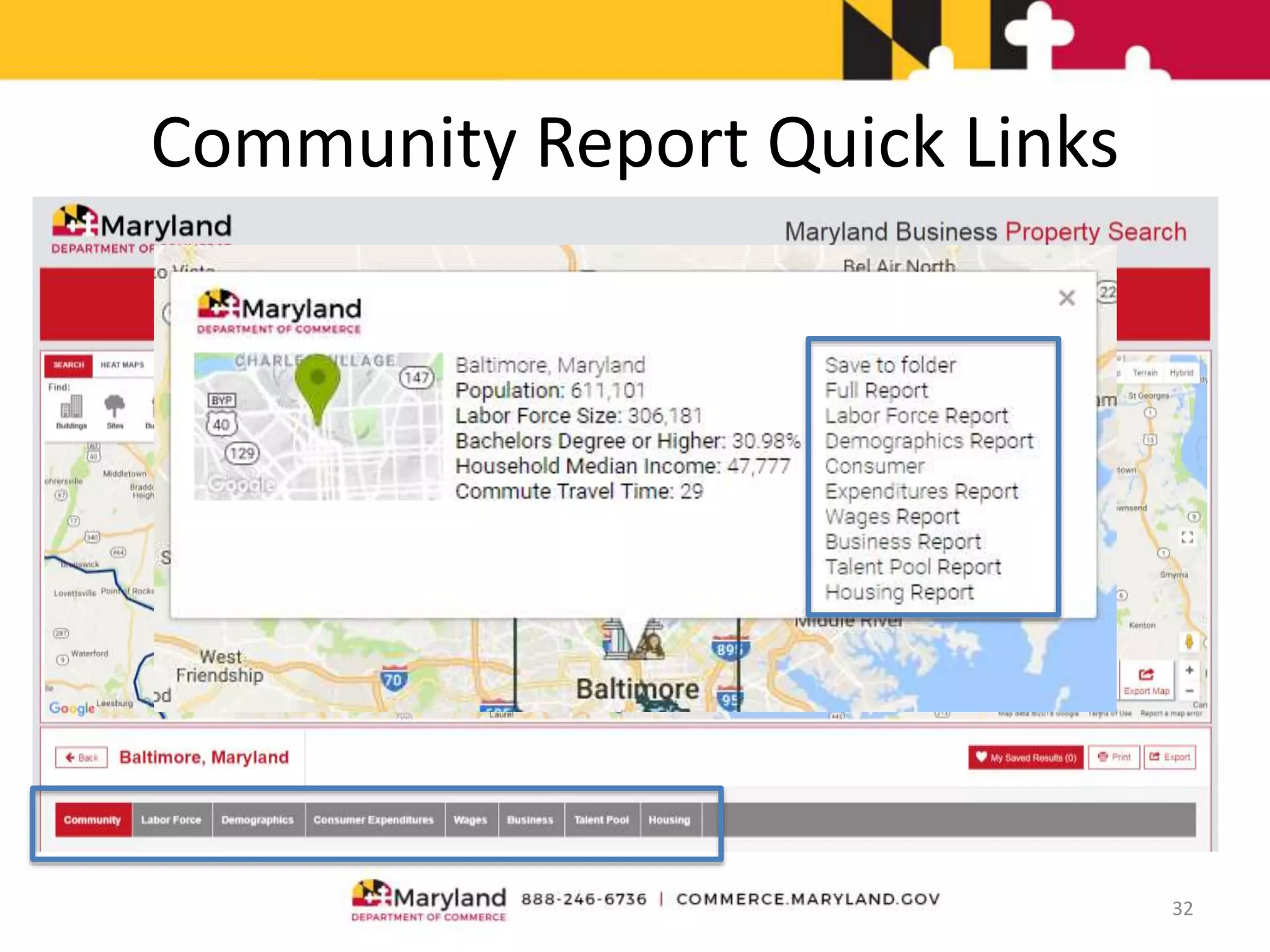
Community Report Quick Links
32
Community Profile
33
Community Profile
34
Time slider
Download Button
Scrolldownformoreinfographics
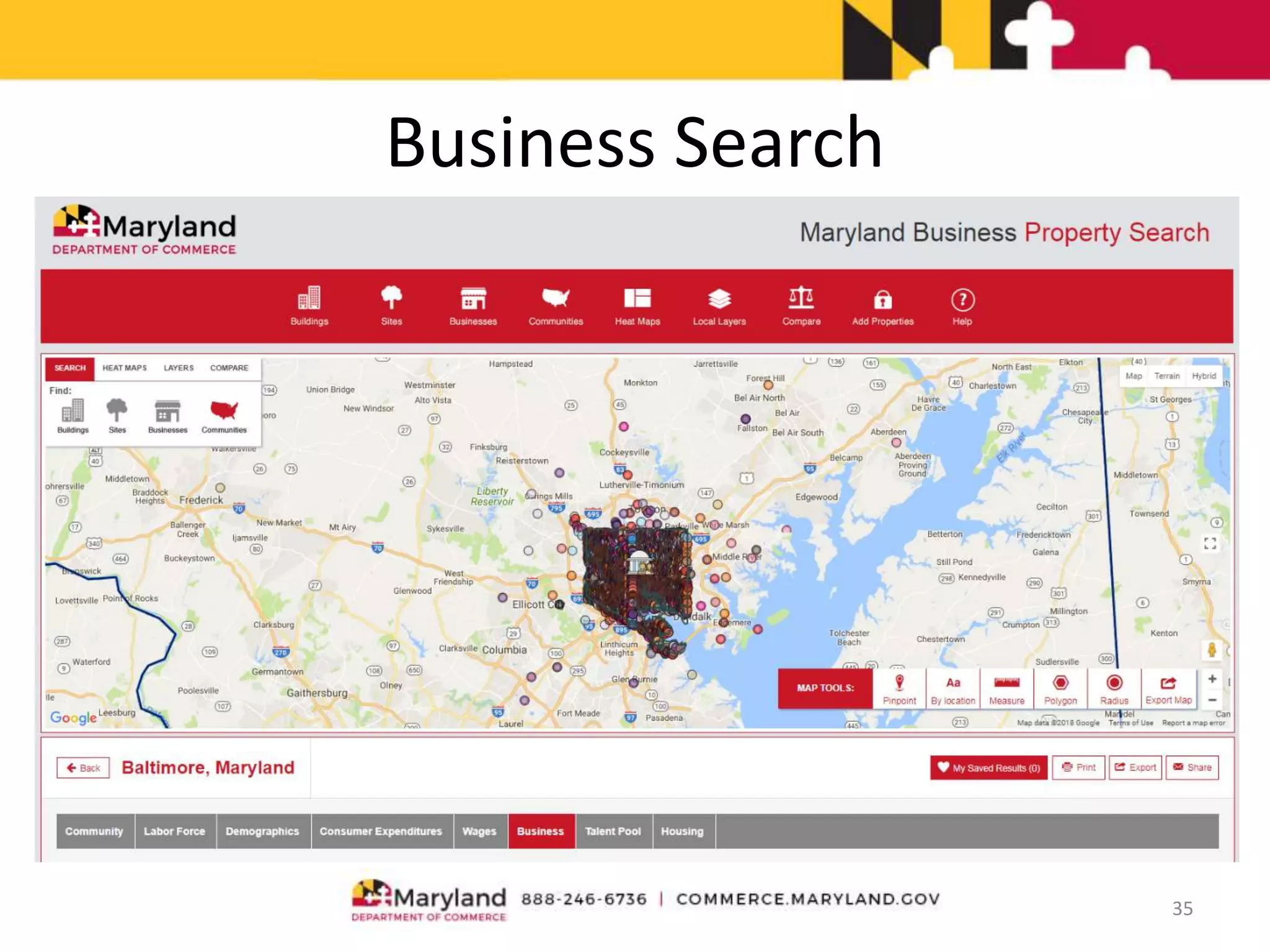
Business Search
35
Business Search (Cont.)
36
Data is from InfoUSA, meaning it will not match public data sources
Click on [ + ] to expand category
Business Search (Cont.)
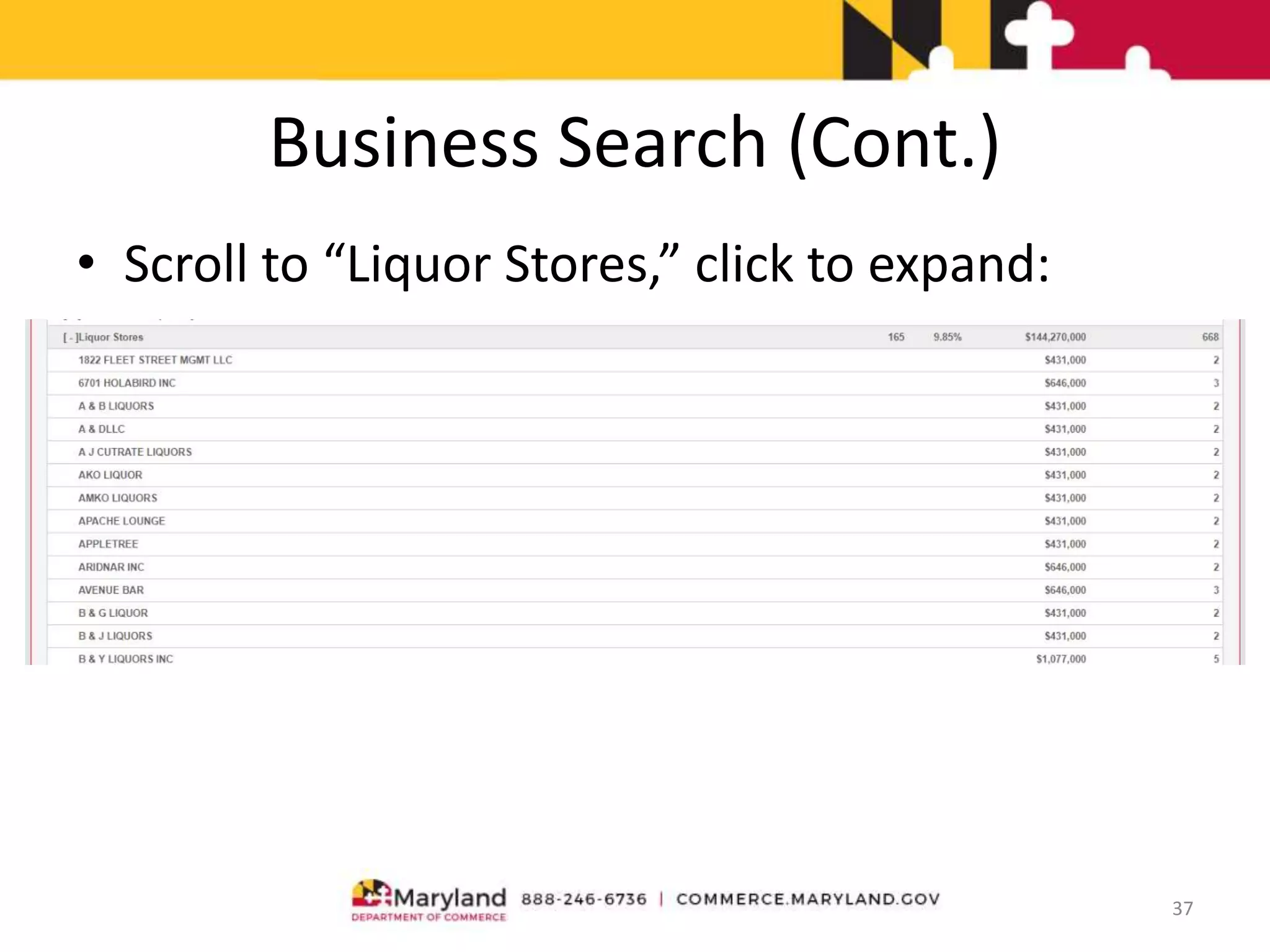
• Scroll to “Liquor Stores,” click to expand:
37
Business Search (Cont.)
• Use the “Create Custom Cluster” link to map
specific business categories
38
• Type in NAICS code
or scroll to industry
and highlight in grey
using mouse
Business Search (Cont.)
Map shows only beer, wine & liquor stores, list is below. List can be
expanded using [+] controls, copied and pasted into MS Excel
39
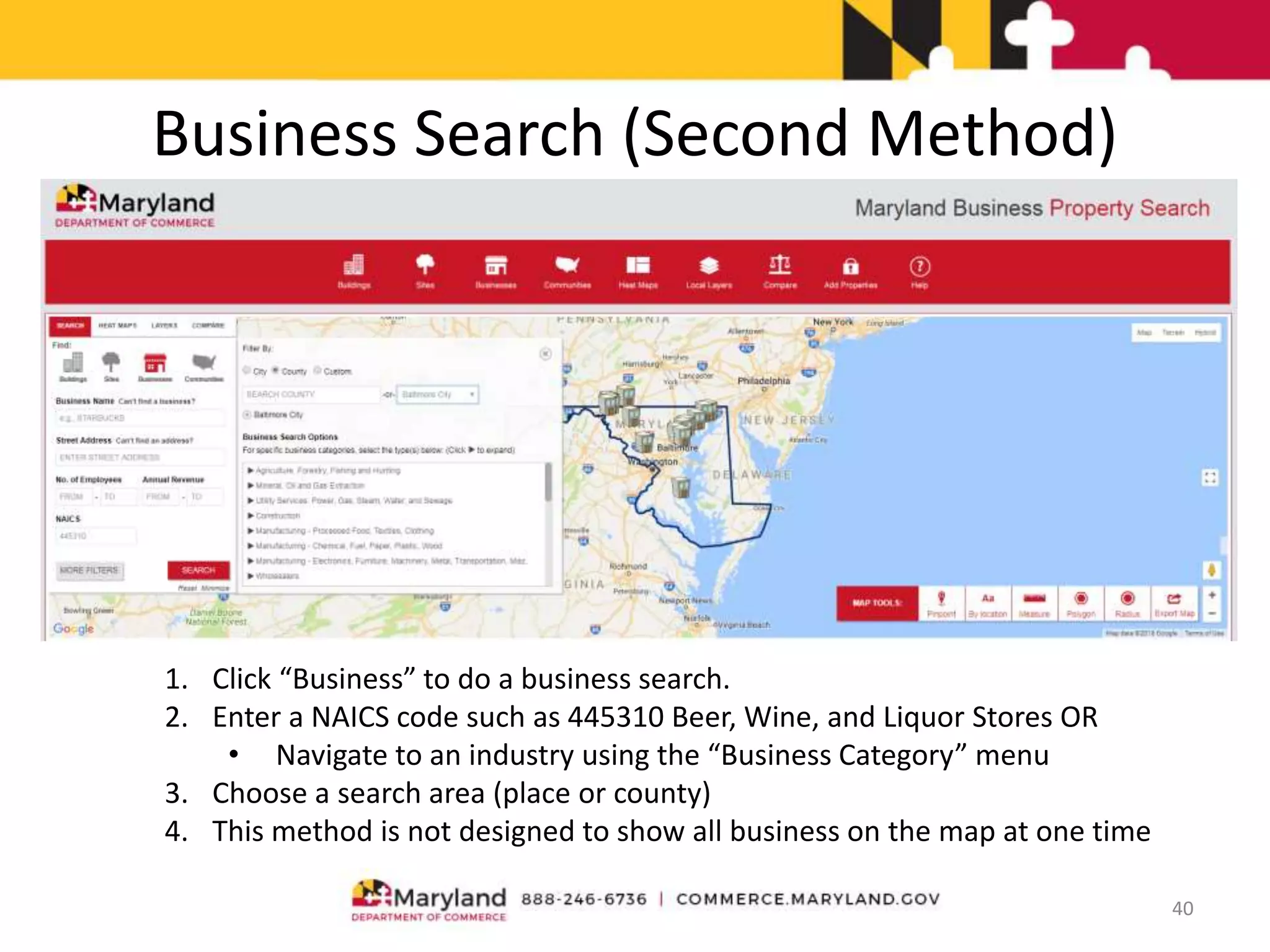
Business Search (Second Method)
40
1. Click “Business” to do a business search.
2. Enter a NAICS code such as 445310 Beer, Wine, and Liquor Stores OR
• Navigate to an industry using the “Business Category” menu
3. Choose a search area (place or county)
4. This method is not designed to show all business on the map at one time
Business Search (Second Method)
41
Business Search (Results)
• Resulting list can be printed. Marking companies as favorites allows them to be
downloaded as PDF or Excel files
– Javascript must be enabled to download
42
Community Mapping - Heat Maps
• System has built-in “heat maps,” color-coded background layers showing
demographics, labor force, and consumer expenditure data.
• Layers auto-scale between block groups, tracts, counties, etc. based on
zoom level
43
Community Mapping - Local Layers
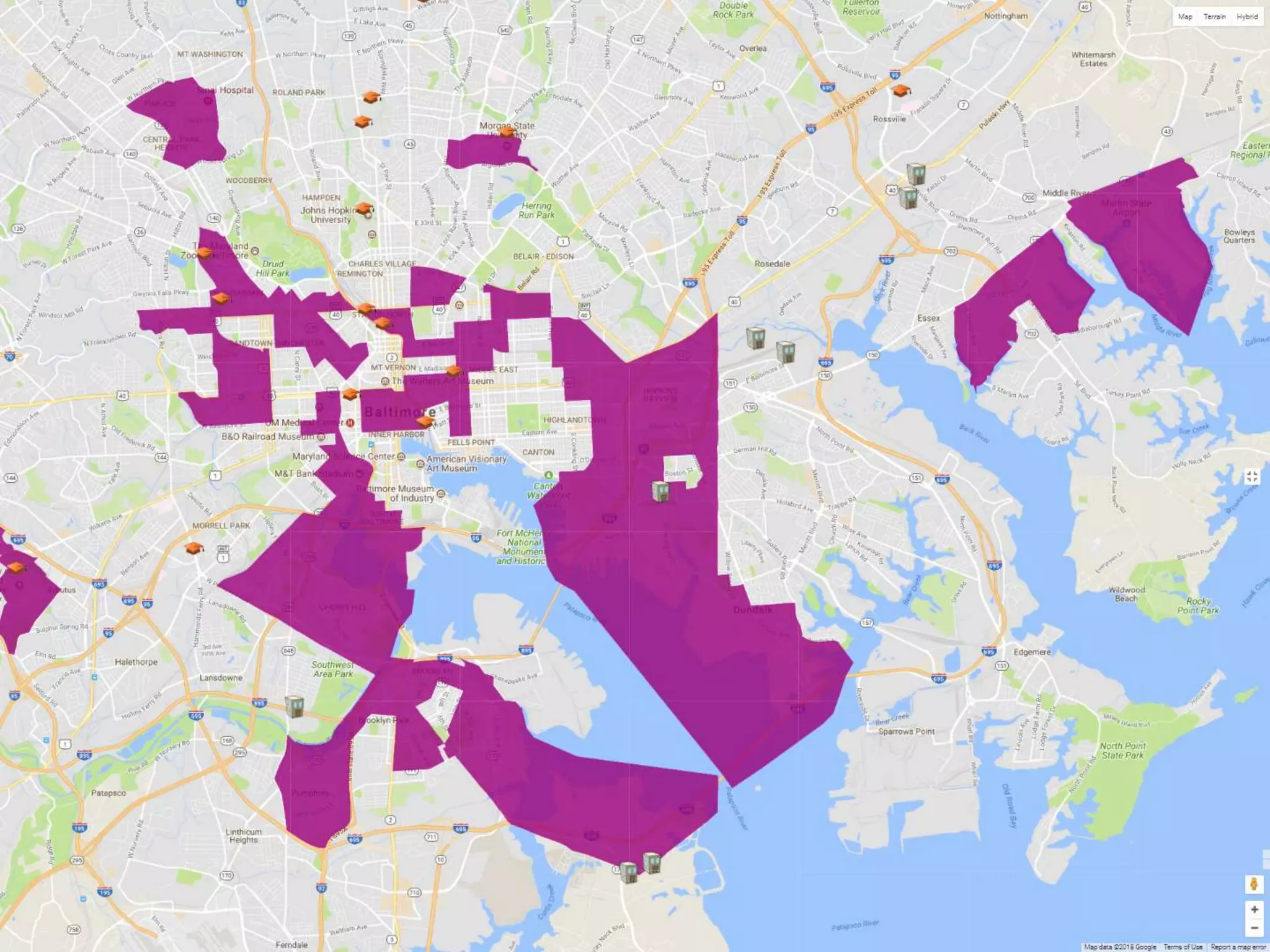
• System has built-in “local layers,” color-coded background layers showing
geographies, incentive zones, energy-related infrastructure, post-
secondary educational facilities, and transportation infrastructure
• Layers can be displayed singly or together
44
Community Comparisons
45
Any two areas can be compared, whether inside or outside Maryland. Comparisons topics
include community factors, labor force, demographics, and consumer expenditures
Other Sources: On The Map
46
The work and home location of employed people can be analyzed. Commuting patterns
can be revealed. Very basic demographic info on workers is available.
https://onthemap.ces.census.gov/
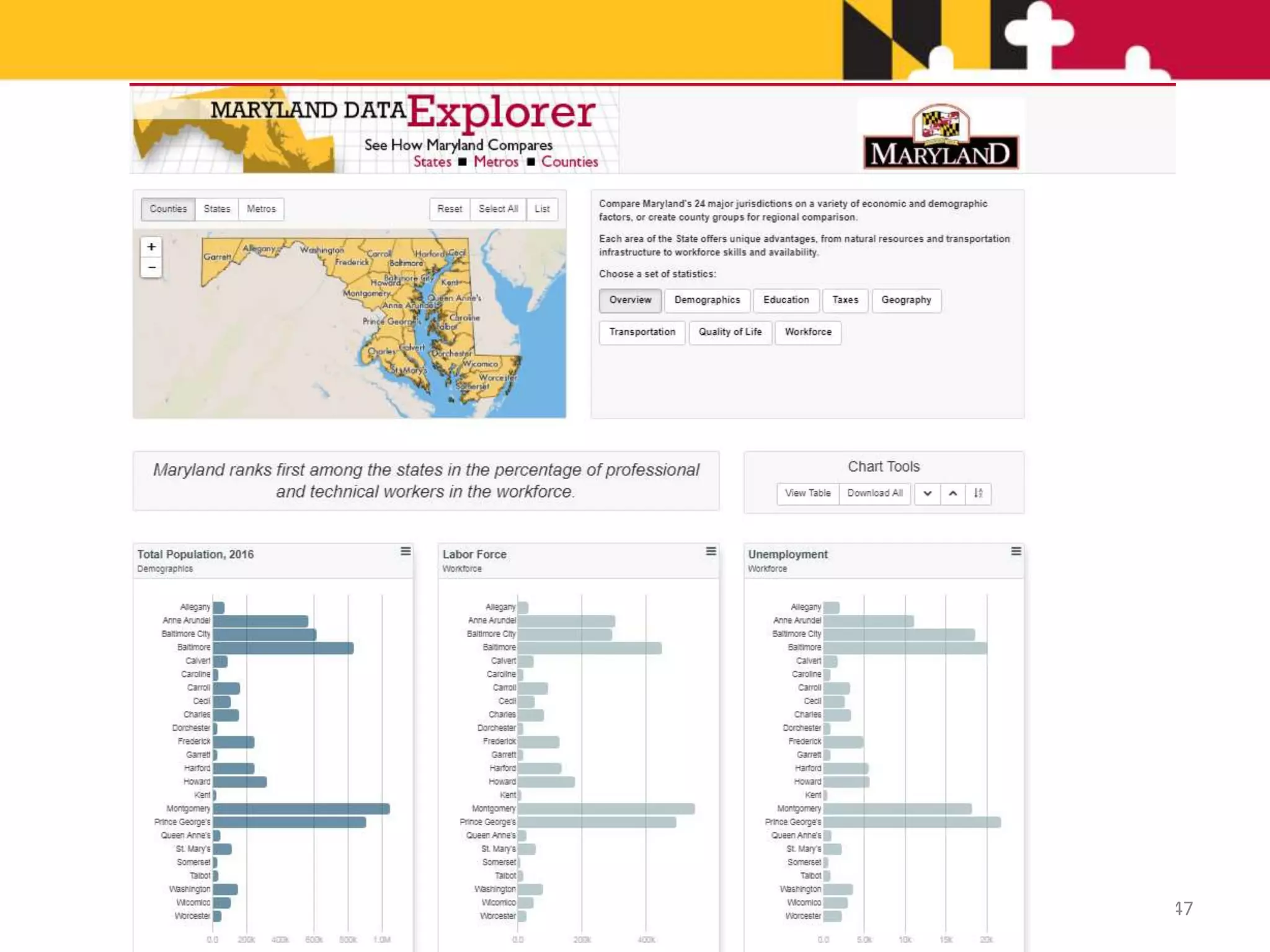
47
Other Sources
• ReferenceUSA
– Covers 11 million businesses in U.S.
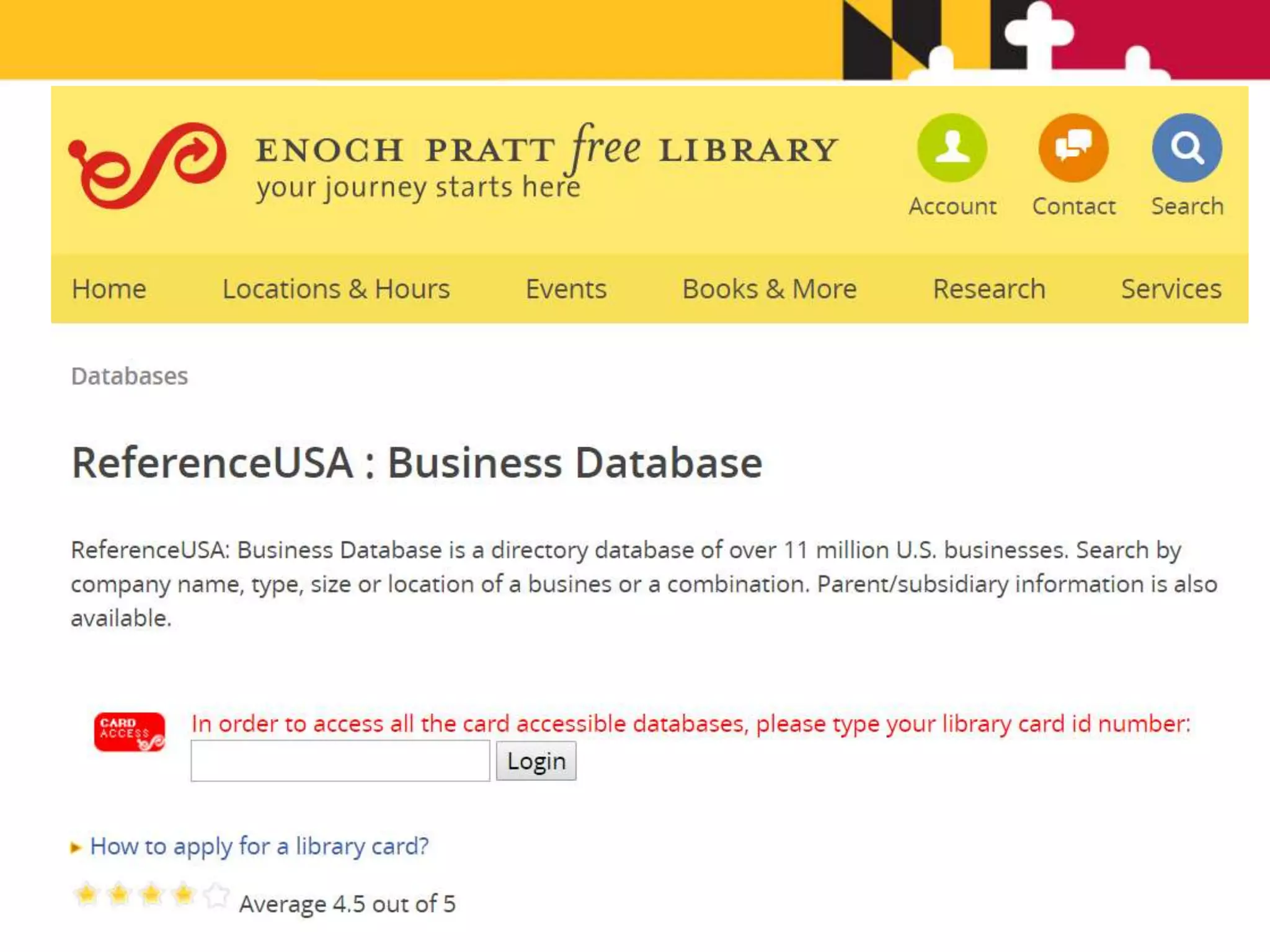
– Access ReferenceUSA through your local library
– A valid library card will grant you access through
your library’s website
– Find ReferenceUSA listed in the Business or
Reference section
48
49
Other Sources
• Census Business Builder
– www.census.gov/data/data-tools/cbb
– Regional Analyst
– Search, state, county, city/town or zip code
– Demographic, business and consumer spending
information
50
Other Sources
• Maryland Workforce Exchange
– mwejobs.maryland.gov Labor Market
Information
– Employer profile
• Search by County, MSA or Workforce Investment Area
• Select industry
51
QUESTIONS?
James Palma, AICP
Senior Research Manager
Maryland Department of Commerce
James.Palma@Maryland.gov
Overview of Maryland's ZoomProspector System

Overview of Maryland's ZoomProspector System

  • 1.
    An Overview ofMaryland’s ZoomProspector System James Palma, AICP Senior Research Manager Office of Policy, Research & Government Affairs
  • 2.
  • 3.
  • 4.
    Reach Your Market Siteselectors, businesses, and neighborhood groups all use Maryland.zoomprospector.com to research communities. The system offers: • Free marketing • Increased traffic • Direct, qualified leads • Expanded lead generation
  • 5.
    Most Effective EDOMarketing Strategies Effectiveness of marketing methods according to site selectors: Marketing Strategy Rating Effective Website 82% Out-of-Town Meetings with Businesses 74% Site Selection Consultants and Familiarization Tours 68% Public Relations 65% Special Events 60% E-Mail 50% Social Media 47% Targeted Lead Development Databases 42% Trade Shows and Conferences 42% Slogans, Logo and Graphic Identity 41% Online Videos (YouTube, etc.) 32% Online Advertising 31% Company Blog 21% Brochures 21% Direct Mail 19% Print Advertising 17% TV/Radio Advertising 11% Videos (VHS, DVD, etc) 10% Telemarketing 5% Source: National Survey of Economic Developers and Site Selection Professionals by Ubalde & Simundza. 2011
  • 6.
    24% 33% 48% 51% 53% 55% 60% 60% 67% 67% 70% 73% 74% 77% 80% 81% 83% 83% 85% 86% 90% 91% 91% User-generated content (blogs,forums) Videos Transactions (business licenses, permit applications, etc.) Formatting option for mobile devices/mobile apps Business list Comparisons to other areas Social media integration News about community (past or present) Hyperlinks to other organizations Testimonials and success stories Employment training programs Quality of life (climate, schools, housing, culture,… Business assistance services/how to start a business GIS mapping tools for site selection analysis assistance Major employers Incentives Staff directory and contact information (phone, fax, email,… Major industries or business/industry clusters Maps Infrastructure (utilities and transportation) Demographic reports Labor force (availability and wages) Land/sites and buildings inventory Most Important EDO Website Features Source: National Survey of Economic Developers and Site Selection Professionals by Ubalde & Simundza. 2011
  • 7.
    @GIS Planning Inc.2018 Maryland.zoomprospector.com speeds up, simplifies and expands the research process
  • 8.
    5 Fundamental Questions 1.Is there available property? 2. Is there a market for a product or service? 3. What is the local competition or synergy for at a specific site? 4. What are the geographic advantages? 5. How can I document and share my research?
  • 9.
    1. Available Property •A new or expanding business needs either a vacant building or developable land in your community • Web GIS provides user-defined property searches in seconds • The ability of users to find properties or land depends on the efforts taken by State and local partners to input the data
  • 10.
  • 11.
    User-defined search for sitesand buildings based on location & size
  • 12.
    Property list isalso displayed on interactive map
  • 13.
    Interactive map toolsallow users to refine their search
  • 14.
    Click to viewindividual property reports
  • 15.
    2. Market Research •A new or expanding business needs to know if there are enough clients, shoppers or quality employees for its business to succeed. • The Maryland ZoomProspector website provides site-specific demographic, consumer spending, and workforce data reports in seconds.
  • 16.
    Analyze the available laborforce Modify reports by radius or drive time Use dynamic report variables to create thematic heat maps
  • 17.
    Analyze the demographics ofthe surrounding area
  • 18.
    Find out howmuch consumers are spending
  • 19.
    3. Local Competitionor Synergies • Nearby businesses may be potential customers, suppliers or competition. A prospective business needs to know the opportunities of a business location. • Web GIS provides site-specific business and industry reports in seconds.
  • 20.
  • 21.
  • 22.
    Filter by criteriasuch as distance, revenue, # of employees and business class
  • 23.
    4. Geographic Advantages •Airports • Ports • Hospitals • Colleges • Towns • Counties • Railroads • Energy @GIS Planning Inc. 2018
  • 24.
    Interactive maps allow usersto select local map layers & points of interest
  • 25.
    Heat maps helpyou visualize how data works across different geographies View the heat map legend here
  • 27.
    5. Documenting andSharing • Research needs to be easily accessible on demand and easily distributed to stakeholders. • Maryland.zoomprospector.com allows users to save, export, print and share reports as well as properties in a just a few clicks.
  • 28.
    Save reports by clickingon the heart symbol View saved results, right-click to clear
  • 29.
    Export reports as aPDF or Excel document
  • 30.
    Community Research • Maryland.zoomprospector.comalso has the ability to perform community research, in addition to performing research around and on properties. • Communities are defined as Census Designated Places (CDPs), Incorporated Places (IPs), Baltimore City Community Areas, and Counties.
  • 31.
  • 32.
  • 33.
  • 34.
    Community Profile 34 Time slider DownloadButton Scrolldownformoreinfographics
  • 35.
  • 36.
    Business Search (Cont.) 36 Datais from InfoUSA, meaning it will not match public data sources Click on [ + ] to expand category
  • 37.
    Business Search (Cont.) •Scroll to “Liquor Stores,” click to expand: 37
  • 38.
    Business Search (Cont.) •Use the “Create Custom Cluster” link to map specific business categories 38 • Type in NAICS code or scroll to industry and highlight in grey using mouse
  • 39.
    Business Search (Cont.) Mapshows only beer, wine & liquor stores, list is below. List can be expanded using [+] controls, copied and pasted into MS Excel 39
  • 40.
    Business Search (SecondMethod) 40 1. Click “Business” to do a business search. 2. Enter a NAICS code such as 445310 Beer, Wine, and Liquor Stores OR • Navigate to an industry using the “Business Category” menu 3. Choose a search area (place or county) 4. This method is not designed to show all business on the map at one time
  • 41.
  • 42.
    Business Search (Results) •Resulting list can be printed. Marking companies as favorites allows them to be downloaded as PDF or Excel files – Javascript must be enabled to download 42
  • 43.
    Community Mapping -Heat Maps • System has built-in “heat maps,” color-coded background layers showing demographics, labor force, and consumer expenditure data. • Layers auto-scale between block groups, tracts, counties, etc. based on zoom level 43
  • 44.
    Community Mapping -Local Layers • System has built-in “local layers,” color-coded background layers showing geographies, incentive zones, energy-related infrastructure, post- secondary educational facilities, and transportation infrastructure • Layers can be displayed singly or together 44
  • 45.
    Community Comparisons 45 Any twoareas can be compared, whether inside or outside Maryland. Comparisons topics include community factors, labor force, demographics, and consumer expenditures
  • 46.
    Other Sources: OnThe Map 46 The work and home location of employed people can be analyzed. Commuting patterns can be revealed. Very basic demographic info on workers is available. https://onthemap.ces.census.gov/
  • 47.
  • 48.
    Other Sources • ReferenceUSA –Covers 11 million businesses in U.S. – Access ReferenceUSA through your local library – A valid library card will grant you access through your library’s website – Find ReferenceUSA listed in the Business or Reference section 48
  • 49.
  • 50.
    Other Sources • CensusBusiness Builder – www.census.gov/data/data-tools/cbb – Regional Analyst – Search, state, county, city/town or zip code – Demographic, business and consumer spending information 50
  • 51.
    Other Sources • MarylandWorkforce Exchange – mwejobs.maryland.gov Labor Market Information – Employer profile • Search by County, MSA or Workforce Investment Area • Select industry 51
  • 52.
    QUESTIONS? James Palma, AICP SeniorResearch Manager Maryland Department of Commerce James.Palma@Maryland.gov