Kelsey’s Intern Guide:
tech stuff + EPIC
(aka preventing date night with the EMR)
aka what you really need to know for intern year
New Innovations
• https://www.new-innov.com/login/Login.aspx
• Youtube tutorial: https://youtu.be/cEk6GHakjoY
E source
• ohesource.ohiohealth.com
• Consult directory
• submit UOR
Email
• www.Outlook.office.com
• Accessing webex invite
https://youtu.be/CcmtAHdfKm4
•
Call schedule
• Www.amion.com or app
• Login: gmcfm or grant
• How to get on your phone:
https://youtu.be/oe08Yj3ETew
Important numbers
• IT: 614-566-EDOC
• Operator: 614-566-9000
• Vocera: 614-533-9200
• Office: 614-788-5400
• Central scheduling: 566-1111
• Transfer center 614-566-5127
• Martii – 855-837-8685
• Gen Surg 566-7444
• 393 566-9108
• Save pagers/r1/r2/ob etc into your phone
Green 788-5401
Blue 788-5404
Gray 788-5403
Yellow 788-5402
And all other numbers
from intern book
Haiku/Canto
• Download – you have to register device and it takes
~24h
• http://news.ohiohealth.com/pdf/haikucantosetupti
psheet.pdf
Zoom
• Zoom cloud meeting
Remote access – VM ware
• Follow instructions given
• News.ohiohealth.com
• 2 factor verification via app instead of phone call:
Microsoft authenticator
• From a PC: go to Mfa.ohiohealth.com, login with opid
Doximity
• You can set “outgoing phone number” to office
number
• It can connect to epic so when you click on a
patient number in haiku it will open in doximity app
• You can also get a personal fax number
How to train your Dragon
• How to sign up
• esource > IS Support > make a request > search for
“dragon”
• How to access: now there’s a button within epic
• Switching mics
• Logout from dragon if logged in
• How to use with mic
• How to use with phone
• Power mic mobile app
• http://news.ohiohealth.com/PMM.htm
Playground
• PLY2
• Opid login
• Then
• login: prov** (where ** is any number between 01
and 19)
• password: train
Badge Tap in!
• Saves you time and keystrokes and fingerprints that
sometimes don’t work
Typing skills
• We can help you if you need help!
Contexts
• OPG GMCGME FM TOWN
• OPG GMCGME OUTRCH TOWN
• GMC MED SURG
• GMC EMERGENCY DEPARTMENT
• GMC ONCOLOGY SURGERY
• GMC LABOR & DELIVERY
Overall Personalize
• Personalize left tabs, top overview
• Orders pick and click (personalize > preference list
composer)
• Dot phrases – how to steal
• Shared lists – how to add self and other
• Wrenching in https://youtu.be/yqQulAGHaeA
• Spend 5 min personalizing / reordering at the start
of each rotation 
Inpatient Overview
• Top bar, personalize button
• Second bar – printing/editing handoff, right service,
arrow to open handoff in chart, printing list, form
reprints
• Left, patient lists, how to find floors/ED
• Adding self/others to list membership, adding
patients to lists
• Result/note flags and time marks
• Admit order status
• Treatment team / sign in
Handoff
• Make sure you are in the correct context
• Use arrow to open chart with handoff still on the
side
Inpatient Chart
• Summary - Overview, handy tabs, MAR
• Chart Review – labs in process, cardio/MUSE,
procedures
• Synopsis
• Flowsheets
• Admit / transfer / discharge buttons
• Orders – home meds, signed and held
• Notes
• https://youtu.be/hsvrxTt0QBQ
Chart review
• Filters
• https://youtu.be/N6MKy2hMvMw
Overview tabs to favorite
• Delivery, Pregnancy, Labor, L&D Timeline
• Peds Flowsheet
• Micro
• Glucose
• Blood transfusion
• Fever
• Weight
• Snapshot
Flowsheets to favorite
• Labor, Mag
• Ballard, Finnegan, Screenings
• Orthostatic vitals
• CIWA
• PHQ9, GAD7
• Stop bang questionnaire
• Chads2vasc score
• Edinburgh post depress
• MOCA, Mini Cog, MMS, SAGE
• Menstrual and sexual hx
• Opioid risk tool
Order sets to favorite
• Adult blood components
• CIWA
• CCTA
• Critical Care Delirium
• Electrolyte replacement
• DKA/HHS
• General Adult Admission
• Insulin Adult
• Opiate withdrawal
• Pain management
• VTE Prophylaxis
Order sets
Order Sets – OB
• c/s admission pre-procedure
• Intrapartum glycemic
• Labor and vaginal
• Labor and delivery triage
• Labor and delivery triage – ROL protocol
• Labor induction focused
• Labor induction admission
• OB GBS focused
• PROM admission
• Preterm labor admission
• Vaginal bleeding admission <23w
• Vaginal delivery PP orders
• Then newborn LPI and term, newborn prophylaxis, newborn circ
Discharge
• Favorite follow up locations
• Favorite outpatient orders
• Dot phrases for discharge edu
Lexicomp
• Can access link directly when ordering meds
Accessing Surgery Schedule
• “Grant”
• Sort by room
• Can save to favorite bar
Accessing L&D board / tracings
• Change context to L&D
• ***Snapboard scheduling
• Tracings via periwatch
Dot Phrases - Inpatient
• .sfm***
• .gfp/.gfm*** (office)
• Rat call, sepsis notes
• Procedure notes
• https://youtu.be/iLuFQf9NyhE inpt/outpt notes
personalization
Dot Phrases - OB
• See OB handout
• .pregnancy
• .obtriage or .gfpobtriage
• .oblabs
• .obhandoff and .obhandofflabs
• .obdcsum
• .session1 -- .session10 for centering
Dot Phrases - Newborn
• .gfpboy or .gfpgirl
• .gfpnewbornprogress
• .gfpnewborndischarge
• .gfpcirc
• .newborn (Assessment and plan summary
statement)
• .newbornhandoff
Dot Phrases - Surgery
• Get from your senior on service – h&p, postop
check, progress notes, consult notes
Dot phrases - Peds
• Use the smart text box or smart sets
• I think .all has some .wcc ones
Dot phrases - Outpatient
• .gfpmednote
• .gfmphonevisit
• .gfmvideovisit
• For problem list to pull in:
.probap (assess & plan)
.probdiag (just diagnoses)
.probov
Note Contexts
• Newborn note in “newborn”
• ICU notes in “critical care”
• Otherwise typically in FM or GYN context
User Dictionary autocorrect
• https://youtu.be/OeDZU8px9Rc
Outpatient Chart
• Demographics
• Treatment team
• Rooming
• History
• Flowsheets
• Note
• Problem list
• Plan
• Wrap up
• Billing/charges
https://youtu.be/Bkj5DJuHUI8
Viewing your schedule
• FM TOWN
• View open slots
• Customize your schedule template
• https://youtu.be/xuoGMuPwsls
Pick and click orders
https://youtu.be/8Qwx3wz0oEk
Pick and click orders
Copy user’s favorite orders
https://youtu.be/fde3dXc_xzk
Meds
Multiple pharmacies
https://youtu.be/FW6rW5LNl-k
Sticky notes
• Self – yellow – only for you. I use for personal
reminders – how many kids, what they do for work,
labs I need to follow up on etc
• Blue sticky – specialty comments – general info,
good especially if you won’t be seeing them next
• Pink – pregnancy only. Continuity person,
important info
Health Maintenance
• Good tab to update
• Can change modifiers for patient to reflect their
status or what schedule they are on
a/p
• Update problem lists
• Overview
• A/P
• Visit diagnoses – wrench in, favorites, past dx
• Associate diagnoses
Maybe you like 3 column view?
Notes – create macros for ROS
and PE
https://youtu.be/8Ch9gUP_SJc
Create pregnancy episode
Charge for procedures
• More > “charge”
• For meds and also for procedure itself
Tips with your MA
• They can do a lot!
• Schedule patient for next appt
• Add pt edu
• Work/school excuses
• Coordinate care
Communications
FYI you can
fax from right
within Epic!
https://youtu.be/pu2yVZRlN-Q
Wrap up
• Patient instructions – defaults/speed buttons
• Follow up time – quick picks
• “Remind me to …”
• Send chart on closing to PCP (last thing you do)
• also can route any note to PCP under chart review >
notes > route button
• https://youtu.be/9L_iByK9m-M
• https://youtu.be/wogOPytA6Tc speed buttons ***
MyChart
• Sign patient up
• More > MyChart utilities > administration
• Text / email signup
• Super easy: https://youtu.be/Pi1SL7oc3jU
Refill and or telephone note
• Orders only entry
• Rx request – approve, deny, open to route to someone
else
• Phone call/telephone note
• Route to your pod MA team
• Can sign meds but not encounter if you need
something else or need MA to call and make
appointment for pt
• “indirect supervision” and your advisor as cosigner
• Can always call R2, office and talk to preceptor, GFP
attending if need advice after hours
Result notes
• Mychart – sends to patient
• Call patient – route but don’t close note, tell MA
exactly what to say
• If abnormal call pt yourself
• Always an option to call patient yourself
• Can also send letter if unreachable
• Result note – “Pt called or mychart message sent”
• Some people write whole note there
Inbox tutorials
• Inbox 1 results https://youtu.be/E-wEfXwaJNU
• Inbox 2 prescriptions
https://youtu.be/FaCoDD7doOg
• Inbox 3 telephone https://youtu.be/oVMMGOtIg9I
Routing
393 Pool: OPG GMCGME TOWN CLINCIAL
485 – homecare
• Review diagnoses, meds, allergies
• Make sure patient has been seen within ~1 year
• Initial meds etc and sign OUTSIDE/very edge of of
main signature box
• Place in 485 bin
• More to come in orientation that will be the most
up to date
Staff message
• More > send message > staff
• Can also send to self! Options tab future date
Route to PCP!
• Please please please
• Send on closing chart
• Also make sure follow up scheduled with PCP if
possible
• Also – how to add yourself to treatment team /
care team as PCP!
Visit diagnoses to remember
• Need for vaccination
• Preventative care visit
Getting patients!
• Give them your business card and/or Grant FP flyer
• Tell them about the walk-in clinic
• Remind office patients seen in the hospital about
walk in clinic
• Ask patients on other rotations if they have a PCP –
you can be their hospital follow up!
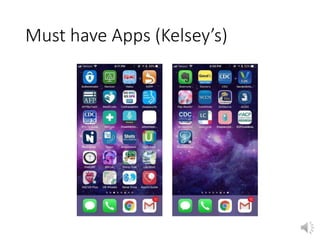
Must have Apps (Kelsey’s)
Other apps
• Whatsapp – that’s our group text would recommend
switching y’all to that app so we can all be on the same
one 
• Evernote
• Photos
• Take photo of all procedure cards, important documents
• Contacts
• Save numbers in there
• Can save operator, vocera, pager numbers, etc
• Also can save ID numbers such as your clock # etc on the
notecard of important stuff
• Can save passcodes for floors etc
Kelsey’s Intern Tips
https://twitter.com/uts_australia/status/1014796553548992514?s=12 << VIDEO
Other tips
• Have backup pair of scrubs, pair of dress clothes,
and pair of underwear/bra/socks in car/locker
• Portable snacks
• You’ll do great!
Kelsey’s Intern Tips

Emr basics

  • 1.
    Kelsey’s Intern Guide: techstuff + EPIC (aka preventing date night with the EMR) aka what you really need to know for intern year
  • 2.
    New Innovations • https://www.new-innov.com/login/Login.aspx •Youtube tutorial: https://youtu.be/cEk6GHakjoY
  • 3.
    E source • ohesource.ohiohealth.com •Consult directory • submit UOR
  • 4.
    Email • www.Outlook.office.com • Accessingwebex invite https://youtu.be/CcmtAHdfKm4 •
  • 5.
    Call schedule • Www.amion.comor app • Login: gmcfm or grant • How to get on your phone: https://youtu.be/oe08Yj3ETew
  • 6.
    Important numbers • IT:614-566-EDOC • Operator: 614-566-9000 • Vocera: 614-533-9200 • Office: 614-788-5400 • Central scheduling: 566-1111 • Transfer center 614-566-5127 • Martii – 855-837-8685 • Gen Surg 566-7444 • 393 566-9108 • Save pagers/r1/r2/ob etc into your phone Green 788-5401 Blue 788-5404 Gray 788-5403 Yellow 788-5402 And all other numbers from intern book
  • 7.
    Haiku/Canto • Download –you have to register device and it takes ~24h • http://news.ohiohealth.com/pdf/haikucantosetupti psheet.pdf
  • 8.
  • 9.
    Remote access –VM ware • Follow instructions given • News.ohiohealth.com • 2 factor verification via app instead of phone call: Microsoft authenticator • From a PC: go to Mfa.ohiohealth.com, login with opid
  • 10.
    Doximity • You canset “outgoing phone number” to office number • It can connect to epic so when you click on a patient number in haiku it will open in doximity app • You can also get a personal fax number
  • 11.
    How to trainyour Dragon • How to sign up • esource > IS Support > make a request > search for “dragon” • How to access: now there’s a button within epic • Switching mics • Logout from dragon if logged in • How to use with mic • How to use with phone • Power mic mobile app • http://news.ohiohealth.com/PMM.htm
  • 12.
    Playground • PLY2 • Opidlogin • Then • login: prov** (where ** is any number between 01 and 19) • password: train
  • 13.
    Badge Tap in! •Saves you time and keystrokes and fingerprints that sometimes don’t work
  • 14.
    Typing skills • Wecan help you if you need help!
  • 15.
    Contexts • OPG GMCGMEFM TOWN • OPG GMCGME OUTRCH TOWN • GMC MED SURG • GMC EMERGENCY DEPARTMENT • GMC ONCOLOGY SURGERY • GMC LABOR & DELIVERY
  • 16.
    Overall Personalize • Personalizeleft tabs, top overview • Orders pick and click (personalize > preference list composer) • Dot phrases – how to steal • Shared lists – how to add self and other • Wrenching in https://youtu.be/yqQulAGHaeA • Spend 5 min personalizing / reordering at the start of each rotation 
  • 17.
    Inpatient Overview • Topbar, personalize button • Second bar – printing/editing handoff, right service, arrow to open handoff in chart, printing list, form reprints • Left, patient lists, how to find floors/ED • Adding self/others to list membership, adding patients to lists • Result/note flags and time marks • Admit order status • Treatment team / sign in
  • 18.
    Handoff • Make sureyou are in the correct context • Use arrow to open chart with handoff still on the side
  • 19.
    Inpatient Chart • Summary- Overview, handy tabs, MAR • Chart Review – labs in process, cardio/MUSE, procedures • Synopsis • Flowsheets • Admit / transfer / discharge buttons • Orders – home meds, signed and held • Notes • https://youtu.be/hsvrxTt0QBQ
  • 20.
    Chart review • Filters •https://youtu.be/N6MKy2hMvMw
  • 21.
    Overview tabs tofavorite • Delivery, Pregnancy, Labor, L&D Timeline • Peds Flowsheet • Micro • Glucose • Blood transfusion • Fever • Weight • Snapshot
  • 22.
    Flowsheets to favorite •Labor, Mag • Ballard, Finnegan, Screenings • Orthostatic vitals • CIWA • PHQ9, GAD7 • Stop bang questionnaire • Chads2vasc score • Edinburgh post depress • MOCA, Mini Cog, MMS, SAGE • Menstrual and sexual hx • Opioid risk tool
  • 23.
    Order sets tofavorite • Adult blood components • CIWA • CCTA • Critical Care Delirium • Electrolyte replacement • DKA/HHS • General Adult Admission • Insulin Adult • Opiate withdrawal • Pain management • VTE Prophylaxis
  • 24.
  • 25.
    Order Sets –OB • c/s admission pre-procedure • Intrapartum glycemic • Labor and vaginal • Labor and delivery triage • Labor and delivery triage – ROL protocol • Labor induction focused • Labor induction admission • OB GBS focused • PROM admission • Preterm labor admission • Vaginal bleeding admission <23w • Vaginal delivery PP orders • Then newborn LPI and term, newborn prophylaxis, newborn circ
  • 26.
    Discharge • Favorite followup locations • Favorite outpatient orders • Dot phrases for discharge edu
  • 27.
    Lexicomp • Can accesslink directly when ordering meds
  • 28.
    Accessing Surgery Schedule •“Grant” • Sort by room • Can save to favorite bar
  • 29.
    Accessing L&D board/ tracings • Change context to L&D • ***Snapboard scheduling • Tracings via periwatch
  • 30.
    Dot Phrases -Inpatient • .sfm*** • .gfp/.gfm*** (office) • Rat call, sepsis notes • Procedure notes • https://youtu.be/iLuFQf9NyhE inpt/outpt notes personalization
  • 31.
    Dot Phrases -OB • See OB handout • .pregnancy • .obtriage or .gfpobtriage • .oblabs • .obhandoff and .obhandofflabs • .obdcsum • .session1 -- .session10 for centering
  • 32.
    Dot Phrases -Newborn • .gfpboy or .gfpgirl • .gfpnewbornprogress • .gfpnewborndischarge • .gfpcirc • .newborn (Assessment and plan summary statement) • .newbornhandoff
  • 33.
    Dot Phrases -Surgery • Get from your senior on service – h&p, postop check, progress notes, consult notes
  • 34.
    Dot phrases -Peds • Use the smart text box or smart sets • I think .all has some .wcc ones
  • 35.
    Dot phrases -Outpatient • .gfpmednote • .gfmphonevisit • .gfmvideovisit • For problem list to pull in: .probap (assess & plan) .probdiag (just diagnoses) .probov
  • 36.
    Note Contexts • Newbornnote in “newborn” • ICU notes in “critical care” • Otherwise typically in FM or GYN context
  • 37.
    User Dictionary autocorrect •https://youtu.be/OeDZU8px9Rc
  • 38.
    Outpatient Chart • Demographics •Treatment team • Rooming • History • Flowsheets • Note • Problem list • Plan • Wrap up • Billing/charges https://youtu.be/Bkj5DJuHUI8
  • 39.
    Viewing your schedule •FM TOWN • View open slots • Customize your schedule template • https://youtu.be/xuoGMuPwsls
  • 40.
  • 41.
    Pick and clickorders https://youtu.be/8Qwx3wz0oEk
  • 42.
  • 43.
    Copy user’s favoriteorders https://youtu.be/fde3dXc_xzk
  • 44.
  • 45.
  • 46.
    Sticky notes • Self– yellow – only for you. I use for personal reminders – how many kids, what they do for work, labs I need to follow up on etc • Blue sticky – specialty comments – general info, good especially if you won’t be seeing them next • Pink – pregnancy only. Continuity person, important info
  • 47.
    Health Maintenance • Goodtab to update • Can change modifiers for patient to reflect their status or what schedule they are on
  • 48.
    a/p • Update problemlists • Overview • A/P • Visit diagnoses – wrench in, favorites, past dx • Associate diagnoses
  • 49.
    Maybe you like3 column view?
  • 50.
    Notes – createmacros for ROS and PE https://youtu.be/8Ch9gUP_SJc
  • 51.
  • 52.
    Charge for procedures •More > “charge” • For meds and also for procedure itself
  • 53.
    Tips with yourMA • They can do a lot! • Schedule patient for next appt • Add pt edu • Work/school excuses • Coordinate care
  • 54.
    Communications FYI you can faxfrom right within Epic! https://youtu.be/pu2yVZRlN-Q
  • 55.
    Wrap up • Patientinstructions – defaults/speed buttons • Follow up time – quick picks • “Remind me to …” • Send chart on closing to PCP (last thing you do) • also can route any note to PCP under chart review > notes > route button • https://youtu.be/9L_iByK9m-M • https://youtu.be/wogOPytA6Tc speed buttons ***
  • 56.
    MyChart • Sign patientup • More > MyChart utilities > administration • Text / email signup • Super easy: https://youtu.be/Pi1SL7oc3jU
  • 57.
    Refill and ortelephone note • Orders only entry • Rx request – approve, deny, open to route to someone else • Phone call/telephone note • Route to your pod MA team • Can sign meds but not encounter if you need something else or need MA to call and make appointment for pt • “indirect supervision” and your advisor as cosigner • Can always call R2, office and talk to preceptor, GFP attending if need advice after hours
  • 58.
    Result notes • Mychart– sends to patient • Call patient – route but don’t close note, tell MA exactly what to say • If abnormal call pt yourself • Always an option to call patient yourself • Can also send letter if unreachable • Result note – “Pt called or mychart message sent” • Some people write whole note there
  • 59.
    Inbox tutorials • Inbox1 results https://youtu.be/E-wEfXwaJNU • Inbox 2 prescriptions https://youtu.be/FaCoDD7doOg • Inbox 3 telephone https://youtu.be/oVMMGOtIg9I
  • 60.
    Routing 393 Pool: OPGGMCGME TOWN CLINCIAL
  • 61.
    485 – homecare •Review diagnoses, meds, allergies • Make sure patient has been seen within ~1 year • Initial meds etc and sign OUTSIDE/very edge of of main signature box • Place in 485 bin • More to come in orientation that will be the most up to date
  • 62.
    Staff message • More> send message > staff • Can also send to self! Options tab future date
  • 63.
    Route to PCP! •Please please please • Send on closing chart • Also make sure follow up scheduled with PCP if possible • Also – how to add yourself to treatment team / care team as PCP!
  • 64.
    Visit diagnoses toremember • Need for vaccination • Preventative care visit
  • 65.
    Getting patients! • Givethem your business card and/or Grant FP flyer • Tell them about the walk-in clinic • Remind office patients seen in the hospital about walk in clinic • Ask patients on other rotations if they have a PCP – you can be their hospital follow up!
  • 66.
    Must have Apps(Kelsey’s)
  • 67.
    Other apps • Whatsapp– that’s our group text would recommend switching y’all to that app so we can all be on the same one  • Evernote • Photos • Take photo of all procedure cards, important documents • Contacts • Save numbers in there • Can save operator, vocera, pager numbers, etc • Also can save ID numbers such as your clock # etc on the notecard of important stuff • Can save passcodes for floors etc
  • 68.
  • 69.
  • 70.
  • 71.
    Other tips • Havebackup pair of scrubs, pair of dress clothes, and pair of underwear/bra/socks in car/locker • Portable snacks • You’ll do great!
  • 72.