Downloaded 13 times


![WORKING WITH STRINGS
# Some operations on strings
$line = "Hallo, this is a test string"
$line = $line.Replace("test", "123")
$idx = $line.IndexOf("this")
If ( [string]::Compare($stra, $strb, $True) ) { } # case sensitive compare
If ($line.StartsWith("Script")) { }
$line.Substring(2,3)
$line[2]
$line[2..4] # not a substring, this is an array !
$items = [Array]($line -split " ")
$lineArray = $line.ToCharArray()
"Hello $($MyName), today is $(get-date -format 'dd-MM')“ # string concatenation
# Formatting
"Today is {0:dddd}" -f (Get-Date) # Show day of the week
"{0:N2}" -f 1554.22272 # Two decimal positions
"{0:P}" -f (5/10) # Percentage
"{0:C}" -f 5 # Currency
"0x{0:x}" -f 55 # Convert to Hex](https://image.slidesharecdn.com/powershellgaetanocausio-160706055703/75/Everything-About-PowerShell-3-2048.jpg)
![WORKING WITH STRINGS
# Be careful…
if ($abc -eq "") { Write-Host "is null" } # may not work as you expected!
if ([string]::IsNullOrEmpty($abc)) { Write-Host "is null" } # this is better...
-contains # is designed to work on arrays, not strings
-match # looks for a match inside a string and supports regexes
–like # looks for a match inside a string and supports wildcards
# Regular Expressions
If ("192.168.15.20" -match "d{1,3}.d{1,3}.d{1,3}.d{1,3}“) { }
If (([regex]::Matches($email, "[0-9]" )).count -gt 0) { }
$var = $var -replace '[{]?[0-9a-fA-F]{8}[-]?([0-9a-fA-F]{4}[-]?){3}[0-9a-fA-F]{12}[}]?', '[GUID]‘
$var = $var -replace '(19|20)dd(-)(0[1-9]|1[012])2(0[1-9]|[12][0-9]|3[01]) dd(:)dd(:)dd',
'[DATETIME]‘](https://image.slidesharecdn.com/powershellgaetanocausio-160706055703/75/Everything-About-PowerShell-4-2048.jpg)
![DATA STRUCTURES
# Array
[Array]$ErrorMessages = @("File does not exist.")
$ErrorMessages += "Unable to open file.“ # add item to an array
$ErrorMessages[1] = "Unable to open file for writing.“ # change item in an array
Write-Host $ErrorMessages[0] # access item from an array
# ! you cannot remove items from an array, use a .NET System.Collections.ArrayList instead
# reading items in an array:
foreach ($message in $ErrorMessages) { Write-Host $message }
$mixArray = @(12,"David",1.2,$(Get-Date))
$mixArray.length # items in de array
# Array of Array
[Array]$SkipFiles = @()
$SkipFiles +=, @("test.dat", 123)
$SkipFiles +=, @("file.dat", 7)
Write-Host $SkipFiles[1][0]](https://image.slidesharecdn.com/powershellgaetanocausio-160706055703/75/Everything-About-PowerShell-6-2048.jpg)
![DATA STRUCTURES
# Dictionary
$dict = New-Object 'system.collections.generic.dictionary[string,int]'
$dict["David"] = 36
$dict["Joe"] = 27
# Hash Table
[hashtable]$ReturnData = @{}
$ReturnData.ErrorCode = 23
$ReturnData.ErrorMessage = "Failed to read database"
$ReturnData.ProcessedRecords = 0
$ReturnData.DataTable = new-object system.data.datatable
return $ReturnData](https://image.slidesharecdn.com/powershellgaetanocausio-160706055703/75/Everything-About-PowerShell-7-2048.jpg)

![OPERATIONS ON FILES
# Search or replace text in files
Get-ChildItem -Filter "*.xml" -Path "D:data" -Recurse | Select-String -pattern "123456“
(Get-Content "c:temptest.xml").replace('[ID]', '123456') | Set-Content "c:temptest.xml"
# Operations on file system
Copy-Item "d:datatest.log" "d:temp"
Move-Item -path "d:datatest.log" -destination "d:temp"
Rename-Item -path "d:datatest.xml" "test.xml.processed"
if ($(Test-Path "d:datalogs") -eq $false) {
New-Item -Name "logs" -Path "d:data" -ItemType directory
}
$data | Out-File -Append "d:datafile.dat“
# this will ask for confirmation, not handy in a script:
Remove-Item -Path "C:temp" -Filter "*.log" -Force
# this works better on a script:
Get-ChildItem -Path "C:temp" -Filter "*.log" | Remove-Item -force](https://image.slidesharecdn.com/powershellgaetanocausio-160706055703/75/Everything-About-PowerShell-9-2048.jpg)
![OPERATIONS ON FILES
# Reading Files
[Array]$InRecords = Import-Csv -Path "d:test.csv" -Delimiter ',‘ -Header ID, Name, Age
$Data = Get-Content -Path $InputFile
[System.Object[]]$Triggers = Get-ChildItem -Filter "*.test.*.trg" -Path "d:data"
ForEach ($Trigger in $Triggers) {
$Trigger.BaseName
$Trigger.Name
$Trigger.FullName
}
# Handy
$HashCode = Get-FileHash -Path "$FileName" -Algorithm MD5
$HashCode.Hash](https://image.slidesharecdn.com/powershellgaetanocausio-160706055703/75/Everything-About-PowerShell-10-2048.jpg)

![INTERACTIONS WITH OS
# Accessing environment variables
[Environment]::SetEnvironmentVariable("SYS_LOGS", "D:dataLogs", "Machine")
$logs = $([Environment]::GetEnvironmentVariable('SYS_LOGS','Machine'))
# Accessing Windows Events
if(![System.Diagnostics.EventLog]::SourceExists("CleanUp")) {
[System.Diagnostics.EventLog]::CreateEventSource("CleanUp",'Application')
}
Write-Eventlog -logname 'Application' -source "CleanUp" –eventID 17532 -EntryType Information
-message "your event message"
# Start a DOS batch command
Start-Process "D:batchrun.cmd" "-f -v" -Wait -WindowStyle Hidden-WorkingDirectory "D:batch"
# Start a PowerShell script from DOS
CALL %SystemRoot%system32WindowsPowerShellv1.0powershell.exe -NoLogo
-NonInteractive -File "D:scriptstest.ps1"](https://image.slidesharecdn.com/powershellgaetanocausio-160706055703/75/Everything-About-PowerShell-12-2048.jpg)


![ABOUT SECURITY
# Get user information
$userAccount = [System.Security.Principal.WindowsIdentity]::GetCurrent()
[System.Security.Principal.WindowsPrincipal]$userAccount).IsInRole("Administrator")
Get-ADUser -Filter { SAMAccountName -eq ‘USR01A' } -Properties extensionAttribute6
Get-ADUser -Filter { SAMAccountName -like 'usr*' } -Properties SamAccountName
# Encrypt a string (i.e. password)
ConvertTo-SecureString 'testtest' -AsPlainText -Force | ConvertFrom-SecureString | Out-File
-FilePath “c:temppassword.dat"
# Decrypt a string
$pswdSec = Get-Content "c:temppassword.dat" | ConvertTo-SecureString
$bPswd = [System.Runtime.InteropServices.Marshal]::SecureStringToBSTR($pswdSec)
$pswd = [System.Runtime.InteropServices.Marshal]::PtrToStringAuto($bPswd)](https://image.slidesharecdn.com/powershellgaetanocausio-160706055703/75/Everything-About-PowerShell-15-2048.jpg)

![USING XML
# Example of processing an XML file
[XML]$XML = Get-Content -Path "d:datafile.xml"
if ($XML.HasChildNodes) {
if ( $XML.'header'.'data'.HasChildNodes) {
foreach ($XMLData in $XML.'header'.'data') {
$XMLData.CustomerName
$XMLData.Children.Child[0].Name
$XMLData.InnerXml
if ($XMLData.SelectSingleNode("Age") -eq $null) {
# Node does not exist
[System.Xml.XmlElement]$Node = $XMLData.CreateElement("Age")
$Node.InnerText = "34"
$XMLData.AppendChild($Node) | Out-Null
} else {
# Update existing node
[System.Xml.XmlElement]$Node = $XMLData.SelectSingleNode("Age")
$Node.InnerText = "34"
}
}
$XMLData.Save("$OutputFile")
}
}](https://image.slidesharecdn.com/powershellgaetanocausio-160706055703/75/Everything-About-PowerShell-17-2048.jpg)
![WORKING WITH SQL
# Prepare SQL Connections
$SqlConnection = New-Object System.Data.SQLClient.SQLConnection
$SqlCommand = New-Object System.Data.SQLClient.SQLCommand
$SqlConnection.ConnectionString ="Server=MYSERVER;Database=TestDB;User
Id=SA_Account;Password=Passw0rd!;trusted_connection=False;"
$SqlCommand.Connection = $SqlConnection
# Fetch data via SQL query into a DataTable object
$SqlQuery = "SELECT BatchId, Status from [DataTable]“
$adapter = new-object system.data.sqlclient.sqldataadapter ($SqlQuery, $SqlConnection)
[system.data.datatable]$Batches = new-object system.data.datatable
$adapter.Fill($Batches) | out-null
foreach ($Row in $Batches)
{
"$($Row["BatchId"]) - $($Row["Status"])"
}](https://image.slidesharecdn.com/powershellgaetanocausio-160706055703/75/Everything-About-PowerShell-19-2048.jpg)
![WORKING WITH SQL
# Execute an SQL statement
$SqlCommand.CommandText = "UPDATE [Table] SET Status=3 WHERE BatchId=$ID"
$SqlConnection.Open()
$result = $SqlCommand.ExecuteNonQuery()
$SqlConnection.Close()
# Working with Transactions
$SqlConnection.Open()
$SqlTransaction =
$SqlConnection.BeginTransaction([System.Data.IsolationLevel]::Serializable)
$SqlCommand.Transaction = $SqlTransaction
$result = $SqlCommand.ExecuteNonQuery()
if ($errors) {
$SqlTransaction.Rollback()
} else {
$SqlTransaction.Commit()
}
$SqlConnection.Close()](https://image.slidesharecdn.com/powershellgaetanocausio-160706055703/75/Everything-About-PowerShell-20-2048.jpg)

) { }
# Report execution progress
Write-Progress -activity "Processing files" -status "Files read: " -PercentComplete 40
# Check speed of a command
Measure-Command -Expression { get-service | ForEach-Object { Write-Host $PSItem.Name -ForegroundColor
"green“ } }
# Ask for user input
$serverName = Read-Host "Enter server name:"
# It’s all about pipes:
function test {
begin { write-host "start" }
process { write-host "$_" }
end { write-host "end" }
}
"a", "b", "c" | test](https://image.slidesharecdn.com/powershellgaetanocausio-160706055703/75/Everything-About-PowerShell-22-2048.jpg)

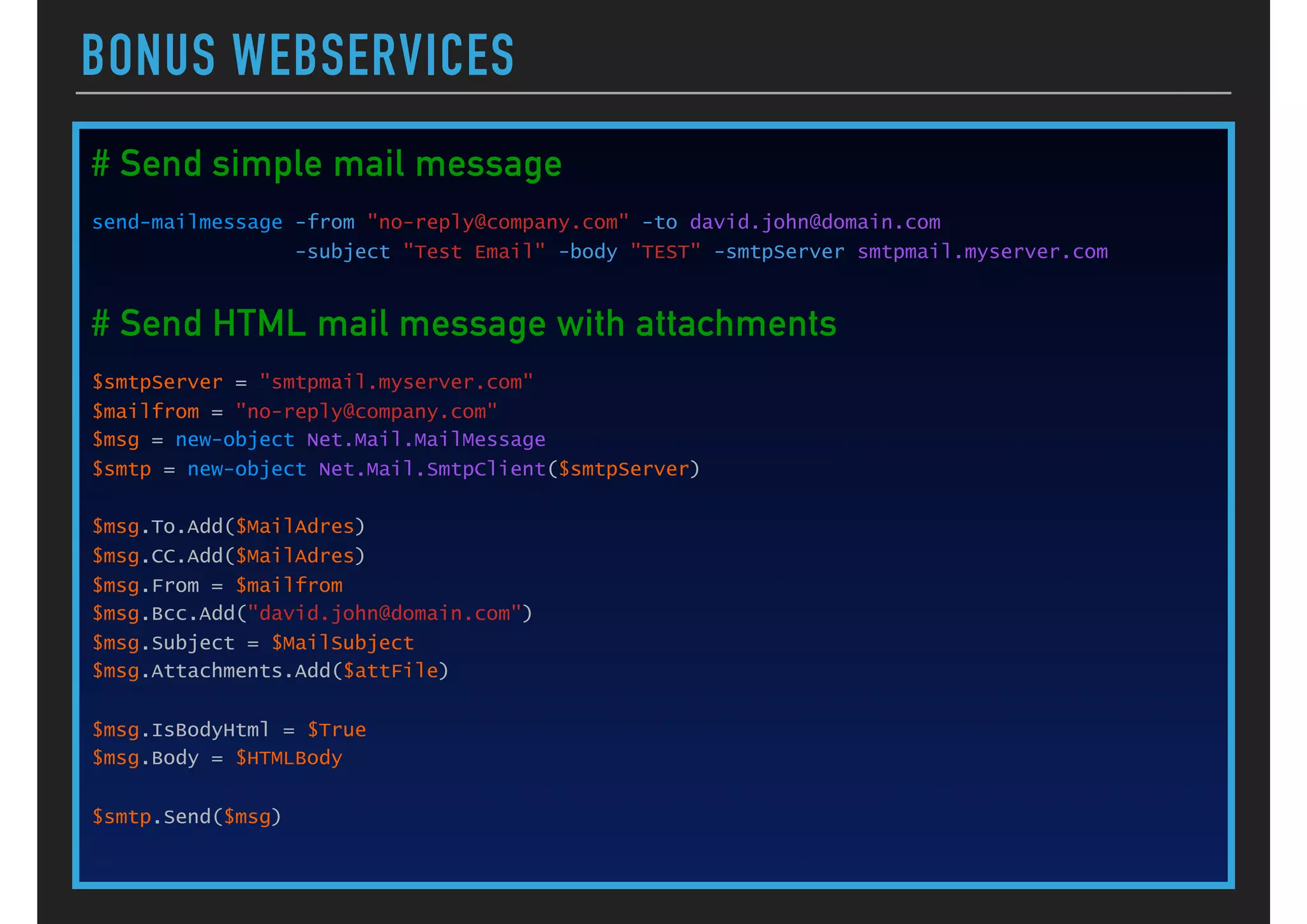
![BONUS WEBSERVICES
# Post URL http://service.com/send?op=set&form=report&id=1234
[hashtable]$postParams = @{}
$postParams.OP = 'set'
$postParams.FORM = 'report'
$postParams.ID = '1234'
$url = "http://service.com/send"
$rc = Invoke-WebRequest -Uri $url -Method GET -Body $postParams
# Download file from a URL web service
$webClient = New-Object System.Net.WebClient
$webClient.UseDefaultCredentials = $true
$url = "http://download.aspx?action=get&area=$($area)&id=$($id)"
$bron = $webClient.DownloadString($url)
# you may need to use a proxy for urls outside your network
If (Test-Connection "myserver.com" -Count 1 -Quiet ) {
$global:PSDefaultParameterValues = @{
'Invoke-RestMethod:Proxy'='http://myproxy.com/acc_base.pac'
'Invoke-WebRequest:Proxy'='http://myproxy.com/acc_base.pac'
'*:ProxyUseDefaultCredentials'=$true
}
}](https://image.slidesharecdn.com/powershellgaetanocausio-160706055703/75/Everything-About-PowerShell-25-2048.jpg)
![BONUS WEBSERVICES
# SOAP request
$webService = "http://myserver/myservice/interfaceWcfService.svc"
$Action = "http://mycompany.com/interfaceWcfService/Contract/IinterfaceWcfService/Start"
[XML]$SOAPRequest = '<soapenv:Envelope xmlns:soapenv="http://schemas.xmlsoap.org/soap/
envelope/" xmlns:con="http://mycompany.com/interfaceWcfService/Contract"><soapenv:Header/
><soapenv:Body><con:StartID><con:appName>APP_ID</con:appName></con:StartID></soapenv:Body></
soapenv:Envelope>‘
$soapWebRequest = [System.Net.WebRequest]::Create( $webService)
$soapWebRequest.Headers.Add( "SOAPAction", $Action)
$soapWebRequest.ContentType = "text/xml;charset=`"utf-8`""
$soapWebRequest.Accept = "application/xop+xml, application/dime, multipart/related, text/xml";
$soapWebRequest.Method = "POST"
$requestStream = $soapWebRequest.GetRequestStream()
$SOAPRequest.Save($requestStream)
$requestStream.Close()
# perform SOAP request
$resp = $soapWebRequest.GetResponse()
$responseStream = $resp.GetResponseStream()
# get response
$soapReader = [System.IO.StreamReader]($responseStream)
$ReturnXml = $soapReader.ReadToEnd()
$responseStream.Close()
"Webservice Response = $($resp.StatusDescription)"](https://image.slidesharecdn.com/powershellgaetanocausio-160706055703/75/Everything-About-PowerShell-26-2048.jpg)


This document provides an overview of common string, data structure, file, operating system, security, XML, SQL, and web service operations in PowerShell. It discusses how to work with strings, arrays, dictionaries, hashtables, files, environment variables, events, services, WMI, encryption, XML processing, SQL queries and transactions, sending emails, downloading files from URLs, and using proxies. The document is a helpful reference for many PowerShell tasks.


