Copyright © 2017, Oracle and/or its affiliates. All rights reserved. | Confidential – Oracle Internal/Restricted/Highly Restricted 1
th
김동후
donghu.kim@oracle.com
Ansible with OCI
2020.1.18
16
thOracle
Developer
Meetup
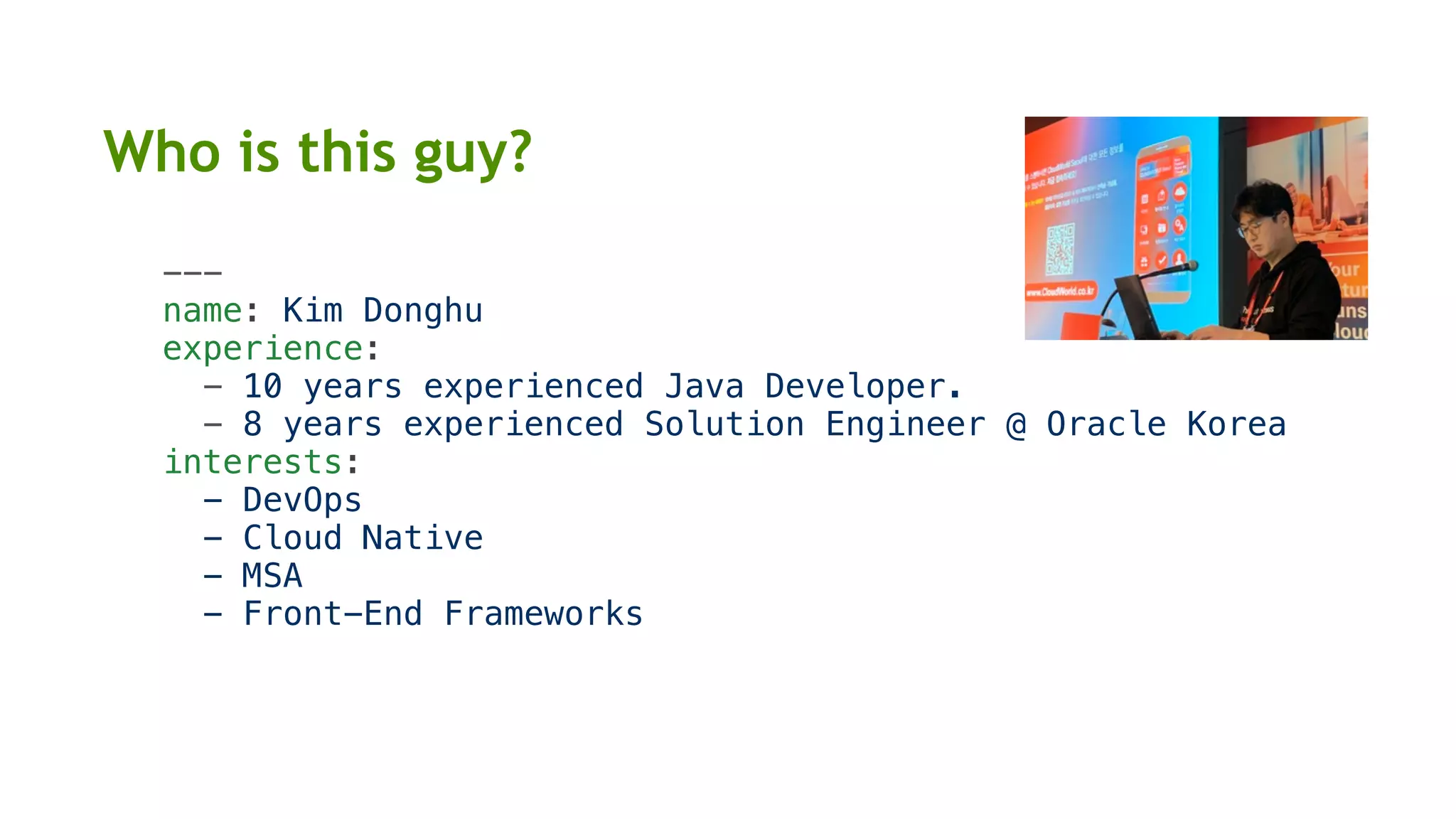
Who is this guy?
---
name: Kim Donghu
experience:
- 10 years experienced Java Developer.
- 8 years experienced Solution Engineer @ Oracle Korea
interests:
- DevOps
- Cloud Native
- MSA
- Front-End Frameworks
{
"name": "Kim Donghu",
"experience": [
"10 years experienced Java Developer.",
"8 years experienced Solution Engineer @ Oracle Korea"
],
"interests": [
"DevOps",
"Cloud Native",
"MSA",
"Front-End Frameworks"
]
}
Who is this guy?
Ansible named from novel <<Ender's Game>>.
It is a fictional superluminal communication device.
Ansible
Puppet
Chef
Salt
Ansible is...
• 오픈소스 구성관리 및 프로비저닝 도구 (similar to Chef, Puppet, Salt)
• 실행 작업을 작성하기 쉬운 YAML 형식으로 정의
• SSH 접속만 가능하면 대부분 Ansible을 통해 작업을 수행
• Agentless: 대상 서버에 Agent 설치가 필요 없음
• Idempotency: 같은 작업을 여러번 수행하더라도 결과는 같음
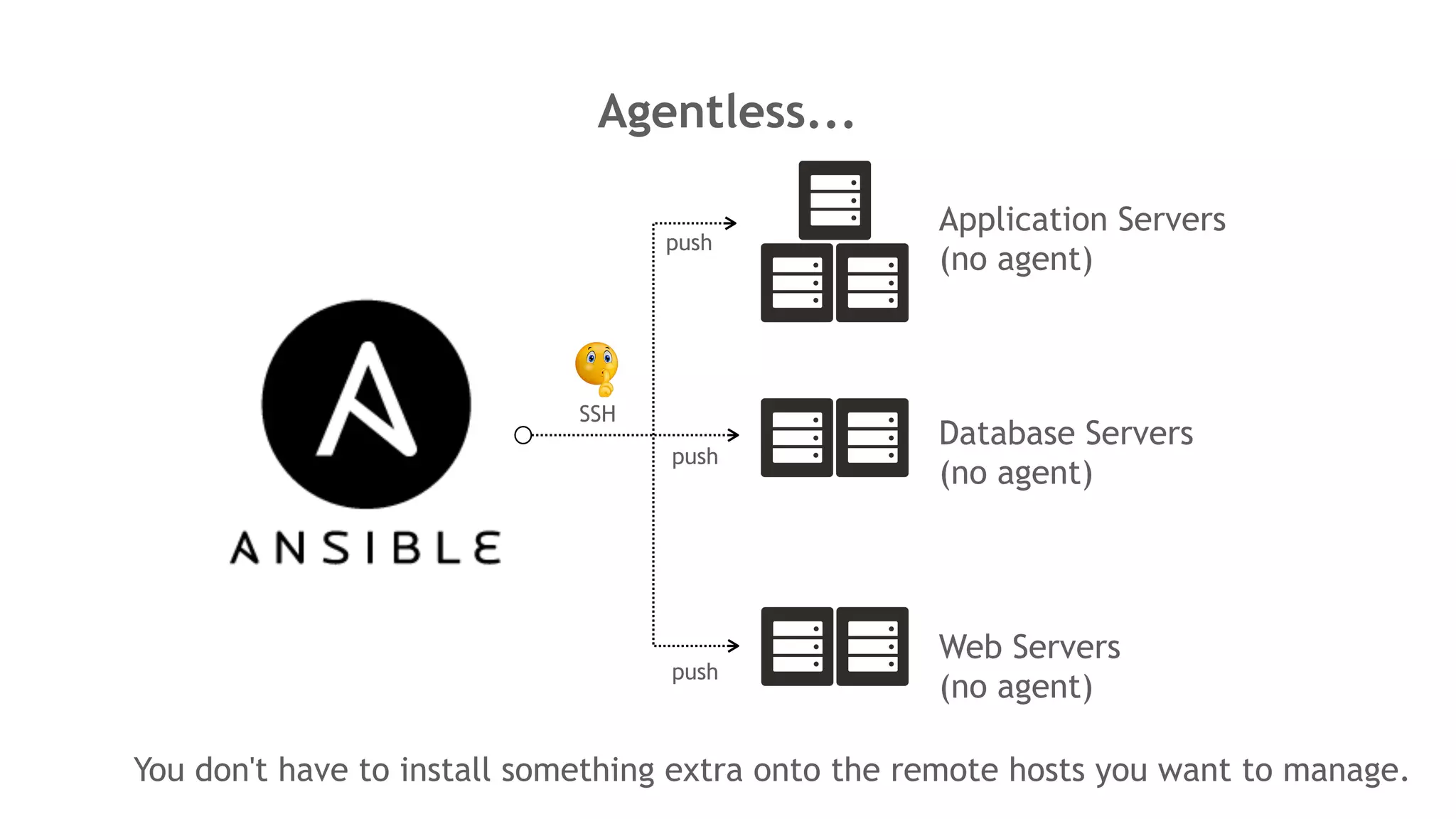
Agentless...
Application Servers
(no agent)
Database Servers
(no agent)
Web Servers
(no agent)
SSH
push
push
push
You don't have to install something extra onto the remote hosts you want to manage.
Idempotency...
SSH
1. create
a cron
job
2.
create
the same
cron job
3. create
the same
cron job
only 1 cron job
non-idempotent
- file
- shell
- command
---
- hosts: dev-servers
tasks:
- shell: echo test >> /tmp/forbar
Idempotency Demo
Shell Script
Ansible Playbook
What can it automate?
Infrastructure
Provisioning
Configuration
Management
Application
Deployment
SSH
Ansible Architecture
Ansible Control Node (Desktop, Laptop)
Playbook
(YAML)
- name
connection
hosts: DB
tasks:
module
....
- name
connection
hosts: WEB
tasks:
module
....
ssh
ssh
pip install
ansible
Inventory
(hostfile)
[WEB]
10.0.1.100
10.0.2.100
10.0.3.100
[DB]
10.0.4.100
10.0.5.100
WEB (Managed Node)
10.0.1.100 10.0.2.100 10.0.3.100
DB (Managed Node)
10.0.5.10010.0.4.100
How to install Ansible?
Control Node Requirements
• Python 2 (version 2.7)
• Python 3 (version 3.5 and higher)
• Windows is not supported for the control node
Managed Node Requirements
• Native OpenSSH (1.3 or later)
• By default this uses sftp
• If that's not available, you can switch to scp
• Python 2 (2.6 or later) or Python 3 (3.5 or later)
Installing Ansible (RHEL and CentOS)
$ yum install python
$ yum install python-pip
$ pip install virtualenv
$ pip install ansible
What is Ansible Inventory?
mail.example.com
[WEB]
10.0.1.100
10.0.2.100
10.0.3.100
[DB]
10.0.4.100
10.0.5.100
INI, GROUP, HOST
WEB:
hosts:
10.0.1.100:
10.0.2.100:
vars:
some_server:
some_server=test.exam
ple.com
YAML, HOST, HOST VAR
[WEB]
host1
ansible_connection=ssh
ansible_host=10.0.1.11
ansible_user=opc
host2
ansible_connection=ssh
ansible_host=10.0.1.12
ansible_user=opc
INI, GROUP, HOST, HOST VAR
[WEB]
10.0.1.100
[WAS1:children]
10.0.1.101
10.0.1.102
[WAS1:vars]
some_server=test.exampl
e.com
INI, GROUP, CHILD GROUP & VAR
• 기본 Inventory File: /etc/ansible/hosts
• 별도의 경로에 별도의 파일로 생성 가능[Inventory]
• host, group, group children에 대한 변
수를 별도의 파일로 관리 가능 (권장)
• Managed Node (구성할 리모트 서버)에 대
한 호스트 정보를 가짐, 그룹과 호스트로 관리
Playbook - Basic
---
- name: Web Server Play
hosts: web
remote_user: opc
become_method: sudo
become: yes
tasks:
- name: add web user
user:
name: webuser
shell: /bin/bash
append: yes
state: present
tags:
- add_web_user
- name: DB Server Play
hosts: db
remote_user: opc
tasks:
- name: add db user
user:
name: oracle
shell: /bin/bash
append: yes
state: present
tags:
- add_db_user
...
YAML
https://docs.ansible.com/ansible/2.4/playbooks_keywords.html
Playbook keywords
Playbook Keywords
Tasks
Module
Module Input Parameters
Tags
Play1
Play2
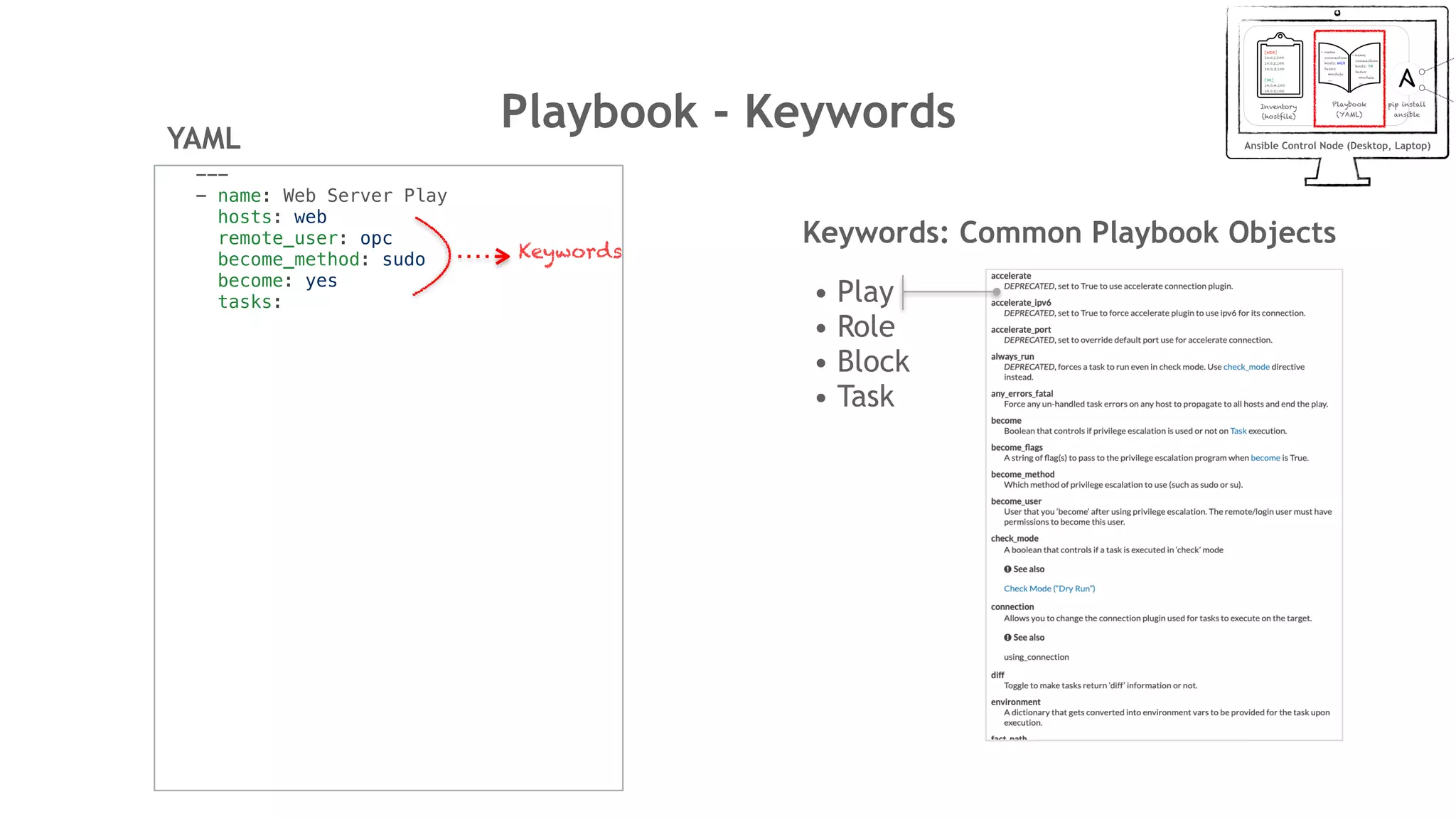
Playbook - Keywords
---
- name: Web Server Play
hosts: web
remote_user: opc
become_method: sudo
become: yes
tasks:
YAML
Keywords: Common Playbook Objects
• Play
• Role
• Block
• Task
Keywords
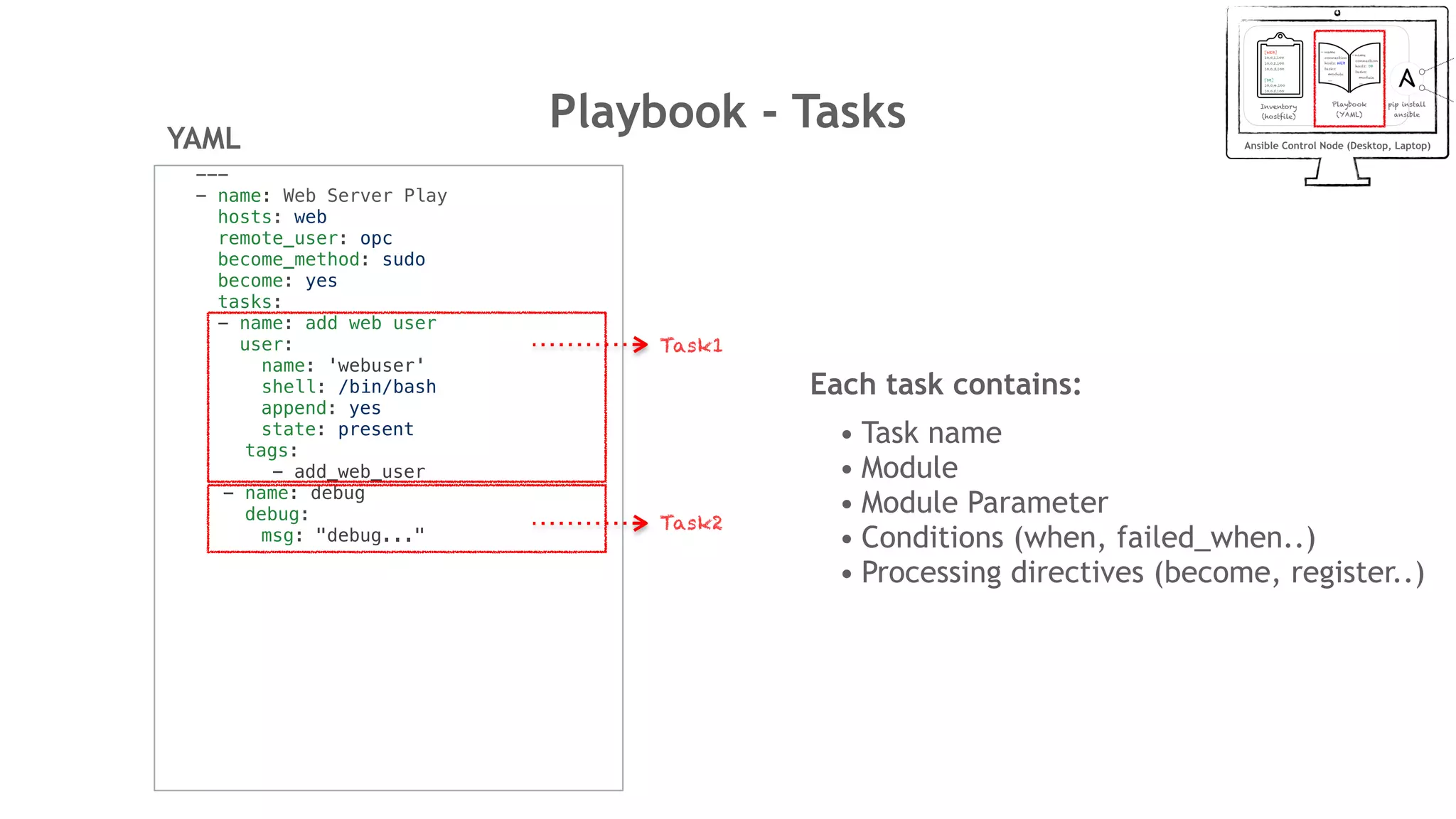
Playbook - Tasks
---
- name: Web Server Play
hosts: web
remote_user: opc
become_method: sudo
become: yes
tasks:
- name: add web user
user:
name: 'webuser'
shell: /bin/bash
append: yes
state: present
tags:
- add_web_user
- name: debug
debug:
msg: "debug..."
YAML
Each task contains:
• Task name
• Module
• Module Parameter
• Conditions (when, failed_when..)
• Processing directives (become, register..)
Task1
Task2
Playbook - Module
---
- name: Web Server Play
hosts: web
remote_user: opc
become_method: sudo
become: yes
tasks:
- name: add web user
user:
name: 'webuser'
shell: /bin/bash
append: yes
state: present
tags:
- add_web_user
- name: debug
debug:
msg: "debug..."
YAML
https://docs.ansible.com/ansible/latest/modules/modules_by_category.html
User Module
Module Input Parameters
Debug Module
Module Input Parameters
Ansible Module List
Playbook - Working with Modules
https://docs.ansible.com/ansible/latest/modules/find_module.html#find-module
예) File find Module
Playbook - Working with Modules
Input Parameters Return Values
• Return Values는 Ansible에서 기본 제공하는 Common
Return Value와 Internal 사용을 위한 Value를 별도 제공
https://docs.ansible.com/ansible/latest/reference_appendices/common_return_values.html
Playbook - Working with Modules
- name: Recursively find /tmp files older than 2 days
find:
paths: /tmp
age: 2d
recurse: yes
register: result
- name: print find files result
debug:
msg: "{{ result }}"
find Module 사용 예시
Input Parameter
find Module
Capture return value to a variable
debug Module
Print output variable
< TASK [print find files result] >
ok: [1.2.3.4] => {
"result": {
"changed": false,
"examined": 3119,
"files": [
{
"atime": 1483973253.7295375,
...
"mode": "0600",
"mtime": 1483973253.7295375,
"nlink": 1,
"path": "/tmp/delme",
Playbook - Variables
---
- name: Web Server Play
hosts: web
vars: web
user_name: webuser
vars_files:
- /home/user/ansible/users.yml
remote_user: opc
become_method: sudo
become: yes
tasks:
- name: add web user
user:
name: '{{ user_name }}'
shell: /bin/bash
append: yes
state: present
tags:
- add_web_user
YAML
---
users:
- user: user1
tenancy: ocid1.tenancy.oc1..
region: ap-seoul-1
- user: user2
tenancy: ocid1.tenancy.oc1..
region: ap-seoul-1
vars
ansible-playbook release.yml --extra-vars "user_name=webuser"
extra vars
inventory vars
host_vars, group_vars
- /etc/ansible/hosts/host_vars/{host}
- /etc/ansible/hosts/group_vars/{group}
var file
facts
ansible hostname -m setup
- ansible_hostname, ansible_version..
Role Defaults
The lowest priority of any variables available
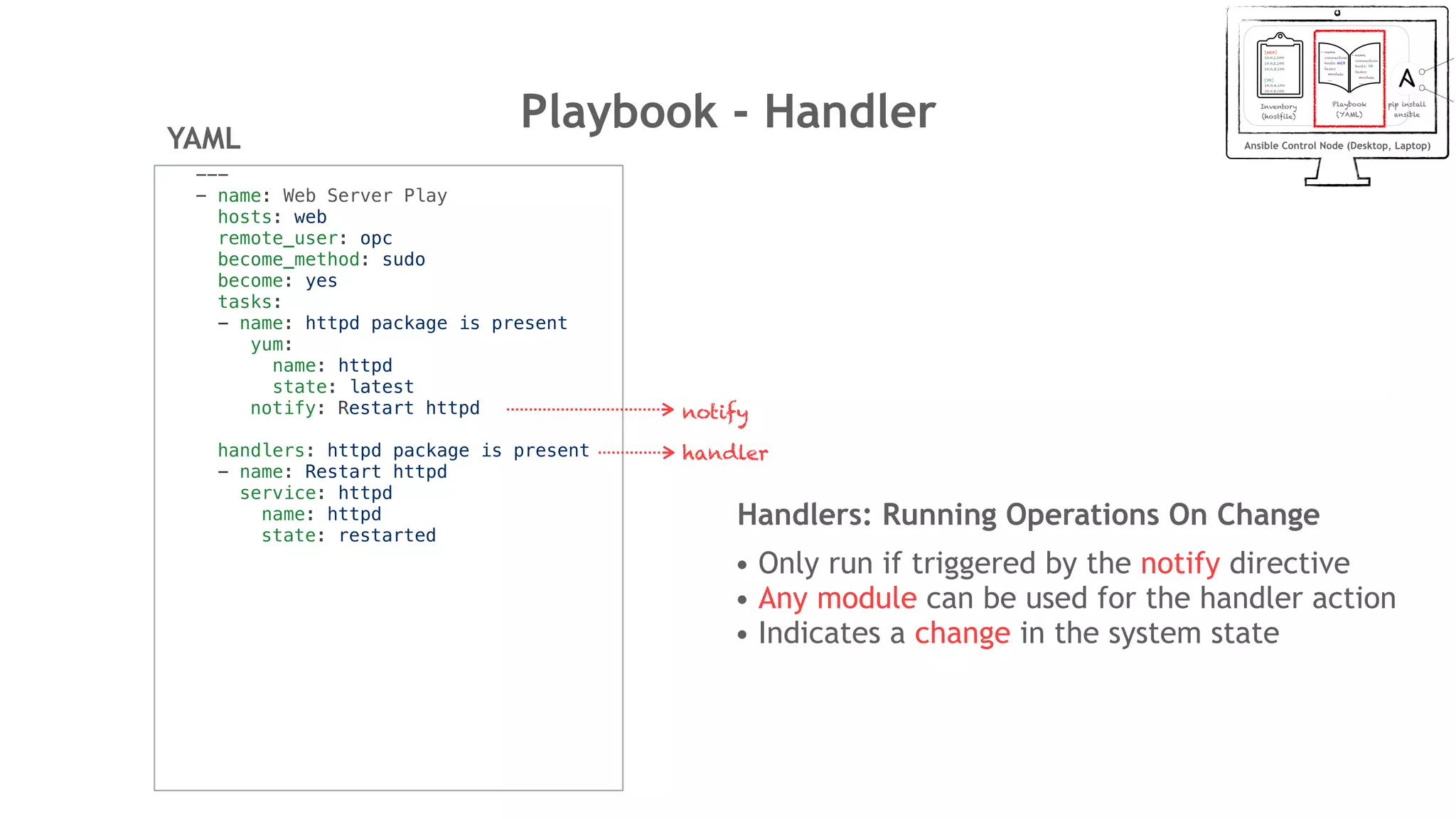
Playbook - Handler
---
- name: Web Server Play
hosts: web
remote_user: opc
become_method: sudo
become: yes
tasks:
- name: httpd package is present
yum:
name: httpd
state: latest
notify: Restart httpd
handlers: httpd package is present
- name: Restart httpd
service: httpd
name: httpd
state: restarted
YAML
notify
handler
Handlers: Running Operations On Change
• Only run if triggered by the notify directive
• Any module can be used for the handler action
• Indicates a change in the system state
Playbook - TemplatesYAML
---
- name: Web Server Play
hosts: web
remote_user: opc
become_method: sudo
become: yes
tasks:
- name: Install nginx
yum:
name: nginx
state: present
- name: Copy nginx conf for
wordpress
- template: src=default.conf dest=/
etc/nginx/conf.d/default.conf
notify: restart nginx server {
listen {{ nginx_port }} default_server;
server_name {{ server_hostname }};
root /src/wordpress/ ;
client_max_body_size 64M;
location ~* /(?:uploads|files)/.*.php$ {
deny all;
}
....
• Jinja is a modern and designer-friendly templating language for Python
• Jinja2 template language used in Ansible
• {% … %} for control statements (conditions)
• {{ … }} for expressions (variables)
• {# … #} for comments (describe the task)
Jinja2 Template
default.conf
How it works
Playbook - Roles
---
- name: WordPress,MariaDB,NginX, php-fpm
hosts: all
remote_user: opc
become_method: sudo
become: yes
roles:
- common
- mariadb
- nginx
- php-fpm
- wordpress
YAML
site.yml
roles/
common/
tasks/
handlers/
files/
templates/
vars/
defaults/
meta/
Role Directory Structure
The main list of tasks
Handlers (used by this role or anywhere)
Can be deployed via this role
Other variables for the role
Default variables for the role
Some meta data for this role
Using Role
Ansible Galaxy
• Free site for finding, downloading, rating, and reviewing all kinds of
community developed Ansible roles (https://galaxy.ansible.com)
• Command line tool for Ansible Galaxy: ansible-galaxy
Using ansible-galaxy
• ansible-galaxy init --force common
• ansible-galaxy install oracle.oci_ansible_modules
• ansible-galaxy remove oracle.oci_ansible_modules
• ansible-galaxy list
Playbook - Conditionals & Loops
Loop and Conditionals
---
tasks:
- command: echo {{ item }}
loop: [ 0, 2, 4, 6, 8, 10 ]
when: item > 5
When
---
tasks:
- name: "shut down Debian flavored systems"
command: /sbin/shutdown -t now
when: ansible_facts['os_family'] ==
"Debian"
# note that all variables can be used
directly in conditionals without double curly
braces
Iterating over a simple list
---
- name: add several users
user:
name: "{{ item }}"
state: present
groups: "wheel"
loop:
- testuser1
- testuser2
Iterating over a list of hashes
---
- name: add several users
user:
name: "{{ item.name }}"
state: present
groups: "{{ item.groups }}"
loop:
- { name: 'testuser1', groups: 'wheel' }
- { name: 'testuser2', groups: 'root' }
with_list
---
- name: with_list
debug:
msg: "{{ item }}"
with_list:
- one
- two
with_items
---
- name: with_items
debug:
msg: "{{ item }}"
with_items: "{{ items }}"
with_list -> loop
loop and the flatten filter.
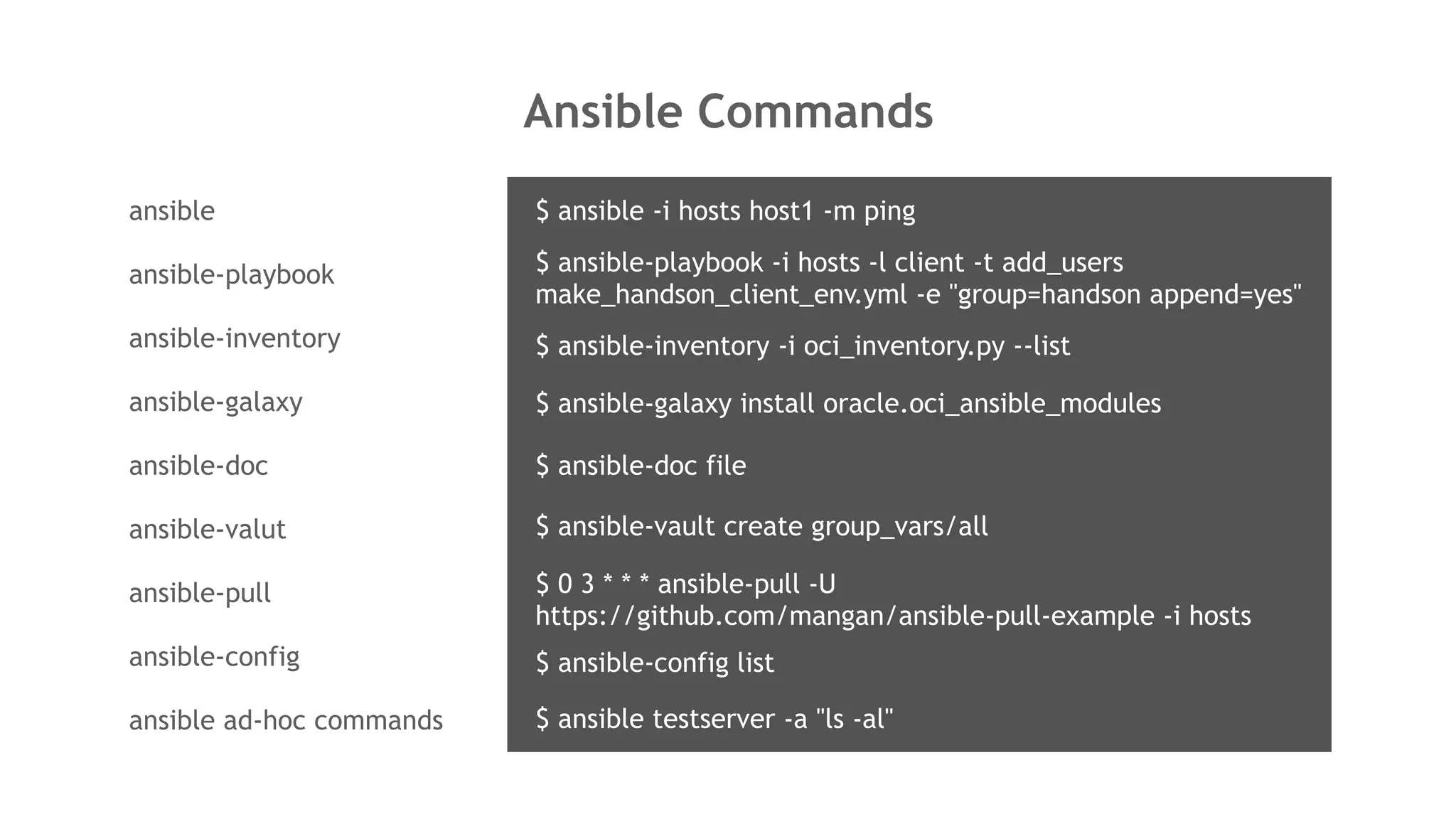
Ansible Commands
ansible
ansible-playbook
ansible-inventory
ansible-galaxy
ansible-doc
ansible-valut
ansible-pull
ansible-config
ansible ad-hoc commands
$ ansible-playbook -i hosts -l client -t add_users
make_handson_client_env.yml -e "group=handson append=yes"
$ ansible-inventory -i oci_inventory.py --list
$ ansible-galaxy install oracle.oci_ansible_modules
$ ansible-doc file
$ ansible-vault create group_vars/all
$ 0 3 * * * ansible-pull -U
https://github.com/mangan/ansible-pull-example -i hosts
$ ansible-config list
$ ansible testserver -a "ls -al"
$ ansible -i hosts host1 -m ping
Playbook Demo
Advanced Topics
https://github.com/ansible/awx
https://www.ansible.com/products/tower
https://docs.ansible.com/ansible/latest/reference_appendices/test_strategies.html
https://docs.ansible.com/ansible/latest/reference_appendices/special_variables.html
https://docs.ansible.com/ansible/latest/user_guide/playbooks_best_practices.html#playbooks-best-practices
Best Practices
- Dynamic Inventory PlugIn
- Group and Host Variables
- Top Level Playbooks Are Separated By Role
- Task And Handler Organization For A Role
- Building Ansible Modules
- Vaults
Testing Strategies
- The Right Level of Testing
- Check Mode As A Drift Test
- Modules That Are Useful for Testing
- Testing Lifecycle
- Integrating Testing With Rolling Updates
- Achieving Continuous Deployment
Special Variables
- Magic
- Facts
- Connection Variables
- Configuration
UI Console
- Ansible Tower
- Ansible AWX
Oracle Ansible Module
• Dynamic Inventory Script
• Security and IAM
• Logging/Telemetry
• Retries/Backoff
• Idempotency
OCI ansible modules architecture diagram
• Services supported
1. Block Volume
2. Compute
3. Container Engine for Kubernetes Service (OKE)
4. Database (including support for Autonomous Transaction Processing
and Autonomous Data Warehouse Services)
5. Edge Services (DNS, WAF)
6. IAM
7. Load Balancing
8. Networking
9. Object Storage
10.File Storage
11.Email Delivery
12.Search
Oracle Ansible Module
OCI Ansible Modules (251)
Oracle Ansible Dynamic Inventory
ansible-galaxy
https://galaxy.ansible.com/oracle/oci_ansible_modules
Output (JSON)
ansible-inventory -i ~/.ansible/roles/oracle.oci_ansible_modules/
inventory-script/oci_inventory.py --list
Dynamic Inventory Demo
Terraform and Ansible with OCI
nginx.ymlmariadb.yml
phpfpm.yml wordpress.yml
HTTP
Dynamic
Inventory
HTTP
SSH
compartment.tf
vcn.tf
compute.tf
1
OCI
Terraform Plug-in
2
3
OCI
Ansible Module
4
5
6
Provisioning
Configuration
전체 시나리오
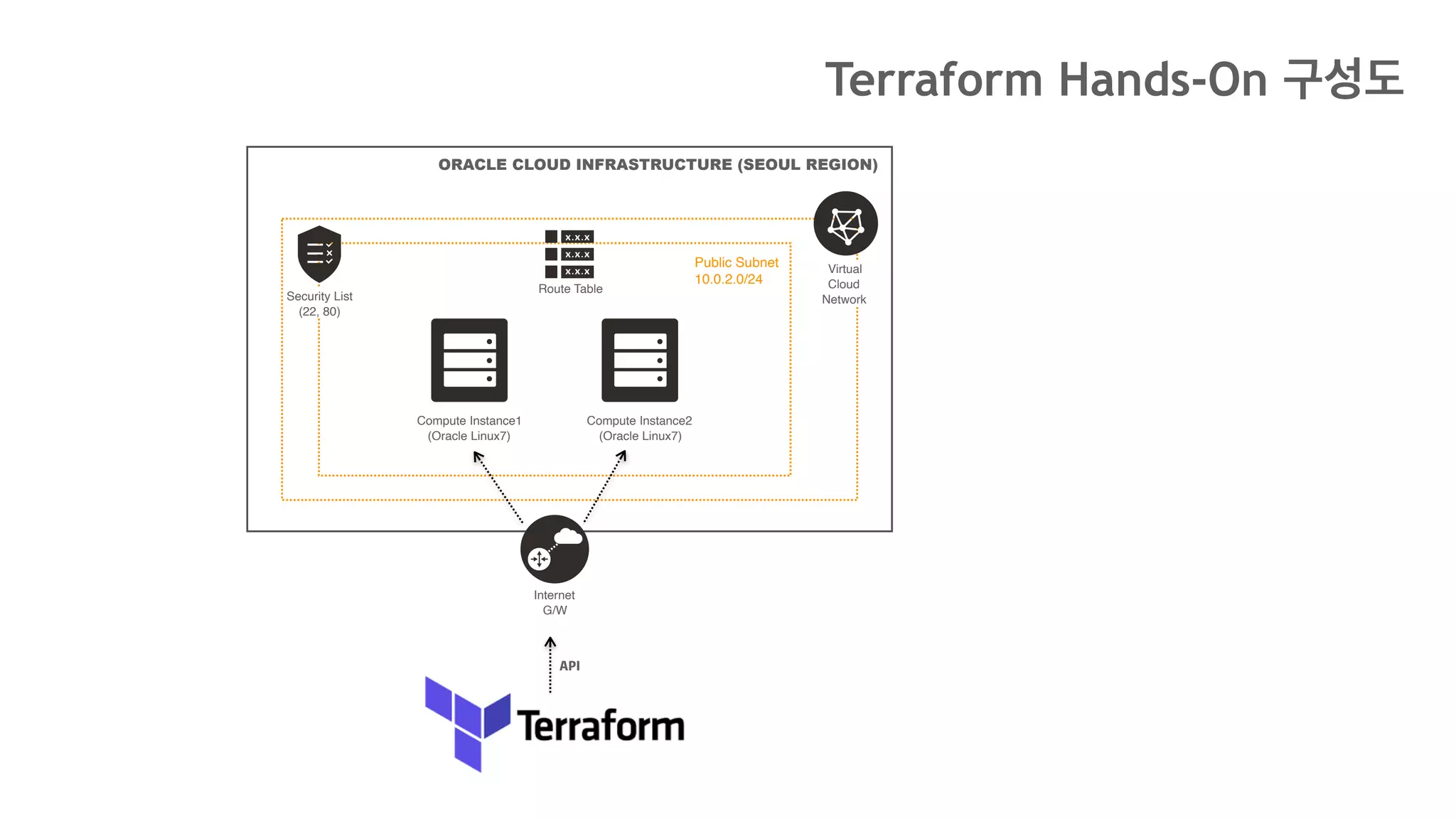
ORACLE CLOUD INFRASTRUCTURE (SEOUL REGION)
Virtual
Cloud
Network
Public Subnet
10.0.2.0/24
Internet
G/W
Security List
(22, 80)
Route Table
Compute Instance1
(Oracle Linux7)
Compute Instance2
(Oracle Linux7)
API
Terraform Hands-On 구성도
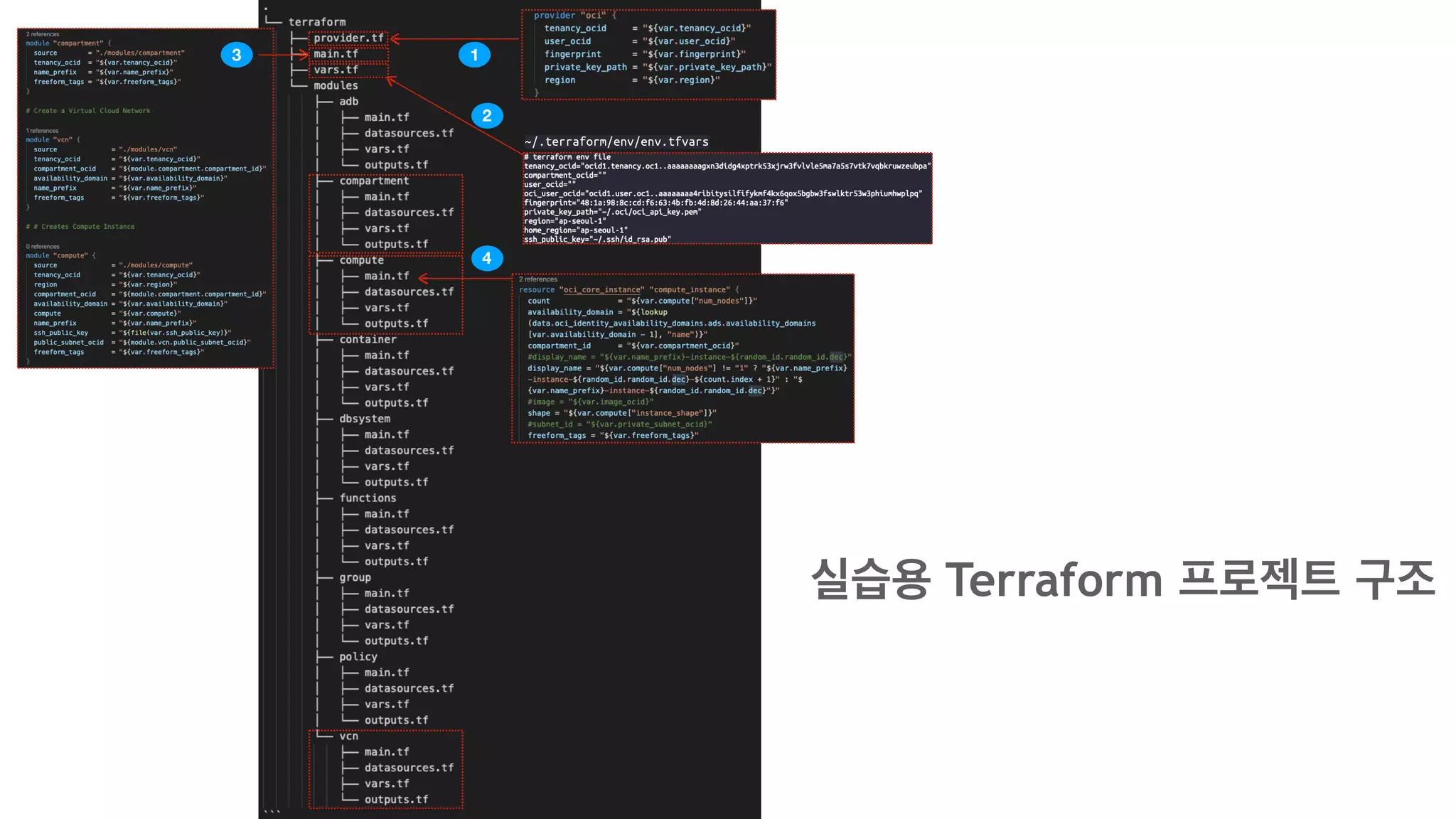
~/.terraform/env/env.tfvars
2
3
4
1
실습용 Terraform 프로젝트 구조
~/.terraform/env/env.tfvars
1
2
사용
사용
4
3
실습용 Terraform 프로젝트 구조
- 변수 사용
할당
ORACLE CLOUD INFRASTRUCTURE (SEOUL REGION)
Virtual
Cloud
Network
Public Subnet
10.0.2.0/24
Security List
(22, 80)
Route Table
Compute
Instance1
(Oracle Linux7)
Compute
Instance2
(Oracle Linux7)
SSH
Internet
G/W
Ansible Hands-On 구성도
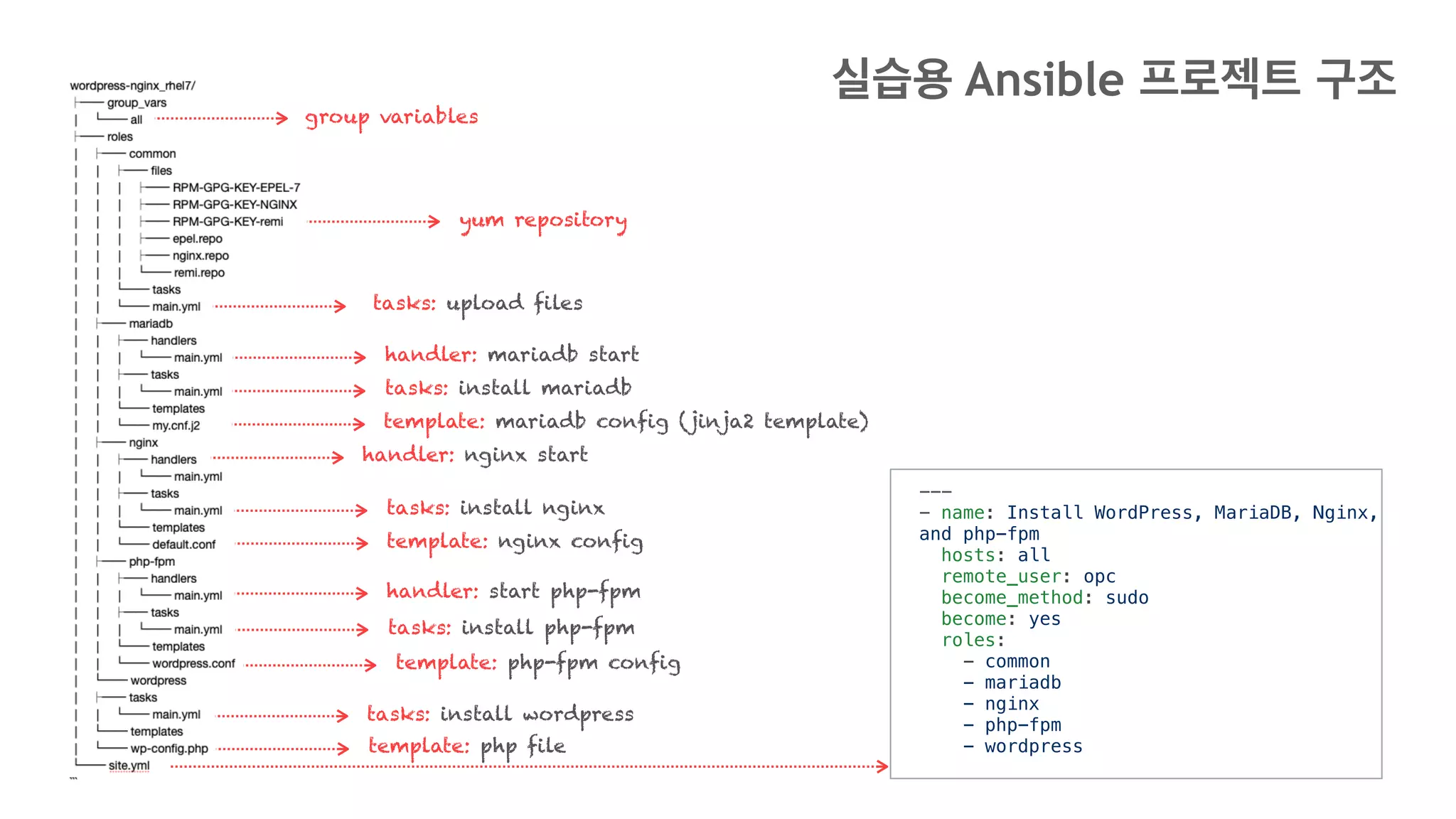
yum repository
tasks: upload files
handler: mariadb start
tasks: install mariadb
template: mariadb config (jinja2 template)
handler: nginx start
tasks: install nginx
template: nginx config
handler: start php-fpm
tasks: install php-fpm
template: php-fpm config
tasks: install wordpress
template: php file
group variables
---
- name: Install WordPress, MariaDB, Nginx,
and php-fpm
hosts: all
remote_user: opc
become_method: sudo
become: yes
roles:
- common
- mariadb
- nginx
- php-fpm
- wordpress
실습용 Ansible 프로젝트 구조
Copyright © 2019, Oracle and/or its affiliates. All rights reserved. | Confidential – Oracle Internal/Restricted/Highly Restricted
감사합니다
42

Ansible with oci

  • 1.
    Copyright © 2017,Oracle and/or its affiliates. All rights reserved. | Confidential – Oracle Internal/Restricted/Highly Restricted 1 th 김동후 donghu.kim@oracle.com Ansible with OCI 2020.1.18 16 thOracle Developer Meetup
  • 2.
    Who is thisguy? --- name: Kim Donghu experience: - 10 years experienced Java Developer. - 8 years experienced Solution Engineer @ Oracle Korea interests: - DevOps - Cloud Native - MSA - Front-End Frameworks
  • 3.
    { "name": "Kim Donghu", "experience":[ "10 years experienced Java Developer.", "8 years experienced Solution Engineer @ Oracle Korea" ], "interests": [ "DevOps", "Cloud Native", "MSA", "Front-End Frameworks" ] } Who is this guy?
  • 4.
    Ansible named fromnovel <<Ender's Game>>. It is a fictional superluminal communication device.
  • 5.
  • 6.
    Ansible is... • 오픈소스구성관리 및 프로비저닝 도구 (similar to Chef, Puppet, Salt) • 실행 작업을 작성하기 쉬운 YAML 형식으로 정의 • SSH 접속만 가능하면 대부분 Ansible을 통해 작업을 수행 • Agentless: 대상 서버에 Agent 설치가 필요 없음 • Idempotency: 같은 작업을 여러번 수행하더라도 결과는 같음
  • 7.
    Agentless... Application Servers (no agent) DatabaseServers (no agent) Web Servers (no agent) SSH push push push You don't have to install something extra onto the remote hosts you want to manage.
  • 8.
    Idempotency... SSH 1. create a cron job 2. create thesame cron job 3. create the same cron job only 1 cron job non-idempotent - file - shell - command --- - hosts: dev-servers tasks: - shell: echo test >> /tmp/forbar
  • 9.
  • 10.
  • 11.
    What can itautomate? Infrastructure Provisioning Configuration Management Application Deployment SSH
  • 12.
    Ansible Architecture Ansible ControlNode (Desktop, Laptop) Playbook (YAML) - name connection hosts: DB tasks: module .... - name connection hosts: WEB tasks: module .... ssh ssh pip install ansible Inventory (hostfile) [WEB] 10.0.1.100 10.0.2.100 10.0.3.100 [DB] 10.0.4.100 10.0.5.100 WEB (Managed Node) 10.0.1.100 10.0.2.100 10.0.3.100 DB (Managed Node) 10.0.5.10010.0.4.100
  • 13.
    How to installAnsible? Control Node Requirements • Python 2 (version 2.7) • Python 3 (version 3.5 and higher) • Windows is not supported for the control node Managed Node Requirements • Native OpenSSH (1.3 or later) • By default this uses sftp • If that's not available, you can switch to scp • Python 2 (2.6 or later) or Python 3 (3.5 or later) Installing Ansible (RHEL and CentOS) $ yum install python $ yum install python-pip $ pip install virtualenv $ pip install ansible
  • 14.
    What is AnsibleInventory? mail.example.com [WEB] 10.0.1.100 10.0.2.100 10.0.3.100 [DB] 10.0.4.100 10.0.5.100 INI, GROUP, HOST WEB: hosts: 10.0.1.100: 10.0.2.100: vars: some_server: some_server=test.exam ple.com YAML, HOST, HOST VAR [WEB] host1 ansible_connection=ssh ansible_host=10.0.1.11 ansible_user=opc host2 ansible_connection=ssh ansible_host=10.0.1.12 ansible_user=opc INI, GROUP, HOST, HOST VAR [WEB] 10.0.1.100 [WAS1:children] 10.0.1.101 10.0.1.102 [WAS1:vars] some_server=test.exampl e.com INI, GROUP, CHILD GROUP & VAR • 기본 Inventory File: /etc/ansible/hosts • 별도의 경로에 별도의 파일로 생성 가능[Inventory] • host, group, group children에 대한 변 수를 별도의 파일로 관리 가능 (권장) • Managed Node (구성할 리모트 서버)에 대 한 호스트 정보를 가짐, 그룹과 호스트로 관리
  • 15.
    Playbook - Basic --- -name: Web Server Play hosts: web remote_user: opc become_method: sudo become: yes tasks: - name: add web user user: name: webuser shell: /bin/bash append: yes state: present tags: - add_web_user - name: DB Server Play hosts: db remote_user: opc tasks: - name: add db user user: name: oracle shell: /bin/bash append: yes state: present tags: - add_db_user ... YAML https://docs.ansible.com/ansible/2.4/playbooks_keywords.html Playbook keywords Playbook Keywords Tasks Module Module Input Parameters Tags Play1 Play2
  • 16.
    Playbook - Keywords --- -name: Web Server Play hosts: web remote_user: opc become_method: sudo become: yes tasks: YAML Keywords: Common Playbook Objects • Play • Role • Block • Task Keywords
  • 17.
    Playbook - Tasks --- -name: Web Server Play hosts: web remote_user: opc become_method: sudo become: yes tasks: - name: add web user user: name: 'webuser' shell: /bin/bash append: yes state: present tags: - add_web_user - name: debug debug: msg: "debug..." YAML Each task contains: • Task name • Module • Module Parameter • Conditions (when, failed_when..) • Processing directives (become, register..) Task1 Task2
  • 18.
    Playbook - Module --- -name: Web Server Play hosts: web remote_user: opc become_method: sudo become: yes tasks: - name: add web user user: name: 'webuser' shell: /bin/bash append: yes state: present tags: - add_web_user - name: debug debug: msg: "debug..." YAML https://docs.ansible.com/ansible/latest/modules/modules_by_category.html User Module Module Input Parameters Debug Module Module Input Parameters Ansible Module List
  • 19.
    Playbook - Workingwith Modules https://docs.ansible.com/ansible/latest/modules/find_module.html#find-module 예) File find Module
  • 20.
    Playbook - Workingwith Modules Input Parameters Return Values • Return Values는 Ansible에서 기본 제공하는 Common Return Value와 Internal 사용을 위한 Value를 별도 제공 https://docs.ansible.com/ansible/latest/reference_appendices/common_return_values.html
  • 21.
    Playbook - Workingwith Modules - name: Recursively find /tmp files older than 2 days find: paths: /tmp age: 2d recurse: yes register: result - name: print find files result debug: msg: "{{ result }}" find Module 사용 예시 Input Parameter find Module Capture return value to a variable debug Module Print output variable < TASK [print find files result] > ok: [1.2.3.4] => { "result": { "changed": false, "examined": 3119, "files": [ { "atime": 1483973253.7295375, ... "mode": "0600", "mtime": 1483973253.7295375, "nlink": 1, "path": "/tmp/delme",
  • 22.
    Playbook - Variables --- -name: Web Server Play hosts: web vars: web user_name: webuser vars_files: - /home/user/ansible/users.yml remote_user: opc become_method: sudo become: yes tasks: - name: add web user user: name: '{{ user_name }}' shell: /bin/bash append: yes state: present tags: - add_web_user YAML --- users: - user: user1 tenancy: ocid1.tenancy.oc1.. region: ap-seoul-1 - user: user2 tenancy: ocid1.tenancy.oc1.. region: ap-seoul-1 vars ansible-playbook release.yml --extra-vars "user_name=webuser" extra vars inventory vars host_vars, group_vars - /etc/ansible/hosts/host_vars/{host} - /etc/ansible/hosts/group_vars/{group} var file facts ansible hostname -m setup - ansible_hostname, ansible_version.. Role Defaults The lowest priority of any variables available
  • 23.
    Playbook - Handler --- -name: Web Server Play hosts: web remote_user: opc become_method: sudo become: yes tasks: - name: httpd package is present yum: name: httpd state: latest notify: Restart httpd handlers: httpd package is present - name: Restart httpd service: httpd name: httpd state: restarted YAML notify handler Handlers: Running Operations On Change • Only run if triggered by the notify directive • Any module can be used for the handler action • Indicates a change in the system state
  • 24.
    Playbook - TemplatesYAML --- -name: Web Server Play hosts: web remote_user: opc become_method: sudo become: yes tasks: - name: Install nginx yum: name: nginx state: present - name: Copy nginx conf for wordpress - template: src=default.conf dest=/ etc/nginx/conf.d/default.conf notify: restart nginx server { listen {{ nginx_port }} default_server; server_name {{ server_hostname }}; root /src/wordpress/ ; client_max_body_size 64M; location ~* /(?:uploads|files)/.*.php$ { deny all; } .... • Jinja is a modern and designer-friendly templating language for Python • Jinja2 template language used in Ansible • {% … %} for control statements (conditions) • {{ … }} for expressions (variables) • {# … #} for comments (describe the task) Jinja2 Template default.conf How it works
  • 25.
    Playbook - Roles --- -name: WordPress,MariaDB,NginX, php-fpm hosts: all remote_user: opc become_method: sudo become: yes roles: - common - mariadb - nginx - php-fpm - wordpress YAML site.yml roles/ common/ tasks/ handlers/ files/ templates/ vars/ defaults/ meta/ Role Directory Structure The main list of tasks Handlers (used by this role or anywhere) Can be deployed via this role Can be deployed via this role Other variables for the role Default variables for the role Some meta data for this role Using Role Ansible Galaxy • Free site for finding, downloading, rating, and reviewing all kinds of community developed Ansible roles (https://galaxy.ansible.com) • Command line tool for Ansible Galaxy: ansible-galaxy Using ansible-galaxy • ansible-galaxy init --force common • ansible-galaxy install oracle.oci_ansible_modules • ansible-galaxy remove oracle.oci_ansible_modules • ansible-galaxy list
  • 26.
    Playbook - Conditionals& Loops Loop and Conditionals --- tasks: - command: echo {{ item }} loop: [ 0, 2, 4, 6, 8, 10 ] when: item > 5 When --- tasks: - name: "shut down Debian flavored systems" command: /sbin/shutdown -t now when: ansible_facts['os_family'] == "Debian" # note that all variables can be used directly in conditionals without double curly braces Iterating over a simple list --- - name: add several users user: name: "{{ item }}" state: present groups: "wheel" loop: - testuser1 - testuser2 Iterating over a list of hashes --- - name: add several users user: name: "{{ item.name }}" state: present groups: "{{ item.groups }}" loop: - { name: 'testuser1', groups: 'wheel' } - { name: 'testuser2', groups: 'root' } with_list --- - name: with_list debug: msg: "{{ item }}" with_list: - one - two with_items --- - name: with_items debug: msg: "{{ item }}" with_items: "{{ items }}" with_list -> loop loop and the flatten filter.
  • 27.
    Ansible Commands ansible ansible-playbook ansible-inventory ansible-galaxy ansible-doc ansible-valut ansible-pull ansible-config ansible ad-hoccommands $ ansible-playbook -i hosts -l client -t add_users make_handson_client_env.yml -e "group=handson append=yes" $ ansible-inventory -i oci_inventory.py --list $ ansible-galaxy install oracle.oci_ansible_modules $ ansible-doc file $ ansible-vault create group_vars/all $ 0 3 * * * ansible-pull -U https://github.com/mangan/ansible-pull-example -i hosts $ ansible-config list $ ansible testserver -a "ls -al" $ ansible -i hosts host1 -m ping
  • 28.
  • 29.
    Advanced Topics https://github.com/ansible/awx https://www.ansible.com/products/tower https://docs.ansible.com/ansible/latest/reference_appendices/test_strategies.html https://docs.ansible.com/ansible/latest/reference_appendices/special_variables.html https://docs.ansible.com/ansible/latest/user_guide/playbooks_best_practices.html#playbooks-best-practices Best Practices -Dynamic Inventory PlugIn - Group and Host Variables - Top Level Playbooks Are Separated By Role - Task And Handler Organization For A Role - Building Ansible Modules - Vaults Testing Strategies - The Right Level of Testing - Check Mode As A Drift Test - Modules That Are Useful for Testing - Testing Lifecycle - Integrating Testing With Rolling Updates - Achieving Continuous Deployment Special Variables - Magic - Facts - Connection Variables - Configuration UI Console - Ansible Tower - Ansible AWX
  • 30.
    Oracle Ansible Module •Dynamic Inventory Script • Security and IAM • Logging/Telemetry • Retries/Backoff • Idempotency OCI ansible modules architecture diagram • Services supported 1. Block Volume 2. Compute 3. Container Engine for Kubernetes Service (OKE) 4. Database (including support for Autonomous Transaction Processing and Autonomous Data Warehouse Services) 5. Edge Services (DNS, WAF) 6. IAM 7. Load Balancing 8. Networking 9. Object Storage 10.File Storage 11.Email Delivery 12.Search
  • 31.
    Oracle Ansible Module OCIAnsible Modules (251)
  • 32.
    Oracle Ansible DynamicInventory ansible-galaxy https://galaxy.ansible.com/oracle/oci_ansible_modules Output (JSON) ansible-inventory -i ~/.ansible/roles/oracle.oci_ansible_modules/ inventory-script/oci_inventory.py --list
  • 33.
  • 34.
  • 35.
  • 36.
    ORACLE CLOUD INFRASTRUCTURE(SEOUL REGION) Virtual Cloud Network Public Subnet 10.0.2.0/24 Internet G/W Security List (22, 80) Route Table Compute Instance1 (Oracle Linux7) Compute Instance2 (Oracle Linux7) API Terraform Hands-On 구성도
  • 37.
  • 38.
  • 39.
    ORACLE CLOUD INFRASTRUCTURE(SEOUL REGION) Virtual Cloud Network Public Subnet 10.0.2.0/24 Security List (22, 80) Route Table Compute Instance1 (Oracle Linux7) Compute Instance2 (Oracle Linux7) SSH Internet G/W Ansible Hands-On 구성도
  • 40.
    yum repository tasks: uploadfiles handler: mariadb start tasks: install mariadb template: mariadb config (jinja2 template) handler: nginx start tasks: install nginx template: nginx config handler: start php-fpm tasks: install php-fpm template: php-fpm config tasks: install wordpress template: php file group variables --- - name: Install WordPress, MariaDB, Nginx, and php-fpm hosts: all remote_user: opc become_method: sudo become: yes roles: - common - mariadb - nginx - php-fpm - wordpress 실습용 Ansible 프로젝트 구조
  • 42.
    Copyright © 2019,Oracle and/or its affiliates. All rights reserved. | Confidential – Oracle Internal/Restricted/Highly Restricted 감사합니다 42