Agenda
Introduction
FaaS Overview
AWS Services
Attack Vectors
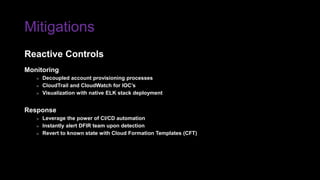
Mitigations
Introduction
Bryan McAninch, a.k.a aph3x
» @BryanMcAninch
Founder at Prevade Cybersecurity
» @PrevadeLLC
Background
» 20+ years in pentesting, security architecture, digital forensics
Research Interests
» Cloud, Containerization, Artificial Intelligence
Whoami
Introduction
Rich Jones — @GUNdotIO
» Gone in 60 Milliseconds
Andrew Krug — @AndrewKrug
» Hacking Serverless Runtimes
DFW Hacker Community
» @NTXCSG, @Dallas_Hackers, @DC214DFW, @OWASPDallas
Inspirational Sources
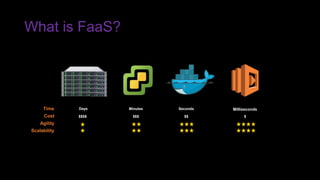
What is FaaS?
Function as as Service, a.k.a. “Serverless”
» Application deployment
» Event-driven execution
Benefits
» Minimal cloud infrastructure
» Minimal operational overhead
Growth Estimates
» Valuation of $7.75B USD by 2021.
» Forecasted to grow 33%
What is FaaS?
Days Seconds MillisecondsMinutesTime
Cost $$$$ $$$ $$ $
Agility
Scalability
AWS Services
A serverless compute service that runs your code in response to events and
automatically manages the underlying compute resources for you. You can use AWS
Lambda to extend other AWS services with custom logic, or create your own back-
end services that operate at AWS scale, performance, and security.
Lambda Overview
AWS Services
A serverless compute service that runs your code in response to events and
automatically manages the underlying compute resources for you. You can use AWS
Lambda to extend other AWS services with custom logic, or create your own back-
end services that operate at AWS scale, performance, and security.
Lambda Overview
AWS Services
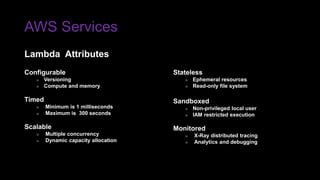
Lambda Attributes
Stateless
» Ephemeral resources
» Read-only file system
Sandboxed
» Non-privileged local user
» IAM restricted execution
Monitored
» X-Ray distributed tracing
» Analytics and debugging
Configurable
» Versioning
» Compute and memory
Timed
» Minimum is 1 milliseconds
» Maximum is 300 seconds
Scalable
» Multiple concurrency
» Dynamic capacity allocation
AWS Services
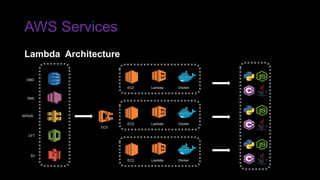
ECS
SNS
APIGW
CFT
S3
DBD
Lambda Architecture
EC2 DockerLambda
EC2 DockerLambda
EC2 DockerLambda
AWS Services
Lambda Example
print('Loading function…')
def lambda_handler(event, context):
print("event['key1']) = " + event['key1'])
print("event['key2']) = " + event['key2'])
print("event['key3']) = " + event['key3'])
return event['key1']
": "value3", "key2": "value2", "key1": "value1"}
{
"key3": "value3",
"key2": "value2",
"key1": "value1”
}
Loading function…
event['key1']) = value1
event['key2']) = value2
event['key3’]) = value3
value1
INPUT CODE
OUTPUT
AWS Services
Identity and Access Management enables you to securely control access to AWS
services and resources for your users. Using IAM, you can create and manage AWS
users and groups, and use permissions to allow and deny their access to AWS
resources.
IAM Overview
AWS Services
IAM Attributes
User
» A person or service for interacting with AWS console, API, CLI
» Authenticated with name, password, access keys
» Created with no permissions by default
Group
» A collection of IAM users with common permissions
» Administrative convenience for granting and revoking access
AWS Services
IAM Attributes
Role
» An identity with permissions but no associated credentials
» Assumed by a resource to temporarily gain access for a specific task
» Retrieves credentials locally from EC2 metadata or AWS Simple Token Service
Policy
» JSON formatted object that defines explicit permissions
» AWS managed or custom inline
» Extremely granular, but supports entity wildcards
AWS Services
IAM Confused
{
"Version": "2012-10-17",
"Id": "some-unique-id”,
"Statement": {
"Sid": "1",
"Effect": "Allow",
"Principal": {"AWS": "arn:aws:iam::111222333444:user/colonel_sanders"},
"Action": [
"s3:PutObject”,
"s3:GetObject" ],
"Resource": "arn:aws:s3:::kfc-bucket/*",
"Condition": {
"DateGreaterThan": {
"aws:CurrentTime": "2017-11-04T00:00:00Z”
}
}
}
}
Attack Vectors
All attack vectors shown assume applicable permissions have been granted through
IAM roles and policies.
Because of IAM policy granularity, esoteric nature, and deny-by-default model, it is
not unusual for permissions to be lax.
Culprits include serverless web service frameworks, automation tools, third party
solutions, and untrained cloud administrators.
Disclaimer
Attack Vectors
Active Reconnaissance
Credential Hijacking
Persistent Remote Access
Reverse Engineering
Attack Vectors
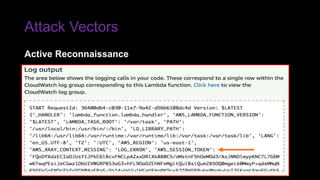
» Where are credentials stored?
» How can credentials be abused?
» What is the operating system?
» How is the network configured?
» What are the file system permissions?
» Which processes are running?
» How is our code bootstrapped?
» What data can we control?
» How can we change the runtime execution flow?
Curious Minds Want to Know…
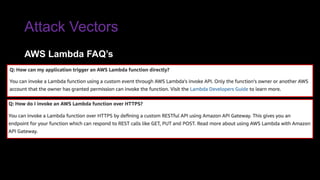
Attack Vectors
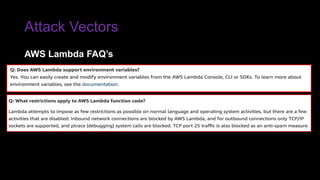
AWS Lambda FAQ’s
Attack Vectors
AWS Lambda FAQ’s
Attack Vectors
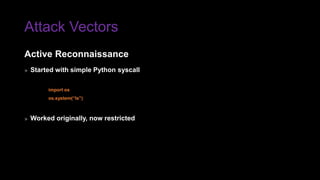
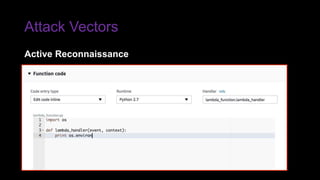
» Started with simple Python syscall
import os
os.system(“ls”)
» Worked originally, now restricted
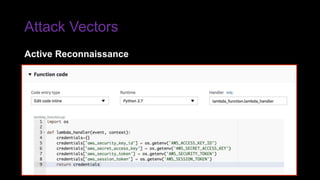
Active Reconnaissance
Attack Vectors
Active Reconnaissance
Attack Vectors
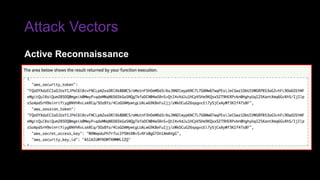
Active Reconnaissance
Attack Vectors
Active Reconnaissance
Attack Vectors
Active Reconnaissance
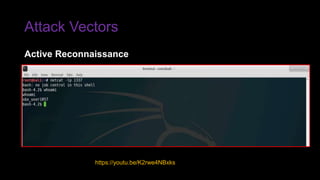
Attack Vectors
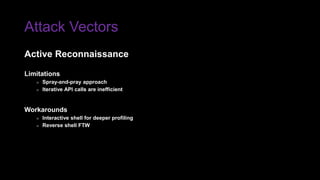
Limitations
» Spray-and-pray approach
» Iterative API calls are inefficient
Workarounds
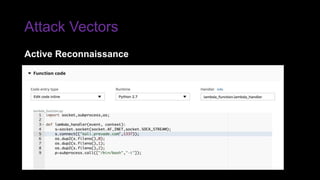
» Interactive shell for deeper profiling
» Reverse shell FTW
Active Reconnaissance
Attack Vectors
Active Reconnaissance
Attack Vectors
Active Reconnaissance
https://youtu.be/K2rwe4NBxks
Attack Vectors
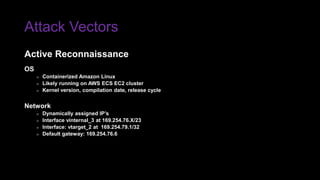
OS
» Containerized Amazon Linux
» Likely running on AWS ECS EC2 cluster
» Kernel version, compilation date, release cycle
Network
» Dynamically assigned IP’s
» Interface vinternal_3 at 169.254.76.X/23
» Interface: vtarget_2 at 169.254.79.1/32
» Default gateway: 169.254.76.6
Active Reconnaissance
Attack Vectors
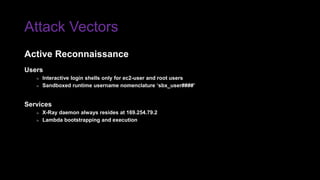
Users
» Interactive login shells only for ec2-user and root users
» Sandboxed runtime username nomenclature ‘sbx_user####’
Services
» X-Ray daemon always resides at 169.254.79.2
» Lambda bootstrapping and execution
Active Reconnaissance
Attack Vectors
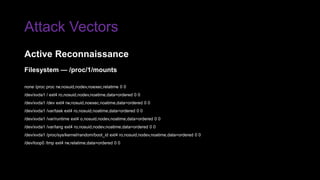
Filesystem — /proc/1/mounts
none /proc proc rw,nosuid,nodev,noexec,relatime 0 0
/dev/xvda1 / ext4 ro,nosuid,nodev,noatime,data=ordered 0 0
/dev/xvda1 /dev ext4 rw,nosuid,noexec,noatime,data=ordered 0 0
/dev/xvda1 /var/task ext4 ro,nosuid,noatime,data=ordered 0 0
/dev/xvda1 /var/runtime ext4 o,nosuid,nodev,noatime,data=ordered 0 0
/dev/xvda1 /var/lang ext4 ro,nosuid,nodev,noatime,data=ordered 0 0
/dev/xvda1 /proc/sys/kernel/random/boot_id ext4 ro,nosuid,nodev,noatime,data=ordered 0 0
/dev/loop0 /tmp ext4 rw,relatime,data=ordered 0 0
Active Reconnaissance
Attack Vectors
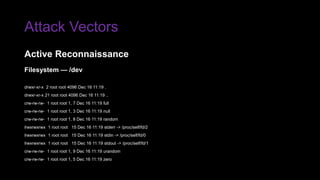
Filesystem — /dev
drwxr-xr-x 2 root root 4096 Dec 16 11:19 .
drwxr-xr-x 21 root root 4096 Dec 16 11:19 ..
crw-rw-rw- 1 root root 1, 7 Dec 16 11:19 full
crw-rw-rw- 1 root root 1, 3 Dec 16 11:19 null
crw-rw-rw- 1 root root 1, 8 Dec 16 11:19 random
lrwxrwxrwx 1 root root 15 Dec 16 11:19 stderr -> /proc/self/fd/2
lrwxrwxrwx 1 root root 15 Dec 16 11:19 stdin -> /proc/self/fd/0
lrwxrwxrwx 1 root root 15 Dec 16 11:19 stdout -> /proc/self/fd/1
crw-rw-rw- 1 root root 1, 9 Dec 16 11:19 urandom
crw-rw-rw- 1 root root 1, 5 Dec 16 11:19 zero
Active Reconnaissance
Attack Vectors
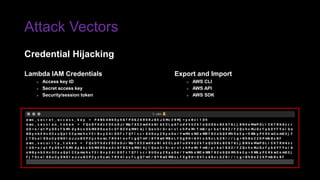
Export and Import
» AWS CLI
» AWS API
» AWS SDK
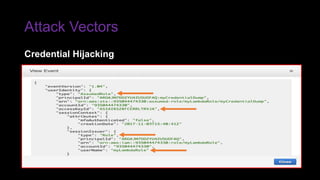
Lambda IAM Credentials
» Access key ID
» Secret access key
» Security/session token
Credential Hijacking
Attack Vectors
Credential Hijacking
Attack Vectors
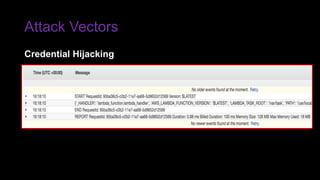
Credential Hijacking
Attack Vectors
Limitations
» Lambda function max lifetime (300 seconds)
» Security token max lifetime (3600 seconds)
Workarounds
» Session token renewal
» Persistent remote access
Credential Hijacking
Attack Vectors
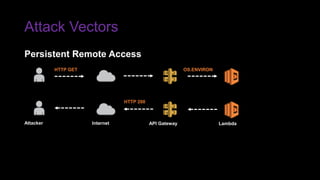
HTTP GET
HTTP 200
Attacker Internet API Gateway Lambda
Persistent Remote Access
OS.ENVIRON
Attack Vectors
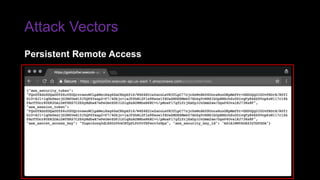
Persistent Remote Access
Attack Vectors
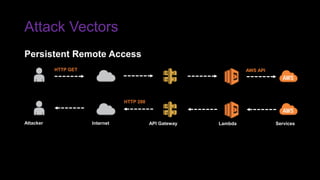
HTTP GET
HTTP 200
Attacker Internet API Gateway Lambda Services
Persistent Remote Access
AWS API
Attack Vectors
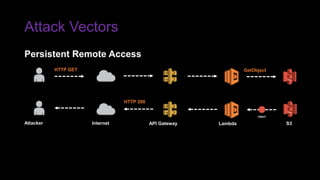
HTTP 200
Attacker Internet API Gateway Lambda S3
GetObject
Persistent Remote Access
object
HTTP GET
Attack Vectors
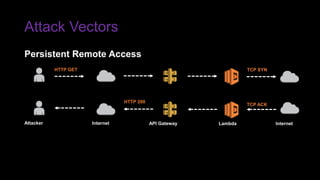
Persistent Remote Access
TCP ACK
Attacker Internet API Gateway Lambda Internet
TCP SYNHTTP GET
HTTP 200
Attack Vectors
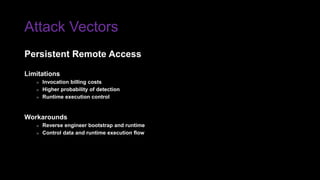
Limitations
» Invocation billing costs
» Higher probability of detection
» Runtime execution control
Workarounds
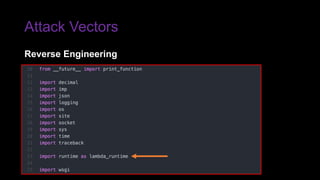
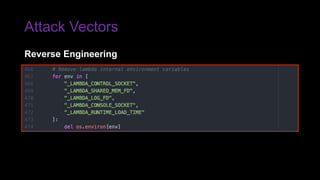
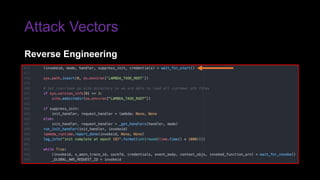
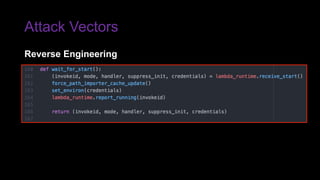
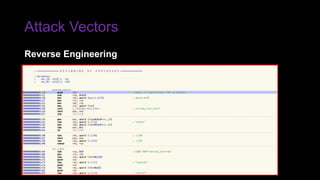
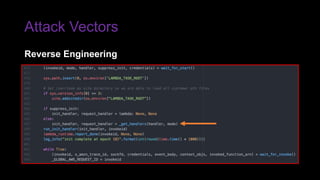
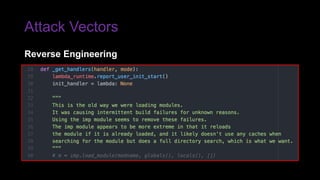
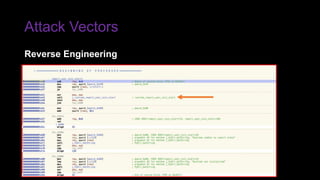
» Reverse engineer bootstrap and runtime
» Control data and runtime execution flow
Persistent Remote Access
Attack Vectors
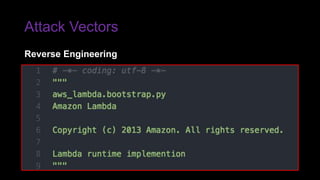
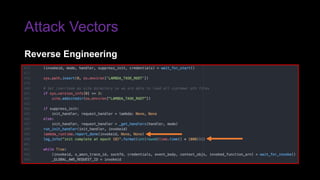
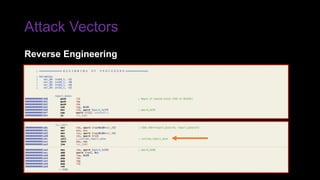
Reverse Engineering
Attack Vectors
Reverse Engineering
Attack Vectors
Reverse Engineering
Attack Vectors
Reverse Engineering
Attack Vectors
Reverse Engineering
Attack Vectors
Reverse Engineering
Attack Vectors
Reverse Engineering
Attack Vectors
Reverse Engineering
Attack Vectors
Reverse Engineering
Attack Vectors
Reverse Engineering
Attack Vectors
Reverse Engineering
Attack Vectors
Execution Control
» Manipulate the cpython interpreter
» Set our own PYTHONPATH environment variable
» Place our package in $PYTHONPATH with same name
» Our package is loaded instead of intended package
Hypothetical Possibilities
» Spoof Lambda execution time
» Malicious code injection / log poisoning
» Container escape
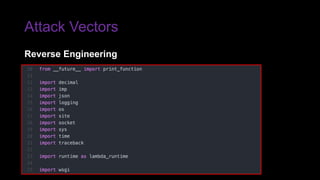
Reverse Engineering
Attack Vectors
Reverse Engineering
Mitigations
Access Control
» Study IAM… for science!
» Least-privilege / need-to-know IAM roles and policies
» Account housekeeping
» Restrict CLI, SDK, API access
Test and Assess
» Peer review Lambda function code
» Integrate into CI/CD pipeline
» Automated SAST pre-deployment
» Infrastructure as Code (IaC)
Proactive Controls
Mitigations
Monitoring
» Decoupled account provisioning processes
» CloudTrail and CloudWatch for IOC’s
» Visualization with native ELK stack deployment
Response
» Leverage the power of CI/CD automation
» Instantly alert DFIR team upon detection
» Revert to known state with Cloud Formation Templates (CFT)
Reactive Controls
The FaaS and the Curious™

The FaaS and the Curious™

  • 2.
  • 4.
    Introduction Bryan McAninch, a.k.aaph3x » @BryanMcAninch Founder at Prevade Cybersecurity » @PrevadeLLC Background » 20+ years in pentesting, security architecture, digital forensics Research Interests » Cloud, Containerization, Artificial Intelligence Whoami
  • 5.
    Introduction Rich Jones —@GUNdotIO » Gone in 60 Milliseconds Andrew Krug — @AndrewKrug » Hacking Serverless Runtimes DFW Hacker Community » @NTXCSG, @Dallas_Hackers, @DC214DFW, @OWASPDallas Inspirational Sources
  • 7.
    What is FaaS? Functionas as Service, a.k.a. “Serverless” » Application deployment » Event-driven execution Benefits » Minimal cloud infrastructure » Minimal operational overhead Growth Estimates » Valuation of $7.75B USD by 2021. » Forecasted to grow 33%
  • 8.
    What is FaaS? DaysSeconds MillisecondsMinutesTime Cost $$$$ $$$ $$ $ Agility Scalability
  • 10.
    AWS Services A serverlesscompute service that runs your code in response to events and automatically manages the underlying compute resources for you. You can use AWS Lambda to extend other AWS services with custom logic, or create your own back- end services that operate at AWS scale, performance, and security. Lambda Overview
  • 11.
    AWS Services A serverlesscompute service that runs your code in response to events and automatically manages the underlying compute resources for you. You can use AWS Lambda to extend other AWS services with custom logic, or create your own back- end services that operate at AWS scale, performance, and security. Lambda Overview
  • 12.
    AWS Services Lambda Attributes Stateless »Ephemeral resources » Read-only file system Sandboxed » Non-privileged local user » IAM restricted execution Monitored » X-Ray distributed tracing » Analytics and debugging Configurable » Versioning » Compute and memory Timed » Minimum is 1 milliseconds » Maximum is 300 seconds Scalable » Multiple concurrency » Dynamic capacity allocation
  • 13.
    AWS Services ECS SNS APIGW CFT S3 DBD Lambda Architecture EC2DockerLambda EC2 DockerLambda EC2 DockerLambda
  • 14.
    AWS Services Lambda Example print('Loadingfunction…') def lambda_handler(event, context): print("event['key1']) = " + event['key1']) print("event['key2']) = " + event['key2']) print("event['key3']) = " + event['key3']) return event['key1'] ": "value3", "key2": "value2", "key1": "value1"} { "key3": "value3", "key2": "value2", "key1": "value1” } Loading function… event['key1']) = value1 event['key2']) = value2 event['key3’]) = value3 value1 INPUT CODE OUTPUT
  • 15.
    AWS Services Identity andAccess Management enables you to securely control access to AWS services and resources for your users. Using IAM, you can create and manage AWS users and groups, and use permissions to allow and deny their access to AWS resources. IAM Overview
  • 16.
    AWS Services IAM Attributes User »A person or service for interacting with AWS console, API, CLI » Authenticated with name, password, access keys » Created with no permissions by default Group » A collection of IAM users with common permissions » Administrative convenience for granting and revoking access
  • 17.
    AWS Services IAM Attributes Role »An identity with permissions but no associated credentials » Assumed by a resource to temporarily gain access for a specific task » Retrieves credentials locally from EC2 metadata or AWS Simple Token Service Policy » JSON formatted object that defines explicit permissions » AWS managed or custom inline » Extremely granular, but supports entity wildcards
  • 18.
    AWS Services IAM Confused { "Version":"2012-10-17", "Id": "some-unique-id”, "Statement": { "Sid": "1", "Effect": "Allow", "Principal": {"AWS": "arn:aws:iam::111222333444:user/colonel_sanders"}, "Action": [ "s3:PutObject”, "s3:GetObject" ], "Resource": "arn:aws:s3:::kfc-bucket/*", "Condition": { "DateGreaterThan": { "aws:CurrentTime": "2017-11-04T00:00:00Z” } } } }
  • 20.
    Attack Vectors All attackvectors shown assume applicable permissions have been granted through IAM roles and policies. Because of IAM policy granularity, esoteric nature, and deny-by-default model, it is not unusual for permissions to be lax. Culprits include serverless web service frameworks, automation tools, third party solutions, and untrained cloud administrators. Disclaimer
  • 21.
    Attack Vectors Active Reconnaissance CredentialHijacking Persistent Remote Access Reverse Engineering
  • 22.
    Attack Vectors » Whereare credentials stored? » How can credentials be abused? » What is the operating system? » How is the network configured? » What are the file system permissions? » Which processes are running? » How is our code bootstrapped? » What data can we control? » How can we change the runtime execution flow? Curious Minds Want to Know…
  • 23.
  • 24.
  • 25.
    Attack Vectors » Startedwith simple Python syscall import os os.system(“ls”) » Worked originally, now restricted Active Reconnaissance
  • 26.
  • 27.
  • 28.
  • 29.
  • 30.
    Attack Vectors Limitations » Spray-and-prayapproach » Iterative API calls are inefficient Workarounds » Interactive shell for deeper profiling » Reverse shell FTW Active Reconnaissance
  • 31.
  • 32.
  • 33.
    Attack Vectors OS » ContainerizedAmazon Linux » Likely running on AWS ECS EC2 cluster » Kernel version, compilation date, release cycle Network » Dynamically assigned IP’s » Interface vinternal_3 at 169.254.76.X/23 » Interface: vtarget_2 at 169.254.79.1/32 » Default gateway: 169.254.76.6 Active Reconnaissance
  • 34.
    Attack Vectors Users » Interactivelogin shells only for ec2-user and root users » Sandboxed runtime username nomenclature ‘sbx_user####’ Services » X-Ray daemon always resides at 169.254.79.2 » Lambda bootstrapping and execution Active Reconnaissance
  • 35.
    Attack Vectors Filesystem —/proc/1/mounts none /proc proc rw,nosuid,nodev,noexec,relatime 0 0 /dev/xvda1 / ext4 ro,nosuid,nodev,noatime,data=ordered 0 0 /dev/xvda1 /dev ext4 rw,nosuid,noexec,noatime,data=ordered 0 0 /dev/xvda1 /var/task ext4 ro,nosuid,noatime,data=ordered 0 0 /dev/xvda1 /var/runtime ext4 o,nosuid,nodev,noatime,data=ordered 0 0 /dev/xvda1 /var/lang ext4 ro,nosuid,nodev,noatime,data=ordered 0 0 /dev/xvda1 /proc/sys/kernel/random/boot_id ext4 ro,nosuid,nodev,noatime,data=ordered 0 0 /dev/loop0 /tmp ext4 rw,relatime,data=ordered 0 0 Active Reconnaissance
  • 36.
    Attack Vectors Filesystem —/dev drwxr-xr-x 2 root root 4096 Dec 16 11:19 . drwxr-xr-x 21 root root 4096 Dec 16 11:19 .. crw-rw-rw- 1 root root 1, 7 Dec 16 11:19 full crw-rw-rw- 1 root root 1, 3 Dec 16 11:19 null crw-rw-rw- 1 root root 1, 8 Dec 16 11:19 random lrwxrwxrwx 1 root root 15 Dec 16 11:19 stderr -> /proc/self/fd/2 lrwxrwxrwx 1 root root 15 Dec 16 11:19 stdin -> /proc/self/fd/0 lrwxrwxrwx 1 root root 15 Dec 16 11:19 stdout -> /proc/self/fd/1 crw-rw-rw- 1 root root 1, 9 Dec 16 11:19 urandom crw-rw-rw- 1 root root 1, 5 Dec 16 11:19 zero Active Reconnaissance
  • 37.
    Attack Vectors Export andImport » AWS CLI » AWS API » AWS SDK Lambda IAM Credentials » Access key ID » Secret access key » Security/session token Credential Hijacking
  • 38.
  • 39.
  • 40.
    Attack Vectors Limitations » Lambdafunction max lifetime (300 seconds) » Security token max lifetime (3600 seconds) Workarounds » Session token renewal » Persistent remote access Credential Hijacking
  • 41.
    Attack Vectors HTTP GET HTTP200 Attacker Internet API Gateway Lambda Persistent Remote Access OS.ENVIRON
  • 42.
  • 43.
    Attack Vectors HTTP GET HTTP200 Attacker Internet API Gateway Lambda Services Persistent Remote Access AWS API
  • 44.
    Attack Vectors HTTP 200 AttackerInternet API Gateway Lambda S3 GetObject Persistent Remote Access object HTTP GET
  • 45.
    Attack Vectors Persistent RemoteAccess TCP ACK Attacker Internet API Gateway Lambda Internet TCP SYNHTTP GET HTTP 200
  • 46.
    Attack Vectors Limitations » Invocationbilling costs » Higher probability of detection » Runtime execution control Workarounds » Reverse engineer bootstrap and runtime » Control data and runtime execution flow Persistent Remote Access
  • 47.
  • 48.
  • 49.
  • 50.
  • 51.
  • 52.
  • 53.
  • 54.
  • 55.
  • 56.
  • 57.
  • 58.
    Attack Vectors Execution Control »Manipulate the cpython interpreter » Set our own PYTHONPATH environment variable » Place our package in $PYTHONPATH with same name » Our package is loaded instead of intended package Hypothetical Possibilities » Spoof Lambda execution time » Malicious code injection / log poisoning » Container escape Reverse Engineering
  • 59.
  • 60.
    Mitigations Access Control » StudyIAM… for science! » Least-privilege / need-to-know IAM roles and policies » Account housekeeping » Restrict CLI, SDK, API access Test and Assess » Peer review Lambda function code » Integrate into CI/CD pipeline » Automated SAST pre-deployment » Infrastructure as Code (IaC) Proactive Controls
  • 61.
    Mitigations Monitoring » Decoupled accountprovisioning processes » CloudTrail and CloudWatch for IOC’s » Visualization with native ELK stack deployment Response » Leverage the power of CI/CD automation » Instantly alert DFIR team upon detection » Revert to known state with Cloud Formation Templates (CFT) Reactive Controls

Editor's Notes

  • #29 import os def lambda_handler(event, context): credentials={} credentials['aws_security_key_id'] = os.getenv('AWS_ACCESS_KEY_ID’) credentials['aws_secret_access_key'] = os.getenv('AWS_SECRET_ACCESS_KEY') credentials['aws_security_token'] = os.getenv('AWS_SECURITY_TOKEN') credentials['aws_session_token'] = os.getenv('AWS_SESSION_TOKEN') return credentials
  • #30 import os def lambda_handler(event, context): credentials={} credentials['aws_security_key_id'] = os.getenv('AWS_ACCESS_KEY_ID’) credentials['aws_secret_access_key'] = os.getenv('AWS_SECRET_ACCESS_KEY') credentials['aws_security_token'] = os.getenv('AWS_SECURITY_TOKEN') credentials['aws_session_token'] = os.getenv('AWS_SESSION_TOKEN') return credentials