THE VIRTUAL ASSISTANT TOUR
HI, I M YOUR CORTANA
Asish Padhy
@AsishPadhy
HELLO, HOLA, NAMASTE,
NI HAO…
• Tech Lover and Enthusiast
• 14+ years of building solutions
• Architect and Developer in M365, Azure, AI
and lot many ...
@AsishPadhy
AGENDA
• Microsoft Teams and Bots
• Virtual Assistant Intro
• What it means for organization
• Components & Template
• Design Flow
• Demo
• Skills
• Use Cases and Things to know
@AsishPadhy
MICROSOFT TEAMS
AND BOTS
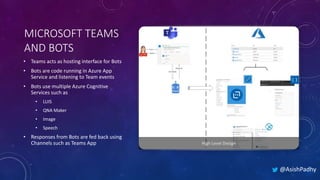
• Teams acts as hosting interface for Bots
• Bots are code running in Azure App
Service and listening to Team events
• Bots use multiple Azure Cognitive
Services such as
• LUIS
• QNA Maker
• Image
• Speech
• Responses from Bots are fed back using
Channels such as Teams App
@AsishPadhy
VIRTUAL ASSISTANT
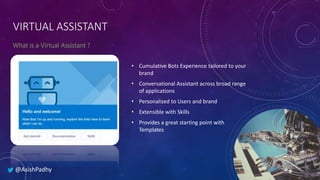
• Cumulative Bots Experience tailored to your
brand
• Conversational Assistant across broad range
of applications
• Personalized to Users and brand
• Extensible with Skills
• Provides a great starting point with
Templates
@AsishPadhy
VIRTUAL ASSISTANT
@AsishPadhy
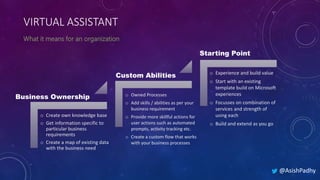
Business Ownership
Custom Abilities
o Create own knowledge base
o Get information specific to
particular business
requirements
o Create a map of existing data
with the business need
o Owned Processes
o Add skills / abilities as per your
business requirement
o Provide more skillful actions for
user actions such as automated
prompts, activity tracking etc.
o Create a custom flow that works
with your business processes
o Experience and build value
o Start with an existing
template build on Microsoft
experiences
o Focusses on combination of
services and strength of
using each
o Build and extend as you go
Starting Point
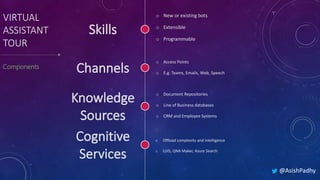
o New or existing bots
o Extensible
o Programmable
VIRTUAL
ASSISTANT
TOUR
@AsishPadhy
o Access Points
o E.g. Teams, Emails, Web, Speech
o Document Repositories
o Line of Business databases
o CRM and Employee Systems
o Offload complexity and intelligence
o LUIS, QNA Maker, Azure Search
VIRTUAL ASSISTANT
@AsishPadhy
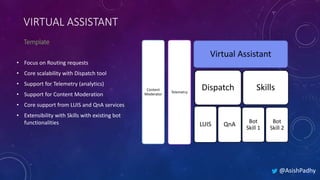
Content
Moderator
Telemetry
Virtual Assistant
Dispatch
LUIS QnA
Skills
Bot
Skill 1
Bot
Skill 2
• Focus on Routing requests
• Core scalability with Dispatch tool
• Support for Telemetry (analytics)
• Support for Content Moderation
• Core support from LUIS and QnA services
• Extensibility with Skills with existing bot
functionalities
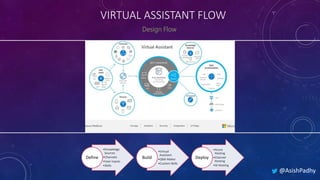
VIRTUAL ASSISTANT FLOW
@AsishPadhy
•Knowledge
Sources
•Channels
•User Inputs
•Skills
Define
•Virtual
Assistant
•QNA Maker
•Custom Skills
Build
•Azure
Hosting
•Channel
Hosting
•AI Hosting
Deploy
DEMO
I AM YOUR CORTANA
@AsishPadhy
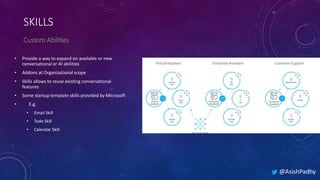
• Provide a way to expand on available or new
conversational or AI abilities
• Addons at Organizational scope
• Skills allows to reuse existing conversational
features
• Some startup template skills provided by Microsoft
• E.g.
• Email Skill
• Todo Skill
• Calendar Skill
SKILLS
@AsishPadhy
CUSTOM SKILLS
• Provided Skill template as a starting point
• Extend an existing custom bot to skill
• Add the skill to virtual assistant using botskills
command
• Update the dispatch skill in assistant
• Support Authentication
• Available Skills CLI tool
@AsishPadhy
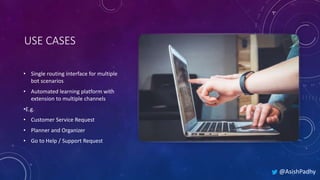
USE CASES
• Single routing interface for multiple
bot scenarios
• Automated learning platform with
extension to multiple channels
•E.g.
• Customer Service Request
• Planner and Organizer
• Go to Help / Support Request
@AsishPadhy
@AsishPadhy
THINGS TO KNOW
 Update Template.json to customize the virtual
assistant azure resources deployment
 Quickly train QnA and LUIS using LU files in
Resources folder under Deployment
 Activate LUIS and assign authoring key to prevent
service drops
 Identify load and plan cost for Azure Search RPUs
 Update Skills dialog for custom prompts and flow
 Deploy the skill to Virtual Assistant after complete
individual testing using bot emulator
 Don’t make skill too specific or heavy. Keep it light and
scalable
 Create more granular independent skills
 Use Direct line Speech for easy accessibility
@AsishPadhy
HELP
Skills
Virtual assistant
Sample Skills Repo
(C#)
Create Virtual
Assistant
Create Skill
https://docs.microsoft.com/en-us/azure/bot-service/bot-
builder-skills-overview?view=azure-bot-service-4.0
https://docs.microsoft.com/en-us/azure/bot-service/bot-builder-
virtual-assistant-introduction?view=azure-bot-service-4.0
https://github.com/microsoft/botframework-
solutions/tree/master/skills/csharp
https://microsoft.github.io/botframework-solutions/virtual-
assistant/tutorials/create-assistant/csharp/1-intro/
https://microsoft.github.io/botframework-
solutions/skills/tutorials/create-skill/csharp/1-intro/
THANK YOU!
Twitter
@asishpadhy
LinkedIn
https://linkedin.com/in/asishpadhy
Blog
https://asishpadhy.com

The virtual assistant tour adelaide

  • 1.
    THE VIRTUAL ASSISTANTTOUR HI, I M YOUR CORTANA Asish Padhy @AsishPadhy
  • 2.
    HELLO, HOLA, NAMASTE, NIHAO… • Tech Lover and Enthusiast • 14+ years of building solutions • Architect and Developer in M365, Azure, AI and lot many ... @AsishPadhy
  • 3.
    AGENDA • Microsoft Teamsand Bots • Virtual Assistant Intro • What it means for organization • Components & Template • Design Flow • Demo • Skills • Use Cases and Things to know @AsishPadhy
  • 4.
    MICROSOFT TEAMS AND BOTS •Teams acts as hosting interface for Bots • Bots are code running in Azure App Service and listening to Team events • Bots use multiple Azure Cognitive Services such as • LUIS • QNA Maker • Image • Speech • Responses from Bots are fed back using Channels such as Teams App @AsishPadhy
  • 5.
    VIRTUAL ASSISTANT • CumulativeBots Experience tailored to your brand • Conversational Assistant across broad range of applications • Personalized to Users and brand • Extensible with Skills • Provides a great starting point with Templates @AsishPadhy
  • 6.
    VIRTUAL ASSISTANT @AsishPadhy Business Ownership CustomAbilities o Create own knowledge base o Get information specific to particular business requirements o Create a map of existing data with the business need o Owned Processes o Add skills / abilities as per your business requirement o Provide more skillful actions for user actions such as automated prompts, activity tracking etc. o Create a custom flow that works with your business processes o Experience and build value o Start with an existing template build on Microsoft experiences o Focusses on combination of services and strength of using each o Build and extend as you go Starting Point
  • 7.
    o New orexisting bots o Extensible o Programmable VIRTUAL ASSISTANT TOUR @AsishPadhy o Access Points o E.g. Teams, Emails, Web, Speech o Document Repositories o Line of Business databases o CRM and Employee Systems o Offload complexity and intelligence o LUIS, QNA Maker, Azure Search
  • 8.
    VIRTUAL ASSISTANT @AsishPadhy Content Moderator Telemetry Virtual Assistant Dispatch LUISQnA Skills Bot Skill 1 Bot Skill 2 • Focus on Routing requests • Core scalability with Dispatch tool • Support for Telemetry (analytics) • Support for Content Moderation • Core support from LUIS and QnA services • Extensibility with Skills with existing bot functionalities
  • 9.
    VIRTUAL ASSISTANT FLOW @AsishPadhy •Knowledge Sources •Channels •UserInputs •Skills Define •Virtual Assistant •QNA Maker •Custom Skills Build •Azure Hosting •Channel Hosting •AI Hosting Deploy
  • 10.
    DEMO I AM YOURCORTANA @AsishPadhy
  • 11.
    • Provide away to expand on available or new conversational or AI abilities • Addons at Organizational scope • Skills allows to reuse existing conversational features • Some startup template skills provided by Microsoft • E.g. • Email Skill • Todo Skill • Calendar Skill SKILLS @AsishPadhy
  • 12.
    CUSTOM SKILLS • ProvidedSkill template as a starting point • Extend an existing custom bot to skill • Add the skill to virtual assistant using botskills command • Update the dispatch skill in assistant • Support Authentication • Available Skills CLI tool @AsishPadhy
  • 13.
    USE CASES • Singlerouting interface for multiple bot scenarios • Automated learning platform with extension to multiple channels •E.g. • Customer Service Request • Planner and Organizer • Go to Help / Support Request @AsishPadhy
  • 14.
    @AsishPadhy THINGS TO KNOW Update Template.json to customize the virtual assistant azure resources deployment  Quickly train QnA and LUIS using LU files in Resources folder under Deployment  Activate LUIS and assign authoring key to prevent service drops  Identify load and plan cost for Azure Search RPUs  Update Skills dialog for custom prompts and flow  Deploy the skill to Virtual Assistant after complete individual testing using bot emulator  Don’t make skill too specific or heavy. Keep it light and scalable  Create more granular independent skills  Use Direct line Speech for easy accessibility
  • 15.
    @AsishPadhy HELP Skills Virtual assistant Sample SkillsRepo (C#) Create Virtual Assistant Create Skill https://docs.microsoft.com/en-us/azure/bot-service/bot- builder-skills-overview?view=azure-bot-service-4.0 https://docs.microsoft.com/en-us/azure/bot-service/bot-builder- virtual-assistant-introduction?view=azure-bot-service-4.0 https://github.com/microsoft/botframework- solutions/tree/master/skills/csharp https://microsoft.github.io/botframework-solutions/virtual- assistant/tutorials/create-assistant/csharp/1-intro/ https://microsoft.github.io/botframework- solutions/skills/tutorials/create-skill/csharp/1-intro/
  • 16.