CREATE YOUR MEEZ Do you like my Meez? Do you want to learn English and enjoy? FOLLOW ME!
Create your own character Follow instructions and create your Meez: Open another browser (window of tab) and visit the following address: http://www.meez.com/
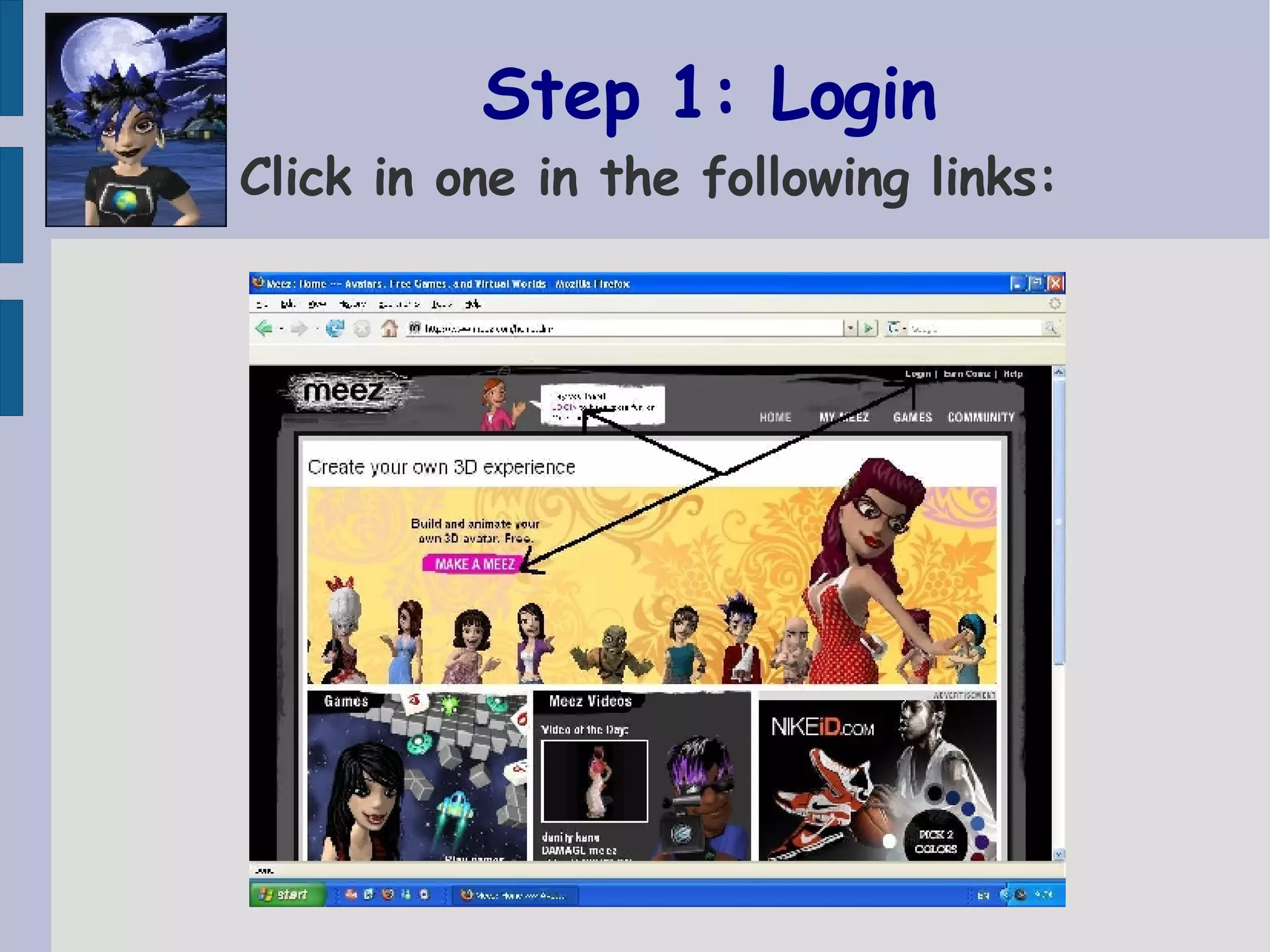
Step 1: Login Click in one in the following links:
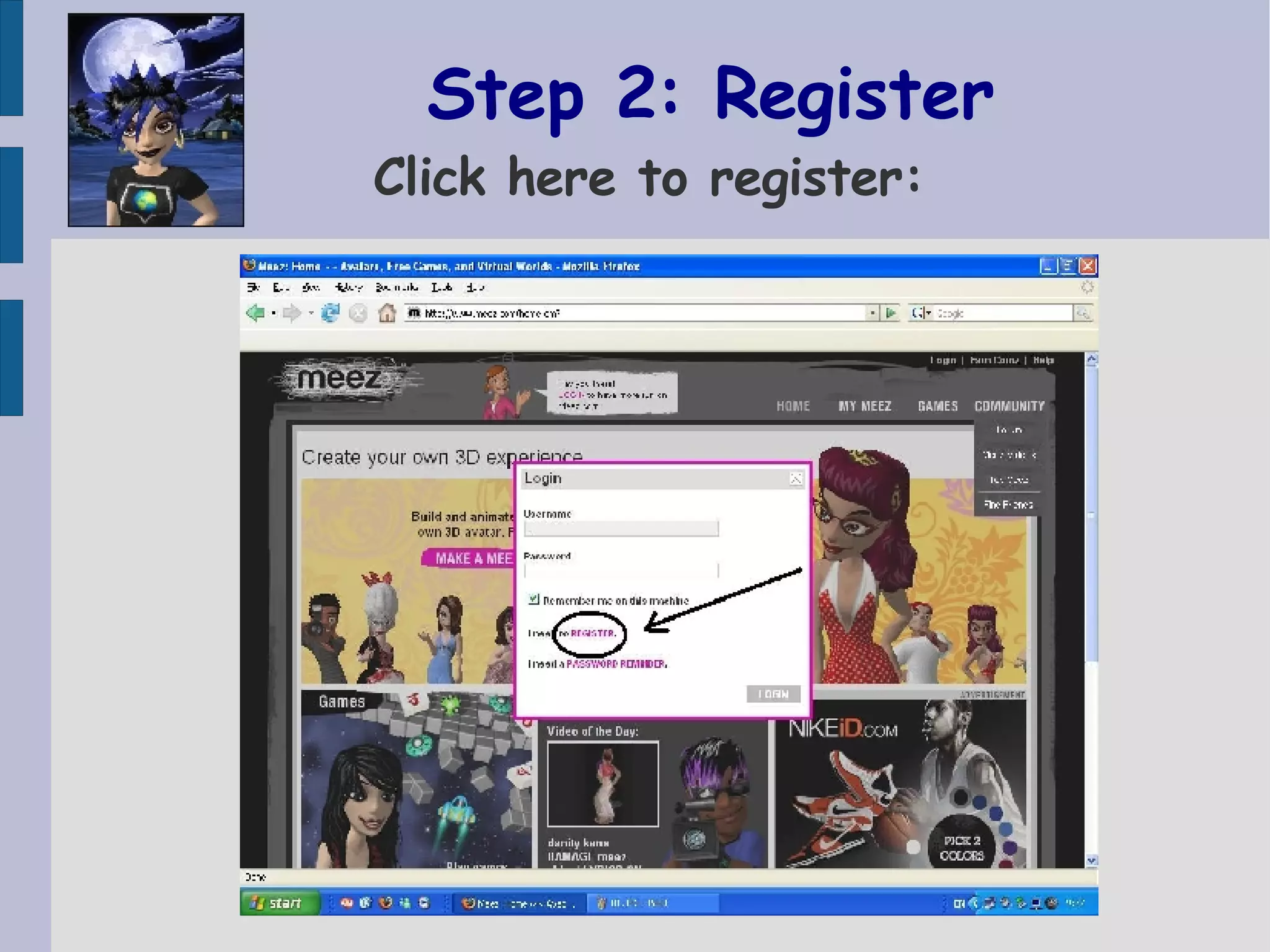
Step 2: Register Click here to register:
Step 3: Sign up Fill in your personal data: Name  Password  &  Confirmation  Email address  Birth  (optional)  Select country  Write the word  you see  Write:  replikant_007  as the meez who introduced you here.
WAITING!!   You will get a password in your email Then you can log in using your name & password.
Step 4: Start up   Choose your look: You can choose: Body type.  Face shape. Skin colour.  Eye colour.  Nose shape. Hairstyle.  Beauty  YOU WILL ALWAYS BE ABLE TO CHANGE  THESE CHARACTERISTICS AGAIN
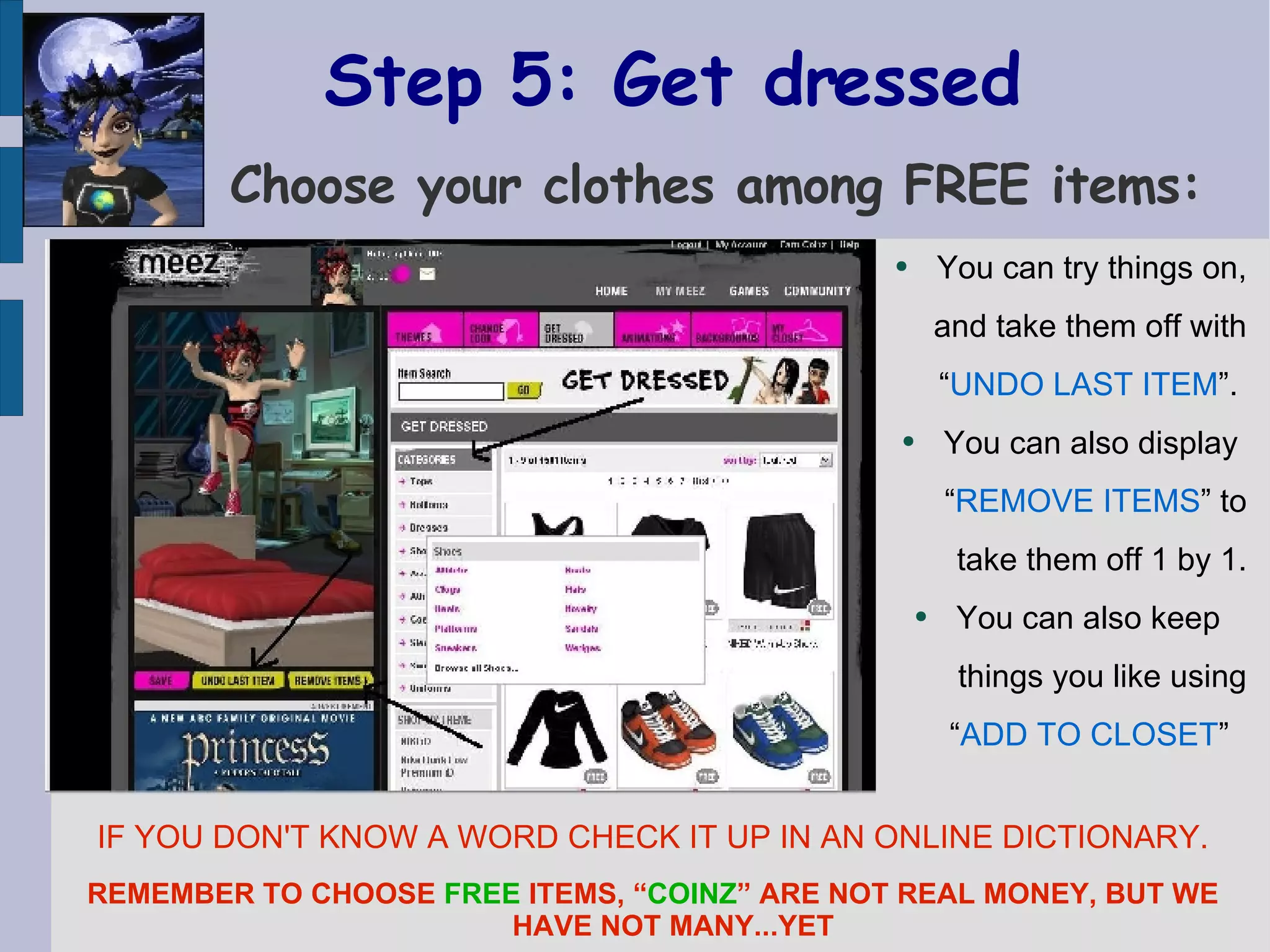
Step 5: Get dressed   Choose your clothes among FREE items: You can try things on, and take them off with “ UNDO LAST ITEM ”.  You can also display  “ REMOVE ITEMS ” to take them off 1 by 1. You can also keep  things you like using “ ADD TO CLOSET ”   IF YOU DON'T KNOW A WORD CHECK IT UP IN AN ONLINE DICTIONARY. REMEMBER TO CHOOSE  FREE  ITEMS, “ COINZ ” ARE NOT REAL MONEY, BUT WE HAVE NOT MANY...YET
Step 6:  Background  & Animation   Choose background & animation  You can display them  behind you and use  “ UNDO LAST ITEM ”  to change again.  You can also keep  the ones you like with “ ADD TO CLOSET ” REMEMBER TO CHOOSE  FREE  ONES,  AS WE HAVE NOT MANY“ COINZ ” YET.
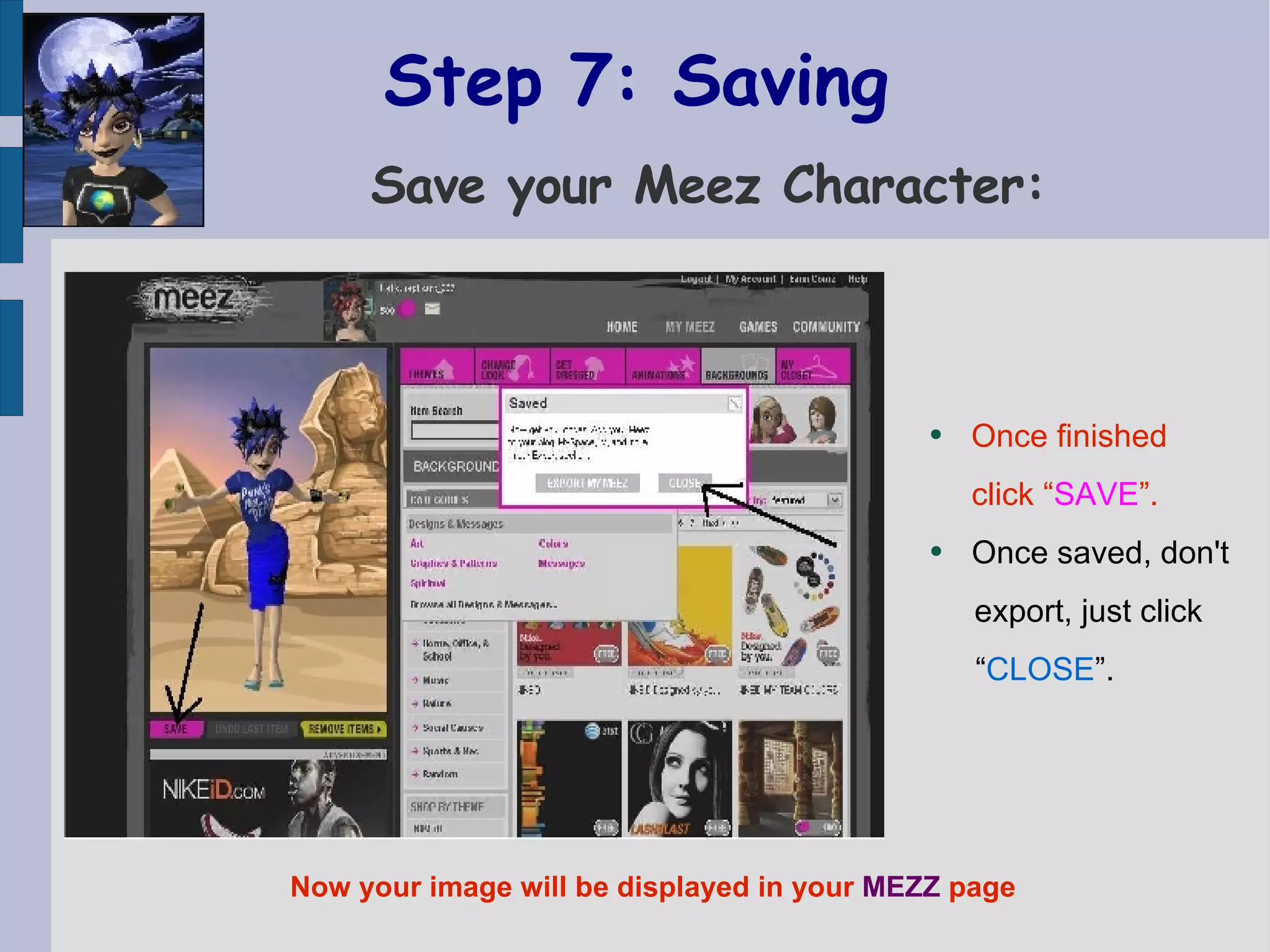
Step 7: Saving    Save your Meez Character: Once finished  click “ SAVE ”.  Once saved, don't  export, just click  “ CLOSE ”.  Now your image will be displayed in your  MEZZ  page
Step 8: GREAT!!!   Your MEEZ character has been created! Now you can keep it in your album.
Step 9: Adding to album   Click the link to SAVE: If you have chosen non-free items,  your “COINZ” will  be taken now.  Once saved click  EXPORT  to access the codes.
Step 10: Download   Save it in your computer: You can use your  Meez in your Blog or in any Forum using  these codes.  FOR YOUR WORK IN ENGLISH , you  just  DOWNLOAD  it  in your computer.  Then UPLOAD it in  eJournal/virtual-slot Media Library.
Step 11: Upload in eJournal   Upload it in eJournal Media Libray: Write the article describing yourself with the help of the vocabulary in Meez. You can create more “avatars” and  save them in your album.  You can also play online games and earn “COINZ” to buy  items you fancy.  ENJOY!! But don't forget your English work!

Create Your Character

  • 1.
    CREATE YOUR MEEZDo you like my Meez? Do you want to learn English and enjoy? FOLLOW ME!
  • 2.
    Create your owncharacter Follow instructions and create your Meez: Open another browser (window of tab) and visit the following address: http://www.meez.com/
  • 3.
    Step 1: LoginClick in one in the following links:
  • 4.
    Step 2: RegisterClick here to register:
  • 5.
    Step 3: Signup Fill in your personal data: Name Password & Confirmation Email address Birth (optional) Select country Write the word you see Write: replikant_007 as the meez who introduced you here.
  • 6.
    WAITING!! You will get a password in your email Then you can log in using your name & password.
  • 7.
    Step 4: Startup Choose your look: You can choose: Body type. Face shape. Skin colour. Eye colour. Nose shape. Hairstyle. Beauty YOU WILL ALWAYS BE ABLE TO CHANGE THESE CHARACTERISTICS AGAIN
  • 8.
    Step 5: Getdressed Choose your clothes among FREE items: You can try things on, and take them off with “ UNDO LAST ITEM ”. You can also display “ REMOVE ITEMS ” to take them off 1 by 1. You can also keep things you like using “ ADD TO CLOSET ” IF YOU DON'T KNOW A WORD CHECK IT UP IN AN ONLINE DICTIONARY. REMEMBER TO CHOOSE FREE ITEMS, “ COINZ ” ARE NOT REAL MONEY, BUT WE HAVE NOT MANY...YET
  • 9.
    Step 6: Background & Animation Choose background & animation You can display them behind you and use “ UNDO LAST ITEM ” to change again. You can also keep the ones you like with “ ADD TO CLOSET ” REMEMBER TO CHOOSE FREE ONES, AS WE HAVE NOT MANY“ COINZ ” YET.
  • 10.
    Step 7: Saving Save your Meez Character: Once finished click “ SAVE ”. Once saved, don't export, just click “ CLOSE ”. Now your image will be displayed in your MEZZ page
  • 11.
    Step 8: GREAT!!! Your MEEZ character has been created! Now you can keep it in your album.
  • 12.
    Step 9: Addingto album Click the link to SAVE: If you have chosen non-free items, your “COINZ” will be taken now. Once saved click EXPORT to access the codes.
  • 13.
    Step 10: Download Save it in your computer: You can use your Meez in your Blog or in any Forum using these codes. FOR YOUR WORK IN ENGLISH , you just DOWNLOAD it in your computer. Then UPLOAD it in eJournal/virtual-slot Media Library.
  • 14.
    Step 11: Uploadin eJournal Upload it in eJournal Media Libray: Write the article describing yourself with the help of the vocabulary in Meez. You can create more “avatars” and save them in your album. You can also play online games and earn “COINZ” to buy items you fancy. ENJOY!! But don't forget your English work!