v4.1.0.5292
Matthias Einig
SharePoint Architect        SharePoint developer since 2005
Steria AB, www.steria.com
Stockholm, Sweden           MCPD, MCITP MSCA in SP and TFS
                                       ,
                            SCRUM Master and Product Owner

Contact:                    Main Focus:
@mattein                    •   Solution Architecture,
matthias.einig@gmail.com    •   Solution Development,
www.matthiaseinig.de        •   SharePoint ALM,
                            •   Solution Quality Assurance
•   Deployment/retraction of WSPs
•   Supports farm and sandboxed solutions
•   Supports staging scenarios
•   Extendable/customizable
•   Detailed deployment log
•   Written in PowerShell
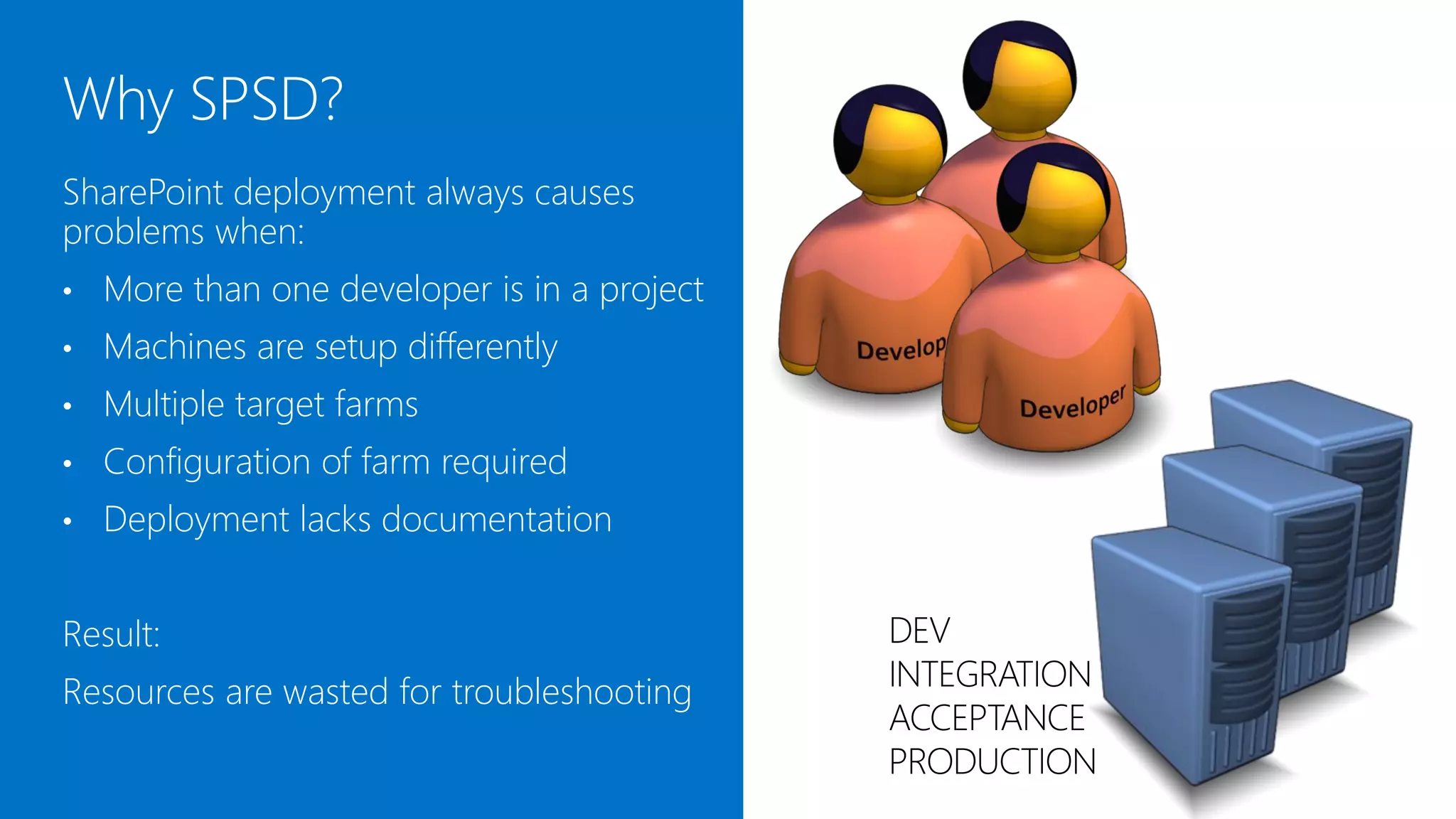
SharePoint deployment always causes
problems when:
•   More than one developer is in a project
•   Machines are setup differently
•   Multiple target farms exist
•   Configuration of the farm is required
•   Deployment lacks documentation


Result:                                       DEV
Resources are wasted for troubleshooting      INTEGRATION
                                              ACCEPTANCE
                                              PRODUCTION
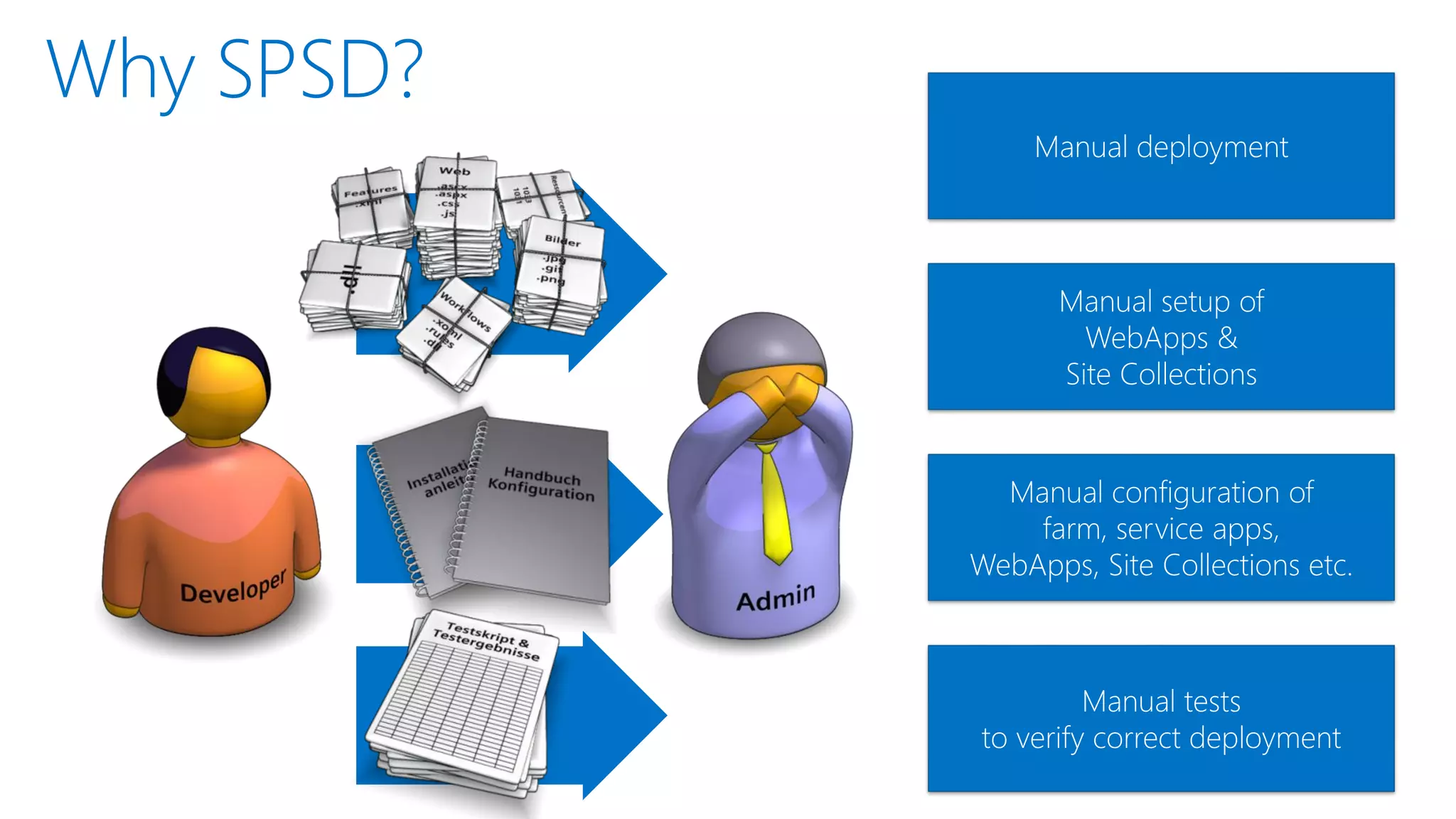
Manual deployment


      Manual setup of
        WebApps &
      Site Collections


  Manual configuration of
    farm, service apps,
WebApps, Site Collections etc.


         Manual tests
to verify correct deployment
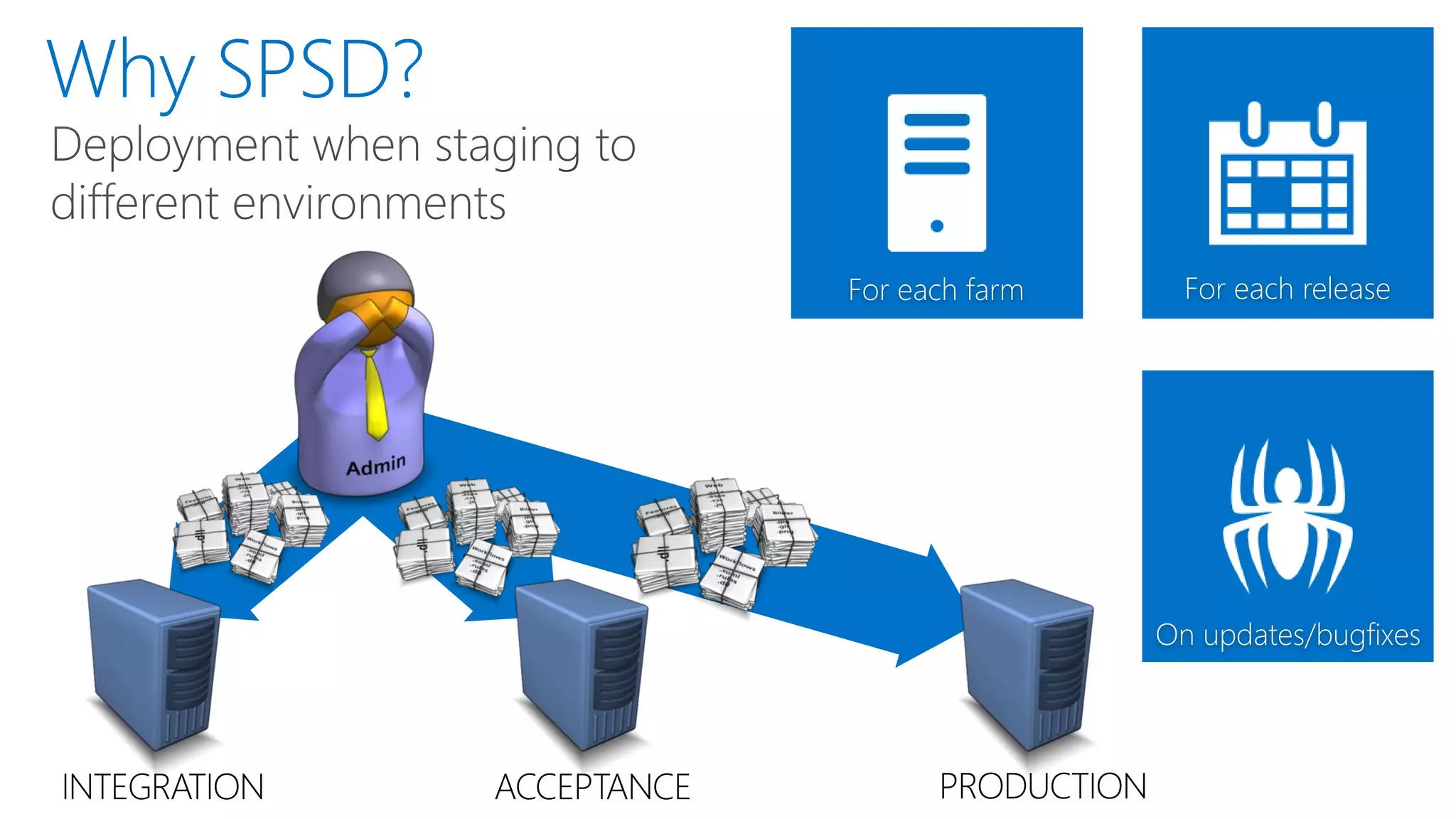
For each farm        For each release


                                              On updates/bugfixes


INTEGRATION   ACCEPTANCE         PRODUCTION
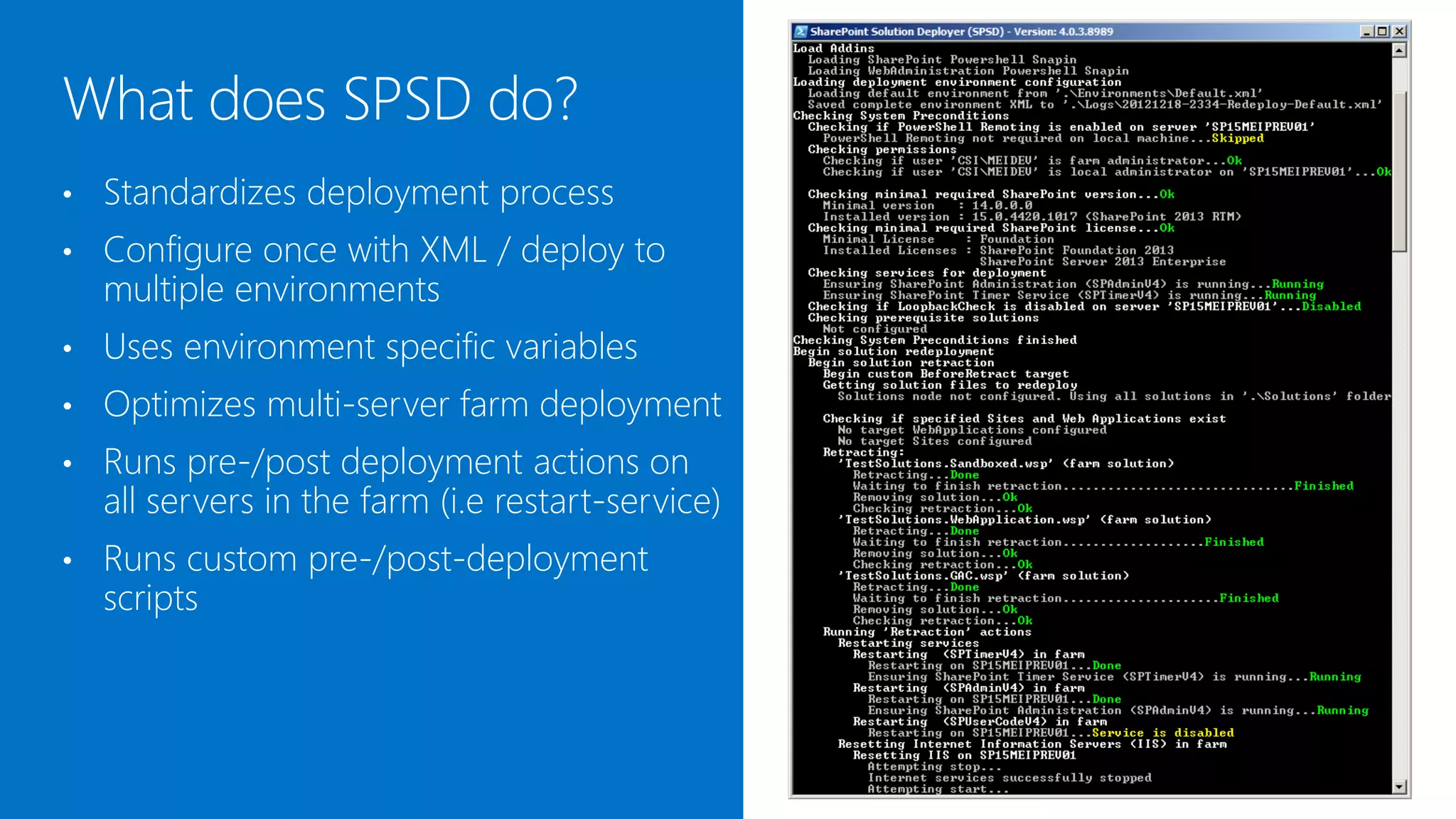
•   Standardizes the deployment process
•   Configure once with XML / deploy to
    multiple environments
•   Uses environment specific variables
•   Optimizes multi-server farm deployment
•   Runs pre-/post deployment actions on
    all servers in the farm (i.e restart-service)
•   Runs custom pre-/post-deployment
    scripts
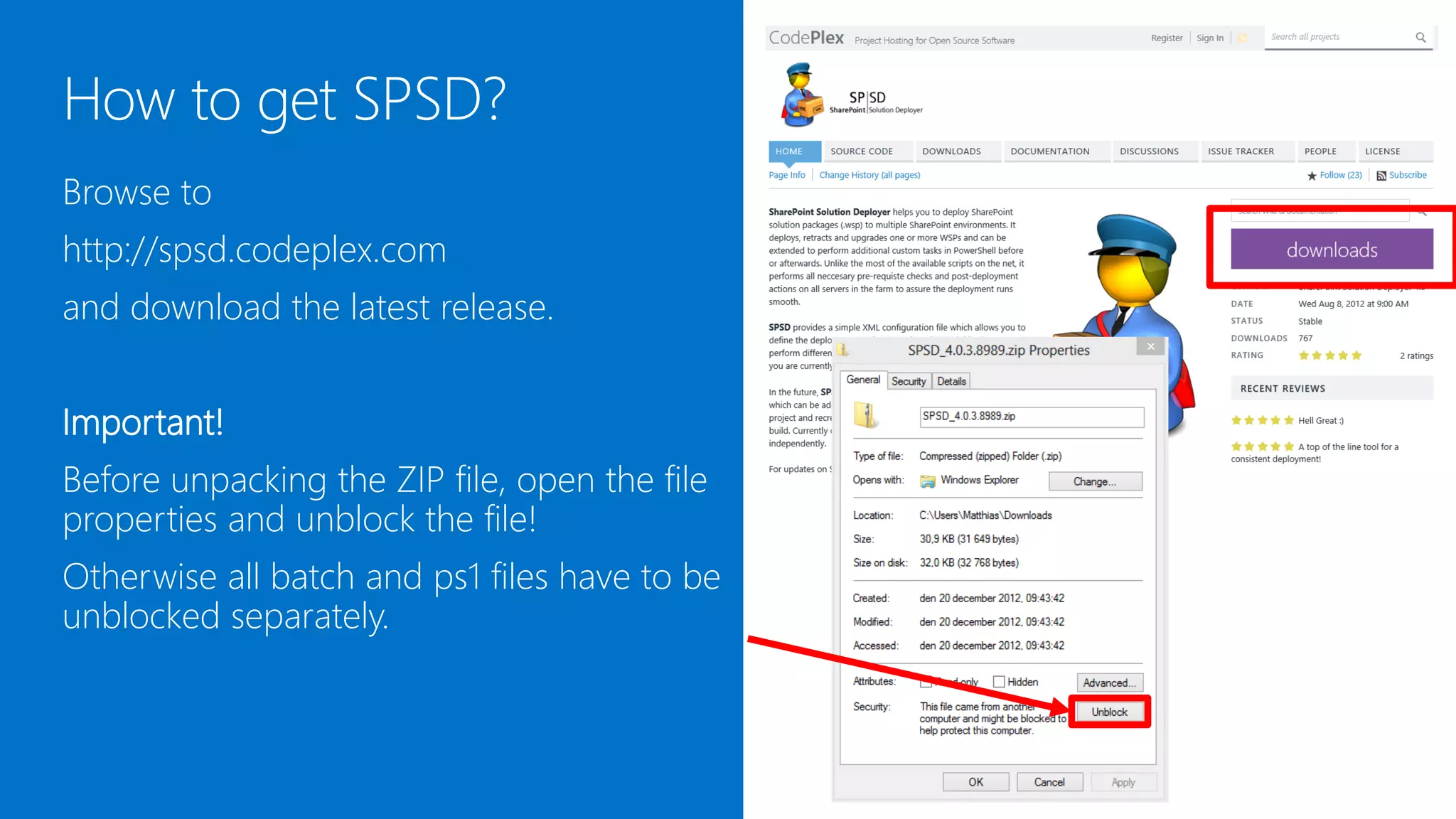
Browse to
http://spsd.codeplex.com
and download the latest release.


Important!
Before unpacking the ZIP file, open the file
properties and unblock the file!
Otherwise all batch and ps1 files have to be
unblocked separately.
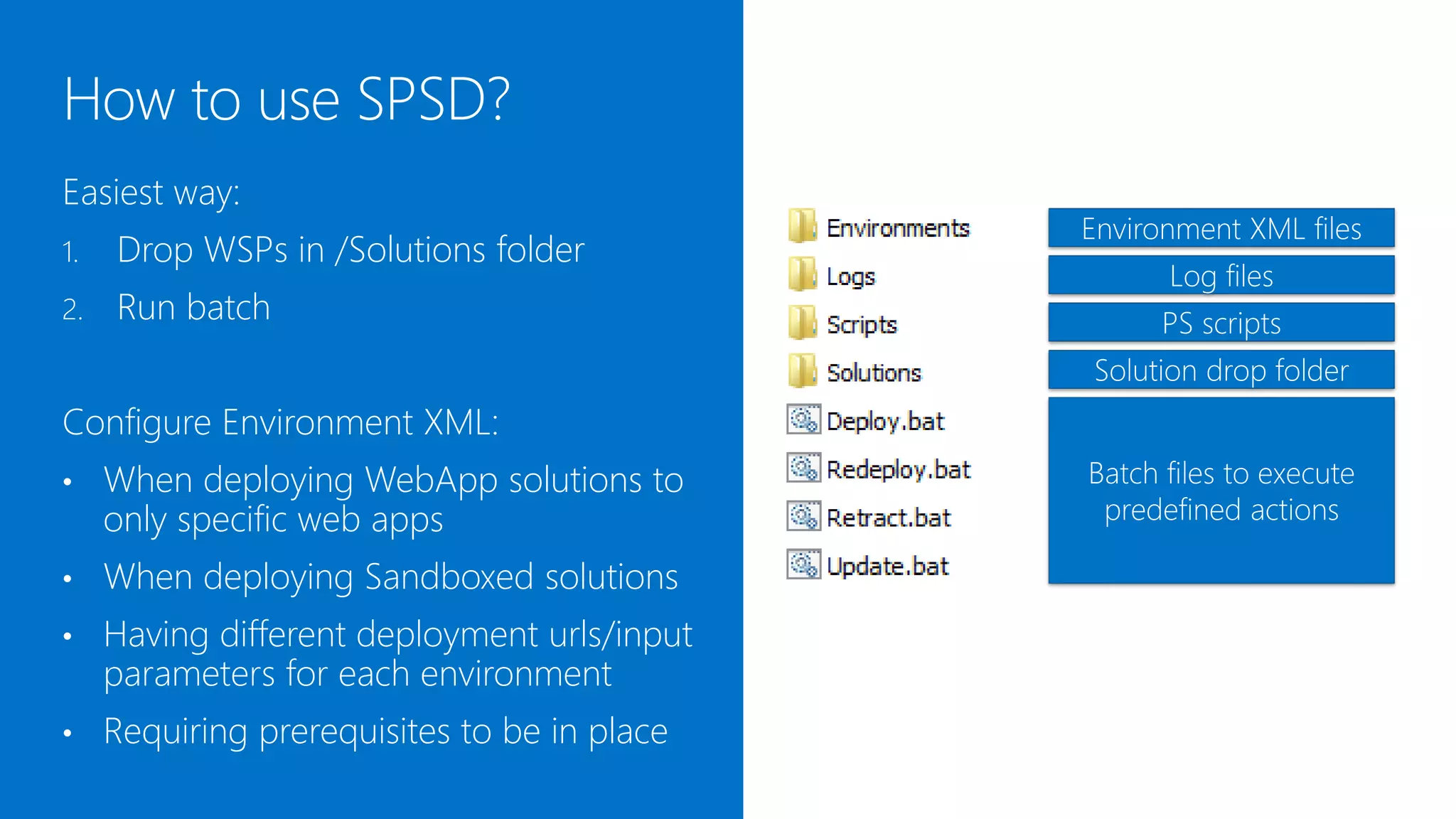
The easiest way:
                                              Environment XML files
1.   Drop WSPs in /Solutions folder
                                                    Log files
2.   Run batch file                                 PS scripts
                                              Solution drop folder
Or configure a custom environment XML:
•    When deploying WebApp solutions to       Batch files to execute
     only specific web apps                    predefined actions

•    When deploying Sandboxed solutions
•    Having different deployment urls/input
     parameters for each environment
•    Requiring prerequisites to be in place
<SPSD Version="4.0.9.5382">
                                            <!-- The Configuration node contains general settings which may be
                                                 reused in several environments -->
                                            <Configuration ID="Default">
                                              <!-- The Settings node specifies global deployment settings for the

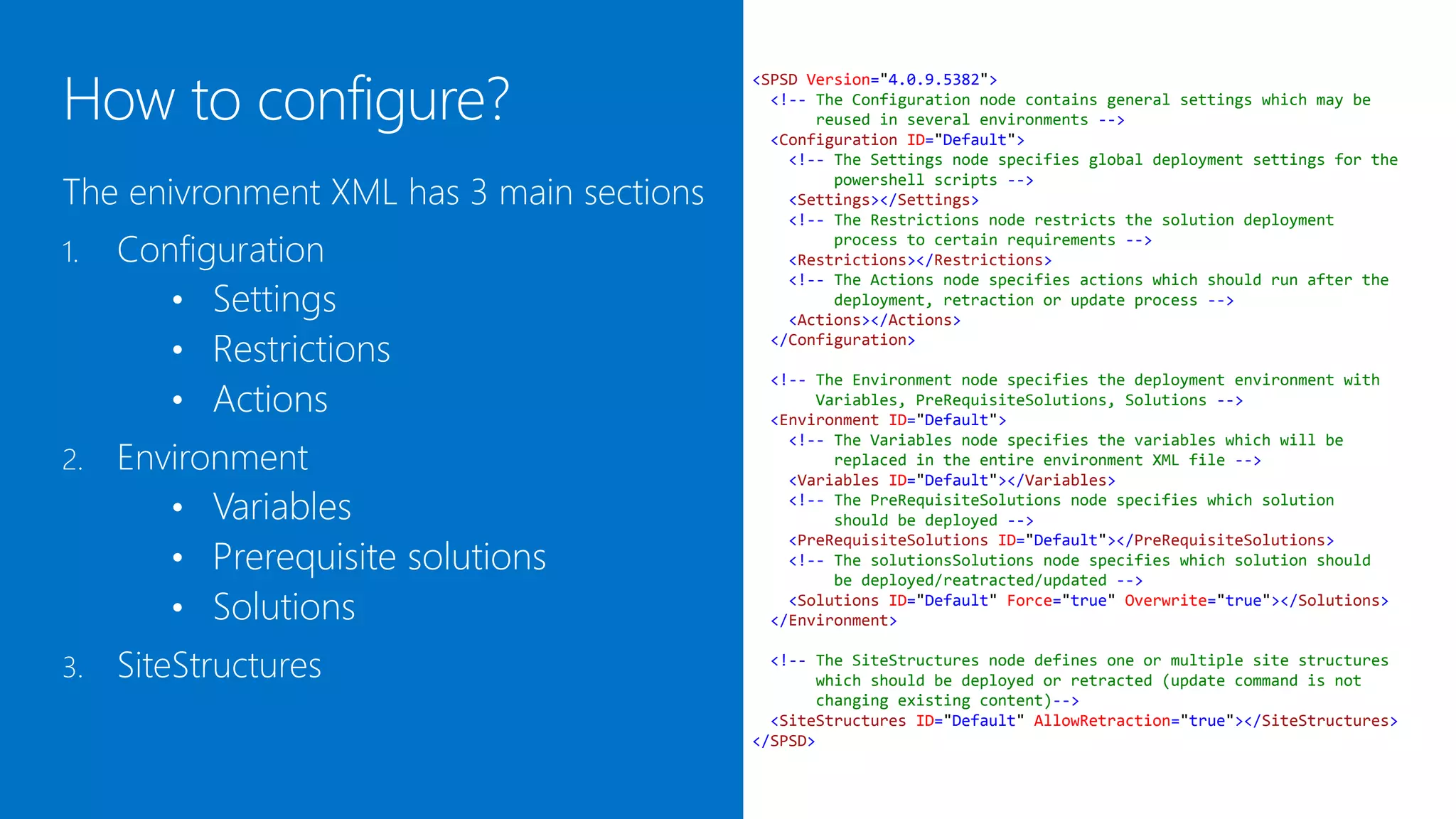
The environment XML has 3 main sections
                                                   powershell scripts -->
                                              <Settings></Settings>
                                              <!-- The Restrictions node restricts the solution deployment

1.   Configuration                                 process to certain requirements -->
                                              <Restrictions></Restrictions>

        • Settings
                                              <!-- The Actions node specifies actions which should run after the
                                                   deployment, retraction or update process -->
                                              <Actions></Actions>

        • Restrictions                      </Configuration>


        • Actions
                                           <!-- The Environment node specifies the deployment environment with
                                                Variables, PreRequisiteSolutions, Solutions -->
                                           <Environment ID="Default">

     Environment
                                             <!-- The Variables node specifies the variables which will be
2.                                                replaced in the entire environment XML file -->
                                             <Variables ID="Default"></Variables>

        • Variables                          <!-- The PreRequisiteSolutions node specifies which solution
                                                  should be deployed -->

        • Prerequisite solutions
                                             <PreRequisiteSolutions ID="Default"></PreRequisiteSolutions>
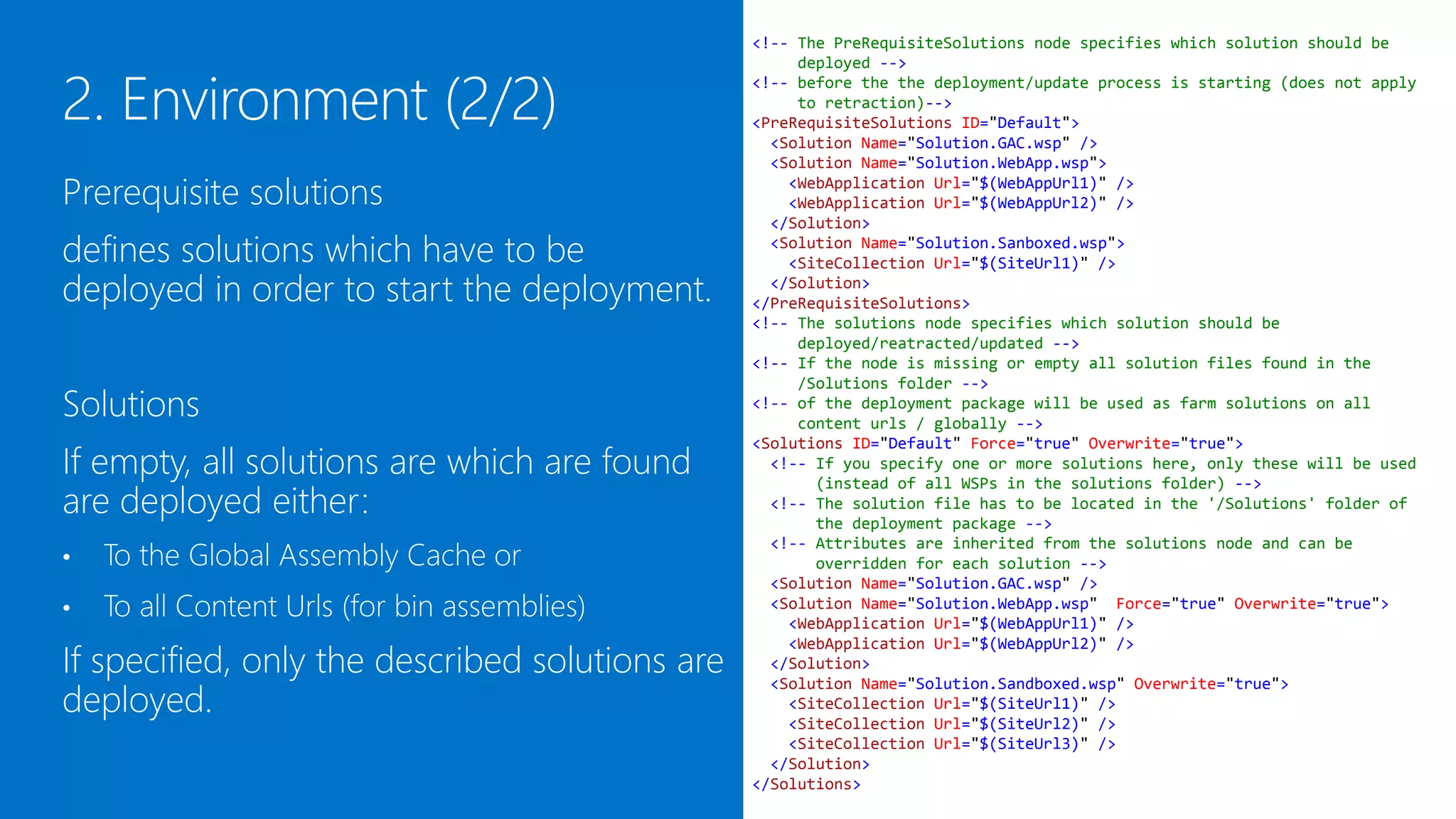
                                             <!-- The solutionsSolutions node specifies which solution should
                                                  be deployed/reatracted/updated -->

        • Solutions                          <Solutions ID="Default" Force="true" Overwrite="true"></Solutions>
                                           </Environment>


3.   SiteStructures                         <!-- The SiteStructures node defines one or multiple site structures
                                                 which should be deployed or retracted (update command is not
                                                 changing existing content)-->
                                            <SiteStructures ID="Default" AllowRetraction="true"></SiteStructures>
                                          </SPSD>
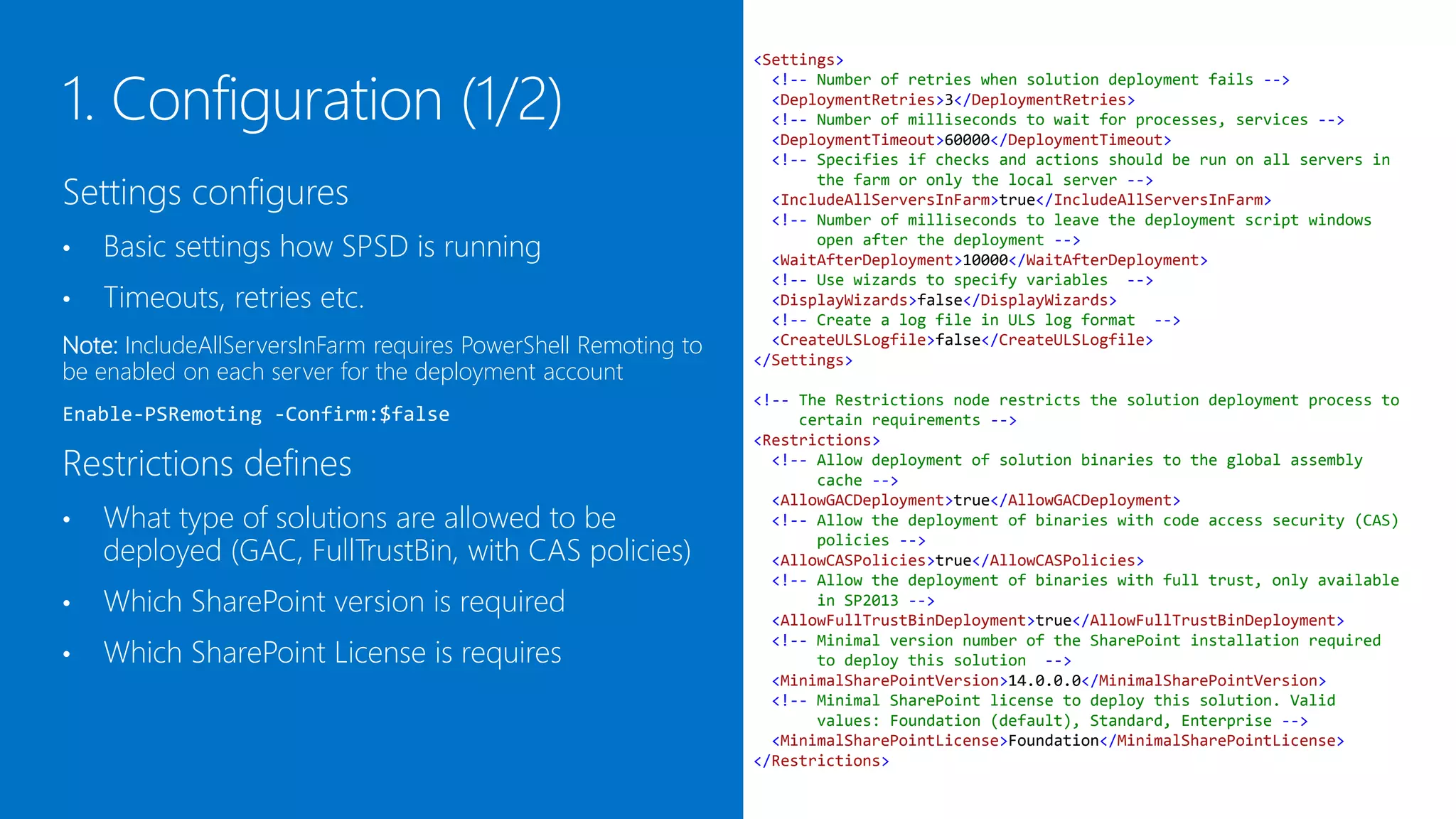
<Settings>
                                                           <!-- Number of retries when solution deployment fails -->
                                                           <DeploymentRetries>3</DeploymentRetries>
                                                           <!-- Number of milliseconds to wait for processes, services -->
                                                           <DeploymentTimeout>60000</DeploymentTimeout>
                                                           <!-- Specifies if checks and actions should be run on all servers in

Settings configures
                                                                the farm or only the local server -->
                                                           <RunOnMultipleServersInFarm>Application</RunOnMultipleServersInFarm>
                                                           <!-- Number of milliseconds to leave the deployment script windows
•   Basic settings how SPSD is running                          open after the deployment -->
                                                           <WaitAfterDeployment>10000</WaitAfterDeployment>
                                                           <!-- Use wizards to specify variables -->
•   Timeouts, retries etc.                                 <DisplayWizards>false</DisplayWizards>
                                                           <!-- Create a log file in ULS log format -->
Note: RunOnMultipleServersInFarm requires PowerShell       <CreateULSLogfile>false</CreateULSLogfile>
                                                         </Settings>
Remoting to be enabled on each included server for the
deployment account                                       <!-- The Restrictions node restricts the solution deployment process to
                                                              certain requirements -->
Enable-PSRemoting -Confirm:$false                        <Restrictions>
                                                           <!-- Allow deployment of solution binaries to the global assembly

Restrictions defines                                            cache -->
                                                           <AllowGACDeployment>true</AllowGACDeployment>
                                                           <!-- Allow the deployment of binaries with code access security (CAS)
•   What type of solutions are allowed to be                    policies -->
                                                           <AllowCASPolicies>true</AllowCASPolicies>
    deployed (GAC, FullTrustBin, with CAS policies)        <!-- Allow the deployment of binaries with full trust, only available
                                                                in SP2013 -->
•   Which SharePoint version is required                   <AllowFullTrustBinDeployment>true</AllowFullTrustBinDeployment>
                                                           <!-- Minimal version number of the SharePoint installation required
                                                                to deploy this solution -->
•   Which SharePoint license is requires                   <MinimalSharePointVersion>14.0.0.0</MinimalSharePointVersion>
                                                           <!-- Minimal SharePoint license to deploy this solution. Valid
                                                                values: Foundation (default), Standard, Enterprise -->
                                                           <MinimalSharePointLicense>Foundation</MinimalSharePointLicense>
                                                         </Restrictions>
<!-- The Actions node specifies actions which should run after the
                                                                   deployment, retraction or update process -->
                                                              <Actions AfterDeploy="true" AfterRetract="true" AfterUpdate="true">
                                                                <!-- Restart SPTimerV4 Service on this/all servers with the Application
                                                                     role in the farm -->
                                                                <RestartService Name="SPTimerV4" Force="false" />

                                                               <!-- Restart SPAdminV4 Service on this/all servers in the farm -->
Actions configures what to do                                  <RestartService Name="SPAdminV4" Force="false" />

                                                               <!-- Restart SPUserCodeV4 Service on this/all servers in the farm -->
•   After deployment                                           <RestartService Name="SPUserCodeV4" Force="false" />


•   After retraction                                           <!-- Perform IIS reset on this/all servers in the farm -->
                                                               <ResetIIS Force="false" />

•   After update                                               <!-- Recycles all IIS application pools on this/all servers in the farm
                                                               <!-- Can be used alternatively to the ResetIIS action -->
Note: The “After*” attributes can also be assigned directly    <RecycleAppPools All="false" />

to every action which overrides the Actions node settings.      <!-- Warms up urls after the deployment process -->
                                                                <!-- The warmup will be executed on this/all servers by using a local

Possible Actions are                                                 proxy to avoid issues with a load balancer -->
                                                                <!-- It is required, that the LoopBackCheck is disabled on this/all
                                                                     servers to run this action -->
•   Restart server                                              <!-- The action will run after all structures are created and the
                                                                     custom deployment tasks are finished -->
    (name can be any Windows Service Name)                      <!-- The action is not executed on retraction -->
                                                                <!-- Optional: AllWebApps="[true|false]" Warms up all SharePoint
•   Reset IIS                                                        WebApplications -->
                                                                <!-- Optional: AllSites="[true|false]" Warms up all SharePoint
                                                                     SiteCollections -->
•   Recycle Application Pools                                   <WarmUpUrls AllWebApps="true" AllSites="false">
                                                                  <!-- You can also specify custom urls which should be hit

•   Warmup Urls                                                     <WarmUp Url="$(SiteUrl)" />
                                                                    <WarmUp Url="$(SiteUrl)" />
                                                                  -->
                                                                </WarmUpUrls>
                                                              </Actions>
Variables allows to create custom variables
which can be used anywhere:
                                                  <!-- The Variables node specifies the variables which will be replaced in
                                                       the entire environment XML file -->
                                                  <!-- You can use variables with $(variablename) in the xml file and

•   In the environment XML file                        $vars["variablename"] in the CustomTargets.ps1 PowerShell
                                                       script -->
                                                  <!-- You can also use system environment variables with
•   In the CustomTargets.ps1 (see further down)        $(env:VARIABLENAME) in the xml file and $vars:VARIABLENAME in
                                                       PowerShell -->
                                                  <!-- For a detailed list of ystem environment variables open cmd.exe and
                                                       type "set“ or "Get-ChildItem env:" in PowerShell-->
                                                  <!-- Attributes -->

The variables                                     <Variables ID="Default">
                                                    <Variable Name="UserID">$(env:USERDOMAIN)$(env:USERNAME)</Variable>

•   Are resolved recursively                        <Variable Name="WebAppUrl">
                                                              http://$(env:COMPUTERNAME).$(env:USERDNSDOMAIN)
                                                    </Variable>
•   Can include system environment                  <Variable Name="SiteUrl">http://$(WebAppUrl)/sites/TestSite</Variable>
                                                    <Variable Name="LCID">1033</Variable>
    variables like current user, machine          </Variables>


    name, domain etc.
<!-- The PreRequisiteSolutions node specifies which solution should be
                                                     deployed -->
                                                <!-- before the the deployment/update process is starting (does not apply
                                                     to retraction)-->
                                                <PreRequisiteSolutions ID="Default">
                                                  <Solution Name="Solution.GAC.wsp" />
                                                  <Solution Name="Solution.WebApp.wsp">

Prerequisite solutions defines solutions            <WebApplication Url="$(WebAppUrl1)" />
                                                    <WebApplication Url="$(WebAppUrl2)" />

which have to be deployed in order to start       </Solution>
                                                  <Solution Name="Solution.Sanboxed.wsp">

the deployment.                                     <SiteCollection Url="$(SiteUrl1)" />
                                                  </Solution>
                                                </PreRequisiteSolutions>
                                                <!-- The solutions node specifies which solution should be
                                                     deployed/reatracted/updated -->
                                                <!-- If the node is missing or empty all solution files found in the
Solutions                                            /Solutions folder -->
                                                <!-- of the deployment package will be used as farm solutions on all
                                                     content urls / globally -->
If empty or not existing, all solutions which   <Solutions ID="Default" Force="true" Overwrite="true">

are found in the /Solutions folder are
                                                  <!-- If you specify one or more solutions here, only these will be used
                                                       (instead of all WSPs in the solutions folder) -->

deployed either:
                                                  <!-- The solution file has to be located in the '/Solutions' folder of
                                                       the deployment package -->
                                                  <!-- Attributes are inherited from the solutions node and can be

    To the Global Assembly Cache or
                                                       overridden for each solution -->
•                                                 <Solution Name="Solution.GAC.wsp" />
                                                  <Solution Name="Solution.WebApp.wsp" Force="true" Overwrite="true">
•   To all Content Urls (for bin assemblies)        <WebApplication Url="$(WebAppUrl1)" />
                                                    <WebApplication Url="$(WebAppUrl2)" />

If specified, only the given solutions are
                                                  </Solution>
                                                  <Solution Name="Solution.Sandboxed.wsp" Overwrite="true">

deployed.
                                                    <SiteCollection Url="$(SiteUrl1)" />
                                                    <SiteCollection Url="$(SiteUrl2)" />
                                                    <SiteCollection Url="$(SiteUrl3)" />
                                                  </Solution>
                                                </Solutions>
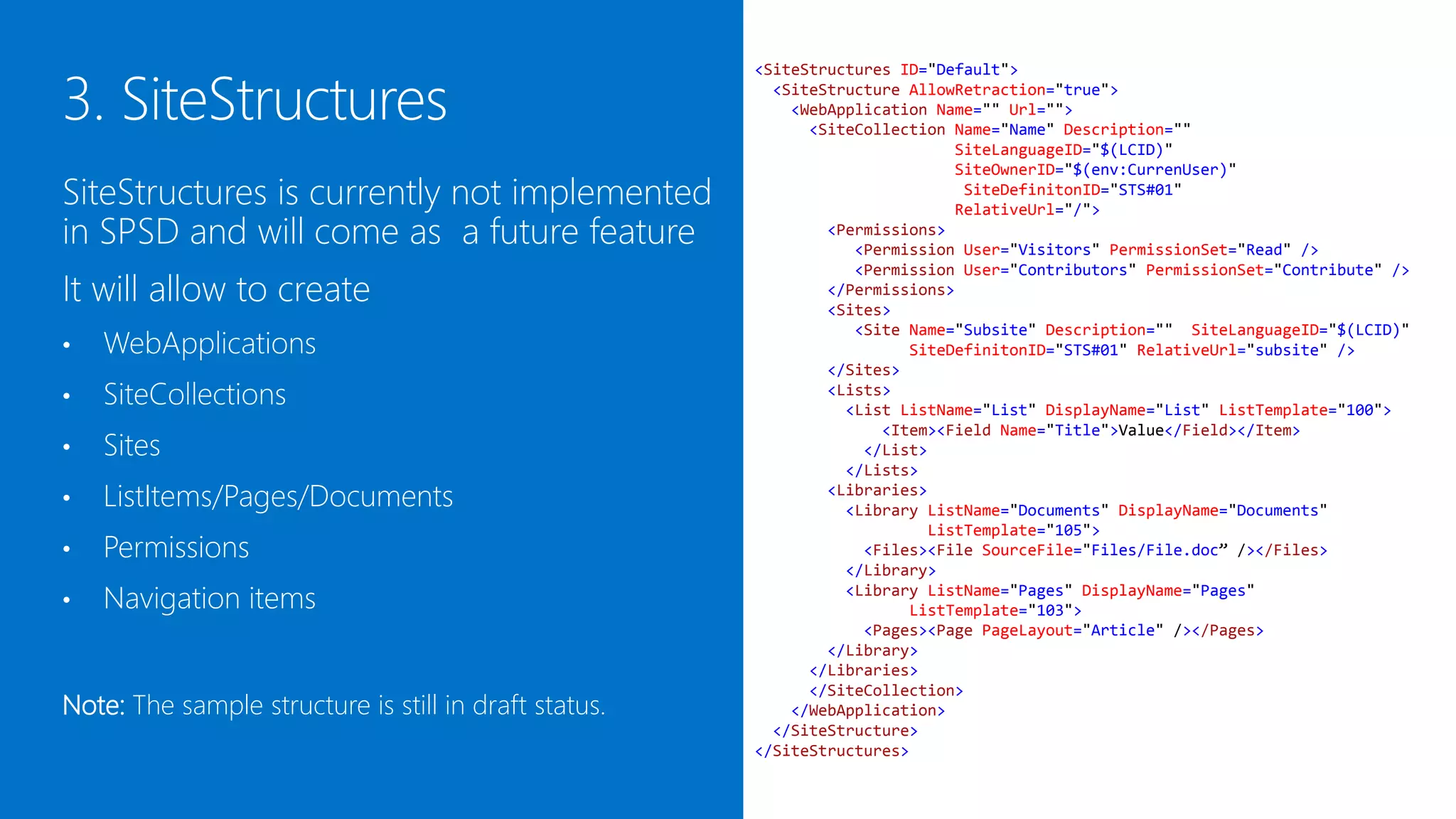
<SiteStructures ID="Default">
                                                         <SiteStructure AllowRetraction="true">
                                                           <WebApplication Name="" Url="">
                                                             <SiteCollection Name="Name" Description=""
                                                                             SiteLanguageID="$(LCID)"
                                                                             SiteOwnerID="$(env:CurrenUser)"
SiteStructures is currently under                                             SiteDefinitonID="STS#01"
                                                                             RelativeUrl="/">
development and will come as a future                          <Permissions>
                                                                  <Permission User="Visitors" PermissionSet="Read" />
feature                                                           <Permission User="Contributors" PermissionSet="Contribute" />
                                                               </Permissions>

It will allow to create
                                                               <Sites>
                                                                  <Site Name="Subsite" Description="" SiteLanguageID="$(LCID)"
                                                                        SiteDefinitonID="STS#01" RelativeUrl="subsite" />

    WebApplications
                                                               </Sites>
•                                                              <Lists>
                                                                 <List ListName="List" DisplayName="List" ListTemplate="100">
•   SiteCollections                                                  <Item><Field Name="Title">Value</Field></Item>
                                                                   </List>

    Sites
                                                                 </Lists>
•                                                              <Libraries>
                                                                 <Library ListName="Documents" DisplayName="Documents"
•   ListItems/Pages/Documents                                             ListTemplate="105">
                                                                   <Files><File SourceFile="Files/File.doc” /></Files>
                                                                 </Library>
•   Permissions                                                  <Library ListName="Pages" DisplayName="Pages"
                                                                        ListTemplate="103">
•   Navigation items                                               <Pages><Page PageLayout="Article" /></Pages>
                                                               </Library>
                                                             </Libraries>
                                                             </SiteCollection>
                                                           </WebApplication>
                                                         </SiteStructure>
Note: The sample structure is still in draft status.   </SiteStructures>
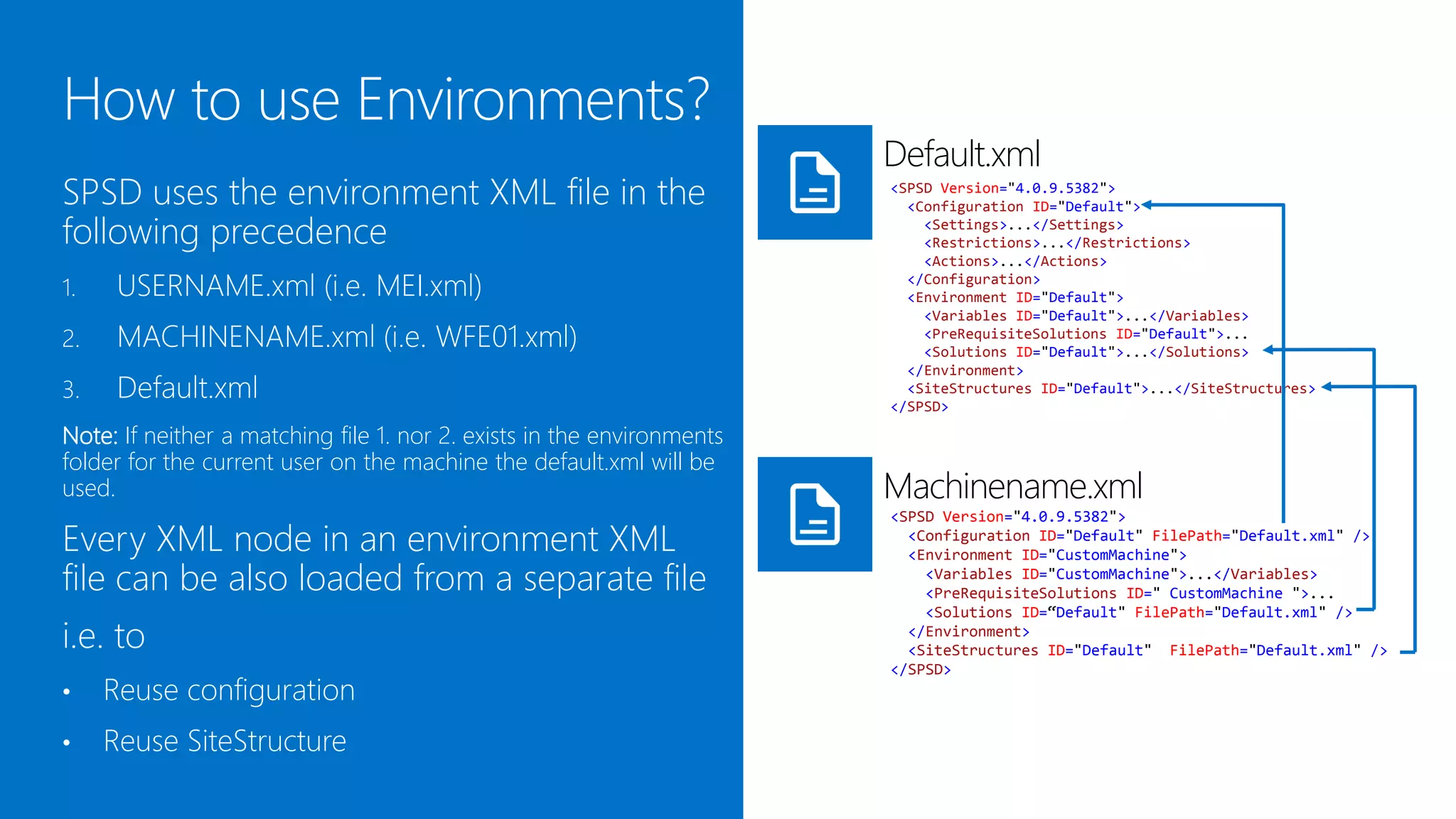
Default.xml
SPSD uses the environment XML file in the                       <SPSD Version="4.0.9.5382">
                                                                  <Configuration ID="Default">

following precedence                                                <Settings>...</Settings>
                                                                    <Restrictions>...</Restrictions>
                                                                    <Actions>...</Actions>
1.    USERNAME.xml (i.e. MEI.xml)                                 </Configuration>
                                                                  <Environment ID="Default">
                                                                    <Variables ID="Default">...</Variables>
2.    MACHINENAME.xml (i.e. WFE01.xml)                              <PreRequisiteSolutions ID="Default">...
                                                                    <Solutions ID="Default">...</Solutions>
                                                                  </Environment>
3.    Default.xml                                                 <SiteStructures ID="Default">...</SiteStructures>
                                                                </SPSD>

Note: If neither a matching file 1. nor 2. exists in the
/environments folder for the current user on the machine, the
default.xml will be used.                                       Machinename.xml
                                                                <SPSD Version="4.0.9.5382">
Every XML node in an environment XML                              <Configuration ID="Default" FilePath="Default.xml" />
                                                                  <Environment ID="CustomMachine">
file can be also loaded from a separate file                        <Variables ID="CustomMachine">...</Variables>
                                                                    <PreRequisiteSolutions ID=" CustomMachine ">...
                                                                    <Solutions ID=“Default" FilePath="Default.xml" />
i.e. to                                                           </Environment>
                                                                  <SiteStructures ID="Default" FilePath="Default.xml" />
                                                                </SPSD>
•    Reuse configuration
•    Reuse SiteStructure
CustomTargets.ps1


SPSD allows to attach custom PowerShell              #region AfterDeploy

deployment tasks to deployment targets in the        # Desc: use this target to perform operations after a
“Scripts/CustomTargets.ps1” file.                    successful deployment
                                                     function AfterDeploy($vars){

Available targets are:                               # Sample PowerShell commands
                                                      New-SPSite -Url '$vars["SiteUrl"]'
•   Before deployment                                            -OwnerAlias '$env:USERDOMAIN$env:USERNAME'
                                                                 -Name 'Test Site'
•   After deployment                                             -Template 'STS#0’

                                                     Install-SPFeature -Path '[feature name]'
•   Before retraction                                                  -Force
                                                     Enable-SPFeature -Identity '[feature name]'
•   After retraction                                                  -Url '$vars["SiteUrl"]' -Force
                                                     Enable-SPFeature -Identity [feature guid]
•   Before upgrade                                                    -Url '$vars["SiteUrl"]'
                                                                      -Force

•   After upgrade                                    }
                                                     #endregion


All custom environment variables which are defined
in the XML are available through the $vars
dictionary variable.
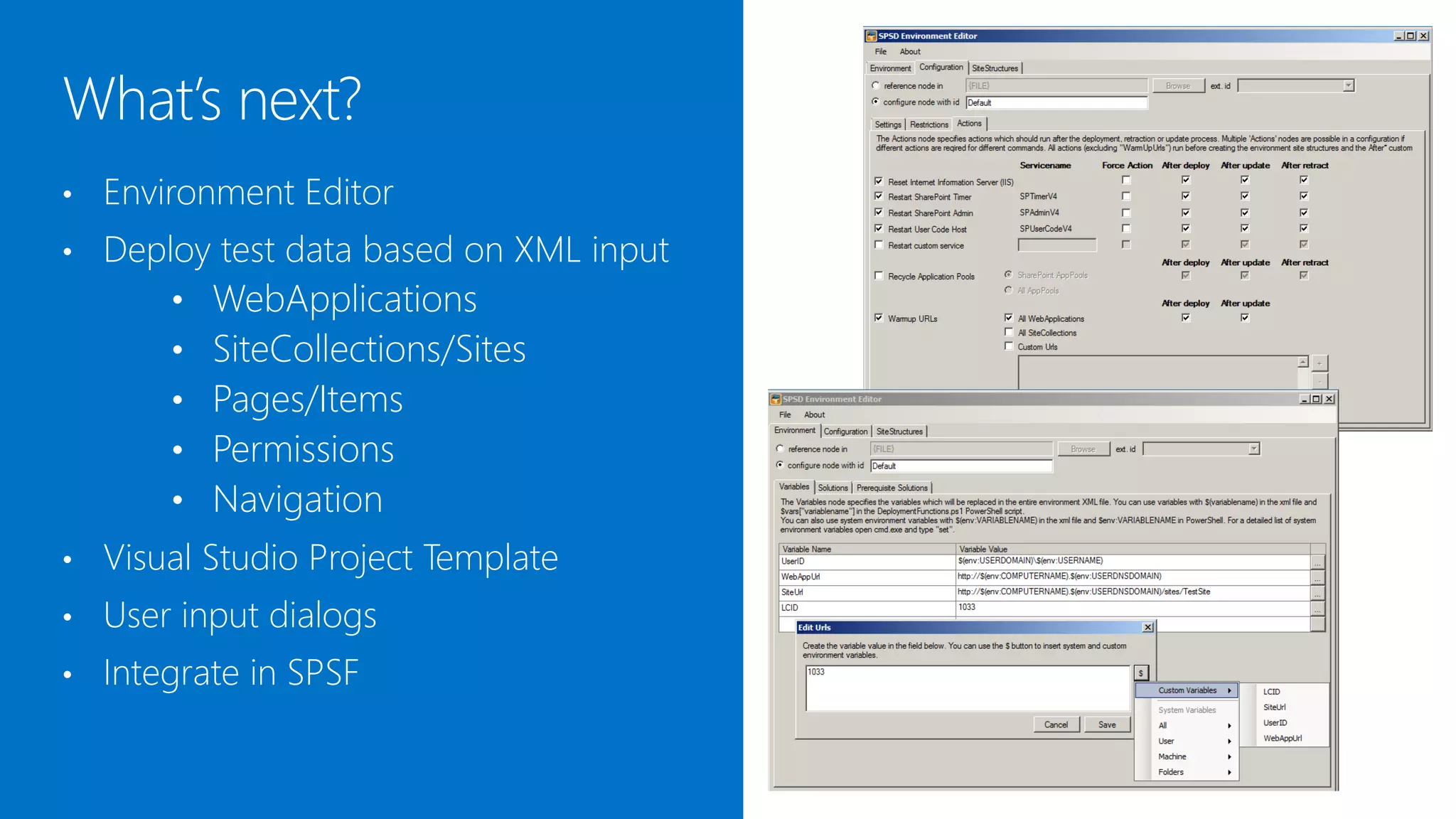
SPSD Environment Editor helps to:
-   Create/edit environment XML files
-   Reference nodes in other files
-   Create custom variables with the variable editor
-   Define environment aware URLs for deployment
    or warmup tasks


Note: Existing files will automatically updated to the
most current version of SPSD. Comments in the XML
file will be lost when saving the file.
WebApplication
•   Deploy test data based on XML input       • Site 1
        • WebApplications                     • Site 2
        • SiteCollections/Sites                  • Subsite 1
        • Pages/Items                            • Subsite 2
        • Permissions                         • Site 3
        • Navigation
•   Visual Studio Project Template
•   User input dialogs
•   Integrate with SPSF (spsf.codeplex.com)
•   Standardized deployment
•   Less manual tasks
•   Highly flexible
•   Can be integrated in VS/TFS build
•   Detailed log
•   Reduced downtime
•   Happy SharePoint project team!!!


http://spsd.codeplex.com

SPSD SharePoint Solution Deployer

  • 1.
  • 2.
    Matthias Einig SharePoint Architect SharePoint developer since 2005 Steria AB, www.steria.com Stockholm, Sweden MCPD, MCITP MSCA in SP and TFS , SCRUM Master and Product Owner Contact: Main Focus: @mattein • Solution Architecture, matthias.einig@gmail.com • Solution Development, www.matthiaseinig.de • SharePoint ALM, • Solution Quality Assurance
  • 3.
    Deployment/retraction of WSPs • Supports farm and sandboxed solutions • Supports staging scenarios • Extendable/customizable • Detailed deployment log • Written in PowerShell
  • 5.
    SharePoint deployment alwayscauses problems when: • More than one developer is in a project • Machines are setup differently • Multiple target farms exist • Configuration of the farm is required • Deployment lacks documentation Result: DEV Resources are wasted for troubleshooting INTEGRATION ACCEPTANCE PRODUCTION
  • 6.
    Manual deployment Manual setup of WebApps & Site Collections Manual configuration of farm, service apps, WebApps, Site Collections etc. Manual tests to verify correct deployment
  • 7.
    For each farm For each release On updates/bugfixes INTEGRATION ACCEPTANCE PRODUCTION
  • 8.
    Standardizes the deployment process • Configure once with XML / deploy to multiple environments • Uses environment specific variables • Optimizes multi-server farm deployment • Runs pre-/post deployment actions on all servers in the farm (i.e restart-service) • Runs custom pre-/post-deployment scripts
  • 9.
    Browse to http://spsd.codeplex.com and downloadthe latest release. Important! Before unpacking the ZIP file, open the file properties and unblock the file! Otherwise all batch and ps1 files have to be unblocked separately.
  • 10.
    The easiest way: Environment XML files 1. Drop WSPs in /Solutions folder Log files 2. Run batch file PS scripts Solution drop folder Or configure a custom environment XML: • When deploying WebApp solutions to Batch files to execute only specific web apps predefined actions • When deploying Sandboxed solutions • Having different deployment urls/input parameters for each environment • Requiring prerequisites to be in place
  • 11.
    <SPSD Version="4.0.9.5382"> <!-- The Configuration node contains general settings which may be reused in several environments --> <Configuration ID="Default"> <!-- The Settings node specifies global deployment settings for the The environment XML has 3 main sections powershell scripts --> <Settings></Settings> <!-- The Restrictions node restricts the solution deployment 1. Configuration process to certain requirements --> <Restrictions></Restrictions> • Settings <!-- The Actions node specifies actions which should run after the deployment, retraction or update process --> <Actions></Actions> • Restrictions </Configuration> • Actions <!-- The Environment node specifies the deployment environment with Variables, PreRequisiteSolutions, Solutions --> <Environment ID="Default"> Environment <!-- The Variables node specifies the variables which will be 2. replaced in the entire environment XML file --> <Variables ID="Default"></Variables> • Variables <!-- The PreRequisiteSolutions node specifies which solution should be deployed --> • Prerequisite solutions <PreRequisiteSolutions ID="Default"></PreRequisiteSolutions> <!-- The solutionsSolutions node specifies which solution should be deployed/reatracted/updated --> • Solutions <Solutions ID="Default" Force="true" Overwrite="true"></Solutions> </Environment> 3. SiteStructures <!-- The SiteStructures node defines one or multiple site structures which should be deployed or retracted (update command is not changing existing content)--> <SiteStructures ID="Default" AllowRetraction="true"></SiteStructures> </SPSD>
  • 12.
    <Settings> <!-- Number of retries when solution deployment fails --> <DeploymentRetries>3</DeploymentRetries> <!-- Number of milliseconds to wait for processes, services --> <DeploymentTimeout>60000</DeploymentTimeout> <!-- Specifies if checks and actions should be run on all servers in Settings configures the farm or only the local server --> <RunOnMultipleServersInFarm>Application</RunOnMultipleServersInFarm> <!-- Number of milliseconds to leave the deployment script windows • Basic settings how SPSD is running open after the deployment --> <WaitAfterDeployment>10000</WaitAfterDeployment> <!-- Use wizards to specify variables --> • Timeouts, retries etc. <DisplayWizards>false</DisplayWizards> <!-- Create a log file in ULS log format --> Note: RunOnMultipleServersInFarm requires PowerShell <CreateULSLogfile>false</CreateULSLogfile> </Settings> Remoting to be enabled on each included server for the deployment account <!-- The Restrictions node restricts the solution deployment process to certain requirements --> Enable-PSRemoting -Confirm:$false <Restrictions> <!-- Allow deployment of solution binaries to the global assembly Restrictions defines cache --> <AllowGACDeployment>true</AllowGACDeployment> <!-- Allow the deployment of binaries with code access security (CAS) • What type of solutions are allowed to be policies --> <AllowCASPolicies>true</AllowCASPolicies> deployed (GAC, FullTrustBin, with CAS policies) <!-- Allow the deployment of binaries with full trust, only available in SP2013 --> • Which SharePoint version is required <AllowFullTrustBinDeployment>true</AllowFullTrustBinDeployment> <!-- Minimal version number of the SharePoint installation required to deploy this solution --> • Which SharePoint license is requires <MinimalSharePointVersion>14.0.0.0</MinimalSharePointVersion> <!-- Minimal SharePoint license to deploy this solution. Valid values: Foundation (default), Standard, Enterprise --> <MinimalSharePointLicense>Foundation</MinimalSharePointLicense> </Restrictions>
  • 13.
    <!-- The Actionsnode specifies actions which should run after the deployment, retraction or update process --> <Actions AfterDeploy="true" AfterRetract="true" AfterUpdate="true"> <!-- Restart SPTimerV4 Service on this/all servers with the Application role in the farm --> <RestartService Name="SPTimerV4" Force="false" /> <!-- Restart SPAdminV4 Service on this/all servers in the farm --> Actions configures what to do <RestartService Name="SPAdminV4" Force="false" /> <!-- Restart SPUserCodeV4 Service on this/all servers in the farm --> • After deployment <RestartService Name="SPUserCodeV4" Force="false" /> • After retraction <!-- Perform IIS reset on this/all servers in the farm --> <ResetIIS Force="false" /> • After update <!-- Recycles all IIS application pools on this/all servers in the farm <!-- Can be used alternatively to the ResetIIS action --> Note: The “After*” attributes can also be assigned directly <RecycleAppPools All="false" /> to every action which overrides the Actions node settings. <!-- Warms up urls after the deployment process --> <!-- The warmup will be executed on this/all servers by using a local Possible Actions are proxy to avoid issues with a load balancer --> <!-- It is required, that the LoopBackCheck is disabled on this/all servers to run this action --> • Restart server <!-- The action will run after all structures are created and the custom deployment tasks are finished --> (name can be any Windows Service Name) <!-- The action is not executed on retraction --> <!-- Optional: AllWebApps="[true|false]" Warms up all SharePoint • Reset IIS WebApplications --> <!-- Optional: AllSites="[true|false]" Warms up all SharePoint SiteCollections --> • Recycle Application Pools <WarmUpUrls AllWebApps="true" AllSites="false"> <!-- You can also specify custom urls which should be hit • Warmup Urls <WarmUp Url="$(SiteUrl)" /> <WarmUp Url="$(SiteUrl)" /> --> </WarmUpUrls> </Actions>
  • 14.
    Variables allows tocreate custom variables which can be used anywhere: <!-- The Variables node specifies the variables which will be replaced in the entire environment XML file --> <!-- You can use variables with $(variablename) in the xml file and • In the environment XML file $vars["variablename"] in the CustomTargets.ps1 PowerShell script --> <!-- You can also use system environment variables with • In the CustomTargets.ps1 (see further down) $(env:VARIABLENAME) in the xml file and $vars:VARIABLENAME in PowerShell --> <!-- For a detailed list of ystem environment variables open cmd.exe and type "set“ or "Get-ChildItem env:" in PowerShell--> <!-- Attributes --> The variables <Variables ID="Default"> <Variable Name="UserID">$(env:USERDOMAIN)$(env:USERNAME)</Variable> • Are resolved recursively <Variable Name="WebAppUrl"> http://$(env:COMPUTERNAME).$(env:USERDNSDOMAIN) </Variable> • Can include system environment <Variable Name="SiteUrl">http://$(WebAppUrl)/sites/TestSite</Variable> <Variable Name="LCID">1033</Variable> variables like current user, machine </Variables> name, domain etc.
  • 15.
    <!-- The PreRequisiteSolutionsnode specifies which solution should be deployed --> <!-- before the the deployment/update process is starting (does not apply to retraction)--> <PreRequisiteSolutions ID="Default"> <Solution Name="Solution.GAC.wsp" /> <Solution Name="Solution.WebApp.wsp"> Prerequisite solutions defines solutions <WebApplication Url="$(WebAppUrl1)" /> <WebApplication Url="$(WebAppUrl2)" /> which have to be deployed in order to start </Solution> <Solution Name="Solution.Sanboxed.wsp"> the deployment. <SiteCollection Url="$(SiteUrl1)" /> </Solution> </PreRequisiteSolutions> <!-- The solutions node specifies which solution should be deployed/reatracted/updated --> <!-- If the node is missing or empty all solution files found in the Solutions /Solutions folder --> <!-- of the deployment package will be used as farm solutions on all content urls / globally --> If empty or not existing, all solutions which <Solutions ID="Default" Force="true" Overwrite="true"> are found in the /Solutions folder are <!-- If you specify one or more solutions here, only these will be used (instead of all WSPs in the solutions folder) --> deployed either: <!-- The solution file has to be located in the '/Solutions' folder of the deployment package --> <!-- Attributes are inherited from the solutions node and can be To the Global Assembly Cache or overridden for each solution --> • <Solution Name="Solution.GAC.wsp" /> <Solution Name="Solution.WebApp.wsp" Force="true" Overwrite="true"> • To all Content Urls (for bin assemblies) <WebApplication Url="$(WebAppUrl1)" /> <WebApplication Url="$(WebAppUrl2)" /> If specified, only the given solutions are </Solution> <Solution Name="Solution.Sandboxed.wsp" Overwrite="true"> deployed. <SiteCollection Url="$(SiteUrl1)" /> <SiteCollection Url="$(SiteUrl2)" /> <SiteCollection Url="$(SiteUrl3)" /> </Solution> </Solutions>
  • 16.
    <SiteStructures ID="Default"> <SiteStructure AllowRetraction="true"> <WebApplication Name="" Url=""> <SiteCollection Name="Name" Description="" SiteLanguageID="$(LCID)" SiteOwnerID="$(env:CurrenUser)" SiteStructures is currently under SiteDefinitonID="STS#01" RelativeUrl="/"> development and will come as a future <Permissions> <Permission User="Visitors" PermissionSet="Read" /> feature <Permission User="Contributors" PermissionSet="Contribute" /> </Permissions> It will allow to create <Sites> <Site Name="Subsite" Description="" SiteLanguageID="$(LCID)" SiteDefinitonID="STS#01" RelativeUrl="subsite" /> WebApplications </Sites> • <Lists> <List ListName="List" DisplayName="List" ListTemplate="100"> • SiteCollections <Item><Field Name="Title">Value</Field></Item> </List> Sites </Lists> • <Libraries> <Library ListName="Documents" DisplayName="Documents" • ListItems/Pages/Documents ListTemplate="105"> <Files><File SourceFile="Files/File.doc” /></Files> </Library> • Permissions <Library ListName="Pages" DisplayName="Pages" ListTemplate="103"> • Navigation items <Pages><Page PageLayout="Article" /></Pages> </Library> </Libraries> </SiteCollection> </WebApplication> </SiteStructure> Note: The sample structure is still in draft status. </SiteStructures>
  • 17.
    Default.xml SPSD uses theenvironment XML file in the <SPSD Version="4.0.9.5382"> <Configuration ID="Default"> following precedence <Settings>...</Settings> <Restrictions>...</Restrictions> <Actions>...</Actions> 1. USERNAME.xml (i.e. MEI.xml) </Configuration> <Environment ID="Default"> <Variables ID="Default">...</Variables> 2. MACHINENAME.xml (i.e. WFE01.xml) <PreRequisiteSolutions ID="Default">... <Solutions ID="Default">...</Solutions> </Environment> 3. Default.xml <SiteStructures ID="Default">...</SiteStructures> </SPSD> Note: If neither a matching file 1. nor 2. exists in the /environments folder for the current user on the machine, the default.xml will be used. Machinename.xml <SPSD Version="4.0.9.5382"> Every XML node in an environment XML <Configuration ID="Default" FilePath="Default.xml" /> <Environment ID="CustomMachine"> file can be also loaded from a separate file <Variables ID="CustomMachine">...</Variables> <PreRequisiteSolutions ID=" CustomMachine ">... <Solutions ID=“Default" FilePath="Default.xml" /> i.e. to </Environment> <SiteStructures ID="Default" FilePath="Default.xml" /> </SPSD> • Reuse configuration • Reuse SiteStructure
  • 18.
    CustomTargets.ps1 SPSD allows toattach custom PowerShell #region AfterDeploy deployment tasks to deployment targets in the # Desc: use this target to perform operations after a “Scripts/CustomTargets.ps1” file. successful deployment function AfterDeploy($vars){ Available targets are: # Sample PowerShell commands New-SPSite -Url '$vars["SiteUrl"]' • Before deployment -OwnerAlias '$env:USERDOMAIN$env:USERNAME' -Name 'Test Site' • After deployment -Template 'STS#0’ Install-SPFeature -Path '[feature name]' • Before retraction -Force Enable-SPFeature -Identity '[feature name]' • After retraction -Url '$vars["SiteUrl"]' -Force Enable-SPFeature -Identity [feature guid] • Before upgrade -Url '$vars["SiteUrl"]' -Force • After upgrade } #endregion All custom environment variables which are defined in the XML are available through the $vars dictionary variable.
  • 19.
    SPSD Environment Editorhelps to: - Create/edit environment XML files - Reference nodes in other files - Create custom variables with the variable editor - Define environment aware URLs for deployment or warmup tasks Note: Existing files will automatically updated to the most current version of SPSD. Comments in the XML file will be lost when saving the file.
  • 20.
    WebApplication • Deploy test data based on XML input • Site 1 • WebApplications • Site 2 • SiteCollections/Sites • Subsite 1 • Pages/Items • Subsite 2 • Permissions • Site 3 • Navigation • Visual Studio Project Template • User input dialogs • Integrate with SPSF (spsf.codeplex.com)
  • 21.
    Standardized deployment • Less manual tasks • Highly flexible • Can be integrated in VS/TFS build • Detailed log • Reduced downtime • Happy SharePoint project team!!! http://spsd.codeplex.com