Display Devices
Computer Monitors
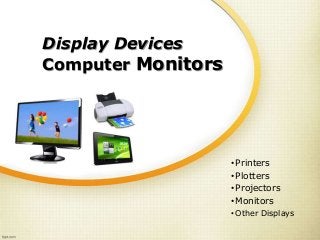
•Printers
•Plotters
•Projectors
•Monitors
• Other Displays
Display Devices
A display device is an output device
for presentation of information in
visual
or in tactile form
When the input information is
supplied as an electrical signal, the
display is called an electronic display
Display Devices
 Printers
 Plotters
 Projectors
 Monitors
 Other Displays
Segment Displays
Some displays called segment displays can show only
digits or alphanumeric characters. They are, because they
are composed of several segments that switch on and off to
give appearance of desired glyph. The segments are usually
single LEDs or liquid crystals. They are mostly used in
digital watches and pocket calculators.
 Seven-segment display: most common, usually digits only
 Fourteen-segment display
 Sixteen-segment display
 HD44780 LCD controller: a widely accepted protocol for LCDs.
2D Displays
2-dimensional displays that cover a full area (usually a
rectangle) are also called video displays, since it's the main
modality of presenting video.
Full-area 2-dimensional displays are used in, for example:
 Television sets
 Computer monitors
 Head-mounted display
 Broadcast reference monitor
 Medical monitors
2D Display Technologies
 Cathode ray tube display (CRT)
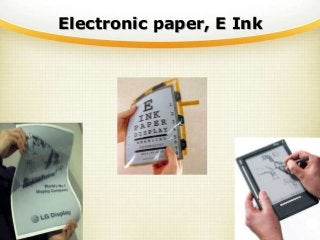
 Electronic paper, E Ink
 Plasma display panel (PDP)
 Liquid crystal display (LCD)
 Light-emitting diode display (LED)
 Organic light-emitting diode display (OLED)
 Laser Display (forthcoming)
Electronic paper, E Ink
3D Displays
 Swept-volume display
 Varifocal mirror display
 Emissive volume display
 Laser display
 Holographic display
 Light field displays
Further information:
Volumetric display
Stereoscopy
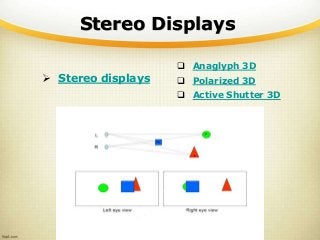
Stereo Displays
 Stereo displays
 Anaglyph 3D
 Polarized 3D
 Active Shutter 3D
Anaglyph 3D
 Anaglyph 3D
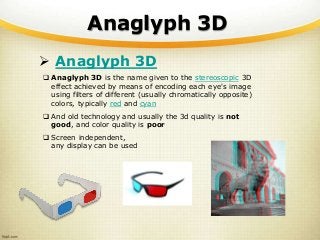
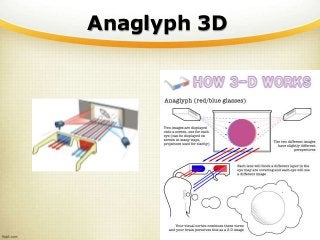
 Anaglyph 3D is the name given to the stereoscopic 3D
effect achieved by means of encoding each eye's image
using filters of different (usually chromatically opposite)
colors, typically red and cyan
 And old technology and usually the 3d quality is not
good, and color quality is poor
 Screen independent,
any display can be used
Anaglyph 3D
Polarized 3D
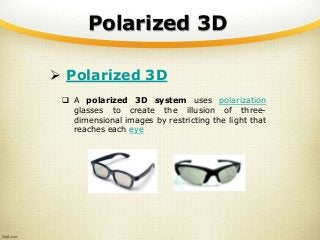
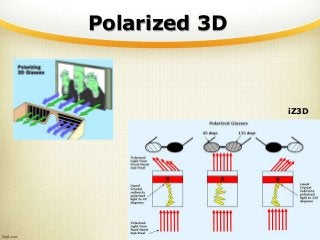
 Polarized 3D
 A polarized 3D system uses polarization
glasses to create the illusion of three-
dimensional images by restricting the light that
reaches each eye
Polarized 3D
iZ3D
Active Shutter 3D
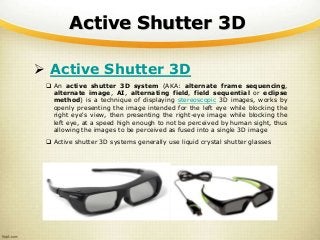
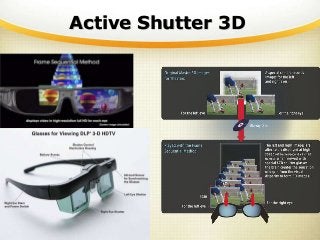
 Active Shutter 3D
 An active shutter 3D system (AKA: alternate frame sequencing,
alternate image, AI, alternating field, field sequential or eclipse
method) is a technique of displaying stereoscopic 3D images, works by
openly presenting the image intended for the left eye while blocking the
right eye's view, then presenting the right-eye image while blocking the
left eye, at a speed high enough to not be perceived by human sight, thus
allowing the images to be perceived as fused into a single 3D image
 Active shutter 3D systems generally use liquid crystal shutter glasses
Active Shutter 3D
Active vs Passive
 Active 3D Glasses
 Active Shutter
 Passive 3D Glasses
 Anaglyph
 Polarized
 Active vs Passive: Comparison
 http://www.ebay.com/gds/Whats-the-Difference-Between-
Active-and-Passive-3D-TV-Glasses/26040/g.html
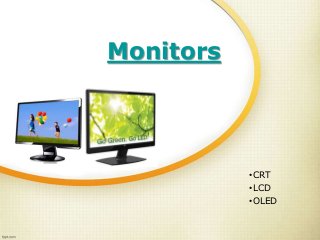
Monitors
•CRT
•LCD
•OLED
Connectors
 VGA (D-sub)
 Analog. Common
 S-Video
 Analog. SD video
 DVI
 Digital. HD video
 HDMI
 Digital. HD video and audio
 DisplayPort
 High/Cross Compatibility.
Latest Trend 
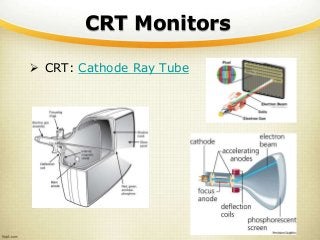
CRT Monitors
 CRT: Cathode Ray Tube
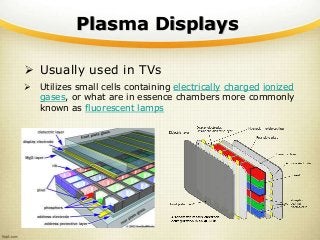
Plasma Displays
 Usually used in TVs
 Utilizes small cells containing electrically charged ionized
gases, or what are in essence chambers more commonly
known as fluorescent lamps
LCD Monitors
 LCD: Liquid Crystal Display
 Passive Matrix
 Active Matrix
o TFT LCD
TFT-LCD
 TFT: Thin Film Transistor
 TFT LCD Panel Types
 TN: Twisted Nematic
 IPS: In-Plane Switching
 VA: Vertical Alignment
TN
 TN: Twisted Nematic
 Most common technology and also the oldest.
 Short response times
 High brightness
 Less power consumption
 Low cost
 Color shifts, especially at wider viewing angles
 No true color (24bit) support. Only 18bit (6bit per channel
instead of 8). Therefore unable to display the 16.7 million
colors
 Display interpolated 24bit color using a dithering method that
combines adjacent pixels to simulate the desired shade
IPS
 IPS: In-Plane Switching
 Wide viewing angle
 Accurate colors
 High cost
TN, VA, IPS
 TN vs IPS vs VA
http://www.tnpanel.com/tn-vs-ips-va/
 TN vs VA vs IPS
http://asia.cnet.com/lcd-types-tn-vs-va-vs-ips-
62213690.htm
LCD Panel Tests
 Online LCD Monitor Panel Type Evaluator
 http://www.mediachance.com/pbrush/monitor.html
 The Lagom LCD monitor test pages
 http://www.lagom.nl/lcd-test/
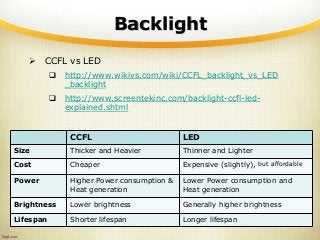
Backlight
 A backlight is a form of illumination used in LCDs.
As LCDs do not produce light themselves (unlike
CRTs), they need illumination (ambient light or a
special light source) to produce a visible image
 Common Light Sources
 CCFL: Cold Cathode Fluorescent Lamp
 LED: Light Emitting Diode
 Early TFT-LCD monitors used a CCFL backlit and
modern ones usually comes with a LED backlit.
Therefore they are called LED monitors. Those LED
monitors are LCD monitors (with LED backlight)
Backlight
 CCFL vs LED
 http://www.wikivs.com/wiki/CCFL_backlight_vs_LED
_backlight
 http://www.screentekinc.com/backlight-ccfl-led-
explained.shtml
CCFL LED
Size Thicker and Heavier Thinner and Lighter
Cost Cheaper Expensive (slightly), but affordable
Power Higher Power consumption &
Heat generation
Lower Power consumption and
Heat generation
Brightness Lower brightness Generally higher brightness
Lifespan Shorter lifespan Longer lifespan
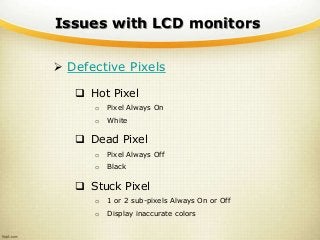
Issues with LCD monitors
 Defective Pixels
 Hot Pixel
o Pixel Always On
o White
 Dead Pixel
o Pixel Always Off
o Black
 Stuck Pixel
o 1 or 2 sub-pixels Always On or Off
o Display inaccurate colors
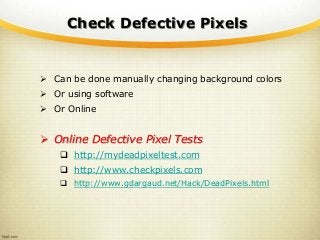
Check Defective Pixels
 Can be done manually changing background colors
 Or using software
 Or Online
 Online Defective Pixel Tests
 http://mydeadpixeltest.com
 http://www.checkpixels.com
 http://www.gdargaud.net/Hack/DeadPixels.html
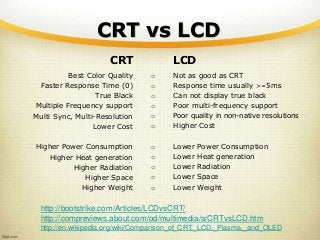
CRT vs LCD
CRT
Best Color Quality
Faster Response Time (0)
True Black
Multiple Frequency support
Multi Sync, Multi-Resolution
Lower Cost
Higher Power Consumption
Higher Heat generation
Higher Radiation
Higher Space
Higher Weight
LCD
o Not as good as CRT
o Response time usually >=5ms
o Can not display true black
o Poor multi-frequency support
o Poor quality in non-native resolutions
o Higher Cost
o Lower Power Consumption
o Lower Heat generation
o Lower Radiation
o Lower Space
o Lower Weight
http://bootstrike.com/Articles/LCDvsCRT/
http://compreviews.about.com/od/multimedia/a/CRTvsLCD.htm
http://en.wikipedia.org/wiki/Comparison_of_CRT,_LCD,_Plasma,_and_OLED
OLED
 OLED: Organic Light-Emitting Diode
 An OLED is a LED in which the emissive
electroluminescent layer is a film of organic compound
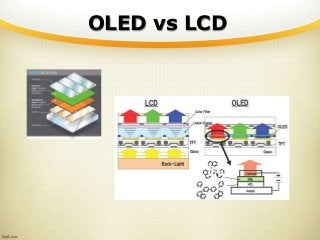
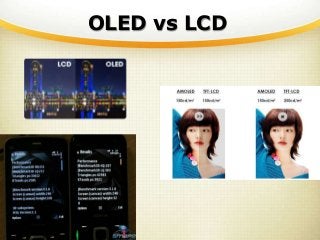
 An OLED display works without a backlight. Thus, it
can display deep black levels and can be thinner and
lighter than a LCD. In low ambient light conditions
such as a dark room an OLED screen can achieve a
higher contrast ratio than an LCD
 AMOLED: Active Matrix OLED
 A display technology for use in mobile devices and
televisions
OLED vs LCD
OLED vs LCD
Power Consumption
 Important
 CRT displays consume low power
when displaying Black/Dark colors
 LCD displays (both CCFL and LED
backlit) consume low power when
displaying White/Light colors
 OLED displays consume low power
when displaying Black/Dark colors
Power Consumption
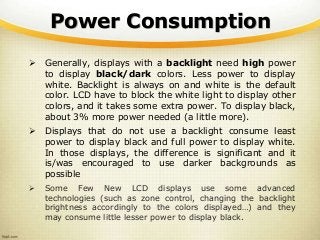
 Generally, displays with a backlight need high power
to display black/dark colors. Less power to display
white. Backlight is always on and white is the default
color. LCD have to block the white light to display other
colors, and it takes some extra power. To display black,
about 3% more power needed (a little more).
 Displays that do not use a backlight consume least
power to display black and full power to display white.
In those displays, the difference is significant and it
is/was encouraged to use darker backgrounds as
possible
 Some Few New LCD displays use some advanced
technologies (such as zone control, changing the backlight
brightness accordingly to the colors displayed…) and they
may consume little lesser power to display black.
Power Consumption
 Tips
 Generally, Old CRTs and Future OLEDs are better with dark
colors.
 Currently most displays are LCD and therefore the color
does not matter much. Even though Lighter colors save
some power, other factors such as eye strain etc. favor
darker colors.
 Anyway, it is always better to Reduce the Display
Brightness and it ALWAYS saves power, as it does reduce
the color of the backlight. Also it is good for eyes.
 Do not reduce brightness too much and also do not reduce
the Contrast. Usually reducing contrast does nothing good.
 In LCD, Blank or Dark Screensavers are not power savers.
But Turn off the display feature is a huge power-saver as
it does turn off both Monitor and Graphic Processing
(VGA/GPU switched off)
Thank You!
Ayubowan!

12. Monitors, Display Devices

  • 1.
  • 2.
    Display Devices A displaydevice is an output device for presentation of information in visual or in tactile form When the input information is supplied as an electrical signal, the display is called an electronic display
  • 3.
    Display Devices  Printers Plotters  Projectors  Monitors  Other Displays
  • 4.
    Segment Displays Some displayscalled segment displays can show only digits or alphanumeric characters. They are, because they are composed of several segments that switch on and off to give appearance of desired glyph. The segments are usually single LEDs or liquid crystals. They are mostly used in digital watches and pocket calculators.  Seven-segment display: most common, usually digits only  Fourteen-segment display  Sixteen-segment display  HD44780 LCD controller: a widely accepted protocol for LCDs.
  • 5.
    2D Displays 2-dimensional displaysthat cover a full area (usually a rectangle) are also called video displays, since it's the main modality of presenting video. Full-area 2-dimensional displays are used in, for example:  Television sets  Computer monitors  Head-mounted display  Broadcast reference monitor  Medical monitors
  • 6.
    2D Display Technologies Cathode ray tube display (CRT)  Electronic paper, E Ink  Plasma display panel (PDP)  Liquid crystal display (LCD)  Light-emitting diode display (LED)  Organic light-emitting diode display (OLED)  Laser Display (forthcoming)
  • 7.
  • 8.
    3D Displays  Swept-volumedisplay  Varifocal mirror display  Emissive volume display  Laser display  Holographic display  Light field displays Further information: Volumetric display Stereoscopy
  • 9.
    Stereo Displays  Stereodisplays  Anaglyph 3D  Polarized 3D  Active Shutter 3D
  • 10.
    Anaglyph 3D  Anaglyph3D  Anaglyph 3D is the name given to the stereoscopic 3D effect achieved by means of encoding each eye's image using filters of different (usually chromatically opposite) colors, typically red and cyan  And old technology and usually the 3d quality is not good, and color quality is poor  Screen independent, any display can be used
  • 11.
  • 12.
    Polarized 3D  Polarized3D  A polarized 3D system uses polarization glasses to create the illusion of three- dimensional images by restricting the light that reaches each eye
  • 13.
  • 14.
    Active Shutter 3D Active Shutter 3D  An active shutter 3D system (AKA: alternate frame sequencing, alternate image, AI, alternating field, field sequential or eclipse method) is a technique of displaying stereoscopic 3D images, works by openly presenting the image intended for the left eye while blocking the right eye's view, then presenting the right-eye image while blocking the left eye, at a speed high enough to not be perceived by human sight, thus allowing the images to be perceived as fused into a single 3D image  Active shutter 3D systems generally use liquid crystal shutter glasses
  • 15.
  • 16.
    Active vs Passive Active 3D Glasses  Active Shutter  Passive 3D Glasses  Anaglyph  Polarized  Active vs Passive: Comparison  http://www.ebay.com/gds/Whats-the-Difference-Between- Active-and-Passive-3D-TV-Glasses/26040/g.html
  • 17.
  • 18.
    Connectors  VGA (D-sub) Analog. Common  S-Video  Analog. SD video  DVI  Digital. HD video  HDMI  Digital. HD video and audio  DisplayPort  High/Cross Compatibility. Latest Trend 
  • 19.
    CRT Monitors  CRT:Cathode Ray Tube
  • 20.
    Plasma Displays  Usuallyused in TVs  Utilizes small cells containing electrically charged ionized gases, or what are in essence chambers more commonly known as fluorescent lamps
  • 21.
    LCD Monitors  LCD:Liquid Crystal Display  Passive Matrix  Active Matrix o TFT LCD
  • 22.
    TFT-LCD  TFT: ThinFilm Transistor  TFT LCD Panel Types  TN: Twisted Nematic  IPS: In-Plane Switching  VA: Vertical Alignment
  • 23.
    TN  TN: TwistedNematic  Most common technology and also the oldest.  Short response times  High brightness  Less power consumption  Low cost  Color shifts, especially at wider viewing angles  No true color (24bit) support. Only 18bit (6bit per channel instead of 8). Therefore unable to display the 16.7 million colors  Display interpolated 24bit color using a dithering method that combines adjacent pixels to simulate the desired shade
  • 24.
    IPS  IPS: In-PlaneSwitching  Wide viewing angle  Accurate colors  High cost
  • 25.
    TN, VA, IPS TN vs IPS vs VA http://www.tnpanel.com/tn-vs-ips-va/  TN vs VA vs IPS http://asia.cnet.com/lcd-types-tn-vs-va-vs-ips- 62213690.htm
  • 26.
    LCD Panel Tests Online LCD Monitor Panel Type Evaluator  http://www.mediachance.com/pbrush/monitor.html  The Lagom LCD monitor test pages  http://www.lagom.nl/lcd-test/
  • 27.
    Backlight  A backlightis a form of illumination used in LCDs. As LCDs do not produce light themselves (unlike CRTs), they need illumination (ambient light or a special light source) to produce a visible image  Common Light Sources  CCFL: Cold Cathode Fluorescent Lamp  LED: Light Emitting Diode  Early TFT-LCD monitors used a CCFL backlit and modern ones usually comes with a LED backlit. Therefore they are called LED monitors. Those LED monitors are LCD monitors (with LED backlight)
  • 28.
    Backlight  CCFL vsLED  http://www.wikivs.com/wiki/CCFL_backlight_vs_LED _backlight  http://www.screentekinc.com/backlight-ccfl-led- explained.shtml CCFL LED Size Thicker and Heavier Thinner and Lighter Cost Cheaper Expensive (slightly), but affordable Power Higher Power consumption & Heat generation Lower Power consumption and Heat generation Brightness Lower brightness Generally higher brightness Lifespan Shorter lifespan Longer lifespan
  • 29.
    Issues with LCDmonitors  Defective Pixels  Hot Pixel o Pixel Always On o White  Dead Pixel o Pixel Always Off o Black  Stuck Pixel o 1 or 2 sub-pixels Always On or Off o Display inaccurate colors
  • 30.
    Check Defective Pixels Can be done manually changing background colors  Or using software  Or Online  Online Defective Pixel Tests  http://mydeadpixeltest.com  http://www.checkpixels.com  http://www.gdargaud.net/Hack/DeadPixels.html
  • 31.
    CRT vs LCD CRT BestColor Quality Faster Response Time (0) True Black Multiple Frequency support Multi Sync, Multi-Resolution Lower Cost Higher Power Consumption Higher Heat generation Higher Radiation Higher Space Higher Weight LCD o Not as good as CRT o Response time usually >=5ms o Can not display true black o Poor multi-frequency support o Poor quality in non-native resolutions o Higher Cost o Lower Power Consumption o Lower Heat generation o Lower Radiation o Lower Space o Lower Weight http://bootstrike.com/Articles/LCDvsCRT/ http://compreviews.about.com/od/multimedia/a/CRTvsLCD.htm http://en.wikipedia.org/wiki/Comparison_of_CRT,_LCD,_Plasma,_and_OLED
  • 32.
    OLED  OLED: OrganicLight-Emitting Diode  An OLED is a LED in which the emissive electroluminescent layer is a film of organic compound  An OLED display works without a backlight. Thus, it can display deep black levels and can be thinner and lighter than a LCD. In low ambient light conditions such as a dark room an OLED screen can achieve a higher contrast ratio than an LCD  AMOLED: Active Matrix OLED  A display technology for use in mobile devices and televisions
  • 33.
  • 34.
  • 35.
    Power Consumption  Important CRT displays consume low power when displaying Black/Dark colors  LCD displays (both CCFL and LED backlit) consume low power when displaying White/Light colors  OLED displays consume low power when displaying Black/Dark colors
  • 36.
    Power Consumption  Generally,displays with a backlight need high power to display black/dark colors. Less power to display white. Backlight is always on and white is the default color. LCD have to block the white light to display other colors, and it takes some extra power. To display black, about 3% more power needed (a little more).  Displays that do not use a backlight consume least power to display black and full power to display white. In those displays, the difference is significant and it is/was encouraged to use darker backgrounds as possible  Some Few New LCD displays use some advanced technologies (such as zone control, changing the backlight brightness accordingly to the colors displayed…) and they may consume little lesser power to display black.
  • 37.
    Power Consumption  Tips Generally, Old CRTs and Future OLEDs are better with dark colors.  Currently most displays are LCD and therefore the color does not matter much. Even though Lighter colors save some power, other factors such as eye strain etc. favor darker colors.  Anyway, it is always better to Reduce the Display Brightness and it ALWAYS saves power, as it does reduce the color of the backlight. Also it is good for eyes.  Do not reduce brightness too much and also do not reduce the Contrast. Usually reducing contrast does nothing good.  In LCD, Blank or Dark Screensavers are not power savers. But Turn off the display feature is a huge power-saver as it does turn off both Monitor and Graphic Processing (VGA/GPU switched off)
  • 38.