







Improve Data Exchange with
 Intergraph Products


                                June 2012


Dale Lutz
Co-Founder and
Vice President of Development

Steve MacCabe
Product Support Specialist
Who Are We?

 Today’s Presenters:


                  Dale Lutz,
                  Co-Founder and
                 Vice President of Development


                  Steve MacCabe,
                  Product Support Specialist
Questions are Encouraged!


 Today’s Q&A Support:


                 Robyn Rennie,
                 Product Specialist
Agenda

 50 Minutes
   Brief introduction to Safe Software and FME
   Demos and tips on ways to use FME with
    Intergraph data sources

 10 Minutes
   Your questions and answers


 Follow-up
   Webinar recording and materials
Giveaway: FME Training Courses


    Stay Tuned: 15 FREE seats up for grabs in any
     online FME training courses:
Poll Question
Poll Question
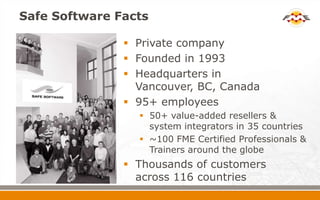
Safe Software Facts

                Private company
                Founded in 1993
                Headquarters in
                 Vancouver, BC, Canada
                95+ employees
                  50+ value-added resellers &
                   system integrators in 35 countries
                  ~100 FME Certified Professionals &
                   Trainers around the globe
                Thousands of customers
                 across 116 countries
Achieve Total Spatial Data Mastery


Achieve Total Spatial Data Mastery
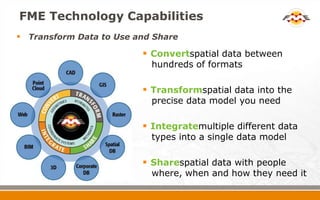
FME Technology Capabilities
 Transform Data to Use and Share
                          Convertspatial data between
                           hundreds of formats

                          Transformspatial data into the
                           precise data model you need

                          Integratemultiple different data
                           types into a single data model

                          Sharespatial data with people
                           where, when and how they need it
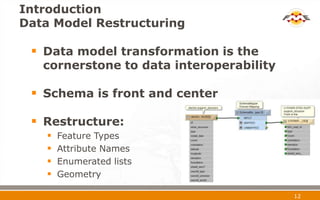
Introduction
Data Model Restructuring

  Data model transformation is the
   cornerstone to data interoperability

  Schema is front and center

  Restructure:
       Feature Types
       Attribute Names
       Enumerated lists
       Geometry

                                          12
Safe Software - Products…
Poll Question
FME Desktop Components

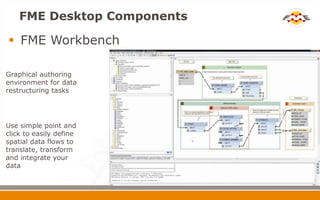
 FME Workbench

Graphical authoring
environment for data
restructuring tasks


Use simple point and
click to easily define
spatial data flows to
translate, transform
and integrate your
data
FME Desktop Components
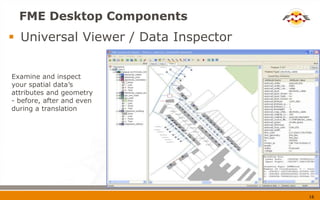
 Universal Viewer / Data Inspector


Examine and inspect
your spatial data’s
attributes and geometry
- before, after and even
during a translation


                                      16
Poll Question
Coming up…
   FME and Intergraph
   FME Intergraph Readers and Writers
   GeoMedia and FME GDO
   FME and G/Technology
   FME and Oracle
   FME and Legacy Formats
   FME and I/CAD
   FME Server and GeoMedia WebMap
FME and Intergraph


 Intergraph and Safe Software have a strong
  relationship
   Supporting Intergraph formats
   Integration with GeoMedia


 Intergraph is using FME around the world
FME Intergraph Readers & Writers

  Readers and Writers:
      Intergraph GeoMedia Access
      Intergraph GeoMedia SQL Server
      Intergraph MGE
      Intergraph FRAMME (custom format)
      Intergraph FRAMME SEF (write-only)
      Oracle Spatial Object Model (with GDOSYS)
      Oracle Spatial Relational Model (G/Tech)
  GeoMedia extension
    FME GDO


                                                   20
Demo


GeoMedia and FME GDO Demo
                            21
GeoMedia and FME GDO


 FME Data Server for GeoMedia
   Integrated with GeoMedia GDO Connections
   Expands GeoMedia’s Data Formats
Demo


GeoMedia, FME and Oracle Spatial Demo
                                        23
Demo


GeoMedia, FME and SQL Server Demo
                                    24
Demo


GeoMedia, FME and ArcSDEDemo
                               25
GeoMedia, FME and Databases


  FME writes to Oracle Spatial Object Model
  GDOSYS, GOOM package from Chuck Woodbury
   of Intergraph.
  Supports GeoMedia Oriented Text and Point data
   types
  FME writes to SQL Server
  FME writes to ESRI Geodatabase
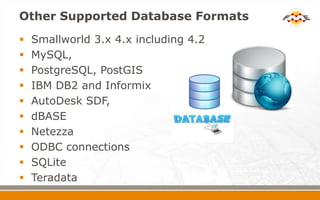
Other Supported Database Formats
   Smallworld 3.x 4.x including 4.2
   MySQL,
   PostgreSQL, PostGIS
   IBM DB2 and Informix
   AutoDesk SDF,
   dBASE
   Netezza
   ODBC connections
   SQLite
   Teradata
Pathways to Esri Data
 Shape File Export
 ArcObjects Based Readers
   Require an ArcGIS License
 SDE “C API”
   Need the SDE SDK
 File Geodatabase API
   No license needed to read
 http://fme.ly/ways2sde
Demo


FMEand Utilities
                   29
FME and Utilities


 FRAMME Export (FME Workbench)
   TO: Oracle Spatial
   TO: KML
   TO: ESRI GeoDatabaseArcSDE


 G/Technology
   Uses Oracle Spatial Relational Model
      Enhanced Geometry
FME and I/CAD


 FME can supply Warehouse for I/Map Editor
 FME Topology Transformers
 POI’s returned from I/CAD to GIS

Sample Workspace FromCustomer
Poll Question
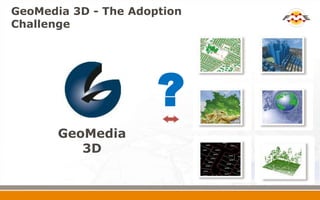
GeoMedia 3D - The Adoption
Challenge


                      ?
       GeoMedia
          3D
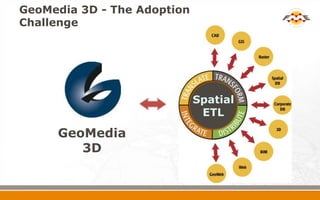
GeoMedia 3D - The Adoption
Challenge


                             Spatial
                              ETL
     GeoMedia
        3D
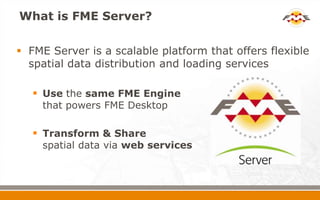
What is FME Server?

 FME Server is a scalable platform that offers flexible
  spatial data distribution and loading services

    Use the same FME Engine
    that powers FME Desktop

    Transform & Share
    spatial data via web services
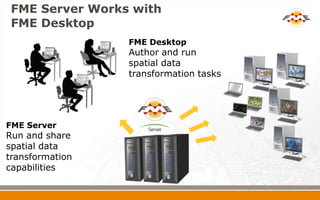
FME Server Works with
 FME Desktop
                 FME Desktop
                 Author and run
                 spatial data
                 transformation tasks


FME Server
Run and share
spatial data
transformation
capabilities
Why FME Server?
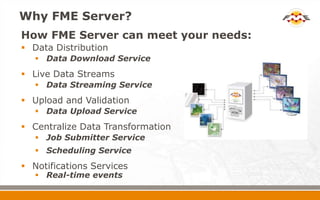
How FME Server can meet your needs:
 Data Distribution
    Data Download Service
 Live Data Streams
    Data Streaming Service
 Upload and Validation
    Data Upload Service
 Centralize Data Transformation
    Job Submitter Service
    Scheduling Service
 Notifications Services
    Real-time events
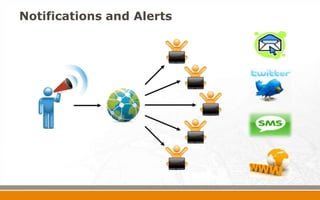
Notifications and Alerts
FME Server and
GeoMedia WebMap

 Integrate FME Server with GeoMedia Web
  Map Professional
   Provide exports of more formats
   Upload user data and validate the information
    before loading into master database.
   Provide imports into non-Intergraph supported
    formats
What’s Next?
 Take the First Step:
   Free trial of FME Desktop
   Personalized web demo

 Expand Your Knowledge:
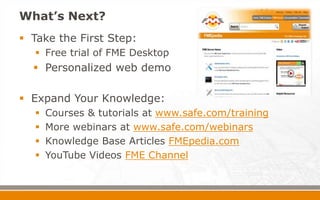
     Courses & tutorials at www.safe.com/training
     More webinars at www.safe.com/webinars
     Knowledge Base Articles FMEpedia.com
     YouTube Videos FME Channel
Poll Question
Question & Answer Period
Summary


 What we’ve seen today:
   Quick look at FME Desktop
     FME Workbench and transformation tools
     Intergraph reader & writers

   Overview of FME Server
     Different services for accessing FME
      Workspaces
     Scalability of FME tasks
Thanks for Attending!

 Webinar recording link and follow-up
  will be sent to you via email

 Info:
    info@safe.com

 Still have questions?
    fme.ly/support
    Try www.FMEpedia.com                Dale & Steve
                                            www.safe.com

Improve Data Exchange in Intergraph Using FME

  • 1.
    Improve Data Exchangewith Intergraph Products June 2012 Dale Lutz Co-Founder and Vice President of Development Steve MacCabe Product Support Specialist
  • 2.
    Who Are We? Today’s Presenters:  Dale Lutz, Co-Founder and Vice President of Development  Steve MacCabe, Product Support Specialist
  • 3.
    Questions are Encouraged! Today’s Q&A Support:  Robyn Rennie, Product Specialist
  • 4.
    Agenda  50 Minutes  Brief introduction to Safe Software and FME  Demos and tips on ways to use FME with Intergraph data sources  10 Minutes  Your questions and answers  Follow-up  Webinar recording and materials
  • 5.
    Giveaway: FME TrainingCourses  Stay Tuned: 15 FREE seats up for grabs in any online FME training courses:
  • 6.
  • 7.
  • 8.
    Safe Software Facts  Private company  Founded in 1993  Headquarters in Vancouver, BC, Canada  95+ employees  50+ value-added resellers & system integrators in 35 countries  ~100 FME Certified Professionals & Trainers around the globe  Thousands of customers across 116 countries
  • 9.
    Achieve Total SpatialData Mastery Achieve Total Spatial Data Mastery
  • 10.
    FME Technology Capabilities Transform Data to Use and Share  Convertspatial data between hundreds of formats  Transformspatial data into the precise data model you need  Integratemultiple different data types into a single data model  Sharespatial data with people where, when and how they need it
  • 11.
    Introduction Data Model Restructuring  Data model transformation is the cornerstone to data interoperability  Schema is front and center  Restructure:  Feature Types  Attribute Names  Enumerated lists  Geometry 12
  • 12.
    Safe Software -Products…
  • 13.
  • 14.
    FME Desktop Components FME Workbench Graphical authoring environment for data restructuring tasks Use simple point and click to easily define spatial data flows to translate, transform and integrate your data
  • 15.
    FME Desktop Components Universal Viewer / Data Inspector Examine and inspect your spatial data’s attributes and geometry - before, after and even during a translation 16
  • 16.
  • 17.
    Coming up…  FME and Intergraph  FME Intergraph Readers and Writers  GeoMedia and FME GDO  FME and G/Technology  FME and Oracle  FME and Legacy Formats  FME and I/CAD  FME Server and GeoMedia WebMap
  • 18.
    FME and Intergraph Intergraph and Safe Software have a strong relationship  Supporting Intergraph formats  Integration with GeoMedia  Intergraph is using FME around the world
  • 19.
    FME Intergraph Readers& Writers  Readers and Writers:  Intergraph GeoMedia Access  Intergraph GeoMedia SQL Server  Intergraph MGE  Intergraph FRAMME (custom format)  Intergraph FRAMME SEF (write-only)  Oracle Spatial Object Model (with GDOSYS)  Oracle Spatial Relational Model (G/Tech)  GeoMedia extension  FME GDO 20
  • 20.
  • 21.
    GeoMedia and FMEGDO  FME Data Server for GeoMedia  Integrated with GeoMedia GDO Connections  Expands GeoMedia’s Data Formats
  • 22.
    Demo GeoMedia, FME andOracle Spatial Demo 23
  • 23.
    Demo GeoMedia, FME andSQL Server Demo 24
  • 24.
  • 25.
    GeoMedia, FME andDatabases  FME writes to Oracle Spatial Object Model  GDOSYS, GOOM package from Chuck Woodbury of Intergraph.  Supports GeoMedia Oriented Text and Point data types  FME writes to SQL Server  FME writes to ESRI Geodatabase
  • 26.
    Other Supported DatabaseFormats  Smallworld 3.x 4.x including 4.2  MySQL,  PostgreSQL, PostGIS  IBM DB2 and Informix  AutoDesk SDF,  dBASE  Netezza  ODBC connections  SQLite  Teradata
  • 27.
    Pathways to EsriData  Shape File Export  ArcObjects Based Readers  Require an ArcGIS License  SDE “C API”  Need the SDE SDK  File Geodatabase API  No license needed to read  http://fme.ly/ways2sde
  • 28.
  • 29.
    FME and Utilities FRAMME Export (FME Workbench)  TO: Oracle Spatial  TO: KML  TO: ESRI GeoDatabaseArcSDE  G/Technology  Uses Oracle Spatial Relational Model  Enhanced Geometry
  • 30.
    FME and I/CAD FME can supply Warehouse for I/Map Editor  FME Topology Transformers  POI’s returned from I/CAD to GIS Sample Workspace FromCustomer
  • 31.
  • 32.
    GeoMedia 3D -The Adoption Challenge ? GeoMedia 3D
  • 33.
    GeoMedia 3D -The Adoption Challenge Spatial ETL GeoMedia 3D
  • 40.
    What is FMEServer?  FME Server is a scalable platform that offers flexible spatial data distribution and loading services  Use the same FME Engine that powers FME Desktop  Transform & Share spatial data via web services
  • 41.
    FME Server Workswith FME Desktop FME Desktop Author and run spatial data transformation tasks FME Server Run and share spatial data transformation capabilities
  • 42.
    Why FME Server? HowFME Server can meet your needs:  Data Distribution  Data Download Service  Live Data Streams  Data Streaming Service  Upload and Validation  Data Upload Service  Centralize Data Transformation  Job Submitter Service  Scheduling Service  Notifications Services  Real-time events
  • 43.
  • 44.
    FME Server and GeoMediaWebMap  Integrate FME Server with GeoMedia Web Map Professional  Provide exports of more formats  Upload user data and validate the information before loading into master database.  Provide imports into non-Intergraph supported formats
  • 45.
    What’s Next?  Takethe First Step:  Free trial of FME Desktop  Personalized web demo  Expand Your Knowledge:  Courses & tutorials at www.safe.com/training  More webinars at www.safe.com/webinars  Knowledge Base Articles FMEpedia.com  YouTube Videos FME Channel
  • 47.
  • 48.
  • 49.
    Summary  What we’veseen today:  Quick look at FME Desktop  FME Workbench and transformation tools  Intergraph reader & writers  Overview of FME Server  Different services for accessing FME Workspaces  Scalability of FME tasks
  • 50.
    Thanks for Attending! Webinar recording link and follow-up will be sent to you via email  Info:  info@safe.com  Still have questions?  fme.ly/support  Try www.FMEpedia.com Dale & Steve www.safe.com