LESSON 2.0: DEFINITION, 
IMPORTANCE, AND 
ADVANTAGES OF 
COMPUTERS 
COMP1: COMPUTER CONCEPTS WITH INTERNET 
INSTRUCTOR: SIR JOSHUA HERNANDEZ
DEFINITION OF A COMPUTER
MODERN DEFINITION 
A computer is a multipurpose device that accepts 
input, processes data, stores data, and produces 
output, all according to a series of stored instructions
MODERN DEFINITION 
A multipurpose device that: 
• 1. accepts input 
• input – whatever is put into the computer system. 
• ex. words, symbols, numbers, pictures, audio signal, 
instructions from a computer program. 
• needs an input device
MODERN DEFINITION (CONT’D) 
A multipurpose device that: 
• 2. process data 
• data – refers to symbols that represent facts, 
objects, and ideas 
• process – a way in which a computer manipulates 
data 
• this process is controlled by a computer program. 
• processing takes place in a CPU (brain of computer)
MODERN DEFINITION (CONT’D) 
A multipurpose device that: 
• 3. Stores data 
• Types of Data Storage 
 Memory – (volatile/temporary) 
• ex. RAM, CMOS 
 Storage Device –(non-volatile/permanent) 
• ex. hard disk, floppy disk, usb flash disk, CDs etc.
MODERN DEFINITION (CONT’D) 
A multipurpose device that: 
• 4. produces output 
• output – is the results produced by a computer. 
• ex. reports, documents, music, pictures, videos, etc., 
• needs output devices
MODERN DEFINITION
CHARACTERISTICS OF COMPUTERS 
1. Word Length 
2. Speed 
3. Storage 
4. Accuracy 
5. Versatility 
6. Automation 
7. Diligence
CLASSIFICATION OF COMPUTERS 
•How do we classify computer? 
• 1.Technology 
• 2.Function 
• 3.Physical Size 
• 4.Performance 
• 5.Cost
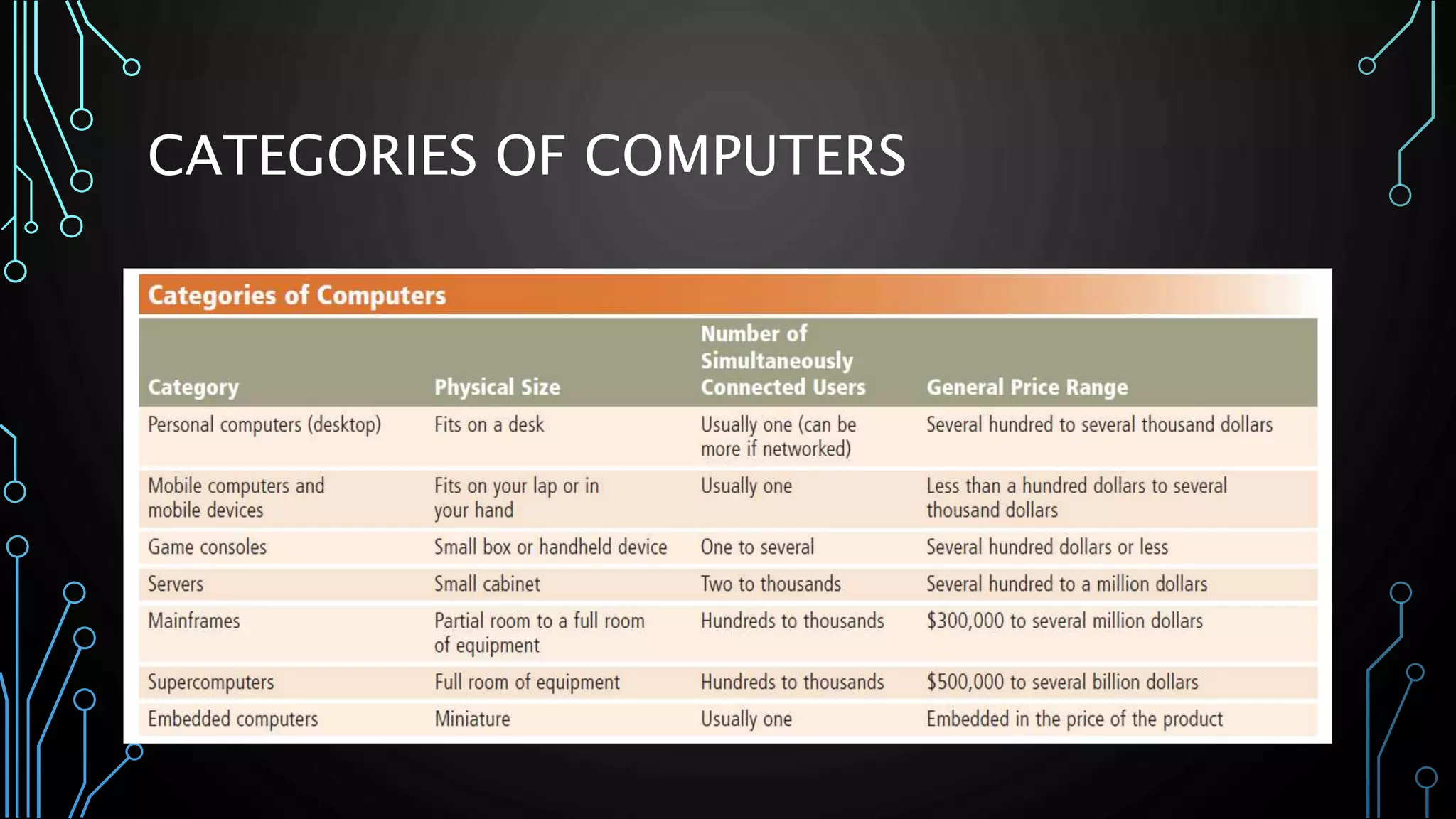
CATEGORIES OF COMPUTERS
ADVANTAGES OF COMPUTERS
ADVANTAGES OF USING COMPUTERS 
• Speed: When data, instructions, and information flow along electronic circuits in 
a computer, they travel at incredibly fast speeds. Many computers process 
billions or trillions of operations in a single second. 
• Reliability: The electronic components in modern computers are dependable and 
reliable because they rarely break or fail. 
• Consistency: Given the same input and processes, a computer will produce the 
same results —consistently. Computers generate error-free results, provided the 
input is correct and the instructions work. 
• Storage: Computers store enormous amounts of data and make this data 
available for processing anytime it is needed. 
• Communications: Most computers today can communicate with other 
computers, often wirelessly. Computers allow users to communicate with one 
another.
DISADVANTAGES OF USING COMPUTERS 
• Violation of Privacy: In many instances, where personal and confidential records 
stored on computers were not protected properly, individuals have found their 
privacy violated and identities stolen. 
• Public Safety: Adults, teens, and children around the world are using computers 
to share publicly their photos, videos, journals, music, and other personal 
information. Some of these unsuspecting, innocent computer users have fallen 
victim to crimes committed by dangerous strangers. 
• Impact on Labor Force: Although computers have improved productivity and 
created an entire industry with hundreds of thousands of new jobs, the skills of 
millions of employees have been replaced by computers. Thus, it is crucial that 
workers keep their education up-to-date. A separate impact on the labor force 
is that some companies are outsourcing jobs to foreign countries instead of 
keeping their homeland labor force employed.
DISADVANTAGES OF USING COMPUTERS 
• Health Risks: Prolonged or improper computer use can lead to health injuries or 
disorders. Computer users can protect themselves from health risks through 
proper workplace design, good posture while at the computer, and appropriately 
spaced work breaks. Two behavioral health risks are computer addiction and 
technology overload. Computer addiction occurs when someone becomes 
obsessed with using a computer. Individuals suffering from technology overload 
feel distressed when deprived of computers and mobile devices. 
• Impact on Environment: Computer manufacturing processes and computer 
waste are depleting natural resources and polluting the environment. Green 
computing involves reducing the electricity consumed and environmental waste 
generated when using a computer. Strategies that support green computing 
include recycling, regulating manufacturing processes, extending the life of 
computers, and immediately donating or properly disposing of replaced 
computers.
IMPORTANCE OF COMPUTERS
KNOWLEDGE IS POWER
KNOWLEDGE IS POWER? 
• Aaron Swartz and JSTOR
KNOWLEDGE IS POWER? 
• Julian Assange and WikiLeaks
ACTIVITY 
• Computers are important because information is important. 
Knowledge is power. Freedom of Information Bill. Do you think 
knowledge is power?
ASSIGNMENT 
• 1. What are the basic functions and parts of a computer? 
• 2. What is the difference between a 64-bit and 32-bit 
computer? 
• 3. How do I know if I run 64-bit or 32-bit?
REFERENCES 
• Norton, Peter. (2006) Introduction to Computers. New Delhi, 
India. McGraw-Hill Companies Inc. 
• Oja, D. and Parsons, J.J. (2014) New Perspectives on Computer 
Concepts. Boston, MA: Cengage Learning 
• Leon, A. and Leon M. (1999) Introduction to Computer. New 
Delhi, India: Vikas Publishing House Pvt. Ltd. (library). (Pg. 1.3 - 
1.4)

Lesson 2.0 definition, importance, and advantages of computers

  • 1.
    LESSON 2.0: DEFINITION, IMPORTANCE, AND ADVANTAGES OF COMPUTERS COMP1: COMPUTER CONCEPTS WITH INTERNET INSTRUCTOR: SIR JOSHUA HERNANDEZ
  • 2.
  • 3.
    MODERN DEFINITION Acomputer is a multipurpose device that accepts input, processes data, stores data, and produces output, all according to a series of stored instructions
  • 4.
    MODERN DEFINITION Amultipurpose device that: • 1. accepts input • input – whatever is put into the computer system. • ex. words, symbols, numbers, pictures, audio signal, instructions from a computer program. • needs an input device
  • 5.
    MODERN DEFINITION (CONT’D) A multipurpose device that: • 2. process data • data – refers to symbols that represent facts, objects, and ideas • process – a way in which a computer manipulates data • this process is controlled by a computer program. • processing takes place in a CPU (brain of computer)
  • 6.
    MODERN DEFINITION (CONT’D) A multipurpose device that: • 3. Stores data • Types of Data Storage  Memory – (volatile/temporary) • ex. RAM, CMOS  Storage Device –(non-volatile/permanent) • ex. hard disk, floppy disk, usb flash disk, CDs etc.
  • 7.
    MODERN DEFINITION (CONT’D) A multipurpose device that: • 4. produces output • output – is the results produced by a computer. • ex. reports, documents, music, pictures, videos, etc., • needs output devices
  • 8.
  • 9.
    CHARACTERISTICS OF COMPUTERS 1. Word Length 2. Speed 3. Storage 4. Accuracy 5. Versatility 6. Automation 7. Diligence
  • 10.
    CLASSIFICATION OF COMPUTERS •How do we classify computer? • 1.Technology • 2.Function • 3.Physical Size • 4.Performance • 5.Cost
  • 11.
  • 12.
  • 13.
    ADVANTAGES OF USINGCOMPUTERS • Speed: When data, instructions, and information flow along electronic circuits in a computer, they travel at incredibly fast speeds. Many computers process billions or trillions of operations in a single second. • Reliability: The electronic components in modern computers are dependable and reliable because they rarely break or fail. • Consistency: Given the same input and processes, a computer will produce the same results —consistently. Computers generate error-free results, provided the input is correct and the instructions work. • Storage: Computers store enormous amounts of data and make this data available for processing anytime it is needed. • Communications: Most computers today can communicate with other computers, often wirelessly. Computers allow users to communicate with one another.
  • 14.
    DISADVANTAGES OF USINGCOMPUTERS • Violation of Privacy: In many instances, where personal and confidential records stored on computers were not protected properly, individuals have found their privacy violated and identities stolen. • Public Safety: Adults, teens, and children around the world are using computers to share publicly their photos, videos, journals, music, and other personal information. Some of these unsuspecting, innocent computer users have fallen victim to crimes committed by dangerous strangers. • Impact on Labor Force: Although computers have improved productivity and created an entire industry with hundreds of thousands of new jobs, the skills of millions of employees have been replaced by computers. Thus, it is crucial that workers keep their education up-to-date. A separate impact on the labor force is that some companies are outsourcing jobs to foreign countries instead of keeping their homeland labor force employed.
  • 15.
    DISADVANTAGES OF USINGCOMPUTERS • Health Risks: Prolonged or improper computer use can lead to health injuries or disorders. Computer users can protect themselves from health risks through proper workplace design, good posture while at the computer, and appropriately spaced work breaks. Two behavioral health risks are computer addiction and technology overload. Computer addiction occurs when someone becomes obsessed with using a computer. Individuals suffering from technology overload feel distressed when deprived of computers and mobile devices. • Impact on Environment: Computer manufacturing processes and computer waste are depleting natural resources and polluting the environment. Green computing involves reducing the electricity consumed and environmental waste generated when using a computer. Strategies that support green computing include recycling, regulating manufacturing processes, extending the life of computers, and immediately donating or properly disposing of replaced computers.
  • 16.
  • 17.
  • 18.
    KNOWLEDGE IS POWER? • Aaron Swartz and JSTOR
  • 19.
    KNOWLEDGE IS POWER? • Julian Assange and WikiLeaks
  • 20.
    ACTIVITY • Computersare important because information is important. Knowledge is power. Freedom of Information Bill. Do you think knowledge is power?
  • 21.
    ASSIGNMENT • 1.What are the basic functions and parts of a computer? • 2. What is the difference between a 64-bit and 32-bit computer? • 3. How do I know if I run 64-bit or 32-bit?
  • 22.
    REFERENCES • Norton,Peter. (2006) Introduction to Computers. New Delhi, India. McGraw-Hill Companies Inc. • Oja, D. and Parsons, J.J. (2014) New Perspectives on Computer Concepts. Boston, MA: Cengage Learning • Leon, A. and Leon M. (1999) Introduction to Computer. New Delhi, India: Vikas Publishing House Pvt. Ltd. (library). (Pg. 1.3 - 1.4)

Editor's Notes

  • #4 The word computer has been part of the English language since 1646; but if you look in a dictionary printed before 1940, you might be surprised to find a computer defined as a person who performs calculations! Prior to 1940, machines designed to perform calculations were usually referred to as calculators and tabulators, not computers. The modern definition and use of the term computer emerged in the 1940s, when the first electronic computing devices were developed. Most people can formulate a mental picture of a computer, but computers do so many things and come in such a variety of shapes and sizes that it might seem difficult to distill their common characteristics into an all-purpose definition. At its core, a computer is a multipurpose device that accepts input, processes data, stores data, and produces output, all according to a series of stored instructions
  • #10 Reference: Leon, A. and Leon M. (1999) Introduction to Computer. New Delhi, India: Vikas Publishing House Pvt. Ltd. (library) (Pg. 1.3 - 1.4)