


Globalcode – Open4education
Intel Movidius: Neural Compute Stick
João Guilherme Reiser de Melo
Luana Vieira Martinez Bonatto
M.Sc Students in Electrical Engineering at UFSC
Trilha – Machine Learning
Globalcode – Open4education
Intel Machine Learning
● Software
○ Intel® Optimization for TensorFlow
○ Intel® Optimization for Caffe
○ Intel® Math Kernel Library
○ Intel® Movidius™ Neural Compute
SDK
● Hardware
○ Intel® Xeon Phi™ processor
○ Intel® Movidius™ Neural Compute
Stick
● Project
○ Evaluation of Intel Machine Learning Solutions
Globalcode – Open4education
What is the Intel Movidius
Neural Compute Stick?
The Intel Movidius Neural Compute Stick (NCS) is a tiny fanless deep learning device that
you can use to learn AI programming at the edge.
3
Computer Vision
What kind of AI programming?
Globalcode – Open4education
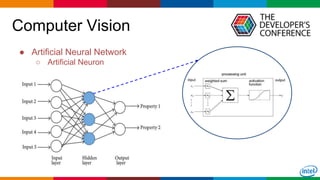
Computer Vision
● Artificial Neural Network
○ Artificial Neuron
Globalcode – Open4education
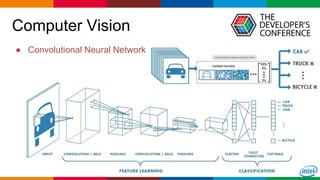
Computer Vision
● Convolutional Neural Network
Globalcode – Open4education6
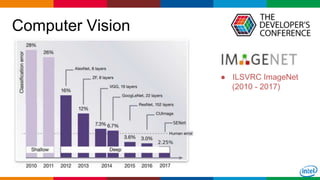
● ILSVRC ImageNet
(2010 - 2017)
Computer Vision
Globalcode – Open4education7
Computer Vision
Typical use cases:
Robot
Security cameras
Smart-home assistant
...
Key capabilities:
Object detection
Classification of objects
Facial recognition
...
Globalcode – Open4education
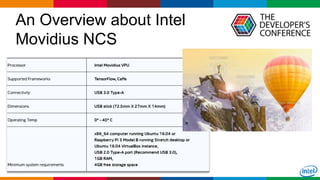
An Overview about Intel
Movidius NCS
Intel Movidius NCS is a low-power device designed to accelerate perform inference of
Deep Neural Network (DNN).
▪ Ultra-low-power tool
▪ Embedded applications
▪ High-performance processor
▪ Programmable architecture
▪ Small-area footprint
▪ And more!
8
Dedicated structure of CNN
hardware blocks
Globalcode – Open4education
An Overview about Intel
Movidius NCS
9
Globalcode – Open4education
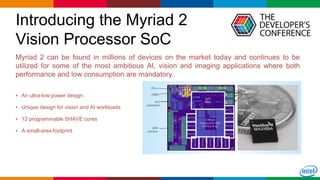
Introducing the Myriad 2
Vision Processor SoC
Myriad 2 can be found in millions of devices on the market today and continues to be
utilized for some of the most ambitious AI, vision and imaging applications where both
performance and low consumption are mandatory.
▪ An ultra-low power design
▪ Unique design for vision and AI workloads
▪ 12 programmable SHAVE cores
▪ A small-area footprint
10
Globalcode – Open4education
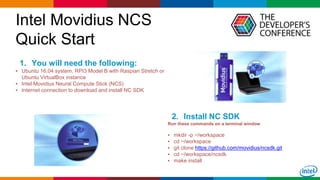
Intel Movidius NCS
Quick Start
1. You will need the following:
▪ Ubuntu 16.04 system, RPI3 Model B with Raspian Stretch or
Ubuntu VirtualBox instance
▪ Intel Movidius Neural Compute Stick (NCS)
▪ Internet connection to download and install NC SDK
11
2. Install NC SDK
Run these commands on a terminal window
▪ mkdir -p ~/workspace
▪ cd ~/workspace
▪ git clone https://github.com/movidius/ncsdk.git
▪ cd ~/workspace/ncsdk
▪ make install
Globalcode – Open4education
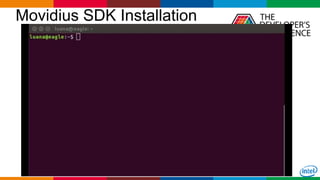
Movidius SDK Installation
12
Globalcode – Open4education
Intel Movidius NCS
Quick Start
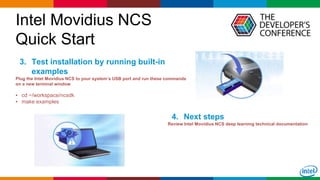
3. Test installation by running built-in
examples
Plug the Intel Movidius NCS to your system’s USB port and run these commands
on a new terminal window
▪ cd ~/workspace/ncsdk
▪ make examples
13
4. Next steps
Review Intel Movidius NCS deep learning technical documentation
Globalcode – Open4education
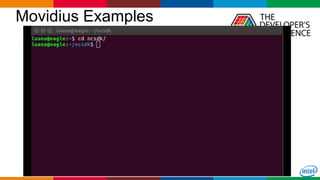
Movidius Examples
14
Globalcode – Open4education
Intel Movidius NCS
Quick Start
15
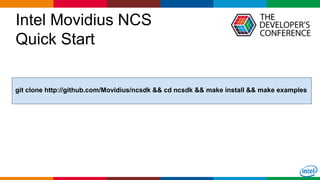
git clone http://github.com/Movidius/ncsdk && cd ncsdk && make install && make examples
Globalcode – Open4education
Intel Movidius NCS
Quick Start
16
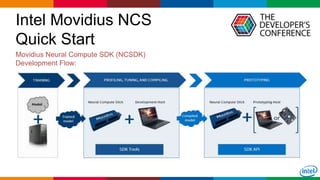
Movidius Neural Compute SDK (NCSDK)
Development Flow:
Globalcode – Open4education
Frameworks Optimized by
Intel AI Academy
17
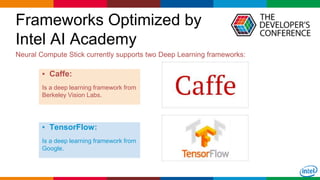
Neural Compute Stick currently supports two Deep Learning frameworks:
▪ Caffe:
Is a deep learning framework from
Berkeley Vision Labs.
▪ TensorFlow:
Is a deep learning framework from
Google.
Globalcode – Open4education
Frameworks Optimized by
Intel AI Academy
18
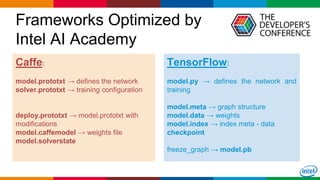
Caffe:
model.prototxt → defines the network
solver.prototxt → training configuration
deploy.prototxt → model.prototxt with
modifications
model.caffemodel → weights file
model.solverstate
TensorFlow:
model.py → defines the network and
training
model.meta → graph structure
model.data → weights
model.index → index meta - data
checkpoint
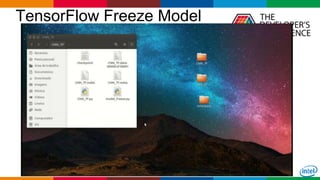
freeze_graph → model.pb
Globalcode – Open4education
Frameworks Optimized by
Intel AI Academy
19
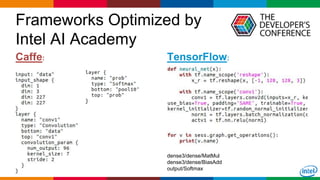
Caffe: TensorFlow:
dense3/dense/MatMul
dense3/dense/BiasAdd
output/Softmax
Globalcode – Open4education
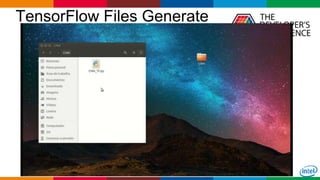
TensorFlow Files Generate
20
Globalcode – Open4education
TensorFlow Freeze Model
21
Globalcode – Open4education
Neural Compute SDK Tools
22
The SDK comes with a set of tools to assist in development and deployment of
applications that utilize hardware accelerated Deep Neural Networks via the Intel
Movidius Neural Compute Stick. Each tool and its usage is described below:
▪ mvNCCompile: Converts Caffe/TF network and weights to Intel Movidius technology internal compiled format.
▪ mvNCProfile: Provides layer-by-layer statistics to evaluate the performance of Caffe/TF networks on the NCS.
▪ mvNCCheck: Compares the results from an inference by running the network on the NCS and Caffe/TF.
Globalcode – Open4education
Neural Compute API
23
Applications for inferencing with NCSDK can be developed either in C/C++ or Python.
The API provides a software interface to Open/Close NCS, load graphs into the Intel
Movidius NCS, and run inferences on the stick.
● from mvnc import mvncapi as mvnc
● devices = mvnc.EnumerateDevices()
● device = mvnc.Device(devices[0])
● device.OpenDevice()
● graph = device.AllocateGraph(graphfile)
● graph.LoadTensor(img.astype(np.float16) , 'obj')
● output, userobj = graph.GetResult()
● graph.DeallocateGraph()
● device.CloseDevice()
Globalcode – Open4education
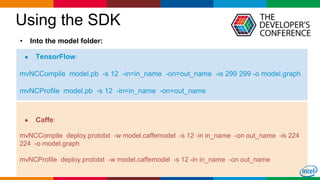
Using the SDK
24
● TensorFlow:
mvNCCompile model.pb -s 12 -in=in_name -on=out_name -is 299 299 -o model.graph
mvNCProfile model.pb -s 12 -in=in_name -on=out_name
• Into the model folder:
● Caffe:
mvNCCompile deploy.prototxt -w model.caffemodel -s 12 -in in_name -on out_name -is 224
224 -o model.graph
mvNCProfile deploy.prototxt -w model.caffemodel -s 12 -in in_name -on out_name
Globalcode – Open4education
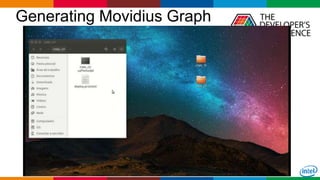
Generating Movidius Graph
25
Globalcode – Open4education
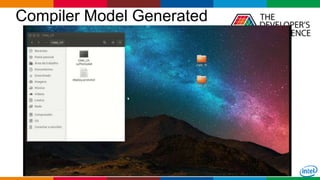
Compiler Model Generated
26
Globalcode – Open4education
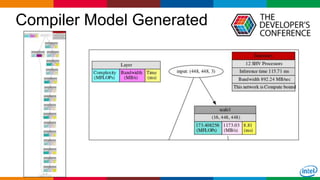
Compiler Model Generated
27
Globalcode – Open4education28
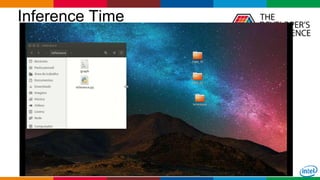
Inference Time
Globalcode – Open4education29
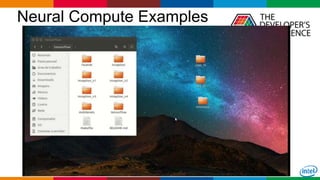
Neural Compute Examples
Globalcode – Open4education30
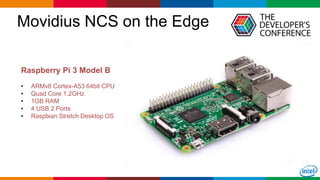
Movidius NCS on the Edge
Raspberry Pi 3 Model B
• ARMv8 Cortex-A53 64bit CPU
• Quad Core 1.2GHz
• 1GB RAM
• 4 USB 2 Ports
• Raspbian Stretch Desktop OS
Globalcode – Open4education31
Movidius API Installation
Globalcode – Open4education
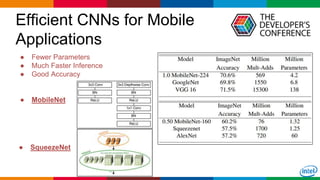
Efficient CNNs for Mobile
Applications
32
● Fewer Parameters
● Much Faster Inference
● Good Accuracy
● MobileNet
● SqueezeNet
Globalcode – Open4education
Raspberry Pi + Movidius
33
Globalcode – Open4education34
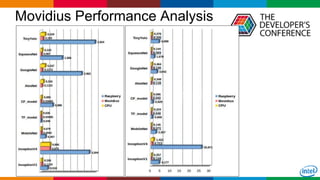
Movidius Performance Analysis
Globalcode – Open4education35
• https://github.com/intel/caffe
• https://software.intel.com/en-us/articles/intel-optimized-tensorflow-installation-guide
• https://developer.movidius.com/
• https://movidius.github.io/ncsdk/
• https://www.raspberrypi.org/downloads/raspbian/
Globalcode – Open4education36
João Guilherme Reiser de Melo
Luana Vieira Martinez Bonatto
Federal University of Santa Catarina
Postgraduate Program in Electrical Engineering
Globalcode – Open4education

TDC2018FLN | Trilha Machine Learning - Intel movidius: Neural Compute Stick

  • 1.
    Globalcode – Open4education IntelMovidius: Neural Compute Stick João Guilherme Reiser de Melo Luana Vieira Martinez Bonatto M.Sc Students in Electrical Engineering at UFSC Trilha – Machine Learning
  • 2.
    Globalcode – Open4education IntelMachine Learning ● Software ○ Intel® Optimization for TensorFlow ○ Intel® Optimization for Caffe ○ Intel® Math Kernel Library ○ Intel® Movidius™ Neural Compute SDK ● Hardware ○ Intel® Xeon Phi™ processor ○ Intel® Movidius™ Neural Compute Stick ● Project ○ Evaluation of Intel Machine Learning Solutions
  • 3.
    Globalcode – Open4education Whatis the Intel Movidius Neural Compute Stick? The Intel Movidius Neural Compute Stick (NCS) is a tiny fanless deep learning device that you can use to learn AI programming at the edge. 3 Computer Vision What kind of AI programming?
  • 4.
    Globalcode – Open4education ComputerVision ● Artificial Neural Network ○ Artificial Neuron
  • 5.
    Globalcode – Open4education ComputerVision ● Convolutional Neural Network
  • 6.
    Globalcode – Open4education6 ●ILSVRC ImageNet (2010 - 2017) Computer Vision
  • 7.
    Globalcode – Open4education7 ComputerVision Typical use cases: Robot Security cameras Smart-home assistant ... Key capabilities: Object detection Classification of objects Facial recognition ...
  • 8.
    Globalcode – Open4education AnOverview about Intel Movidius NCS Intel Movidius NCS is a low-power device designed to accelerate perform inference of Deep Neural Network (DNN). ▪ Ultra-low-power tool ▪ Embedded applications ▪ High-performance processor ▪ Programmable architecture ▪ Small-area footprint ▪ And more! 8 Dedicated structure of CNN hardware blocks
  • 9.
    Globalcode – Open4education AnOverview about Intel Movidius NCS 9
  • 10.
    Globalcode – Open4education Introducingthe Myriad 2 Vision Processor SoC Myriad 2 can be found in millions of devices on the market today and continues to be utilized for some of the most ambitious AI, vision and imaging applications where both performance and low consumption are mandatory. ▪ An ultra-low power design ▪ Unique design for vision and AI workloads ▪ 12 programmable SHAVE cores ▪ A small-area footprint 10
  • 11.
    Globalcode – Open4education IntelMovidius NCS Quick Start 1. You will need the following: ▪ Ubuntu 16.04 system, RPI3 Model B with Raspian Stretch or Ubuntu VirtualBox instance ▪ Intel Movidius Neural Compute Stick (NCS) ▪ Internet connection to download and install NC SDK 11 2. Install NC SDK Run these commands on a terminal window ▪ mkdir -p ~/workspace ▪ cd ~/workspace ▪ git clone https://github.com/movidius/ncsdk.git ▪ cd ~/workspace/ncsdk ▪ make install
  • 12.
  • 13.
    Globalcode – Open4education IntelMovidius NCS Quick Start 3. Test installation by running built-in examples Plug the Intel Movidius NCS to your system’s USB port and run these commands on a new terminal window ▪ cd ~/workspace/ncsdk ▪ make examples 13 4. Next steps Review Intel Movidius NCS deep learning technical documentation
  • 14.
  • 15.
    Globalcode – Open4education IntelMovidius NCS Quick Start 15 git clone http://github.com/Movidius/ncsdk && cd ncsdk && make install && make examples
  • 16.
    Globalcode – Open4education IntelMovidius NCS Quick Start 16 Movidius Neural Compute SDK (NCSDK) Development Flow:
  • 17.
    Globalcode – Open4education FrameworksOptimized by Intel AI Academy 17 Neural Compute Stick currently supports two Deep Learning frameworks: ▪ Caffe: Is a deep learning framework from Berkeley Vision Labs. ▪ TensorFlow: Is a deep learning framework from Google.
  • 18.
    Globalcode – Open4education FrameworksOptimized by Intel AI Academy 18 Caffe: model.prototxt → defines the network solver.prototxt → training configuration deploy.prototxt → model.prototxt with modifications model.caffemodel → weights file model.solverstate TensorFlow: model.py → defines the network and training model.meta → graph structure model.data → weights model.index → index meta - data checkpoint freeze_graph → model.pb
  • 19.
    Globalcode – Open4education FrameworksOptimized by Intel AI Academy 19 Caffe: TensorFlow: dense3/dense/MatMul dense3/dense/BiasAdd output/Softmax
  • 20.
  • 21.
  • 22.
    Globalcode – Open4education NeuralCompute SDK Tools 22 The SDK comes with a set of tools to assist in development and deployment of applications that utilize hardware accelerated Deep Neural Networks via the Intel Movidius Neural Compute Stick. Each tool and its usage is described below: ▪ mvNCCompile: Converts Caffe/TF network and weights to Intel Movidius technology internal compiled format. ▪ mvNCProfile: Provides layer-by-layer statistics to evaluate the performance of Caffe/TF networks on the NCS. ▪ mvNCCheck: Compares the results from an inference by running the network on the NCS and Caffe/TF.
  • 23.
    Globalcode – Open4education NeuralCompute API 23 Applications for inferencing with NCSDK can be developed either in C/C++ or Python. The API provides a software interface to Open/Close NCS, load graphs into the Intel Movidius NCS, and run inferences on the stick. ● from mvnc import mvncapi as mvnc ● devices = mvnc.EnumerateDevices() ● device = mvnc.Device(devices[0]) ● device.OpenDevice() ● graph = device.AllocateGraph(graphfile) ● graph.LoadTensor(img.astype(np.float16) , 'obj') ● output, userobj = graph.GetResult() ● graph.DeallocateGraph() ● device.CloseDevice()
  • 24.
    Globalcode – Open4education Usingthe SDK 24 ● TensorFlow: mvNCCompile model.pb -s 12 -in=in_name -on=out_name -is 299 299 -o model.graph mvNCProfile model.pb -s 12 -in=in_name -on=out_name • Into the model folder: ● Caffe: mvNCCompile deploy.prototxt -w model.caffemodel -s 12 -in in_name -on out_name -is 224 224 -o model.graph mvNCProfile deploy.prototxt -w model.caffemodel -s 12 -in in_name -on out_name
  • 25.
  • 26.
  • 27.
  • 28.
  • 29.
  • 30.
    Globalcode – Open4education30 MovidiusNCS on the Edge Raspberry Pi 3 Model B • ARMv8 Cortex-A53 64bit CPU • Quad Core 1.2GHz • 1GB RAM • 4 USB 2 Ports • Raspbian Stretch Desktop OS
  • 31.
  • 32.
    Globalcode – Open4education EfficientCNNs for Mobile Applications 32 ● Fewer Parameters ● Much Faster Inference ● Good Accuracy ● MobileNet ● SqueezeNet
  • 33.
  • 34.
  • 35.
    Globalcode – Open4education35 •https://github.com/intel/caffe • https://software.intel.com/en-us/articles/intel-optimized-tensorflow-installation-guide • https://developer.movidius.com/ • https://movidius.github.io/ncsdk/ • https://www.raspberrypi.org/downloads/raspbian/
  • 36.
    Globalcode – Open4education36 JoãoGuilherme Reiser de Melo Luana Vieira Martinez Bonatto Federal University of Santa Catarina Postgraduate Program in Electrical Engineering
  • 37.