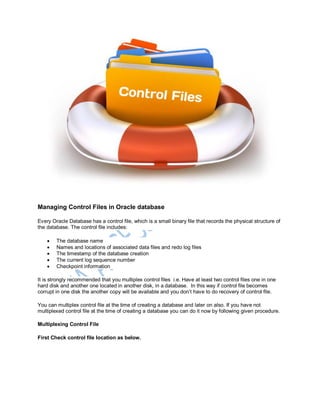
Managing Control Files in Oracle database
Every Oracle Database has a control file, which is a small binary file that records the physical structure of
the database. The control file includes:
 The database name
 Names and locations of associated data files and redo log files
 The timestamp of the database creation
 The current log sequence number
 Checkpoint information
It is strongly recommended that you multiplex control files i.e. Have at least two control files one in one
hard disk and another one located in another disk, in a database. In this way if control file becomes
corrupt in one disk the another copy will be available and you don’t have to do recovery of control file.
You can multiplex control file at the time of creating a database and later on also. If you have not
multiplexed control file at the time of creating a database you can do it now by following given procedure.
Multiplexing Control File
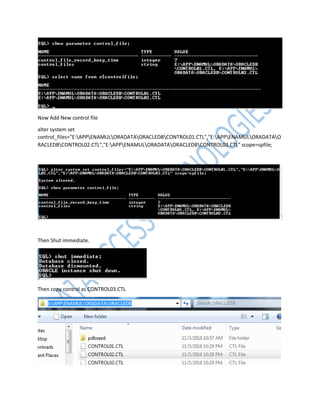
First Check control file location as below.
Now Add New control file
alter system set
control_files="E:APPENAMULORADATAORACLEDBCONTROL01.CTL","E:APPENAMULORADATAO
RACLEDBCONTROL02.CTL","E:APPENAMULORADATAORACLEDBCONTROL03.CTL" scope=spfile;
Then Shut immediate.
Then copy control as CONTROL03.CTL
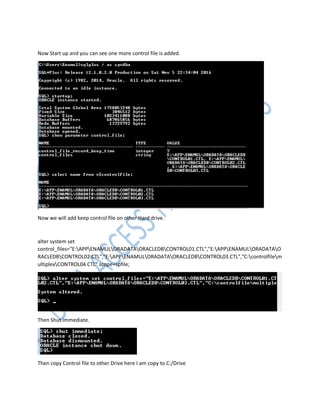
Now Start up and you can see one more control file is added.
Now we will add keep control file on other Hard drive.
alter system set
control_files="E:APPENAMULORADATAORACLEDBCONTROL01.CTL","E:APPENAMULORADATAO
RACLEDBCONTROL02.CTL","E:APPENAMULORADATAORACLEDBCONTROL03.CTL","C:controlfilem
ultiplexCONTROL04.CTL" scope=spfile;
Then Shut immediate.
Then copy Control file to other Drive here I am copy to C:/Drive
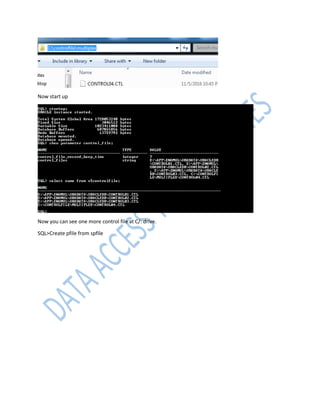
Now start up
Now you can see one more control file at C/: drive.
SQL>Create pfile from spfile

control_file.pdf

  • 1.
    Managing Control Filesin Oracle database Every Oracle Database has a control file, which is a small binary file that records the physical structure of the database. The control file includes:  The database name  Names and locations of associated data files and redo log files  The timestamp of the database creation  The current log sequence number  Checkpoint information It is strongly recommended that you multiplex control files i.e. Have at least two control files one in one hard disk and another one located in another disk, in a database. In this way if control file becomes corrupt in one disk the another copy will be available and you don’t have to do recovery of control file. You can multiplex control file at the time of creating a database and later on also. If you have not multiplexed control file at the time of creating a database you can do it now by following given procedure. Multiplexing Control File First Check control file location as below.
  • 2.
    Now Add Newcontrol file alter system set control_files="E:APPENAMULORADATAORACLEDBCONTROL01.CTL","E:APPENAMULORADATAO RACLEDBCONTROL02.CTL","E:APPENAMULORADATAORACLEDBCONTROL03.CTL" scope=spfile; Then Shut immediate. Then copy control as CONTROL03.CTL
  • 3.
    Now Start upand you can see one more control file is added. Now we will add keep control file on other Hard drive. alter system set control_files="E:APPENAMULORADATAORACLEDBCONTROL01.CTL","E:APPENAMULORADATAO RACLEDBCONTROL02.CTL","E:APPENAMULORADATAORACLEDBCONTROL03.CTL","C:controlfilem ultiplexCONTROL04.CTL" scope=spfile; Then Shut immediate. Then copy Control file to other Drive here I am copy to C:/Drive
  • 4.
    Now start up Nowyou can see one more control file at C/: drive. SQL>Create pfile from spfile