Sensitivity: Internal
Agenda
Sensitivity: Internal
Sync Engine Namespace
• Sync engine consists of two namespaces
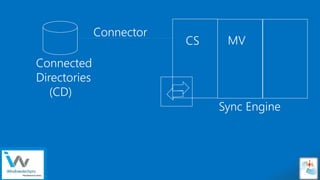
• Connector space is a distinct staging area that contains representations
of the designated objects from a connected data source: stages
incoming/outgoing changes, track changes in the data source.
• Metaverse is a storage area that contains the aggregated identity
information from multiple connected data sources, providing a single
global, integrated view of all combined objects.
Sensitivity: Internal
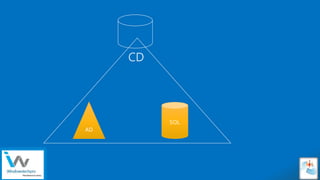
CD
AD
SQL
Sensitivity: Internal
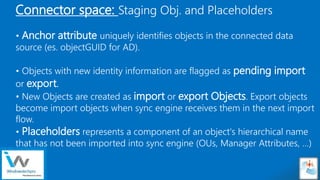
Connector space: Staging Obj. and Placeholders
• Anchor attribute uniquely identifies objects in the connected data
source (es. objectGUID for AD).
• Objects with new identity information are flagged as pending import
or export.
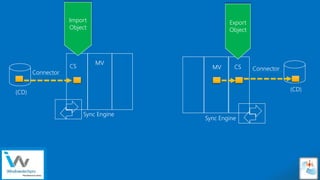
• New Objects are created as import or export Objects. Export objects
become import objects when sync engine receives them in the next import
flow.
• Placeholders represents a component of an object's hierarchical name
that has not been imported into sync engine (OUs, Manager Attributes, …)
Sensitivity: Internal
Connected
Directories
(CD)
Connector
Sync Engine
CS MV
Sensitivity: Internal
(CD)
Connector
Sync Engine
CS
MV
(CD)
Connector
Sync Engine
CSMV
Import
Object
Export
Object
Sensitivity: Internal
Metaverse Objects
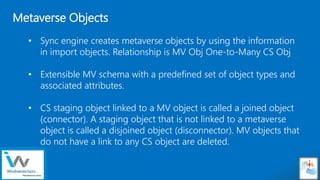
• Sync engine creates metaverse objects by using the information
in import objects. Relationship is MV Obj One-to-Many CS Obj
• Extensible MV schema with a predefined set of object types and
associated attributes.
• CS staging object linked to a MV object is called a joined object
(connector). A staging object that is not linked to a metaverse
object is called a disjoined object (disconnector). MV objects that
do not have a link to any CS object are deleted.
Sensitivity: Internal
CD
Connector
Sync Engine
CSMV
CD
Connector
Joined
Objects
Disjoined
Objects
Sensitivity: Internal
Identity management process
• Import process first tries to locate a representation of the object in the CS matching
the anchor attribute or distinguished name. Staging objects with updated data are
marked as pending import (Add, Update, Delete)
• Inbound synchronization will project/provision new objects in the MV, Join existing
MV objects to a Staging Obj or update attribute values (attribute flow)
• Outbound synchronization updates export objects on MV object change:
• Rename a joined object.
• Create joined objects, where a metaverse object is linked to a newly created
export object
• Disjoin links between a metaverse object and staging objects, creating a
disjoined object.
Sensitivity: Internal
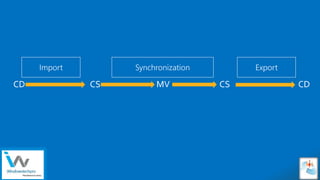
Import Synchronization Export
CD CS MV CS CD
Sensitivity: Internal
Identity management process
• During the export process, sync engine examines all export objects that are
flagged as pending export in the connector space, and then sends updates to the
connected data source.
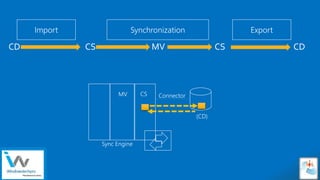
• Sync engine uses the import process to confirm attribute values that have been
exported to the connected data source. A comparison between the imported and
exported information enables sync engine to determine whether the export was
successful or if it needs to be repeated.
Sensitivity: Internal
Import Synchronization Export
CD CS MV CS CD
(CD)
Connector
Sync Engine
CSMV
Sensitivity: Internal
Definition:
• An attribute immutable during the lifetime of an object. It uniquely identifies an
object as being the same object on-premises and in Azure AD. The attribute is also
called immutableId.
What to choose?
• objectGUID is unique *but* unfortunately does change when a user is migrated
between AD forests: when this happens there’s no easy way to relink the migrated user
to his cloud self (your mileage may vary)
• employeeID can be a good choice, should be unique and immutable. • msDS-
ConsistencyGuid adds a bit of rules complexity but is the recommended choice,
especially in multi-forest environments.
• sourceAnchor should *not* be case-sensitive and should avoid characters that may
vary by case.
SourceAnchor
Sensitivity: Internal
Azure AD Connect (1.1.524.0+) now facilitates the use of msDS-
ConsistencyGuid as sourceAnchor :
• Use msDS-ConsistencyGuid as the sourceAnchor attribute for User objects.
ObjectGUID is used for other object types.
• Rule will try to Join using msDS-ConsistencyGuid or ObjectGUID.
• If msDS-ConsistencyGuid attribute isn't populated, Azure AD Connect writes its
objectGUID value back to the msDS-ConsistencyGuid attribute in on-premises Active
Directory
SourceAnchor
Sensitivity: Internal
Express settings installation <> required permissions
 Administrator of the local server
 Creates the local account that is used as the sync engine service account.
 Enterprise Admin credentials
 Creates an account in Active Directory and grants permissions to it.
 Global administrator role in Azure AD
 Creation of the Azure AD account that is used for on-going sync operations in
Azure AD.
 Enabling sync in the Azure AD directory.
Sensitivity: Internal
Responsible for two tasks:
 Synchronization Cycle
 Import, sync and export processes
 Maintenance Tasks
 Renew keys and certificates for Password Reset and DRS.
 Purges old entries in the operations logs.
 Configuration
 View by using Get-ADSyncScheduler in PowerShell • Modify:
 Set-ADSyncScheduler
 CustomizedSyncCycleInterval
 NextSyncCyclePolicyType
Sensitivity: Internal
Custom settings installation <> Required permissions
 Administrator of the local server
 Creates the local account that is used as the sync engine service account.
 AD or local user account credentials
 If this account is specified, it is used as the service account for the sync service.
 On-premises ADDS creds for each forest that is connected to AAD
 Domain Administrator for Installation and configuration of the AD FS
server role.
 Local admin on the Web application proxy servers
 Domain account that is a local administrator of the AD FS server(s) for
the proxy trust credentials
 AD user account credentials for AD FS Service Account
Sensitivity: Internal
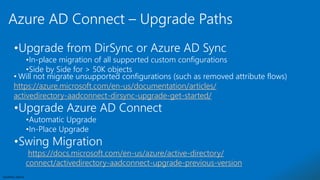
•Upgrade from DirSync or Azure AD Sync
•In-place migration of all supported custom configurations
•Side by Side for > 50K objects
• Will not migrate unsupported configurations (such as removed attribute flows)
https://azure.microsoft.com/en-us/documentation/articles/
activedirectory-aadconnect-dirsync-upgrade-get-started/
•Upgrade Azure AD Connect
•Automatic Upgrade
•In-Place Upgrade
•Swing Migration
https://docs.microsoft.com/en-us/azure/active-directory/
connect/activedirectory-aadconnect-upgrade-previous-version
Azure AD Connect – Upgrade Paths
Sensitivity: Internal
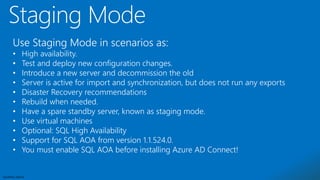
Use Staging Mode in scenarios as:
• High availability.
• Test and deploy new configuration changes.
• Introduce a new server and decommission the old
• Server is active for import and synchronization, but does not run any exports
• Disaster Recovery recommendations
• Rebuild when needed.
• Have a spare standby server, known as staging mode.
• Use virtual machines
• Optional: SQL High Availability
• Support for SQL AOA from version 1.1.524.0.
• You must enable SQL AOA before installing Azure AD Connect!
Sensitivity: Internal
 Stop the scheduler
 Stop-ADSyncSyncCycle
 Custom scheduler:
 Invoke-ADSyncRunProfile -ConnectorName "name of connector" RunProfileName
"name of profile“
 Get the status: Get-ADSyncConnectorRunStatus
 Recommended Order:
1. (Full/Delta) Import from on-premises directories, such as Active Directory
2. (Full/Delta) Import from Azure AD
3. (Full/Delta) Synchronization from on-premises directories, such as Active Directory
4. (Full/Delta) Synchronization from Azure AD
5. Export to Azure AD
6. Export to on-premises directories, such as Active Directory
Sensitivity: Internal
• PurgeRunHistoryInterval
• SyncCycleEnabled
• MaintenanceEnabled
• Disable the scheduler:
• Set-ADSyncScheduler -SyncCycleEnabled $false
• Start the scheduler
• Delta or full (initial) Sync Cycle:
• Start-ADSyncSyncCycle -PolicyType Delta
• Start-ADSyncSyncCycle -PolicyType Initial
Sensitivity: Internal
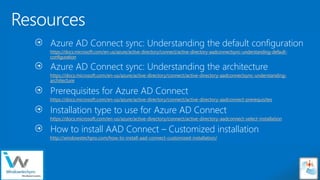
Azure AD Connect sync: Understanding the default configuration
https://docs.microsoft.com/en-us/azure/active-directory/connect/active-directory-aadconnectsync-understanding-default-
configuration
Azure AD Connect sync: Understanding the architecture
https://docs.microsoft.com/en-us/azure/active-directory/connect/active-directory-aadconnectsync-understanding-
architecture
Prerequisites for Azure AD Connect
https://docs.microsoft.com/en-us/azure/active-directory/connect/active-directory-aadconnect-prerequisites
Installation type to use for Azure AD Connect
https://docs.microsoft.com/en-us/azure/active-directory/connect/active-directory-aadconnect-select-installation
How to install AAD Connect – Customized installation
http://windowstechpro.com/how-to-install-aad-connect-customized-installation/
Sensitivity: Internal
Softkrishnan@gmail.com
Softkrishnan@outlook.com

Azure AD connect- Deep Dive Webinar PPT

  • 1.
  • 2.
  • 3.
  • 4.
    Sensitivity: Internal Sync EngineNamespace • Sync engine consists of two namespaces • Connector space is a distinct staging area that contains representations of the designated objects from a connected data source: stages incoming/outgoing changes, track changes in the data source. • Metaverse is a storage area that contains the aggregated identity information from multiple connected data sources, providing a single global, integrated view of all combined objects.
  • 5.
  • 6.
    Sensitivity: Internal Connector space:Staging Obj. and Placeholders • Anchor attribute uniquely identifies objects in the connected data source (es. objectGUID for AD). • Objects with new identity information are flagged as pending import or export. • New Objects are created as import or export Objects. Export objects become import objects when sync engine receives them in the next import flow. • Placeholders represents a component of an object's hierarchical name that has not been imported into sync engine (OUs, Manager Attributes, …)
  • 7.
  • 8.
  • 9.
    Sensitivity: Internal Metaverse Objects •Sync engine creates metaverse objects by using the information in import objects. Relationship is MV Obj One-to-Many CS Obj • Extensible MV schema with a predefined set of object types and associated attributes. • CS staging object linked to a MV object is called a joined object (connector). A staging object that is not linked to a metaverse object is called a disjoined object (disconnector). MV objects that do not have a link to any CS object are deleted.
  • 10.
  • 11.
    Sensitivity: Internal Identity managementprocess • Import process first tries to locate a representation of the object in the CS matching the anchor attribute or distinguished name. Staging objects with updated data are marked as pending import (Add, Update, Delete) • Inbound synchronization will project/provision new objects in the MV, Join existing MV objects to a Staging Obj or update attribute values (attribute flow) • Outbound synchronization updates export objects on MV object change: • Rename a joined object. • Create joined objects, where a metaverse object is linked to a newly created export object • Disjoin links between a metaverse object and staging objects, creating a disjoined object.
  • 12.
  • 13.
    Sensitivity: Internal Identity managementprocess • During the export process, sync engine examines all export objects that are flagged as pending export in the connector space, and then sends updates to the connected data source. • Sync engine uses the import process to confirm attribute values that have been exported to the connected data source. A comparison between the imported and exported information enables sync engine to determine whether the export was successful or if it needs to be repeated.
  • 14.
    Sensitivity: Internal Import SynchronizationExport CD CS MV CS CD (CD) Connector Sync Engine CSMV
  • 15.
    Sensitivity: Internal Definition: • Anattribute immutable during the lifetime of an object. It uniquely identifies an object as being the same object on-premises and in Azure AD. The attribute is also called immutableId. What to choose? • objectGUID is unique *but* unfortunately does change when a user is migrated between AD forests: when this happens there’s no easy way to relink the migrated user to his cloud self (your mileage may vary) • employeeID can be a good choice, should be unique and immutable. • msDS- ConsistencyGuid adds a bit of rules complexity but is the recommended choice, especially in multi-forest environments. • sourceAnchor should *not* be case-sensitive and should avoid characters that may vary by case. SourceAnchor
  • 16.
    Sensitivity: Internal Azure ADConnect (1.1.524.0+) now facilitates the use of msDS- ConsistencyGuid as sourceAnchor : • Use msDS-ConsistencyGuid as the sourceAnchor attribute for User objects. ObjectGUID is used for other object types. • Rule will try to Join using msDS-ConsistencyGuid or ObjectGUID. • If msDS-ConsistencyGuid attribute isn't populated, Azure AD Connect writes its objectGUID value back to the msDS-ConsistencyGuid attribute in on-premises Active Directory SourceAnchor
  • 17.
    Sensitivity: Internal Express settingsinstallation <> required permissions  Administrator of the local server  Creates the local account that is used as the sync engine service account.  Enterprise Admin credentials  Creates an account in Active Directory and grants permissions to it.  Global administrator role in Azure AD  Creation of the Azure AD account that is used for on-going sync operations in Azure AD.  Enabling sync in the Azure AD directory.
  • 18.
    Sensitivity: Internal Responsible fortwo tasks:  Synchronization Cycle  Import, sync and export processes  Maintenance Tasks  Renew keys and certificates for Password Reset and DRS.  Purges old entries in the operations logs.  Configuration  View by using Get-ADSyncScheduler in PowerShell • Modify:  Set-ADSyncScheduler  CustomizedSyncCycleInterval  NextSyncCyclePolicyType
  • 19.
    Sensitivity: Internal Custom settingsinstallation <> Required permissions  Administrator of the local server  Creates the local account that is used as the sync engine service account.  AD or local user account credentials  If this account is specified, it is used as the service account for the sync service.  On-premises ADDS creds for each forest that is connected to AAD  Domain Administrator for Installation and configuration of the AD FS server role.  Local admin on the Web application proxy servers  Domain account that is a local administrator of the AD FS server(s) for the proxy trust credentials  AD user account credentials for AD FS Service Account
  • 20.
  • 21.
    Sensitivity: Internal •Upgrade fromDirSync or Azure AD Sync •In-place migration of all supported custom configurations •Side by Side for > 50K objects • Will not migrate unsupported configurations (such as removed attribute flows) https://azure.microsoft.com/en-us/documentation/articles/ activedirectory-aadconnect-dirsync-upgrade-get-started/ •Upgrade Azure AD Connect •Automatic Upgrade •In-Place Upgrade •Swing Migration https://docs.microsoft.com/en-us/azure/active-directory/ connect/activedirectory-aadconnect-upgrade-previous-version Azure AD Connect – Upgrade Paths
  • 22.
    Sensitivity: Internal Use StagingMode in scenarios as: • High availability. • Test and deploy new configuration changes. • Introduce a new server and decommission the old • Server is active for import and synchronization, but does not run any exports • Disaster Recovery recommendations • Rebuild when needed. • Have a spare standby server, known as staging mode. • Use virtual machines • Optional: SQL High Availability • Support for SQL AOA from version 1.1.524.0. • You must enable SQL AOA before installing Azure AD Connect!
  • 23.
    Sensitivity: Internal  Stopthe scheduler  Stop-ADSyncSyncCycle  Custom scheduler:  Invoke-ADSyncRunProfile -ConnectorName "name of connector" RunProfileName "name of profile“  Get the status: Get-ADSyncConnectorRunStatus  Recommended Order: 1. (Full/Delta) Import from on-premises directories, such as Active Directory 2. (Full/Delta) Import from Azure AD 3. (Full/Delta) Synchronization from on-premises directories, such as Active Directory 4. (Full/Delta) Synchronization from Azure AD 5. Export to Azure AD 6. Export to on-premises directories, such as Active Directory
  • 24.
    Sensitivity: Internal • PurgeRunHistoryInterval •SyncCycleEnabled • MaintenanceEnabled • Disable the scheduler: • Set-ADSyncScheduler -SyncCycleEnabled $false • Start the scheduler • Delta or full (initial) Sync Cycle: • Start-ADSyncSyncCycle -PolicyType Delta • Start-ADSyncSyncCycle -PolicyType Initial
  • 25.
  • 26.
    Sensitivity: Internal Azure ADConnect sync: Understanding the default configuration https://docs.microsoft.com/en-us/azure/active-directory/connect/active-directory-aadconnectsync-understanding-default- configuration Azure AD Connect sync: Understanding the architecture https://docs.microsoft.com/en-us/azure/active-directory/connect/active-directory-aadconnectsync-understanding- architecture Prerequisites for Azure AD Connect https://docs.microsoft.com/en-us/azure/active-directory/connect/active-directory-aadconnect-prerequisites Installation type to use for Azure AD Connect https://docs.microsoft.com/en-us/azure/active-directory/connect/active-directory-aadconnect-select-installation How to install AAD Connect – Customized installation http://windowstechpro.com/how-to-install-aad-connect-customized-installation/
  • 27.