4 Steps to Better
Dashboard Design
Steps inspired by:
4 Steps to Better Dashboard Design2
● Data Science for Dummies
● By Lillian Pierson
● Chapter on data dashboards
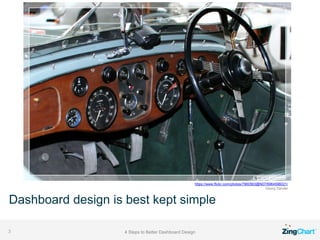
Dashboard design is best kept simple
4 Steps to Better Dashboard Design3
https://www.flickr.com/photos/7960563@N07/6964596021/
Georg Sander
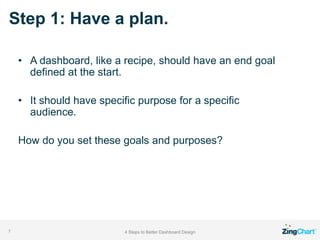
Step 1: Have a plan.
4 Steps to Better Dashboard Design4
● Do you believe dashboards are simply a collection
of charts?
● Do you think fussing over dashboard design is a
waste of time?
You probably haven’t encountered a dashboard
lacking design forethought!
4 Steps to Better Dashboard Design5
4 Steps to Better Dashboard Design6
“Bad design is usually the
direct result of poorly
scoped purpose.”
-Lillian Pierson-
Step 1: Have a plan.
4 Steps to Better Dashboard Design7
• A dashboard, like a recipe, should have an end goal
defined at the start.
• It should have specific purpose for a specific
audience.
How do you set these goals and purposes?
Step 2: Know Your Audience
And Their Needs
4 Steps to Better Dashboard Design8
1. Who is your audience?
Example: Emma, a small business owner who sells cat toys.
2. What does the audience need to know?
She needs to see key performance indicators (KPIs) for each part of
her business.
4 Steps to Better Dashboard Design9
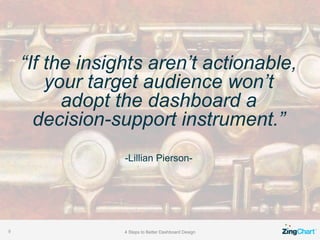
“If the insights aren’t actionable,
your target audience won’t
adopt the dashboard a
decision-support instrument.”
-Lillian Pierson-
Step 2: Know Your Audience
And Their Needs
4 Steps to Better Dashboard Design10
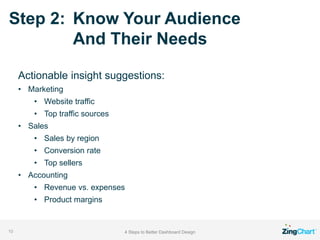
Actionable insight suggestions:
• Marketing
• Website traffic
• Top traffic sources
• Sales
• Sales by region
• Conversion rate
• Top sellers
• Accounting
• Revenue vs. expenses
• Product margins
Step 3: Choose the Right Charts
4 Steps to Better Dashboard Design11
• Selecting chart types is the next important step.
• You don’t need to use solely bar charts.
http://findaccountingsoftware.com/expert-advice/7-alternatives-to-the-
bar-graph-and-when-to-use-them-in-bi-reporting/
• You don’t need to use traditional charts
Step 3: Choose the Right Charts
4 Steps to Better Dashboard Design12
• Sometimes the best way to visualize data is a table
or list.
• In the case of Emma, the top traffic sources are
easiest to read in a table or grid.
4 Steps to Better Dashboard Design13
“Graphs are useful when
a picture of the data makes
meaningful relationships visible
(patterns, trends, and exceptions)
that could not be easily discerned
from a table of the same data.”
-Stephen Few-
Step 3: Choose the Right Charts
4 Steps to Better Dashboard Design14
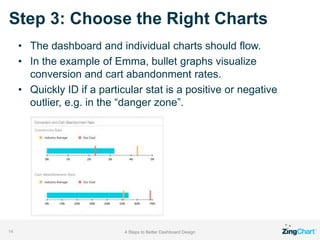
• The dashboard and individual charts should flow.
• In the example of Emma, bullet graphs visualize
conversion and cart abandonment rates.
• Quickly ID if a particular stat is a positive or negative
outlier, e.g. in the “danger zone”.
Step 3: Choose the Right Charts
4 Steps to Better Dashboard Design15
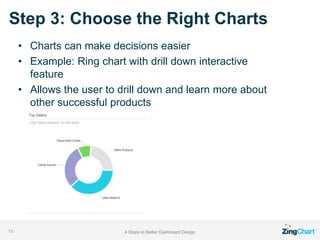
• Charts can make decisions easier
• Example: Ring chart with drill down interactive
feature
• Allows the user to drill down and learn more about
other successful products
Step 4: Keep the Big Picture in Mind
4 Steps to Better Dashboard Design16
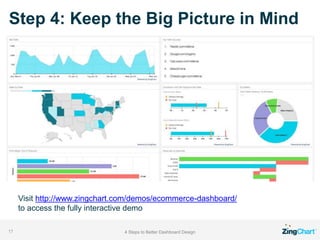
• Use key annotations but don’t overwhelm
• Use only the most important information
• Use plenty of whitespace to allow for focus
• Rows help for flow and organization
Step 4: Keep the Big Picture in Mind
4 Steps to Better Dashboard Design17
Visit http://www.zingchart.com/demos/ecommerce-dashboard/
to access the fully interactive demo
Additional Dashboard Information
4 Steps to Better Dashboard Design18
Read More
http://www.zingchart.com/blog/2015/07/16/
4-steps-to-better-dashboard-design/
Try out a dashboard with your data
http://www.zingchart.com/try

4 Steps to Better Dashboard Design - ZingChart

  • 1.
    4 Steps toBetter Dashboard Design
  • 2.
    Steps inspired by: 4Steps to Better Dashboard Design2 ● Data Science for Dummies ● By Lillian Pierson ● Chapter on data dashboards
  • 3.
    Dashboard design isbest kept simple 4 Steps to Better Dashboard Design3 https://www.flickr.com/photos/7960563@N07/6964596021/ Georg Sander
  • 4.
    Step 1: Havea plan. 4 Steps to Better Dashboard Design4 ● Do you believe dashboards are simply a collection of charts? ● Do you think fussing over dashboard design is a waste of time?
  • 5.
    You probably haven’tencountered a dashboard lacking design forethought! 4 Steps to Better Dashboard Design5
  • 6.
    4 Steps toBetter Dashboard Design6 “Bad design is usually the direct result of poorly scoped purpose.” -Lillian Pierson-
  • 7.
    Step 1: Havea plan. 4 Steps to Better Dashboard Design7 • A dashboard, like a recipe, should have an end goal defined at the start. • It should have specific purpose for a specific audience. How do you set these goals and purposes?
  • 8.
    Step 2: KnowYour Audience And Their Needs 4 Steps to Better Dashboard Design8 1. Who is your audience? Example: Emma, a small business owner who sells cat toys. 2. What does the audience need to know? She needs to see key performance indicators (KPIs) for each part of her business.
  • 9.
    4 Steps toBetter Dashboard Design9 “If the insights aren’t actionable, your target audience won’t adopt the dashboard a decision-support instrument.” -Lillian Pierson-
  • 10.
    Step 2: KnowYour Audience And Their Needs 4 Steps to Better Dashboard Design10 Actionable insight suggestions: • Marketing • Website traffic • Top traffic sources • Sales • Sales by region • Conversion rate • Top sellers • Accounting • Revenue vs. expenses • Product margins
  • 11.
    Step 3: Choosethe Right Charts 4 Steps to Better Dashboard Design11 • Selecting chart types is the next important step. • You don’t need to use solely bar charts. http://findaccountingsoftware.com/expert-advice/7-alternatives-to-the- bar-graph-and-when-to-use-them-in-bi-reporting/ • You don’t need to use traditional charts
  • 12.
    Step 3: Choosethe Right Charts 4 Steps to Better Dashboard Design12 • Sometimes the best way to visualize data is a table or list. • In the case of Emma, the top traffic sources are easiest to read in a table or grid.
  • 13.
    4 Steps toBetter Dashboard Design13 “Graphs are useful when a picture of the data makes meaningful relationships visible (patterns, trends, and exceptions) that could not be easily discerned from a table of the same data.” -Stephen Few-
  • 14.
    Step 3: Choosethe Right Charts 4 Steps to Better Dashboard Design14 • The dashboard and individual charts should flow. • In the example of Emma, bullet graphs visualize conversion and cart abandonment rates. • Quickly ID if a particular stat is a positive or negative outlier, e.g. in the “danger zone”.
  • 15.
    Step 3: Choosethe Right Charts 4 Steps to Better Dashboard Design15 • Charts can make decisions easier • Example: Ring chart with drill down interactive feature • Allows the user to drill down and learn more about other successful products
  • 16.
    Step 4: Keepthe Big Picture in Mind 4 Steps to Better Dashboard Design16 • Use key annotations but don’t overwhelm • Use only the most important information • Use plenty of whitespace to allow for focus • Rows help for flow and organization
  • 17.
    Step 4: Keepthe Big Picture in Mind 4 Steps to Better Dashboard Design17 Visit http://www.zingchart.com/demos/ecommerce-dashboard/ to access the fully interactive demo
  • 18.
    Additional Dashboard Information 4Steps to Better Dashboard Design18 Read More http://www.zingchart.com/blog/2015/07/16/ 4-steps-to-better-dashboard-design/ Try out a dashboard with your data http://www.zingchart.com/try