Writing Tools Assessment and Recording                                                            Quick Guide
Guide

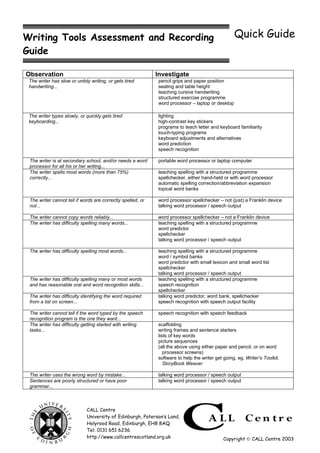
Observation                                                  Investigate
 The writer has slow or untidy writing, or gets tired        pencil grips and paper position
 handwriting...                                              seating and table height
                                                             teaching cursive handwriting
                                                             structured exercise programme
                                                             word processor – laptop or desktop

 The writer types slowly, or quickly gets tired              lighting
 keyboarding...                                              high-contrast key stickers
                                                             programs to teach letter and keyboard familiarity
                                                             touch-typing programs
                                                             keyboard adjustments and alternatives
                                                             word prediction
                                                             speech recognition

 The writer is at secondary school, and/or needs a word      portable word processor or laptop computer
 processor for all his or her writing...
 The writer spells most words (more than 75%)                teaching spelling with a structured programme
 correctly...                                                spellchecker, either hand-held or with word processor
                                                             automatic spelling correction/abbreviation expansion
                                                             topical word banks

 The writer cannot tell if words are correctly spelled, or   word processor spellchecker – not (just) a Franklin device
 not...                                                      talking word processor / speech output

 The writer cannot copy words reliably...                    word processor spellchecker – not a Franklin device
 The writer has difficulty spelling many words...            teaching spelling with a structured programme
                                                             word predictor
                                                             spellchecker
                                                             talking word processor / speech output

 The writer has difficulty spelling most words...            teaching spelling with a structured programme
                                                             word / symbol banks
                                                             word predictor with small lexicon and small word list
                                                             spellchecker
                                                             talking word processor / speech output
 The writer has difficulty spelling many or most words       teaching spelling with a structured programme
 and has reasonable oral and word recognition skills...      speech recognition
                                                             spellchecker
 The writer has difficulty identifying the word required     talking word predictor, word bank, spellchecker
 from a list on screen...                                    speech recognition with speech output facility

 The writer cannot tell if the word typed by the speech      speech recognition with speech feedback
 recognition program is the one they want...
 The writer has difficulty getting started with writing      scaffolding
 tasks...                                                    writing frames and sentence starters
                                                             lists of key words
                                                             picture sequences
                                                             (all the above using either paper and pencil, or on word
                                                                processor screens)
                                                             software to help the writer get going, eg. Writer’s Toolkit,
                                                                StoryBook Weaver

 The writer uses the wrong word by mistake...                talking word processor / speech output
 Sentences are poorly structured or have poor                talking word processor / speech output
 grammar...


                             CALL Centre
                             University of Edinburgh, Paterson’s Land,
                             Holyrood Road, Edinburgh, EH8 8AQ
                             Tel: 0131 651 6236
                             http://www.callcentrescotland.org.uk                            Copyright  CALL Centre 2003
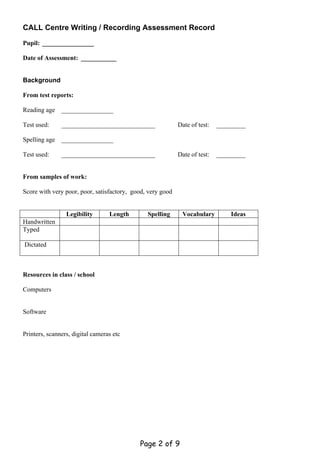
CALL Centre Writing / Recording Assessment Record

Pupil: ________________

Date of Assessment: ___________


Background

From test reports:

Reading age    ________________

Test used:     _____________________________                Date of test:   _________

Spelling age   ________________

Test used:     _____________________________                Date of test:   _________


From samples of work:

Score with very poor, poor, satisfactory, good, very good


                 Legibility       Length       Spelling      Vocabulary         Ideas
Handwritten
Typed

Dictated


Resources in class / school

Computers


Software


Printers, scanners, digital cameras etc


                                            Page 2 of 9
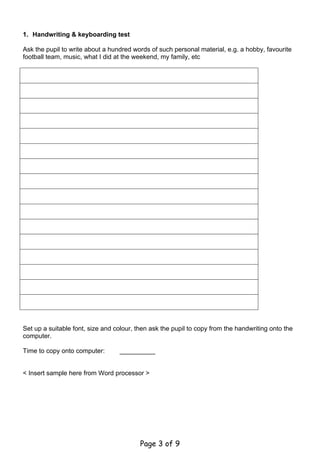
1. Handwriting & keyboarding test

Ask the pupil to write about a hundred words of such personal material, e.g. a hobby, favourite
football team, music, what I did at the weekend, my family, etc


Set up a suitable font, size and colour, then ask the pupil to copy from the handwriting onto the
computer.

Time to copy onto computer:       ___________


< Insert sample here from Word processor >


                                          Page 3 of 9
The pupil should then copy the printout by hand.

Time to copy by hand:            ___________


                                        Page 4 of 9
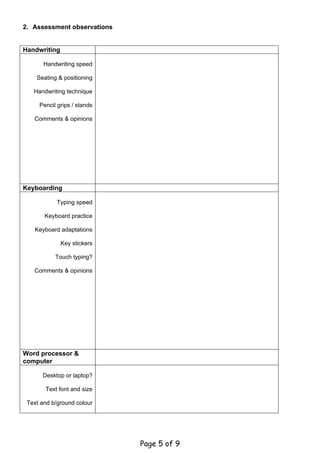
2. Assessment observations


Handwriting

       Handwriting speed

    Seating & positioning

   Handwriting technique

     Pencil grips / stands

   Comments & opinions


Keyboarding

            Typing speed

       Keyboard practice

   Keyboard adaptations

              Key stickers

           Touch typing?

   Comments & opinions


Word processor &
computer

      Desktop or laptop?

       Text font and size

 Text and b/ground colour


                             Page 5 of 9
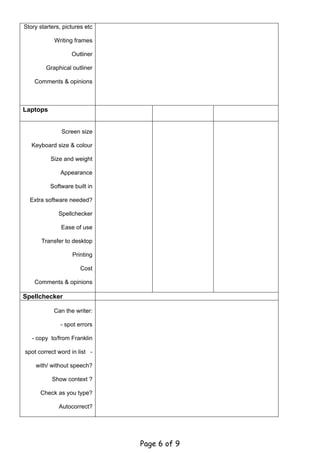
Story starters, pictures etc

            Writing frames

                   Outliner

         Graphical outliner

    Comments & opinions


Laptops


               Screen size

   Keyboard size & colour

          Size and weight

              Appearance

          Software built in

  Extra software needed?

              Spellchecker

               Ease of use

       Transfer to desktop

                   Printing

                       Cost

    Comments & opinions

Spellchecker

            Can the writer:

               - spot errors

   - copy to/from Franklin

spot correct word in list -

    with/ without speech?

           Show context ?

      Check as you type?

              Autocorrect?


                               Page 6 of 9
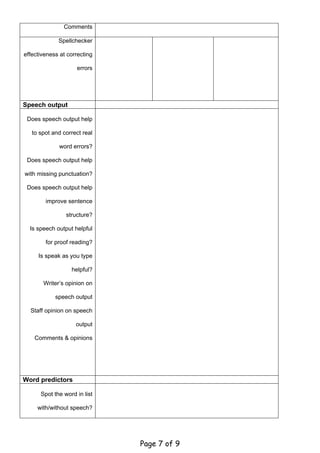
Comments

             Spellchecker

effectiveness at correcting

                    errors


Speech output

 Does speech output help

   to spot and correct real

             word errors?

 Does speech output help

with missing punctuation?

 Does speech output help

        improve sentence

                structure?

  Is speech output helpful

        for proof reading?

     Is speak as you type

                  helpful?

       Writer’s opinion on

            speech output

  Staff opinion on speech

                    output

    Comments & opinions


Word predictors

      Spot the word in list

     with/without speech?


                              Page 7 of 9
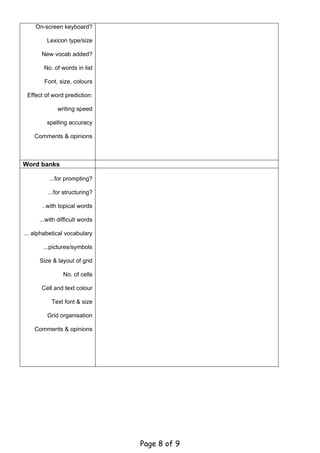
On-screen keyboard?

         Lexicon type/size

       New vocab added?

        No. of words in list

        Font, size, colours

 Effect of word prediction:

             writing speed

         spelling accuracy

    Comments & opinions


Word banks

          ...for prompting?

         ...for structuring?

       ..with topical words

      ...with difficult words

... alphabetical vocabulary

       ...pictures/symbols

      Size & layout of grid

                No. of cells

       Cell and text colour

           Text font & size

         Grid organisation

    Comments & opinions


                                Page 8 of 9
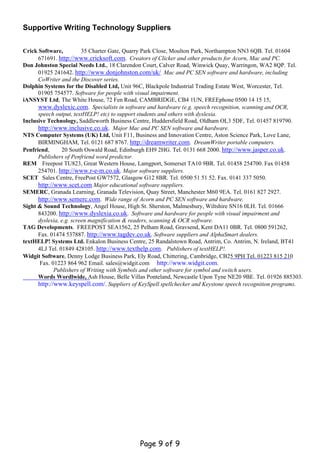
Supportive Writing Technology Suppliers


Crick Software,          35 Charter Gate, Quarry Park Close, Moulton Park, Northampton NN3 6QB. Tel. 01604
      671691. http://www.cricksoft.com. Creators of Clicker and other products for Acorn, Mac and PC.
Don Johnston Special Needs Ltd., 18 Clarendon Court, Calver Road, Winwick Quay, Warringon, WA2 8QP. Tel.
      01925 241642. http://www.donjohnston.com/uk/ Mac and PC SEN software and hardware, including
      CoWriter and the Discover series.
Dolphin Systems for the Disabled Ltd, Unit 96C, Blackpole Industrial Trading Estate West, Worcester, Tel.
      01905 754577. Software for people with visual impairment.
iANSYST Ltd, The White House, 72 Fen Road, CAMBRIDGE, CB4 1UN, FREEphone 0500 14 15 15,
      www.dyslexic.com. Specialists in software and hardware (e.g. speech recognition, scanning and OCR,
      speech output, textHELP! etc) to support students and others with dyslexia.
Inclusive Technology, Saddleworth Business Centre, Huddersfield Road, Oldham OL3 5DF, Tel. 01457 819790.
      http://www.inclusive.co.uk. Major Mac and PC SEN software and hardware.
NTS Computer Systems (UK) Ltd, Unit F11, Business and Innovation Centre, Aston Science Park, Love Lane,
      BIRMINGHAM, Tel. 0121 687 8767. http://dreamwriter.com. DreamWriter portable computers.
Penfriend,      20 South Oswald Road, Edinburgh EH9 2HG. Tel. 0131 668 2000. http://www.jasper.co.uk.
      Publishers of Penfriend word predictor.
REM Freepost TU823, Great Western House, Lamgport, Somerset TA10 9BR. Tel. 01458 254700. Fax 01458
      254701. http://www.r-e-m.co.uk. Major software suppliers.
SCET Sales Centre, FreePost GW7572, Glasgow G12 8BR. Tel. 0500 51 51 52. Fax. 0141 337 5050.
      http://www.scet.com Major educational software suppliers.
SEMERC, Granada Learning, Granada Television, Quay Street, Manchester M60 9EA. Tel. 0161 827 2927.
      http://www.semerc.com. Wide range of Acorn and PC SEN software and hardware.
Sight & Sound Technology, Angel House, High St. Sherston, Malmesbury, Wiltshire SN16 0LH. Tel. 01666
      843200. http://www.dyslexia.co.uk. Software and hardware for people with visual impairment and
      dyslexia, e.g. screen magnification & readers, scanning & OCR software.
TAG Developments. FREEPOST SEA1562, 25 Pelham Road, Gravsend, Kent DA11 0BR. Tel. 0800 591262,
      Fax. 01474 537887. http://www.tagdev.co.uk. Software suppliers and AlphaSmart dealers.
textHELP! Systems Ltd. Enkalon Business Centre, 25 Randalstown Road, Antrim, Co. Antrim, N. Ireland, BT41
      4LJ Tel. 01849 428105. http://www.texthelp.com. Publishers of textHELP!.
Widgit Software, Denny Lodge Business Park, Ely Road, Chittering, Cambridge, CB25 9PH Tel. 01223 815 210
       Fax. 01223 864 962 Email. sales@widgit.com http://www.widgit.com.
             Publishers of Writing with Symbols and other software for symbol and switch users.
      Words Wordlwide, Ash House, Belle Villas Ponteland, Newcastle Upon Tyne NE20 9BE. Tel. 01926 885303.
      http://www.keyspell.com/. Suppliers of KeySpell spellchecker and Keystone speech recognition programs.


                                             Page 9 of 9

Writingtoolsassess

  • 1.
    Writing Tools Assessmentand Recording Quick Guide Guide Observation Investigate The writer has slow or untidy writing, or gets tired pencil grips and paper position handwriting... seating and table height teaching cursive handwriting structured exercise programme word processor – laptop or desktop The writer types slowly, or quickly gets tired lighting keyboarding... high-contrast key stickers programs to teach letter and keyboard familiarity touch-typing programs keyboard adjustments and alternatives word prediction speech recognition The writer is at secondary school, and/or needs a word portable word processor or laptop computer processor for all his or her writing... The writer spells most words (more than 75%) teaching spelling with a structured programme correctly... spellchecker, either hand-held or with word processor automatic spelling correction/abbreviation expansion topical word banks The writer cannot tell if words are correctly spelled, or word processor spellchecker – not (just) a Franklin device not... talking word processor / speech output The writer cannot copy words reliably... word processor spellchecker – not a Franklin device The writer has difficulty spelling many words... teaching spelling with a structured programme word predictor spellchecker talking word processor / speech output The writer has difficulty spelling most words... teaching spelling with a structured programme word / symbol banks word predictor with small lexicon and small word list spellchecker talking word processor / speech output The writer has difficulty spelling many or most words teaching spelling with a structured programme and has reasonable oral and word recognition skills... speech recognition spellchecker The writer has difficulty identifying the word required talking word predictor, word bank, spellchecker from a list on screen... speech recognition with speech output facility The writer cannot tell if the word typed by the speech speech recognition with speech feedback recognition program is the one they want... The writer has difficulty getting started with writing scaffolding tasks... writing frames and sentence starters lists of key words picture sequences (all the above using either paper and pencil, or on word processor screens) software to help the writer get going, eg. Writer’s Toolkit, StoryBook Weaver The writer uses the wrong word by mistake... talking word processor / speech output Sentences are poorly structured or have poor talking word processor / speech output grammar... CALL Centre University of Edinburgh, Paterson’s Land, Holyrood Road, Edinburgh, EH8 8AQ Tel: 0131 651 6236 http://www.callcentrescotland.org.uk Copyright  CALL Centre 2003
  • 2.
    CALL Centre Writing/ Recording Assessment Record Pupil: ________________ Date of Assessment: ___________ Background From test reports: Reading age ________________ Test used: _____________________________ Date of test: _________ Spelling age ________________ Test used: _____________________________ Date of test: _________ From samples of work: Score with very poor, poor, satisfactory, good, very good Legibility Length Spelling Vocabulary Ideas Handwritten Typed Dictated Resources in class / school Computers Software Printers, scanners, digital cameras etc Page 2 of 9
  • 3.
    1. Handwriting &keyboarding test Ask the pupil to write about a hundred words of such personal material, e.g. a hobby, favourite football team, music, what I did at the weekend, my family, etc Set up a suitable font, size and colour, then ask the pupil to copy from the handwriting onto the computer. Time to copy onto computer: ___________ < Insert sample here from Word processor > Page 3 of 9
  • 4.
    The pupil shouldthen copy the printout by hand. Time to copy by hand: ___________ Page 4 of 9
  • 5.
    2. Assessment observations Handwriting Handwriting speed Seating & positioning Handwriting technique Pencil grips / stands Comments & opinions Keyboarding Typing speed Keyboard practice Keyboard adaptations Key stickers Touch typing? Comments & opinions Word processor & computer Desktop or laptop? Text font and size Text and b/ground colour Page 5 of 9
  • 6.
    Story starters, picturesetc Writing frames Outliner Graphical outliner Comments & opinions Laptops Screen size Keyboard size & colour Size and weight Appearance Software built in Extra software needed? Spellchecker Ease of use Transfer to desktop Printing Cost Comments & opinions Spellchecker Can the writer: - spot errors - copy to/from Franklin spot correct word in list - with/ without speech? Show context ? Check as you type? Autocorrect? Page 6 of 9
  • 7.
    Comments Spellchecker effectiveness at correcting errors Speech output Does speech output help to spot and correct real word errors? Does speech output help with missing punctuation? Does speech output help improve sentence structure? Is speech output helpful for proof reading? Is speak as you type helpful? Writer’s opinion on speech output Staff opinion on speech output Comments & opinions Word predictors Spot the word in list with/without speech? Page 7 of 9
  • 8.
    On-screen keyboard? Lexicon type/size New vocab added? No. of words in list Font, size, colours Effect of word prediction: writing speed spelling accuracy Comments & opinions Word banks ...for prompting? ...for structuring? ..with topical words ...with difficult words ... alphabetical vocabulary ...pictures/symbols Size & layout of grid No. of cells Cell and text colour Text font & size Grid organisation Comments & opinions Page 8 of 9
  • 9.
    Supportive Writing TechnologySuppliers Crick Software, 35 Charter Gate, Quarry Park Close, Moulton Park, Northampton NN3 6QB. Tel. 01604 671691. http://www.cricksoft.com. Creators of Clicker and other products for Acorn, Mac and PC. Don Johnston Special Needs Ltd., 18 Clarendon Court, Calver Road, Winwick Quay, Warringon, WA2 8QP. Tel. 01925 241642. http://www.donjohnston.com/uk/ Mac and PC SEN software and hardware, including CoWriter and the Discover series. Dolphin Systems for the Disabled Ltd, Unit 96C, Blackpole Industrial Trading Estate West, Worcester, Tel. 01905 754577. Software for people with visual impairment. iANSYST Ltd, The White House, 72 Fen Road, CAMBRIDGE, CB4 1UN, FREEphone 0500 14 15 15, www.dyslexic.com. Specialists in software and hardware (e.g. speech recognition, scanning and OCR, speech output, textHELP! etc) to support students and others with dyslexia. Inclusive Technology, Saddleworth Business Centre, Huddersfield Road, Oldham OL3 5DF, Tel. 01457 819790. http://www.inclusive.co.uk. Major Mac and PC SEN software and hardware. NTS Computer Systems (UK) Ltd, Unit F11, Business and Innovation Centre, Aston Science Park, Love Lane, BIRMINGHAM, Tel. 0121 687 8767. http://dreamwriter.com. DreamWriter portable computers. Penfriend, 20 South Oswald Road, Edinburgh EH9 2HG. Tel. 0131 668 2000. http://www.jasper.co.uk. Publishers of Penfriend word predictor. REM Freepost TU823, Great Western House, Lamgport, Somerset TA10 9BR. Tel. 01458 254700. Fax 01458 254701. http://www.r-e-m.co.uk. Major software suppliers. SCET Sales Centre, FreePost GW7572, Glasgow G12 8BR. Tel. 0500 51 51 52. Fax. 0141 337 5050. http://www.scet.com Major educational software suppliers. SEMERC, Granada Learning, Granada Television, Quay Street, Manchester M60 9EA. Tel. 0161 827 2927. http://www.semerc.com. Wide range of Acorn and PC SEN software and hardware. Sight & Sound Technology, Angel House, High St. Sherston, Malmesbury, Wiltshire SN16 0LH. Tel. 01666 843200. http://www.dyslexia.co.uk. Software and hardware for people with visual impairment and dyslexia, e.g. screen magnification & readers, scanning & OCR software. TAG Developments. FREEPOST SEA1562, 25 Pelham Road, Gravsend, Kent DA11 0BR. Tel. 0800 591262, Fax. 01474 537887. http://www.tagdev.co.uk. Software suppliers and AlphaSmart dealers. textHELP! Systems Ltd. Enkalon Business Centre, 25 Randalstown Road, Antrim, Co. Antrim, N. Ireland, BT41 4LJ Tel. 01849 428105. http://www.texthelp.com. Publishers of textHELP!. Widgit Software, Denny Lodge Business Park, Ely Road, Chittering, Cambridge, CB25 9PH Tel. 01223 815 210 Fax. 01223 864 962 Email. sales@widgit.com http://www.widgit.com. Publishers of Writing with Symbols and other software for symbol and switch users. Words Wordlwide, Ash House, Belle Villas Ponteland, Newcastle Upon Tyne NE20 9BE. Tel. 01926 885303. http://www.keyspell.com/. Suppliers of KeySpell spellchecker and Keystone speech recognition programs. Page 9 of 9