Working with
complex
data types in BigQuery
Birger Halfmeier - Cloud Data Architect, DoiT International
Multi-Cloud Engineering Australia Meetup
Data Engineering Melbourne Meetup
Tuesday 27 October 2020
About the Speaker
Birger Halfmeier
Cloud Data Architect, DoiT International
Context
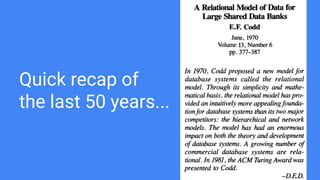
Quick recap of
the last 50 years...
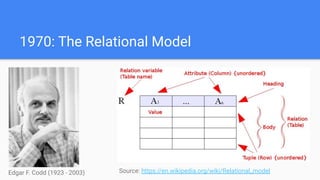
1970: The Relational Model
Source: https://en.wikipedia.org/wiki/Relational_modelEdgar F. Codd (1923 - 2003)
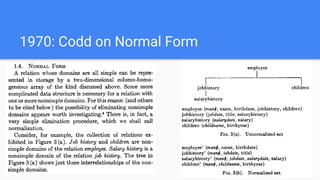
1970: Codd on Normal Form
The First Decade
1971 Codd formalises the first three normal forms.
1974 Chamberlin and Boyce release their first paper on “SEQUEL: A Structured English Query Language”. The
acronym was later changed to SQL due to Trademark violations.
1976 Honeywell releases Multics Relational Data Store, the first commercial RDBMS, does not support SQL
1977 IBM System R was sold to its first customer. System R was the first implementation of SQL.
1979 Larry Ellison’s company Relational Software, Inc. (RSI) releases the first version of Oracle, “Oracle V2”
was released. Larry Ellison didn’t believe customers would buy a version 1 product. RSI later become Oracle
Corporation.
1981: Codd on Relational Database
Management Systems (RDBMSs)
“All information in a relational database is represented by values in
tables [...] Tables are the most important conceptual representation
of relations, because they are universally understood. [...] The
relational model calls not only for relational structures [...] but also
for a particular kind of set processing. [...] A DBMS that does not
support relational processing should be considered non-relational.
Such a system might be more appropriately called tabular. [...] Some
relational systems support a data sublanguage that is usable [...]
interactively at a terminal and embedded in an application program.
[...] People who have used SQL to develop application programs
claim that the double-mode feature significantly enhances their
productivity.”
The Second Decade
1986 SQL-86 becomes a standard of the American National Standards Institute (ANSI)
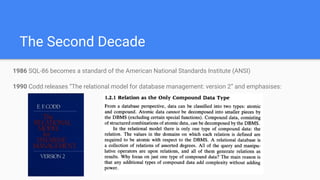
1990 Codd releases “The relational model for database management: version 2” and emphasises:
1996 Ralph Kimball publishes the first edition of “The Data Warehouse Toolkit” popularising dimensional
modelling, Star Schemas and promoting a denormalised data models for analytics.
1999 ANSI releases SQL:1999, its fourth SQL standard. Mostly notably, it introduces CTEs,
Structured user-defined types and non-scalar types (i.e. arrays) along with UNNEST keyword.
2003 ANSI SQL:2003 supersedes SQL:1999, introduces XML support and Window Functions.
2006 Apache Hadoop is released.
2010 Apache Hive enables SQL on Hadoop. Google releases BigQuery.
2016 Google BigQuery releases support for ANSI SQL. ANSI SQL:2016 adds JSON support.
The remaining 30 years
Why?
- Google Cloud’s native “Data Warehouse” offering. Looks increasingly like an RDBMS.
- Infinite column-oriented, tabular storage.
- Massively parallel, serverless compute (ANSI SQL query engine)
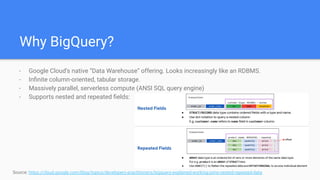
- Supports nested and repeated fields:
Source: https://cloud.google.com/blog/topics/developers-practitioners/bigquery-explained-working-joins-nested-repeated-data
Why BigQuery?
- Performance. Along with the obvious benefits of columnar, massively parallel and serverless come the
obvious downsides. There are a lot of smarts in there but there is no magic. Joins are naturally more
expensive. For this reason, BigQuery’s official documentation provides these guidelines:
- Denormalize a dimension table larger than 10GB, unless there is strong evidence that the costs of data
manipulation, such as UPDATE and DELETE operations, outweigh the benefits of optimal queries.
- Take full advantage of nested and repeated fields in denormalized tables
- Usability. Of course this one is highly debatable. One could make a strong argument that data models
using these structures can be more self-documenting. On the other hand queries against these
structures require more advanced SQL constructs.
- This has been happening all along. What else was all that XML and JSON support for? Even without
explicit XML and JSON data types, people have been squeezing non-atomic values into strings.
Whether we agree with their reasons or not, they will likely continue to do so. And I’d rather have them
use structs and arrays than misuse strings. In fact, Google uses these extensively in their datasets...
Why should we care about Nested and
Repeated Fields? Isn’t this literally
denormalising to below First Normal Form?
Real World Usage Scenarios
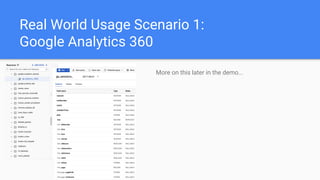
Real World Usage Scenario 1:
Google Analytics 360
More on this later in the demo...
Real World Usage Scenario 2:
Google Cloud Billing Extracts
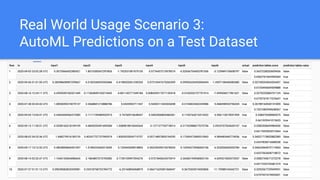
Real World Usage Scenario 3:
AutoML Predictions on a Test Dataset
Rules for STRUCTs and ARRAYs
- A STRUCT is a complex type that can be used to represent an object that has multiple child columns.
- In a STRUCT column, you can also define one or more of the child columns as STRUCT types.
- In a STRUCT column, you can also define one or more of the child columns as ARRAY types.
- When you nest STRUCTs, BigQuery enforces a nested depth limit of 15 levels. The nested depth limit is
independent of whether the STRUCTs are scalar or array-based.
- STRUCTs are not orderable (i.e. no ORDER BY)
- STRUCTs are not groupable (i.e. no GROUP BY, DISTINCT or PARTITION BY)
- STRUCTs can be directly compared using equality operators:
- Equal (=)
- Not Equal (!= or <>)
- [NOT] IN
- These operators compare the fields of the STRUCT pairwise in ordinal order ignoring any field names
- Less than and greater than comparisons are not supported.
Basic rules for STRUCTs in BigQuery
- An ARRAY is an ordered list of zero or more elements of any non-ARRAY type. E.g.: ARRAY<INT64>
- ARRAYs of STRUCTs are allowed. E.g.: ARRAY<STRUCT<INT64, INT64>>
- ARRAYs of ARRAYs are not allowed. E.g.: ARRAY<ARRAY<INT64>>
- ARRAYs of STRUCTs of ARRAYs are allowed. E.g.: ARRAY<STRUCT<ARRAY<INT64>>>
- NULL ARRAY elements cannot persist to a table.
- BigQuery raises an error if query result has ARRAYs which contain NULL elements, although such
ARRAYs can be used inside the query.
- BigQuery translates NULL ARRAY into empty ARRAY in the query result, although inside the query NULL
and empty ARRAYs are two distinct values.
- ARRAYs are not comparable (e.g. in a WHERE clause or a JOIN condition)
- ARRAYs are not orderable (no ORDER BY)
- ARRAYs are not groupable (no GROUP BY, DISTINCT or PARTITION BY)
Basic rules for ARRAYs in BigQuery
Demos
Questions?
Thanks!
Birger Halfmeier
birger@doit-intl.com
linkedin.com/in/birgerhalfmeier/

Working with complex data types in BigQuery

  • 1.
    Working with complex data typesin BigQuery Birger Halfmeier - Cloud Data Architect, DoiT International Multi-Cloud Engineering Australia Meetup Data Engineering Melbourne Meetup Tuesday 27 October 2020
  • 2.
    About the Speaker BirgerHalfmeier Cloud Data Architect, DoiT International
  • 3.
  • 4.
    Quick recap of thelast 50 years...
  • 5.
    1970: The RelationalModel Source: https://en.wikipedia.org/wiki/Relational_modelEdgar F. Codd (1923 - 2003)
  • 6.
    1970: Codd onNormal Form
  • 7.
    The First Decade 1971Codd formalises the first three normal forms. 1974 Chamberlin and Boyce release their first paper on “SEQUEL: A Structured English Query Language”. The acronym was later changed to SQL due to Trademark violations. 1976 Honeywell releases Multics Relational Data Store, the first commercial RDBMS, does not support SQL 1977 IBM System R was sold to its first customer. System R was the first implementation of SQL. 1979 Larry Ellison’s company Relational Software, Inc. (RSI) releases the first version of Oracle, “Oracle V2” was released. Larry Ellison didn’t believe customers would buy a version 1 product. RSI later become Oracle Corporation.
  • 8.
    1981: Codd onRelational Database Management Systems (RDBMSs) “All information in a relational database is represented by values in tables [...] Tables are the most important conceptual representation of relations, because they are universally understood. [...] The relational model calls not only for relational structures [...] but also for a particular kind of set processing. [...] A DBMS that does not support relational processing should be considered non-relational. Such a system might be more appropriately called tabular. [...] Some relational systems support a data sublanguage that is usable [...] interactively at a terminal and embedded in an application program. [...] People who have used SQL to develop application programs claim that the double-mode feature significantly enhances their productivity.”
  • 9.
    The Second Decade 1986SQL-86 becomes a standard of the American National Standards Institute (ANSI) 1990 Codd releases “The relational model for database management: version 2” and emphasises:
  • 10.
    1996 Ralph Kimballpublishes the first edition of “The Data Warehouse Toolkit” popularising dimensional modelling, Star Schemas and promoting a denormalised data models for analytics. 1999 ANSI releases SQL:1999, its fourth SQL standard. Mostly notably, it introduces CTEs, Structured user-defined types and non-scalar types (i.e. arrays) along with UNNEST keyword. 2003 ANSI SQL:2003 supersedes SQL:1999, introduces XML support and Window Functions. 2006 Apache Hadoop is released. 2010 Apache Hive enables SQL on Hadoop. Google releases BigQuery. 2016 Google BigQuery releases support for ANSI SQL. ANSI SQL:2016 adds JSON support. The remaining 30 years
  • 11.
  • 12.
    - Google Cloud’snative “Data Warehouse” offering. Looks increasingly like an RDBMS. - Infinite column-oriented, tabular storage. - Massively parallel, serverless compute (ANSI SQL query engine) - Supports nested and repeated fields: Source: https://cloud.google.com/blog/topics/developers-practitioners/bigquery-explained-working-joins-nested-repeated-data Why BigQuery?
  • 13.
    - Performance. Alongwith the obvious benefits of columnar, massively parallel and serverless come the obvious downsides. There are a lot of smarts in there but there is no magic. Joins are naturally more expensive. For this reason, BigQuery’s official documentation provides these guidelines: - Denormalize a dimension table larger than 10GB, unless there is strong evidence that the costs of data manipulation, such as UPDATE and DELETE operations, outweigh the benefits of optimal queries. - Take full advantage of nested and repeated fields in denormalized tables - Usability. Of course this one is highly debatable. One could make a strong argument that data models using these structures can be more self-documenting. On the other hand queries against these structures require more advanced SQL constructs. - This has been happening all along. What else was all that XML and JSON support for? Even without explicit XML and JSON data types, people have been squeezing non-atomic values into strings. Whether we agree with their reasons or not, they will likely continue to do so. And I’d rather have them use structs and arrays than misuse strings. In fact, Google uses these extensively in their datasets... Why should we care about Nested and Repeated Fields? Isn’t this literally denormalising to below First Normal Form?
  • 14.
  • 15.
    Real World UsageScenario 1: Google Analytics 360 More on this later in the demo...
  • 16.
    Real World UsageScenario 2: Google Cloud Billing Extracts
  • 17.
    Real World UsageScenario 3: AutoML Predictions on a Test Dataset
  • 18.
  • 19.
    - A STRUCTis a complex type that can be used to represent an object that has multiple child columns. - In a STRUCT column, you can also define one or more of the child columns as STRUCT types. - In a STRUCT column, you can also define one or more of the child columns as ARRAY types. - When you nest STRUCTs, BigQuery enforces a nested depth limit of 15 levels. The nested depth limit is independent of whether the STRUCTs are scalar or array-based. - STRUCTs are not orderable (i.e. no ORDER BY) - STRUCTs are not groupable (i.e. no GROUP BY, DISTINCT or PARTITION BY) - STRUCTs can be directly compared using equality operators: - Equal (=) - Not Equal (!= or <>) - [NOT] IN - These operators compare the fields of the STRUCT pairwise in ordinal order ignoring any field names - Less than and greater than comparisons are not supported. Basic rules for STRUCTs in BigQuery
  • 20.
    - An ARRAYis an ordered list of zero or more elements of any non-ARRAY type. E.g.: ARRAY<INT64> - ARRAYs of STRUCTs are allowed. E.g.: ARRAY<STRUCT<INT64, INT64>> - ARRAYs of ARRAYs are not allowed. E.g.: ARRAY<ARRAY<INT64>> - ARRAYs of STRUCTs of ARRAYs are allowed. E.g.: ARRAY<STRUCT<ARRAY<INT64>>> - NULL ARRAY elements cannot persist to a table. - BigQuery raises an error if query result has ARRAYs which contain NULL elements, although such ARRAYs can be used inside the query. - BigQuery translates NULL ARRAY into empty ARRAY in the query result, although inside the query NULL and empty ARRAYs are two distinct values. - ARRAYs are not comparable (e.g. in a WHERE clause or a JOIN condition) - ARRAYs are not orderable (no ORDER BY) - ARRAYs are not groupable (no GROUP BY, DISTINCT or PARTITION BY) Basic rules for ARRAYs in BigQuery
  • 21.
  • 22.
  • 23.