Download free for 30 days
Sign in
Upload
Language (EN)
Support
Business
Mobile
Social Media
Marketing
Technology
Art & Photos
Career
Design
Education
Presentations & Public Speaking
Government & Nonprofit
Healthcare
Internet
Law
Leadership & Management
Automotive
Engineering
Software
Recruiting & HR
Retail
Sales
Services
Science
Small Business & Entrepreneurship
Food
Environment
Economy & Finance
Data & Analytics
Investor Relations
Sports
Spiritual
News & Politics
Travel
Self Improvement
Real Estate
Entertainment & Humor
Health & Medicine
Devices & Hardware
Lifestyle
Change Language
Language
English
Español
Português
Français
Deutsche
Cancel
Save
Submit search
EN
雄安
Uploaded by
雄一郎 安倍
PPTX, PDF
2,465 views
WordPressでログイン必須のコンテンツを作ったときに気付いたこと
各コンテンツの保護利用時の注意点と ログインしないと見れない画像の実現方法のサンプル等
Internet
◦
Read more
0
Save
Share
Embed
Embed presentation
Download
Download to read offline
1
/ 18
2
/ 18
3
/ 18
4
/ 18
5
/ 18
6
/ 18
7
/ 18
8
/ 18
9
/ 18
10
/ 18
11
/ 18
12
/ 18
13
/ 18
14
/ 18
15
/ 18
16
/ 18
17
/ 18
18
/ 18
More Related Content
PPTX
C006_Wood Anatomy.pptx
by
IshanShah88
PPT
Direitos do leitor
by
paulocapelo
PPT
Glasni 1
by
Rosica Mileva
PPT
Dicta of Evolution
by
Usama Abdel-Hameed
PPTX
Портфолио 1б гр "Делфинче"
by
ГРУПА ДЕЛФИНЧЕ
PPT
комуникации в миналото_2 denica spasova
by
videnovam
PPT
τα στενά παπούτσια καναβου β2
by
cgialopsos
PPTX
Portfolio ahmedova2
by
Шермин Ахмедова
C006_Wood Anatomy.pptx
by
IshanShah88
Direitos do leitor
by
paulocapelo
Glasni 1
by
Rosica Mileva
Dicta of Evolution
by
Usama Abdel-Hameed
Портфолио 1б гр "Делфинче"
by
ГРУПА ДЕЛФИНЧЕ
комуникации в миналото_2 denica spasova
by
videnovam
τα στενά παπούτσια καναβου β2
by
cgialopsos
Portfolio ahmedova2
by
Шермин Ахмедова
What's hot
PPTX
Gymnosperms: Order Ginkogales and Cycadales
by
Afrasiyab Ahmed
PPTX
AYESHA SADDIQA...... Family Convolvulaceace.pptx
by
ayeshaaa12082003
PPT
anthoceros structure and types of reproduction
by
babu kakumanu
PPTX
Bryophyte as bioindicators of pollution
by
ANAMIKA RAJ
PPT
Lycopodiophyta
by
Ivana Damnjanović
PDF
Family Fabaceae
by
sarfraz008
PPTX
Loculoascomycetes^.^.pptx
by
SNEHA AGRAWAL GUPTA
PPT
JodłA Pospolita
by
Magda Noszczyk
PPT
Гатанки за цветя
by
rusem
PDF
Codigo Ambiental do Município de São Paulo PL 252 /2009
by
Chico Macena
PPTX
Fritsch classification of microalgae.pptx
by
DharshinipriyaJanaki
PPT
Glavni 4asti podlog
by
Лидия Ганева
PPTX
Части на растенията 1 клас- Ивелина Иванова
by
ОУ "Васил Друмев"- Варна
PPTX
characteristics and importance of Agaricales order
by
Hem Raj Pant
PPT
ასოციაციური რუკა
by
Keti Tseradze
PPTX
Съгласуване на прилагателни имена копие
by
Цвети Колева
PPTX
10. Органи на растенията - РК, Просвета, В. П.
by
Veska Petrova
PPT
лесно е да си добър 2014
by
Dani Parvanova
PPT
дете и лястовица
by
daniela velcheva
PPTX
Игрите на баба и дядо
by
NinaKaneva
Gymnosperms: Order Ginkogales and Cycadales
by
Afrasiyab Ahmed
AYESHA SADDIQA...... Family Convolvulaceace.pptx
by
ayeshaaa12082003
anthoceros structure and types of reproduction
by
babu kakumanu
Bryophyte as bioindicators of pollution
by
ANAMIKA RAJ
Lycopodiophyta
by
Ivana Damnjanović
Family Fabaceae
by
sarfraz008
Loculoascomycetes^.^.pptx
by
SNEHA AGRAWAL GUPTA
JodłA Pospolita
by
Magda Noszczyk
Гатанки за цветя
by
rusem
Codigo Ambiental do Município de São Paulo PL 252 /2009
by
Chico Macena
Fritsch classification of microalgae.pptx
by
DharshinipriyaJanaki
Glavni 4asti podlog
by
Лидия Ганева
Части на растенията 1 клас- Ивелина Иванова
by
ОУ "Васил Друмев"- Варна
characteristics and importance of Agaricales order
by
Hem Raj Pant
ასოციაციური რუკა
by
Keti Tseradze
Съгласуване на прилагателни имена копие
by
Цвети Колева
10. Органи на растенията - РК, Просвета, В. П.
by
Veska Petrova
лесно е да си добър 2014
by
Dani Parvanova
дете и лястовица
by
daniela velcheva
Игрите на баба и дядо
by
NinaKaneva
Similar to WordPressでログイン必須のコンテンツを作ったときに気付いたこと
PPTX
Webサイトをめぐるセキュリティ状況と効果的な防御方法(WordPress編)
by
Hiroshi Tokumaru
PDF
第3回WordPress Cafe プラグイン紹介
by
foom_in
PDF
ゼロからつくるWord pressテーマ第8回
by
Hitsuji
PDF
WordBech Osaka No.28
by
Kite Koga
PDF
ノンプログラマーのためのWordPressプラグイン作成超入門 | Mignon Style
by
Mignon Style
PDF
第4回ゼロから始めるwp勉強会120815
by
Takahiro Nakahata
PDF
WordPressでパスワード保護
by
Yuko Toriyama
PDF
カスタムフィールドでクライアントさんの モチベーションをアップ!!
by
西村 州平
Webサイトをめぐるセキュリティ状況と効果的な防御方法(WordPress編)
by
Hiroshi Tokumaru
第3回WordPress Cafe プラグイン紹介
by
foom_in
ゼロからつくるWord pressテーマ第8回
by
Hitsuji
WordBech Osaka No.28
by
Kite Koga
ノンプログラマーのためのWordPressプラグイン作成超入門 | Mignon Style
by
Mignon Style
第4回ゼロから始めるwp勉強会120815
by
Takahiro Nakahata
WordPressでパスワード保護
by
Yuko Toriyama
カスタムフィールドでクライアントさんの モチベーションをアップ!!
by
西村 州平
WordPressでログイン必須のコンテンツを作ったときに気付いたこと
1.
WordPressでログイン必須のコンテ ンツを作ったときの気付いたこと アイティーエー株式会社 ゆいち
2.
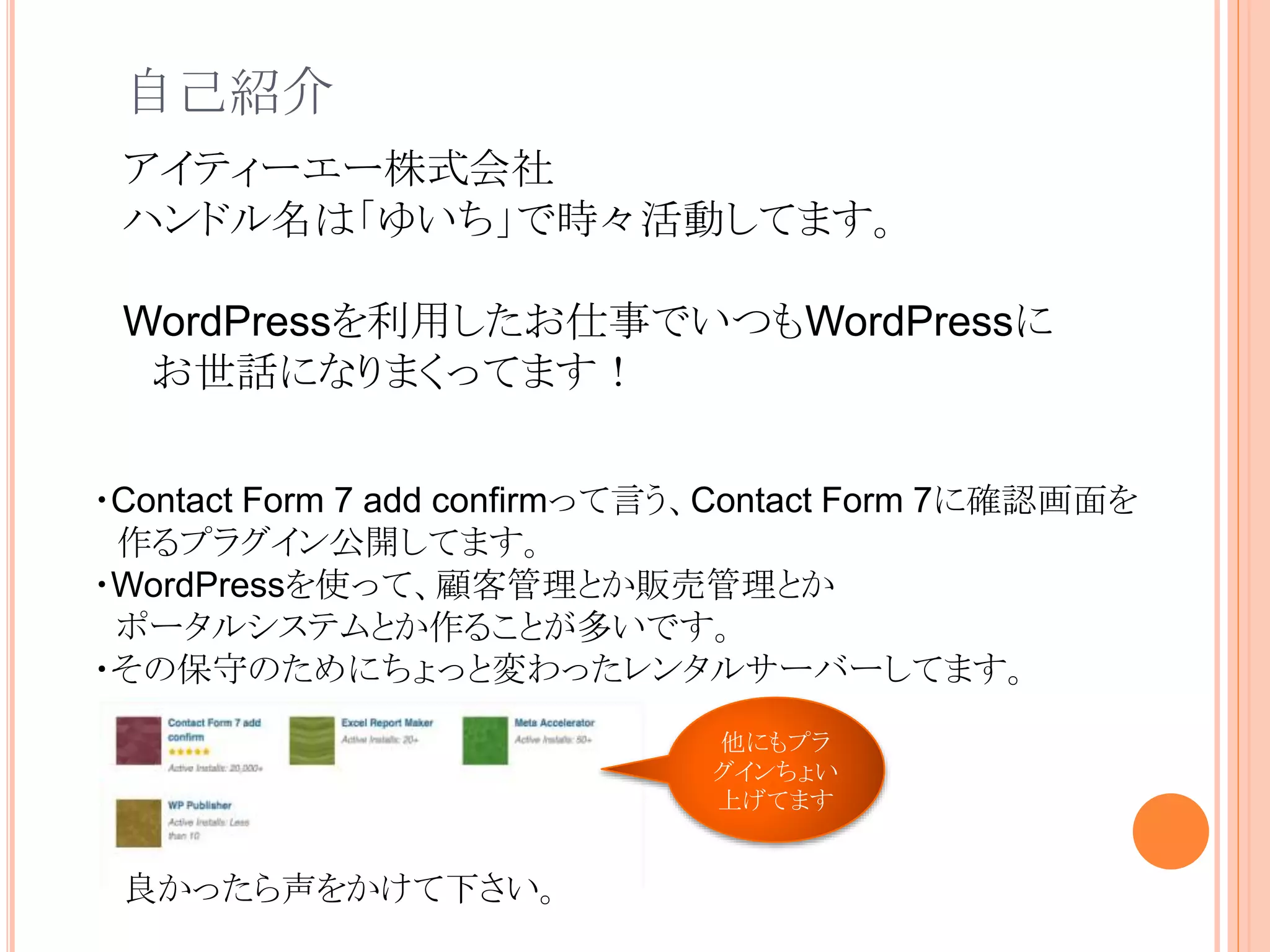
自己紹介 ・Contact Form 7
add confirmって言う、Contact Form 7に確認画面を 作るプラグイン公開してます。 ・WordPressを使って、顧客管理とか販売管理とか ポータルシステムとか作ることが多いです。 ・その保守のためにちょっと変わったレンタルサーバーしてます。 アイティーエー株式会社 ハンドル名は「ゆいち」で時々活動してます。 WordPressを利用したお仕事でいつもWordPressに お世話になりまくってます! 他にもプラ グインちょい 上げてます 良かったら声をかけて下さい。
3.
WordPressにはいくつかのログイン必須の コンテンツを提供する方法が用意されてい ますよね
4.
投稿にパスワード設定 非公開(ログインしないと見れない)
後、頑張って自力で実装
5.
とても手軽に使えて便利。
6.
でも 要望によっては対応しきれない、 困ったことがありました。
7.
投稿にパスワード設定の場合 パスワード保護されるのは、the_content()の部分だけ、 カスタムフィールドなどを駆使してテーマを作っていると、 その部分は見えてしまう。 <div><?php the_content();?></div> <ul> <?php
$hogehoge = get_post_meta($post_id, ’hogehoge’); ?> <li>フィールド1:<?php echo $hogehoge;?> </ul> ここは隠せるけど ここは隠せない → → 隠したい場合は「非公開」を使うか、 → 自力でごりごりしないとだめ →
8.
非公開(ログインしないと見れない) add_action( ‘wp’, ‘mysite_wp’
); function mysite_wp() { if ( 隠したいページだったら ) { if ( ! is_user_logged_in() ) { // ログイン画面へ wp_safe_redirect( home_url( ‘wp- login.php?redirect_to=‘ . urlencode(ページURL) ) ); } } } 例えばこんな感じ ログインせずにアクセスすると404エラーになる(そりゃ そうだ!)ので、自力でログイン画面へ遷移させたい。
9.
どちらの場合でもメディアは隠れない どちらの機能を使っても、ページに添付されたメディア は直リンクなので隠せない。 → → 隠したい場合は →
自力でごりごりしないとだめ → http://example.com/wp-content/uploads/2017/04/post1.jpg とか直接アクセスすると見えてしまう。
10.
管理画面を隠す際の注意点 管理画面を権限によって、隠すのに私はadmin_initフックをよ く使うのですが、すべてをredirectしてしまうとajaxが動作しな いプラグインが出てしまうことがあります。 → → これだとajaxが動作しないことがるので → add_action(
'admin_init', 'mysite_admin_init' ); function mysite_admin_init() { if ( ! current_user_can( 'administrator' ) ) { wp_safe_redirect( home_url( '/' ) ); die; } } function mysite_admin_init() { if ( ! current_user_can( 'administrator' ) ) { // admin-ajaxは除く if ( ( defined( 'DOING_AJAX' ) && ( ! DOING_AJAX ) ) || ( ! defined( 'DOING_AJAX' ) ) ) { wp_safe_redirect( home_url( '/' ) ); die; } } } ajaxを除外
11.
ざっと整理 パスワード保護で保護されるのはthe_contentの中身だけ 非公開の投稿はアクセスするとログインせずにアクセスすると 404エラーになる(当たり前と言えば当たり前
どちらの方法も、メディアファイルは保護されない。 管理画面を隠す際はajaxの動作(admin-ajax.php)を考慮す る必要がある。
12.
時間があれば画像のログイン必須の実現をさらっと 例えば、secureposts投稿タイプの投稿画面からのアップ ロードの場合、ログイン必須の画像として扱うようにする
13.
例えばこんな感じ <IfModule mod_rewrite.c> RewriteEngine On RewriteRule
^index.php$ - [L] RewriteRule (.*) /wp-admin/admin-ajax.php?action=mysite_secure&path=$1 </IfModule> /wp-content/uploads/secureフォルダを作成して、 .htaccessファイルを設置、このフォルダのアクセスをAPIへ location /wp-content/uploads/secure { return 301 /wp-admin/admin-ajax.php?action=mysite_secure&path=$uri; } nginxなら 本当はREST APIで作り直したいけど、時間が無かったので、とりあえず admin-ajaxでファイルへのアクセス
14.
/** 制御対象だった場合、アップロード先をsecureフォルダに変更 **/ add_filter(
'upload_dir', 'mysite_upload_dir' ); function mysite_upload_dir( $uploads ) { if ( isset( $_REQUEST['action'] ) && 'upload-attachment' == $_REQUEST['action'] ) { // ファイルのアップロード $is_secure = false; if ( isset( $_REQUEST[‘post_id’] ) && ( ‘’ != $_REQUEST[‘post_id’] ) ) { $post = get_post( intval( $_REQUEST[‘post_id’] ) ); if ( ‘secureposts’ == $post->post_type ) { $is_secure = true; } } elseif ( isset( $_REQUEST[‘post’] ) && ( ‘’ != $_REQUEST[‘post’] ) ) { // 投稿編集画面 $post = get_post( intval( $_REQUEST[‘post’] ) ); if ( ‘secureposts’ == $post->post_type ) { $is_secure = true; } } elseif ( isset( $_REQUEST[‘post_type’] ) && ( ‘secureposts’ == $_REQUEST[‘post_type’] ) ) { // 新規投稿画面 $is_secure = true; } // 紐付く投稿あり if ( $is_secure ) { $uploads['subdir'] = '/secure' . $uploads['subdir']; $uploads['path'] = $uploads['basedir'] . $uploads['subdir']; $uploads['url'] = $uploads['baseurl'] . $uploads['subdir']; if ( ! file_exists( $uploads['path'] ) ) { mkdir( $uploads['path'], 0777, true ); } } } return $uploads; } 対 象 の 投 稿 タ イ プ の 編 集 画 面 か を 判 別 パ ス を 変 更
15.
/** メディア上ではどれがセキュアな画像かわからないのでタイトルに[secure]を自動追加 **/ add_filter(
'mysite_secure_file_prefix', 'mysite_secure_file_prefix', 10 , 1); function mysite_secure_file_prefix($prefix) { return '[secure]'; } add_filter( 'wp_insert_attachment_data', 'mysite_wp_insert_attachment_data', 10, 2 ); function mysite_wp_insert_attachment_data( $data, $postarr ) { if ( isset( $_REQUEST['action'] ) && 'upload-attachment' == $_REQUEST['action'] ) { $is_secure = false; if ( isset( $_REQUEST['post_id'] ) && ( '' != $_REQUEST['post_id'] ) ) { $post = get_post( intval( $_REQUEST['post_id'] ) ); if ( 'secureposts' == $post->post_type ) { $is_secure = true; } } elseif ( isset( $_REQUEST['post'] ) && ( '' != $_REQUEST['post'] ) ) { $post = get_post( intval( $_REQUEST['post'] ) ); if ( 'secureposts' == $post->post_type ) { $is_secure = true; } } elseif ( isset( $_REQUEST['post_type'] ) && ( 'secureposts' == $_REQUEST['post_type'] ) ) { $is_secure = true; } if ( $is_secure ) { $data['post_title'] = apply_filters( 'mysite_secure_file_prefix', '' ) . $data['post_title']; } } return $data; } 対 象 の 投 稿 タ イ プ の 編 集 画 面 か を 判 別タイトルを変更
16.
/** 本当はREST APIで作り直したいけど、時間が無かったので、とりあえずadmin-ajaxでファイルへのアク セス
**/ add_action( ‘wp_ajax_mysite_secure’, ‘mysite_secure’ ); add_action( ‘wp_ajax_nopriv_mysite_secure’, ‘mysite_secure’ ); function mysite_secure() { if ( is_user_logged_in() === false ) { wp_die( ‘アクセス権がありません。' ); } $path = ABSPATH . $_REQUEST['path']; $filename = basename( $path ); // ファイル名から投稿を抽出 $file_meta_value = substr( $_REQUEST['path'], strpos( $_REQUEST['path'], '/secure/' ) + 1 ); $att_posts = new WP_Query( array( 'post_type' => 'attachment', 'post_status' => 'inherit', 'meta_query' => array( array( 'key' => '_wp_attached_file', 'value' => $file_meta_value ) ) ) ); if ( $att_posts->have_posts() ) { $att_posts->the_post(); $array_meta_data = get_post_meta( get_the_ID(), '_wp_attachment_metadata', true ); $ext = pathinfo( get_attached_file( get_the_ID() ), PATHINFO_EXTENSION ); $filename = substr( get_the_title(), strlen( apply_filters( 'mysite_secure_file_prefix', '' ) ) ) . '.' . $ext; if ( file_exists( $path ) ) { $filetype = wp_check_filetype( $filename ); header( "Content-Type: " . $filetype['type'] ); //$d = new DateTime('now', new DateTimeZone("Asia/Tokyo")); header( 'Content-Disposition: attachment; filename*=UTF-8''' . rawurlencode( $filename ) ); header( "Content-Length: " . filesize( $path ) ); ob_end_clean(); readfile( $path ); } } exit; } 元 の フ ァ イ ル 名 を 取 得 ダウンロード ログインチェック
17.
ちなみに文中のネコはうちの子です。
18.
おしまい
Download


![例えばこんな感じ
<IfModule mod_rewrite.c>
RewriteEngine On
RewriteRule ^index.php$ - [L]
RewriteRule (.*) /wp-admin/admin-ajax.php?action=mysite_secure&path=$1
</IfModule>
/wp-content/uploads/secureフォルダを作成して、
.htaccessファイルを設置、このフォルダのアクセスをAPIへ
location /wp-content/uploads/secure {
return 301 /wp-admin/admin-ajax.php?action=mysite_secure&path=$uri;
}
nginxなら
本当はREST APIで作り直したいけど、時間が無かったので、とりあえず
admin-ajaxでファイルへのアクセス](https://image.slidesharecdn.com/170723ltabe-170723235906/75/WordPress-13-2048.jpg)
![/** 制御対象だった場合、アップロード先をsecureフォルダに変更 **/
add_filter( 'upload_dir', 'mysite_upload_dir' );
function mysite_upload_dir( $uploads ) {
if ( isset( $_REQUEST['action'] ) && 'upload-attachment' == $_REQUEST['action'] ) {
// ファイルのアップロード
$is_secure = false;
if ( isset( $_REQUEST[‘post_id’] ) && ( ‘’ != $_REQUEST[‘post_id’] ) ) {
$post = get_post( intval( $_REQUEST[‘post_id’] ) );
if ( ‘secureposts’ == $post->post_type ) {
$is_secure = true;
}
} elseif ( isset( $_REQUEST[‘post’] ) && ( ‘’ != $_REQUEST[‘post’] ) ) {
// 投稿編集画面
$post = get_post( intval( $_REQUEST[‘post’] ) );
if ( ‘secureposts’ == $post->post_type ) {
$is_secure = true;
}
} elseif ( isset( $_REQUEST[‘post_type’] ) && ( ‘secureposts’ == $_REQUEST[‘post_type’] ) ) {
// 新規投稿画面
$is_secure = true;
}
// 紐付く投稿あり
if ( $is_secure ) {
$uploads['subdir'] = '/secure' . $uploads['subdir'];
$uploads['path'] = $uploads['basedir'] . $uploads['subdir'];
$uploads['url'] = $uploads['baseurl'] . $uploads['subdir'];
if ( ! file_exists( $uploads['path'] ) ) {
mkdir( $uploads['path'], 0777, true );
}
}
}
return $uploads;
}
対
象
の
投
稿
タ
イ
プ
の
編
集
画
面
か
を
判
別
パ
ス
を
変
更](https://image.slidesharecdn.com/170723ltabe-170723235906/75/WordPress-14-2048.jpg)
![/** メディア上ではどれがセキュアな画像かわからないのでタイトルに[secure]を自動追加 **/
add_filter( 'mysite_secure_file_prefix', 'mysite_secure_file_prefix', 10 , 1);
function mysite_secure_file_prefix($prefix) {
return '[secure]';
}
add_filter( 'wp_insert_attachment_data', 'mysite_wp_insert_attachment_data', 10, 2 );
function mysite_wp_insert_attachment_data( $data, $postarr ) {
if ( isset( $_REQUEST['action'] ) && 'upload-attachment' == $_REQUEST['action'] ) {
$is_secure = false;
if ( isset( $_REQUEST['post_id'] ) && ( '' != $_REQUEST['post_id'] ) ) {
$post = get_post( intval( $_REQUEST['post_id'] ) );
if ( 'secureposts' == $post->post_type ) {
$is_secure = true;
}
} elseif ( isset( $_REQUEST['post'] ) && ( '' != $_REQUEST['post'] ) ) {
$post = get_post( intval( $_REQUEST['post'] ) );
if ( 'secureposts' == $post->post_type ) {
$is_secure = true;
}
} elseif ( isset( $_REQUEST['post_type'] ) && ( 'secureposts' == $_REQUEST['post_type'] ) ) {
$is_secure = true;
}
if ( $is_secure ) {
$data['post_title'] = apply_filters( 'mysite_secure_file_prefix', '' ) . $data['post_title'];
}
}
return $data;
}
対
象
の
投
稿
タ
イ
プ
の
編
集
画
面
か
を
判
別タイトルを変更](https://image.slidesharecdn.com/170723ltabe-170723235906/75/WordPress-15-2048.jpg)
![/** 本当はREST APIで作り直したいけど、時間が無かったので、とりあえずadmin-ajaxでファイルへのアク
セス **/
add_action( ‘wp_ajax_mysite_secure’, ‘mysite_secure’ );
add_action( ‘wp_ajax_nopriv_mysite_secure’, ‘mysite_secure’ );
function mysite_secure() {
if ( is_user_logged_in() === false ) {
wp_die( ‘アクセス権がありません。' );
}
$path = ABSPATH . $_REQUEST['path'];
$filename = basename( $path );
// ファイル名から投稿を抽出
$file_meta_value = substr( $_REQUEST['path'], strpos( $_REQUEST['path'], '/secure/' ) + 1 );
$att_posts = new WP_Query( array(
'post_type' => 'attachment',
'post_status' => 'inherit',
'meta_query' => array(
array(
'key' => '_wp_attached_file',
'value' => $file_meta_value
)
)
) );
if ( $att_posts->have_posts() ) {
$att_posts->the_post();
$array_meta_data = get_post_meta( get_the_ID(), '_wp_attachment_metadata', true );
$ext = pathinfo( get_attached_file( get_the_ID() ), PATHINFO_EXTENSION );
$filename = substr( get_the_title(), strlen( apply_filters( 'mysite_secure_file_prefix', '' ) ) ) . '.' . $ext;
if ( file_exists( $path ) ) {
$filetype = wp_check_filetype( $filename );
header( "Content-Type: " . $filetype['type'] );
//$d = new DateTime('now', new DateTimeZone("Asia/Tokyo"));
header( 'Content-Disposition: attachment; filename*=UTF-8''' . rawurlencode( $filename ) );
header( "Content-Length: " . filesize( $path ) );
ob_end_clean();
readfile( $path );
}
}
exit;
}
元
の
フ
ァ
イ
ル
名
を
取
得
ダウンロード
ログインチェック](https://image.slidesharecdn.com/170723ltabe-170723235906/75/WordPress-16-2048.jpg)


